Skip to content

Ransomware, along with malware, major server crashes, and even simple human error, is just one of many potential threats that can risk the integrity of your organization’s data at a moment’s notice. Any of these threats can quickly create a domino effect, resulting in costly downtime and disruption to everything from internal processes to end users.

And while these threats differ in origin and scope, they can all cripple your organization and create lasting ramifications if you’re not prepared to quickly recover and restore lost or compromised data. Enter the disaster recovery plan.

What is a Disaster Recovery Plan?

A disaster recovery plan is a core component of a business continuity plan, and is focused on objectives like restoring crucial data and workloads while minimizing any downtime caused by a disaster event. In today’s data-centric business environment, these are often the first steps in maintaining business continuity.

What Can a Disaster Recovery Plan Do to Protect Against the Effects of a Ransomware Attacks?

Ransomware attacks have been on the rise for years and show no signs of slowing down.

When a ransomware attack occurs, an organization’s network is infected with malware that can wreak havoc on network infrastructure and compromise primary data. The goal of the attack is to disable the organization’s processes and disrupt business continuity. The perpetrator demands a ransom payment to (supposedly) reverse the effects and return any stolen or disabled data, allowing the organization to resume operations after the payment has been received.

As you can imagine, the costs of this situation can be widespread, involving everything from the ransom payment itself to performing IT forensics. And this is in addition to any data loss and costs stemming from downtime.

Yes, your organization can (and should) work to protect itself from disaster events like ransomware attacks from happening in the first place, but, as we’ve seen in recent years, that’s simply not enough. In fact, having a robust disaster recovery plan in place may be more important than merely taking steps to guard against disaster events.

So, while a disaster recovery plan cannot prevent a malicious threat like a ransomware attack — or any other disaster event for that matter — it can protect your organization from lasting damage stemming from data loss and downtime.

How Cloud Backup Fits with Disaster Recovery

With data now at the heart of every organization’s operations, the primary objective of a disaster recovery plan is getting data recovered and restored. While data backup was once mainly achieved with on-premises hardware, cloud backup has emerged as the most efficient and comprehensive method to automatically create and store backup copies of all data in the cloud. These constantly updated backup copies remain ready in case a data restore is needed. If that happens, the cloud backup platform can instantly start a recovery process that restores the most recent copy of the data, thus ensuring business continuity.

However, not every cloud backup solution includes the full capabilities needed to ensure a quick and full disaster recovery from a targeted attack like ransomware.

Potential Limitations of Some Cloud Backups Creates Risk of Data Loss and Downtime

Creating and storing copies of backup data is no longer enough to protect data from the sharp increase and efficacy of ransomware attacks — the backup copies themselves are also at risk of being stolen or compromised. If a ransomware attack successfully targets both your primary and backup data, there’s simply nothing you can do.

It’s also worth pointing out that the restore process can take an extremely long time if your cloud backup solution can only restore entire data instances rather than prioritizing the mission-critical data and workloads needed to keep operations going. If the restore time falls outside your Recovery Point Objective (RPO) and Recovery Time Objective (RTO), you risk permanent data loss and costly downtime to vital infrastructure.

If you truly want a way to protect your backup data and ensure fast recovery time, you need a cloud backup solution that can:

  1. Store backup data in a secured environment, away from the primary data
  2. Provide a way to prioritize mission-critical data and workloads during recovery

Optimize Your Disaster Recovery Plan with the Industry’s Best Cloud Backup

Successful, timely disaster recovery is ultimately dependent on the tools you use. Clumio’s cloud-native, industry-leading cloud backup-as-a-service solution enables organizations of all sizes to securely back up data and workloads in the cloud, where it can then be swiftly recovered and restored if a disaster event strikes — whether it’s from ransomware or any other source.

Clumio achieves this by first storing backup copies in a safe, encrypted, air-gapped environmentoutside of an organization’s primary data account. Clumio’s rapid recovery features can identify and quickly restore the mission-critical data and applications needed to maintain business continuity.

Don’t risk your vital data to catastrophic threats like ransomware. Experience firsthand why Clumio is the industry’s leading innovator for cloud backup and rapid disaster recovery by scheduling a demo today. We’ll show you how your business can be up and running with
More related posts


Thumbnail_Blog-Clumio-Chat-2026

Meet Clumio Chat: An AI Assistant to Help Evaluate Cloud-Native Data Protection

Read more about Meet Clumio Chat: An AI Assistant to Help Evaluate Cloud-Native Data Protection
Thumbnail_Blog-Clumio-Fedramp-2026

Clumio Advances Cloud-Native Cyber Resilience with FedRAMP® Milestone

Read more about Clumio Advances Cloud-Native Cyber Resilience with FedRAMP® Milestone
Thumbnail_Blog-Lateral-Access-2026

Private Cloud Data Security Technical Guide

Read more about Private Cloud Data Security Technical Guide

Editor’s note: This post was originally published in February 2022. Since then, TrapX’s deception technology has been integrated into our data security and resilience platform, enhancing how we help customers secure, defend, and recover from threats. Learn more about threat detection with Threatwise.


As we previously shared, we want our customers to rest easy knowing that we have their data covered and are constantly innovating to be an active partner in their fight against cyber threats. Today we’re thrilled to welcome TrapX, an Israel-based cyber-security company, to the Commvault family, accelerating our data security innovation journey. TrapX is a pioneer and leader in deception technology and has helped businesses of all sizes around the globe neutralize the threat of potentially crippling ransomware events. With cutting-edge technology and massive scale, TrapX expertly exposes even the stealthiest zero-day attacks that evade conventional detection technology and circumvent security controls.    

Cyber deception has emerged as a vital piece in layered cybersecurity strategies, offering sophisticated tools that detect and divert attacks before they cause harm. We believe this new acquisition will set Commvault apart as the only vendor in our industry to offer customers active data management capabilities that are integrated with their security investments. 

Whether helping a MA-based hospital immediately discover Wannacry in a blood gas analyzer; finding ransomware in a pressure controller that could have led to a dangerous failure for a manufacturing company; or consistently helping clients protect networks from contractors who are operating outside of critical security policies, TrapX enables customers across industries to keep their businesses safely running. 

Broad-reaching attacks like we’ve seen populate news headlines with increasing frequency are forcing companies to think differently. IT, Security, DevOps even Operations have to work together to anticipate and minimize risk, and there is no single vendor today that is offering the right breadth of capabilities at a time when conventional approaches to security must be reconsidered. To move forward with digital transformation, companies need smart and innovative, cloud-based solutions to address the threats they face. 

We look forward to sharing more in the coming months, as we bring this technology into the Metallic SaaS portfolio. We will enable customers to extend their data security capabilities like never before—at a time when it has never mattered more. 

What Happened After the TrapX Acquisition

Since welcoming TrapX to the Commvault family in 2022, we’ve advanced our security and resilience offerings in several ways:

  • Deception technology integration: TrapX’s cyber deception tools were integrated into Commvault’s security platform, giving organizations earlier threat detection and visibility.
  • Expanded threat response: These capabilities complement Commvault’s data protection, helping customers accelerate response and reduce dwell time when attacks occur.
  • Stronger cyber resilience: The TrapX acquisition laid the foundation for ongoing innovation in cyber deception, insider threat detection, and proactive defense strategies within our portfolio.

Today, these advancements form a core part of Commvault’s mission: empowering organizations to secure, defend, and recover their data with confidence.

Learn more about our Commvault Cloud platform to see how we continue to evolve.

More related posts


Thumbnail_Blog-Clumio-Chat-2026

Meet Clumio Chat: An AI Assistant to Help Evaluate Cloud-Native Data Protection

Read more about Meet Clumio Chat: An AI Assistant to Help Evaluate Cloud-Native Data Protection
Thumbnail_Blog-Clumio-Fedramp-2026

Clumio Advances Cloud-Native Cyber Resilience with FedRAMP® Milestone

Read more about Clumio Advances Cloud-Native Cyber Resilience with FedRAMP® Milestone
Thumbnail_Blog-Lateral-Access-2026

Private Cloud Data Security Technical Guide

Read more about Private Cloud Data Security Technical Guide

Editor’s note: This post was originally published in January 2022. Since then, TrapX’s deception technology has been integrated into our data security and resilience platform, enhancing how we help customers secure, defend, and recover from threats. Learn more about threat detection with Threatwise.


More than a decade ago, Sanjay and I were part of the leadership team that led RSA Security through one of the most high-profile nation-state breaches of our time – one we wouldn’t wish on our worst enemies. Unfortunately, as we’ve seen over the past two years, attacks like this have become mainstream in the form of ransomware and they are more frequent, sophisticated, and detrimental to businesses than ever before. And while a well-implemented data protection system or service, with capabilities like air-gapping and built-in security controls, is the last line of defense for a company, we at Commvault know that early detection is the difference between a close call and a disaster. That’s why I’m excited to share that Commvault has acquired TrapX, a cyber deception firm, to enhance Commvault customers’ capability to proactively detect, defend, and recover from unknown threats, as announced in our FY22 Q3 earnings call.

Protecting the crown jewels from the known and the unknown

Data is the crown jewel of your business, and it’s what the bad actors are after. Data protection has always been core for business continuity and compliance, as well as cost control and productivity. Now, the conversation with our customers has expanded from one of IT operations and infrastructure, to a matter of security, with IT and Security teams converging on their strategies. With the staggering rise in cyberattacks, the immense pressure to support a work-from-anywhere workforce, and the need to navigate increasingly complex hybrid environments, the pressure is on to achieve comprehensive security across all layers of the tech stack. This requires a much more active and expanded set of data management services than most companies currently have in place.  

At Commvault and Metallic, we know how critical it is to put the right measures in place to safeguard your data. It’s difficult enough to navigate threats that are known, but what about threats that are hidden until it’s too late? Customers need to detect and protect against the threats they see, as well as the ones they are blind to. All security experts agree – defenses will be breached. It’s how quickly you know about it and what you do next that matters.

Data security – with a side of SaaS

Cyber deception has emerged as a vital piece in layered cybersecurity strategies, offering sophisticated tools that detect and divert attacks before they cause harm. We believe this new acquisition will set Commvault apart as the only vendor in our industry to offer customers active data management capabilities that are integrated with their security investments.

The new capabilities we’re integrating into our portfolio are just the next step in the laser focus we have on building and delivering differentiated data security services, including our Metallic SaaS offerings. These include Metallic Cloud Storage Service, designed for air-gapped ransomware protection, as well as Security IQ, which helps Metallic customers stay ahead of evolving threats with advanced security tools and insights. In addition, Metallic has achieved FedRAMP High In Process – In PMO Review the only solution in our space to meet all 420 security controls required.

We know that companies need the simplified management and reduced infrastructure that smart SaaS solutions can deliver. We’re looking forward to leveraging this new technology to bring the next SaaS-delivered data security service to market with availability later this year. We want our customers to rest easy knowing we have their data covered – beyond any buzz words of zero trust, immutability, or warranties on recoverability.

What Happened After the TrapX Acquisition   

Since welcoming TrapX to the Commvault family in 2022, we’ve advanced our security and resilience offerings in several ways:   

  • Deception technology integration: TrapX’s cyber deception tools were integrated into Commvault’s security platform, giving organizations earlier threat detection and visibility.   
  • Expanded threat response: These capabilities complement Commvault’s data protection, helping customers accelerate response and reduce dwell time when attacks occur.   
  • Stronger cyber resilience: The TrapX acquisition laid the foundation for ongoing innovation in cyber deception, insider threat detection, and proactive defense strategies within our portfolio.   

Today, these advancements form a core part of Commvault’s mission: empowering organizations to secure, defend, and recover their data with confidence.    

Learn more about our Commvault Cloud platform to see how we continue to evolve.

More related posts


Thumbnail_Blog-Clumio-Chat-2026

Meet Clumio Chat: An AI Assistant to Help Evaluate Cloud-Native Data Protection

Read more about Meet Clumio Chat: An AI Assistant to Help Evaluate Cloud-Native Data Protection
Thumbnail_Blog-Clumio-Fedramp-2026

Clumio Advances Cloud-Native Cyber Resilience with FedRAMP® Milestone

Read more about Clumio Advances Cloud-Native Cyber Resilience with FedRAMP® Milestone
Thumbnail_Blog-Lateral-Access-2026

Private Cloud Data Security Technical Guide

Read more about Private Cloud Data Security Technical Guide

Of course, you can’t have a disaster recovery process in place without proper disaster recovery planning. By outlining the plan beforehand and making sure you have the right tools in place, you can develop a recovery plan that can protect your data, your business, and your customers in the event of a disaster, such as a cloud outage or a cyber attack like ransomware.

What Should We Include in Our Disaster Recovery Planning?

Cloud Backup

Disaster recovery starts with carefully identifying how you will back up your business’s data, applications, and workloads so they can be recovered and restored when needed.

Cloud backup-as-a-service provides automatic backups, unlimited scalability, routinely updated security, and doesn’t require new software or hardware—making this solution the most effective and streamlined method to create and store backups for recovery.

Not all cloud backup solutions are equal. Make sure that your disaster recovering planning utilizes a cloud backup solution that offers the following:

  • Backups stored outside of the user’s account
  • Granular recovery
  • Rapid, flexible recovery
Recovery Time Objective

In addition to the ability to back up and restore application data, disaster recovery planning also involves establishing certain metrics. The first of these is the recovery time objective or RTO. This is defined as the amount of time that an organization has deemed acceptable to recover from a disaster, usually aiming for that recovery to occur before the downtime creates significant consequences.

For example, let’s say an organization has identified an RTO of four hours and later experiences an outage that disables its infrastructure. In this scenario, the organization must have its applications back up and running within four hours, or the downtime will cause a severe break in business continuity.

Recovery Point Objective

The second key metric in a disaster recovery plan is the recovery point objective or RPO. This is the maximum acceptable amount of data loss during a disaster event or outage before the amount of data lost exceeds the maximum threshold allotted within a business continuity plan. Put simply, this is the acceptable amount of data that can be lost before internal operations and end users are affected, but expressed as an amount of time.

For example, suppose an organization automatically backs up its data via cloud backup every five hours and later experiences an outage that lasts for three hours. The duration of the outage did not exceed the last data backup point, thus the organization has adhered to its RPO since it can recover enough data to resume operations without major disruptions or critical data loss.

Simplify Disaster Recovery Planning with Clumio
An enterprise’s disaster recovery capabilities are only as good as the tools it uses. Clumio’s industry-leading cloud backup-as-a-service platform provides swift and efficient disaster recovery via innovative rapid restore capabilities that maintain and support business continuity in the face of a disaster event — all while meeting RTOs and RPOs. These features include:

  • Rapid backups of AWS data from any region across your entire organization
  • Air-gapped backups stored outside of the primary account and region, providing secure protection from ransomware and other cyber attacks
  • Granular and flexible data restore for faster recovery

More related posts


Thumbnail_Blog-Clumio-Chat-2026

Meet Clumio Chat: An AI Assistant to Help Evaluate Cloud-Native Data Protection

Read more about Meet Clumio Chat: An AI Assistant to Help Evaluate Cloud-Native Data Protection
Thumbnail_Blog-Clumio-Fedramp-2026

Clumio Advances Cloud-Native Cyber Resilience with FedRAMP® Milestone

Read more about Clumio Advances Cloud-Native Cyber Resilience with FedRAMP® Milestone
Thumbnail_Blog-Lateral-Access-2026

Private Cloud Data Security Technical Guide

Read more about Private Cloud Data Security Technical Guide

Commvault’s quarterly cadence of Feature Releases allows us to continually bring new functionality and general awesomeness to our award-winning data protection platform. This constant innovation is the basis for our suite of Intelligent Data Services that help our customers solve their toughest, most business-critical data challenges. And while great technology is certainly nice to have, it’s nothing if it doesn’t actually improve the user experience. And Feature Release 11.25 does just that. Generally available since November 15, it’s already proving useful to some of our early adopter customers, and here’s why: This round of enhancements is all about helping to reduce cloud costs while streamlining deployment and management of cloud-based workloads, along with expanded workload support, new Command Center functionality, and powerful security enhancements.

Data Management & Protection

As with each Feature Release, FR 11.25 delivers on both market needs and customer requests. Our modernized CommServe for Linux allows organizations to take advantage of the cost-saving benefits of the Linux operating system. Additionally, we facilitate the deployment and migration of cloud-based database workloads with Cloud AWS PaaS enhancements for Oracle RDS & MS SQL. For our Service Provider partners, we’ve greatly simplified data protection and management for their customers with robust, unified, single-pane-of-glass management through the Commvault Command Center™. Here’s a closer look at some of the new features.

Operating Systems

  • CommServe® software on Linux – Some organizations choose Linux over Windows in order to take advantage of reduced cost, enhanced performance, and, given that Linux is targeted less frequently by cyber threats, increased security. CommServe for Linux also helps organizations in Financial Services; Federal; and State, Local, and Education (SLED) remain in compliance in scenarios that require Linux-based environments.

Cloud and Virtualization

  • V2 Indexing for Hyper-V and Azure Stack Hub provides admins with greater control and enables backup, recovery, aging, and reporting at the Virtual Machine level, particularly useful in helping customers meet aggressive SLAs. We’ve also simplified migration from V1 to V2 hypervisors, allowing customers to take full advantage of this new feature.
  • VirtualizeMe to Azure Stack Hub allows a user to convert physical computers into a virtual machine instance within the hypervisor platform. This enables a fully-automated disaster recovery and migration solution for both physical servers and virtual machines, via File System Agent, directly into Azure Stack Hub.
  • Amazon EBS Direct-Read Support enables users to protect and recover Amazon EC2 and Elastic Block Store (EBS) data in the most efficient manner. This simplifies recovery of files and folders without the need for labor-intensive indexing and searching. It’s also been extended to allow for live browse for Linux Guest Instances, along with Direct Write volume restores for both EC2 and EBS. With this new API-driven capability, you’re able to recover data directly to wherever you need it, without the need for access nodes or additional infrastructure.
  • AWS Graviton2 Support for MediaAgents (for M6g and R6g instances) and Cloud Access Nodes (for C6g, M6g, and R6g instances) enables improved performance and cost savings over Intel or AMD-based offerings within Amazon EC2. This is just the latest example of Commvault investing in cost-optimization through modernized infrastructure for our customers’ cloud environments.

Disaster Recovery

Commvault Disaster Recovery is a comprehensive solution for meeting the DR needs of customers with workloads both on-prem and in the cloud, as well as in hybrid environments, helping them to meet their cloud transformation and business continuity needs. Enhancements in FR 11.25 include:

  • Continuous Replication Enhancements such as block-level filtering for faster sync times and reduced storage consumption on the source-side storage pool.
  • Support for VMware to GCP Replication for better on-prem application portability for customers of both VMware and Google Cloud.
  • Test Failover Capability for AWS Replication enabling periodic failovers for DR testing without impacting the production environment.
  • Replication Using Multiple Access Nodes to allow optimal throughput and improved scalability within larger environments.
  • Enhancements to the Disaster Recovery Dashboard including contextual views that highlight your Environment, your SLAs, your prior month’s Stats, your Replication Status, and your largest Hypervisors, allowing you to work more quickly and with greater accuracy.
  • Disaster Recovery as a Services (DRaaS) for Managed Service Providers allowing MSPs to offer Commvault Disaster Recovery as a Service. Their customers can now take full advantage of Commvault’s robust disaster recovery technology, including sub-minute Recovery Point Objectives and near-zero Recovery Time Objectives for continuous or periodic replication at virtually any scale, in on-prem, cloud, multi-cloud, and hybrid environments. Enhanced metering allows an MSP to keep track of consumption, while Utility and Subscription billing options allow them to better meet the unique financial requirements of their customers.

Enhancements to the Commvault Command Center™ and the overall User Experience

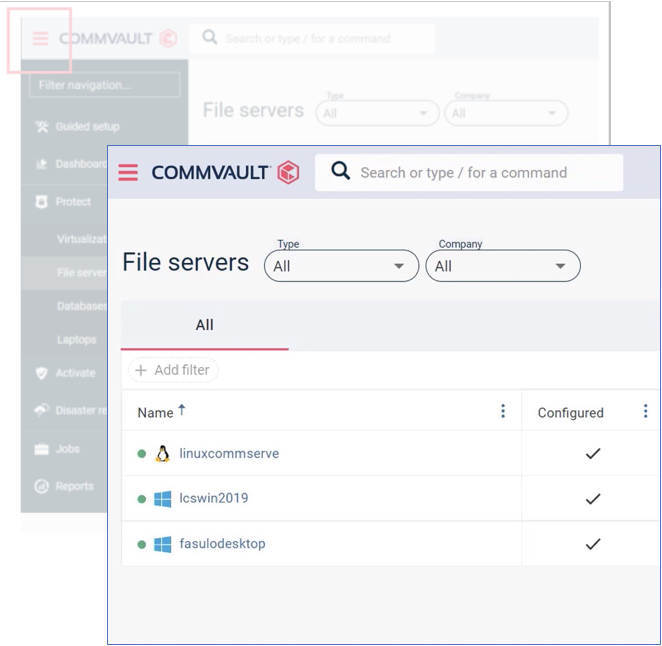
Updates to the Commvault Command Center™ include migration to the Javascript-based React framework, allowing us to modernize the look, feel, and usage across all areas, along with a collapsible nav bar that expands the usable screen real estate to allow more room on-screen for important functional tasks.

Search functionality has been expanded to include the Entity Search Bar and Breadcrumbing, helping to simplify and speed up navigation across the entire application. Additionally, many “right-side fly-in” menu items have been replaced by full-page “wizards,” again providing both uniformity and optimizing screen real estate to simplify the creation and management of many routine tasks.

Metallic Backup as a Service (SaaS) linkage for Service Providers

This allows Service Providers to link individual Metallic subscriptions to their Tenants within the Commvault Command Center™, and extends Metallic BaaS as another service that can be offered – and rapidly deployed – by our Service Provider Partners. It provides for intuitive, single-pane-of-glass workload management, regardless of where they reside: on-prem, in the cloud, in multiple clouds, or in hybrid environments. Tenants can now consume Metallic services as well as on-prem services, all directly through the Commvault Command Center™

Data Security

With ransomware on the rise – the FBI reports a 300% increase in documented cybercrimes since the start of the Covid pandemic – at least 75% of IT organizations are expected to face a ransomware attack within the next 3 years. And since it’s only going to get worse, Commvault takes data security very seriously… and so should you. While it’s prudent to be doing everything possible to protect against cyberattacks, the assumption is that you’re likely to experience an attack regardless of how much protection you have. So the real question is, how quickly – and how thoroughly – can you recover from an attack? Because being able to recover – and quickly – is the difference between a minor business disruption and a potentially catastrophic business failure. Accordingly, here are some of the security enhancements that we’re bringing to you with Feature Release 11.25:

  • CIS Level 1 Hardening for Microsoft Office Validation Assistant (OVA) – The Center for Internet Security (CIS) provides the global IT community with recognized best practices for securing data and IT systems. CIS Benchmarks are consensus-based security configuration guides that have been developed and accepted as the benchmark of choice within government, business, industry, and academia. CIS Level 1 provides a foundational hardening of the IT environment, reduces the potential attack surface while minimizing adverse impacts on performance. In 11.25, we’ve introduced a pre-hardened image of the CommServe, an easy-to-deploy virtual image. This reduces the attack surface for Commvault infrastructure and helps mitigate against common threat tactics including lateral movements and malicious execution of code. It also helps organizations remain compliant with policies centered around other security standards, including the National Institute of Standards and Technology (NIST) Cybersecurity Framework (CSF), as well as ISO 27000, PCI DSS, HIPPA, and others.
  • Ransomware protection enhancements for Windows Media Agents is designed to help ensure that backups are protected from common, newly-identified methods used to gain access to and destroy backups that might be used in a recovery scenario. By using Commvault’s immutable framework to reject unauthorized changes to network and local attached storage on the Media Agent, we’re able to provide an additional level of protection and help ensure that you’ve got a clean backup from which you can recover. Taken in conjunction with air-gapping and a 3-2-1 backup strategy, this provides both excellent protection and a path to recoverability in the event of a cyberattack.
  • Encryption Key Management enhancements. Exfiltration has become a frequently-employed tactic used by cyber criminals to steal data and credentials. Mitigation techniques include encrypting data and maintaining encryption keys securely. Commvault’s built-in Key Management System (KMS) stores all keys in the CommServe® database. However, we recognize that might not satisfy security requirements for certain types of customers. New key management features in Feature Release 11.25 include enhanced protection for Encryption Keys to restrict unauthorized access to backup data.

We’ve also decoupled the KMS credentials from the CommServe database to limit access to unauthorized personnel. And we’ve added new options that enable a higher level of control and security. Other enhancements around Key Management include:

  • Identity and Access Management (IAM) role for AWS Key Management System (KMS)
  • Managed Identity Authentication for Azure Key Vault
  • Ability to configure Access Nodes for KMS Authentication
  • Ability to use credential files for AWS KMS configurations
  • Ability to Bring Your Own Key (BYOK)
  • One-way forwarding gateway topology isolates and segments data storage targets, reducing access to critical systems and services. Our new network topology forwards in only one direction through the proxy or gateway, instead of requiring both sides into the gateway. This provides greater flexibility in how we architect network topologies for service providers. Data isolation is an effective strategy for mitigating against lateral moving threats. Commvault’s methodology allows for a simple, policy-driven approach to isolating data.
  • Restricted mode for workloads adds multi-factor authentication as well as dual authorization controls around the deletion or disabling of workflows. This reduces risks posed by insider threats (or even a simple user error) gaining access to valid credentials and subsequently deleting or disabling workflows.
  • Platform security optimizations including an upgrade to Python 3.9.2, along with automated internal texting for ransomware, and optimization of encryption key lookups increase security, help to validate our protection mechanisms, and improve performance of restores.

Data Compliance & Governance

As the volume of electronic content that organizations generate, receive and store continues to grow rapidly, the challenge of eDiscovery and maintaining regulatory compliance expands with it. In 2020, the SEC alone brought more than 7 enforcement actions for non-compliance, totaling nearly $4.7 billion USD in penalties – the highest amount on record. To help our customers meet these challenges, Commvault helps to streamline collection and identification of electronically-stored information for investigations, legal and compliance matters, and Freedom of Information Act (FIOA) and Open Records requests. In FR 11.25, Compliance Archiver is now available from directly within the Commvault Command Center™. We’ve also added support for Customer Data Management (CDM) for Oracle. There are new data governance entities in support of data privacy and security initiatives. There’s File Storage Optimization for AWS, Azure, and Google Cloud. And we’ve added file system immutability to complement and extend our ability to protect customer data, regardless of how – and where – you’re using Commvault: On-prem, in the cloud, across multiple clouds, or in hybrid environments.  

Data Transformation

Modernization of data infrastructure is on everyone’s mind these days, with nearly 75% of those surveyed telling us that at least 1 out of 4 applications are currently undergoing modernization, with 65% saying that they are in the midst of an active digital transformation journey. To help facilitate those initiatives, enhancements in Feature Release 11.25 include:

  • Google Cloud Spanner Protection – Cloud Spanner is a fully-managed, mission-critical relational database service that offers transactional consistency at global scale. It’s used by banks and financial services institutions for transaction tracking; in the gaming industry for micro-transactions; and in retail for dynamic pricing and just-in-time fulfillment. By expanding our Database as a Service (DBaaS portfolio through support of Google Cloud Spanner, we’re giving DB admins a simple user interface for initiating, managing, and monitoring backups and restores, with multiple options for retention and scheduling.
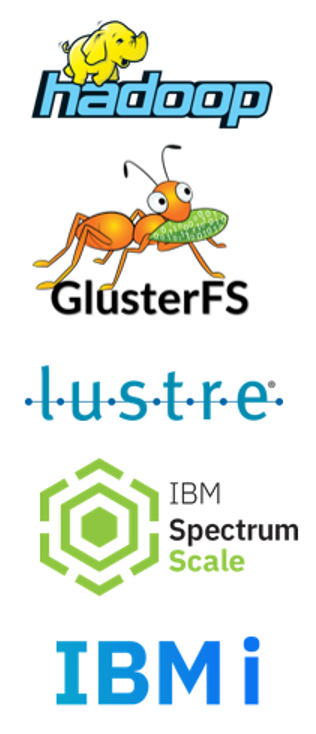
  • Commvault Command Center support for Gluster and Lustre Backup. TheGluster file system is a scalable network file system suitable for data-intensive tasks such as cloud storage and media streaming.The Lustre file system is a high-performance clustered file system that enables parallel data access across multiple cluster nodes for workloads requiring speed, such as in Machine Learning or video processing.

We’ve provided the ability to archive GPFS, HDFS, and Lustre data these for some time within our CommCell Console, but by bringing them into the Commvault Command Center™, we’re providing a much simpler, more efficient way to manage them all.

  • IBM Spectrum Scale (General Parallel File System or GPFS) is a large-scale network file system suitable for advanced workloads such as high-performance computing and Big Data.
  • Hadoop (HDFS) is a distributed file system that handles large data sets and be run on commodity hardware. It has a wide variety of use cases, such as data analytics.
  • Lustre file system is a high-performance clustered file system that enables parallel data access across multiple cluster nodes for workloads requiring speed, such as in Machine Learning or video processing.

With these agents already available for backup within the Commvault Command Center, it was only natural for users to want Command Center File Archiving, putting all of these under control of a single interface.

  • Commvault VTL 2.0 Support for IBMi – The Commvault Virtual Tape Library (VTL) 2.0 is a direct replacement for tape storage, reducing the cost of both physical storage and transport. It’s useful for off-site copies for Disaster Recovery, and when coupled with Fiber Channel connections, provides fast backup, with built-in deduplication to reduce the storage footprint. And it circumvents the standard IBM “save while active” limitations that accompany the standard streaming backup methodology.
  • Optimized licensing and reporting for Kubernetes – Feature Release 11.25 introduces optimized Kubernetes Reporting around container licensing. The new License Summary Report is now available within the Commvault Command Center™.

Databases

Databases are at the heart of enterprise IT infrastructure. With the wide array of databases in use today, you need a unified approach that allows you to migrate workloads to the cloud faster, back up your databases more efficiently, and streamline data access, all while supporting things like copy data management. Commvault makes it easy with support for a wide range of databases, including Oracle, Microsoft SQL Server, SAP, MySQL, IBM DB2, PostgreSQL, Informix, and Sybase, as well as protection for distributed applications such as MongoDB, Cassandra, Greenplum, Hadoop, and IBM Spectrum Scale. In FR 11.25, we’ve added:

  • Full-instance backups and restores of MySQL databases using Percona XtraBackup. This allows a user to perform a hot backup even while the system is running. This enables faster backups of MySQL InnoDB databases and DB instances when using mixed storage engines, particularly useful if your MySQL instance is comprised of many smaller InnoDB databases.
  • Performance enhancements to IntelliSnap® snapshots include enabling multi-stream restores from each snapshot mount point. This allows files restores to be distributed across multiple streams for any given mount point, helping to improve SLAs.
  • Extent-Based Backups for SAP HANA® divides large data files into smaller-sized chunks (extents) to enable parallel backups across streams, for quicker recovery times and improved SLAs. Additional enhancements for SAP HANA® include buffering of non-uniform-sized data blocks and deduplication to optimize writes to a backup target, as well as progress tracking of backup and restore operations.

These are just some of the highlights of the many new features that have arrived with Feature Release 11.25, providing a powerful incentive for customers to keep their Commvault deployments up-to-date.

Commvault Intelligent Data Services

It’s no secret: Data and workloads have expanded and evolved over time, leading to multi-generational data sprawl that introduces new risks to your business. The result? A business integrity gap, the gap between where organizations’ data environments are today – hampered by the challenges of data sprawl – and where their data environments should be, in order to thrive, accelerate, and modernize how data is utilized in their business.

Commvault’s Intelligent Data Services platform provides a variety of tools to help meet these challenges, closing that business integrity gap and enabling organizations to accelerate business growth. From data management and protection to data security, data compliance and governance, data transformation, and data insights, Commvault delivers a flexible, future-proof architecture that provides unprecedented customer choice in consumption models: As an on-prem solution, via SaaS with Metallic, through an integrated appliance with Commvault Grid, as enterprise software, or as a fully managed service through one of our global partners.

Commvault Intelligent Data Services help solve real customer challenges and deliver tangible benefits. Our relentless focus on the user experience is why we’re investing every quarter in expanding our workload coverage, bringing multi-cloud to the edge, and constantly evolving our strategies around ransomware defense and recovery.

Need a deeper dive? Check out the official documentation for FR 11.25 at https://documentation.commvault.com/essential/index.html

More related posts


Thumbnail_Blog-Clumio-Chat-2026

Meet Clumio Chat: An AI Assistant to Help Evaluate Cloud-Native Data Protection

Read more about Meet Clumio Chat: An AI Assistant to Help Evaluate Cloud-Native Data Protection
Thumbnail_Blog-Clumio-Fedramp-2026

Clumio Advances Cloud-Native Cyber Resilience with FedRAMP® Milestone

Read more about Clumio Advances Cloud-Native Cyber Resilience with FedRAMP® Milestone
Thumbnail_Blog-Lateral-Access-2026

Private Cloud Data Security Technical Guide

Read more about Private Cloud Data Security Technical Guide

How are you doing? A common question, and one we often casually respond to with a “fine” or “good.”  But how do we really know how we are doing? We ask an expert. We rely on our doctor, optometrist, dentist, or financial advisor for their advice. We have regular check-ups to ensure our health and finances are secure. We may not always like the news (i.e., only flossing the two weeks before the dentist appointment is not sufficient), but it makes us aware of what corrective action we should be taking. 

If we do that with our personal lives, why don’t we do it in our professional lives? How confident are you that your organization is protected and can recover from a ransomware attack?

The Commvault ransomware protection and recovery assessment

To help organizations determine their level of ransomware protection and recovery, Commvault has created an assessment tool. The Commvault Ransomware Risk Assessment is a series of questions about your current environment. Based on your responses, it delivers a recommended solution and additional features to improve your ransomware protection and recovery capabilities. 

The assessment is quick, easy, and no office visit is required

The Ransomware Assessment is based on 15 questions, and in less time that it takes to brew a cup of coffee (or 3.5 minutes), you can be reading your results. Unlike a dentist or doctor visit, the Assessment allows you to change your responses and see how the changes impact your results.

Make it exciting and have others on your team take the Assessment and compare your results.

A 3-2-1 solution for greater protection and recovery

For ransomware protection and recovery, Commvault recommends a 3-2-1 solution, paired with an offsite air-gapped backstop: three copies of your data, two different types of media, and one offsite air-gapped copy.

With Commvault, you will enable your organization to:

  • Reduce your available attack surface to decrease the risk
  •  Detect unusual behavior before a threat impacts your IT environment and your business
  • Quickly recover data in the event of an attack

Using our intelligent data protection platform, Commvault secures your entire data management environment. With real-time monitoring capabilities that target malware – including ransomware – Commvault helps ensure that your data is safe, secure, and always recovery ready. Following standards established by the National Institute of Standards and Technology (NIST) Cybersecurity Framework, augmented by real-world best practices and security controls across your backup and recovery stack, Commvault’s multi-layered approach delivers the most comprehensive data protection and recovery available today.

Successful execution requires a team with a plan

While having the proper IT environment is critical for ransomware protection and recovery, it also requires a documented, well-thought-out ransomware recovery plan, along with the trained, knowledgeable staff to execute against it. And with cyber threats becoming more frequent and sophisticated, having a periodic review of your infrastructure and plan can mean the difference between success and unmitigated disaster. To help in this area, Commvault Readiness Solutions can assist you in the proper planning, expert implementation, and rapid response to accelerate your return to normal business operations.

Get started with the Commvault Ransomware Risk Assessment

Cyber threats continue to evolve at an unprecedented pace. As new and more sophisticated threats emerge, the challenge of protecting against – and recovering from – a ransomware attack is greater than ever before. It’s no longer a question of “if” but of “when.” Are you prepared? Find out by taking the Commvault Ransomware Risk Assessment.

More related posts


Thumbnail_Blog-Clumio-Chat-2026

Meet Clumio Chat: An AI Assistant to Help Evaluate Cloud-Native Data Protection

Read more about Meet Clumio Chat: An AI Assistant to Help Evaluate Cloud-Native Data Protection
Thumbnail_Blog-Clumio-Fedramp-2026

Clumio Advances Cloud-Native Cyber Resilience with FedRAMP® Milestone

Read more about Clumio Advances Cloud-Native Cyber Resilience with FedRAMP® Milestone
Thumbnail_Blog-Lateral-Access-2026

Private Cloud Data Security Technical Guide

Read more about Private Cloud Data Security Technical Guide

Data is a company’s most critical asset—it helps organizations make money, spend money, and spot inefficiencies in their operations. But how are businesses effectively managing their data today?

The new IDC White Paper, sponsored by Commvault, “Quantifying the Business Value of Commvault Software: Worldwide Customer Survey Analysis,” digs deep into the customer experience with data management using Commvault solutions.

With more than 18 months of uncertainty around world events and business challenges—and more to come—IT right now faces a chaotic landscape with ever-evolving threats like ransomware, obstacles like lack of agility, and the overall need for data resiliency.

We’re diving into a blog series on this survey to uncover customers’ biggest challenges and how they’re leveraging Commvault’s Intelligent Data Services to overcome them. The survey covers 470+ Commvault customers and their struggles to manage and protect data wherever it lives. The 2021 survey updates similar surveys conducted by IDC commissioned by Commvault in 2016 and 2018.

According to the survey, Commvault’s key benefits fall into three categories:

  • Simplification: streamlining data processes through automation and consolidation
  • Risk reduction: Mitigating risk by reducing downtime and data loss, improving recovery speed, and providing litigation support
  • Productivity gains: enabling gains in terms of both tactical operations and strategic planning

This means efficiency, protection, and overall productivity are increased with Commvault. Numbers don’t lie, so let’s look at how that shakes out in our customers’ environments:

  • 50% reduction in annual unplanned downtime
  • 60+% reduction in annual exposure to compliance failures, audit failures, and/or data theft or breach
  • 30% improvement in VM recovery times and 19% improvement in average recovery time for database applications
  • 78% net cost reduction per TB for data management IT staff support
  • More than 80% of surveyed customers said Commvault solutions enabled their organizations to be more agile in adapting to the market conditions of the past year

Commvault customers have been able to thrive in uncertain times due to effective data management, rock-solid protection and recovery—resulting in cost control, among other positive results.

This survey takes a critical look at market drivers for Commvault’s technology and its effectiveness in real-world environments. Stay tuned for the next installment, which will cover the simplicity aspect in detail.

To read the IDC White Paper, visit: IDC: Quantifying the Business Value of Commvault Software Whitepaper

More related posts


Thumbnail_Blog-Clumio-Chat-2026

Meet Clumio Chat: An AI Assistant to Help Evaluate Cloud-Native Data Protection

Read more about Meet Clumio Chat: An AI Assistant to Help Evaluate Cloud-Native Data Protection
Thumbnail_Blog-Clumio-Fedramp-2026

Clumio Advances Cloud-Native Cyber Resilience with FedRAMP® Milestone

Read more about Clumio Advances Cloud-Native Cyber Resilience with FedRAMP® Milestone
Thumbnail_Blog-Lateral-Access-2026

Private Cloud Data Security Technical Guide

Read more about Private Cloud Data Security Technical Guide

Every organization today is concerned about security and the inevitability of a ransomware attack. 64% of surveyed CISOs feel at risk of suffering a material cyber-attack in the next 12 months. With multi-generational data sprawl that increases the attack surface, recovering from a malicious attack in a consistent fashion becomes increasingly difficult.

Through Commvault’s multi-layered approach to data security and Intelligent Data Services platform, organizations can better manage ransomware risk and ensure their data is ready for business growth.  Commvault’s deep interoperability with applications, databases, cloud, virtual, and container platforms ensures that a great variety of workloads are protected (hence the Commvault mantra of “Never leave a workload behind”).   This interoperability does require special privileged credentials, and that’s why Commvault and CyberArk are combining to help organizations keep their data safe and recoverable from any threat.

The challenge with managing privileged credentials

Managing privileged credentials is a difficult challenge for organizations and, when improperly handled, can lead to accounts getting exploited for malicious use such as data exfiltration, data loss, and corruption.

Ransomware is especially notorious for relying on exploited credentials to spread and propagate within an environment. This puts production data as well as backup data at risk. Aggressive rotation policies provide a better level of security; however, there is greater risk of breaking interoperability within applications that rely on those credentials. 

Securing the privileged pathway

Together, Commvault and CyberArk are helping organizations solve this growing security issue head-on.

Global Identity Security leader CyberArk pioneered privileged access management (PAM), a critical layer of IT security to protect data, infrastructure, and assets across the enterprise, in the cloud and throughout the DevOps pipeline. As attackers increasingly seek to exploit privileged credentials and elevated access to compromise high-value data, CyberArk has been at the forefront of protecting organizations and their most sensitive assets.  The company is trusted by the world’s leading organizations, including more than 50 percent of the Fortune 500.

With Commvault and CyberArk, organizations can reduce the risk of privileged account compromise by centrally managing credentials and enforcing strict password retention and rotation policies without affecting interoperability within the Commvault platform. CyberArk’s privileged session management plugins support any application account used within Commvault as well as any local admin accounts.

Privileged Session Management for secure administration

CyberArk has also integrated its privileged session management capabilities with Commvault. This provides secure administrative access to the Commvault management interface without ever exposing administrative credentials. This can be thought of as a password-less login session that isolates end users from direct access to target systems, as well as monitors and records the activity that occurs within the privileged session. The SecOP teams can manage local Commvault administrative credentials allowing them to implement stricter password complexity requirements and provide administrative access to Commvault without ever exposing the passwords to the end user.

Improved RTO and RPO

With these key CyberArk integrations, #SecOps teams now have full control to enforce the policies required to keep an organization safe and compliant without any impact to Commvault operations. This greatly improves recovery point and time objectives within Commvault while improving security posture for the organization.

These CyberArk plugins are available in the CyberArk Marketplace for CyberArk customers.  They are supported on Commvault 11.19+ and above platforms. To download the plugins, head over to the CyberArk Marketplace.

More related posts


Thumbnail_Blog-Clumio-Chat-2026

Meet Clumio Chat: An AI Assistant to Help Evaluate Cloud-Native Data Protection

Read more about Meet Clumio Chat: An AI Assistant to Help Evaluate Cloud-Native Data Protection
Thumbnail_Blog-Clumio-Fedramp-2026

Clumio Advances Cloud-Native Cyber Resilience with FedRAMP® Milestone

Read more about Clumio Advances Cloud-Native Cyber Resilience with FedRAMP® Milestone
Thumbnail_Blog-Lateral-Access-2026

Private Cloud Data Security Technical Guide

Read more about Private Cloud Data Security Technical Guide

Criticality of data

Protecting data has become more essential today than ever before, when cybercrimes are on the rise and digital transformation is altering every aspect of business. According to a survey1 conducted by the FBI, there has been a 300% increase in cybercrimes during the pandemic. And with increased adoption of digital technologies and remote ways of working, ransomware is clearly here to stay.

Businesses allocate many resources to create their database and the last thing they need is to lose their valuable digital assets to such crimes. So, is there a way to manage and protect our data? Having a robust data protection strategy can help businesses protect their data – namely a system that can store and manage your data, which might be spread across multiple locations or devices.

Managing and protecting your most crucial asset

Data storage and data management solutions from HPE protect all your workloads through a single solution, without the need for multiple, complex technology stacks. Last month HPE announced its next-generation HPE StoreOnce Systems to deliver enhanced backup and recovery performance with simplicity and agility. HPE StoreOnce features no lock-in, rapid recovery on-premises in the datacenter, low-cost archiving in the cloud, accelerated transfer speed, and increased disk capacities. Built on the HPE Proliant Gen 10+ platform, HPE StoreOnce is a highly scalable disk-based deduplication solution that modernizes data protection for hybrid cloud environments by neutralizing threats, and provides the same level of integrations with ISV partners such as Commvault. 

Commvault, having the largest breadth and depth of coverage across the HPE servers and storage portfolios, sees HPE StoreOnce as a great backup option for customers desiring a scale-up architecture. After significant development effort, we announced full integration with HPE StoreOnce Catalyst in 2019, which enables users to move backup data natively, reliably, and cost-effectively to the public, private, or hybrid cloud. This integration was a coordinated effort between Commvault and HPE engineering teams, adhering to our commitment to “build solutions tailored for customer requirements.” We led integration and feature support ahead of our competition and our efforts were recognized by many. I have heard many times that “nobody integrates with StoreOnce Catalyst like Commvault does.”

HPE StoreOnce Systems tightly integrate with Commvault CommServe through HPE StoreOnce Catalyst API to enable movement of deduplicated data across the enterprise, from one HPE StoreOnce system to another. The Catalyst Clone allows for highly efficient and fast synthetic full backups while HPE Cloud Bank Storage, an optional feature for StoreOnce customers, provides long-term retention in low-cost public or private clouds. The storage accelerator integration supports low bandwidth mode and client-side deduplication.

Commvault won the 2019 Technology Partner of the Year award, followed by the 2020 HPE Momentum Partner of the Year award and the 2021 HPE GreenLake Momentum Partner of the Year award – these awards are a testament to our deep and broad integration with HPE’s server and storage portfolio, which continues to be an important combined solution offering.

Our engineering teams are committed to continuing full support and integration as new and exciting features and capabilities from HPE are released, further strengthening our partnership to provide industry-leading data protection and data security for our customers’ constantly changing data landscape. Together, HPE and Commvault provide a portfolio of integrated solutions with the flexibility of consumption, delivering from a traditional on-prem offering to a consumption-based backup as a service. Customers can be confident in turning to HPE and Commvault for all their data protection and management needs. 

Learn more about how we can protect and manage your data through the new StoreOnce offerings, and our Commvault and HPE integrated offerings here.

1 COVID-19 News: FBI Reports 300% Increase in Reported Cybercrimes

More related posts


Thumbnail_Blog-Clumio-Chat-2026

Meet Clumio Chat: An AI Assistant to Help Evaluate Cloud-Native Data Protection

Read more about Meet Clumio Chat: An AI Assistant to Help Evaluate Cloud-Native Data Protection
Thumbnail_Blog-Clumio-Fedramp-2026

Clumio Advances Cloud-Native Cyber Resilience with FedRAMP® Milestone

Read more about Clumio Advances Cloud-Native Cyber Resilience with FedRAMP® Milestone
Thumbnail_Blog-Lateral-Access-2026

Private Cloud Data Security Technical Guide

Read more about Private Cloud Data Security Technical Guide

My Background

In June 2016 I obtained my Bachelors of Science in Electrical Engineering from Nirma University in India. My undergraduate studies helped me develop a passion for learning about computer technology and software. This motivated me to pursue postgraduate studies in engineering. I came to the United States in January 2018 to attend San Jose State University and pursue my Masters of Science in Electrical Engineering, with an emphasis on computer networks. Grad school gave me the opportunity to learn about the fields of network security, cloud computing, virtualization, software-defined networks, IoT, and more. Additionally, I self-studied programming languages like Python to build up my engineering skills.

My first industry experience came in the form of an internship as a Quality Assurance Engineer at Nuage Networks. This internship lasted through my last semester of grad school and got me very excited for accomplishing even greater things with full-time opportunities ahead.

In talking to friends, family, and mentors, I understood the importance of choosing the right company to kick start my career. Upon graduation, I was fortunate enough to have three unique job opportunities, from an engineering role at the largest cloud provider, to a QA engineering role at a small cloud security company, and an opportunity to join the Customer Support Engineering team at Clumio. I did my due diligence in talking to industry peers and hiring managers in evaluating the opportunities.

I ultimately decided to join Clumio for the following reasons:

  1. The opportunity to join a fast-growing start-up as an early engineer
  2. The ability to grow technically by working on cutting edge cloud technologies
  3. Career growth opportunities within the Customer Support team
  4. A competitive compensation package, and last but not least,
  5. A work environment and team that I knew would become my second family

My Clumio Journey

My growth journey starting as an engineer on the Clumio Customer Support team exceeded all of my expectations. My initial role focused on working with our customers and engineering teams to resolve complex technical issues. My role quickly expanded as business needs drove us towards more automation within our support workflows. My manager gave me the opportunity to tackle a large automation initiative that would help scale our proactive support processes.

To help ramp up my software development abilities, one of our software engineering leaders provided me with a two-week boot camp. This covered basic knowledge of our backend processes and helped me become familiar with technologies and concepts such as GoLang, CI/CD, Kubernetes, Microservices, APIs, Databases, and so much more. The most exciting and challenging part of this growth was the fact that I was responsible for customer support duties while learning all of this!

My manager constantly coached me and recognized both the near and long-term impact I was having on the strategic direction of the team and customer experience. In July 2021, I was officially designated as the Automation and Tooling Engineering Lead for the Customer Support team.

Making an Impact

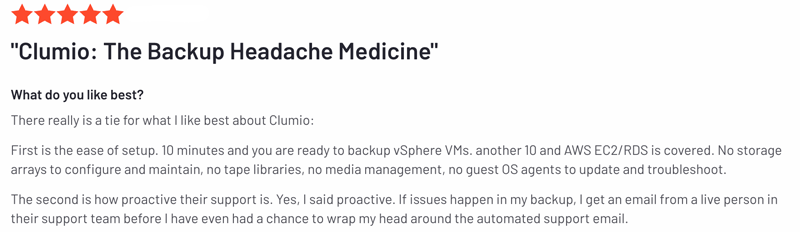
Our team provides enterprise level 24/7/365 support to customers across the world. To differentiate our support offering from competitors, we provide fully automated proactive support (APS) which our customers have come to love!

With our APS, customer backup and restore failures are promptly identified, and tickets are automatically generated. In most cases, we detect, triage, and resolve issues even before customers themselves are aware. This is made possible by the fact that the Clumio platform is 100% cloud-native. Fully automating this means that we’re able to continue delivering a unique world class experience as our customer base grows.

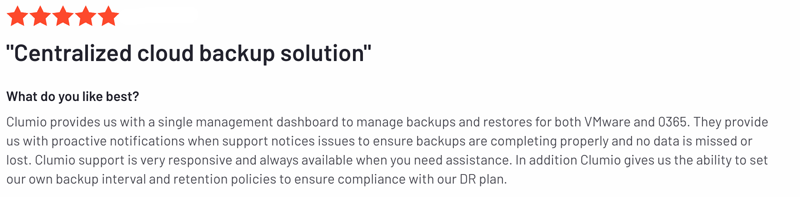
To see what real customers are saying about our support, check out these G2 reviews: https://www.g2.com/products/clumio/reviews


More related posts


Thumbnail_Blog-Clumio-Chat-2026

Meet Clumio Chat: An AI Assistant to Help Evaluate Cloud-Native Data Protection

Read more about Meet Clumio Chat: An AI Assistant to Help Evaluate Cloud-Native Data Protection
Thumbnail_Blog-Clumio-Fedramp-2026

Clumio Advances Cloud-Native Cyber Resilience with FedRAMP® Milestone

Read more about Clumio Advances Cloud-Native Cyber Resilience with FedRAMP® Milestone
Thumbnail_Blog-Lateral-Access-2026

Private Cloud Data Security Technical Guide

Read more about Private Cloud Data Security Technical Guide

Most recovery use cases that we’ve heard from our customers are along the lines of either recovering a single object or multiple objects. Multiple objects could be an entire prefix, an entire bucket, or even multiple buckets at the same time. No customers want anything bad to happen to their production environment but if it does, the capability to restore multiple buckets becomes really crucial. With Clumio, customers can either use the Global search capability or go to a specific Point in Time to recover objects from a Protection Group. Let’s start with Global Search first:

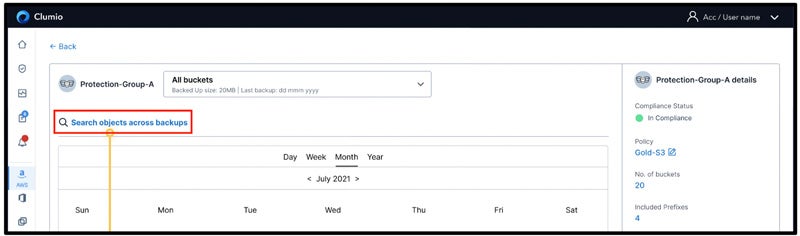
Customers can visit the asset details page of the Protection Group by clicking on its name. On the asset details page, customers can click on Search objects across backups as shown below:

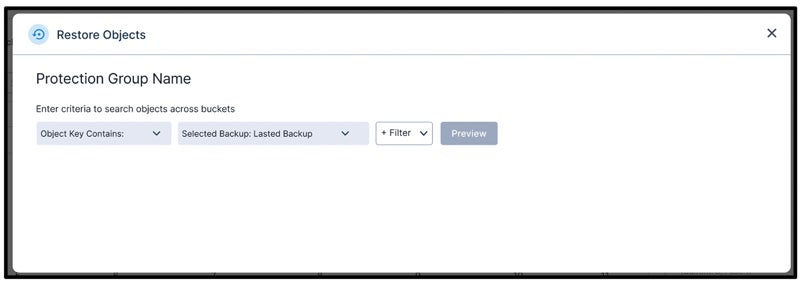
In order to search across backups, customers can specify a range of different search options like:

  • Object Key Contains
  • Object Key Begins With
  • Selected Backup (latest backup or all backups)
  • Version ID
  • Object Type
  • Object Size (minimum and maximum)
  • Storage Class
  • ETag
  • Bucket Name

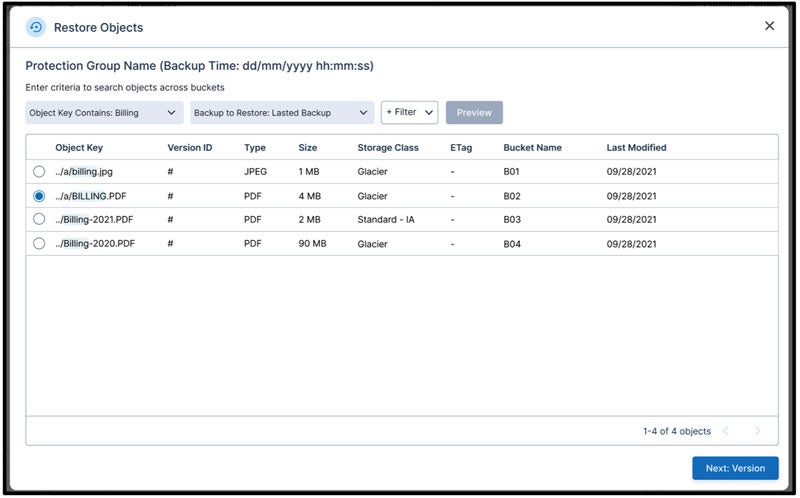
Once the search criteria are specified and customers clickPreview, they will be able to see a quick preview of the first 100 objects that match the search criteria. If the match is less than that, then you will only see limited objects as shown below:

This is a Google Search like experience where customers usually do not visit the second page but keep on refining their search criteria to find that needle in the haystack of backups. Once they find what they are looking for, they can select that particular object and click on Next: Version

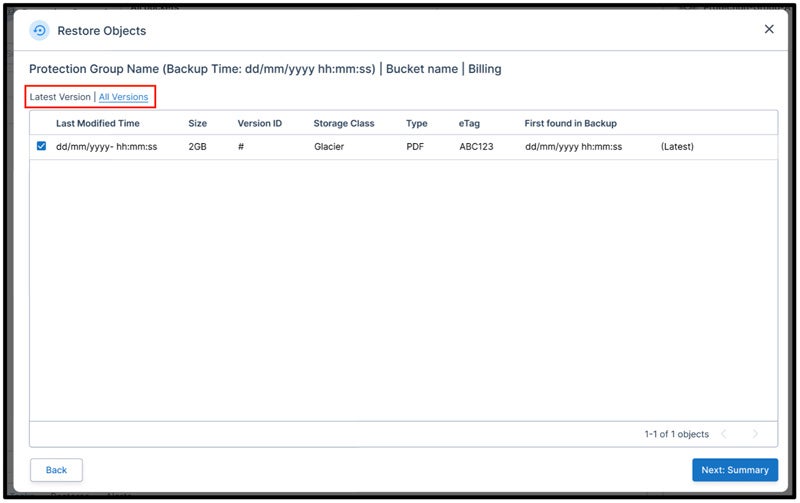
By default, the latest version that matches the search criteria will be selected but customers can also switch to All Versions that will populate all the versions matching the search criteria. From there, customers can select multiple versions of the same object to be restored. Customers can click on Next: Summary to configure the restore options:

Selecting Restore Options

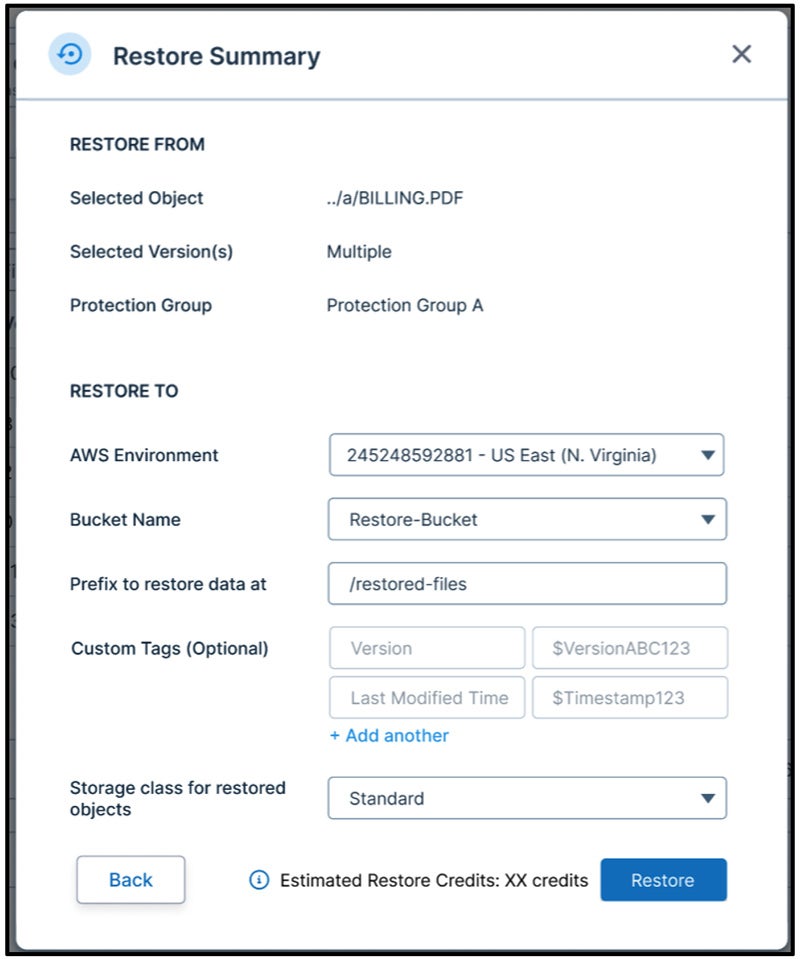
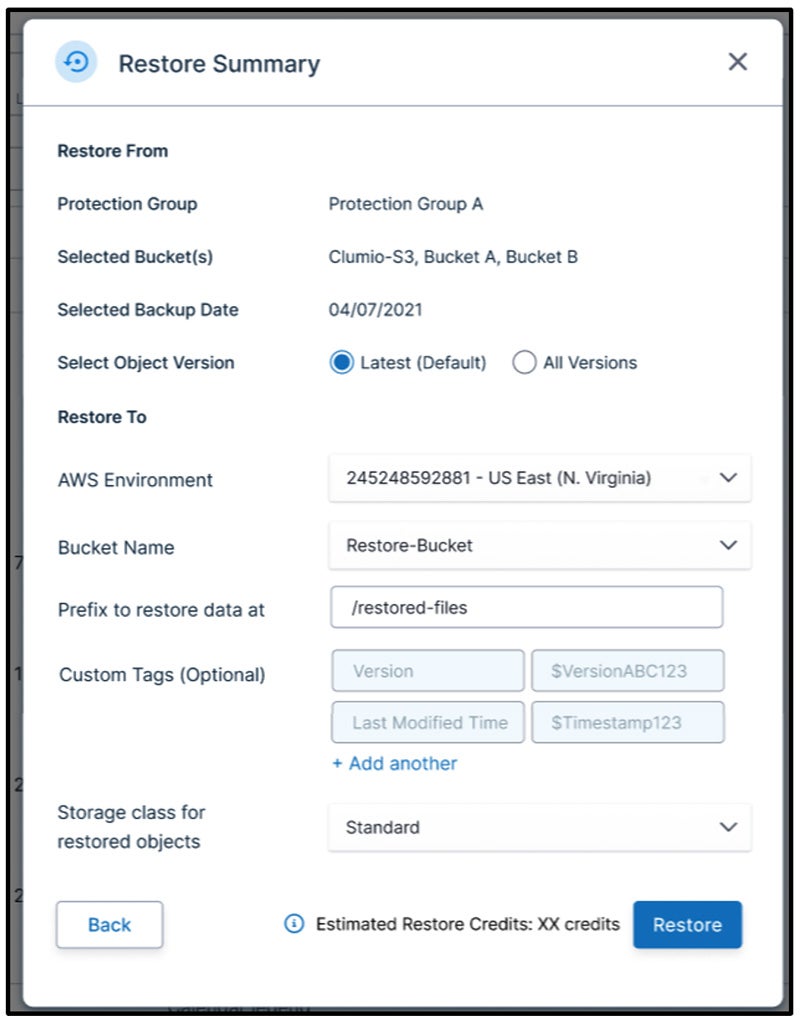
From this configuration, customers can specify which account/region/bucket the object (with/without multiple versions) should be restored into. They can add a prefix to either differentiate this restored data or keep it blank to restore the data in its original location. The entire object key will be restored so that the object goes back to its original location. Clumio adds Tags like Version and Last Modified Time so that customers can differentiate these objects from other objects in case the objects are restored back into their original location. Customers can also specify the storage class for restored objects and the data will be restored accordingly. They will get an estimate on the number of credits that they will get charged for performing this restore.

Restoring from a Protection Group using Point in Time

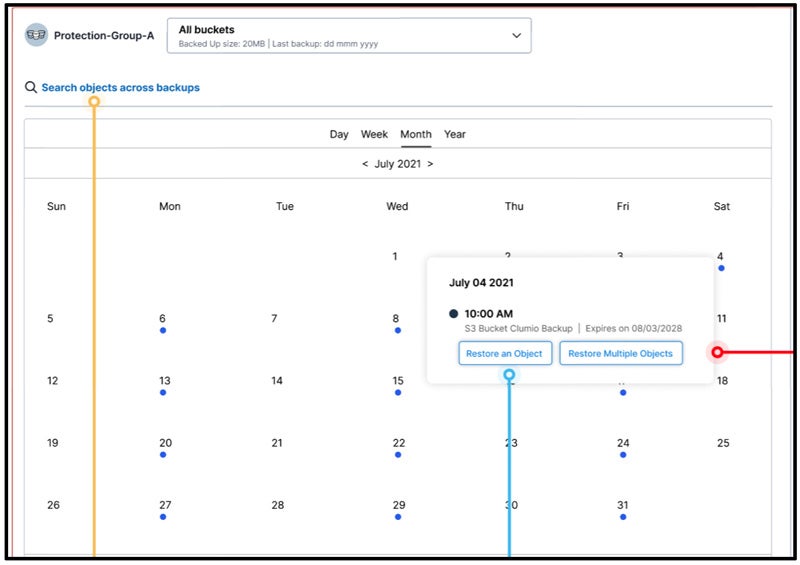
That represents the Global Search flow. Additionally, customers can use a Point in Time to restore either a single object or multiple objects as shown below:

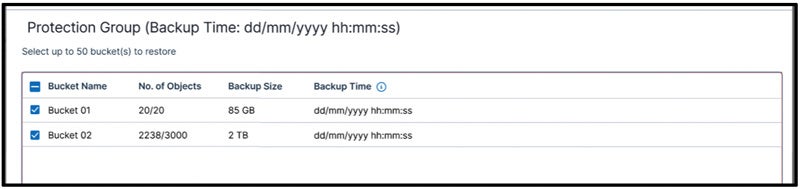
In the calendar view shown above, customers can pick a specific date and then select the option to either Restore an Object or Restore Multiple Objects. Restoring an object is similar to the Global Search flow as covered above. Restoring multiple objects also flows similarly where customers can specify their search criteria. If they wish to restore entire buckets, they don’t need to specify any criteria and just the buckets that they would like to restore as shown below:

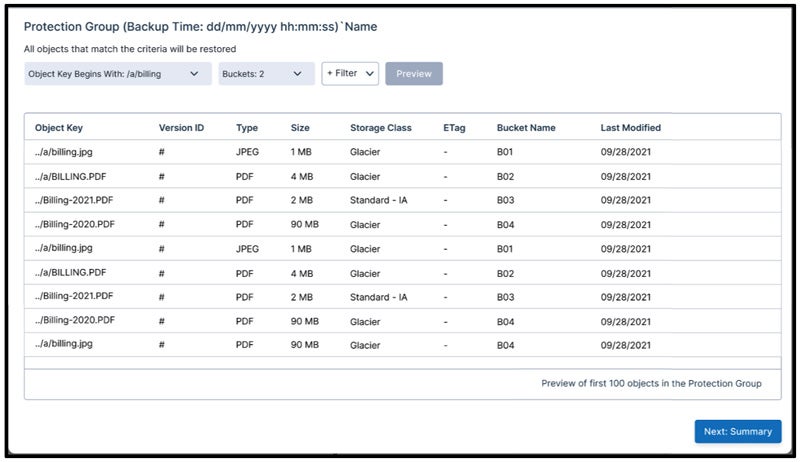
If the search criteria is indeed configured, customers don’t need to select a particular object but all objects that match their search criteria gets restored as shown below:

Customers can preview the first 100 objects and confirm whether the objects look good or not. If no search criteria is specified, then all objects that were present in the state of buckets will get restored.

In addition to all the options seen in Global Search, customers can specify whether they want to restore only the latest version or all versions of the objects.

All in all, customers can either use the Global Search option or the Point in Time feature to find specific objects quickly and restore them to account or location of their choice. If this doesn’t wow you, maybe we will need to get an actual genie 🙂

More related posts


Thumbnail_Blog-Clumio-Chat-2026

Meet Clumio Chat: An AI Assistant to Help Evaluate Cloud-Native Data Protection

Read more about Meet Clumio Chat: An AI Assistant to Help Evaluate Cloud-Native Data Protection
Thumbnail_Blog-Clumio-Fedramp-2026

Clumio Advances Cloud-Native Cyber Resilience with FedRAMP® Milestone

Read more about Clumio Advances Cloud-Native Cyber Resilience with FedRAMP® Milestone
Thumbnail_Blog-Lateral-Access-2026

Private Cloud Data Security Technical Guide

Read more about Private Cloud Data Security Technical Guide

The world around us is changing rapidly where everything is being offered and consumed as a Service – including Ransomware. Ransomware as a Service (RaaS) is proving to be the “virus” (pun intended) that is forcing the evolution of security postures adopted by organizations.

Organizations are in varying stages of their journey to cloud, which is being made more challenging by bad actors and threat vectors. Add to this the concerns around misconfigurations in cloud that market analysts have declared as one of the key vulnerabilities that bad actors tend to exploit first.

In the current IT climate, with the ransomware threat looming large, Zero Trust architecture has become central to all enterprise’s security posture. “Challenge and Verify” all communication and access paths between components of the IT landscape is the core tenet of a Zero Trust architecture, which, when available on an easy-to-consume platform, makes it a compelling proposition.

Zero Trust architecture is a shift in paradigm from the concepts of “persistence” of connection that we have seen in the past. It starts with laying the foundations for micro-segmentation of the IT landscape, access limited with the Least Privilege principle, and all communication to and between the micro-segments being authenticated, audited, and verified. Leveraging micro-segmentation helps create micro-containment zones in the event of a disaster to minimize the lateral movement of threat vectors.

However, despite best-laid plans, we witness organizations falling victim to ransomware attacks and being subject to double extortion. In such cases, an organization’s ability to minimize business downtime relies heavily on its secure backup copies and recovering safely, at optimal speed, performance, and cost. This is proving to be the insurance policy that customers are relying on.

Constantly in step with the changing times, Commvault, armed with 25 years of experience in the data protection and management arena, helps customers recover their data and bounce back from cyber and disaster recovery (DR) crises via a multi layered security approach. These success stories only go to highlight the importance of backup copies that are cyber- and recovery-ready!


To be able to bring all siloed workloads – reducing the surface area of attack, into a unified framework that can easily fit into customers current hybrid ecosystem, with on-premises and SaaS presence, and consistently deliver the highest level of protection and recovery assurance at every layer of interaction, is now the gold standard in cyber-recoverability.For Commvault, adhering to business SLAs is of the highest priority and a non-negotiable parameter.

Across our Intelligent Data Services Platform, customers have a wide range of options to support their workloads and deployment flexibility. Commvault customers enjoy a seamless experience of protecting and managing data across on-premises, cloud, and SaaS platforms.

  • Commvault HyperScale X is Commvault’s hyperconverged infrastructure (HCI) offering leveraging Commvault Distributed Storage. Customers benefit from uniformly high standards of security, segmentation, and ease of deployment. HyperScale X also benefits the customer with seamless cloud integration options.
  • Metallic Cloud Storage Services (MCSS) is a Commvault/Metallic flagship offering built on Azure services. Metallic Hub provides SaaS flexibility for Microsoft Office 365 and Salesforce.com, apart from several other cloud-centric workloads. Similarly, Metallic Cloud Storage services complement hybrid use-cases of enterprise customers looking for the much-needed logically segmented and air-gapped data of a secondary or tertiary copy. MCSS storage provides customers the peace of mind and the assurance that, with the abstraction of access and additional security layers, complete with data encryption at rest and in-flight, their data is immutable.

With backup copies becoming the “insurance policy” for enterprises to recover from, data immutability is critical.

Customers have an array of capabilities built into Commvault software that complement anomaly detection and notification mechanisms, making it a secure and cyber-ready data protection solution. As described by the NIST Cybersecurity Framework, enterprises are fast aligning themselves to the “Defense in Depth” strategy. When extended to data protection and management environments, the same framework helps achieve desired levels of immutability and security without compromising recovery, performance, and cost.

Best Practices for Security and backup data immutability

Immutability is defined as the ability of any data to be maintained in a non-fungible state for a specific duration of time. Data immutability can be attained via various methods working in conjunction with each other.

Here are the key best practices recommended by Commvault to achieve security and backup data immutability:

1. Have a tighter grip on Role-Based Access Controls to ensure only resources within the organization have access to backup repositories. Coupled with multi-factor authentication (MFA) and Multi-person authentication, this ensures protection against rogue admin or compromised admin credentials. Answering basic questions like “Who has access to what and why?” helps guide the Role-based Access Control (RBAC) principles. This aligns with Least Privilege Access guidelines.

2. Protect against “rogue admin” or “compromised admin credentials” wreaking havoc on your Commvault environment by enabling Commvault Retention Lock on the policies (formerly known as WORM Copy). Once enabled on a policy, this software level locking configuration helps protect against accidental or intentional deletions or changes to the policy retention, deleted jobs or unmounted/dropped libraries, by anyone including admins.

3. Encryption is a default setting for Commvault. Data at rest and in-flight is encrypted and assures the backup data, even if exfiltrated, is rendered useless to bad actors without the decryption keys. Additionally, since data written by Commvault is in deduplicated chunks, the blocks of data are not of any use to bad actors in the event of Double Extortion Ransomware threats.

Commvault’s integration with and support for 3rd party Key Management Servers provides an additional layer of security.

4. Commvault’s Ransomware Lock protects on-premises data mover mount paths, wherever relevant. This ensures data can be written into the target disk storage only by Commvault and Commvault approved processes, thus rendering the mount path inaccessible to read, writes, and updates any non-Commvault process, hence immutable.

5. With Commvault HyperScale X, customers gain tighter OS-level data protection that blocks users and/or ransomware attacks from bypassing other security layers through access controls. Under the hood, HyperScale X engages SELinux to enhance immutability by providing access policies restricting file modifications or disk-level activity, such as reformatting drives. Most importantly, HyperScale X powered by Commvault’s integrated scale-out file system provides additional immutability at the storage layer. This ensures that data in backup repositories cannot be modified or encrypted at the file system level. This capability is enabled by default.

6. Access to cloud storage services is authenticated just before backup jobs are triggered.  This also aligns closely with Zero Trust architecture, which mandates all communication channels be “Challenged” and then “Verified,” thus negating the notion of persistence.

7. Commvault also allows leveraging time–based retention lock (WORM immutable lock) on Cloud Object storage and on-premises object storage that support it. Backup copies placed in cloud storage, where a time-based retention lock is applied, cannot be deleted or updated by any process or persons, including Cloud IaaS vendors until retention is met.

8. Network topologies recommended by Commvault emphasize “Pull” architecture vs. “Push” thus, adhering to the principles of Zero Trust architecture. Push architecture relies on the persistence of connection and has the potential for malware to infiltrate through this always-on connection; however, in “Pull” architecture, connection to the clients is periodic, which requires a request for access, authentication of access, and finally resulting in “pulling” of data and events.

9. For Metallic Cloud Storage Services, the Metallic storage subscription is abstracted away from the customers, as they have visibility only to their Metallic Storage account and not the Metallic subscription. This layer of abstraction, when used in conjunction with Commvault Retention Lock, provides a secure and immutable copy of data on MCSS.

Key Architecture Considerations for Immutability

One of the frequently asked questions is, how do we architect the right fit for a given environment with all these capabilities? What are the key architecture considerations when designing a hybrid environment while balancing security, cost, and performance parameters?

Include these elements in your immutability architecture

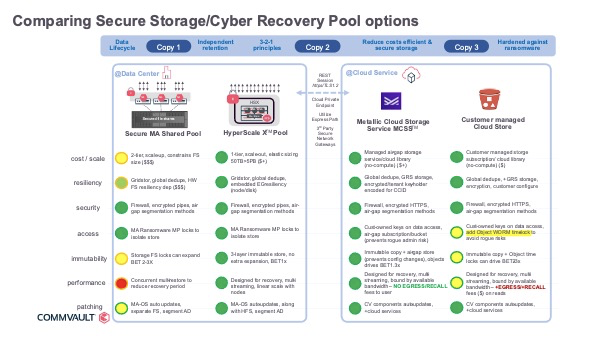
  1. Access locks to isolate copy store against Ransomware
  2. Immutability with lifecycle locks to reduce risks, balanced with consumption impact
  3. Air-gap isolation network and controls
  4. Configuration governance to protect against intentional or accidental changes
  5. Recovery concurrent performance – reduce latency with due importance to speed and cost impact
  6. Automatic patching to stay current, simplifying management and maintenance of data protection infrastructure
  7. 3-2-1 Offsite vaulted copy

The image below illustrates these salient points that can serve as a quick and easy guide.

To learn more about Commvault immutability, read Commvault’s immutable infrastructure architecture.

More related posts


Thumbnail_Blog-Clumio-Chat-2026

Meet Clumio Chat: An AI Assistant to Help Evaluate Cloud-Native Data Protection

Read more about Meet Clumio Chat: An AI Assistant to Help Evaluate Cloud-Native Data Protection
Thumbnail_Blog-Clumio-Fedramp-2026

Clumio Advances Cloud-Native Cyber Resilience with FedRAMP® Milestone

Read more about Clumio Advances Cloud-Native Cyber Resilience with FedRAMP® Milestone
Thumbnail_Blog-Lateral-Access-2026

Private Cloud Data Security Technical Guide

Read more about Private Cloud Data Security Technical Guide

As highlighted in one of the recent posts for Clumio Protect for Amazon S3, customers face several challenges in order to successfully differentiate between critical and non-critical data and be able to only protect critical data. This data classification challenge is solved by Clumio using an innovative concept called Protection Groups. I’ll dive deeper into how Protection Groups can be used to not just help classify critical data, but also protect it while producing tremendous cost savings.

Protection Groups provides an abstraction layer to manage buckets and prefixes across all your AWS accounts. it provides a mechanism to classify data across buckets in all of your AWS accounts to help protect critical data as per the business requirement.

Configuring Protection Groups is a Simple 3-Step Process

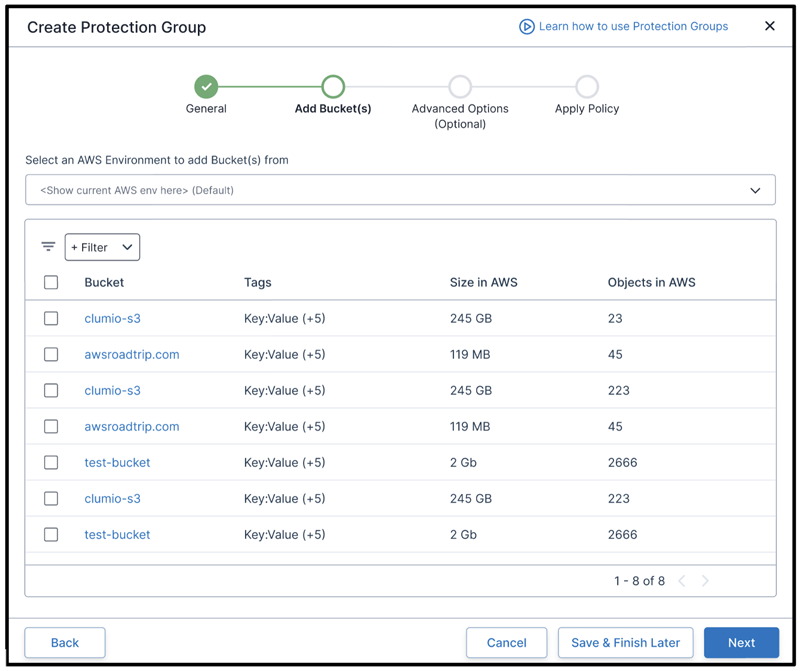
Step 1: After giving it an intuitive name, you can decide what buckets to add inside the Protection Groups. These buckets could belong to either a specific AWS account or could be across all your AWS accounts. In the near future, you will also be able to add buckets via Tags so that they can get added into the Protection Groups automatically!

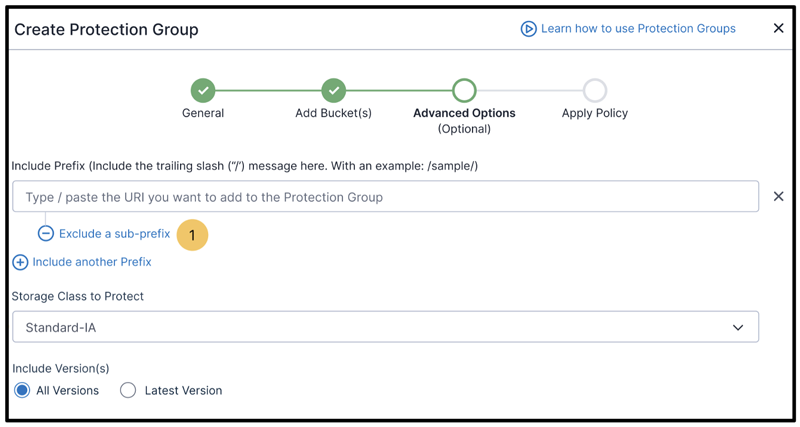
Step 2: Decide whether the entire bucket or a subset of the bucket gets added into the Protection Group. You can use 3 different criteria to select which data gets protected. They are:

  • Prefix: You can configure to include specific prefixes or exclude them depending on what you want to protect. For example; several customers dump their DB logs into a specific prefix and want that data to be protected. They can configure /dblogs/ to protect all objects sitting inside that prefix to be protected. If needed, they can even exclude a prefix to not get protected.
  • Storage Class: You can configure what objects to backup depending on their Storage Class. For example; you can configure to backup objects sitting in Standard and Infrequent Access only while not protecting objects in Glacier. This will reduce the time and cost significantly as objects stored in colder storage require time to unthaw and are expensive to pull out.
  • Version: You can configure whether to protect all versions or just the latest versions of the objects.

Step 3: Applying a policy to the Protection Group so that data can be protected as per the business requirements.

And voila!! That’s it!! Your Amazon S3 data is protected in an air gap environment giving you protection against events like Ransomware or bad actors deleting/modifying your AWS environment.

Several customers have requirements to represent the state of their bucket at a specific point in time. They assumed that S3 Object Versioning is able to achieve the same thing, but it’s really not. We’ve created a simple table below to highlight the differences between the two:

Scope AWS S3 Versioning Clumio Protection Group
Protection Granularity Buckets Only One-to-Many Accounts
One-to-Many Buckets
One-to-Many Prefixes
Recovery Points Changes to Objects Point In Time
Daily, Monthly, Annual
Recovery Granularity Objects Only One-to-Many Buckets
One-to-Many Prefixes
One-to-Many Objects
Recovery Location Local Account Only Any Bucket in Any AWS Account
Restore To Any Prefix Existing or New

As you can see, clumio help make it easier for customers to … but also helps make it easier to restore them.

However, any backup is only as good as its recovery and customers require flexibility to recover a specific object, or an entire prefix, or entire bucket, and even multiple buckets at the same time. With protection groups, Clumio enables you to do all of these our unique capability to perform Global Search across all of your critical data sitting in different AWS accounts. Keep an eye out for a future blog where I dive into Amazon S3 data recovery coupled with Global Search and show how Clumio can help you recover your data.


More related posts


Thumbnail_Blog-Clumio-Chat-2026

Meet Clumio Chat: An AI Assistant to Help Evaluate Cloud-Native Data Protection

Read more about Meet Clumio Chat: An AI Assistant to Help Evaluate Cloud-Native Data Protection
Thumbnail_Blog-Clumio-Fedramp-2026

Clumio Advances Cloud-Native Cyber Resilience with FedRAMP® Milestone

Read more about Clumio Advances Cloud-Native Cyber Resilience with FedRAMP® Milestone
Thumbnail_Blog-Lateral-Access-2026

Private Cloud Data Security Technical Guide

Read more about Private Cloud Data Security Technical Guide

Data is the lifeblood of busy organizations. Worldwide data is expected to explode to 175 zettabytes by 2025, representing 61% CAGR1. 51% of the data is expected to be in data centers and 49% will likely be in the cloud. 90 ZB of this data will be from IoT devices in 2025. And 80% of data is predicted to be unstructured by 2025.2  With such exponential growth and dependency on data, the stakes of protecting mission-critical data have never been higher.

The need to build resilience to avoid downtime

Organizations today are being digitally disrupted almost daily. Rising cybersecurity threats. Unpredictable natural disasters. Power outages. Equipment failure. You name it. Data backup and recovery safeguards critical data, applications and systems from permanent loss that can cause major business disruptions.

As a busy “as-a-service” managed security provider serving customers nationwide, our teams at Magna5 regularly tell our customers to be prepared for the unexpected. Recently, one of our customers, a multi-state supplier of technical motion and control systems and industrial lubrication solutions, was a victim of a ransomware attack. Fortunately, they were able to bounce back quickly. We were providing VMware image-based backups with off-site replication leveraging Commvault software. As a result, we recovered multiple Windows systems, including web servers and Microsoft SQL servers, on our hosting platform located in our secure Iron Mountain datacenters. The customer also had an offsite air-gapped copy of their data that allowed them to fully recover and resume business operations after the ransomware attack.

Many organizations are not so fortunate. Research shows a business will fall victim to a ransomware attack every 11 seconds in 2021.3 The average cost of a data breach is $3.86 million.4 Roughly 40-60% of midsize businesses never reopen after a disaster.[add source citation]  Even more eye opening … 90% of businesses that experience a disaster and do not resume operations in five days go out of business within the first year.5 With regular data backup, organizations can ensure data security and business continuity in the event of data loss. To bounce back quickly in the event of a disaster, a fully managed backup-as-a-service strategy makes a lot of sense to avoid downtime when catastrophe occurs.

What questions should you be asking when determining the right Backup-as-a-Service for your organization?

  • How quickly do I need to get back online in the event of an outage? How much data loss can I tolerate? Will the solution meet those needs?
  • Can my environment be managed and monitored 24/7with recovery time objective (RTO), recovery point objective (RPO) or service level agreements?
  • Can I deliver compliant-ready data governance so organizations can streamline their information collection and handling? Do my processes allow contextualizing, rule application and implementing regulation requirements to satisfy GDPR, HIPAA, PCI, CCPA and more?
  • Do I have built-in redundancies and failover capabilities to prevent downtime, are such connections impacted if, for example, power lines go down in a natural disaster? 
  • Can I restoredata across multiple types of data layers and locations – on-premises environments, public and private clouds?
  • Do I have a testing schedule to ensure your backup recovery works? How often should data backups be performed?

A checklist to get you started

To avoid business disruption or downtime, here is a good checklist to help ensure your organization can respond rapidly when disaster strikes.

  1. Define your tolerance for downtime and data loss.
    Know in advance which networks, applications and data are mission critical. Which ones must be restored in a matter of milliseconds vs. those that can wait to be restored within hours? For example: If you are a Tier 1 bank with high-transaction applications, you cannot afford a high RPO. You need a short RTO to get your business back up and running full speed. Data types can be assigned to multiple tiers with specific RPO/RTO, personalizing recovery to business-critical data first and restoring non-critical data later.
  2. Build in redundancies and failovers to reduce downtime.
    In a typical natural disaster, power lines may be down, buildings flooded, internet connections slowed, or the virtual private network cannot handle the extra workload. Be sure you have multiple layers of WAN connectivity to failover to unimpacted links for smooth network operations. Built-in dynamic traffic orchestration can also make a difference in redirecting struggling traffic connections to a better connection without a session drop.
  3. Ensure backups are offsite and disconnected.
    A hosted backup and disaster recovery-as-a-service solution in a cloud environment copies your data in a secure data center disconnected from your network. Backed up data can be stored locally and replicated to an offsite data center or sent directly to the data center from your servers. You can specify recovery for an entire virtual environment or specific end-user systems, cloud applications and enterprise infrastructures.
  4. Verify that you can restore data across multiple types of data layers and locations.
    Your data backup and disaster recovery should be deployed to and from multiple platforms – on-premises environments, public and private clouds. Check to see if you can recover both the state and data inside hypervisors. Choose the quickest route for recovery – full recovery vs. rebuild – and populate data.
  5. Review and test your data backup and disaster recovery regularly.
    You would be surprised how many data backup and disaster recovery plans are collecting dust on the shelf covering systems five years old when the company was half the size. When it comes to disaster recovery, you are only as good as your last test! A testing schedule is the single most important part of any data backup and disaster recovery plan. Remember, a failing test is not a bad thing as it alerts you to problems early rather than finding them during a crisis. It is important your data backup and disaster recovery plan is up to date on current systems and have been tested at least once a year. This way you can feel confident that your business can fully recover without data loss or problems in the event of a real data disaster.
  6. Monitor backups to ensure they work.
    More and more companies are relying on managed service providers to manage and support their organizations’ scheduling, alerting and testing process 24/7/365. They can easily failover and back up virtual machines or an entire site, with zero data loss and minimal disruption.

Conclusion

Safeguarding your data with reliable backup should not be a battleground. Managed data backup-as-a-service with seamless recovery can provide organizations with better assurance their data and network recovery are in good hands. If you need to team up with a trusted partner, do not wait for a disaster to strike. Let Magna5’s experts do the heavy lifting of managing and monitoring your data backup activities to protect your organization’s critical assets … on-premises, in the cloud or wherever your data resides.

Magna5 provides managed IT, voice and connectivity solutions to mid-market and enterprise customers nationwide, including leaders within the education, healthcare, government, financial services and other industry segments. Within the managed services offerings, Magna5 provides security services, data backup, disaster recovery management, hosting services, and IT consulting from their 24/7/365 fully staffed Operations Center. The company also provides voice and data services, as well as a host of “above the net” cloud services, and operates a proprietary, secure network designed to leverage diversified carriers and infrastructure in targeted points-of-presence (PoPs) throughout the United States, a key strategy for network reliability. Headquartered in Frisco, TX, Magna5 operates nationally and has office locations in Pittsburgh; San Antonio; Seattle; and Troy, NY. 

References

1 IDC, “Data Age 2025” [Seagate] [Aparavi]

2 IDC, as quoted by Data Management Solution Review, “80 Percent of Your Data Will be Unstructured in Five Years” [Solutions Review] [Aparavi]

3 Cybercrime to Cost the World $10.5 Trillion Annually by 2025 [Cybersecurity Ventures]

4 Average Cost of a Data Breach in 2020: $3.86M [Dark Reading]

5 A Good Business Leader Will Prepare for a Disaster. Here’s How [Environmental Defense Fund]

More related posts


Thumbnail_Blog-Clumio-Chat-2026

Meet Clumio Chat: An AI Assistant to Help Evaluate Cloud-Native Data Protection

Read more about Meet Clumio Chat: An AI Assistant to Help Evaluate Cloud-Native Data Protection
Thumbnail_Blog-Clumio-Fedramp-2026

Clumio Advances Cloud-Native Cyber Resilience with FedRAMP® Milestone

Read more about Clumio Advances Cloud-Native Cyber Resilience with FedRAMP® Milestone
Thumbnail_Blog-Lateral-Access-2026

Private Cloud Data Security Technical Guide

Read more about Private Cloud Data Security Technical Guide

An organization’s compliance with regulatory standards for application usage and data storage must remain in accordance with industry guidelines and local, national, and international laws.
Failing to maintain compliance can result in several consequences, including steep fines, damage to a business’s reputation, and even the potential of downtime to its network infrastructure, causing severe disruptions to its processes and end users.

Let’s look at what compliance in AWS entails and some solutions organizations can leverage to ensure they remain compliant.

Compliance Regulations Within AWS

Cloud environments like AWS have become increasingly popular as more organizations realize their scalability and cost efficiencies. However, as these organizations increase their cloud migrations, they must also understand the increased scope of compliance they are taking on—especially since cloud providers like AWS do not offer the necessary data protection and security requirements to meet full compliance on all ends.

Remember that compliance is not just about meeting requirements for real-time processes; securing enterprise data and its backups is an essential aspect that can often prove even more complicated. If your organization is currently using AWS for its workloads and data, you must be equipped to meet all the various compliance requirements, both now and as they change in the future.

Although AWS does provide a level of compliance on its end, full compliance for the organization falls under what is known as a shared responsibility model.

What Is the AWS Shared Responsibility Model?

Under AWS’s shared responsibility model, AWS is responsible for compliance with any regulations regarding the host layer and physical infrastructure, while the organizations using AWS are responsible for regulations relevant to how they use the cloud services, host applications, and store data.
These shared compliance responsibilities are referred to as “security of the cloud” and “security in the cloud.”

AWS is responsible for the security of the cloud itself—the infrastructure that runs its cloud services, such as hardware, software, networking, and facilities.

Organizations using AWS are responsible for maintaining security in the cloud. These responsibilities are dependent on the actual services the organization is using and can include any application, software, or utilities installed by the customer on the instances, access to the endpoints used to store and retrieve data, and management of data, which includes any encryption options being deployed.

The organization’s responsibilities don’t end there; they must also classify their assets and use identity and access management (IAM) tools to apply the appropriate permissions. And this is all in addition to meeting service-level agreements (SLAs) with their customers.

Although AWS does offer organizations native compliance tools of their own, this does not negate how complicated and burdensome the process can be when performed manually on an ongoing basis.

The Challenges of Achieving Compliance in AWS

Organizations have many hurdles to face when seeking to meet compliance requirements within AWS.

First, there is a wide range of governmental and industry-specific regulations, including HIPPA, PCI, the California Consumer Privacy Act (CCPA), and Europe’s Global Data Protection Regulation (GDPR). These requirements are in addition to the complexities surrounding protecting consumer personally identifiable information (PII).

Such regulations are also subject to change at any time. Further complicating matters are the inconsistencies between state, federal, and international regulations. For example, there is a minimum six-year federal retention period for HIPAA-protected records, but state-level requirements can be anywhere from five to ten years.

There’s also the issue of the hidden costs and sticker shock that can occur when achieving compliance within AWS. Organizations that use large volumes of snapshots to back up data and meet retention requirements can see their costs snowball over time as the snapshots add up.

Furthermore, organizations going the manual route with compliance must use multiple tools or manually-written scripts to piece together their policies—a process that’s very complex to implement and maintain. This is even more difficult when trying to keep up with shifting regulations or trying to stifle rising storage costs.

What’s the Best Way To Meet Compliance in AWS?

Relying on manual compliance is complicated, burdensome, costly, and leaves plenty of room for error. This environment creates a high risk of compliance failure that can quickly translate into business failure.

Choosing an AWS compliance solution that meets the necessary data retention periods, security measures, cost efficiencies, and data recovery requirements is the most effective way to help you not only achieve but continue meeting requirements as they change.

Clumio Simplifies AWS Data Protection and Compliance With a Turnkey Solution

Clumio is a fully secure, backup-as-a-service that provides air-gap ransomware protection and compliance-driven data retention for AWS applications. it offers simple automation of even the most tedious compliance tasks, freeing up your IT and development staff to focus on other aspects of the organization’s operations.

With Clumio, your organization has a centralized backup solution that defines backup policies and monitors compliance in real-time across your entire AWS environment—and all of your SLAs. Clumio also enables predictable cloud backup and data storage costs, eliminating skyrocketing overhead and sticker shock associated with the constant creation of data snapshots.

Clumio achieves this by:

  • Offering a simple interface that provides a single, cohesive view of all your AWS assets and removes complexity by automatically discovering AWS accounts and indexing any resources that require compliance protection with uniform policies. Plus, new resources are automatically detected and have the same policies applied.
  • Providing encryption, compression, and resource management, and instant alerts when compliance may be at risk.
  • Storing backups behind an air-gap and outside of production environments to help protect against account compromises such as ransomware attacks and bad actor behavior.
  • Clumio has completed many rigorous certification efforts including ISO 27001, ISO 27701, SOC 2 Type 2, HIPAA, and PCI DSS. This rigorous testing makes Clumio one of the most secure platforms in AWS.
  • Eliminating the need to write work-around automation scripts thanks to Clumio’s policy-driven solution that helps organizations meet data and governance mandates by by enabling the application of uniform policies to all assets. Clumio allows policies to be built using AWS tags, so it integrates into existing workflows.

Clumio Helping with AWS Compliance

Built natively in AWS Clumio offers automatic scalability and 24/7 monitoring and support, all within a responsive and intuitive interface with a quick onboarding process.

Schedule a demo today, or click here to test Clumio for your enterprise.

More related posts


Thumbnail_Blog-Clumio-Chat-2026

Meet Clumio Chat: An AI Assistant to Help Evaluate Cloud-Native Data Protection

Read more about Meet Clumio Chat: An AI Assistant to Help Evaluate Cloud-Native Data Protection
Thumbnail_Blog-Clumio-Fedramp-2026

Clumio Advances Cloud-Native Cyber Resilience with FedRAMP® Milestone

Read more about Clumio Advances Cloud-Native Cyber Resilience with FedRAMP® Milestone
Thumbnail_Blog-Lateral-Access-2026

Private Cloud Data Security Technical Guide

Read more about Private Cloud Data Security Technical Guide

The government imposes certain requirements. Mainly, with the rise of threats like malware and ransomware, businesses should seek measures that prioritize safety. Determining your organization’s tolerance for data loss and recovery time can minimize or even fully mitigate the repercussion of a potential disruption to its project or mission-critical applications and databases. This should also include periodic reevaluations that account for new and emerging threats to your data and infrastructure—enable your organization to remain functional in the condition of a disruption. But let’s look at RTO vs. RPO more closely.

What’s the Difference Between RTO vs. RPO?

Recovery Time Objective (RTO) and Recovery Point Objective (RPO) are two of the most important parameters of an effective disaster recovery strategy. In order for businesses to safeguard their projects and meet government requirements for safety, it’s crucial to understand what each means, how they are calculated, and tools you can leverage to ensure you meet or exceed each one.

Understanding Recovery Time Objective (RTO) and Recovery Point Objective (RPO)

Although RPO and RTO are somewhat intertwined, each one refers to entirely different aspects of disaster recovery within a business continuity plan. Here’s how they are defined:

Recovery Time Objective (RTO)

RTO is the acceptable amount of time an organization has designated to recover from a disaster before the downtime causes severe consequences due to a break in business continuity.

For example, suppose a government-regulated organization has determined an RTO of five hours and experiences an event that causes its infrastructure to go down. In that case, it will need to have its infrastructure back up and running within the five hours before the downtime causes severe problems with its operations and/or projects.

Recovery Point Objective (RPO)

RPO refers to the time period that can pass during a disaster event until the amount of data lost surpasses the maximum threshold set by governments’ safety requirements of the business continuity plan. In other words, what is the allowable amount of data that can be lost before the data loss effectively disrupts operations or end-users?

Typically, an organization’s data backups automatically according to the backup schedule it has set. For example, let’s say an organization automatically backs up its data every 10 hours and later experiences an outage that lasts for eight hours. Since the outage’s duration did not exceed the last data backup

point, the organization has met its RPO and can recover enough data to resume operations in a tolerable manner without significant disruptions and losses. This is crucial for businesses to meet the safety requirements set and for the smooth running of their projects.

Differences between RTO and RPO

Although RTO and RPO are both essential aspects of a business continuity plan, the main differences center on their respective purposes within the plan.

RTO concerns a much larger scale within disaster recovery, as it involves the entirety of the organization’s operations, projects and applications, and how long it can function during downtime before its operations, including project work, are impeded. Comparatively, RPO focuses solely on data and the organization’s resilience to the loss of that data.

How to Calculate RTO

An organization’s RTO is dependent on several different factors, from the nature of its business to the full scope of its infrastructure.

Here are some general steps that are often used by organizations to help pinpoint an RTO:

  • Compile a list of all the systems and applications the organization utilizes during normal business operations, then account for all the teams and end users that would be hindered if these systems and applications experienced an outage.
  • Calculate what the losses would be if these systems and applications went down, such as lost revenue and any added expenses from the loss of access to them.
  • If your organization oversees the data of its customers, you will also need to consider the service agreements you have with your constituents, which may factor into the amount of time you have to recover their data.
  • Identify any applications that would be affected if a database crashed.
  • Note any customer-facing services that would become unavailable and result in negative backlash and possible financial loss.

After accounting for every application, consider which one would cause the most loss if it were unavailable, then use its recovery time as your organization’s baseline RTO. If every application is equally important, you can create an average from each RTO and use it as your baseline.

How to Calculate RPO

Every organization’s RPO will be unique and based on several variables, especially when there are multiple systems, applications and projects involved. However, there are common factors tied to government safety requirements that should be considered when determining what the actual recovery point is, such as:

  • The maximum data loss amount your organization can handle while still functioning
  • The anticipated costs associated with this data loss and any services rendered unavailable from it
  • The cost of software recovery solutions
  • Adherence to service level agreements (SLAs)
  • Implications for customers and end users
  • Industry and vertical-specific needs

Weighing these factors together can help an organization, be it government or private, identify the acceptable amount of data loss that is also in line with its allotted budget for backing up the data. This will help determine how often the data should be backed up and identify a concrete RPO, ensuring safety and continuity in any given condition.

What’s More Important, RTO or RPO?

RTO and RPO are both essential components of any business continuity plan, but is one really more important than the other? This ongoing debate is central to businesses aiming to maintain their safety protocols while meeting the stringent requirements set forth by the government.There is no objective answer, as each organization’s unique needs—both in terms of internal process and end user experience—are always determined by the services they offer, the industry they operate within, and the network or community they cater to. Each of these categories requires a different application of technology, and the intricate details of each process vary accordingly.

Meet or Exceed RTOs and RPOs with Clumio

Having an effective disaster recovery plan in place is always crucial to maintaining business continuity. This is especially significant in a technologically powered community where the details of hardware and software functioning are intertwined and critical to operations.

These plans aim to maintain your organization’s continued operation in case of downtime caused by attackers, accidental deletions, faulty hardware, or periodic issues with cloud hosting. This preparation, facilitated by the latest technology, will always include having a viable RTO and RPO in place.

Clumio’s rapid recovery capabilities enable swift data restores from its cloud-native data protection platform. By providing capabilities to restore an entire instance as well as granularly recovering individual files, records, or mailboxes, Clumio optimizes the data recovery process tohelp either meet or minimize your existing RTOs. This technology allows a seamless network recovery, helping diminish the impact of business disruptions..

With Clumio Protect, you can implement global policies across your entire AWS environment to back up your applications at the right frequency, helping meeting your recovery SLAs and compliance needs.Additionally, Clumio Discover’s backup optimization engine provides enhanced reporting and deeper visibility into the current and historical status of AWS backups. This technology gives organizations the ability to decipher the suitable amount of snapshots needed to meet their RPO while avoiding wasted costs that can come from excessive, unnecessary snapshot creation and storage. Such detailed insights are a valuable resource to the community of AWS users.

Let us show you how Clumio, a leader in recovery technology, enables faster data recovery of AWS workloads such as EC2, EBS, RDS, DynamoDB, etc., by scheduling a demo.

Embrace this opportunity to network with our community of satisfied users.

More related posts


Thumbnail_Blog-Clumio-Chat-2026

Meet Clumio Chat: An AI Assistant to Help Evaluate Cloud-Native Data Protection

Read more about Meet Clumio Chat: An AI Assistant to Help Evaluate Cloud-Native Data Protection
Thumbnail_Blog-Clumio-Fedramp-2026

Clumio Advances Cloud-Native Cyber Resilience with FedRAMP® Milestone

Read more about Clumio Advances Cloud-Native Cyber Resilience with FedRAMP® Milestone
Thumbnail_Blog-Lateral-Access-2026

Private Cloud Data Security Technical Guide

Read more about Private Cloud Data Security Technical Guide

Today, as Enterprise Administrative teams are being asked to do more with less, the push for self-service has never been greater. Off-loading mundane tasks like user requested backups and file restores frees up time on the Core IT team to focus on more mission critical tasks. However, granting access to these powerful tools which house your company’s most critical data should be tightly controlled in order to meet data compliance needs and prevent any unintentional or malicious consequences.

So how do you give access to users to perform these valid functions but prevent any unintended or harmful consequences? Simple, a combination of RBAC and EBAC enables you to provide user access that conforms to your organization’s data compliance requirements.

What is RBAC and How to Use it?

Role Based Access Control or RBAC has been around forever, and administrators are very familiar with the concept. At its simplest form specific users can be given Read-Only, Write, or Read/Write access. In the old days of simple file shares, this satisfied most people’s needs. However, in today’s enterprise world we need much more fine tuned granularity.

The days of giving full Super Admin to everyone are long gone. Only a select few users should have this God-level permission and it should be highly monitored and audited. On the flip side, read-only can be too restrictive and can prevent users from doing what they need to do, causing them to open tickets with the IT Team. A happy middle ground must be possible.

At Clumio, we give administrators the ability to give their end-users specific predefined roles that would more closely align with their job function without being too open or restrictive. At a glance, the below list of roles should fit 99% of permission levels administrators wish to give their users without “giving away the keys to the castle.”

Additionally, each Role has fine grain controls.

What is EBAC and How to Use it

Entity Based Access Control or EBAC is a slightly newer concept that allows you to put guardrails around specific resources and group them together to further control what your users have access to. This concept works great with Enterprises and even MSPs (Managed Services Providers) as it allows better support to enable more of a self-service experience for basic user requests.

Clumio’s approach to EBAC introduces the concept of an Organizational Unit or OU. Administrators can create these OUs and then place specific users and resources inside of these OUs to create isolation, restrict outside access, and reduce the blast radius in the event of unauthorized access. Let’s take a real world example to demonstrate how RBAC and EBAC function together to deliver a simple yet powerful mechanism to manage data access.

How RBAC and EBAC Work in Cohesion

In the below diagram we have created 3 different OUs – AWS Team, VMC Team and M365 Team. Inside each of these OUs are specific resources such as AWS accounts, VMware Cloud on AWS SDDC’s, and M365 Domains.

For example: When the user Dennis logs in, he can only see resources in the OU that he belongs to which are the two M365 domains. Dennis is an OU admin so he has full control over everything inside his M365 Team OU, but he has no access or visibility into the VMC Team or AWS Team’s OUs.

On the other hand, Jim is on the Helpdesk and his user account exists in all three OUs. When Jim logs in, he has visibility to resources inside all three OUs, but his restricted helpdesk permissions only allow him to perform specific functions within each of the OUs of which he is a member.

In summary, RBAC controls what you can do and EBAC controls what you can see. By combining these two control methods, you can safely grant access to powerful enterprise tools such as Clumio and conform to your data compliance needs.

Check out this demo to see how you can quickly set access controls in Clumio.


More related posts


Thumbnail_Blog-Clumio-Chat-2026

Meet Clumio Chat: An AI Assistant to Help Evaluate Cloud-Native Data Protection

Read more about Meet Clumio Chat: An AI Assistant to Help Evaluate Cloud-Native Data Protection
Thumbnail_Blog-Clumio-Fedramp-2026

Clumio Advances Cloud-Native Cyber Resilience with FedRAMP® Milestone

Read more about Clumio Advances Cloud-Native Cyber Resilience with FedRAMP® Milestone
Thumbnail_Blog-Lateral-Access-2026

Private Cloud Data Security Technical Guide

Read more about Private Cloud Data Security Technical Guide

In a world of ubiquitous, healthy competition, our industry is constantly on the move – and it’s one that’s centered around providing continuous value to our customers. This environment fosters innovation that benefits our customers, our company, and the market at large. 

It’s during these times that I am pleased to share that, today, Commvault and Rubrik have come to an agreement on all outstanding patent litigation proceedings between our companies that started last spring.

We have reached an amicable settlement that respects our mutual intellectual property and is in the best interest of our company and shareholders.

More related posts


Thumbnail_Blog-Clumio-Chat-2026

Meet Clumio Chat: An AI Assistant to Help Evaluate Cloud-Native Data Protection

Read more about Meet Clumio Chat: An AI Assistant to Help Evaluate Cloud-Native Data Protection
Thumbnail_Blog-Clumio-Fedramp-2026

Clumio Advances Cloud-Native Cyber Resilience with FedRAMP® Milestone

Read more about Clumio Advances Cloud-Native Cyber Resilience with FedRAMP® Milestone
Thumbnail_Blog-Lateral-Access-2026

Private Cloud Data Security Technical Guide

Read more about Private Cloud Data Security Technical Guide