Skip to content

This feature enables AWS customers to list the blocks in an EBS snapshot, compare the differences between two EBS snapshots, and directly read data from EBS snapshots. To perform these tasks before AWS released the EBS direct APIs, you would need to launch temporary Amazon Elastic Compute Cloud (EC2) instances and attach EBS volumes created from the EBS snapshots. Now you can call the APIs from EC2 instances, AWS Lambda functions, or containers. This enables you to read from, list the contents of a single snapshot, or list the changes between two EBS snapshots without having to create EBS volumes from snapshots first. In July 2020, AWS launched an additional set of EBS direct APIs that enable customers to create and write directly to EBS snapshots. We have seen a lot of interest and feedback from AWS Partners since we launched the direct APIs.

This blog post focuses specifically on Clumio, an AWS Advanced Technology Partner with AWS Storage competency. Clumio provides a secure, multi-platform, backup as a service offering that launched in August 2019, initially protecting on-premises VMware and VMware Cloud on AWS workloads. In December 2019, Clumio’s offerings quickly expanded to include protecting EBS volumes. In this post, I discuss how introducing Amazon EBS direct APIs into their EBS backup workflow helped provide an average of 30% cost savings and an overall 15% reduction in backup times for Clumio customers. As an active participant in the beta program for the direct APIs, Clumio was very interested in implementing them into their EBS backup workflows.

Introduction to Clumio for AWS native services

Clumio provides backup as a service for enterprises with requirements to protect EC2 instances, EBS volumes, and Amazon Relational Database Service (Amazon RDS) instances. Built on AWS, Clumio provides its customers with a simple, agent-less method to protect EBS volumes, with none of the typical complexity and costs of managing snapshots or backup infrastructure. With Clumio, you can protect all your accounts, across Regions, in one single-paned interface. This helps maintan consistency of data protection and opens use cases for disaster recovery (DR), testing and development, and migration.

Once subscribed to Clumio, Clumio customers simply deploy an AWS CloudFormation template in their account, set up their backup policies. The process is streamlined and can be up and running in 15 minutes or less. Clumio backs up all data securely in an immutable fashion and provides customers with an ‘air gapped’ copy of their data outside of their account. This way, if a customer’s account is compromised or has volumes/snapshots deleted mistakenly, Clumio can help them quickly restore their data to their account. Finally, as a SaaS offering, Clumio transparently provides updates and enhancements for its services on a biweekly basis, like integration with Amazon EBS direct APIs. This lets Clumio customers focus more on their core competencies, versus spending time maintaining backup infrastructure.

Clumio’s Amazon EBS workflow before EBS direct APIs

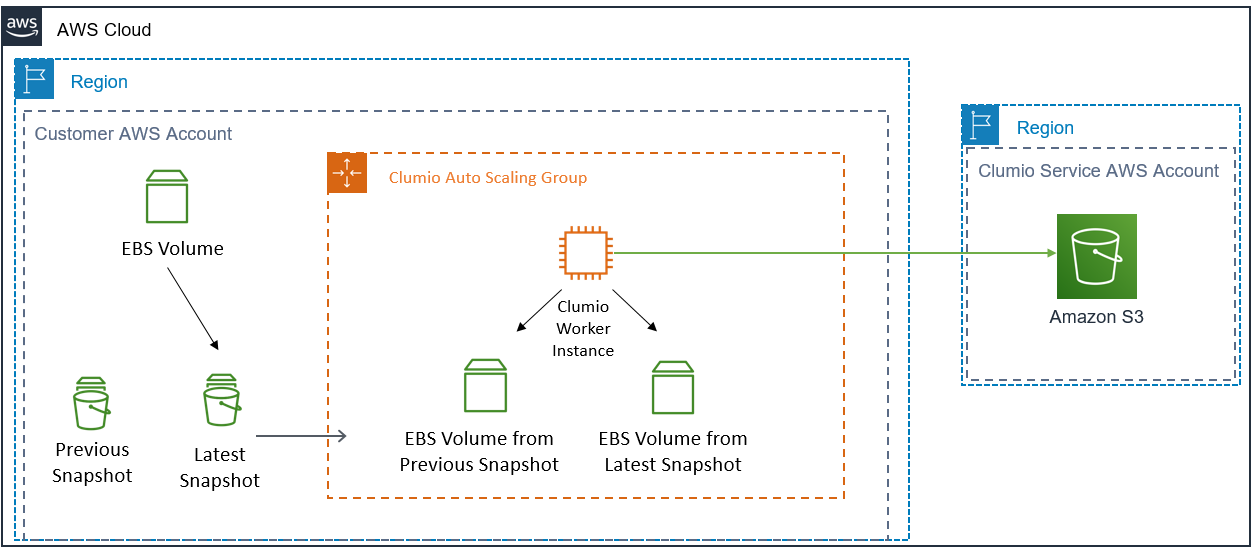
When Clumio launched their Clumio for Amazon EBS service in late 2019, EBS direct APIs were not yet available. As a result, whenever Clumio initiated a backup of an Amazon EBS volume, they had to mount the EBS volume on an Amazon EC2 worker instance inside a Clumio EC2 Auto Scaling Group. At that point, Clumio would have to read the contents of the entire volume to determine which blocks had changed, then process and send the changed data to the Clumio service. While this workflow was automated and seamless to the customer, there were some drawbacks. One such drawback was that the EC2 worker instance needed to read the full contents of the volume to determine the changed data during the backup process. Reading the full contents of a volume to determine changes was expensive in both time and cost for customers.

Clumio Amazon EBS workflow before Amazon direct APIs

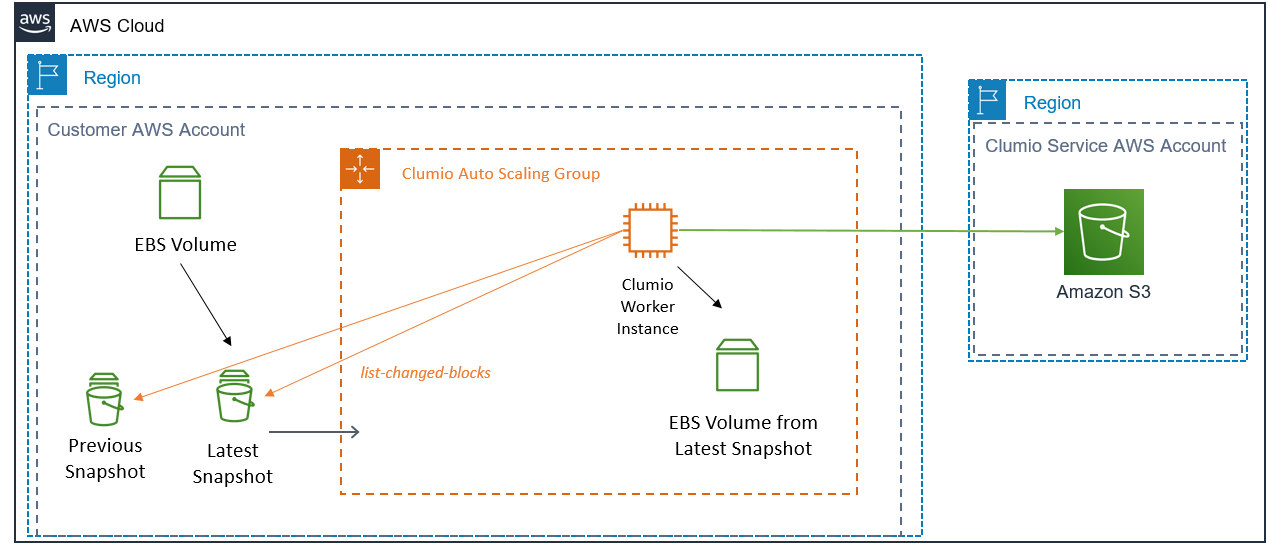
Clumio Amazon EBS workflow after Amazon EBS direct APIs

In February 2020, Clumio rolled out an update to their platform that leveraged the new Amazon EBS direct APIs. As a result, Clumio is now capable of programmatically determining the changed blocks between EBS snapshots. They no longer have to restore EBS volumes from snapshots and compare the differences on an EC2 worker instance, which greatly benefitted Clumio customers. Clumio’s customers can now perform up to 15% faster” and “spending up to 30% less on AWS infrastructure costs associated with running Clumio worker instances (EC2 and EBS). Clumio still makes use of EC2 worker instances today, to provide services such as deduplication, compression, and indexing for customers before they receive the data in the Clumio service.

Clumio Amazon EBS workflow after Amazon EBS direct APIs

Future plans for Clumio for Amazon EBS with EBS direct snapshot APIs

Clumio, like AWS, is continuously enhancing their services and innovating based on customer feedback. Amazon EBS direct APIs were the result of AWS listening closely to its partners and customers, understanding what features mattered most to them, and innovating with that in mind. Clumio is working closely with AWS service teams on methods that would enable them to introduce additional Amazon EBS direct APIs into their workflow. The goal is to persistently drive down expenses for their customers by integrating AWS cost optimization strategies, while concurrently enhancing their operational efficiency. This includes streamlining processes to minimize expenditures on AWS services, alongside improving backup and restore times for heightened resilience and cost-effectiveness.

One action-item under consideration is completely removing the need for Amazon EC2 worker instances in a customer AWS account. Clumio could seek to do this through introducing serverless workflows that would call the EBS direct APIs for list, read, and write operations. They also have the option of using a serverless architecture to perform the necessary deduplication, compression. Considering these options could further simplify EBS backup and restore operations for Clumio customers.

Summary

In this post, I provided a brief overview of Clumio’s AWS-native service, and covered how their Amazon EBS backup workflows looked before and after the use of EBS direct APIs. The direct APIs are a programmatic way to compare the changes between two EBS Snapshots, which helped Clumio customers save an average of 30% in cost and 15% reduction in backup times. I also discussed how they are planning to enhance their service in the future using more of the EBS direct APIs.

If would also like to consider the Amazon EBS direct APIs for your EBS backup and restore workflow, please review the EBS direct API documentation available on our website.

Thanks for reading this blog post! If you have any comments or questions, please do not hesitate to leave them in the comment section.

More related posts


Thumbnail_Blog-Clumio-Chat-2026

Meet Clumio Chat: An AI Assistant to Help Evaluate Cloud-Native Data Protection

Read more about Meet Clumio Chat: An AI Assistant to Help Evaluate Cloud-Native Data Protection
Thumbnail_Blog-Clumio-Fedramp-2026

Clumio Advances Cloud-Native Cyber Resilience with FedRAMP® Milestone

Read more about Clumio Advances Cloud-Native Cyber Resilience with FedRAMP® Milestone
Thumbnail_Blog-Lateral-Access-2026

Private Cloud Data Security Technical Guide

Read more about Private Cloud Data Security Technical Guide

By Ranga Rajagopalan

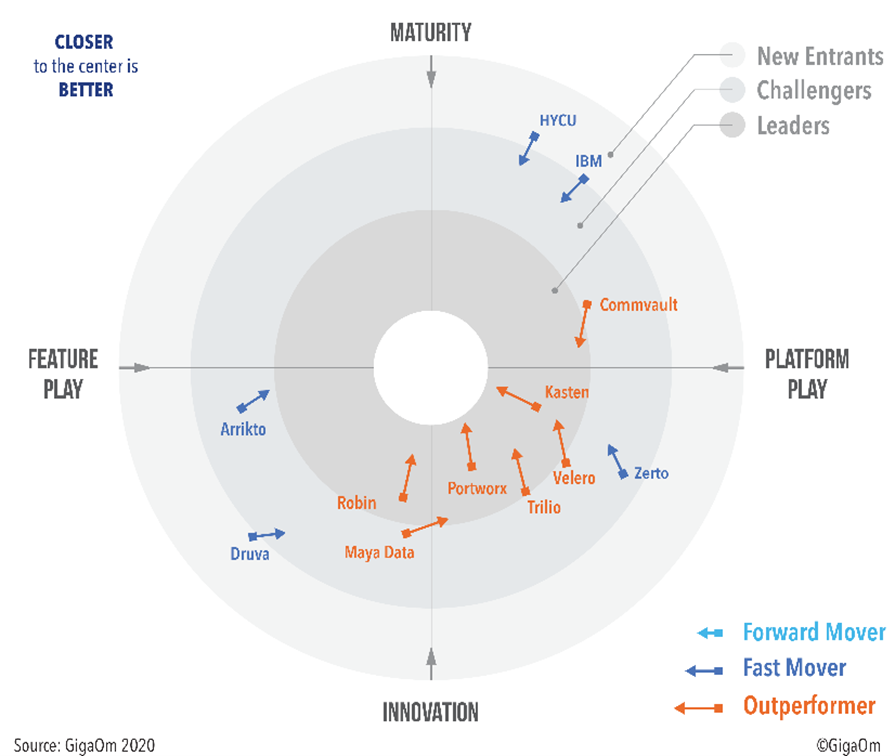
We are excited that Commvault has been rated as an Outperformer in the recently pushed GigaOm radar report for Kubernetes Data Protection  – awesome validation of our continued innovation to simplify how our customers store, protect and migrate their Kubernetes applications!

Enrico Signoretti, author of the GigaOm report, summarized it perfectly: “Commvault is demonstrating a strong commitment to Kubernetes and its operational models while continuing its robust support for traditional platforms and operations. And thanks to Metallic, the company’s SaaS solution, Commvault can provide data protection for Kubernetes across a broad range of organizations. At the end of the day, Commvault is a market leader for enterprise data protection.”

Thanks, Enrico.  We couldn’t agree more!

Enterprises are rapidly accelerating their cloud-native journey by adopting containers to provide application portability, faster onboarding and lower infrastructure costs. We predicted this trend more than three years back when we started our container data protection journey, starting with our support for Docker, followed by OpenShift and now, Kubernetes.

We also saw storage and data protection needing to come together for effective – or shall we say, intelligent – data management of containers. This is exactly why we added native data protection to Hedvig software-defined cloud-native storage for containers, fully integrated with Kubernetes and designed for DevOps.

And this week, we further transformed data protection for Kubernetes by introducing Metallic VM and Kubernetes backup, as a cloud-delivered BaaS solution for Kubernetes applications. Metallic protects the Kubernetes applications, regardless of whether they are running on-premises, in Azure or AWS, in just four steps!

With hybrid cloud-native software-defined storage and BaaS data protection, fully integrated with Kubernetes, Commvault is a simple and comprehensive data management solution for containers. Say goodbye to point product complexity – enjoy the Commvault simplicity of one solution across all workloads, including containerized applications, regardless of where your application lives. Or as the GigaOm report nicely puts it, enjoy Commvault’s strengths of “an easy-to-use and familiar environment to operate, helping the user to consolidate all backup operations on a single platform.”

Ranga Rajagopalan is Commvault’s VP, Products.

More related posts


Thumbnail_Blog-Clumio-Chat-2026

Meet Clumio Chat: An AI Assistant to Help Evaluate Cloud-Native Data Protection

Read more about Meet Clumio Chat: An AI Assistant to Help Evaluate Cloud-Native Data Protection
Thumbnail_Blog-Clumio-Fedramp-2026

Clumio Advances Cloud-Native Cyber Resilience with FedRAMP® Milestone

Read more about Clumio Advances Cloud-Native Cyber Resilience with FedRAMP® Milestone
Thumbnail_Blog-Lateral-Access-2026

Private Cloud Data Security Technical Guide

Read more about Private Cloud Data Security Technical Guide

This new threat prompted the Department of Homeland Security’s Cybersecurity and Infrastructure Security Agency (CISA) to send out an advisory this week warning healthcare providers to beware of ransomware and take immediate actions to prevent an attack. Healthcare is the recent target, but no one is safe from ransomware attacks. Security researchers have tracked a growing ransomware threat during Q3 2020, including a massive spike in September. During that time, the U.S. has seen a staggering 145.2 million ransomware hits — a 139% YoY increase (Source: SonicWall research finds aggressive growth in ransomware, rise in IoT attacks).

In the advisory, CISA details how many of the attacks work and how to protect your data. Backups have traditionally been the savior of many of these attacks, but just having a backup is not enough. Ransomware has been known to encrypt backups if they are on the same network or delete the backup altogether. The best solution detailed in this advisory is to airgap the backup to you always have a copy outside the enterprise’s network or security sphere. This that data cannot be encrypted by bad actors and can be restored no matter what. The advisory calls out “Regularly back up data, air gap, and password-protect backup copies offline. Implement a recovery plan to maintain and retain multiple copies of sensitive or proprietary data and servers in a physically separate, secure location.” While this seems simple and clear cut, building an air-gapped backup solution is not simple by any means. But time is of the essence, so in this blog post, we will detail the 3 best practices for protecting your data from ransomware.

Not All Air Gap Solutions are the same

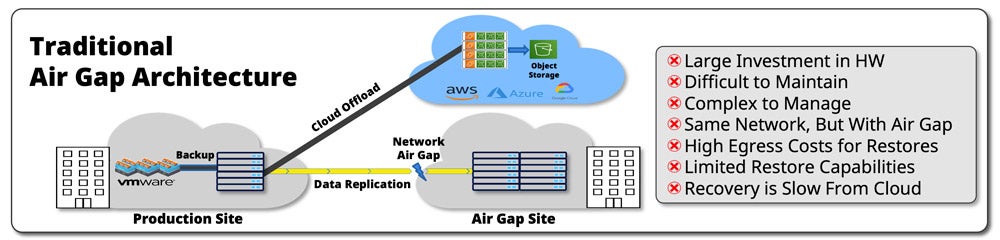
Traditional air gap architecture for legacy backup solutions throw hardware at the problem to provide both network air gapping and hardware air gapping. Vendors offering this type of solution typically recommend businesses replicate their data to a secondary or tertiary site which requires another backup product at another location and a network that supports air gapping. The hope is that bad actors that get access to the primary or secondary site cannot get access to the air gap. Many enterprises are using the cloud as an offload to reduce the costs of the hardware at the primary and secondary locations, but with an air gap, it is recommended to have all the data local to that site, making the air gap copy an even higher cost than the primary or secondary. This results in a massive investment in both gear, installation, and management time and does not guarantee it is fully protected, as the enterprise owns the security and management of the air gap solution to make sure it is well secured and cannot be compromised. The complexity of getting this up and running could take months to complete.

Clumio can help you forget about complexity, high costs, or worrying about constantly focusing on our backup security. We can help protect you from ransomware in as few as a couple of minutes and deliver the following:

  • Backups are air-gapped in the cloud and stored outside of the enterprise’s security sphere for ransomware protection that can be up and running in minutes, not weeks or months.
  • All data is encrypted in-flight and at rest with our keys or you can bring your own keys.
  • There is no ability to delete backups in the user interface, so if a hacker gets access to your credentials, there is nothing for them to do.

Security and Testing is key

Building in security for your air-gapped backup solution is not a simple task. It includes certifications and consistent penetration testing to to maintain the procedures. At Clumio, we complete quarterly penetration testing by BishopFox, to check that all our security methodologies. We complete all this work, so our customers can focus on their mission versus ensuring their backup data is highly protected and secure. This removes all the complexity of building an air gap solution yourself.

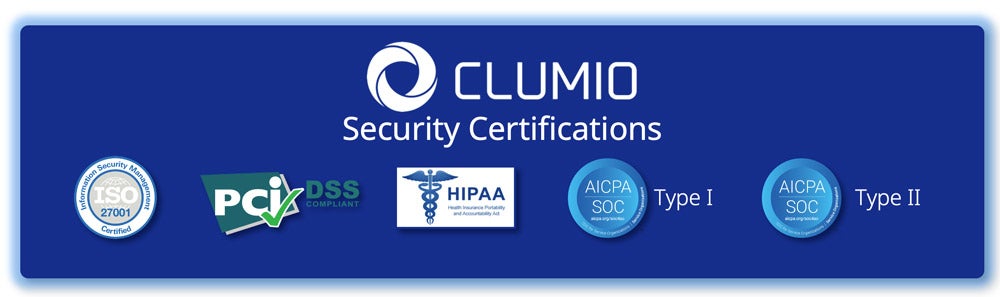
Clumio has completed many rigorous certification efforts including ISO 27001, SOC II Type 1, SOC II Type 2, HIPAA, and PCI DSS. This rigorous testing makes Clumio one of the most secure SaaS platforms out there.

Always Have Flexibility On What and Where Data Is Restored

Nothing is worse than getting attacked by ransomware, but to be safe you need to prepare as if it is going to happen today. Once it happens, you need a quick way to get out of the situation and get your enterprise back up and running. To do this, you need the flexibility to restore the data in various different environments in case the production environment is still compromised. Having an air-gapped solution is great, but if you cannot restore to the location you need the data, then you don’t have a solution.

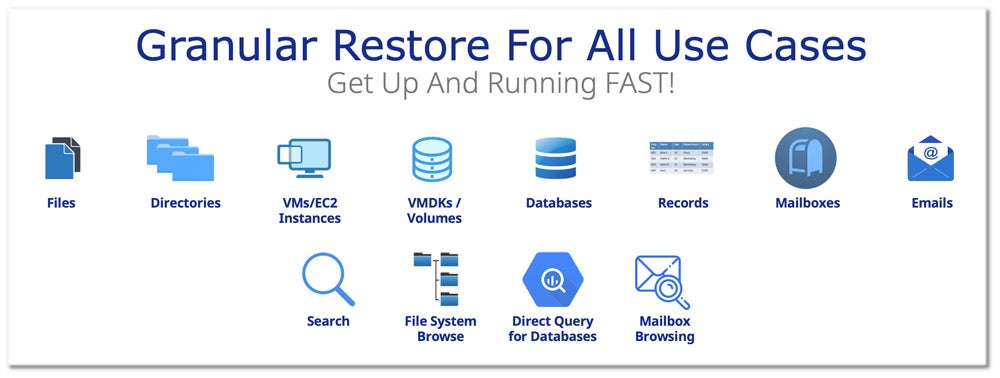
With Clumio, we enable fine-grain granularity to restore the data you need fast, without having to recover everything, no matter if you are looking to restore a file, directory, VM/EC2 instance, volume, database, record, mailbox or email. This functionality is enabled by search, file system browsing, direct query access for databases, and mailbox browsing. Clumio’s cloud-native platform makes restores fast and simple, with data able to be restored anywhere a cloud connector is installed.

So now is the time to get Clumio up and running so that we can help protect you from ransomware. To learn more about how truly simple it is to protect your data from ransomware, please check out a 4-minute demo on how fast you can remove the worries of ransomware.

Video Thumbnail

More related posts


Thumbnail_Blog-Clumio-Chat-2026

Meet Clumio Chat: An AI Assistant to Help Evaluate Cloud-Native Data Protection

Read more about Meet Clumio Chat: An AI Assistant to Help Evaluate Cloud-Native Data Protection
Thumbnail_Blog-Clumio-Fedramp-2026

Clumio Advances Cloud-Native Cyber Resilience with FedRAMP® Milestone

Read more about Clumio Advances Cloud-Native Cyber Resilience with FedRAMP® Milestone
Thumbnail_Blog-Lateral-Access-2026

Private Cloud Data Security Technical Guide

Read more about Private Cloud Data Security Technical Guide

Today, the modern business continuity plan starts with the ability to backup, protect, and quickly restore data.

Data is Now at the Center of Modern Business Continuity Planning

Today’s businesses are extremely data-centric and host the majority of their applications in the cloud. Scenarios like a server outage or a ransomware attack — while not as outwardly significant to the naked eye as something like a flood or fire — threaten to cripple internal operations and disrupt end users. These disruptions can lead to significant lost revenue and lasting repercussions in terms of reputation and customer experiences.

But that’s only if your organization is not equipped to address these threats.

The Role of Data Backup, Protection, and Rapid Recovery in Business Continuity Planning

Business continuity planning is not just about proper strategy and organization, it’s also about using the right tools that can ensure your plan is failsafe. If your business hosts its data and applications in the cloud, your planning should be centered around how you can ensure your most essential workloads are securely backed up and remain operational in the face of a disaster event. This all begins with using a robust and comprehensive cloud backup solution.

Cloud backup provides organizations that have migrated to the cloud with a simple, streamlined, and automated way to routinely backup data to the cloud, rather than using physical backup hardware. The cloud backups are then securely stored in an encryption-protected environment and automatically updated according to the organization’s backup schedule. If a disaster event occurs, the latest copy of the data backup can be used to recover and restore data from anywhere using the same cloud backup-as-a-service solution.

When a disaster threatens your organization’s data, time is of the essence. If your cloud backup solution is not equipped to provide rapid recovery, the ramifications can be severe. Downtime to mission-critical data and workloads can freeze business operations and create a costly domino effect that may require significant time to fully recover.

This makes your choice of a cloud backup solution all the more crucial.

Business Continuity Planning Should Include a Comprehensive Cloud Backup Solution

Built natively in the cloud, Clumio’s industry-leading cloud backup and rapid recovery capabilities provide fast data restores that can ensure business continuity when disaster events threaten downtime. Organizations can choose to restore an entire instance or utilize Clumio’s granular and flexible recovery features to target and restore specific mission-critical files.

In addition to Clumio’s rapid restore capabilities, organizations also receive:

  • Turnkey ransomware protection with air-gapped backups that are stored away from primary accounts
  • Simplified data compliance with global policies
  • Cost analyzers to help reduce unnecessary cloud spend

More related posts


Thumbnail_Blog-Clumio-Chat-2026

Meet Clumio Chat: An AI Assistant to Help Evaluate Cloud-Native Data Protection

Read more about Meet Clumio Chat: An AI Assistant to Help Evaluate Cloud-Native Data Protection
Thumbnail_Blog-Clumio-Fedramp-2026

Clumio Advances Cloud-Native Cyber Resilience with FedRAMP® Milestone

Read more about Clumio Advances Cloud-Native Cyber Resilience with FedRAMP® Milestone
Thumbnail_Blog-Lateral-Access-2026

Private Cloud Data Security Technical Guide

Read more about Private Cloud Data Security Technical Guide

Recovery Point Objective (RPO) refers to the maximum amount of data that can be lost after a recovery from a disaster or failure before data loss becomes unacceptable to an organization. RPO plays a critical role in data backup and disaster recovery planning, as it helps determine the frequency of backups and the optimal disaster recovery technologies and procedures. Ultimately, understanding your RPO tolerance is key to ensuring that your organization can recover its critical data assets within an acceptable timeframe, even in the wake of unexpected events.

Understanding Recovery Point Objective (RPO)

As a business grows, it accumulates an increasing amount of data that needs to be stored and protected. But no matter how careful a company may be with its backups, there’s always the possibility of unexpected system failures or irreversible data loss. This is where the Recovery Point Objective (RPO) comes into play.

In simple terms, RPO refers to the maximum amount of data that an organization determines it can afford to lose in case of a disaster or failure without causing significant harm to its operations. It serves as the measuring stick for backup frequency and recovery strategy.

For instance, if a company sets an RPO of every five hours and undergoes severe data loss within two hours of backup, they will lose three hours’ worth of data, since the most recent backup was taken 3 hours ago. In this scenario, the RPO has not been met as more data than acceptable is lost and hence, poses a threat to business continuity.

Think about losing precious family photos due to an unforeseen hardware failure, power outage or cyber-attack. The pain associated with permanent data loss is impossible to quantify. Now imagine having your critical business files such as contracts for clients or creative materials to present in client meetings destroyed with no way to recover quickly. If you want to protect your business from such calamities, you will have a Recovery Point Objective in place.

Without clear limits and objectives on the maximum amount of acceptable data loss at different tiers of importance for your business processes and their relationships to each other, there’s no way of preventing disastrous consequences.

RPO measures determine what the minimum frequency should be for backups and the optimal disaster recovery technologies that need implementation.

It also provides businesses with defined criteria for potential data loss. Instead of a disaster being unpredictable and without any preparation in place, organizations will know what the maximum amount of data loss and downtime could be.

RPO in Business Continuity Planning

Business Continuity Plans (BCPs) are detailed set of guidelines, processes, and procedures put in place to ensure that an organization can continue operations during a disaster or unplanned event. When forming your BCP strategy, it’s vital to consider your Recovery Point objective.

Setting your RPO limits early on will make it easier for IT teams to choose backup systems that meet these standards and recover as quickly possible.

The loss tolerance levels for your business based on your RPO work by defining how long data can be lost before the volume of data loss exceeds what is allowed as part of the business continuity plan.

This is why it’s so important to identify precisely what your organization’s Recovery Point Objective is. Regardless of the size or scale of your business, having an RPO measured to meet even bare minimum best practices can save you from potentially detrimental financial losses later down the line.

For example, if you’re running a healthcare centre where critical patient records need safekeeping, then failing to keep up with regular backups with tight RPOs may lead to significant data and paper losses which may result in fatal consequences for patients.

However, not everyone agrees on the importance of setting strict RPOs – some argue that focusing too much on short-term data protection measures can harm overall security because these strategies may not provide sufficient capacity for more extensive breaches.

While there might be some truth in this belief, it’s essential to highlight that all businesses must choose the storage and backup options they feel most comfortable with; after assessing their unique priorities, budget constraints and risk management strategies.

RPO vs. Recovery Time Objective (RTO)

One of the critical parameters for achieving data protection in business continuity planning is to establish and comply with two significant values: Recovery Point Objective (RPO) and Recovery Time Objective (RTO). While RPO specifies how much data loss an organization can tolerate after a disaster strikes, RTO determines how fast a company needs to restore its processes. Despite their apparent differences, the two metrics are closely related and work together to form the backbone of any data recovery plan.

For instance, let us assume that Company A has set an RPO of two hours, giving it a tolerance for no more than two hours of lost data if anything happens to the system. On the other hand, if the firm’s RTO is four hours, then it means that it will take up to four hours to get their systems fully operational again. In this case, Company A needs to ensure that its backup solutions and disaster recovery technologies can provide four-hour recovery times while keeping data loss within two hours.

The crucial difference between RPO and RTO is that they deal with separate aspects of data protection and continuity planning. While RPO deals with the amount of data that can be lost before harm occurs, RTO speaks to the downtime that a business can tolerate after a disaster or system failure. In other words, administrators use both parameters alongside each other to determine factors such as how frequently backups should occur and what technologies are needed for optimal recovery time.

Although related to each other, businesses must approach RPO and RTO differently when designing their backup policies. Depending on organizational priorities such as application criticality or regulatory compliance requirements, companies have varying preferences around how much data-loss they can tolerate in worst-case scenarios versus how long it takes for them to resume normal operations fully. Therefore, while some organizations may choose to focus on optimizing their RPOs, others prefer to prioritize their RTOs.

For example, a financial institution that must meet strict regulatory requirements might prioritize its RPO over RTO. This is because such a business may be required to record every transaction that occurs on their systems, incurring significant losses should any data be lost during recovery. Conversely, a tech firm might favor an RTO-first approach since it relies more on real-time updates of its products and services, requiring a faster recovery time window.

Given each company’s unique needs and priorities, calculating the appropriate RPO and RTO for any business must involve a thorough understanding of its applications’ criticality, data value, and potential loss scenarios.

  • Establishing and complying with Recovery Point Objective (RPO) and Recovery Time Objective (RTO) values are critical for achieving data protection in business continuity planning. These metrics work together to form the backbone of any data recovery plan, with RPO specifying how much data loss an organization can tolerate after a disaster strike and RTO determining how quickly a company needs to restore its processes. To design an effective backup policy, businesses must prioritize either their RPO or RTO based on their organizational priorities, such as application criticality or regulatory compliance requirements. Therefore, calculating the appropriate RPO and RTO for any business must involve a thorough understanding of its applications’ criticality, data value, and potential loss scenarios.

Calculating an RPO for Your Business

As mentioned earlier, organizations need to compute their Recovery Point Objectives to determine their maximum tolerable amount of data loss from different disaster situations. This section will show how businesses can calculate their own RPO through various methods.

One popular method for computing an RPO is by performing a data inventory to know the amount of critical data being changed daily. This requires identifying what data is most essential to the organization and how frequently it is updated. Once this understanding is clear, administrators can then estimate the total amount of data created or modified within a given day.

Another way businesses can calculate their RPO is by studying incident reports from previous disasters or system failures. These records help organizations understand better the severity level of past issues typical areas of vulnerability. With this knowledge, companies can then set up an appropriate backup plan that caters explicitly to the risks identified as part of those incidents.

To illustrate this: Imagine Susan runs her own baking business with a constant stream of orders coming in online every day. Susan knows that customers expect their orders to be received within 24 hours, and so she has set an RTO of under a day for any data loss event. Now, for calculating her RPO, Susan needs to identify her most critical data—the customers’ details and their orders—and estimate how many changes occur per day for these records. Suppose the total daily change rates stand at approximately ten percent. In that case, Susan needs to back up her systems at least once every ten hours to maintain an acceptable RPO.

Nevertheless, calculating an appropriate RPO requires businesses to choose between ensuring total protection from any data loss event or balancing backup expenses with tolerable data loss rates. Organizations must weigh the cost of meeting stricter RPOs versus the potential damage of exceeding them.

For instance, let us imagine John runs a small photography business. John considers his past activity levels and estimates that he can tolerate a data loss of under four hours before any severe implications arise. In this case, having a 12-hour backup interval might suffice, costing less than real-time replication or constant backups to hardware.

Ultimately, computing an optimal RPO is never a straightforward process. It requires careful consideration of an organization’s risk appetite, regulations environment, application criticality and frequency of data changes, and recovery time goals.

After computing an appropriate RPO value for your business, you’ll need reliable solutions that can match your determined level of tolerance for data loss. Fortunately, there are now many options available across hardware, software and cloud platforms that cater to businesses’ specific needs and priorities.

  • According to a study conducted by the Disaster Recovery Preparedness Council in 2022, nearly 80% of businesses have experienced a data loss event or infrastructure failure in the past year, highlighting the significance of establishing an RPO.
  • A survey conducted by IT research firm Gartner found that only 35% of small and medium-sized businesses (SMBs) have a comprehensive disaster recovery plan in place, which includes clearly defined RPOs.
  • A study published in the International Journal of Disaster Risk Reduction reported that businesses with well-defined RPOs and Recovery Time Objectives (RTOs) were able to reduce downtime by approximately 60% during a disaster event when compared to those without clear objectives.

Selecting Backup Solutions for Optimal RPO

Selecting the right backup solutions to achieve optimal RPO can be a challenging task, but it doesn’t have to be. There is no one-size-fits-all solution when it comes to backup, and various factors must be considered to achieve both the desired RPO and recovery time objective (RTO).

One of the most critical steps in selecting the right backup solution is identifying the types of data that need to be backed up, their frequency of change, and how quickly they will need to be restored in case of a disaster. For instance, business-critical data such as financial records or customer information may need high-frequency backups with low RPO. In contrast, less important data that changes more infrequently can have longer RPOs.

Suppose you’re running an online retail store that only updates its product catalog every two weeks. In that case, you don’t need real-time backups or short RPOs since two weeks’ worth of lost data would not cause significant harm to your business continuity.

Another essential consideration for selecting backup solutions is the actual backup process. Traditional tape backups take longer and are less reliable than newer cloud-based solutions. Cloud-based backup solutions offer ease of use, scalability, and instant availability of crucial data in case of a disaster.

A study by StorageCraft reveals that 51% of small businesses rely on manual single-location backups that risk data loss if disaster strikes. On the other hand, 86% of companies using cloud-based backup services were able to recover from ransomware attacks within six hours or less.

Data replication is another crucial factor in selecting a backup solution for optimal RPO. Replication ensures redundancy by copying live production data into secondary locations that can also act as failover sites during disaster recovery. Multiple levels of replication ensure that even if your primary site goes down, you can instantly failover to redundant systems, reducing your RPO close to zero.

One of the most debated topics in backup solutions is whether to go for on-premise or cloud-based solutions. On-premise backup solutions offer better control and data privacy than cloud-based solutions since data remains within the organization’s premises. Still, they could be more costly to set up, manage and upgrade than cloud-based counterparts.

On the other hand, cloud-based backup solutions offer unlimited scalability, accessibility from anywhere with internet connectivity, and lower upfront costs since users pay only for what they use. However, users must also ensure that their cloud-based providers’ security measures meet regulatory compliance standards.

Hardware, Software and Cloud Solutions

Hardware, software, and cloud backup solutions all have pros and cons when it comes to achieving optimal RPOs. Hardware-based backups involve the use of physical devices such as tape drives or external hard drives mounted on a server. While hardware solutions provide fast backup times and high speeds for large data sets, they require frequent replacement due to wear and tear. They also suffer from the risk of theft or damage in case of disasters such as fires.

Imagine losing your most crucial data along with damaged hardware in a fire accident. With no copies available offsite, there is significant downtime and productivity loss waiting for new hardware to restore your lost data.

Software-based backups involve using software applications deployed across a network of computers to automate backups. Such backends also have incremental backups that enable regular backing up of changed files without duplicating previously backed-up data, resulting in faster backup times and less storage space than hardware-based solutions.

Think of backing up using software solutions as similar to cooking using a recipe: once the instructions are in place, the process is automated and hassle-free.

Cloud-based backups use offsite servers managed by third-party providers to back up critical data. These solutions offer ease of use, accessibility from anywhere, unlimited scalability options, and instant availability of crucial data during disaster recovery processes. However, cloud backup solutions may not be practical for organizations with slow or no internet connectivity.

According to a report by Information Age, 69% of companies have experienced downtime due to network outages brought about by increased dependence on cloud services. Therefore, while cloud-based backups are beneficial in terms of RPO and RTO times for some businesses, they are not always the best solution for all business types or sizes.

Pros and Cons of RPO-Driven Data Protection Strategies

There is no doubt that setting an RPO for your backups can be a game-changer for disaster recovery. However, with every strategy, there are potential advantages and disadvantages to consider. In this section, we explore both the pros and cons of RPO-driven data protection strategies.

One of the most significant advantages of setting an RPO is that it helps organizations define their loss tolerance, which can be instrumental in making informed decisions about backup frequency and technology. It also enables you to confidently prioritize your critical applications by assigning lower RPOs to higher-priority data and applications. With the right backup strategy in place, you’re well protected against even major data loss events like ransomware or hardware failure.

One potential downside to consider is that setting an RPO may require more investment in hardware, software, personnel or all of these to support faster recovery times. Depending on your organization’s specific requirements, an RPO can require more frequent backups which may require more resources than expected. Still, the benefits of reduced downtime and increased data protection can justify these extra expenses in many cases.

Another point to consider is that an aggressive RPO may not be necessary for all organizations depending on the nature and criticality of your business operations. While some businesses such as healthcare providers have zero tolerance for data loss or downtime, others may find longer intervals between backups adequate.

However, it’s important to remember that any business is vulnerable to data loss from various types of damages whether it is natural (fire, flood) or human errors (accidental deletion). Therefore calculated risk management must always be at play when deciding on optimal backup frequencies.

Although it’s tempting to think of backup frequency solely in terms of cost-effectiveness, it’s important to approach this decision from a more holistic perspective. Think of backup frequency as insurance for your data, just like how you would place your bets in horse racing; the successful bettor calculates risks against potential winnings and chooses their horses accordingly.

At Clumio, we believe that RPO-driven data protection has more significant benefits than drawbacks. By setting an RPO, you gain a clearer understanding of your business operations’ criticality while putting more advanced backup strategies into action. Configuring multiple points of data recovery can mean the difference between instant restoration versus days of downtime with no clear endpoint.

Ultimately, it’s up to each company to determine the appropriate RPO based on their unique needs, objectives and budget constraints. It’s up to data protection professionals to advocate for RPO-driven strategies that provide flexible, cost-effective tools for protecting against any eventuality.

Answers to Common Questions with Explanations

How can data backup and recovery solutions help with achieving RPO goals?

Data backup and recovery solutions are crucial in achieving Recovery Point Objective (RPO) goals since they offer data protection against disasters, cyber attacks, user errors, and hardware failures. These solutions also aid in minimizing downtime and data loss by facilitating the restoration of files or entire systems to a previous state.

For example, cloud backup services can help businesses achieve RPO objectives with their ability to continuously and automatically back up data regularly. A study conducted by Datto revealed that 60% of businesses that suffer from a significant data loss event are forced out of business within six months. This is why it is more important than ever to invest in backup and recovery solutions to prevent such devastating outcomes.

Moreover, backup and recovery solutions can reduce the time needed for manual backups and system restores – which make up most incidents of business disruption – by automating these processes. According to a report by Druva, automated backup provides an average reduction of 85% in backup time while improving recovery times by 90%.

In summary, investing in reliable data backup and recovery solutions can greatly assist businesses achieve their RPO goals by providing continuous backups, reducing downtime during catastrophic events, and significantly improving recoverability rates.

How does RPO impact business continuity and disaster recovery planning?

In the world of business continuity and disaster recovery, RPO is like the golden egg that ensures that a company can recover from any catastrophic event. Recovery Point Objective (RPO) is the maximum amount of data loss that an organization can tolerate in case of system failure or any natural calamity. It helps to determine the frequency of backups and replication needed to ensure that data is restored to its previous state.

When RPO is set correctly, it minimizes the loss of important information and operational downtime for a company. The impact of not meeting RPO during a disaster can be detrimental, leading to significant financial losses, reputational damage, legal consequences and lost business opportunities. According to recent studies by IDC, companies that do not have a reliable disaster recovery plan in place experience an average loss of $82,200 per hour.

On the other hand, businesses with effective disaster recovery plans inclusive of RPO can minimize their losses significantly. For example, a study by Ponemon Institute found that organizations with an RPO of less than four hours experienced a 90% reduction in downtime costs compared to those with an RPO of more than 12 hours.

Therefore having well-defined RPOs as part of Disaster Recovery Planning is critical for businesses., it ensures that they can keep operating regardless of whatever comes their way while minimizing data loss and ensuring fast recovery times after any unforeseen events.

What are the common challenges faced by organizations in achieving their desired RPO targets?

The common challenges faced by organizations in achieving their desired Recovery Point Objective (RPO) targets are many. It’s because the RPO target is dependent on several factors and requires a good amount of planning and investment to achieve it.

One of the most significant barriers to achieving the RPO is budget constraint. Data protection solutions can be costly, and organizations must allocate enough money to ensure they have adequate systems in place to meet their RPO targets.

Another challenge is that IT teams may struggle with creating and maintaining backup policies. As the data evolves, data sources grow, and applications change, ensuring that backups are up-to-date and running smoothly becomes increasingly challenging.

Moreover, the complexity of backup technologies can also present a barrier. Since there are various backup technologies available in the market today, selecting one that fits your environment needs some effort. Hence choosing a proper backup solution that meets both recovery point objectives and recovery time objectives is likely to be complicated.

The speed at which data accumulates is also challenging for organizations seeking desired RPO targets as this requires an increasing amount of storage hardware. A business needs to use modern technology solutions that meet its backup requirements without requiring extra storage space continually.

Lastly, cyberattacks such as ransomware have become more frequent, leading to potential data loss and increased downtime. According to a report by Sophos, around 37% of organizations experienced ransomware attacks in 2020 alone [1]. The consequential impact from growing cases of cybercrime further stresses the criticality of having an efficient disaster recovery plan in place that meets desired RPO targets.

In conclusion, businesses aiming to achieve their desired RPO targets will face multiple obstacles along the way. However, through sound planning strategies paired with investment in reliable data protection technologies, these challenges can be overcome.

References:

[1] “The State of Ransomware 2021”. Sophos, 2021.

How is Recovery Point Objective different from Recovery Time Objective (RTO)?

When it comes to disaster recovery, Recovery Point Objective (RPO) and Recovery Time Objective (RTO) are two critical concepts that businesses need to understand. RTO refers to the amount of time that it takes for a business to recover its systems and data after a disruption. Whereas RPO defines the point in time to which data must be recovered after an outage or disaster.

In simple terms, RTO is focused on time while RPO is focused on data. For instance, if your RTO is four hours, this means that you expect your business operations to be fully back up and running within four hours after your systems go down. On the other hand, if your RPO is one hour, you will lose at most one hour’s worth of data.

While both are essential metrics for disaster recovery planning, they are significantly different when it comes to implications for the business. Specifically, RTO measures how much downtime a business can sustain without suffering serious consequences such as lost productivity and revenue loss. In contrast, RPO measure’s how much data loss a business can withstand without significant damage suffered.

To put this difference into perspective, consider this example: A hospital’s electronic health record system experiences an outage. If their RTO is four hours but their RPO is 30 minutes, this means that the hospital requires regular backups of their EHR systems every 30 minutes. And if they fail to meet this requirement and take four hours to recover all data and systems during an outage, they might face a severe impact as real-time health records are necessary in emergency situations.

In conclusion, it’s essential for businesses to identify both their Recovery Point Objective (RPO) and Recovery Time Objective (RTO) as part of their disaster recovery plan. Although they may seem similar in nature, these two metrics measure different aspects of recovery from a disruption or catastrophic event impacting business operations.

What are the best practices for determining RPO for an organization?

When determining Recovery Point Objective (RPO) for an organization, it is important to follow best practices to ensure proper data protection and continuity. Here are some key guidelines to consider when determining your RPO:

1. Understand the criticality of your data: It is important to determine what data is essential for the survival of your business operations and processes. This can help you prioritize which data needs to be backed up more frequently and with higher accuracy.

2. Evaluate recovery time objectives (RTO): Your RTO determines how quickly you need the data back up and running after a disaster occurs. The RPO should be harmonized with the RTO, as having a very low RPO might affect the ability to meet its designated RTO.

3. Consider Legal and Regulatory Requirements: Government laws, industry regulations may set or require minimum standards; therefore, ensure that your organization meets these requirements in terms of backup frequency and accuracy.

4. Test Recovery Capability Regularly: Having regular testing exercises can help determine whether or not your backups are correctly implemented and if they’re sufficient when retrieving files after an incident.

According to a study by Forrester Research, an estimated 27% of businesses experienced a significant disruption or disaster last year, leading to loss of productivity, revenue, reputational damage, and ultimately costing companies substantial amounts of money in lost business opportunities or damage control. Determining your organization’s Recovery Point Objective not only protects your company but also helps maintain viability in the face of disaster.

RPO vs. RTO
In this piece, we define the recovery point objective and recovery time objective, explain their differences and help you understand how to calculate your organization’s RPO and RTO.

Ways to Optimize Your Recovery Time Objective
Related to Recovery Point Objective, in this post we dig into Recovery Time Objective (RTO) and how to optimize it for your organization.

Why Cloud Backup is a Crucial Component of Business Continuity
Read up on the ways that enterprises can mitigate the effects of a disaster event by using cloud backup.

Essential Disaster Recovery Capabilities for Business Continuity Management
Discover the three disaster recovery capabilities to look for in a cloud backup-as-a-service solution.

Incremental Backup vs. Full and Differential Backup: What’s The Difference?
Read about the differences among the main types of backups available and how each functions within a disaster recovery plan.
More related posts


Thumbnail_Blog-Clumio-Chat-2026

Meet Clumio Chat: An AI Assistant to Help Evaluate Cloud-Native Data Protection

Read more about Meet Clumio Chat: An AI Assistant to Help Evaluate Cloud-Native Data Protection
Thumbnail_Blog-Clumio-Fedramp-2026

Clumio Advances Cloud-Native Cyber Resilience with FedRAMP® Milestone

Read more about Clumio Advances Cloud-Native Cyber Resilience with FedRAMP® Milestone
Thumbnail_Blog-Lateral-Access-2026

Private Cloud Data Security Technical Guide

Read more about Private Cloud Data Security Technical Guide

Capturing and monitoring events into logs helps you in several ways, including but not limited to:

  1. Detecting breaches: Just like your security camera helps capture any unknown person entering your home, audit logs help detect login events that seem suspicious. If your administrator is logging in at 3am from Russia, you know something is off.
  2. Demonstrating compliance: Sometimes, even if the instructions say to not allow your kids to watch TV, your nanny still allows them to do so! Your security cameras help to validate whether your nanny is compliant with the instructions or not. Similarly, if your business requires your assets to be backed up at a certain frequency, audit logs keep a record of it so if audited, you can demonstrate compliance.
  3. Integrating with SIEM (Security Incident and Event Management) solutions: In today’s IoT (Internet of Things) world, mutual interaction happens between security cameras, smart lock, motion sensors, smart lights etc. All of these coordinate amongst themselves using Apple HomeKit or Google Assistant. Similarly, you also want audit logs to flow into a centralized SIEM solution. This helps organizations get all the necessary logs in one place and build workflows from it.
  4. Valuable insights: Footage from your security cameras tells you which neighbor knocks your garbage bins down or when birds come to drink water from your fountain. Similarly analyzing audit logs can provide insight into which assets behave nicely and which assets have challenges while being backed up.

After talking to many customers, we realized that the majority of issues they face stems from hardware centric solutions such as backup servers and appliances that have limited resources in terms of CPU, memory, and disk. Also, the user experience is not optimized for today’s cloud centric world and customers are forced to build and run complex scripts. To address these issues, we went back to the drawing board to build the right architecture. We wanted to ensure that we have:

  1. Always On logging: Since some hardware/software vendors, by definition, have limited resources, they do not enable logs by default. Customers have to choose whether to enable logging. This is like having a security camera that is not turned on because the vendor wants to save your energy bill. Clumio, being an authentic SaaS solution, has access to nearly infinite resources and turns on audit logs for all of its customers at no additional costs.
  2. Capture in-depth information: Even if your backup vendor offers logging, sometimes the logs which do not capture all the important details. When these logs are analyzed by someone in your SOC (Security Operations Center) team, they require as much detail as possible. The Clumio SaaS, by default, logs all the relevant information to ensure that security investigations don’t get stalled due to lack of detail. With Clumio, you always get 4K UHD, whereas your backup vendor may recommend you choose a lower resolution to accommodate their shortcomings.
  3. Do not miss events: With hardware/software based solutions, resources like memory and disk are limited. When an appliance is performing some operation (like a backup) and concurrently wants to write to an audit log in a low memory situation, guess what operation it’ll perform and what it’ll drop? This challenge is not present in Clumio’s world due to our capability to consume resources on-demand. We also architected our service correctly to ensure that logs are captured before and after any events happen. Clumio can record every single day for 24x7x365 independent of weather conditions, but competitors may not have video for days with snowfall.
  4. Scale elastically: Some customers have had to make a difficult decision of extracting logs every week because of the limited capacity of the appliance. When they expand their data protection coverage to include a new asset, suddenly they find they only have capacity to hold the logs for 4 days. These challenges are common in the appliance world but in Clumio’s SaaS world, there are no resource constraints. We can tap into our infinite disk resources to capture as many audit events that our customers can generate. The issue of limited storage is also very common with security cameras but with Clumio, you get the equivalent of unlimited video storage in the cloud, and you can access it at any place or time.
  5. Help find that needle in a haystack: Clumio supports granular filtering capabilities so customers can find the exact information they seek. This is similar to finding the exact frame in the security camera footage that has the thief’s face clearly captured.

Clumio has been investing in its audit logging capabilities by architecting an audit log solution to meet and exceed customer expectations. With increased adoption of cloud and SaaS services, many customers are moving towards SIEM in the cloud. Logs can stream directly from Clumio to your cloud. In this world, even if your network gets compromised, attackers will still not have access to your logs. 

More related posts


Thumbnail_Blog-Clumio-Chat-2026

Meet Clumio Chat: An AI Assistant to Help Evaluate Cloud-Native Data Protection

Read more about Meet Clumio Chat: An AI Assistant to Help Evaluate Cloud-Native Data Protection
Thumbnail_Blog-Clumio-Fedramp-2026

Clumio Advances Cloud-Native Cyber Resilience with FedRAMP® Milestone

Read more about Clumio Advances Cloud-Native Cyber Resilience with FedRAMP® Milestone
Thumbnail_Blog-Lateral-Access-2026

Private Cloud Data Security Technical Guide

Read more about Private Cloud Data Security Technical Guide

Some say that the best things in life are free, but when it comes to data protection in the cloud, free might only get you part of what you need and cost more in the long run. At the end of the day, it is good to have options and review the pros and cons of any data protection solution in the public cloud to ensure you are getting what you need at the lowest cost.

I am sure that many people thought to themselves, “what is Clumio doing providing free snapshot management capabilities since snapshots are not backups?” You are correct, snapshots are not backups, but they do have their place in the public cloud.

Snapshots are an awesome operational recovery mechanism for applications that need point-in-time recovery in AWS.Operational recovery might be the only requirement if you are an early cloud adopter, or for most, it can be part of a broader holistic data protection solution that requires backup of data with longer than 14 – 30 days of retention for compliance requirements.

We are providing this snapshot management capability for free to our customers, versus charging for it like many of our friends in the industry. It is only part of a complete data protection solution in the cloud. Although I think they should rename it to AWS Operational Recovery instead. 🙂

What are the pros and cons of snapshots in AWS and why are they not backups?

One of the major pros with snapshots is the ability to quickly restore from mistakes, accidental deletions, or data corruptions. On-premises snapshots are typically stored on the same array or application infrastructure as the core application to enable quick recovery. In AWS, snapshots are stored in the same AWS account as the production data. No matter where these snapshots reside, they are typically kept for relatively short-term durations as their value diminishes over time for operational recovery.

Beyond snapshots, backups are required to be held outside the production environment to ensure you have access to your data, even when the production infrastructure goes down or has major issues. Backups are also stellar at fine-grain recovery as they are indexed and cataloged for quick granular retrieval outside of production. Compliance backup goes even further, as it needs to be kept for legal or compliance needs, which need to be protected even when an entire site or account is compromised.

One of the major cons of snapshots is they fail miserably in both functionality and cost when used for backup and long-term compliance. For example, let’s say you have a new application you developed or moved from on-premises that has a requirement for 30 daily backups and 12 monthly backups for long-term retention. Snapshots are stored on the same account as the production data, so if you fat-finger a script, delete the wrong thing, or a bad actor gets access to your account, you lose the backup and potentially the data. This is obviously bad.

To avoid this vulnerability, you could always replicate these snapshots to another AWS account for safekeeping, but then you get hit with transfer costs, twice the snapshot bill, and if you are using PaaS services such as RDS you will be required to keep full copies versus chains of snapshots. Since none of the data is indexed or cataloged, now you have to restore the entire thing and find the data yourself. Getting the data back is painful as well, but the costs alone in this scenario makes snapshots unusable.

Why use Clumio’s Free Tier for Operational Recovery instead of AWS Backup or snapshot managers?

Clumio’s backup as a service for native AWS services provides a holistic data protection solution well beyond snapshot management. As you proceed along your cloud journey, Clumio can provide a single data protection service to help with your enterprise needs. Maybe today you use snapshots for operational recovery in a testing and development environment. When the application goes into production, the requirements change and you need more protection, yet you don’t want and probably didn’t plan for massive costs with snapshots.

With Clumio, you can leverage our unique air gap protection, full indexing and catalog, and granular restores of files for EBS or granular record retrieval for RDS via direct query access to our data lake. The experience is stellar and can be turned on for any application requiring these features beyond snapshots. The best part is all of this may be delivered at up to 50% less cost compared to AWS snapshots.

What is the Clumio experience for snapshot management?

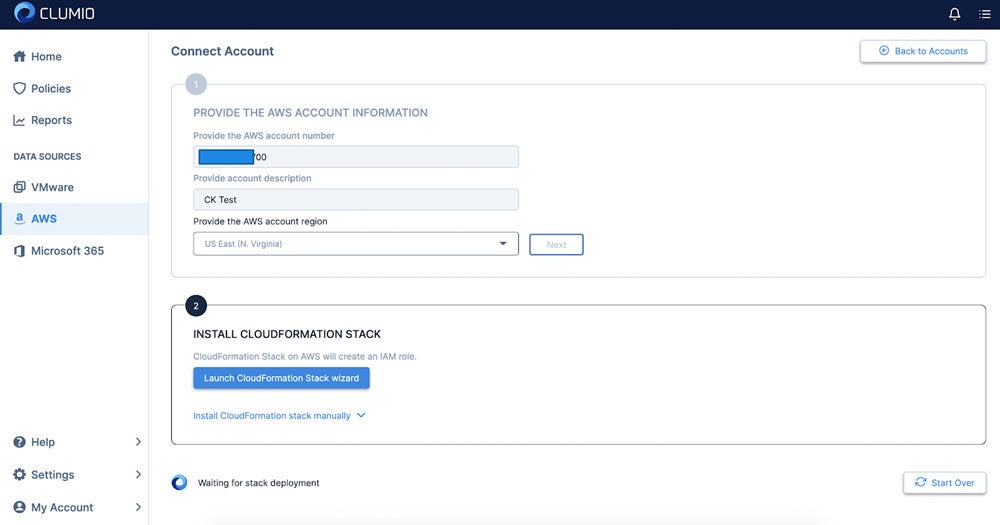
As with everything at Clumio, the experience is simple and getting up and running takes as few as 15 minutes. The first step is to create your login, which is as simple as inputting an email and password. Afterward, you input your AWS account information including AWS account number, account description (so you can remember), AWS region, and click next, then launch CloudFormation Stack wizard:

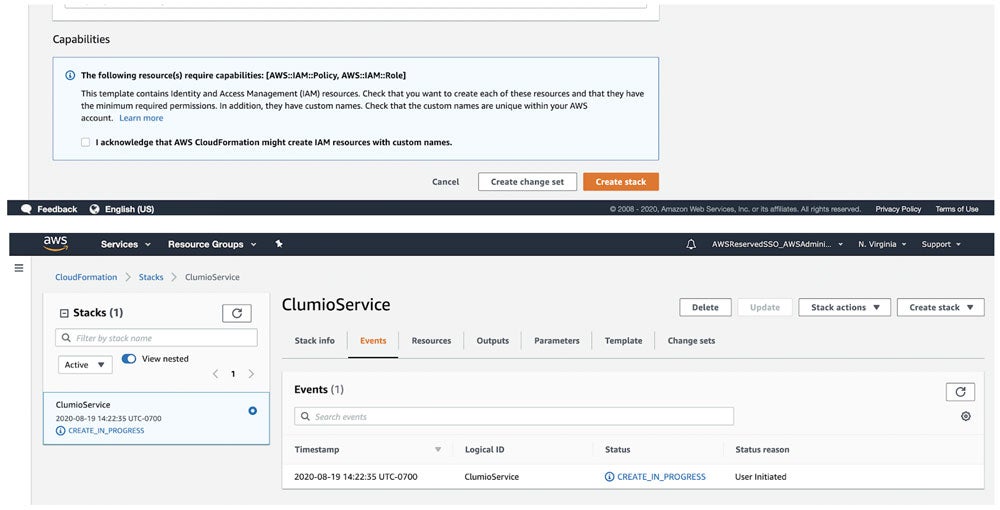
This will kick you over to AWS to create the stack. Click Create stack and wait about 3 – 5 minutes to complete.

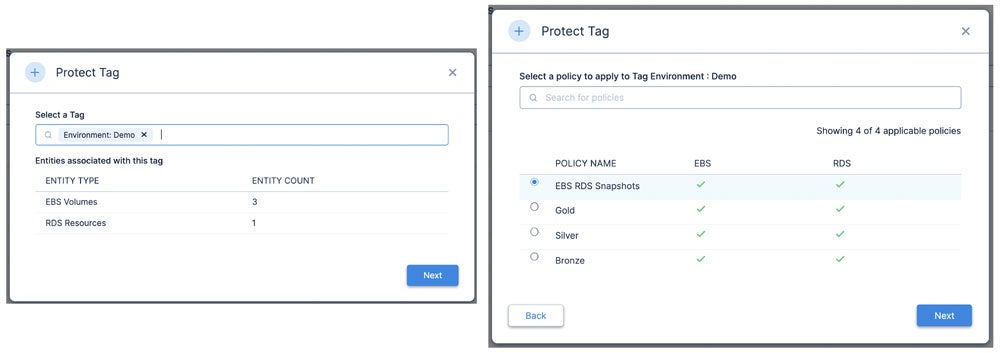
Once completed, your account will run through inventory services. You can run the same process on all our other accounts you want to protect as well. Once you are done, the next step is to create a unified policy across EBS and/or RDS.

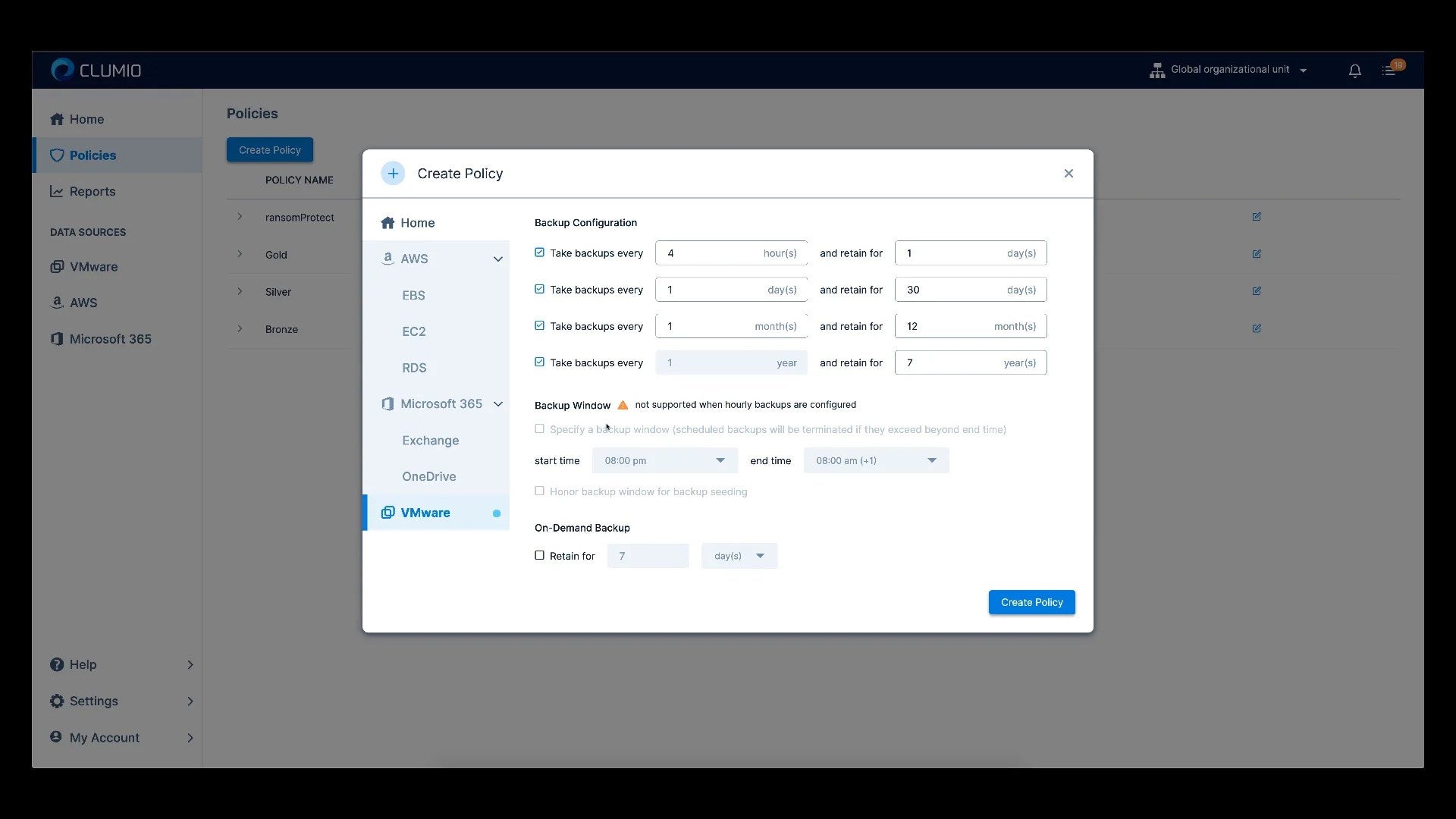
Define the policies for up to 30 days for EBS or up to 35 days for RDS:

Clumio leverages existing tags for aligning policies, so the next step is to determine the tags you would like to protect with your new policy you just created. This allows you to tag specific resources to protect with this policy.

That is it! Now you are up and running with Clumio’s free tier for operational recovery for both EBS and RDS.

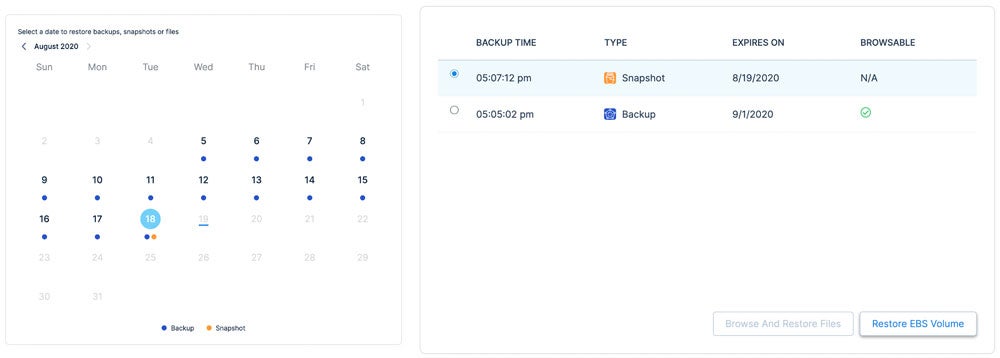
Now that we have operational recovery available for EBS and RDS, let’s review the restoration process for EBS. First, you pick the EBS volume you want to restore, then define the point in time you want to restore. In this case, I have backups (shown in blue dots) and snapshots (shown in orange dots). When you click on the date it will give you options for both.

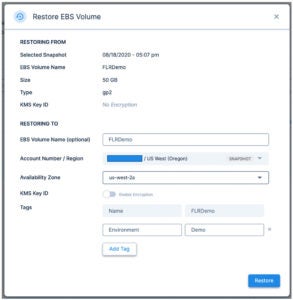
You can then restore the volume to any AZ available.

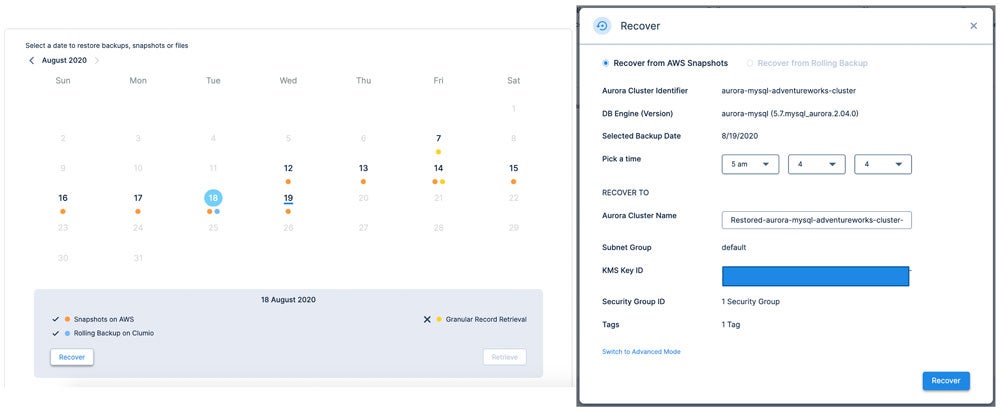
RDS is a similar experience, but slightly different as there are multiple options for the protection of RDS available including rolling backup (time-lagged RDS instance in Clumio) and granular record retrieval (long-term backup).

First you pick a restore date where there is a snapshot available (orange dot), click recover, then pick the point in time of which you want to recover the database, down to the second. In this case I am restoring to 5:04:04 AM.

As you can see in this quick overview, protecting AWS resources for operational recovery is incredibly easy! No matter if you are developing net-new applications, lifting and shifting legacy applications from your on-premises data center, or a cloud-optimized veteran with 100% of your applications running on the cloud, Clumio has a solution to help. For more information, check out our backup as a service for AWS.

Until next time, stay SaaSy my friends.

More related posts


Thumbnail_Blog-Clumio-Chat-2026

Meet Clumio Chat: An AI Assistant to Help Evaluate Cloud-Native Data Protection

Read more about Meet Clumio Chat: An AI Assistant to Help Evaluate Cloud-Native Data Protection
Thumbnail_Blog-Clumio-Fedramp-2026

Clumio Advances Cloud-Native Cyber Resilience with FedRAMP® Milestone

Read more about Clumio Advances Cloud-Native Cyber Resilience with FedRAMP® Milestone
Thumbnail_Blog-Lateral-Access-2026

Private Cloud Data Security Technical Guide

Read more about Private Cloud Data Security Technical Guide

In 2007, ten years after the company was founded, Netflix was slinging rentals of Weekend at Bernie’s in red envelopes by mail. Anyone remember the last Netflix DVD that they failed to return? Not saying mine was Weekend at Bernie’s, but it very well could have been. In 2007, Netflix pivoted to streaming services. As early as 2011, they realized that their digital content suppliers would ultimately be their competitors and they shifted from a reliance on third-party content to becoming a producer of original content. In July of this year, Netflix broke HBO’s record for the most Emmy nominations.

Netflix started not with the end game of disrupting Blockbuster but with the full intention of streaming when network bandwidth and digital content was readily available. After all, their name from the get-go was Netflix, not DVDsDirect.com. In the early innings, they executed on short term goals and remained customer, not competition, focused. They also had the good fortune of a massive market category and a few tired, old competitors they could disrupt early on. Here at Clumio, there is a lot of neat stuff we aim to deliver. There is also a vast amount of low hanging fruit out there to harvest as well.

For those who have spent time in the data protection space and don’t know Clumio:

  • We’re relentlessly focused on simplifying data protection with a secure, air-gapped backup and recovery service for a world where customer data is increasingly distributed across clouds, SaaS and on-premises realms. We’re also here for a world where the bitcoin-seeking boogie man is just as much of a threat as a natural disaster.
  • We’re a company focused on customer delight. We belive in simplfying data protection. Clumio can be turned on in as few as 10 minutes and our customers can go focus on more important things to drive their businesses forward.
  • We’re a platform company with our eyes to the horizon. We seek to deliver value creation opportunities as a by-product of our data protection offering. Think analytics and ETL. Think multi-cloud data management and cloud arbitrage. Our follow-on acts are why this author joined and why smart people with backgrounds in search, security, analytics and cloud are steering the company, on our board or have voted for us with their wallets.

For the analysts and my friends and family members who might not know much about Clumio:

  • Clumio for VMware Protection = Weekend at Bernie’s mailed in a Red Netflix Envelope. Protecting on-premises assets is our “DVD in a red envelope” use case. It’s our “right now” interest simplifying and disrupting the private cloud data protection market, and it’s a massive market that’s ripe for disruption.
  • Clumio for Cloud Native Services and SaaS Protection = Streaming The Office on Netflix. This is an emerging market as organizations move to public cloud and SaaS and find that the native data protection services offered by traditional providers are purpose-built for the data center, short on functionality and super costly.
  • Clumio Data Platform = Netflix Studios. I’m going to venture a guess that Ozark helps drive far more consumers to the Netflix service than Weekend at Bernie’s. Over time you will see us evolve from being solely focused on data protection to opening up the platform to afford customers and their partners the opportunity to derive greater value than just operational recovery. The proof points and hints are already there if you look for them.

Thanks for putting up with this author’s incessant desire to trot out analogies. It’s just that signing up for and deploying a protection strategy with Clumio is about as uninvolved as signing up for Netflix. And just like the Netflix service, new content and goodness arrives while you sleep.

More related posts


Thumbnail_Blog-Clumio-Chat-2026

Meet Clumio Chat: An AI Assistant to Help Evaluate Cloud-Native Data Protection

Read more about Meet Clumio Chat: An AI Assistant to Help Evaluate Cloud-Native Data Protection
Thumbnail_Blog-Clumio-Fedramp-2026

Clumio Advances Cloud-Native Cyber Resilience with FedRAMP® Milestone

Read more about Clumio Advances Cloud-Native Cyber Resilience with FedRAMP® Milestone
Thumbnail_Blog-Lateral-Access-2026

Private Cloud Data Security Technical Guide

Read more about Private Cloud Data Security Technical Guide

Cloud Recovery: A Complete Guide

Downtime costs businesses thousands per minute, and traditional backup alone is not enough. This guide covers what cloud recovery is, why it matters, and how to build a strategy that keeps your data safe. 

(Updated August 20, 2026)

Key Takeaways

Cloud recovery is a fast-evolving discipline. Here are the most important points you should take away from this guide: 

  • Cloud recovery combines data protection with rapid recovery to help reduce downtime and data loss.
  • Data breaches now cost organizations millions of dollars on average, making a cloud disaster recovery strategy more critical than ever.
  • Backup and disaster recovery serve different purposes – backup preserves copies of data, while disaster recovery focuses on restoring operations after a failure.
  • Best practices include defining recovery time objective (RTO) and recovery point objective (RPO) targets, following the 3-2-1 backup rule, tiering workloads by criticality, and testing recovery plans regularly.
  • Clumio by Commvault provides air-gapped, cloud-native backup and recovery for AWS workloads including Amazon S3, DynamoDB, and more.

Cloud recovery is the practice of replicating data to a cloud environment so your organization can restore operations quickly after a disruption. Whether you are dealing with a ransomware attack, a misconfigured deployment, or a region-wide outage, a strong cloud recovery strategy helps give you the ability to recover critical data and resume business operations without relying on legacy infrastructure.   

The stakes are high. Cyberattacks are growing in frequency and sophistication. Hardware failures happen without warning. Human error – from accidental deletions to bad code pushes – remains one of the leading causes of data loss. And for organizations running production workloads in the cloud, the blast radius of any of these events can extend across applications, databases, and entire regions.  

A cloud disaster recovery approach helps address these risks by storing backup copies of your data in isolated, off-site cloud environments and providing the tools to help restore that data rapidly. Unlike traditional on-premises backup, cloud-based solutions scale with your infrastructure and can be tested and validated without disrupting production systems.  

In this guide, we break down what cloud recovery is, how it differs from traditional backup, and what best practices you should follow to help protect your organization. 

What Is Cloud Recovery?

Cloud backup and disaster recovery are two related but distinct disciplines that work together to help protect your organization’s data and operations.   

Cloud backup is the process of copying data – files, databases, application configurations, and system images – to a remote cloud environment. These copies serve as point-in-time snapshots that you can use to help restore data if the original is lost, corrupted, or compromised. Cloud backup removes the need for physical media like tape or on-site storage arrays and helps give you the flexibility to store data across multiple regions and accounts.   

Disaster recovery goes further. Disaster recovery is a strategy for restoring not just data, but the applications, infrastructure, and workflows your business depends on. A disaster recovery plan defines how quickly you need to be back online (your RTO) and how much data loss you can tolerate (your RPO). 

When you combine cloud backup with disaster recovery, you get a cloud-based disaster recovery strategy – one that helps store protected copies of your data off-site and provide the automation and tooling needed to recover workloads at scale.  

Why Cloud Recovery Matters

The cost of failing to protect your data has never been higher. Data breaches now cost organizations millions of dollars on average.  

But breach costs are only part of the picture. Unplanned downtime disrupts revenue, erodes customer trust, and triggers regulatory scrutiny. For organizations in regulated industries like financial services, healthcare, and legal, the failure to recover data within defined timeframes can result in fines, litigation, and loss of operating licenses.   

Ransomware has changed the calculus further. Attackers increasingly target backup infrastructure itself, encrypting or destroying recovery data before launching their primary attack. Without a cloud recovery strategy that includes isolated, immutable copies of your data, you risk losing both your production environment and your ability to recover from it.   

Disaster recovery as a service (DRaaS) has emerged as one response to this challenge, helping give organizations the ability to replicate and fail over workloads to a cloud-hosted environment without managing their own disaster recovery infrastructure.  

A well-designed cloud recovery plan helps reduce both the financial and operational impact of unplanned outages – and increasingly, it is a baseline expectation from auditors, regulators, and cyber insurance providers.  

The bottom line: Ransomware recovery readiness is no longer optional. It is a business requirement.  

Cloud Backup vs. Disaster Recovery: Whats the Difference?

Many organizations confuse backup with disaster recovery, but a backup without a recovery plan leaves critical gaps in your response strategy. Understanding the distinction is essential for building a complete backup and disaster recovery plan. Let’s compare them.  

  Cloud Backup  Disaster Recovery 
Purpose  Preserve copies of data at specific points in time.  Restore full operations – applications, infrastructure, and data – after a failure. 
Scope  Data-level protection (files, databases, objects).  System-level and business-level continuity. 
Speed  Restore individual files or datasets; speed varies by volume.  Designed to meet defined RTO targets – minutes to hours. 
Key metric  RPO – how frequently data is backed up.  RTO – how quickly operations resume. 
Cost model  Pay for storage and transfer.  Pay for replication, failover infrastructure, and orchestration. 

Backup answers the question: “Can I make copies of my data?” Disaster recovery answers: “Can I get my business running again?” You need both.

A backup strategy without a disaster recovery plan means you may have your data but no way to restore the applications and infrastructure that depend on it. A disaster recovery plan without reliable backups means you may be able to fail over, but the data you recover could be incomplete, stale, or corrupted.

The strongest protection comes from combining cloud backup with a structured disaster recovery plan that defines RTO and RPO targets per workload and tests recovery procedures regularly.

Best Practices for Cloud Recovery

Building an effective cloud recovery strategy requires more than selecting a tool. It demands a structured approach to planning, architecture, and testing. The following best practices help you design a cloud disaster recovery solution that holds up under real-world conditions.   

Follow the 3-2-1 backup rule. Maintain at least three copies of your data, stored on two different media types, with one copy off-site in the cloud. This foundational rule helps reduce the risk of a single point of failure wiping out all your recovery options.  

Define RTO and RPO targets per workload. Not every workload has the same criticality. Your customer-facing production database may require a five-minute RPO and a 15-minute RTO, while a development environment may tolerate hours of downtime. Tier your workloads accordingly and allocate cloud backup solutions for business continuity based on these tiers.  

Use air-gapped, immutable storage. Air-gapped vaults and immutable backups help prevent ransomware from encrypting or deleting your recovery data.   

Test your recovery plan regularly. A backup you have never restored is a backup you cannot trust. Schedule operational recovery drills at least quarterly, validate that your RTO and RPO targets are achievable, and document the results.  

Automate where possible. Manual backup and recovery processes introduce human error and delay. Cloud-native solutions can automate backup schedules, retention policies, and recovery workflows to help reduce the exposure window. 

How Clumio by Commvault Helps Protect Your Cloud Data

 Clumio by Commvault is built for organizations that run production workloads across AWS and Google Cloud and need cloud disaster recovery that delivers speed, reliability, and security at scale. 

Clumio takes a cloud-native, serverless approach to backup and recovery. There is no infrastructure to deploy or manage—you connect your cloud environments, define your protection policies, and Clumio handles the rest. Backup data is stored in an immutable, air-gapped vault isolated from production, helping protect recovery data even if the primary environment is compromised. 

Clumio supports cloud-native workloads including Amazon S3, DynamoDB, RDS and Aurora, EC2 and EBS, Apache Iceberg on AWS, Amazon Neptune, Amazon DocumentDB, and Google Cloud Storage. Recovery is granular, enabling restores at the object, prefix, bucket, partition, table, or workload level depending on the service. Clumio Backtrack enables in-place rollback for Amazon S3 and DynamoDB, while Instant Access lets you query S3 backup data without full rehydration. 

For ransomware recovery, Clumio helps organizations restore clean recovery points with granular recovery workflows. Clumio also supports cross-account, cross-region, and cross-project recovery, providing flexibility to restore data into clean cloud environments when needed. 

Common Use Cases for Cloud DR Solutions

A cloud disaster recovery solution is not a one-size-fits-all tool. The right approach depends on the failure scenarios you need to plan for and the workloads you need to protect.  Here are the most common use cases for cloud disaster recovery.  

Ransomware attack recovery. Ransomware attacks increasingly target backup infrastructure itself, making air-gapped cloud disaster recovery solutions a critical layer of defense. Having immutable, air-gapped backups stored outside your primary cloud account can help you restore clean data without paying a ransom.  

Accidental data deletion. A single misapplied script or manual error can wipe out an entire S3 bucket or DynamoDB table. Granular cloud backup lets you recover specific objects, prefixes, or partitions without restoring an entire environment – getting your team back to work in minutes, not days.   

Infrastructure or region failure. Cloud outages are rare but not impossible. Cross-region backup and recovery give you the ability to restore workloads in a different region if your primary region goes down, helping maintain business continuity.  

Compliance and audit requirements. Regulatory frameworks in financial services, healthcare, and other industries require documented backup and recovery capabilities. Disaster recovery as a service can help satisfy audit requirements by providing automated, policy-driven backup with full reporting and retention controls.  

Multi-region and hybrid cloud environments. Organizations operating across multiple regions or in hybrid cloud configurations need a unified cloud disaster recovery strategy that spans environments without creating management complexity. 


Cloud backup is no longer a nice-to-have – it is a foundational requirement for any organization running workloads in the cloud. The threats are real, the costs of failure are measured in millions, and the regulatory bar continues to rise.  

The good news is that modern cloud-native solutions help make it possible to protect your data, meet your recovery objectives, and stay resilient – without the complexity and overhead of legacy approaches. Whether you are defending against ransomware, recovering from human error, or satisfying an auditor, a well-designed cloud recovery strategy helps put you in control. 

Frequently Asked Questions

What is cloud recovery?

Cloud recovery is a strategy that combines copying data to a remote cloud environment with the tools and processes needed to restore operations after a disruption. It helps protect against data loss from ransomware, hardware failure, accidental deletion, and other threats. 

How do backup and disaster recovery differ?

Backup preserves copies of data at specific points in time. Disaster recovery is a broader strategy focused on restoring applications, infrastructure, and business operations. A complete backup and disaster recovery plan includes both disciplines working together. 

What is DRaaS?
What are RTO and RPO?

RTO (recovery time objective) is the maximum acceptable downtime after a failure. RPO (recovery point objective) is the maximum acceptable data loss measured in time. Both should be defined per workload based on business criticality. 

What are cloud backup best practices?

Follow the 3-2-1 rule, define RTO and RPO targets per workload, use air-gapped and immutable storage, tier workloads by criticality, and test your recovery plan at least quarterly. These practices help build a resilient cloud disaster recovery solution. 

How does Clumio protect cloud data?

Clumio provides cloud-native, air-gapped backup and recovery for AWS and Google Cloud workloads. It helps reduce recovery time with granular restores and helps protect against ransomware with isolated vault architecture and AI-enhanced threat detection. 


In a previous blog, I detailed how Clumio’s data protection platform for Amazon RDS was used in a SOC 2 audit led by the AICPA to demonstrate that proper backup and restoration was implemented for a critical data source.  In this blog, I’ll talk about the broader aspects of data protection, information security, and compliance requirements in the 2017 Trust Services Criteria that SOC 2 is based upon.

What does it mean to be SOC 2 compliant?

Service Organization Control 2 (commonly referred to as SOC 2) is a report on controls for service organizations that provide services to other organizations, conducted by an independent auditor. The report details how your organization implemented the 2017 TSC (Trust Services Criteria) guidance (PDF) and how effective the controls operated during the period of time covered by the report (usually 6 months or more). SOC 2 compliance is an indicator to customers and proves with compliance reports, that they can trust that the services performed meet a standardized set of quality controls. These certifications, including SOC 2, are extremely valuable in the prevention of data breaches.

There are 5 criteria, encompassing data security and various security practices:

  • Security
  • Confidentiality
  • Availability
  • Processing Integrity
  • Privacy

and along with a set of Common Criteria. Most organizations select, design, and implement controls for Security, Confidentiality, and Availability at a minimum. Common Criteria have to be addressed regardless of the additional criteria selected.

Common Criteria as they relate to data protection obligations

CC6.4 The entity restricts physical access to facilities and protected information assets (for example, data center facilities, backup media storage, and other sensitive locations) to authorized personnel to meet the entity’s objectives.

If you’re using a cloud service provider like Amazon Web Services (AWS), you’ve got the benefit of AWS’s physical and environmental controls that protect their data centers. However, your backup media storage typically would be snapshots in your AWS accounts. These reside in your account, within the same administrative domain as your online data. This can be undesirable from a security standpoint, especially if an incident like a ransomware attack allows someone control over your account. If they’ve got control of your account, they’ve got control of your backups.  However, if your data is protected by Clumio, your backup media is in a separate administrative domain, using a dedicated encryption key. Adding 2-factor authentication or an external SAML-based identity provider to your Clumio account allows for additional protection.

CC6.7 The entity restricts the transmission, movement, and removal of information to authorized internal and external users and processes, and protects it during transmission, movement, or removal to meet the entity’s objectives.

Specifically for CC6.7, I’m examining this point of focus:

  • Protects Removal Media — Encryption technologies and physical asset protections are used for removable media (such as USB drives and backup tapes), as appropriate.

Clumio’s platform has encryption built in, with options for a Clumio-managed key or bring-your-own-key…!

Now, we can look at some more challenging controls for many organizations:

1. CC7.5 The entity identifies, develops, and implements activities to recover from identified security incidents.

There are several points of focus in this control, but I’ll focus on these:

  • Restores the Affected Environment — The activities restore the affected environment to functional operation by rebuilding systems, updating software, installing patches, and changing configurations, as needed.
  • Improves Response and Recovery Procedures — Lessons learned are analyzed and the incident-response plan and recovery procedures are improved.
  • Implements Incident-Recovery Plan Testing — Incident-recovery plan testing is performed on a periodic basis.

2. CC9.1 The entity identifies, selects, and develops risk mitigation activities for risks arising from potential business disruptions.

Consider this point of focus, with an additional emphasis on data processing and the importance of proper data encryption:

  • Considers Mitigation of Risks of Business Disruption — Risk mitigation activities include the development of planned policies, procedures, communications, and alternative processing solutions to respond to, mitigate, and recover from security events that disrupt business operations. Those policies and procedures include monitoring processes, information, and communications to meet the entity’s objectives during response, mitigation, and recovery efforts.

Certainly, these controls should be front-of-mind in the current climate of constant cyberthreats.

A great feature of Clumio, which makes use of cloud computing, is the ability to do what we call “cross-account recovery”.   I can attach multiple AWS accounts to my Clumio environment and protect assets like EC2 instances, EBS volumes, S3 buckets, etc.  However when I recover, I can choose to restore some or all of these assets into any AWS account I’ve attached, not just the account the data sources were originally protected in. It allows companies to simulate an audit process, a feature that’s crucial in compliance audits. This means I can have an AWS account attached and ready to perform recovery from an incident.  This not only can aid recovery tremendously if there is an actual incident, but it allows me to simulate that exact procedure for testing and refinement purposes. The core of approaches like SOC 2 and ISO 27001 are that procedures are tested, refined, expanded, and improved over time. Recovery of your environment 1 year ago may not be the same as recovery of your environment next week. You may have added new data or resources critical to the environment’s operation over the last year. Frequent testing and updating of your recovery procedures should be a cornerstone of a healthy operation.

Availability trust service criteria

Now, for more specific controls paired with elements like data encryption and data processing. In the Availability trust service criteria, consider:

A1.2 The entity authorizes, designs, develops or acquires, implements, operates, approves, maintains, and monitors environmental protections, software, data backup processes, and recovery infrastructure to meet its objectives.

A1.3 The entity tests recovery plan procedures supporting system recovery to meet its objectives.

The specific points of focus to think about in in these controls are:

(in A1.2)

  • Determines Data Requiring Backup — Data is evaluated to determine whether backup is required.
  • Performs Data Backup — Procedures are in place for backing up data, monitoring to detect backup failures, and initiating corrective action when such failures occur.
  • Addresses Offsite Storage — Backup data is stored in a location at a distance from its principal storage location sufficient that the likelihood of a security or environmental threat event affecting both sets of data is reduced to an appropriate level.

(in A1.3)

  • Implements Business Continuity Plan Testing — Business continuity plan testing is performed on a periodic basis. The testing includes (1) development of testing scenarios based on threat likelihood and magnitude; (2) consideration of system components from across the entity that can impair the availability; (3) scenarios that consider the potential for the lack of availability of key personnel; and (4) revision of continuity plans and systems based on test results.
  • Tests Integrity and Completeness of Backup Data — The integrity and completeness of backup information is tested on a periodic basis

Clumio’s platform focuses on a policy-driven approach for data protection. You select criteria for assets to be backed up, via asset name, type, grouping, tags, etc. You then construct a policy, and optionally a time window that determines when and how frequently your assets are protected. This powerful method supplies clear design and implementation of the listed points of focus in control A1.2 above, in addition to helping meet standards for data processing and encryption.

For A1.3, the emphasis is on business continuity and its close relative, disaster recovery. This control is also closely related to the CC7.5 control above, as a security incident could easily trigger the need to engage your business continuity/disaster recovery procedures. It bears repeating that testing your procedures is critically important. There’s no “easy” button, but testing the integrity and restorability of your data protected in Clumio is simple through the UI and automatable through the API.

Confidentiality

The last controls we’ll talk about are part of the Confidentiality criteria.  Here they are:

  1. C1.1 The entity identifies and maintains confidential information to meet the entity’s objectives related to confidentiality.
  2. C1.2 The entity disposes of confidential information to meet the entity’s objectives related to confidentiality.

The points of focus are:

  • Identifies Confidential information — Procedures are in place to identify and designate confidential information when it is received or created and to determine the period over which the confidential information is to be retained.
  • Protects Confidential Information From Destruction — Procedures are in place to protect confidential information from erasure or destruction during the specified retention period of the information.
  • Identifies Confidential Information for Destruction — Procedures are in place to identify confidential information requiring destruction when the end of the retention period is reached.
  • Destroys Confidential Information — Procedures are in place to erase or otherwise destroy confidential information that has been identified for destruction.

These points can be difficult depending on how your data is stored. However, the policy-based approach to data protection can mitigate some of the difficulties. 

Conclusion

In the final calculus, many organizations have significant burdens for data protection. The needs are multifold: you must securely protect your data, and you must be able to demonstrate the procedures that protect your data and make it recoverable. The controls detailed here are just a fraction of the requirements for a SOC 2 audit, but they’re critical controls that have benefits far beyond the scope of a compliance report. To learn more about help make your audits, schedule a customized demo with a cloud expert.

To hear more information on SOC 2 compliance along with expert tips to help you pass your next SOC 2 audit, sign up for the Simplifying SOC 2 Compliance webinar, an excellent resource for those in governance roles.

More related posts


Thumbnail_Blog-Clumio-Chat-2026

Meet Clumio Chat: An AI Assistant to Help Evaluate Cloud-Native Data Protection

Read more about Meet Clumio Chat: An AI Assistant to Help Evaluate Cloud-Native Data Protection
Thumbnail_Blog-Clumio-Fedramp-2026

Clumio Advances Cloud-Native Cyber Resilience with FedRAMP® Milestone

Read more about Clumio Advances Cloud-Native Cyber Resilience with FedRAMP® Milestone
Thumbnail_Blog-Lateral-Access-2026

Private Cloud Data Security Technical Guide

Read more about Private Cloud Data Security Technical Guide

While the first few months of this year brought unprecedented global change from the way we think to the way we work, at Commvault we rallied together to adjust to the “new normal.” We remained steadfast in our top priorities: keep our employees and communities safe, continue to be there for our customers and remain unwavering in our innovation.  

And while the way we engage with our customers has changed, business did not stop. We brought many new users into the Commvault family and expanded existing relationships, with use cases spanning cloud, cloud-native, multi-cloud and SaaS workloads. In the spirit of sharing some good news, I’d like to take the opportunity to celebrate some of the new and expanded customer use cases in our fiscal Q4.

Blue Cross and Blue Shield of Minnesota; NASA (see below); mobile service provider MTS; Shaanxi Coal Industry; CPA Global; Ministry of Finance of Poland; and cloud services provider, Chmury Krajowej, all embraced Commvault for their critical needs in Q4.

https://share.vidyard.com/watch/H1RYLBTzeT29s7M7htSUEb?

Kira Blackwell, Program Executive at NASA HQ within the Space Technology Mission Directorate Office, explains the value of data, well-managed data and the value of using Commvault.


Additionally, McDonald’s Corporation turned to Commvault to address the growing trend of moving infrastructure to the cloud. Here is what they had to say about how Commvault is helping them tackle that initiative.

McDonald’s Corporation moves to the cloud

With an already-robust Commvault deployment in place, we’re now leveraging Commvault’s cloud capabilities to shed ownership of our technology infrastructure; instead, we’re investing heavily in the cloud to keep our IT operations running. The software solution from Commvault fills gaps in native cloud tools and has cut across every use case McDonald’s Cloud Services team requires, providing optimized and effective backups across databases. Commvault’s solution tunes performance across AWS and Microsoft Azure cloud servers and drives cost savings through deduplication and compression.

– Douglas Leonard, Director – Cloud Services, McDonald’s Corporation

I’d also like to highlight customers who have shared their stories this quarter. These customers span industries and use cases, leveraging Commvault to protect critical data both on-premises and in the cloud, while ensuring compliance for document retention, medical record privacy and more.

Commvault protects Parsons Corporation  

https://share.vidyard.com/watch/WYnraLDUt7DfM1Ck88zaRU?

Parsons uses Commvault intelligent data management for workloads across AWS S3 Standard-IA and AWS S3 Glacier cloud storage locations, VMware and Hyper-V virtual machines, plus physical servers.


Cloud environments typically don’t have robust built-in data protection capabilities – and they can also be hard to protect without the right tools in place. Parsons Corporation manages its total on-premises recovery environment and AWS data protection with Commvault.

“We’ve moved off of tape backups to AWS, and now we have an initiative to move the whole environment to the cloud. Moving into the cloud has been really simple. With the Commvault solution, it’s just having the Command Center. Everything is simplistic.” –Benjamin Roper, Enterprise Backup and Recovery Specialist, Parsons Corporation

Delaware Department of Correction becomes data ready

https://share.vidyard.com/watch/i1NVW9yeBrFHYm36YqnKpq?

“Data helps provide a story,” says Phil Winder, Director of Information Technology for the Delaware Department of Correction.


When every data point shapes a person’s life, the public sector needs to be data ready. Streamlined data management is critical, from disaster recovery with no data loss to quickly accessing data that affects a person’s freedom.

“We went through a disaster recovery exercise and, in fact, we thought we had lost some data. We don’t have time to have data loss. With a quick call to Commvault support, the problem was identified. The organization was back up and operational within the hour — with no data loss.” – Phil Winder, Delaware Department of Correction

As someone who thrives on meeting with customers, I miss the in-person engagement we’ve had to put on hold in this current environment, but we’ve been getting creative in how we interact with our customers to keep the personal touch. It was great to see and hear from a few of our customers in recent videos. I encourage you to take a look at how customers like Cochlear, Penn State Health and Mitchell International (see videos below) are using Commvault to solve their most critical data challenges.

https://share.vidyard.com/watch/GMP6VNbo8SJBU3SNnkSX8u?

Consistency, reliability, daily VMware virtual machine backups and a worry-free environment? By consolidating backup products, Cochlear was able to streamline secure healthcare data protection and gain that worry-free environment.


https://share.vidyard.com/watch/FWb33HvixuZJR6Jh4iCLoa?

Replacing IBM TSM with Commvault data protection gave Penn State Health more ability to manage large volumes of data, improved customer support and the reassurance that data could be easily recovered.


https://share.vidyard.com/watch/rf6uwp5RwX9hDiM5WJgs1g?

For Mitchell International, a technology provider for the auto and casualty insurance industry, Commvault software covers data protection for a growing IT environment and helps provide better customer service.


Commvault is the toast of the town

On top of customer victories, we’ve also been winning industry accolades!  Check out our recent awards from CRN, Gartner, Storage Magazine and others:

Although this is a time when the industry – and the world – is definitely not conducting business as usual, we’re proud to be there for our customers. We’re customer centric all the time, and these customer use cases speak for themselves.

More related posts


Thumbnail_Blog-Clumio-Chat-2026

Meet Clumio Chat: An AI Assistant to Help Evaluate Cloud-Native Data Protection

Read more about Meet Clumio Chat: An AI Assistant to Help Evaluate Cloud-Native Data Protection
Thumbnail_Blog-Clumio-Fedramp-2026

Clumio Advances Cloud-Native Cyber Resilience with FedRAMP® Milestone

Read more about Clumio Advances Cloud-Native Cyber Resilience with FedRAMP® Milestone
Thumbnail_Blog-Lateral-Access-2026

Private Cloud Data Security Technical Guide

Read more about Private Cloud Data Security Technical Guide

Cloud Data Compliance: What It Is and Why It Matters

Cloud data compliance enables your cloud-stored data to meet all applicable laws, regulations, and industry standards. Learn which frameworks apply and how to build a compliant cloud environment.

(Updated August 25, 2026)

Key Takeaways

Cloud data compliance spans regulations, shared responsibility, and continuous monitoring. Here are the essential points.

  • Cloud data compliance is the practice of aligning your cloud operations with regulatory requirements, industry standards, and internal data governance policies.
  • Major frameworks including GDPR, HIPAA, PCI DSS, SOC 2, and FedRAMP each impose distinct obligations depending on your industry, geography, and data types.
  • The shared responsibility model means your cloud provider helps secure the infrastructure, but you are accountable for how you configure, access, and protect your data.
  • Best practices include data classification, least-privilege access, encryption, automated compliance monitoring, and regular risk assessments.
  • Continuous compliance requires automated tooling, defined audit cadences, and incident response plans that evolve alongside regulatory changes.

What Is Cloud Data Compliance? 

Cloud data compliance is the discipline of enabling data stored, processed, and transmitted in cloud environments to meet all applicable laws, regulations, industry standards, and internal governance policies. It spans everything from how you collect and classify information to how you encrypt it in transit and at rest, control access, and respond to breaches. 
 
Why does cloud data compliance demand your attention right now? Because the cost of getting it wrong keeps climbing. Data breaches now carry multimillion-dollar price tags when you factor in technical remediation, regulatory fines, legal fees, and lasting reputational damage. 
 
If your organization handles customer data, financial records, health information, or government workloads in the cloud, data compliance is not optional. Regulations like GDPR and HIPAA carry enforcement teeth, and customers increasingly expect proof that you protect their information. Cloud compliance is also a competitive differentiator: organizations that demonstrate strong data governance win trust, close deals faster, and avoid the operational chaos of post-breach firefighting. 
 
Whether you are migrating your first workloads or managing a mature multi-cloud environment, understanding cloud data compliance is the foundation for building resilient, trustworthy cloud operations. 

Key Compliance Frameworks and Standards 

Navigating cloud data compliance standards starts with understanding which frameworks apply to your organization. Here are the five most critical: 
 
GDPR (General Data Protection Regulation): Applies to any organization that processes personal data of EU residents, regardless of where you are headquartered. Key requirements include data subject rights, breach notification within 72 hours, and data protection by design. Violations carry fines of up to 20 million euros or 4% of annual global turnover, whichever is higher. For a deeper look at the regulatory landscape, see our guide to data privacy regulations. 
 
HIPAA (Health Insurance Portability and Accountability Act): Governs protected health information (PHI) in the United States. If you are a healthcare provider, health plan, or business associate handling PHI in the cloud, HIPAA compliance demands encryption, access controls, and audit logging. 
 
PCI DSS (Payment Card Industry Data Security Standard): Applies to any entity that stores, processes, or transmits cardholder data. PCI DSS compliance requires network segmentation, vulnerability management, and regular penetration testing. 
 
SOC 2 (Service Organization Control 2): A trust-based cloud compliance framework built on five criteria: security, availability, processing integrity, confidentiality, and privacy. SOC 2 compliance is often a prerequisite for enterprise SaaS vendors. 
 
FedRAMP and NIST: FedRAMP standardizes the security assessment and authorization process for cloud products used by U.S. federal agencies. The underlying NIST Cybersecurity Framework, updated to version 2.0 in February 2024, now includes governance as a sixth core function, reflecting the growing importance of cloud compliance frameworks at the organizational level. 

The Shared Responsibility Model

The shared responsibility model is the foundational concept behind cloud data compliance and cloud security compliance, and misunderstanding it is the leading cause of cloud compliance failures. In simple terms, your cloud provider is responsible for helping secure the infrastructure, and you are responsible for securing everything you put on it. 
 
For Infrastructure as a Service (IaaS), the provider supports physical hardware, hypervisors, and network fabric. You own the operating system, middleware, applications, data classification, identity and access management, and encryption. As you move up the stack to Platform as a Service (PaaS), the provider absorbs more responsibility for the runtime and operating system, but you still control application logic and data access. With Software as a Service (SaaS), the provider manages nearly everything, yet you remain accountable for user access, data sharing, and configuration settings. 
 
The financial impact of getting this wrong is severe. Many of those incidents trace back to misconfigured storage buckets, overly permissive access policies, or unmonitored third-party integrations, all squarely within the customer’s side of the shared responsibility model. 

Cloud Compliance Best Practices 

Building a strong cloud data compliance and cloud data security posture requires a systematic approach. Here are eight practices that form the backbone of effective cloud compliance:

  1. Classify your sensitive data. You cannot protect what you do not understand. Map every data asset to its regulatory category, whether it is personal data under GDPR, PHI under HIPAA, or cardholder data under PCI DSS.
  2. Implement least-privilege access and multi-factor authentication (MFA). Grant users only the permissions they need, and enforce MFA across all cloud accounts. This reduces your blast radius if credentials are compromised.
  3. Encrypt data at rest and in transit. Use strong encryption standards such as AES-256 for stored data and TLS 1.2 or higher for data in motion.
  4. Automate compliance monitoring. Manual audits cannot keep pace with the speed of cloud deployments. Deploy tools that continuously assess configurations against your compliance baselines.
  5. Conduct regular risk assessments. Quarterly assessments help you identify emerging gaps before auditors do.
  6. Build a cloud governance program. Establish policies, assign ownership, and create accountability structures that connect technical teams to compliance leadership.
  7. Address shadow IT. Unauthorized cloud services create blind spots in your compliance posture. Implement discovery tools and clear procurement policies.
  8. Develop a disaster recovery plan. Compliance frameworks increasingly require demonstrated recovery capabilities. Document your recovery time objectives and test your plans regularly. For guidance on building one, see our post on creating a backup plan for compliance.
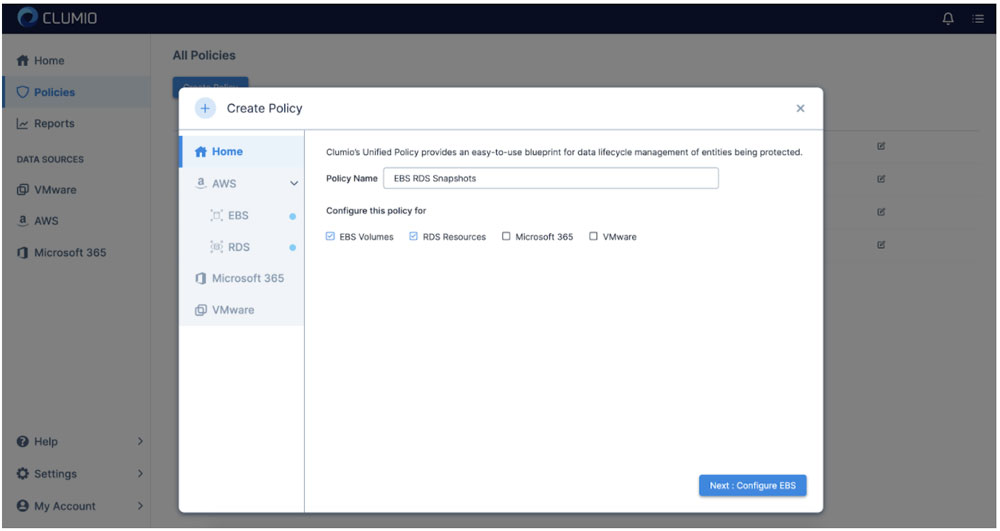
How to Stay Compliant Over Time 

Data compliance is not a destination. It is a continuous practice that evolves as regulations change, your cloud footprint grows, and new threats emerge. Here is how to build lasting cloud data compliance discipline. 
 
Invest in automated monitoring tools. Manual checks fail at cloud scale. Automated platforms continuously scan your environment for configuration drift, policy violations, and access anomalies, then alert your team in real time.  
 
Define a clear audit cadence. Conduct internal compliance reviews quarterly and comprehensive external audits annually. Document every finding, and track remediation to completion. 
 
Maintain a tested incident response plan.
Regulations like GDPR require breach notification within 72 hours. You cannot meet that deadline with an untested plan. Run tabletop exercises at least twice a year and update your playbook after each real incident. 
 
Audit third-party vendors. Your cloud compliance posture extends to every vendor that touches your data. Require SOC 2 reports, conduct annual vendor reviews, and include compliance obligations in your contracts. 
 
Track regulatory changes proactively. Assign ownership for monitoring regulatory updates in every jurisdiction where you operate. Subscribe to regulatory feeds, join industry groups, and build regulatory change into your governance calendar. 

Clumio provides cloud-native data protection with air-gapped backups, granular recovery, and continuous compliance monitoring purpose-built for cloud workloads.

Request a demo to see how Clumio helps keep your cloud data compliant and recoverable. 


Frequently Asked Questions

What Is Cloud Data Compliance?

Cloud data compliance is the practice of enabling data in cloud environments to meet all applicable legal, regulatory, and organizational requirements. It involves aligning your cloud configurations, access policies, and data handling practices with frameworks such as GDPR, HIPAA, and PCI DSS.

Which Regulations Apply to Cloud Data?

The regulations that apply depend on your industry, geography, and data types. Common frameworks include GDPR for EU personal data, HIPAA for healthcare information in the U.S., PCI DSS for payment card data, SOC 2 for service organizations, and FedRAMP for U.S. federal cloud services. Many organizations must comply with multiple frameworks simultaneously.

What Does the Shared Responsibility Model Mean?

The shared responsibility model divides cloud security obligations between the cloud provider and the customer. The provider secures the underlying infrastructure, while you are responsible for configuring your environment, managing access, protecting your data, and meeting compliance requirements specific to your workloads.

What Are Common Cloud Compliance Challenges?

The most common challenges include managing compliance across multi-cloud environments, keeping pace with rapidly evolving regulations, and addressing shadow IT where unauthorized cloud services create blind spots. Lack of skilled personnel and inadequate automation also contribute to compliance gaps.

How Can Organizations Maintain Compliance?

Organizations maintain compliance through regular internal audits, automated monitoring tools that detect configuration drift, ongoing employee training, and clearly defined governance structures. Partnering with cloud-native compliance platforms helps reduce manual effort and enables continuous audit readiness.

What Are the Consequences of Non-Compliance?

Non-compliance can result in substantial financial penalties. GDPR violations carry fines up to 20 million euros or 4% of global annual turnover. Beyond fines, the average data breach costs $4.44 million, and organizations face reputational damage, customer churn, and potential legal action.  


Let us say you have a SQL Server Availability Group (AG) in your virtualized data center. This SQL Server AG is hosting many databases serving mission critical applications. There is a total of half a terabyte of mission critical data today but it is growing rapidly. You are worried about this SQL Server’s availability, and that is why you had configured it as an AlwaysOn Availability Group in the first place. And, you are well aware that AG does not protect against software glitches, corruptions and security vulnerabilities so you want to backup that half a terabyte somewhere else, preferably air-gapped away from the production site. In the unfortunate event of data loss, what is the best recovery time objective (RTO) that your backup vendor can offer?

You are likely to hear bricks and blocks backup vendors for on-premises touting the value of “instant recovery” for virtual machines. The RTO being promised is seconds to minutes. But when it comes to recovering a virtual machine (VM) to its production operational level, there is nothing ‘instant’ about the so-called instant recovery.

The so-called instant recovery is to serve the VM disk files from backup system via NFS and let VMware vSphere run the VM from those disk files. It is true that the process to boot up a VM from backup this way will only take a few minutes. It is true that the flash storage on backup systems can act as a caching mechanism for write-I/O. However, in order to make the VM operationally on-par for production use, the VM administrator must carefully plan and execute storage vMotion when the time is right. This process will migrate the VM disks from backup storage onto production storage while the VM is live. This process is often throttled down by vSphere so as not to hinder the live VM. It takes several hours to even a full day before a large VM can be migrated and becomes operationally ready for production level performance. So much for the “instant” in instant recovery!

Thus, for the SQL Server AG example above, the nodes must be served by a single backup storage system which goes against why you have AG. The AG is supposed to be set up with dedicated storage systems at each node for availability. Then, the AG cluster would have a hard time coming up as the synchronization will be extremely slow because I/O-reads are occurring from backup storage. Note that AG is unavailable during this time period and hence there is no ‘instant recovery’ really. To add insult to injury, the AG would limp along while the required storage vMotion needs to occur from overloaded backup storage onto production storage.

The problem for this instant recovery does not end there. The backup is still co-located with production and hence is prone to site loss and security vulnerabilities. You cannot use cloud storage as a viable backup destination for operational recovery from these solutions. And, instant recovery is useless once you plan to migrate workloads to VMware Cloud on AWS because there is no support for third party NFS storage.

Clumio Rapid Recovery – Superior Operational RTO

Help to deliver secure backup and recovery for your data – wherever it needs to be. Rapid Recovery is a set of innovations from Clumio that enables fast operational restores from cloud storage even when you are protecting on-premises workloads. Thanks to Rapid Recovery with Clumio SaaS, it took just 5 minutes to recover an active SQL Server AG environment with 500GB of data given in the above example This is the time taken for end-to-end recovery and data restored to a fully operationally state. How did we do this? There are two innovations in Rapid Recovery playing key roles here.


Scale-out Rehydration:

Clumio’s scale-out rehydration eliminates the rehydration penalty of traditional bricks and blocks systems altogether. Rehydration is done by Clumio using serverless compute and it takes advantage of the unlimited compute capacity of the cloud while running parallel I/O operations across all blocks of interest for a given request. The result: restore throughput from the Clumio backup service beats that of a traditional deduplication system co-located in the data center.

Reverse Changed Block Tracking:

When you are recovering a VM in production from backup, you are essentially trying to roll back the clock so as to get to a last known good condition. Clumio’s reverse changed block tracking helps you do exactly that without the need to go through a full restore. The Clumio backup service retrieves the changed blocks (regenerated via scale-out rehydration described earlier) and applies them directly into production storage to rollback the VM to the previous point in time. The result: the time it takes to recover a VM from the Clumio backup service to a production operational level is faster than that of recovering from local storage!

These two Rapid Recovery capabilities from Clumio eliminate ALL of the limitations of instant recovery from legacy vendors.

Let’s summarize the key customer benefits of Rapid Recovery from Clumio:

  • No human intervention required: The backup admin or VM admin does not need to do anything during backup or recovery to take advantage of Rapid Recovery. Clumio SaaS automatically detects if the requested restore point in time meets rollback criteria and initiates it automatically during recovery.
  • RTO is superior to that of instant recovery: You are bringing just the data required to roll back the VM and your recovery is complete. The time it takes to do this is better than the overall time it takes to perform instant recovery followed by storage vMotion.
  • Protect against data loss and ransomware: Unlike co-located bricks and blocks based backup solutions needed for instant recovery, Clumio backups are air-gapped from your production datacenter. Clumio helps protect you against site loss and site-level vulnerabilities.
  • Gets you ready for VMware Cloud on AWS: Instant recovery does not work in VMware Cloud on AWS environments because of its dependency on NFS. Rapid Recovery has you covered when you are migrating to VMware Cloud on AWS.

Want to try Rapid Recovery? Contact us.

More related posts


Thumbnail_Blog-Clumio-Chat-2026

Meet Clumio Chat: An AI Assistant to Help Evaluate Cloud-Native Data Protection

Read more about Meet Clumio Chat: An AI Assistant to Help Evaluate Cloud-Native Data Protection
Thumbnail_Blog-Clumio-Fedramp-2026

Clumio Advances Cloud-Native Cyber Resilience with FedRAMP® Milestone

Read more about Clumio Advances Cloud-Native Cyber Resilience with FedRAMP® Milestone
Thumbnail_Blog-Lateral-Access-2026

Private Cloud Data Security Technical Guide

Read more about Private Cloud Data Security Technical Guide

After spending the last 20 years helping my customers properly evaluate and right-size storage architectures for these peaks, it was never lost on me that they generally occurred less than 20% of the total run time of the sized environment. In the era of on-prem infrastructure, this equated to a lot of dormant resources waiting in reserve.

At Clumio, as I now shift into the sphere of helping customers right-size a data protection solution for the public cloud, the first thing that became apparent is that, if done correctly, the dynamic scalability of the public cloud allows for much more precise utilization of resources at all points in time. In fact, this is an optimization that must occur to seriously advance any idea into a fully formed, developed solution because, in public cloud, every second a resource is reserved or “in use” costs money. This is exactly why solutions designed to address an on-prem problem cannot simply be lifted and shifted to the public cloud. We often hear customers talk about the need to ‘refactor’ an application. This is a time-consuming effort, but the value in wasting less resources, in the end, is worth the time spent redesigning a solution.

For a SaaS application to manage peak workloads at scale, resource utilization is even more important – not just for resources that get presented in the customer’s environment, but especially for the backend services that support not just one customer, but thousands of customers. Only by building an application end-to-end with an intelligent resource utilization model will true scalability occur while minimizing cost for the consumers of the service.

By bringing to bear a cloud-native approach using microservices, Clumio has already designed our secure, enterprise backup service to help our customers get the benefit of cloud efficiency instead of having to ‘refactor’ their existing backup applications. This is best exemplified by the way Clumio inserts zero fixed-compute resources in the data path and, instead, incorporates the parallelism of AWS S3 combined with the dynamic scalability of AWS Lambda functions and AWS DynamoDB resources to help provide that seamless, fluid experience that customers expect when using SaaS. This also creates a much simpler methodology for right-sizing a customer environment – Clumio will provide the requested resources on-demand.

Clumio has helped remove the need for the arduous task to size for peak workloads. I find that I now spend most of my time educating customers on the importance of a truly optimized architecture and the value that brings to the consumer. Of course, the best way to discover the value of Clumio is by experiencing it first-hand….I encourage you to give it a test run.

More related posts


Thumbnail_Blog-Clumio-Chat-2026

Meet Clumio Chat: An AI Assistant to Help Evaluate Cloud-Native Data Protection

Read more about Meet Clumio Chat: An AI Assistant to Help Evaluate Cloud-Native Data Protection
Thumbnail_Blog-Clumio-Fedramp-2026

Clumio Advances Cloud-Native Cyber Resilience with FedRAMP® Milestone

Read more about Clumio Advances Cloud-Native Cyber Resilience with FedRAMP® Milestone
Thumbnail_Blog-Lateral-Access-2026

Private Cloud Data Security Technical Guide

Read more about Private Cloud Data Security Technical Guide

Commvault is “in the zone” – a mindset and special place often reserved for athletes on a scoring streak. 

While no one here will argue that customer success is one of the most important validations of our business, it’s hard not to be impressed with Commvault’s recent string of industry accolades for its products, services and people under Sanjay Mirchandani’s leadership. The recent wave of recognition and company momentum across all areas of the business speaks for itself.

Just this month, Commvault received word that its Commvault Complete Backup and Recovery solution had been named a finalist for TechTarget’s product storage awards in the category for backup and disaster recovery hardware, software and services. Judged by an impartial panel of analysts, consultants and users, TechTarget’s product of the year award program helps buyers identify the best products amid a crowded field. It’s kind of a big deal. While the winners in each category will be announced in February on SearchStorage.com, we feel we’ve already won.

Commvault was also included in Solutions Review’s Backup and Disaster Recovery and Data Management Software buyer’s guides while Hedvig – a company we recently acquired if you haven’t heard   –  was included in the Enterprise Data Storage guide. Solutions Review releases these guides to assist organizations during the research and discovery phase of buying business software. Editors compile each Buyer’s Guide using research, analyst reports, industry experts and product demos. These guides are scientific and well-respected. While it’s great to see Commvault recognized in two guides, it’s also noteworthy that competitors such as Rubrik, Veeam and Veritas were only recognized in one.

Last but certainly not least, taking center stage in our proverbial trophy room, just a few months ago Forrester named Commvault a Leader in Data Resiliency Solutions, while Gartner recognized Commvault as a Leader in its Magic Quadrant for Data Center Backup and Recovery Solutions. Forrester ranked Commvault the highest in its Current Offering category, while Gartner positioned Commvault furthest for completeness of vision in its Leaders quadrant and highest for ability to execute in its entire Magic Quadrant for the 8th consecutive year. 

More related posts


Thumbnail_Blog-Clumio-Chat-2026

Meet Clumio Chat: An AI Assistant to Help Evaluate Cloud-Native Data Protection

Read more about Meet Clumio Chat: An AI Assistant to Help Evaluate Cloud-Native Data Protection
Thumbnail_Blog-Clumio-Fedramp-2026

Clumio Advances Cloud-Native Cyber Resilience with FedRAMP® Milestone

Read more about Clumio Advances Cloud-Native Cyber Resilience with FedRAMP® Milestone
Thumbnail_Blog-Lateral-Access-2026

Private Cloud Data Security Technical Guide

Read more about Private Cloud Data Security Technical Guide

Being a true, cloud-native backup solution allows us to provide our customers with a level of support previously unseen with legacy enterprise backup products.

Users see the difference as noted in this message from a Clumio customer after being proactively notified of an issue by our support team:

“Thank you for taking care of this issue. We appreciate having a second set of eyes on our backups and how easy this whole thing has been for us”
– Midwestern US Healthcare Provider

Proactive Customer Support

Being Authentic SaaS means that we’ve architected our solution to remove the complexities of managing enterprise backup for our customers. This is reflected in our model of service delivery – from proactive support to transparent over-the-air software upgrades.

Our customers enjoy real-time monitoring of their Clumio service delivered via software, processes, and people. As of November 2019, 72% of our customer cases have been proactively opened and triaged by our support team without any action from the customer.

Clumio Automated Proactive Support

Unlike the ineffective “call home” alerting provided by legacy hardware vendors, Clumio support capabilities are built in the cloud and provide:

  • Continuous 24/7 monitoring of task and environmental failures
  • Triggers for the creation of proactive support tickets
  • Ongoing improvement of the Clumio service by the automated detection of product defects

Our framework for delivering the most innovating support in the industry consists of three stages:

Stage 1 – Data Gathering

As an authentic SaaS solution, we have complete access to critical failure information that legacy hardware and software vendors do not have, whether generated in the cloud or from the customer’s on-prem environment. The data sources include:

  • Task Status – Backup, restore, file-level indexing, or file-level restore failures.
  • Connectivity Status – On-prem network or application failures.

Stage 2 – Analysis

To make sense of the data gathered, the analysis stage performs 1) deduplication, 2) correlation, and 3) classification of the failure data.

The analysis stage is critical help minimize to ensure that we minimize the amount of unwanted noise and distill the information down to succinct actionable steps to improve the customer experience.

Stage 3 – Action!

The failure data that emerges after the analysis stage then triggers one of three remediation workflows:

  • Automated Ticketing – Proactive support ticket is opened for triage
  • Service Alert – Customers are notified via product alerts of failures
  • Transparent Updates – Product defects are tracked by our support team and resolved via over-the-air upgrades

The result of the action stage is a customer experience that breaks away from the traditional, reactive nature of support delivered by legacy hardware and software vendors.

Over-the-Air Upgrade Model

In addition, customers need not worry about the complexities traditionally associated with upgrading legacy backup products: planned downtime, on-call administrators, validation testing, or service downtime. Clumio patches, upgrades, and fixes are all delivered seamlessly over-the-air with no complicated upgrade planning required.

This has manifested itself in an unprecedented enterprise backup experience. As of November 2019, 100% of Clumio product defects have been resolved without requiring any customer action.

Innovative Customer Experience is a Journey

As an innovative enterprise backup vendor, should also provide an innovative enterprise customer support most innovative enterprise backup vendor should also provide the most innovative enterprise customer support. This is why customer experience and leveraging cloud and automation technology are at the heart of our customer success strategy.

Our team consists of highly trained engineers with expertise in cloud, security, storage, automation and more, all committed to the success of our customers.

As we continue on our journey of innovation, customer experience will always be a top priority, and we look forward to partnering with you.

More related posts


Thumbnail_Blog-Clumio-Chat-2026

Meet Clumio Chat: An AI Assistant to Help Evaluate Cloud-Native Data Protection

Read more about Meet Clumio Chat: An AI Assistant to Help Evaluate Cloud-Native Data Protection
Thumbnail_Blog-Clumio-Fedramp-2026

Clumio Advances Cloud-Native Cyber Resilience with FedRAMP® Milestone

Read more about Clumio Advances Cloud-Native Cyber Resilience with FedRAMP® Milestone
Thumbnail_Blog-Lateral-Access-2026

Private Cloud Data Security Technical Guide

Read more about Private Cloud Data Security Technical Guide

The public cloud has delivered tremendous value to the enterprise, but a new mindset is required. Without a new mindset, you are bound to replay the same challenges you had before as they follow all with you on your new journey.

Over the last ten years, the journey to the cloud has provided 3 big lessons that have shaped the way enterprises approach the cloud in the current era. Shadow IT showcased the value of agility and scale, but also alerted us to the fact that a security-first mindset is required as data becomes dispersed across clouds. The cloud-first era reminded us that the cloud is costly if you leverage the same on-premises methodologies in the public cloud. The goal of today’s era, I like to call the cloud smart era, is to accelerate to the cloud intelligently by taking advantage of public cloud innovation, scale, and economics.

One core business function that did not evolve along this journey is data protection. If you look at the data center today, the data protection methodologies are robust including replication between storage arrays, snapshots, backups, replicated backups, and tape backups for offsite storage. But in the public cloud, data protection solutions are minimal, especially for backup. Today’s options include a virtualized version (or cloud retrofit) of the same legacy backup product you use in your data center today or volume level snapshots you have to orchestrate in the public cloud. Let’s take a look at the challenges of each of these options.

Legacy Backup Product – “Cloud Retrofit”

Traditional backup products have been in the data center for years. Most of these solutions are 10, if not 30 years old. As we saw in the cloud-first era, lifting and shifting existing products as a virtualized appliance, even with a “cloud-like consumption” model, results in complexity, higher costs, a software bill, a cloud bill, and a lack of scale and agility. Without re-architecting or rebuilding these backup products from the cloud up, the result is the same on-premises challenges enterprises are running away from in the first place.

Native Cloud Snapshot Management

Most enterprises have seen the complexity and false claims of the traditional backup products and decided to roll their own snapshot managers or orchestrate the creation of those snapshots. Snapshots are suitable for a quick recovery of a volume to a point in time, but cannot deliver long-term cost-effectiveness, file searching capabilities, or single file restores with any ease. Imagine if you accidentally deleted a few files across multiple volumes, need to go back in time for ediscovery, or require data to compare from 5 years ago. Having snapshots as your only tool makes life very painful. Another area of concern is putting your primary data and snapshots in the same account, which brings the additional risk for ransomware or bad actors who could compromise the data and the “backup.” To alleviate this issue, many users copy their snapshots to other accounts to keep them separate, which incurs additional egress costs. If this was not challenging enough, most enterprises have 10s, if not 1000s of accounts in the public cloud, so the challenge grows exponentially.

What enterprises demand is a secure, simple, and predictable SaaS data protection solution that follows along as they accelerate their journey to the cloud. At Clumio, we have the luxury of building products in a cloud-first world, building services natively from the cloud up, without any legacy products or services in our platform to change or evolve. We develop products that give our customers a competitive advantage by removing the complexity of legacy backup solutions and protecting data as enterprises accelerate their journey to the public cloud. We believe that backup should be a service provided to the enterprise with a setup that can take as few as 10 minutes., the quick discovery of all data assets, global search, single file, volume, or application recovery, with a security-first mindset. And this is just the beginning. In my next blog post, we will dig deep into how Clumio solves the multi-cloud data protection challenge.

Take care and stay “authentic” SaaSy my friends.

More related posts


Thumbnail_Blog-Clumio-Chat-2026

Meet Clumio Chat: An AI Assistant to Help Evaluate Cloud-Native Data Protection

Read more about Meet Clumio Chat: An AI Assistant to Help Evaluate Cloud-Native Data Protection
Thumbnail_Blog-Clumio-Fedramp-2026

Clumio Advances Cloud-Native Cyber Resilience with FedRAMP® Milestone

Read more about Clumio Advances Cloud-Native Cyber Resilience with FedRAMP® Milestone
Thumbnail_Blog-Lateral-Access-2026

Private Cloud Data Security Technical Guide

Read more about Private Cloud Data Security Technical Guide

Imagine your business has just been hit by a disastrous event – be it a natural disaster, cyber-attack, or even human error, and all your company’s critical data is either lost or inaccessible. The clock is ticking, and each second of downtime spells potential financial losses and irreparable damage to your organization’s reputation. This nightmarish scenario is precisely why understanding Recovery Time Objective (RTO) and accurately calculating it is crucial for businesses of all sizes. In this post, we’ll demystify RTO, guide you on determining the optimal target for your business, and share how to calculate it effectively to limit the impact of data loss, avoid catastrophe, and give you peace of mind.

A Recovery Time Objective (RTO) is the maximum amount of time that an organization can tolerate for restoring its critical systems, applications, and data after a disruption or outage. It is a  key metric used in disaster recovery planning and helps organizations determine how quickly their business operations need to be resumed after a major incident. RTO can be calculated by performing a business impact analysis (BIA) and determining the recovery time needed for each application, service, system, or data component based on its criticality and loss tolerance.

Understanding Recovery Time Objective (RTO)

When an unexpected disaster like a cyber attack or natural calamity occurs, IT systems in an organization may go down. The recovery process for bringing these IT systems back up and running will have to be done within a specific time frame. This is where the concept of the Recovery Time Objective (RTO) comes into play. RTO is defined as the maximum duration of time acceptable before an organization can resume normal business operations after a significant disruption.

To understand RTO better, consider the analogy of a hospital’s emergency room. In case of any life-threatening injury, it is essential to provide medical attention to the patient within a certain time frame. This time frame or duration is known as the ‘Golden Hour.’ If doctors and staff fail to provide medical aid within this hour, there are chances that the injury turns fatal, causing long-term damage. In the same way, for an organization, if critical applications and systems are not resumed within the RTO period, there could be financial and reputational damage that will hurt the business’s interests.

In today’s world, businesses rely heavily on technology systems to conduct their day-to-day activities. Any downtime or delay in resuming those critical services can lead to severe losses, including revenue, missed opportunities, unplanned expenses, decreased customer satisfaction and loss of market share. Therefore, having proper RTO planning in place is essential for swift disaster recovery.
Sometimes organizations prioritize cost over quick service restoration in case of failure or disaster. However, downtime could prove much more expensive than investing in proper RTO planning options from the beginning.

Now let’s delve deeper into why RTO is important and how it can benefit your organization.

  • According to a report by the Aberdeen Group, 93% of businesses that experienced data center downtime for more than ten days filed for bankruptcy within a year.
  • A study conducted by Gartner revealed that the average cost of IT downtime is $5,600 per minute, emphasizing the importance of having a well-defined Recovery Time Objective (RTO).
  • In a survey by the Disaster Recovery Preparedness Council, nearly three-quarters (73%) of businesses reported not having an adequate RTO in place, highlighting the need for organizations to prioritize disaster recovery planning.

Importance of RTO in Disaster Recovery Plans

RTO plays a crucial role in ensuring that your organization can resume normal operations as quickly as possible in case of any disruption. The following are some ways RTO is essential in disaster recovery plans:

Firstly, RTO helps to reduce loss of revenue, reputation damage, and other impacts caused by lengthy downtime. Downtime has immediate tangible costs like revenue loss and intangible costs such as loss of customer trust.

Secondly, let’s consider a scenario where an accounting application is down for several days. This application is vital to the business’ operations since it takes care of all accounting activities. In this situation, failure to restore the application within the RTO duration will lead to late payments and incorrect balances that could result in loss of significant amounts of money or gradual fallbacks.
To understand how important RTO is to organizations, imagine being without your mobile phone for one day during an important project; inevitably, you’ll lose valuable time and work behind schedule on delivery deadlines.

Thirdly, defining RTO helps an enterprise to identify critical IT systems that have the potential to cause the most severe impact on the business if they fail. With clear identification of these systems and their associated RTO values makes prioritization easier for IT teams while system restoration since it determines which services must be brought back first to maintain steady operations.
Lastly, ignoring or mismanaging RTO planning may lead you in the wrong direction when determining which Disaster Recovery technologies would be suitable for restoring vital data and applications.
Understanding how crucial RTO Planners are in disaster recovery planning should prompt us to consider how we can calculate them.

RTO vs. Recovery Point Objective (RPO)

Recovery time objective (RTO) and recovery point objective (RPO) are often considered together as the two most important parameters of a data protection or disaster recovery plan. While both concepts are related to data recovery in the event of a disaster, they differ in their focus.

RTO is concerned with how quickly an organization can resume normal business operations after a major incident has occurred that has caused a disruption. RPO, on the other hand, focuses on the maximum amount of data that can be lost during this time before it becomes unacceptable.

To illustrate the difference between RTO and RPO, imagine a company that conducts its operations through various critical applications and databases. These applications process orders from customers, manage inventory levels, and handle financial transactions. If one of these applications goes down due to hardware failure or natural disaster, how long can the company afford to have the application unavailable? This duration would be the RTO for that application.

Now consider what happens if there is a backup system in place but it is not able to recover all of the latest transaction data since its last backup was taken 24 hours ago. The entire day’s worth of work would be lost, leading to significant financial losses and other negative consequences. The acceptable limit for such data loss would be defined by the RPO.

Calculating RTO for Your Organization

The first step in calculating your organization’s RTO is to conduct a business impact analysis (BIA). This helps you identify critical systems and applications that require the highest level of availability and assess how much downtime each system can tolerate before operational disruptions negatively impact your business.

For instance, imagine an insurance company whose claims processing application goes down. The company may be able to survive if the application is offline for a few hours during off-peak times but may suffer significant financial losses and damage to its reputation if it is unavailable during peak hours. Therefore, peak hours could be defined as the period during which the RTO must be met.
Another analogy to consider is similar to how hospitals prepare for natural disasters. They have a plan in place that outlines what they will do if there is an influx of patients due to an earthquake or hurricane. Within this plan, they define the maximum time it should take for them to get back up and running in case something disruptive happens. A hospital with critical surgeries scheduled that day would have different RTO timelines than one without any scheduled procedures.

Once you have identified critical systems and applications, you need to determine how quickly they need to be restored after a disaster has occurred. When calculating RTO, it’s essential to consider factors such as backup frequency, location, transport mechanism, security measures, staff capabilities, and end-user requirements.

Conducting a Business Impact Analysis (BIA)

Before calculating RTO for your organization, it is important to conduct a business impact analysis (BIA). The BIA involves evaluating the potential effects of a disaster or system failure on critical business functions. It is important to note that BIA is separate from the disaster recovery planning process as it instead focuses on understanding the potential impact of disruptions on key business functions.
For example, in mid-2020, many organizations were caught off guard by the rapid shift to remote work due to COVID-19. Companies that had previously relied on on-premise solutions struggled to adapt their systems to accommodate a remote workforce. To prevent such issues in the future and better understand the risks associated with this kind of disruption, businesses should consider conducting a BIA.
To begin the analysis process, organizations should identify key stakeholders from across departments and functional areas. This team should gather information about every critical business function and determine how long each can be disrupted before causing significant harm to operations.

It is also important for organizations to consider both direct and indirect impacts of disruption. Direct impacts might include halted production, while indirect effects could include lost sales due to supply chain problems. Accounting for these different types of effects can help create a comprehensive understanding of potential impacts.

Comparing a business to a building with multiple levels can help visualize this process. Each level represents different aspects of business functions and processes, such as finance or supply chain management. You must diligently map every floor’s contents within your business context and determine what happens if you remove specific parts partially or completely.
Once you’ve completed your BIA and identified all critical business functions, you’re ready to move on to the next step: identifying critical systems and applications.

Identifying Critical Systems and Applications

Identifying critical systems and applications is critical in creating a disaster recovery plan. The identification process should involve thinking through which IT systems and applications are essential to supporting the business functions identified in the BIA.
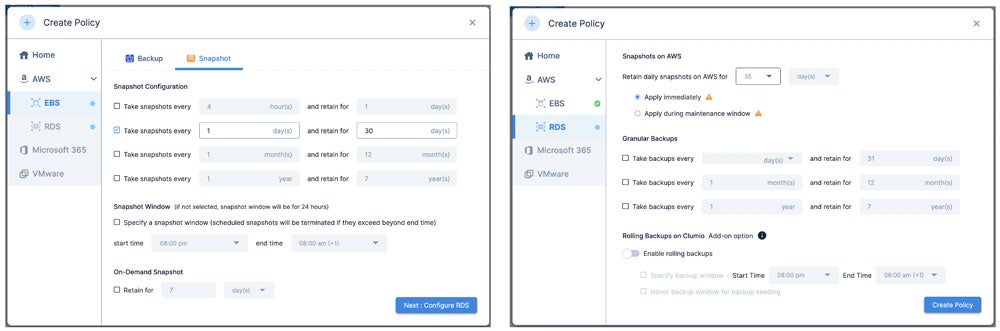
For example, a manufacturer would likely identify production systems as a critically vital application, while a financial institution might focus on their trading or core banking applications. In all cases, however, any application that is vital to supporting critical operations must be documented and analyzed.

Once you’ve identified your critical applications, it’s also essential to examine dependencies between them. This includes examining the infrastructure and hardware components required for each application’s proper functioning.

It is recommended to consider dependency tracking even beyond primary layers since a change at the second level of dependencies still may have secondary effects that can cascade to critical applications.

To investigate these dependencies further, system analysts often used flowcharts to detail the expected workflow or data movements between applications. By visualizing the interconnectivity between different systems, it becomes easier to prioritize recovery procedures and implement more comprehensive resiliency measures.
After carefully analyzing your organization’s critical systems and dependencies between them, you’ll be well-prepared to select suitable disaster recovery technologies in our next section.

Implementing and Improving RTO Strategies

Once you have calculated your organization’s Recovery Time Objective (RTO), it is crucial to implement and improve strategies that will help you achieve the desired recovery time. One of the key components of implementing an efficient RTO strategy is ensuring that all stakeholders understand their respective roles during a disaster or crisis.
It is essential to undertake continuous training and education for both employees and IT staff on disaster recovery procedures and plans. Simulations can be conducted periodically to ensure that everyone understands the procedures, as well as to test the efficacy of systems, technologies, and personnel.

Additionally, regularly reviewing the effectiveness of RTO strategies can reveal areas requiring improvement. It is essential always to seek ways to improve and make available more effective backup solutions. This could involve a shift in the existing technology, updating software or conducting regular hardware upgrades.
One company based in New York City learned this lesson after storms caused severe flooding of data centers within their region. Power outages resulted in catastrophic data loss, including losing our clients’ vital information stored in storage devices.

In response, we scaled up our cloud-based infrastructure services, ensuring our clients could continuously access data backups remotely should anything go wrong. With strict privacy policies and compliance requirements for storage regulations adhered to by our team of experts, we gave our clients peace of mind knowing that their critical business operations were secure.
Evaluating backup data can also give insight into additional improvements required on top of existing strategies. If specific applications are taking too long to back up regularly, upgrading them using modern infrastructure with higher capacity might be necessary.

Another way to enhance your RTO strategy would be by implementing automation tools which allow IT teams quickly and efficiently respond to emergencies without interrupting regular productivity. In addition, automating repetitive or predictable tasks can free up time for IT professionals to focus on more complicated aspects such as monitoring software performance and conducting regular drills.

Selecting Suitable Disaster Recovery Technologies

Selecting the best disaster recovery technologies for your unique business needs is vital. Business-critical applications require a recovery time objective that favors speedy applications, while other non-critical applications might have a higher RTO.

When looking for the perfect disaster recovery technology, you’ll need to consider aspects such as security, costs, scalability, and your organization’s technological capabilities. Cloud-based services are increasingly popular due to their accessibility, scalability, and low capital investment costs.
Amazon Web Services (AWS) is one cloud provider used by several major companies such as Airbnb and Netflix. With AWS, organizations can deploy recovery plans in multiple zones and regions to ensure redundancy in case of disasters or data outages.

Another available technology option is synchronous replication between sites. This requires having replicate data centers combine with failover settings that minimize disruptions during a societal breakdown. Both software-defined WANs (Wide Area Networking) and Fiber connections are viable options to synchronizing replicated data centers to ensure near-zero RTO periods.
An important debate revolves around whether to opt for hot or cold standby sites against an essential application failover in case of a disaster. A hot site refers to a ready-to-go backup center that mirrors both data operations and infrastructure; it allows for instant resumption of normal operations but might incur higher costs. A cold site on the other hand requires more preparation before switches can happen however with less expense attached.

By identifying crucial applications coupled with careful zone and region selection across diverse data centers, selecting suitable disaster recovery technologies will overall be beneficial regardless of which solution is chosen.

  • Selecting the best disaster recovery technologies for your unique business needs is crucial, and there are several options available to meet different recovery time objectives. Cloud-based services, such as AWS, offer accessibility, scalability, and low capital investment costs. Synchronous replication between sites can minimize disruptions during a societal breakdown, while software-defined WANs and fiber connections can ensure near-zero RTO periods. Choosing between hot or cold standby sites depends on the level of preparedness and cost considerations. Overall, identifying critical applications and carefully selecting suitable disaster recovery technologies across diverse data centers can significantly benefit any organization.

Monitoring and Adjusting RTO Over Time

Once you have calculated your Recovery Time Objective (RTO) and implemented strategies to achieve it, your work is not yet over. Monitoring and adjusting your RTO will ensure that it remains relevant and effective in mitigating the effects of unexpected disasters or failures.

Let’s say that a few months after calculating your RTO and implementing recovery strategies, you experience a major data breach that takes down your critical systems for several hours. This incident could reveal weaknesses in your RTO plan and requirements, leading to necessary adjustments for future readiness. By analyzing the data from the incident, you can determine if the RTO needs to be adjusted based on factors like the severity of the disaster or failure or if new technologies would better facilitate data restoration.
As technology constantly evolves, so do the tools available for recovering critical data. Hence, IT departments need to remain up-to-date on newer alternatives or enhanced version of existing technologies that may address the potential gaps in their current RTO plan. An excellent way to monitor advancements in this industry is by attending technology conferences or webinars that explain emerging trends and give organizations an opportunity to network with industry experts.

On the other hand, some organizations might argue that monitoring RTOs is not necessary as long as their initial calculations are robust enough to cater for all eventualities. However, this argument overlooks the fluid nature of technological systems where things could change as quickly as an overnight software update or hack tool emerging in criminal circles.

Monitoring and adjusting your RTO is similar to driving a car. Once you set out on the road, you don’t just settle down and forget about caution altogether because you believe everything went well at the start. A vigilant driver continuously monitors their environment by regularly checking mirrors and avoiding hazards as they appear along their path. Any sudden changes on the road like a blown tire or engine trouble will require quick thinking and new strategies, much like how IT organizations must adapt quickly to emerging security threats or IT failures.

So there you have it, monitoring and adjusting RTO over time is crucial for all organizations’ disaster recovery plans. By being vigilant in paying attention to potential threats and keeping track of technological advancements, you can ensure that your system remains robust and effective in the long run. Remember, recovery does not end after the implementation phase, for an efficient plan should account for any dynamic changes that might occur in an ever-evolving technological landscape.

What role does technology and infrastructure play in achieving desired RTOs?

Technology and infrastructure are crucial aspects in achieving desired RTOs. The right technology and infrastructure can help businesses recover faster from potential downtime, lessening the negative impact on their operations, customers, and bottom line.

For instance, implementing a robust backup and recovery system that leverages cloud computing technologies can enable organizations to restore important data or applications in a matter of minutes. Additionally, having a resilient IT infrastructure with redundant systems, automated failover processes, and disaster recovery plans can significantly reduce RTOs.

According to a recent study by Veeam Software, 84% of companies reported that they experienced downtime events in the past year. Of those that experienced such events, 33% lost access to their critical systems for an hour or more. Furthermore, research suggests that unplanned downtimes can cost businesses up to $5600 per minute.

In conclusion, technology and infrastructure play an essential role in not only achieving desired RTOs but also minimizing business risks associated with downtime events. By investing in the right technological tools and infrastructure solutions, businesses can drastically improve their operational resiliency and minimize the potential financial losses caused by unplanned outages.

How does RTO differ from Recovery Point Objective (RPO)?

Recovery Time Objective (RTO) and Recovery Point Objective (RPO) are two critical metrics that organizations must take into account when designing their disaster recovery plans. While some people may use these terms interchangeably, they are not the same thing.

In short, RTO defines the length of time an organization can afford to be without a particular system or application before it starts to suffer significant financial losses or other negative consequences. On the other hand, RPO specifies the maximum amount of data that an organization can afford to lose as a result of a disruption before it begins to experience significant damage.
For example, if a company has an RTO of two hours, it means that it can only tolerate up to two hours of downtime before suffering severe consequences such as losing customers or revenue. On the other hand, if an organization has an RPO of one hour, it implies that it can only afford to lose up to one hour’s worth of data before experiencing significant damage.
To put things into perspective; according to a study conducted by IBM, every minute of unplanned downtime costs enterprises around $8,851 on average. Furthermore, research from IDC suggests that the average cost of downtime for critical applications is approximately $100,000 per hour.

Therefore, setting realistic RTOs and RPOs for your organization is crucial in minimizing downtime and avoiding financial losses. However, keep in mind that these metrics should also align with your business goals and needs since overly aggressive objectives could be difficult to achieve and maintain without overburdening your resources.

What factors determine an appropriate RTO for a business or organization?

Determining an appropriate Recovery Time Objective (RTO) for a business or organization involves considering several factors. The RTO should be determined based on the potential impact of system downtime and how rapidly the organization needs to resume operations. Some of the factors that determine an appropriate RTO include:

  1. Business Impact Analysis (BIA) – A BIA helps identify critical systems, data, and applications that are essential for business continuity. By prioritizing these aspects, organizations can develop recovery plans with specific RTOs that align with their importance.
  2. Industry Standards – Certain industries such as healthcare or financial services have stricter regulatory requirements that dictate specific RTOs for protecting sensitive data and ensuring uninterrupted operation.
  3. Financial Implications – According to a study by the Ponemon Institute, the average cost of data center downtime has risen to $9,000 per minute in 2021. Therefore, an organization’s financial situation plays a significant role in determining an appropriate RTO as it impacts both short-term revenue loss and long-term reputation damage.
  4. Technology Infrastructure – The RTO should be based on the organization’s technological capabilities, including hardware, software, and network infrastructure. This includes assessing redundancy levels of IT systems and ensuring backup solutions are available to minimize recovery time.

In summary, determining an appropriate RTO requires understanding the potential impact of system downtime on your business operations, analyzing your critical systems and data, and balancing financial implications with technology infrastructure capabilities. By taking a proactive approach towards disaster recovery planning, businesses can minimize downtime while ensuring seamless business continuity during unexpected failures or disruptions.

What are some common mistakes businesses make when establishing RTOs, and how can they be avoided?

Establishing a recovery time objective (RTO) is crucial for businesses to plan and prepare for disasters, cyberattacks, and other potential disruptions. However, there are some common mistakes that businesses make when determining their RTOs.

One of the most significant mistakes is setting an unrealistic RTO. According to a survey by IDG, 28% of IT professionals admit to setting unachievable RTOs. Setting an RTO without considering the resources available or testing the plan can lead to downtime, loss of revenue and damage to reputation.
Another common mistake is not reviewing or updating the RTO regularly. As businesses grow and technology changes, so do the potential risks and required solutions. The Disaster Recovery Preparedness Council reports that 60% of organizations have not updated their disaster recovery plans in over a year, leading to out-of-date and ineffective plans.

To avoid these mistakes, businesses need to conduct risk assessments, test their disaster recovery plans regularly and consult with experts in business continuity planning. It’s essential to establish an achievable RTO based on the needs and capabilities of your organization. A realistic plan will allow you to recover quickly while minimizing costs.

In summary, avoiding the common mistakes of setting unrealistic RTOs or failing to update them regularly requires ongoing preparation, planning, and consultation with disaster recovery experts within organizations.

How can businesses minimize their RTO in the event of a disaster or downtime?

Businesses can minimize their Recovery Time Objective (RTO) by implementing the following strategies:

  1. Establish a comprehensive disaster recovery plan: A well-documented plan reduces confusion and helps to restore systems quickly. According to a study by Gartner, only 35% of small and medium-sized businesses have a disaster recovery plan in place.
  2. Invest in resilient infrastructure: Robust IT infrastructure with multiple redundancies, backup generators, and power sources ensures business continuity even in the event of an outage.
  3. Practice regular backups: Regular backups mean that data is always up-to-date and available when needed. 60% of small businesses close down within six months of experiencing significant data loss without proper backup solutions
  4. Adopt cloud-based solutions: Cloud-based solutions offer flexibility and scalability that traditional on-premises solutions lack, providing faster recovery times according to 95% of surveyed IT professionals.
  5. By implementing these measures along with others tailored to their specific industry and business needs, companies can ensure minimal RTOs during disasters or downtimes, minimizing potential losses to revenue and reputation alike.

Meet or Exceed Your RTOs with Clumio

Disaster recovery planning is essential for enterprises of all sizes looking to ensure business continuity during malicious attacks, downtime, and disruptions to infrastructure. Good data backups and a well-defined recovery process are critical elements of this planning.

Having a viable RTO—and the ability to meet or exceed the RTO—is a vital component to protecting both your business and its customers.
As a cloud-native data protection backup-as-a-service platform, Clumio’s industry-leading rapid recovery capabilities provide enterprises with quick and reliable data restores to help ensure business continuity in the face of downtime to critical infrastructure.

By providing a seamless way to restore an entire instance as well as granularly recovering individual files, records, or mailboxes, Clumio optimizes data recovery to easily meet or beat your existing RTOs.

Data Protection Essentials: RTO vs. RPO
Learn the data protection essentials: the difference between RTO (Recovery Time Objective) and RPO (Recovery Point Objective) for effective backup and recovery.

What is RPO? The Importance of Recovery Point Objective in Your Business Continuity Plan
Learn why Recovery Point Objective is vital to an enterprise’s business continuity plan in today’s risk-filled environment where threats like malware and ransomware are now commonplace. Implementing effective data backups and setting recovery objectives will help secure your business’s future.

Exploring Cloud Backup Options: A List of Considerations
Examine your available options for cloud backup and learn why a cloud-native solution specifically designed for the cloud is the best choice for everything from ransomware protection to faster data recovery and easier compliance. This is particularly important for businesses and organizations with complex network environments and specific requirements.

The Role of Disaster Recovery in a Business Continuity Plan for Businesses and Organizations
Read about the key role disaster recovery plays in a business continuity plan and learn why your choice of cloud backup can affect the speed of recovery.

How the Right Cloud Backup Solution Enables Faster Disaster Recovery across Diverse Network Environments
When a disaster event (such as a ransomware attack) strikes, disaster recovery planning is paramount for businesses and organizations operating in various network environments. Learn about the key capabilities a cloud backup solution should provide to enable faster disaster recovery.

What Is a Data Retention Policy?
Learn the basics about data retention policy and discover how the right cloud backup can simplify your compliance while securing backup data, catering to the distinct needs of businesses and organizations in different industries.

More related posts


Thumbnail_Blog-Clumio-Chat-2026

Meet Clumio Chat: An AI Assistant to Help Evaluate Cloud-Native Data Protection

Read more about Meet Clumio Chat: An AI Assistant to Help Evaluate Cloud-Native Data Protection
Thumbnail_Blog-Clumio-Fedramp-2026

Clumio Advances Cloud-Native Cyber Resilience with FedRAMP® Milestone

Read more about Clumio Advances Cloud-Native Cyber Resilience with FedRAMP® Milestone
Thumbnail_Blog-Lateral-Access-2026

Private Cloud Data Security Technical Guide

Read more about Private Cloud Data Security Technical Guide