Skip to content

One of the most essential parts of a robust and ultimately effective business continuity plan is the disaster recovery plan. After all, a business may do all it can to protect itself from a disaster event—such as a ransomware attack, a cloud outage, or corrupted data—but it still needs a failsafe plan for how it will restore data and workloads in the event of any disruption that nevertheless occurs.

What is Disaster Recovery?

Although “disaster recovery” is a term often used interchangeably with “business continuity,” it is actually a subset of business continuity management that mainly involves restoring crucial data and operations while minimizing any downtime caused by a disaster event.

Having a disaster recovery plan in place is essential for any enterprise. Without one, the aftermath of a disaster can spiral out of control and leave a business vulnerable to permanent data loss and disruption to operations that eventually affect everything from revenue to customers.

Cloud Backup and Optimizing Disaster Recovery

An enterprise’s disaster recovery plan should include a way to identify all mission-critical data that should be prioritized during a restore, along with a way to quickly recover and restore lost data from backups — all while still keeping essential operations afloat during recovery. This is in addition to identifying the suitable number of backups needed to meet the recovery point objective (RPO) while avoiding excessive costs from unneeded backups creation and storage.

This all starts with using cloud backup-as-a-service to continually replicate and store enterprise data. Here are three disaster recovery capabilities to look for in a cloud backup-as-a-service solution that will provide profound advantages during disaster recovery:

Incremental Forever Backup

Incremental forever backup is a type of incremental backup that uses a method called changed block recovery. This streamlines the restoration process, saving IT teams from having to go through backups and figure out which copies need to be restored in order to recover the most current data.

Incremental forever backup expedites the restoration process by restoring only the latest versions of blocks that belong to a restored backup, resulting in significantly faster restores.

Granular Recovery

During disaster recovery, the actual speed of data restoration is at the core of an organization’s RTO. However, during recovery, some data is more important than other data — particularly the mission-critical data and processes that the organization needs to remain operational while full recovery is in progress. Restoring an entire instance can be time-consuming and may put business continuity at risk.

Granular recovery capability is the solution to this glaring issue, as it enables IT teams to initiate both file- and record-level recovery from a single pass backup operation instead of waiting on a full instance restore. This makes it possible to identify and prioritize specific mission-critical data and workloads to keep essential processes and operations functional while drastically speeding up recovery.

Flexible Recovery

Flexible recovery is another beneficial capability to have in your disaster recovery plan via your cloud backup solution. With flexible recovery, you can recover to any account or region that has not been compromised by the disaster event, and quickly resume operations.

Industry-Leading Disaster Recovery with Clumio

Built in the cloud, Clumio supports optimized business continuity management and disaster recovery with capabilities such as granular recovery, incremental forever backup, flexible recovery, and more. Clumio’s industry-leading rapid restore capabilities provide enterprises of all sizes with lightning-quick data restores that can maintain and support business continuity in the face of a disaster event.

Along with optimized disaster recovery features, Clumio also provides:

  • Instant backups of AWS data from any region across your entire organization
  • Protection from ransomware and other malicious attacks with air-gapped backups
  • Simplified data compliance with global policies
  • Flexible pay-as-you-go consumption model
  • Cost-savings via in-depth insights into enterprise cloud spend

Clumio is the industry’s leading innovator for AWS cloud backup.

More related posts


888×500-blog.8

Demystifying SOC 2 Data Protection Requirements

Read more about Demystifying SOC 2 Data Protection Requirements
Thumbnail_Blog-What-is-Resops-2026

What Is ResOps – and Why Cyber Resilience Needs It

Read more about What Is ResOps – and Why Cyber Resilience Needs It
Thumbnail_Blog-Playbook-2026

Prove It Before You Need It: The Playbook I Wish I’d Had 10 Years Ago

Read more about Prove It Before You Need It: The Playbook I Wish I’d Had 10 Years Ago

Cybersecurity Awareness Month is here and, as you can imagine, this topic is always part of our conversations here at Commvault and especially in my role as Chief Information Security Officer.  

Protecting our customers’ data is core to who we are as a company.    

We all know that data has never been more valuable, nor more vulnerable, than it is in today’s digital landscape. Organizations face an increasingly turbulent data environment with cyberattacks increasing year over year. That’s why it’s so important for us to be more proactive than ever – we’ve done this by deploying technologies like Metallic ThreatWise, next-generation cyber deception that immediately engages and surfaces threats the moment they happen, but we also do it by empowering our employees. We discuss data protection, recovery, and ransomware with our partners and customers every day, but it’s crucial that our employees understand that they are the first line of defense in mitigating Security Risks. 

As we look inside Commvault at how we’re talking about this with our Vaulters, creating a culture of continual education and conversation on cybersecurity topics is integral to our security strategy. We recently completed our annual Security Training, which helps us reinforce the security posture of our company and empowers our Vaulters to embrace their role as the first line of defense when it comes to cyber threats. It is our top priority to ensure our teams know how to identify, mitigate, and respond to security risks that could potentially jeopardize Commvault, our data, and impact our stakeholders. Commvault is proud to be a 2022 Champion for Cybersecurity Awareness Month and over the next few weeks we’ll be providing our Vaulters with new resources and learning opportunities on this very important topic.   

And outside the walls of Commvault, we certainly remain focused on cybersecurity. We’re continuing the conversation at Connections, our cloud data management experience. Join me as I moderate our session on Ransomware Retrospective: Supporting the Recovery, one of three Fending Off Ransomware solutions tracks that will be offered during our event. Join us to hear real customer recovery stories from our Commvault® Support & Services Team as they share the good, the bad, and the ugly. Learn why some recoveries went well and why others did not. Take advantage of this up close and personal interaction with the Commvault® Support & Services Team, which has helped organizations recover quickly and maintain a state of recovery readiness and steady response. The importance of data protection strategies and cybersecurity awareness will only continue to grow – make sure your business, and employees, are set up for success this month and beyond. 

More related posts


888×500-blog.8

Demystifying SOC 2 Data Protection Requirements

Read more about Demystifying SOC 2 Data Protection Requirements
Thumbnail_Blog-What-is-Resops-2026

What Is ResOps – and Why Cyber Resilience Needs It

Read more about What Is ResOps – and Why Cyber Resilience Needs It
Thumbnail_Blog-Playbook-2026

Prove It Before You Need It: The Playbook I Wish I’d Had 10 Years Ago

Read more about Prove It Before You Need It: The Playbook I Wish I’d Had 10 Years Ago

What is a Disaster Recovery Plan Template?

Disaster recovery is a subcomponent of a business continuity plan. It focuses on restoring core operations while minimizing or avoiding downtime caused by a disaster event. In today’s data-centric business environment, the IT portion of a disaster recovery plan is typically the heart of a modern business continuity plan. It’s intended to ensure core operations remain online when a disaster event — such as a ransomware attack, natural disaster, or prolonged power outage — threatens the interruption of business continuity.

Many organizations use a disaster recovery plan template to ensure they account for every last element when creating their plan. This document covers aspects that can range from keeping power on to secondary lines of communication and ensuring IT systems remain operational.

Below, we’ll look at perhaps the most important part of a disaster recovery plan template for organizations that have migrated their data and workloads to the cloud:cloud backup.

How Cloud Backup Fits into a Disaster Recovery Plan Template

The IT portion of a disaster recovery plan is primarily focused on recovering and restoring the mission-critical data and workloads needed to ensure business continuity. For example, if your business has experienced a ransomware attack and lost access to its primary data, the disaster recovery plan outlines the steps needed to restore that data so core operations can continue.

If your organization has migrated to the cloud, a cloud backup solution is the ideal method to facilitate a restore since it can leverage the scale and elasticity of the cloud. The cloud backup solution allows you to automatically back up data on a customized schedule and then store the data. Should data recovery be required, the solution can restore the data from the most recent backup.

It’s crucial to note that data can only be recovered and restored if there’s a valid backup copy to restore from, making the security of the backup data paramount. If your backup data copy is unsecured and exposed, you are risking your ability to recover the data. Plus, since business continuity is time-sensitive, the disaster recovery plan should be able to restore the most important data and workloads first so your most essential operations and processes can continue unhindered while a full restore completes.

Therefore, an effective disaster recovery plan template for a cloud-native organization should include:

  • A viable cloud backup solution
  • A way to ensure the security of the backups
  • A way to identify and prioritize the mission-critical data needed to ensure business continuity

However, not all cloud backup solutions are capable of checking all these boxes. The cloud backup tool you choose will directly affect your organization’s disaster recovery abilities.

Achieve Secure Cloud Backup and Rapid Disaster Recovery with Clumio

Clumio’s secure cloud backup platform optimizes disaster recovery with features designed to streamline data restoration—enabling an organization to meet or exceed its recovery time objective (RTO) during a disaster event.

Clumio safeguards backup copies by storing them in an encrypted, air-gapped backup solutionoutside of the primary account — meaning if your primary data is accessed or compromised, the backup remains safe. When data restoration is needed, Clumio’s granular and flexible recovery capabilities can quickly identify and rapidly restore the specific mission-critical data and applications needed to maintain business continuity while a full recovery completes.

Cloud backup is the key to a successful disaster recovery plan template. Learn why Clumio is the industry’s leading innovator for cloud backup and rapid disaster recovery by scheduling a demo today.

More related posts


888×500-blog.8

Demystifying SOC 2 Data Protection Requirements

Read more about Demystifying SOC 2 Data Protection Requirements
Thumbnail_Blog-What-is-Resops-2026

What Is ResOps – and Why Cyber Resilience Needs It

Read more about What Is ResOps – and Why Cyber Resilience Needs It
Thumbnail_Blog-Playbook-2026

Prove It Before You Need It: The Playbook I Wish I’d Had 10 Years Ago

Read more about Prove It Before You Need It: The Playbook I Wish I’d Had 10 Years Ago

Our value – We Connect – is a guiding principle for my day-to-day here at Commvault.

Since I joined Commvault seven years ago, I’ve been very fortunate to work with a group of incredibly motivated and hardworking Vaulters.

I first joined Commvault as a Digital Project Manager on the Marketing team, where I assisted the digital marketing team with the planning and execution of multi-channel campaigns. When we incubated Metallic in 2019, I was recruited to join the team. It’s crazy to think that back then, the Metallic team was a small group of agile, scrappy Vaulters in a start-up culture creating and building our new software-as-a-service offering. And now, more than three years later, it’s grown to a $50 million ARR business for Commvault.

Now, as Director of Program Management for Metallic, I’m primarily responsible for managing the overall roadmap, timelines, and cross-functional coordination across the entire Metallic team. With a SaaS business, all team members—from our engineers to our marketers—need to be connected to create a flawless customer experience. My program management team and I drive communication and ensure that all teams have what they need to deliver innovative solutions, campaigns and enhanced customer experiences.

So much of my job is connecting different people and teams to each other, and I have the privilege of seeing first-hand the benefit of our collaboration to deliver results efficiently. Most recently, Commvault acquired TrapX and launched Metallic® ThreatWise™, a newly-available data security service that provides customers with early threat detection. This is just one example of how we bring together smart people to solve tough problems for our customers—and we have fun doing it!

If you’re looking to learn more about what it’s like to work at Commvault, check out this recent blog from David to hear his perspective!  

More related posts


888×500-blog.8

Demystifying SOC 2 Data Protection Requirements

Read more about Demystifying SOC 2 Data Protection Requirements
Thumbnail_Blog-What-is-Resops-2026

What Is ResOps – and Why Cyber Resilience Needs It

Read more about What Is ResOps – and Why Cyber Resilience Needs It
Thumbnail_Blog-Playbook-2026

Prove It Before You Need It: The Playbook I Wish I’d Had 10 Years Ago

Read more about Prove It Before You Need It: The Playbook I Wish I’d Had 10 Years Ago

With today’s announcement around Metallic ThreatWise Cyber Deception Service, Commvault is changing the game when it comes to addressing security threats including ransomware. But our innovations in enhancing data security don’t stop there. We’ve also recently released Commvault Platform Release 2022E, and with that release come additional enhancements to help our customers better protect their data. This new release introduces several new capabilities to simplify data management – in this blog, I’ll focus on the new data security additions in our new release.

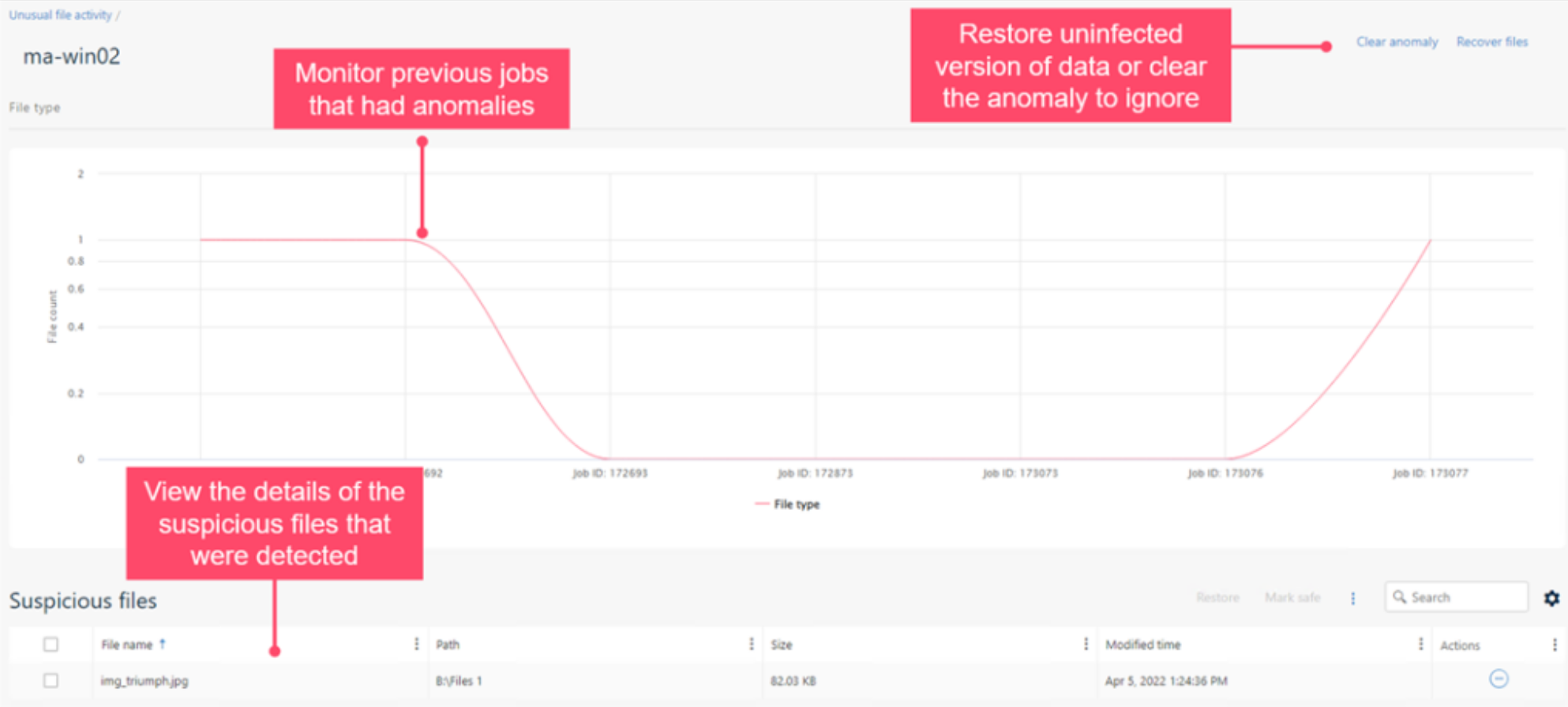
A Zero Loss Strategy is designed to help protect you from ransomware attacks and is anchored on the pillars of end-to-end data visibility, broadest workload protection, and faster business response, built on the foundation of Zero Trust principles. End-to-end data visibility ensures that you catch threats before they impact your data – in addition to Metallic ThreatWise for early detection through cyber deception, we have also expanded our file anomaly framework to detect malicious applications that may evade traditional detection methods by posing as safe file types.

Deeper insights into suspicious file activity yield better detection and faster responses to potential threats to your data


This feature drives faster business response with immediate alerting of suspicious activity, along with automatic, efficient data recovery using clean versions from unaffected backups. Not just that – we’ve also expanded our data governance capabilities to now profile object storage for Azure, AWS and GCP, eliminating another common area of data leakage.

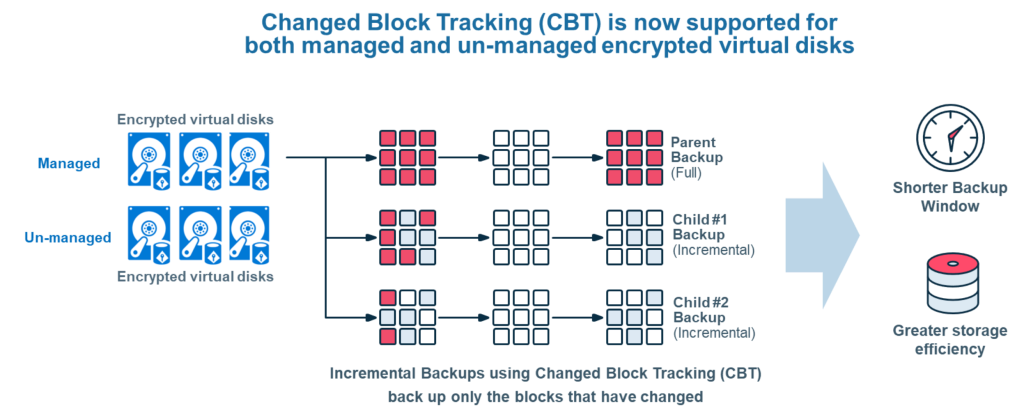
Another enhancement we’ve added is Changed Block Tracking (CBT) support for Azure Disk encryption. CBT improves backup performance while lowering backup costs, by consuming less storage and bandwidth for incremental backups. Historically, however, the ability to perform encryption while using CBT was limited, forcing a tough customer choice between security or cost savings. Working closely with Microsoft, we are excited to now introduce CBT efficiencies with Azure Disk encryption for managed and unmanaged encrypted disks. No longer do you need to make a choice between security, performance and cost efficiencies!

Last but not the least, I am excited to share that we have now achieved WORM-compliant Sec17a certification for Commvault Grid, adding to our already rich list of security certifications including FIPS 140-2, FedRAMP High In Process – In PMO Review ready and more, and rounding out Commvault Grid immutable file system capabilities.

These are just some of the new Data Security capabilities available in Commvault Platform Release 2022E, a release that’s packed with new features and innovation, reflecting on our continued investment in Intelligent Data Services.

For more information on this release, check out this page and stay tuned and we’ll be discussing more of the exciting new updates in Commvault Platform Release 2022E at our virtual event, Connections on Nov 2/3.


More related posts


888×500-blog.8

Demystifying SOC 2 Data Protection Requirements

Read more about Demystifying SOC 2 Data Protection Requirements
Thumbnail_Blog-What-is-Resops-2026

What Is ResOps – and Why Cyber Resilience Needs It

Read more about What Is ResOps – and Why Cyber Resilience Needs It
Thumbnail_Blog-Playbook-2026

Prove It Before You Need It: The Playbook I Wish I’d Had 10 Years Ago

Read more about Prove It Before You Need It: The Playbook I Wish I’d Had 10 Years Ago

On September 22, Commvault will be presenting live from San Jose, as part of Cloud Field Day 15. 

For the uninitiated, Cloud Field Day is part of the popular “Field day” series, which also includes Tech Field Day and Security Field Day. 

Hosted by Stephen Foskett, delegates from cutting edge companies, including Commvault, share their latest product news and innovations live with a group of hand-picked influencers.  A lively debate usually results, which also takes place across Social Media.

This Cloud Field Day, we’ll be taking the delegates through the very latest in data security technology including a first deep look at Metallic ThreatWise, a newly available data security service which provides customers with much needed early threat detection.  Highlights from Commvault’s recently released Platform release 2022E will also be included to showcase the breadth of Commvault’s Intelligent Data Services.

We’ll be live streaming the session right here on this blog as well as across Commvault’s LinkedIn Channels.

See you on Thursday, 22nd September at 1:30pm PT. Join in the Social Media conversation by using #CFD15.  You don’t want to miss it.

More related posts


888×500-blog.8

Demystifying SOC 2 Data Protection Requirements

Read more about Demystifying SOC 2 Data Protection Requirements
Thumbnail_Blog-What-is-Resops-2026

What Is ResOps – and Why Cyber Resilience Needs It

Read more about What Is ResOps – and Why Cyber Resilience Needs It
Thumbnail_Blog-Playbook-2026

Prove It Before You Need It: The Playbook I Wish I’d Had 10 Years Ago

Read more about Prove It Before You Need It: The Playbook I Wish I’d Had 10 Years Ago

Microsoft 365 is an essential component of today’s enterprise data environment. Still, many organizations fail to include it in their data protection plan. This is partly due to the misconception that cloud service providers are responsible for both administering the solution and protecting the data created and stored within it. However, this is not the case.

Your data, your responsibility

Microsoft provides a highly resilient platform and goes to great lengths to secure data residing within its application. However, like many cloud service providers, they follow what is known as the shared responsibility model, where they are responsible for maintaining the uptime, availability, and access to the solution, while the customer is responsible for protecting the data created and stored within that solution. And now, more than ever, your Microsoft 365 data must be protected and recoverable in the face of emerging threats.

It’s no secret that cyberattacks are on the rise, and SaaS applications are not immune. And there are other potential risks for the data beyond the risks of ransomware. Accidental deletion of data, network vulnerabilities, and internal breaches are all causes of data loss in SaaS applications.

Protection measures to prevent data loss go beyond understanding the shared responsibility model. They require purpose-built tools to help you safeguard your data from today’s threats.

You need dedicated data protection and recovery

While Microsoft offers native controls for data replication, today’s businesses need long-term retention, data separation, and tools for SLA compliance and recoverability. You need a dedicated third-party backup solution that offers the essential capabilities needed to protect and secure your data.

Here are just a few components where protection from third-party backup extends beyond native capabilities to provide advanced protection from today’s threats:

  • Data Isolation
  • Extended Retention
  • Flexible Restore
  • SLA Compliance

Commvault enhances Microsoft 365 data protection

Whether you are an existing Commvault customer or looking to use Commvault in the future, we offer Microsoft 365 data protection through both Commvault Complete Data Protection and Metallic SaaS Backup, meaning you get to choose what works best for your unique business requirements.

Are you looking for a SaaS-delivered solution with rapid deployments, unlimited storage and retention included, and no additional infrastructure required? Then Metallic for Microsoft 365 is the best fit.

Looking for on-premises data protection or want to leverage your own infrastructure? Do you have specific needs for long-term retention or migration between on-premises Exchange and Microsoft 365?  Then look to on-premises protection through Commvault Complete Data Protection for Microsoft 365.

To learn more about how Commvault enhances Microsoft 365 data protection, please visit commvault.com/microsoft-365.

Learn more about Microsoft’s Shared Responsibility.

More related posts


888×500-blog.8

Demystifying SOC 2 Data Protection Requirements

Read more about Demystifying SOC 2 Data Protection Requirements
Thumbnail_Blog-What-is-Resops-2026

What Is ResOps – and Why Cyber Resilience Needs It

Read more about What Is ResOps – and Why Cyber Resilience Needs It
Thumbnail_Blog-Playbook-2026

Prove It Before You Need It: The Playbook I Wish I’d Had 10 Years Ago

Read more about Prove It Before You Need It: The Playbook I Wish I’d Had 10 Years Ago

https://play.vidyard.com/HSrWMH7cRstsFT42QdpTua.jpg

Do your teams know their roles and responsibilities during an actual cyber-attack?

Do your teams have the decision-making authority to make decisions on the fly, or do they need to hop on zoom calls to get permission to shut down servers?

Is your IT, networking, and security OP teams aligned in knowing what team is responsible for what, when to engage, and when not?

According to a recent Gartner report, multidisciplinary teams that blend technology or analytics and business domain expertise and share accountability for business and technology outcomes foster team fusion innovation for digital delivery. Fusion teams consist of business and IT staff: product owners, scrum masters, developers, and domain experts. Fusion teams help to remove friction and address companywide issues and requirements.1

A village

With so many ransomware factors, it is usually within the innocent context that someone simply clicks a link, infecting an organization’s entire network with malware. There are many considerations on how you will defend against this very prevalent threat. Defending against ransomware is a major challenge  – and no individual team can combat it on their own. It takes a well-equipped, prepared, and practiced village to deal with complex threats successfully – one that includes:

People

Being aligned with internal and external teams before, during, and after a ransomware attack is vital for speed and recovery so they can react faster and mitigate the costs associated with downtime.

Process

It is important that internal and external teams are aware of and in sync regarding their responsibilities and what processes they need to follow during a ransomware attack. Test, test, and test your process, as speed will be essential, and you don’t want to test out your process during an attack.

Technology

Follow the National Institute of Standards and Technology (NIST) Cybersecurity Framework to aid your preparation. Adopting a multi-layered security framework helps ensure your data is ready for recovery and reduces the risk of loss.

Call To Action

Data loss and the inability to recover quickly will cost your organization money and time and put your reputation and operation at risk.

  • Identify key stakeholders: determine who needs to be involved during a cyberattack.
  • Identify key assets: know what is important and what is not.
  • Conduct a tabletop exercise: proactively review and communicate your plans.
  • Postmortem and change implementation: capture areas of improvement enact those changes.

Please read our eBook Understanding Team Roles & Responsibilities in fighting ransomware to learn more.

This content has been derived from Commvault Connections 2021. Watch Dave Martin’s presentation here.


  1. Gartner, I&O Forward Leading the Next Phase of Growth, 2022

More related posts


888×500-blog.8

Demystifying SOC 2 Data Protection Requirements

Read more about Demystifying SOC 2 Data Protection Requirements
Thumbnail_Blog-What-is-Resops-2026

What Is ResOps – and Why Cyber Resilience Needs It

Read more about What Is ResOps – and Why Cyber Resilience Needs It
Thumbnail_Blog-Playbook-2026

Prove It Before You Need It: The Playbook I Wish I’d Had 10 Years Ago

Read more about Prove It Before You Need It: The Playbook I Wish I’d Had 10 Years Ago

A Few Examples of the Mandela Effect:

  • Although most people remember childhood character Curious George as being drawn with a tail, he does not have one.
  • Many people believe there is a brand of peanut butter called “Jiffy” but there is not. There’s Jif, and there’s Skippy, but no Jiffy.
  • In the iconic scene in “Silence of the Lambs,” Hannibal Lecter does not say “Hello Clarice” as many people remember.  He says “good morning.”

The Mandela Effect in the Cloud

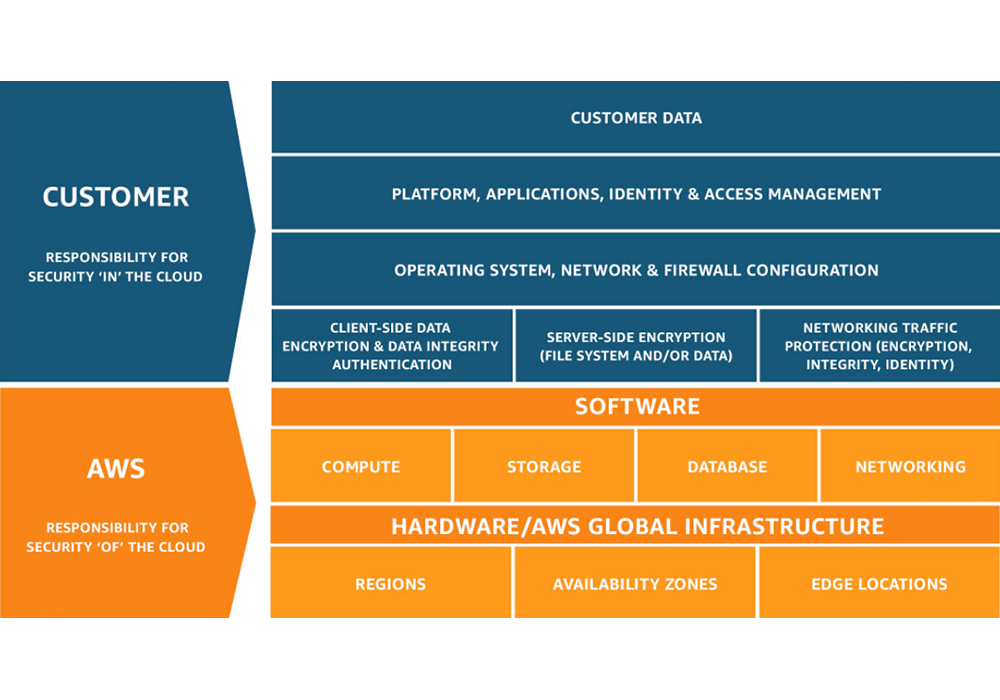
The Mandela effect is not just a pop culture phenomenon, it exists in the world of enterprise technology, too. It’s a common misconception that data stored in the cloud is automatically backed up.  The truth is that cloud providers operate on a shared responsibility model, in which the cloud provider is responsible for the security of the software, hardware and infrastructure, but not customers’ data.

Shared Responsibility Model from AWS

For example, when AWS refers to their highly durable Amazon S3 service, it’s true that the platform is incredibly durable, which means you’re unlikely to experience any trouble with their systems or infrastructure.  However, this has nothing to do with protecting your data from accidental deletions, ransomware attacks or insider threats. According to the shared responsibility model, that’s your job.

Taking Steps to Protect Your Cloud Data

Customers love working with Clumio because they get air-gapped, immutable data protection with incredibly fast time to value while SaaS simplicity ensures fast and simple ingest, cataloging, search and recovery at any scale. Clumio allows customers to automate protection of their AWS and Microsoft 365 data, saving time and resources that allow them to focus on strategic initiatives and reducing TCO compared with other options.

Don’t let data protection misconceptions leave you vulnerable.

More related posts


888×500-blog.8

Demystifying SOC 2 Data Protection Requirements

Read more about Demystifying SOC 2 Data Protection Requirements
Thumbnail_Blog-What-is-Resops-2026

What Is ResOps – and Why Cyber Resilience Needs It

Read more about What Is ResOps – and Why Cyber Resilience Needs It
Thumbnail_Blog-Playbook-2026

Prove It Before You Need It: The Playbook I Wish I’d Had 10 Years Ago

Read more about Prove It Before You Need It: The Playbook I Wish I’d Had 10 Years Ago

In this blog we will examine:

Containerization

What is a container?

  • A Container is a basic software unit that packages up code and all its dependencies so an application can run smoothly in any environment. Each container is made up of a hardware, an operating system, a container engine, libraries, and dependency’s and finally the application. Everything the application needs to run is inside the container which means it can be created and deleted quickly using automation.
    • By 2025, 85% of global enterprises will be running containerized applications in production1

Container Orchestration

  • Container Orchestration is the automation of containerized workloads. It is key when working with containers because it is what allows you to deploy the same application across different environments without the need to redesign it.

Kubernetes

What is Kubernetes (aka K8s)?

  • Kubernetes is an open-source container orchestration software designed for deploying, managing, and scaling containers. So, what does that mean? Essentially it eliminates much of the manual processes that needs to be done during deploying and scaling containerized workloads, even across various types of physical, virtual, and cloud environments.
  • According to a recent survey by the Cloud Native Computing Foundation, of the 3800 survey respondents, 96% of organizations are either using or evaluating Kubernetes2

Did you know?

  • The name Kubernetes comes Greek word κυβερνήτης (kubernḗtēs) which means pilot or helmsman therefore the Kubernetes logo is a ship’s steering wheel.  Kubernetes is often abbreviated as K8s because there are 8 letters in between ‘K’ and ‘S’
  • Kubernetes was originally developed and designed by Google Engineers and was later donated to CNCF in 2015.

How does it work?

  • Kubernetes is a concept made up of several different components, and, while there are several elements and use-cases in the implementation of Kubernetes, the main concepts to understand are: the Control PlanePods, and Nodes.
    • The Control Plane consists of elements and API processes which coordinate workloads and communications, allowing for the smooth flow of information and resource allocation across the environment.
    • Pods are the base element in Kubernetes. A Pod consists of one or more containers and are co-located on the same node.
    • A Node (also known as a minion, or worker)is a machine on which containers are deployed. Each node must run a container runtime such as Docker, CoreOS rkt, Containerd, etc. Multiple Nodes can be grouped into Clusters.

Your IT environment and Kubernetes

  • As a result of shifts in modern computing practices, users are expecting applications to be available 24/7 and developers are sometimes expected to be able to deploy new versions of the applications several times a day. Also, IT environments are increasingly more hybrid and based on multi-cloud approaches, integrating on-premises resources with public or private clouds from different suppliers. While container systems allowed developers to make software more portable and hold all of the packages needed to run a service, they were still limited by the amount of manual effort needed to provision and modify each container across an environment.
  • Kubernetes can help organizations better manage their workloads and reduce risks. Kubernetes is able to automate container management operations and optimize the use of IT resources. It even can restart orphaned containers, shut down the ones that are not being used, and recreate them.Kubernetes automates the deployment of containers without DevOps having to move all the pieces manually themselves. This allows developers to deploy new versions of specific applications on a more frequent basis and enables them to be released and updated without downtime, even across multiple environments (i.e. Dev, Test, Prod).

Benefits of Kubernetes

  • The key benefits of Kubernetes can be summarized as: reduced application development and release timeframes, optimization of IT costs, increased software scalability and availability, flexibility in multi-cloud environments, and cloud portability.
  • Portable Workloads
    • Because Kubernetes is an open source your workloads become portable take advantage of on-prem, hybrid, and multiple cloud environment— all while maintaining consistency across each environment.
  • Flexibility
    • No matter where you are running Kubernetes, it offers flexibility in hybrid and multi-cloud environments allowing operation of any of our applications in any public or private environment smoothly.
  • Automation
    • Kubernetes can automate containerized environments by acting as its operating system. It does this my automating the operation requirements of containerized workloads.
  • Scalability and Availability
    • Kubernetes can define complex containerized applications and deploy them across clusters of servers. As Kubernetes scales applications according to your desired state, it automatically monitors and maintains container health.

Kubernetes Architecture 

  • Kubernetes control plane: Also known as the master machine, is the container orchestration layer that exposes the API and interfaces to define, deploy, and manage the lifecycle of containers aswell as the nodes that hold the containerized applications. It ensures that every cluster is kept in its desired state.

The components of the Control Plane

  • API Server: The Application Programming Interface also know as API is the front end of Kubernetes. It is where clients make an initial request for an object or a collection and it determines if the request is valid and then it will process it. The API server also is what is used to transmit, create, and configure data within K8 clusters.
  • K8s scheduler: The scheduler is what watches and manages pods that are newly created and assigns them to a node so they can run on it smoothly.
  • Controller manager: Within the Control Plane there are multiple controllers, they are the control loops designed to watch the state of your cluster and make or request changes as they are needed.
  • Etcd: Is a data base where all your container storage is stored. It is a strongly consistent, distributed key-value store that holds and manages the critical information that systems need to run.
  • Cluster
    • NODE: (also known as a minion, or worker)is a machine on which containers are deployed. Each node must run a container runtime such as Docker, CoreOS rkt, Containerd, etc. Multiple Nodes can be grouped into Clusters.
    • Pod: are the base element in Kubernetes. A Pod consists of one or more containers and are co-located on  nodes.
      • This is where all of your important information is kept

Modernize with Kubernetes

  • Kubernetes makes it possible to simplify and accelerate the migration of applications from an on-premises environment to public or private clouds, offered by any provider. Applications can be migrated to the cloud through the adoption of various methodologies:
    • the simple transposition of the application, without any coding changes (Lift & Shift);
    • the minimum changes necessary to allow the application to work on new environments (replatforming);
    • the extensive rewriting of the application structure and functionality (refactoring).
  • Modernize your environment more smoothly than ever before with Kubernetes adoption. No need to ask yourself where your data is anymore, all your data is stored in one place. Kubernetes storage is based on volumes. The volumes can either be persistent or non- persistent. Inside the pods, containers request for more storage.
    • Kubernetes can be built once and then is able to be deployed anywhere. This means no matter where you build your cluster whether it is on prem or in the cloud you don’t need to rebuild the solution you just have to deploy a different cluster.

Challenge

  • Kubernetes clusters can be prone to ransomware attacks, like any other workload. In some cases, a hacker can gain access to what is inside of your pod –  potentially receiving critical information about your organization. Therefore, backing up and having data protection for your clusters is vital when it comes to moving your workloads around.

Kubernetes Backup

  • Is the process of backing up all of the components that run in a Kubernetes orchestration platform, which include all of the organizations containerized applications. Since a Kubernetes cluster has so many components, pods, nodes, control plane and volume, each of them needs a level of protection. Protection is critical for a cluster especially since organizations are relying more and more on Kubernetes. Backing up a Kubernetes cluster will ensue that the data, configurations, and the files are protected from any attack. This is why you need a solution that has the ability to back up your entire cluster.
  • The main stages of Kubernetes back up include:
    • Discovery
    • Identify resources
    • Backup
      • According to Red Hats 2022 State of Kubernetes Security Report, 93% of respondents experienced at least one security incident in their Kubernetes environments in the last 12 months, sometimes leading to revenue or customer loss3

Commvault and Metallic’s Kubernetes Backup

Commvault and Kubernetes Data Protection

  • Commvault has the ability to back up your entire cluster unlike most solutions that can only back up your containers. Commvault provides data protection for persistent storage in your stateful applications. Commvault’s solution automates back up of this data all from a single platform that increases the visibility and management capabilities of your entire environment. Our solution gives you the flexibility to migrate and deploy containers from on-prem to cloud, cloud to cloud and even back on- prem seamlessly with ease. It also offers broad support for VMs, data services and cloud services in a single platform. It is also compatible with all CNCF- certified distributions and integrated with CSI for snapshot-based backups.
  • Commvault has been recognized by the 2022 GigaOm report as a “leader and outperformer” in Kubernetes data protection for our flexible deployment architecture and single interface across multiple deployments. The report also states that our security and ransomware controls are extensive which makes it suitable for larger enterprises.

How Commvault does it

  • Commvault schedules a temporary worker pod to perform data movement. The settings specify a private container registry where you store an image that Commvault can download. It allows you to consolidate clusters, simplify cross-cluster migration, and streamline cluster lifecycle management.

Challenges before Commvault

  • Before Commvault organizations had to deal with cluster sprawls, having to manage their cluster life cycles and consolidating clusters. Commvault helps with these challenges by allowing you to migrate your Kubernetes applications to any cloud with ease.

Metallic and Kubernetes backup

  • Metallic offers VM & Kubernetes Backup. This is the only SaaS data Protection service that offers a full range of hybrid workload coverage ensuring your containers are always safe.
  • VM & Kubernetes Backup by Metallic is a solution that allows you to simply extend to containers to modernize apps with confidence all while being able to protect traditional apps. Whether you are on-prem or in the cloud, Metallic supports all Cloud Native Computing Foundation certified Kubernetes distributions such as Azure Kubernetes Service (AKS), AmazonEKS, Vmware, Rancher, and many more.
  • Metallic can protect Cloud or On-prem Databases, Source code control systems, Image registries, and Cloud-native object storage.
  • With this solutions unmatched flexibility, Ultimate Security, and Hassle-free management consider all your workloads covered.

Conclusion

Kubernetes is the future, the time is now to make sure all of your workloads are protected and have the ability to migrate safely to the cloud. Commvault is the easy choice. We were named a leader and outperformer in the 2022 GigaOm report on Kubernetes data protection because of our broad workload support, compatibility with CNCF certified distributions and extensive ransomware controls. So pack your bags, the ship is setting sail for the cloud today.

References

1. Best Practices for Running Containers and Kubernetes in Production – 4 Aug 2020 – Gartner ID G00730344 – 2. CNCF 2021, Annual Survey – 3. Red Hat 2022, State of Kubernetes Security Report

More related posts


888×500-blog.8

Demystifying SOC 2 Data Protection Requirements

Read more about Demystifying SOC 2 Data Protection Requirements
Thumbnail_Blog-What-is-Resops-2026

What Is ResOps – and Why Cyber Resilience Needs It

Read more about What Is ResOps – and Why Cyber Resilience Needs It
Thumbnail_Blog-Playbook-2026

Prove It Before You Need It: The Playbook I Wish I’d Had 10 Years Ago

Read more about Prove It Before You Need It: The Playbook I Wish I’d Had 10 Years Ago

Enterprises today are inherently heterogeneous, running applications and supporting workloads across on-prem, edge and multiple clouds. As businesses accelerate their IT transformation, this hybrid multi-cloud presence is set to further expand. It is imperative, then, that enterprise data protection and data management solutions excel in all of these areas – across on-prem, edge and multiple clouds.

Gartner Critical Capabilities report assesses these types of solutions on various key aspects such as security, efficiency, scalability and performance, Data Center ecosystem, and reporting and analytics across the key use cases of on-prem, edge and cloud. In my conversations with CIO’s, IT leaders, and architects, these are exactly the key aspects they are concerned with when architecting their data management strategy to protect their crown jewels.

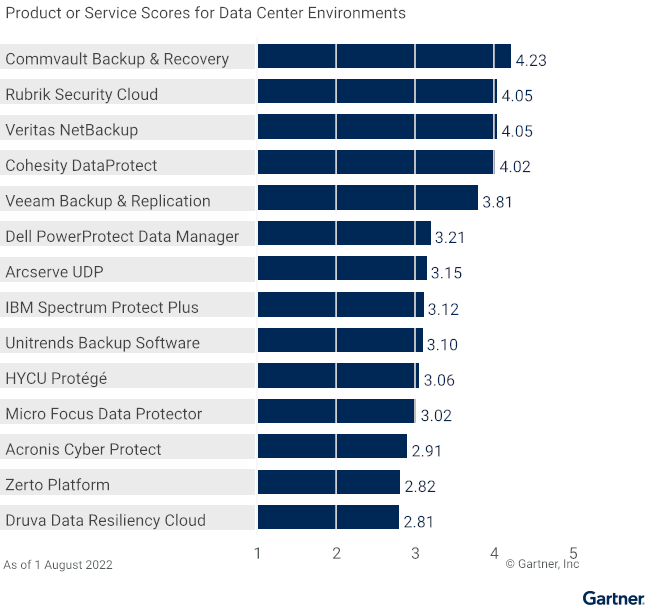
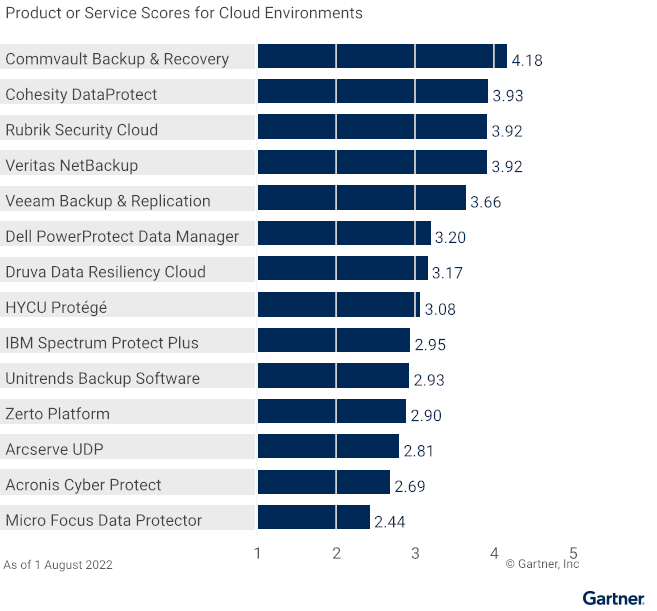
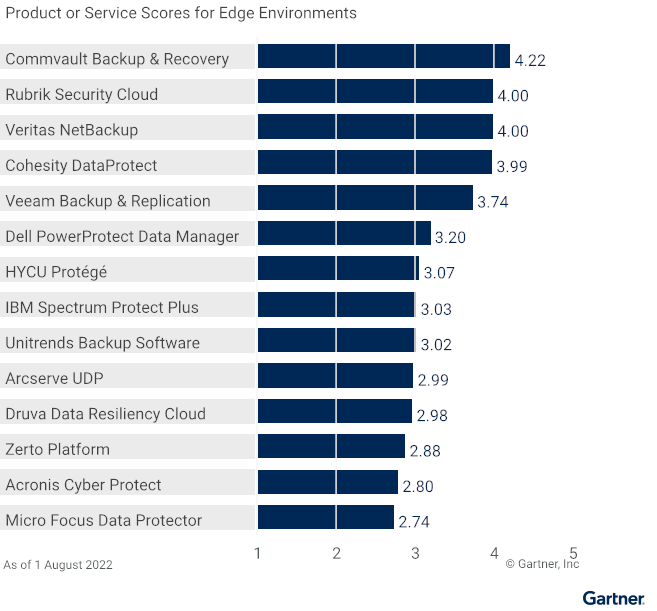
This is why we are thrilled and honored that Commvault Backup & Recovery has scored the highest in all three use cases in the 2022 Gartner Critical Capabilities for Enterprise Backup and Recovery Software Solutions: Data Center Environments (4.23/5), Cloud Environments (4.18/5), and Edge Environments (4.22/5). With the highest scores in all three use cases – for the third time in a row – we believe this is yet another validation of our commitment to be a trusted partner to our customers in protecting their data and workloads – no matter where they reside.

Data Center Environments (4.23/5)
Cloud Environments (4.18/5)
Edge Environments (4.22/5)

Enterprises are continuously evolving and expanding to meet business needs. Therefore, another critical accelerator of IT transformation is a data management solution that can flexibly evolve with the rest of IT.

“Our continuous innovation is designed with ultimate flexibility when it comes to data management – offering not only an enterprise software solution but also the ability to manage and protect enterprise data with Commvault Grid as an integrated solution or via Metallic as a cloud-delivered DMaaS solution.”


Unfortunately, flexibility and breadth are often offered at the cost of simplicity in our industry.  In contrast, Commvault breaks this paradigm with our “infinitely scalable, radically simple” approach. We bring together all management – across our broad set of supported workloads, flexible form factors and array of Intelligent Data Services – through the single experience of Commvault Command Center. This simplicity – with no compromise to flexibility and breadth – empowers customers to fast-track their business transformation aligning their data management to their broader IT strategy. As businesses modernize and transform, transitioning applications and workloads from one form factor or location to another (from on-prem to cloud, for example), we ensure they remain protected no matter where they are in this journey.

As an eleven-time Leader in the Gartner Magic Quadrant and back-to-back years with the highest scores in all three use cases in the Gartner Critical Capabilities report, we are grateful to our customers for partnering with us in this journey of continuous customer-first innovation and to our partners in building a data ecosystem with no boundaries. Our journey to solve the hard data management problems with elegant solutions continues … together with our dear customers and partners!

Gartner, Magic Quadrant for Enterprise Backup and Recovery Software Solutions, 28 July 2022, Michael Hoeck, et. Al. Gartner, Critical Capabilities for Enterprise Backup and Recovery Software Solutions, 22 August 2022, Nik Simpson, et. Al.

Gartner Disclaimer:

**Gartner does not endorse any vendor, product or service depicted in its research publications, and does not advise technology users to select only those vendors with the highest ratings or other designation. Gartner research publications consist of the opinions of Gartner’s research organization and should not be construed as statements of fact. Gartner disclaims all warranties, expressed or implied, with respect to this research, including any warranties of merchantability or fitness for a particular purpose.**

**GARTNER and Magic Quadrant are registered trademarks and service marks of Gartner, Inc. and/or its affiliates in the U.S. and internationally and are used herein with permission. All rights reserved.**

Get your copy of the 2022 Gartner Critical Capabilities for Enterprise Backup and Recovery Solutions

More related posts


888×500-blog.8

Demystifying SOC 2 Data Protection Requirements

Read more about Demystifying SOC 2 Data Protection Requirements
Thumbnail_Blog-What-is-Resops-2026

What Is ResOps – and Why Cyber Resilience Needs It

Read more about What Is ResOps – and Why Cyber Resilience Needs It
Thumbnail_Blog-Playbook-2026

Prove It Before You Need It: The Playbook I Wish I’d Had 10 Years Ago

Read more about Prove It Before You Need It: The Playbook I Wish I’d Had 10 Years Ago

Commvault’s long time partnership with Microsoft has once again given us the opportunity to offer our customers cutting edge features and functionality.  We are excited to have had the opportunity to develop this feature in lockstep with Microsoft allowing us to release our enhanced capabilities on Commvault Complete and Metallic® DMaaS simultaneously when Azure Restore Points became publicly available on July 19th 2022.

Commvault Protection for Azure Virtual Machines

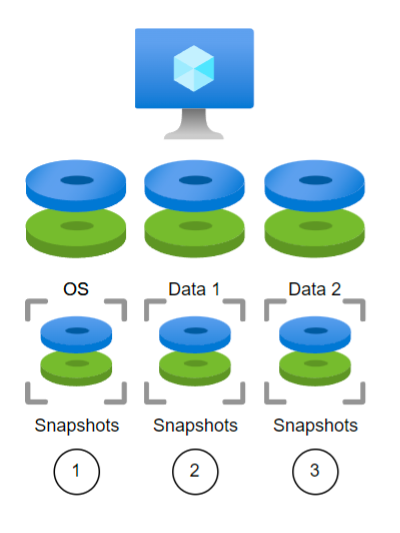
Figure 1

Commvault has always offered options for protecting Azure Virtual Machines (VM) by using snapshots or even installing software on the VM to provide Application Awareness.   Each disk resource is individually snapped and protected.  The process is serial by nature as each resource request needed to be made in series. 

In Figure 1, a backup request would need to protect the OS disk, then Data 1 disk and then Data 2. All 3 create the virtual machine and would be protected together, but their snaps may not complete at exactly the same time and additional coordination with the application layer may be needed to ensure consistency at an application level.

New Restore Point Functionality

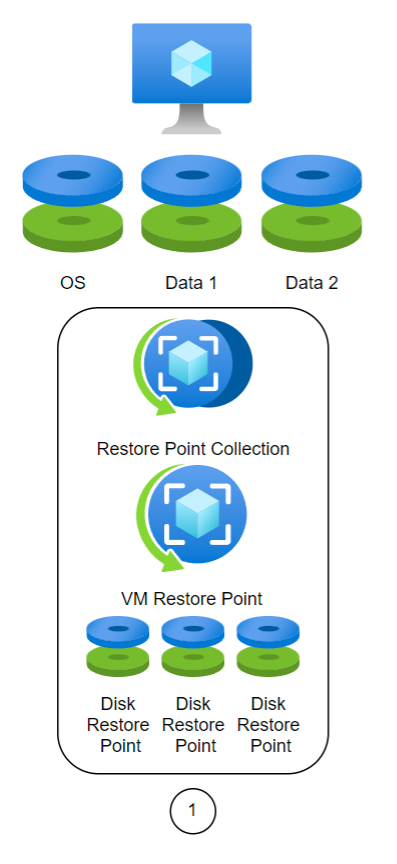
Figure 2

With Restore Points, Commvault will now have the ability to create collections of restore points across all volumes on a VM.  When doing so, the restore process is simplified, and the collection points are stored on cost efficient storage.  This is a major architectural change in data protection for Microsoft that Commvault Complete and Metallic enable with a click.

In the example in Figure 2, once a Restore Point Collection is created, the same VM would be protected as a single API call to create a Restore Point.  Every Restore Point is incremental and should complete in seconds.  All disks within the VM are consistent with the restore point automatically.  Every Restore Point will contain a Disk Restore Point for all managed disks.  The Disk Restore Point consists of a snapshot of that disk.  This reduces the restore process in this example from 3 steps to 1.  

How is it simplified? 

Leveraging the Commvault platform to orchestrate VM protection and more importantly, the recovery of VMs at enterprise scale is a critical need.  Getting away from point solutions and homebrew scripting naturally promotes growth and reduces downtime.  Being able to recover dozens or hundreds of instances with a few clicks keeps end user time from being sacrificed.

Improve resiliency while reducing tech waste

Commvault supports creating snapshots in cost audited resource groups already and automatically tags resources as they are created so that cost reporting is accurate.  Adding VM Restore Points to our portfolio now allows us to create the restore points in cost efficient and less redundant storage tiers.  It might be a minor cost difference, but at cloud scale, the billing is in the details and every improvement brings value to the solution.   There’s no tradeoff in taking advantage of Restore Points.  It simplifies and reduces cost while improving resiliency.  Azure Restore Points ensures that the applications and the operating system are consistent when creating these collections at the native instance level. 

A quick recap

Better cost efficiency, better performance, better resiliency, and a simplified design.  A resounding win!  We are excited to have had the opportunity to develop this feature in lockstep with Microsoft and prove yet again our commitment to making the latest enhancements in Azure readily available within the Commvault Intelligent Data Services portfolio of solutions.   

More related posts


888×500-blog.8

Demystifying SOC 2 Data Protection Requirements

Read more about Demystifying SOC 2 Data Protection Requirements
Thumbnail_Blog-What-is-Resops-2026

What Is ResOps – and Why Cyber Resilience Needs It

Read more about What Is ResOps – and Why Cyber Resilience Needs It
Thumbnail_Blog-Playbook-2026

Prove It Before You Need It: The Playbook I Wish I’d Had 10 Years Ago

Read more about Prove It Before You Need It: The Playbook I Wish I’d Had 10 Years Ago

The Grass is Actually Greener in the Cloud

Until very recently, many enterprises were limited by on-prem infrastructure, requiring huge data centers that had to be maintained, cooled, and secured. On top of that, the enterprise-owned server utilization rate is a measly 18%, with the majority of data centers operating at energy efficiency levels below 80%. This underutilization made on-prem ripe for disruption when the cloud came about. The cloud’s on-demand scalability provided companies the ability to optimize utilization rates without the hassle of managing, powering or cooling infrastructure. Considering the benefits, it’s not surprising that the average enterprise on-prem to cloud migration led to a 65% energy reduction and 84% carbon reduction (Accenture, The Green Behind the Cloud). Moreover, AWS is set to power all operations with 100% renewable energy by 2025, with a commitment to achieve net-zero carbon emissions by 2040. They use reclaimed or recycled water for cooling and have embodied carbon in the construction of newer data centers across the globe. And as an AWS recommended partner, Clumio is pushing the boundaries of environmentally sustainable computing with its on-demand hyper-scalable architecture.

Cloud-Native Solutions are Key to Maximize Sustainability

whether you need help protecticting your data against ransomware, meeting compliance requirements, or recovering from data loss; data backups can take up a significant amount of storage space, and increase your infrastructure footprint if done on-prem. Companies must choose carefully if they are conscious of reducing their carbon footprint from their data. Some best practices include going with a cloud-native / SaaS data protection vendor if possible, implementing incremental backups vs full system snapshots, categorizing and auto-archiving data based on criticality and usage, and most importantly, investing in a platform that is architected to scale on demand. If these concerns sound like yours, Clumio can help.

How Clumio Can Help

Clumio is a cloud-native backup solution, architected with a container-based stateless data processing pipeline that leverages efficient Lambda functions. This allows adaptability and efficient scaling to optimize usage based on your exact policies. Having this scalable compute and increased utilization rates can ultimately lead to significant carbon reduction from your data estate, in addition to significantly lower TCO (save your wallet while saving the planet).

See for yourself how the industry’s first cloud-native backup and rapid recovery solution can optimize your business’s sustainability metrics. Schedule a demo and learn how your business can be up and running with Clumio in as few as 10 minutes — no need to wait for and install new infrastructure and software.

More related posts


888×500-blog.8

Demystifying SOC 2 Data Protection Requirements

Read more about Demystifying SOC 2 Data Protection Requirements
Thumbnail_Blog-What-is-Resops-2026

What Is ResOps – and Why Cyber Resilience Needs It

Read more about What Is ResOps – and Why Cyber Resilience Needs It
Thumbnail_Blog-Playbook-2026

Prove It Before You Need It: The Playbook I Wish I’d Had 10 Years Ago

Read more about Prove It Before You Need It: The Playbook I Wish I’d Had 10 Years Ago

In this blog, you’ll learn how Commvault Grid makes implementing an immutable architecture easy as an integrated appliance or reference design for an all-in-one solution. With cyber-attacks increasing it delivers comprehensive data management across workloads to protect your data through 5 security layers. Commvault offers a hybrid of controls that work together to harden data against ransomware, cyber threats, and bad actors. 

What is an Immutable Architecture and how do organization benefit?   

Immutability is defined as the ability of any data to be maintained in a non-fungible state for a specific duration of time. Data immutability can be attained via various methods working in conjunction with each other.  An immutable architecture is a model in which no updates, security patches, or configuration changes happen “in-place” on production systems.  If any change is needed, a new version of the architecture is built and deployed into production.  

Organizations need an immutable architecture to ensure their data is safe and secure and more importantly, ready whenever they need to restore it. Immutability is a proven technique used to reduce cyber-attacks on backup data and ensure that backup copies aren’t changed in any way. 

Commvault Grid for Greater Immutability  

Commvault Grid makes it easier to implement an immutable architecture as an integrated appliance or reference design for an all-in-one solution. It delivers comprehensive data management for all workloads from a single, extensible platform. Commvault employs a multi-layered approach to protect against various threat vectors and ensure data is safe. Commvault’s immutable architecture consists of 5 layers which are:   

  • Storage I/O Controls   
  • Zero Trust AAA Controls   
  • Infrastructure Hardening   
  • Zero trust isolation and air gap  
  • Data Validation  

Commvault Grid leverages the entire Commvault software portfolio providing access to all the features, functions, and industry-leading integrations with applications, databases, public cloud environments, hypervisors, operating systems, containers and NextGen workloads. Wherever your data resides, you have the ability to view it, use it, and confidently protect it. Commvault Grid accelerates hybrid cloud adoption with an integrated solution built on a deeply layered system of controls that work together to harden data against ransomware, cyber threats, and bad actors.   


More related posts


888×500-blog.8

Demystifying SOC 2 Data Protection Requirements

Read more about Demystifying SOC 2 Data Protection Requirements
Thumbnail_Blog-What-is-Resops-2026

What Is ResOps – and Why Cyber Resilience Needs It

Read more about What Is ResOps – and Why Cyber Resilience Needs It
Thumbnail_Blog-Playbook-2026

Prove It Before You Need It: The Playbook I Wish I’d Had 10 Years Ago

Read more about Prove It Before You Need It: The Playbook I Wish I’d Had 10 Years Ago

Examples of hidden and fluctuating cloud backup costs

Egress Fees

The majority of cloud providers will allow their users to place data into the cloud without any fees. However, this does not apply when their data is retrieved from the cloud. Cloud providers typically charge what’s known as egress fees any time data is retrieved.

If your enterprise is constantly pulling its data out of the cloud—such as migrating or recovering data— you can see how the fees can add up quickly and lead to inflated costs that are nearly impossible to predict. Egress fees are considered a hidden fee since they fluctuate based on usage and are tied to a common action (data retrieval).

Licenses

There may be a variety of licenses that are required, each with their own fee. These can snowball when cloud backup vendors require licenses for each of the data sources you back up or multiple licenses per user—something you may not realize until the bill comes.

Snapshots and Storage Costs

It is common for enterprises to create long-term storage for their production data if they need to recover it after an attack—such as ransomware. This could involve creating massive amounts of snapshots for each account in high-tier storage. Furthermore, each time a block or file is changed, a new snapshot is automatically created. These snapshots are replicated across accounts, effectively doubling backup storage costs that continue to pile up over time. Costs are further compounded when considering industry retention requirements that go beyond 35 days.

Adding to all the complexity is the fact that it’s difficult to gauge just how many of the backup snapshots in your AWS accounts are even needed. Sure, your bill can display how much you are spending in a particular region, but it doesn’t show the level of granularity regarding the age of the snapshots or assets they are associated with.

Achieve Predictable Costs and Lower TCO with the Industry’s Leading Cloud-Native Backup Solution

You can avoid excessive cloud spending and gain control over backup costs by choosing a cloud backup solution with a simple, straightforward pricing model that clearly spells out the ongoing charges.

Built natively in AWS, Clumio’s backup solution offers the scalability, performance, data protection, and faster access to innovation made possible by the cloud while avoiding the hidden costs, complexity, and limited flexibility of snapshot-based backup solutions.

Simplified Pricing

Clumio’s Pay-As-You-Go consumption model with rollover credits provides enterprises with a simplified and clear backup-as-a-service solution that ensures cost predictability while lowering TCO:

  • Transparency – No hidden costs, no license fees, and no egress charges—plus full visibility into data consumption.
  • No Friction – Choose from on-demand or commitment contracts with no setup required.
  • 100% SaaS – No complex cloud infrastructure or software to install or manage.
  • An integrated cost analyzer tool that provides insights to help reduce unnecessary cloud spend

Reduced Storage Spending

Rather than retain Amazon EBS snapshots, Clumio further reduces spending by storing data in a compressed, de-duplicated format in Amazon S3, effectively cutting the cost of long-term EBS data retention. This allows enterprises to meet compliance and develop retention strategies based on business and regulatory requirements instead of costs.

Get Started with Clumio

Clumio offers more than just cost savings. In under 15 minutes, your enterprise can:

  • Instantly backup AWS data across your entire organization with Clumio
  • Gain data protection from ransomware attacks and other malicious threats via air-gapped storage with Clumio
  • Meet varying and complex data compliance objectives with global policies with Clumio
  • Lower RTO (Recovery Time Objective) and ensure business continuity in the event of downtime with Clumio

Experience firsthand why Clumio is the industry’s leading innovator for AWS cloud backup. Start your free trial, all without any pre-planning or the need to install new infrastructure or software.

More related posts


888×500-blog.8

Demystifying SOC 2 Data Protection Requirements

Read more about Demystifying SOC 2 Data Protection Requirements
Thumbnail_Blog-What-is-Resops-2026

What Is ResOps – and Why Cyber Resilience Needs It

Read more about What Is ResOps – and Why Cyber Resilience Needs It
Thumbnail_Blog-Playbook-2026

Prove It Before You Need It: The Playbook I Wish I’d Had 10 Years Ago

Read more about Prove It Before You Need It: The Playbook I Wish I’d Had 10 Years Ago

Eleven times.

The 2022 Gartner Magic Quadrant for Enterprise Backup and Recovery Software Solutions marks the 11th consecutive time that Commvault has been positioned by Gartner as a “Leader” in this dynamic backup and recovery market.

We are immensely proud of this achievement. Why not? We have been in this quadrant longer than some of our competitors have even been in business.

As an innovation-driven company, we have always prided ourselves on building elegant solutions to your hard problems, which let’s face it, have only gotten harder over the last few years.

Living between legacy and hybrid cloud applications and systems, today’s CIOs and IT professionals grapple with more applications and workloads than ever. All while bolstering their security posture to protect their data from ransomware and advance transformational business projects with the resources they have at hand.

Now is not the time to take chances on unproven technologies in today’s increasingly uncertain macroenvironment. It is the time to invest for the future, so you and your organization come out stronger on the other side.

I’ve had a lot of these conversations with customers lately, many of whom are weighing these concerns with the need for a trusted, intelligent, and reliable cloud data management vendor. One that not only provides proven technology, but the flexibility and scalability needed to continue to evolve to meet tomorrow’s needs. And one with the demonstrated its ability to execute on a vision over and over.

In its latest report, Gartner highlighted a few of Commvault’s strengths in this area:

First, we provide comprehensive workload support on premises and in the cloud. This enables you to add new backup and recovery capabilities for your business regardless of the applications creating and using your mission critical data. And you can manage your data through a single pane of glass.

Next, based on your unique business needs, you may want to leverage backup software, an appliance, or software as a service. Commvault enables you to choose any or all these approaches – to balance your capital and operating expenses based on your business needs, staffing concerns, or even in response to supply chain delays.

Last, our solutions and our extensive partner ecosystem span multiple geographies extending the reach and capabilities for global enterprises. We will protect your data wherever it is or has to be.

Thank you, Gartner, for the rigorous analysis and for sharing your findings. And more importantly, thank you to all our customers and partners globally who continue to entrust Commvault to protect and manage their critical data. We owe this honor to you.

Download a copy of the 2022 Gartner® Magic Quadrant™ for Enterprise Backup and Recovery Solutions

More related posts


888×500-blog.8

Demystifying SOC 2 Data Protection Requirements

Read more about Demystifying SOC 2 Data Protection Requirements
Thumbnail_Blog-What-is-Resops-2026

What Is ResOps – and Why Cyber Resilience Needs It

Read more about What Is ResOps – and Why Cyber Resilience Needs It
Thumbnail_Blog-Playbook-2026

Prove It Before You Need It: The Playbook I Wish I’d Had 10 Years Ago

Read more about Prove It Before You Need It: The Playbook I Wish I’d Had 10 Years Ago

Ron Miller recently wrote an article on TechCrunch titled “It Really Does Take a Village to Keep you Secure in the Cloud” that struck a chord with me.  In his article, Ron discussed the cloud shared responsibility model and the importance of us all taking steps to ensure the security and persistence of our data. I appreciate his view of the cloud computing community as a village and the opportunity to consider everyone’s part in it. How can we help each other? How can we make this village better?

Thinking about the cloud computing community as a village; an interdependent network of individuals within a given space.  Individual members have their own specializations but many have overlapping needs for which it may not be feasible to be self-sufficient. You might have a farmer, a blacksmith and a shoemaker.  The farmer doesn’t make his own tools and shoes, because it would cause him to neglect the farm. Instead he gets them from the blacksmith and the shoemaker.  As members of the cloud computing village, we also want to focus on our specializations, making them the best they can be, and relying on other members of the village for the other things we need.

Ron paraphrases AWS Chief Security Officer Steve Schmidt saying “AWS is a target. It has to deal with millions of events every month, most of which we (cloud consumers) never hear about.”  With AWS’s security team monitoring their services and Security Guardians embedded in each service development team, it’s safe to say that AWS is doing their part. But as Steve Schmidt states, AWS data is targeted by bad actors. So what about the rest of us in the shared responsibility model? What is our responsibility and what do we need from each other? As Ron states, “Security is such a complex undertaking that no one entity can be responsible for keeping a system safe, especially when user error at any level can leave a system vulnerable to clever hackers. There have to be communication channels across every level of the organization, with customers and with concerned third parties.”

Preventative security measures are an important part of everyone’s responsibility, and there are other village members who can help with that part of your security stance.  But experts agree that when it comes to data breaches, ransomware and insider threats, it’s not a matter of if, but when. This makes it imperative to back up your data outside your account and control access domain.  Clumio provides an important part of keeping the village safe by offering its members turnkey, air gapped, immutable data protection. We use the power of the cloud to power incredible scale and speed within a secure, simple, intuitive backup and recovery solution that frees up your time for creating your own innovations. We know how important security is, so we’ve built in security features like SSO, MFA, end-to-end encryption with BYOK, access controls and more.

More related posts


888×500-blog.8

Demystifying SOC 2 Data Protection Requirements

Read more about Demystifying SOC 2 Data Protection Requirements
Thumbnail_Blog-What-is-Resops-2026

What Is ResOps – and Why Cyber Resilience Needs It

Read more about What Is ResOps – and Why Cyber Resilience Needs It
Thumbnail_Blog-Playbook-2026

Prove It Before You Need It: The Playbook I Wish I’d Had 10 Years Ago

Read more about Prove It Before You Need It: The Playbook I Wish I’d Had 10 Years Ago

Here at Commvault, we’re continuing to live our values and celebrate why it’s OUR TIME as we connect, inspire, care, and deliver… together! 

Last week, we hosted our quarterly internal Global Town Hall meeting and presented our CEO Living Our Values Awards. This quarterly awards program helps us globally recognize and celebrate our Vaulters for their incredible work!

I’m so proud to announce the inspiring Vaulters who just won our FY’23 Q1 CEO Living Our Values Awards:  

Analyst Submissions Team

Microsoft & Oracle Teams

CEO Living Our Values Awards

If you are interested in joining our team and becoming a Vaulter, visit our Careers site for more information.

More related posts


888×500-blog.8

Demystifying SOC 2 Data Protection Requirements

Read more about Demystifying SOC 2 Data Protection Requirements
Thumbnail_Blog-What-is-Resops-2026

What Is ResOps – and Why Cyber Resilience Needs It

Read more about What Is ResOps – and Why Cyber Resilience Needs It
Thumbnail_Blog-Playbook-2026

Prove It Before You Need It: The Playbook I Wish I’d Had 10 Years Ago

Read more about Prove It Before You Need It: The Playbook I Wish I’d Had 10 Years Ago