Skip to content

25 years of Microsoft + Commvault co-engineering will be highlighted at Microsoft Ignite, with a focus on a single & easy-to deploy solution for business continuity and disaster recovery (BCDR)

In a recent conversation with a long-time customer, their comments on the current state of backup and recovery (or data protection as it’s more commonly referred to) pretty much sums it up: “All of a sudden, it’s the most important thing to everyone in the organization – and it’s no longer boring!” 

With bad actors finding new ways to get to your data, combined with pressure from the highest levels of every organization to ensure that data is protected and recoverable when bad things happen, the focus on protecting data is undeniable. Agility and the ability to stay one step ahead are keys to success.

At Microsoft Ignite, running October 12th – 14th, the partnership between Commvault and Microsoft will be on full display, showcasing the over two decades of proven best practices we’ve leveraged into a powerful solution running on Azure. A single solution, the Commvault and Microsoft offering protects your entire data estate – wherever your data resides – providing the confidence you need to innovate faster while ensuring you won’t have to manage and maintain multiple solutions.

If you’re challenged to solve these five data challenges, be sure to take in all Ignite has to offer:

Beat bad actors at their own game—deceive the deceivers

Metallic, Commvault’s Data Management as a Service (DMaaS) offering, takes protecting data from ransomware threats beyond recoverability, with the introduction of ThreatWise™. Think of it as your early warning system. It’s another industry-first from Commvault, as we deliver patented cyber deception to uncover, deceive, and detect zero day and unknown threats the moment a ransomware attack begins – before your data is compromised.

Meeting you wherever you are on your cloud journey

Your cloud journey is unique – and you have unique needs. Commvault provides the flexibility you need, regardless of where you are on your cloud journey. We protect and manage all your data with a single solution that spans across on-prem, hybrid cloud, and SaaS. We’ll help you drive simplicity, which will help you reduce costs and complexity.

Confidence of knowing no matter what the workload, you’re cloud ready

Commvault’s industry leading workload coverage – across Microsoft applications, databases, and beyond – allows you to accelerate your cloud journey. Whether you’re looking to take your first workloads to Azure or your mission critical workloads to Azure (from Oracle to SAP HANA – even your industry-specific applications and Azure PaaS databases), Commvault enables you to move, protect and use your data, providing the peace of mind and agility you need. 

Seamless path to SaaS – the future of holistic data protection and data mobility

Driven by a combination of pandemic priorities and ransomware realities, the move to SaaS is on. According to major analysts, it will soon be the dominant data protection deployment option. Metallic DMaaS can help you comprehensively safeguard data while lowering costs and eliminating the need for specialized cloud skills. With Metallic, built on proven Commvault technology, your path to DMaaS is simplified and seamless, enabling you to plan how quickly and completely you move to the cloud, while providing one interface and a single view of your data through the Commvault/Metallic Command Center. Yes, the future of data protection is here now – and only from Commvault.

Explore Commvault and Metallic at Ignite

Use Ignite to see Commvault and Metallic in action. Don’t miss the on-demand session, “Modern BCDR with Metallic DMaaS and Azure,“ featuring the exceptional CTO duo of Dave Totten (Microsoft) and David Ngo (Metallic). It’s a conversation designed to help you solve your biggest BCDR challenges and future-proof your data protection.

More related posts


Thumbnail_Blog-Clumio-Chat-2026

Meet Clumio Chat: An AI Assistant to Help Evaluate Cloud-Native Data Protection

Read more about Meet Clumio Chat: An AI Assistant to Help Evaluate Cloud-Native Data Protection
Thumbnail_Blog-Clumio-Fedramp-2026

Clumio Advances Cloud-Native Cyber Resilience with FedRAMP® Milestone

Read more about Clumio Advances Cloud-Native Cyber Resilience with FedRAMP® Milestone
Thumbnail_Blog-Lateral-Access-2026

Private Cloud Data Security Technical Guide

Read more about Private Cloud Data Security Technical Guide

The annual IT event season is off and running, starting with Microsoft Ignite (Oct 12-13), where Commvault’s Metallic wizard and CTO David Ngo is joining Microsoft’s Dave Totten, CTO, US Partners to talk business continuity and disaster recovery (BCDR) strategies, security, Metallic Data Management as a Service (DMaaS), and everything in between (more on that here).

Ignite doesn’t just serve as a great place for technologists to get the latest training, and learn directly from Microsoft engineers about the newest hybrid cloud technologies, it’s also the first in a rapid-fire series of great industry events packed with real-world advice on cloud transformation.

Throw in the fact that it’s International CyberSecurity Awareness Month and we’re marking the third anniversary of Commvault’s Metallic DMaaS portfolio – it’s the perfect time to get up to speed on the best and brightest innovations developed through our deep partnership with Microsoft and how we are leading the way in the industry to deliver intelligent data management and protection services.

The latest Commvault Platform Release is chock full of new features integrations, enhancements and security upgrades aimed at battling cyber threats in cloud and hybrid cloud environments. On top of its support for three of the most popular platforms in the Microsoft Cloud – Azure, Dynamics 365, and O365 – Commvault has a slew of new features across its software and SaaS portfolio designed for securing and protecting Microsoft cloud data:

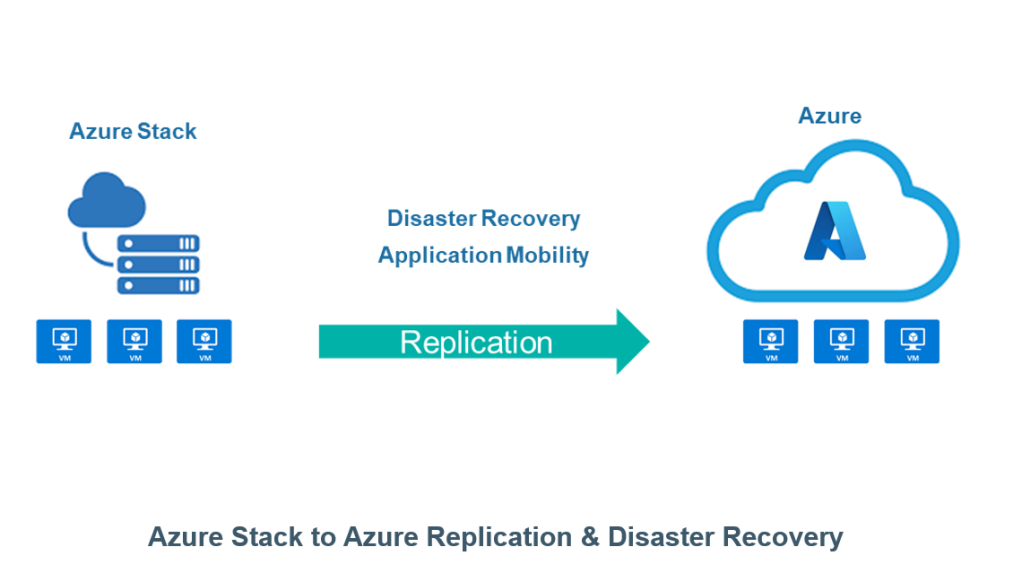
What’s New: Azure Stack to Azure Replication and Disaster Recovery

Why: New Disaster Recovery and application mobility capabilities for Azure Stack and Azure customers

What’s Different:

  • Simplify your hybrid cloud strategy with Disaster Recovery and application mobility across Azure Stack and Azure deployments
  • Improve RPO/RTO over standard backup Service Level Objectives
  • Easily configure, manage, and monitor through existing Replication Group administration within Commvault Command Center

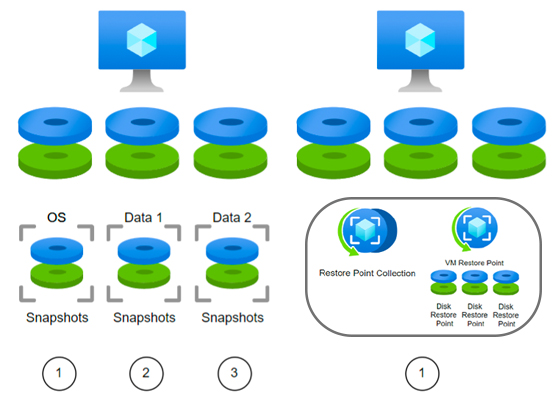
What’s New: Enhanced Capabilities with Azure Restore Points

Why: New Azure VM Restore Points create collections of restore point snap shots that span all the managed volumes within a VM

What’s Different:

  • Simplified design that leverages Commvault’s platform to enable scalable data protection and recovery with a single click
  • Improved resiliency ensuring that the applications and the operating system are consistent when creating these collections at the native instance level
  • Better cost efficiency with collection points stored on less redundant storage tiers

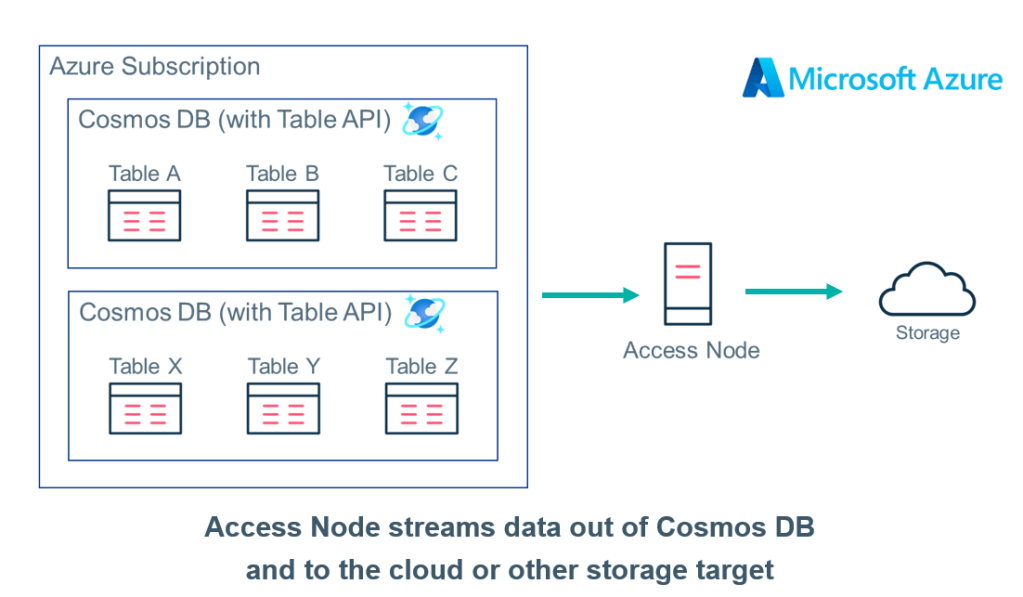
What’s New: Metallic now supports the broadest selection of Azure databases of any DMaaS solution

Why: Extend Microsoft native capabilities with dedicated protection for fully managed, globally distributed, multi-modal Azure databases

What’s Different:  

  • Single-solution protection for critical Azure databases, including SQL Server, SQL Managed Instance, Cosmos DB, MariaDB, MySQL, and PostgreSQL
  • Purpose-built protection for cloud development and app modernization initiatives
  • Air-gapped architecture to safeguard data from deletion, corruption, or attack
  • Extended long-term retention with rapid recoverability

And if all that wasn’t enough, we’ll be continuing the conversation with Microsoft in just a few short weeks at Commvault Connections, a true cloud data management experience, where Microsoft will lead a discussion on the topic, “Protect Your Critical IT Assets with Azure.” During this session, event attendees will learn more about the joint hybrid cloud solutions from Commvault and Microsoft and how they can be used to create a business continuity and disaster recovery plan that protects critical VMs, databases, PaaS and SaaS services (like M365), and more.

More related posts


Thumbnail_Blog-Clumio-Chat-2026

Meet Clumio Chat: An AI Assistant to Help Evaluate Cloud-Native Data Protection

Read more about Meet Clumio Chat: An AI Assistant to Help Evaluate Cloud-Native Data Protection
Thumbnail_Blog-Clumio-Fedramp-2026

Clumio Advances Cloud-Native Cyber Resilience with FedRAMP® Milestone

Read more about Clumio Advances Cloud-Native Cyber Resilience with FedRAMP® Milestone
Thumbnail_Blog-Lateral-Access-2026

Private Cloud Data Security Technical Guide

Read more about Private Cloud Data Security Technical Guide

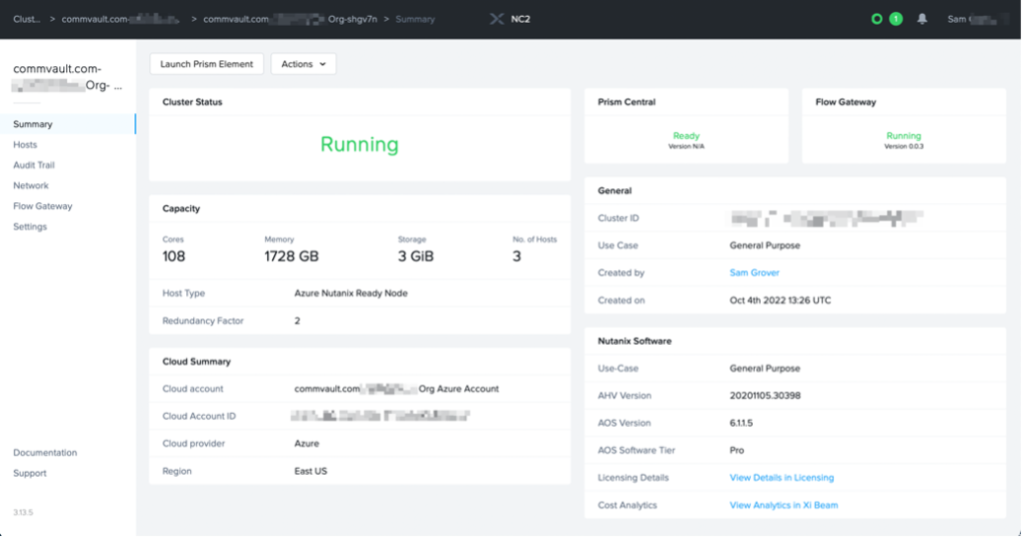
At Microsoft Ignite, Nutanix announced support for Nutanix Cloud Clusters (NC2) running on Microsoft Azure. This will help Nutanix customers accelerate cloud adoption through unified management and seamless mobility for applications, data, and licenses across on-prem and Azure environments.1 This platform will allow Nutanix customers to move Nutanix workloads to – and from – on-prem into an Azure-based NC2 cluster, as an extension of their existing Nutanix ecosystem.

Commvault’s industry-leading platform provides seamless data protection and management for NC2 on Azure. Customers looking to extend their existing protection platform into the cloud can grow into a hybrid cloud model or even build a net new, cloud-based data protection platform to protect greenfield NC2 on Azure environments. Customers can seamlessly leverage Azure VM resources to build their data management platform and can easily consume Azure storage options for use for retention copies of their data without requiring additional resources running on the NC2 on Azure.

Easy to configure and consume

Once NC2 on Azure has been deployed, customers can create a subnet on the Prism Central management VNet created within Azure, allowing direct communication between Azure data protection resources and the NC2 on Azure. With this subnet configured, customers can deploy Commvault resources within the subnet. This can include the CommServe, MediaAgent, Access Nodes, and more, all of which will have direct access to the NC2 on Azure environment. Commvault even provides an Azure Marketplace offering that will deploy all required resources for the customer with the click of a button.

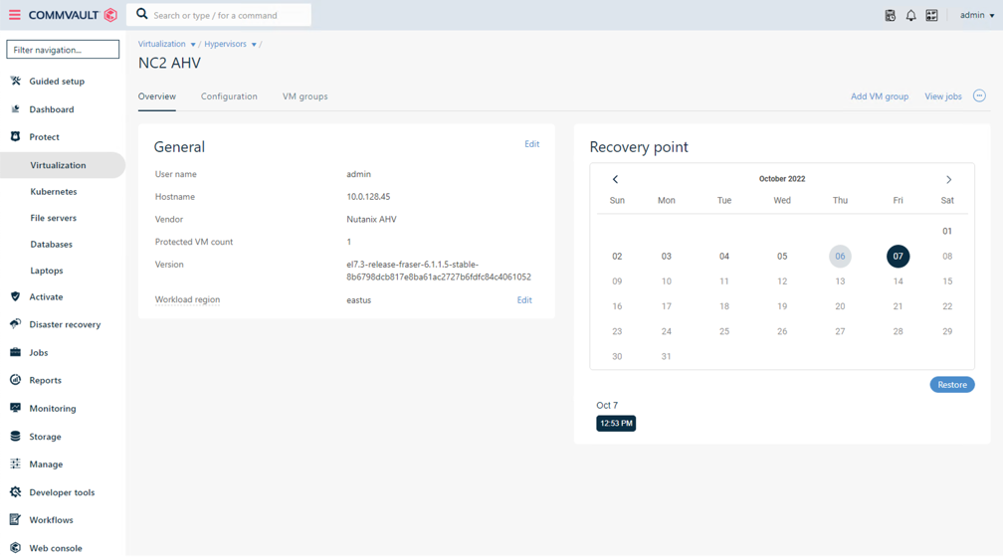
With the Commvault platform configured, setting up the Nutanix AHV hypervisor takes just seconds and data protection can begin immediately. Data protection operations can leverage the Direct NFS transport method for Nutanix AHV, reducing the resource requirements on the NC2 on Azure platform.

Simplicity in data protection and recovery

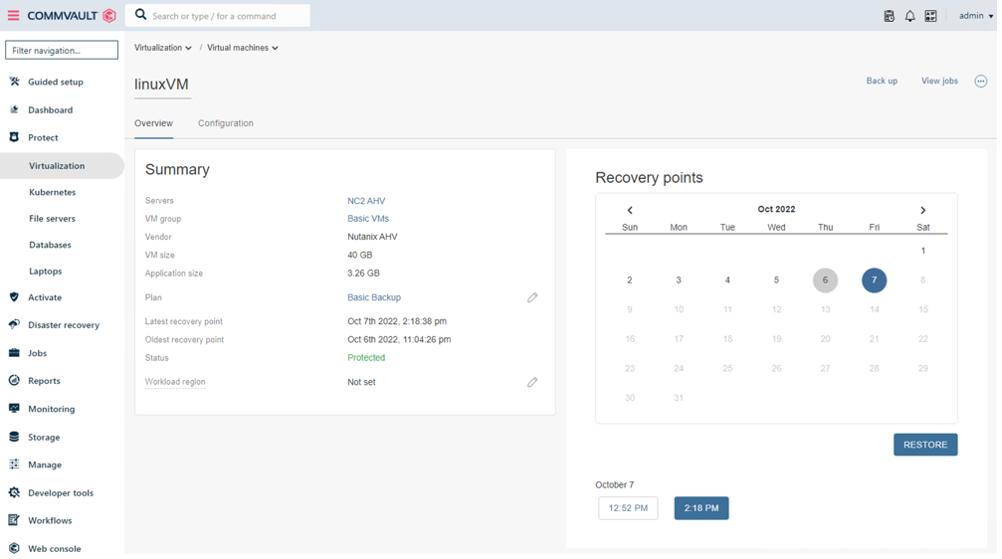
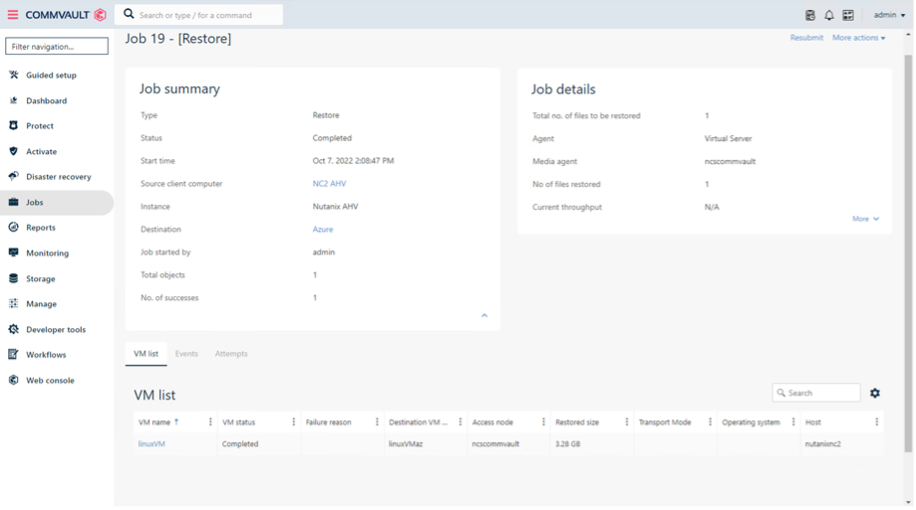
Commvault also allows customers to quickly and easily move workloads between on-prem and NC2 on Azure environments, while making it easy to move workloads – through a simple data recovery operation – into cloud-native platforms like Azure VM.

Quick Recap

Nutanix Cloud Clusters on Azure allows customers to accelerate their journey to the hybrid cloud. And Commvault is ready to protect their data and workloads wherever they reside: on-prem, in the cloud, and in hybrid environments. In addition to protecting data on the Nutanix Cloud Clusters on Azure, Commvault is the industry leader in protection of Azure VMs, Azure Storage, and virtually every other workload within an enterprise environment.

Commvault offers industry leading data protection scaling, data transformation, data management, and deduplication performance.

Reference

More related posts


Thumbnail_Blog-Clumio-Chat-2026

Meet Clumio Chat: An AI Assistant to Help Evaluate Cloud-Native Data Protection

Read more about Meet Clumio Chat: An AI Assistant to Help Evaluate Cloud-Native Data Protection
Thumbnail_Blog-Clumio-Fedramp-2026

Clumio Advances Cloud-Native Cyber Resilience with FedRAMP® Milestone

Read more about Clumio Advances Cloud-Native Cyber Resilience with FedRAMP® Milestone
Thumbnail_Blog-Lateral-Access-2026

Private Cloud Data Security Technical Guide

Read more about Private Cloud Data Security Technical Guide

Continuing our very full dance card for October, this week the Commvault team is in Las Vegas at Oracle CloudWorld and while we’re thrilled to be a gold sponsor of the show, Commvault and Oracle are so much more than just event supporters – we’re also multi-could partners! In fact, we expanded our strategic partnership with Oracle a few months ago to include the entire portfolio of Metallic Data Management as a Service (DMaaS) offerings on Oracle Cloud Infrastructure (OCI). 

It’s a simple equation: OCI + Metallic DMaaS = simple to use enterprise data management, threat protection and recovery. So, what exactly does that mean? Oracle customers can now protect critical workloads in the cloud or on-premises by maintaining flexibility across IT-managed storage or SaaS-delivered data protection of managed cloud storage. The simplicity is in the interface. All data assets protected and secured in hybrid and multi-cloud environments are managed through a single web-based console.

But that’s just the beginning. Commvault and Oracle are already well down the path on our newly minted, multi-cloud, SaaS-delivered DMaaS journey. Just this week, Commvault rolled out new support and features for the Metallic DMaaS portfolio designed specifically to expand support for OCI.

Specifically, Metallic now protects Oracle Database Cloud Service (DBCS) and Oracle Exadata Database Service on OCI, as well as OCI Object Storage.  These workloads join our existing support for Oracle, Oracle RAC, Oracle Container Engine for Kubernetes (OKE) and OCI VMs. Metallic provides support for both Metallic Recovery Reserve for OCI storage and BYO OCI Storage for air-gapped protection. 

Like my colleague Jeff mentioned in his rundown during last week’s events, the conversation doesn’t end at CloudWorld. Oracle is bringing its expertise to bear alongside our best and brightest at the upcoming Commvault Connections 22 event. Oracle’s Joe Corvaia, GVP, NACT ISV, MGS and MSP Sales, will join Commvault’s Chief Partner Officer Alan Atkinson, to discuss best practices for protecting against ransomware in a multi-cloud world. It’s just a few weeks away and I can tell you it’s going to be a world-class cloud experience. Register for Connections today and reserve your seat now for this special partner session!

More related posts


Thumbnail_Blog-Clumio-Chat-2026

Meet Clumio Chat: An AI Assistant to Help Evaluate Cloud-Native Data Protection

Read more about Meet Clumio Chat: An AI Assistant to Help Evaluate Cloud-Native Data Protection
Thumbnail_Blog-Clumio-Fedramp-2026

Clumio Advances Cloud-Native Cyber Resilience with FedRAMP® Milestone

Read more about Clumio Advances Cloud-Native Cyber Resilience with FedRAMP® Milestone
Thumbnail_Blog-Lateral-Access-2026

Private Cloud Data Security Technical Guide

Read more about Private Cloud Data Security Technical Guide

As we continue our Commvault Cares Month celebration, we are raising awareness on causes close to our hearts.

This week I had the honor of hosting a Courageous Conversation regarding domestic violence awareness. Our Courageous Conversation platform is our way to have the tough conversation about things that matter – and this one sure did not fail!

During our Courageous Conversation, I was joined by special guests Anna Diaz-White, Caitlin Tamayo, and Randi Zamkotowicz from 180 Turning Lives Around, a local non-profit organization in the New Jersey area that empowers survivors and families affected by domestic violence and sexual assault to find the courage and strength to turn their lives around. We also had Bill Appleton from our Employee Assistance Program (EAP) to share more about the resources and support we have as Vaulters. Available 24/7, 365 days per year, our EAP connects participants with counselors specialized in a variety of focus areas, many of which are aspects of mental health.

We broadcasted our Courageous Conversation on domestic violence live from our headquarters so all our Vaulters could join the discussion. During the event, we focused on three ways to drive awareness of domestic violence – how to Recognize, Respond, and Refer – whether it’s for ourselves, our co-workers, friends, or family:

  1. Recognize signs of domestic violence and better understand how common it is. The reality is that anyone can be a victim of domestic violence, regardless of race, age, ethnicity, sexual orientation, or economic status. If you are questioning how you’re treated by your partner, I encourage you to review this checklist from the National Coalition Against Domestic Violence. And when it comes to recognizing signs of domestic violence abuse with a colleague, friend, or family member, it’s important to notice changes in behavior and dress and check in if you think someone may be in an unsafe situation.  
  2. Respond by creating a safety plan to help lower the risk of being hurt by a partner. This is a set of actions to be referenced when experiencing abuse, preparing to leave, or after a victim leaves. Having a safety plan is especially important during moments of crisis when stress makes it very hard to think clearly. An example of one of these actions is to keep a “to-go bag” ready and waiting. This way, in case of an emergency situation, someone who is being abused is able to leave immediately with all the essentials.
  3. Refer to local and/or company resources for safety planning and support. Like many local organizations across the U.S. and throughout the world, 180 Turning Lives Around has hotlines, a safe house, and counselors available to help domestic violence victims. At Commvault, our HR team and our EAP is here to help all our Vaulters through any life challenges.

And while October is Domestic Violence Awareness Month in the U.S., we continue to talk about this incredibly important topic year-round as we honor domestic violence awareness days across the world throughout the year.

We believe you need to have the conversation, to change the conversation. And any conversation, whether it’s big or small, can make a difference. I’m so proud of our Vaulter community for continuing to have open discussions as we support our culture of respect, care, and belonging.

More related posts


Thumbnail_Blog-Clumio-Chat-2026

Meet Clumio Chat: An AI Assistant to Help Evaluate Cloud-Native Data Protection

Read more about Meet Clumio Chat: An AI Assistant to Help Evaluate Cloud-Native Data Protection
Thumbnail_Blog-Clumio-Fedramp-2026

Clumio Advances Cloud-Native Cyber Resilience with FedRAMP® Milestone

Read more about Clumio Advances Cloud-Native Cyber Resilience with FedRAMP® Milestone
Thumbnail_Blog-Lateral-Access-2026

Private Cloud Data Security Technical Guide

Read more about Private Cloud Data Security Technical Guide

These attacks can be used to block access to—or outright steal—essential business data, which can often include both the backup and restore data contained in places like an Amazon Cloud Backup (AWS Backup). The perpetrators will then encrypt the data and withhold it from the business until they pay a ransom, or threaten to delete it altogether if the company refuses to meet their demands.

Ransomware attacks can create chaos within an organization due to service disruptions, loss of data critical to essential business functions, exposure of private customer information, and loss of public credibility. And the problem is only getting worse.

According to the U.S. Financial Crimes Enforcement Network (FinCEN), the number of ransomware attacks in 2021 will vastly exceed the number of attacks in 2020. These attacks are growing in terms of cost as well—the average cost of reported ransomware transactions per month in 2021 was $102.3 million.

You may be wondering where cloud backups and snapshots fit into this. After all, can’t you simply restore the stolen data from a backup or snapshot in the event of an attack? Ideally, yes. But ransomware attackers also target an organization’s data backups, which is why it’s crucial to secure those backups to avoid paying outrageous ransoms while ensuring business continuity and a fast recovery.

Vulnerabilities with Amazon Cloud Backup

​​Although cloud backup snapshots are great for operational recoveries, they do not provide complete protection from threats like ransomware. When used directly out of the box, AWS backup vulnerabilities include:

  • No air-gap protection – AWS snapshots are by default created in the same account as the primary data sources. In this scenario, if the primary account is compromised, so are the snapshots. And if the snapshots are compromised, there is no way to recover data deleted or encrypted by outside parties.
  • Backups are not automatically immutable – AWS on its own does not make snapshots immutable, and mutable backups can be altered—or even, in some cases, accidentally deleted.
  • Slow recovery – AWS’s lack of flexible restores impacts recovery speed and can result in disruptions to business continuity in the event of an attack that results in a need for data restore.
  • Possible script errors – Complex, manually-written scripts are required to replicate snapshots across all accounts within AWS. This is obviously time-consuming and prone to human error, which can leave the snapshots exposed during an attack.

How to Protect AWS Backups from Ransomware

The potential inherent vulnerabilities of AWS backups can leave your data copies at risk to bad actors. And while AWS does offer some native tools and solutions for securing backups, they can be cumbersome to use while still not providing full protection.

Here are some key steps you should take to shield your valuable data and backups from ransomware and other attacks:

  • Air-gapping – Backups should be air-gapped and stored outside of the customer’s primary account and region. In the event of an attack, this prevents hackers and bad actors from corrupting and deleting the backup copies as well as the working data.
  • Immutable backups – Backup copies of data should be made immutable (unable to be altered or deleted), which preserves the data in a format that prevents it from being altered in any way.
  • Encryption for data at rest and data in transit – Both at rest and in transit, data should be encrypted, ideally with the user’s own encryption keys, and protected at a platform level with top security features in compliance with certifications such as ISO 27001, SOC II Type 1, SOC II Type 2, and PCI DSS.
  • Periodically test your data recovery abilities – In the event of an intrusion or disruption to your data and workloads, it’s essential to know you can recover quickly and ensure business continuity. Organizations should routinely test their ability to recover data from their backups.

(Is your data fully protected from ransomware? Click here to view our comprehensive ransomware checklist.)

Safeguard Your AWS Backup from Ransomware in Just Minutes with Clumio

Clumio’s innovative, industry-leading platform was designed in the cloud to protect the cloud.

With Clumio, your AWS backups receive instant protection via air-gapping, which places your valuable backup data “off site” and outside of production environments and other accounts.

Data is also encrypted with your encryption key of choice before it leaves any of your cloud accounts. Built-in integrity checking, full immutability for your backup files, and testing data recovery are all only a few clicks away within the intuitive interface.

More related posts


Thumbnail_Blog-Clumio-Chat-2026

Meet Clumio Chat: An AI Assistant to Help Evaluate Cloud-Native Data Protection

Read more about Meet Clumio Chat: An AI Assistant to Help Evaluate Cloud-Native Data Protection
Thumbnail_Blog-Clumio-Fedramp-2026

Clumio Advances Cloud-Native Cyber Resilience with FedRAMP® Milestone

Read more about Clumio Advances Cloud-Native Cyber Resilience with FedRAMP® Milestone
Thumbnail_Blog-Lateral-Access-2026

Private Cloud Data Security Technical Guide

Read more about Private Cloud Data Security Technical Guide

Importance of Compliance & Data Security

Not only do companies need to protect their own sensitive information, but they also must safeguard the personal information of their customers and clients. Failing to comply with relevant regulations can lead to financial and reputational damage, as well as potential legal consequences.

For example, consider the recent data breaches that have affected numerous high-profile companies. These incidents not only resulted in costly fines but also damaged customer trust and negatively impacted brand reputation. In fact, according to a recent survey conducted by Edelman, a global communications firm, 81% of consumers will stop buying from a company if it is found to be mishandling data.

Compliance with regulations can help reduce security and privacy risks, align cybersecurity requirements with business processes, maintain effective cybersecurity programs, build customer trust, and improve company reputation. As a result, companies must prioritize both compliance and data security in order to remain competitive in today’s market.

To illustrate the importance of compliance and data security further let’s consider the healthcare industry. Medical providers need to follow various laws and regulations for patient privacy and protection of confidential information such as HIPAA (Health Insurance Portability and Accountability Act), which holds organizations accountable for not protecting medical records correctly. Non-compliance with these laws could lead to customers losing trust or even being sued for neglecting confidentiality obligations at worst case scenarios.

Furthermore, having proper compliance measures in place ensures that sensitive business information remains confidential amongst stakeholders who require access it on an everyday basis while keeping unauthorized personnel away. It builds a sense of security within employees who handle confidential items reducing data breach cases that might cause severe financial harm.

However, some people might argue that the cost associated with maintaining such compliance standards might outweigh some of the benefits derived from it. This quite untrue as the benefits of adherence to compliance regulations to data protection surpass the cost in the long-term savings and protection it provides.

  • According to a 2020 study conducted by Statista, around 45% of organizations worldwide increased their spending on data protection and compliance efforts.
  • A Ponemon Institute research report in 2021 found that the average cost of a data breach in the United States was $8.64 million, emphasizing the importance of having reliable backup solutions for regulatory compliance.
  • In a survey by Spiceworks in 2019, approximately 42% of organizations reported using a combination of public cloud, private cloud, and hybrid cloud environments for their data backups, in order to achieve better compliance and redundancy.

Role of Backups in Regulatory Compliance

When it comes to data security, backups play a crucial role in ensuring regulatory compliance and business continuity. Regulatory compliance can be extremely complex, involving strict guidelines that must be followed to avoid financial penalties, legal consequences, and damage to reputation. Having a reliable backup plan can help companies maintain compliance with regulations such as GDPR (General Data Protection Regulation), which establishes rules for protecting European Union residents’ personal data; PCI (Payment Card Industry) standards for processing and storing payment card information securely; and HIPAA (Health Insurance Portability and Accountability Act) standards for protecting health information.

In addition to satisfying compliance requirements, backups also help companies ensure business continuity. Natural disasters, power outages, cyber attacks, and other unexpected events can cause loss or corruption of data. Without an effective backup plan in place, businesses risk losing important data along with customer trust.

To understand the importance of backups further, let’s consider a company that experiences a ransomware attack. Ransomware is a type of malicious software that threatens to publish sensitive data if payment isn’t made.

If the company doesn’t have a robust backup plan in place, they may have no options but to pay the ransom or lose significant amounts of valuable data. However, if they’ve been backing up their files regularly and properly following best practice recovery protocols when implementing their backup process which involves full and partial backups implemented frequently as possible amongst other features available with top-notch services like Rewind Backup Tool according to SaaS compliance solution then they would be able to recover critical files without paying criminals for release of hijacked files or draining their resources.

Thus having a robust set up required by backup compliance system means businesses can mitigate risks otherwise resulting in data loss, customer downtime, payment of expensive fines, lawsuits from affected parties aside from lost trust between company and clients.

Some people might argue that backups are not necessary if the data is already stored securely. However, accidents happen, and when they occur some vendors would not be able to provide data recovery services without backing up their client’s system. It is better to be safe than sorry when dealing with sensitive data which could result in a breach leading to legal consequences.

  • Backups are critical for businesses to maintain regulatory compliance and ensure business continuity. Compliance regulations can be complex, and strict guidelines must be followed to avoid financial penalties, legal consequences, and reputational damage. Reliable backups also help companies protect against the loss or corruption of data due to natural disasters, cyber attacks, or other unexpected events. Investing in a robust backup plan, including full and partial backups implemented frequently as possible amongst other features available with top-notch services like Rewind Backup Tool according to SaaS compliance solution, can help mitigate risks otherwise resulting in data loss, customer downtime, payment of expensive fines, lawsuits from affected parties, and lost trust between company and clients. Ultimately, accidents happen, so it is better to be safe than sorry when dealing with sensitive data that could result in a breach leading to legal consequences.

Impact on Business Continuity

The impact of compliance and data security on business continuity cannot be overstated. In fact, without a robust backup plan in place, businesses are at a significant risk of irreversible damage to their operations and reputation. With the number of cyber-attacks increasing every year, it’s crucial that companies take proactive measures to protect their data and ensure their systems remain operational in the event of an attack.

For instance, imagine a scenario where a company was hit by a ransomware attack that encrypted all their data and backups. Without a proper backup plan in place, they would lose access to all their critical files and data necessary for business continuity. As a result, they would be forced to restart from scratch, resulting in prolonged downtime, lost revenues from halted operations, and reputational damage.

A backup plan provides the assurance that, should such an attack occur, the company can quickly restore its systems’ functionality without significant disruptions to its operations. This is especially important for companies with compliance obligations or those that deal with sensitive or confidential information.

Backups also help businesses maintain customer trust and build their reputation. Companies that continuously experience service disruptions or data breaches are likely to lose customers who will take their business elsewhere. By having a reliable backup plan in place, businesses can demonstrate their commitment to protecting their customers’ sensitive information while maintaining the continuity of their services.

Some companies may argue that creating a robust backup plan is unnecessary because it takes too much time and resources to implement. They may consider it as an additional cost without significant immediate returns on investment. However, the risks of not having one far outweigh any perceived costs. The cost of recovering from a cyber-attack without proper backups in place greatly exceeds the investment required for implementing an effective backup plan.

Key Regulations and Certifications

Several regulations govern how organizations handle sensitive data, making it essential to understand the implications of non-compliance and what certifications are necessary to mitigate these risks.

Regulations such as GDPR, PCI, and HIPAA mandate that businesses protect their customers’ sensitive information. Specifically, GDPR applies to European Union (EU) citizens’ personal data, while PCI compliances deal with payment card data handling. Similarly, HIPAA governs the handling of protected health information (PHI). Non-compliance with these regulations can result in significant legal and financial repercussions.

When companies comply with these regulations, they align their cybersecurity requirements with business processes, maintain effective cybersecurity programs that keep customer data secure, reduce security and privacy risks, and improve company reputation.

Obtaining certifications like ISO 27001 and SOC 2 serve as proof that an organization has implemented thorough audits of its data security compliance. ISO 27001 is an information security management certification that demands a company’s adherence to strict standards of data protection. On the other hand, SOC 2 requires adherence to specific criteria for system security, availability, confidentiality, processing integrity, and privacy. These certifications cater to different aspects of compliance but work together to ensure effective data security practices.

GDPR, PCI, and HIPAA

When it comes to compliance and data security, there are a number of regulations and certifications that businesses need to be aware of to ensure their backup plan is up-to-date and effective. Among these, three important standards are the General Data Protection Regulation (GDPR), Payment Card Industry Data Security Standard (PCI DSS), and the Health Insurance Portability and Accountability Act (HIPAA).

The GDPR, which came into effect in May 2018, is designed to protect personal data belonging to European Union citizens. Any organization that collects or processes EU citizens’ data must comply with these stringent regulations. Failure to do so may result in hefty fines, loss of reputation, or legal action. To comply with the GDPR, businesses need to have a robust data management system including proper backups containing personal data.

PCI DSS applies specifically to companies that handle payment card information. It regulates how businesses should process sensitive customer information like credit card numbers to prevent fraud and hacking. PCI DSS requires annual audits from an approved Qualified Security Assessor (QSA) and regular reviews of backup policies.

HIPAA is another critical regulation for healthcare organizations. It requires strict methods for securing medical records both physically and electronically. The law also enables patients’ access to their own medical records while requiring healthcare providers provide them with proper privacy practices.

Complying with these regulations can be compared to buckling your seatbelt before driving on the road – safety first! Regulations give your business the tools it needs to protect sensitive information and avoid data breaches while keeping your customers’ trust.

ISO 27001 and SOC 2

Apart from regulatory requirements, there are certifications that demonstrate a commitment towards the best practices in cybersecurity management. The International Organization for Standardization (ISO) provides both guidelines and certification regarding information security. The ISO 27001 standard specifically focuses on the creation of an Information Security Management System (ISMS) within any organization.

Implementing ISO 27001 involves assessing risks, devising policies and procedures for securing data at all times, including backup data. This includes specific requirements for data redundancy, disaster recovery planning as well as testing of the policies in places such as offsite backups in particular.

Additionally, the SOC 2 examination report is an independent third-party evaluation that gives assurance about how well you perform your controls. SOC 2 reports concentrate on a company’s non-financial reporting controls as they relate to key compliance and security issues.

Obtaining these sorts of certifications can be compared to receiving your driving license- it takes dedication to learn the rules of the road before being able to safely drive where you need to go. With these certifications, businesses demonstrate their commitment to best practices in cybersecurity management that protect their customers’ sensitive information.

Creating a Robust Backup Plan

When it comes to creating a robust backup plan for compliance and data security, there are many factors that organizations need to consider. A comprehensive backup plan should not only ensure the protection of sensitive data, but also provide a way to restore lost or corrupted information in the event of an attack or data loss. In this section, we will look at some of the key considerations for creating a robust backup plan.

First and foremost, your organization needs to decide on the type of backups it will use. This may involve implementing both full and partial backups as often as possible, depending on how critical your data is. Full backups are designed to capture all data on a system while partial backups capture only smaller subsets of data. The frequency of the backups will vary depending on factors such as how rapidly data changes within your organization and the amount of data you’re dealing with.

Once you have decided on the type and frequency of backups that your organization will use, you need to determine where the backups will be stored. There are many options available, including cloud-based backup solutions and physical storage devices such as hard drives and tapes. Backups stored in multiple locations are generally more secure than those stored in only one place.

Another important consideration when creating a backup plan is determining how long backups should be retained. While regulatory requirements drive retention policies in some cases, organizations might choose to store their backups even longer than regulations require if business continuity could be threatened without it. In short, retaining more copies does come at a cost – requiring investment in additional storage space and management efforts – but having those extra copies provides an additional layer of risk mitigation.

It’s important to remember that creating a robust backup plan is like creating a safety net for your organization’s sensitive data. If something goes wrong, having a backup plan in place will ensure that your organization can quickly recover and restore lost or corrupt data.

Let’s take a look at some of the key considerations when choosing the right backup tools for your organization.

Choosing the Right Backup Tools

When selecting the correct backup tools, it is essential to find a solution that aligns with your organization’s specific needs. There are several factors to consider before making a final decision, including how often backups need to happen, how they’re being created and operated—whether through an automated mechanism or manual solutions—and what type of encryption algorithms you’d prefer for protecting sensitive information.

One crucial factor to consider when selecting backup tools is scalability and reliability. Organizations that expect future growth must choose solutions capable of expanding to meet their changing requirements. Automated solutions like Clumio should be preferred as they offer more flexibility to handle unexpected increases in data volume without stressing the IT personnel. With scalable tools, users benefit from a stable platform while minimizing interruptions and ensuring business continuity.

Furthermore, backup tools must be designed with security in mind. They must be updated frequently to make sure any known vulnerabilities are addressed immediately while also featuring strong encryption methods for protecting sensitive data across the communication lines throughout the backup lifecycle.

Other critical considerations when selecting a backup tool include cost-effectiveness and easier management . These are especially crucial for companies working with tight budgets where resources may not be plentiful. Before making any decisions on a backup tool, determine if it provides value for its pricing while ensuring easy maintenance, deployment, and administration, besides providing adequate security functions required by your business.

Choosing the right backup tool is like finding the perfect pair of shoes. Just as finding a good pair of shoes requires careful evaluation of comfort, style, and price over time – finding an ideal solution requires taking into account key factors, including scalability, security, cost-effectivenesss and management needs, while selecting the right solution for your organization.

Now that we’ve explored some of the essential aspects to consider when creating a backup plan, let’s move on to monitoring and reporting compliance.

Implementing Full and Partial Backups

When it comes to implementing backups for compliance and data security, one size does not fit all. Your organization’s specific needs will determine the type of backup strategy that works best for you. Full backups are ideal if you need complete copies of all your data on a regular basis. However, partial backups may also be necessary to ensure the protection of your most critical data.

For example, let’s say you run an e-commerce website that generates a significant amount of daily sales. In this scenario, you would likely want to implement both full and partial backups. A full backup could be performed once a week or month, while partial backups would occur several times a day, ensuring that critical sales data is always protected.

Another case where partial backups would be essential is in a biotech research firm that conducts complex experiments. Here, real-time data plays a crucial role in experiments, so hourly backups will work best to ensure the recovery of any lost information during any untoward incident.

Moreover, implementing multiple types of backup strategies can provide additional layers of redundancy that can help ensure data is protected should one backup fail. For instance, using both incremental and differential backups means that only changed files since the last backup are saved. This approach reduces the amount of storage space needed and minimizes the time required for each backup.

On the other hand, full backups take longer but allow quicker restoration capabilities because they include all system files at once. While switching between the two types can increase complexity, utilizing both methods provides insurance against severe losses.

One key element when implementing any backup plan is considering off-site storage options like cloud-based services or secure remote sites. This step ensures that there are backup files in place if some catastrophic event occurs at the primary location.

Monitoring and Reporting for Compliance

Tracking information on each backup strategy is very important for meeting compliance standards. Regular monitoring of backup processes and results can identify unsuccessful backups and reduce the risk of data loss.

To ensure regulatory adherence, it’s crucial to define metrics that measure backup performance over time. From measuring the total storage space used for the backup process to tracking how quickly a full system restore takes, having statistics helps your organization stay on track with its goals while ensuring compliance.

Furthermore, by using software automation tools, managers can receive daily reports regarding the status of backups without any manual intervention. These tools give real-time insights into backups, such as whether there was unauthorized access or any modification in files. Nowadays, logs have become an easy way to go through this information.

Backup performance evaluations are essential for businesses to gauge their adherence to established compliance regulations such as GDPR, HIPAA, and PCI DSS. It is necessary to create policies that specify the types of tests necessary and their frequency—these policies should be reviewed regularly during audits.

While some backup approaches include using external tapes to store data redundantly, these methods aren’t always suitable for larger companies with higher processing demands or those with several locations. This approach can have long restoration times that may damage the continuity of any business.

Thus, implementing a reliable, efficient backup array works wonders here because it reduces operational downtime caused by data corruption or server crash incidents. Therefore, having scheduled “backup retention time” where IT professionals research probable risks acting on timely apparatus replacement is more practical than recurring backups.

It’s just like building a structure strong enough from natural disasters instead of only counting buckets when it floods up to your knees!

Backup Performance Metrics

One of the most critical aspects of backup planning is monitoring and reporting. In today’s compliance-driven world, organizations must be able to prove that they are adhering to regulations and protecting user data. Backup performance metrics play a vital role in ensuring regulatory adherence and avoiding data breaches.

For instance, backup performance metrics can provide insights into the amount of time it takes to create backups, the frequency of backups, or how many backups are created per day/week. If there are any issues with the backup process, these metrics can be used to identify and address them before they become a problem.

Additionally, backup performance metrics can also provide proof of adherence to regulatory requirements. For example, regulations such as HIPAA require organizations to maintain an audit trail that shows who accessed patient records and when they were accessed. Similarly, GDPR requires organizations to provide an audit trail for data breaches. Backup performance metrics can help organizations meet these requirements by providing evidence of regular backups and recovery testing.

However, it’s crucial to note that backup performance metrics alone won’t ensure compliance. Compliance involves implementing a wide range of security procedures, including disaster recovery planning, risk assessments, monitoring security controls, and integrating best practice security procedures into day-to-day workflows. While backup performance metrics are an essential part of compliance monitoring and reporting, they should be used in conjunction with other security measures.

With that being said, how can organizations ensure that their backup plan is compliant?

Ensuring Regulatory Adherence

To ensure regulatory adherence, organizations need to take a holistic approach to their backup plan. Here are some key steps to consider:

First, choose backup tools that meet industry standards. Top-notch data backup tools like Clumio can make the complex process of compliance and data security easier by automating daily backups and ensuring that data restoration is available while following the strictest security standards.

Think of it this way: choosing the right backup tools is like choosing the right lock for your front door. Just as you want a lock that’s tough to break, you want backup tools that are hard to hack. The right tools can help you ensure that your data is safely stored and stored in compliance with industry regulations.

Next, implement full and partial backups as often as possible. Full backups should be performed regularly (e.g., weekly or monthly) to ensure that all data is backed up. Partial backups should be performed more frequently (e.g., daily) to ensure that data changes are captured.

For example, if you have an e-commerce website, you might perform full backups on a monthly basis but run partial backups every night to capture new orders.

Finally, regularly test backups to ensure they can be restored in the event of an attack or data loss. Testing should include failover testing (i.e., testing whether your backup system can take over if your primary system fails) and failback testing (i.e., testing whether your primary system can take over again once the backup system has been used).

However, it’s important to keep in mind that implementing a compliant backup plan isn’t a one-time thing – it’s an ongoing process. As regulations change and new threats emerge, organizations must continue to evaluate and refine their backup plans to maintain regulatory compliance and protect user data.
More related posts


Thumbnail_Blog-Clumio-Chat-2026

Meet Clumio Chat: An AI Assistant to Help Evaluate Cloud-Native Data Protection

Read more about Meet Clumio Chat: An AI Assistant to Help Evaluate Cloud-Native Data Protection
Thumbnail_Blog-Clumio-Fedramp-2026

Clumio Advances Cloud-Native Cyber Resilience with FedRAMP® Milestone

Read more about Clumio Advances Cloud-Native Cyber Resilience with FedRAMP® Milestone
Thumbnail_Blog-Lateral-Access-2026

Private Cloud Data Security Technical Guide

Read more about Private Cloud Data Security Technical Guide

One of the most essential parts of a robust and ultimately effective business continuity plan is the disaster recovery plan. After all, a business may do all it can to protect itself from a disaster event—such as a ransomware attack, a cloud outage, or corrupted data—but it still needs a failsafe plan for how it will restore data and workloads in the event of any disruption that nevertheless occurs.

What is Disaster Recovery?

Although “disaster recovery” is a term often used interchangeably with “business continuity,” it is actually a subset of business continuity management that mainly involves restoring crucial data and operations while minimizing any downtime caused by a disaster event.

Having a disaster recovery plan in place is essential for any enterprise. Without one, the aftermath of a disaster can spiral out of control and leave a business vulnerable to permanent data loss and disruption to operations that eventually affect everything from revenue to customers.

Cloud Backup and Optimizing Disaster Recovery

An enterprise’s disaster recovery plan should include a way to identify all mission-critical data that should be prioritized during a restore, along with a way to quickly recover and restore lost data from backups — all while still keeping essential operations afloat during recovery. This is in addition to identifying the suitable number of backups needed to meet the recovery point objective (RPO) while avoiding excessive costs from unneeded backups creation and storage.

This all starts with using cloud backup-as-a-service to continually replicate and store enterprise data. Here are three disaster recovery capabilities to look for in a cloud backup-as-a-service solution that will provide profound advantages during disaster recovery:

Incremental Forever Backup

Incremental forever backup is a type of incremental backup that uses a method called changed block recovery. This streamlines the restoration process, saving IT teams from having to go through backups and figure out which copies need to be restored in order to recover the most current data.

Incremental forever backup expedites the restoration process by restoring only the latest versions of blocks that belong to a restored backup, resulting in significantly faster restores.

Granular Recovery

During disaster recovery, the actual speed of data restoration is at the core of an organization’s RTO. However, during recovery, some data is more important than other data — particularly the mission-critical data and processes that the organization needs to remain operational while full recovery is in progress. Restoring an entire instance can be time-consuming and may put business continuity at risk.

Granular recovery capability is the solution to this glaring issue, as it enables IT teams to initiate both file- and record-level recovery from a single pass backup operation instead of waiting on a full instance restore. This makes it possible to identify and prioritize specific mission-critical data and workloads to keep essential processes and operations functional while drastically speeding up recovery.

Flexible Recovery

Flexible recovery is another beneficial capability to have in your disaster recovery plan via your cloud backup solution. With flexible recovery, you can recover to any account or region that has not been compromised by the disaster event, and quickly resume operations.

Industry-Leading Disaster Recovery with Clumio

Built in the cloud, Clumio supports optimized business continuity management and disaster recovery with capabilities such as granular recovery, incremental forever backup, flexible recovery, and more. Clumio’s industry-leading rapid restore capabilities provide enterprises of all sizes with lightning-quick data restores that can maintain and support business continuity in the face of a disaster event.

Along with optimized disaster recovery features, Clumio also provides:

  • Instant backups of AWS data from any region across your entire organization
  • Protection from ransomware and other malicious attacks with air-gapped backups
  • Simplified data compliance with global policies
  • Flexible pay-as-you-go consumption model
  • Cost-savings via in-depth insights into enterprise cloud spend

Clumio is the industry’s leading innovator for AWS cloud backup.

More related posts


Thumbnail_Blog-Clumio-Chat-2026

Meet Clumio Chat: An AI Assistant to Help Evaluate Cloud-Native Data Protection

Read more about Meet Clumio Chat: An AI Assistant to Help Evaluate Cloud-Native Data Protection
Thumbnail_Blog-Clumio-Fedramp-2026

Clumio Advances Cloud-Native Cyber Resilience with FedRAMP® Milestone

Read more about Clumio Advances Cloud-Native Cyber Resilience with FedRAMP® Milestone
Thumbnail_Blog-Lateral-Access-2026

Private Cloud Data Security Technical Guide

Read more about Private Cloud Data Security Technical Guide

Cybersecurity Awareness Month is here and, as you can imagine, this topic is always part of our conversations here at Commvault and especially in my role as Chief Information Security Officer.  

Protecting our customers’ data is core to who we are as a company.    

We all know that data has never been more valuable, nor more vulnerable, than it is in today’s digital landscape. Organizations face an increasingly turbulent data environment with cyberattacks increasing year over year. That’s why it’s so important for us to be more proactive than ever – we’ve done this by deploying technologies like Metallic ThreatWise, next-generation cyber deception that immediately engages and surfaces threats the moment they happen, but we also do it by empowering our employees. We discuss data protection, recovery, and ransomware with our partners and customers every day, but it’s crucial that our employees understand that they are the first line of defense in mitigating Security Risks. 

As we look inside Commvault at how we’re talking about this with our Vaulters, creating a culture of continual education and conversation on cybersecurity topics is integral to our security strategy. We recently completed our annual Security Training, which helps us reinforce the security posture of our company and empowers our Vaulters to embrace their role as the first line of defense when it comes to cyber threats. It is our top priority to ensure our teams know how to identify, mitigate, and respond to security risks that could potentially jeopardize Commvault, our data, and impact our stakeholders. Commvault is proud to be a 2022 Champion for Cybersecurity Awareness Month and over the next few weeks we’ll be providing our Vaulters with new resources and learning opportunities on this very important topic.   

And outside the walls of Commvault, we certainly remain focused on cybersecurity. We’re continuing the conversation at Connections, our cloud data management experience. Join me as I moderate our session on Ransomware Retrospective: Supporting the Recovery, one of three Fending Off Ransomware solutions tracks that will be offered during our event. Join us to hear real customer recovery stories from our Commvault® Support & Services Team as they share the good, the bad, and the ugly. Learn why some recoveries went well and why others did not. Take advantage of this up close and personal interaction with the Commvault® Support & Services Team, which has helped organizations recover quickly and maintain a state of recovery readiness and steady response. The importance of data protection strategies and cybersecurity awareness will only continue to grow – make sure your business, and employees, are set up for success this month and beyond. 

More related posts


Thumbnail_Blog-Clumio-Chat-2026

Meet Clumio Chat: An AI Assistant to Help Evaluate Cloud-Native Data Protection

Read more about Meet Clumio Chat: An AI Assistant to Help Evaluate Cloud-Native Data Protection
Thumbnail_Blog-Clumio-Fedramp-2026

Clumio Advances Cloud-Native Cyber Resilience with FedRAMP® Milestone

Read more about Clumio Advances Cloud-Native Cyber Resilience with FedRAMP® Milestone
Thumbnail_Blog-Lateral-Access-2026

Private Cloud Data Security Technical Guide

Read more about Private Cloud Data Security Technical Guide

What is a Disaster Recovery Plan Template?

Disaster recovery is a subcomponent of a business continuity plan. It focuses on restoring core operations while minimizing or avoiding downtime caused by a disaster event. In today’s data-centric business environment, the IT portion of a disaster recovery plan is typically the heart of a modern business continuity plan. It’s intended to ensure core operations remain online when a disaster event — such as a ransomware attack, natural disaster, or prolonged power outage — threatens the interruption of business continuity.

Many organizations use a disaster recovery plan template to ensure they account for every last element when creating their plan. This document covers aspects that can range from keeping power on to secondary lines of communication and ensuring IT systems remain operational.

Below, we’ll look at perhaps the most important part of a disaster recovery plan template for organizations that have migrated their data and workloads to the cloud:cloud backup.

How Cloud Backup Fits into a Disaster Recovery Plan Template

The IT portion of a disaster recovery plan is primarily focused on recovering and restoring the mission-critical data and workloads needed to ensure business continuity. For example, if your business has experienced a ransomware attack and lost access to its primary data, the disaster recovery plan outlines the steps needed to restore that data so core operations can continue.

If your organization has migrated to the cloud, a cloud backup solution is the ideal method to facilitate a restore since it can leverage the scale and elasticity of the cloud. The cloud backup solution allows you to automatically back up data on a customized schedule and then store the data. Should data recovery be required, the solution can restore the data from the most recent backup.

It’s crucial to note that data can only be recovered and restored if there’s a valid backup copy to restore from, making the security of the backup data paramount. If your backup data copy is unsecured and exposed, you are risking your ability to recover the data. Plus, since business continuity is time-sensitive, the disaster recovery plan should be able to restore the most important data and workloads first so your most essential operations and processes can continue unhindered while a full restore completes.

Therefore, an effective disaster recovery plan template for a cloud-native organization should include:

  • A viable cloud backup solution
  • A way to ensure the security of the backups
  • A way to identify and prioritize the mission-critical data needed to ensure business continuity

However, not all cloud backup solutions are capable of checking all these boxes. The cloud backup tool you choose will directly affect your organization’s disaster recovery abilities.

Achieve Secure Cloud Backup and Rapid Disaster Recovery with Clumio

Clumio’s secure cloud backup platform optimizes disaster recovery with features designed to streamline data restoration—enabling an organization to meet or exceed its recovery time objective (RTO) during a disaster event.

Clumio safeguards backup copies by storing them in an encrypted, air-gapped backup solutionoutside of the primary account — meaning if your primary data is accessed or compromised, the backup remains safe. When data restoration is needed, Clumio’s granular and flexible recovery capabilities can quickly identify and rapidly restore the specific mission-critical data and applications needed to maintain business continuity while a full recovery completes.

Cloud backup is the key to a successful disaster recovery plan template. Learn why Clumio is the industry’s leading innovator for cloud backup and rapid disaster recovery by scheduling a demo today.

More related posts


Thumbnail_Blog-Clumio-Chat-2026

Meet Clumio Chat: An AI Assistant to Help Evaluate Cloud-Native Data Protection

Read more about Meet Clumio Chat: An AI Assistant to Help Evaluate Cloud-Native Data Protection
Thumbnail_Blog-Clumio-Fedramp-2026

Clumio Advances Cloud-Native Cyber Resilience with FedRAMP® Milestone

Read more about Clumio Advances Cloud-Native Cyber Resilience with FedRAMP® Milestone
Thumbnail_Blog-Lateral-Access-2026

Private Cloud Data Security Technical Guide

Read more about Private Cloud Data Security Technical Guide

Our value – We Connect – is a guiding principle for my day-to-day here at Commvault.

Since I joined Commvault seven years ago, I’ve been very fortunate to work with a group of incredibly motivated and hardworking Vaulters.

I first joined Commvault as a Digital Project Manager on the Marketing team, where I assisted the digital marketing team with the planning and execution of multi-channel campaigns. When we incubated Metallic in 2019, I was recruited to join the team. It’s crazy to think that back then, the Metallic team was a small group of agile, scrappy Vaulters in a start-up culture creating and building our new software-as-a-service offering. And now, more than three years later, it’s grown to a $50 million ARR business for Commvault.

Now, as Director of Program Management for Metallic, I’m primarily responsible for managing the overall roadmap, timelines, and cross-functional coordination across the entire Metallic team. With a SaaS business, all team members—from our engineers to our marketers—need to be connected to create a flawless customer experience. My program management team and I drive communication and ensure that all teams have what they need to deliver innovative solutions, campaigns and enhanced customer experiences.

So much of my job is connecting different people and teams to each other, and I have the privilege of seeing first-hand the benefit of our collaboration to deliver results efficiently. Most recently, Commvault acquired TrapX and launched Metallic® ThreatWise™, a newly-available data security service that provides customers with early threat detection. This is just one example of how we bring together smart people to solve tough problems for our customers—and we have fun doing it!

If you’re looking to learn more about what it’s like to work at Commvault, check out this recent blog from David to hear his perspective!  

More related posts


Thumbnail_Blog-Clumio-Chat-2026

Meet Clumio Chat: An AI Assistant to Help Evaluate Cloud-Native Data Protection

Read more about Meet Clumio Chat: An AI Assistant to Help Evaluate Cloud-Native Data Protection
Thumbnail_Blog-Clumio-Fedramp-2026

Clumio Advances Cloud-Native Cyber Resilience with FedRAMP® Milestone

Read more about Clumio Advances Cloud-Native Cyber Resilience with FedRAMP® Milestone
Thumbnail_Blog-Lateral-Access-2026

Private Cloud Data Security Technical Guide

Read more about Private Cloud Data Security Technical Guide

With today’s announcement around Metallic ThreatWise Cyber Deception Service, Commvault is changing the game when it comes to addressing security threats including ransomware. But our innovations in enhancing data security don’t stop there. We’ve also recently released Commvault Platform Release 2022E, and with that release come additional enhancements to help our customers better protect their data. This new release introduces several new capabilities to simplify data management – in this blog, I’ll focus on the new data security additions in our new release.

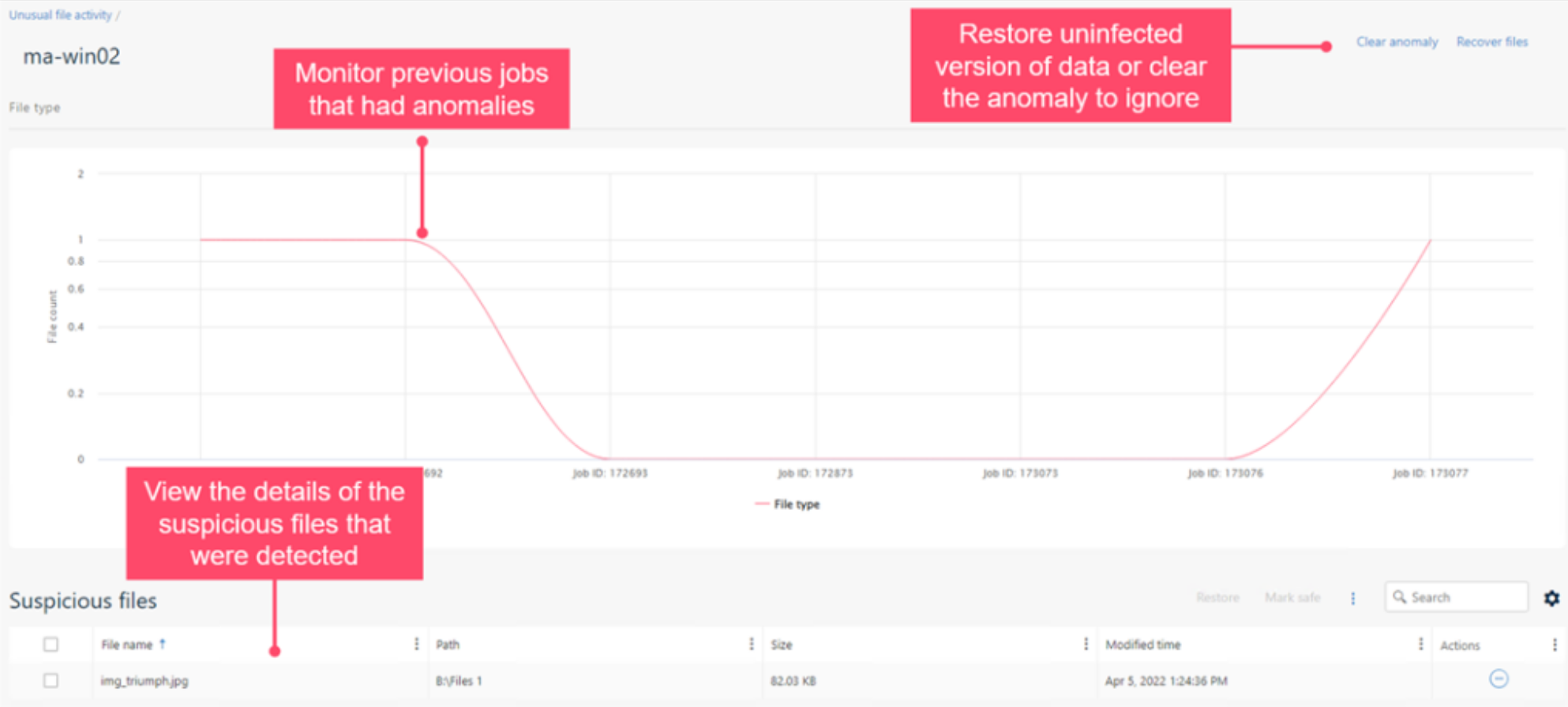
A Zero Loss Strategy is designed to help protect you from ransomware attacks and is anchored on the pillars of end-to-end data visibility, broadest workload protection, and faster business response, built on the foundation of Zero Trust principles. End-to-end data visibility ensures that you catch threats before they impact your data – in addition to Metallic ThreatWise for early detection through cyber deception, we have also expanded our file anomaly framework to detect malicious applications that may evade traditional detection methods by posing as safe file types.

Deeper insights into suspicious file activity yield better detection and faster responses to potential threats to your data


This feature drives faster business response with immediate alerting of suspicious activity, along with automatic, efficient data recovery using clean versions from unaffected backups. Not just that – we’ve also expanded our data governance capabilities to now profile object storage for Azure, AWS and GCP, eliminating another common area of data leakage.

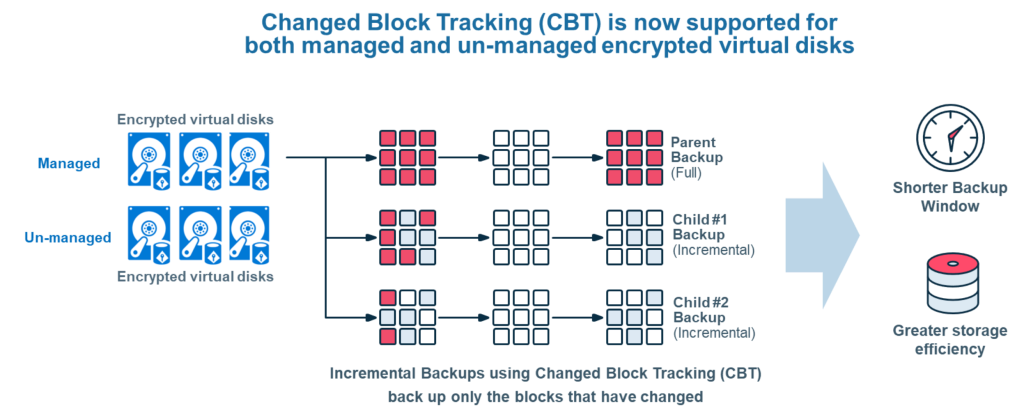
Another enhancement we’ve added is Changed Block Tracking (CBT) support for Azure Disk encryption. CBT improves backup performance while lowering backup costs, by consuming less storage and bandwidth for incremental backups. Historically, however, the ability to perform encryption while using CBT was limited, forcing a tough customer choice between security or cost savings. Working closely with Microsoft, we are excited to now introduce CBT efficiencies with Azure Disk encryption for managed and unmanaged encrypted disks. No longer do you need to make a choice between security, performance and cost efficiencies!

Last but not the least, I am excited to share that we have now achieved WORM-compliant Sec17a certification for Commvault Grid, adding to our already rich list of security certifications including FIPS 140-2, FedRAMP High In Process – In PMO Review ready and more, and rounding out Commvault Grid immutable file system capabilities.

These are just some of the new Data Security capabilities available in Commvault Platform Release 2022E, a release that’s packed with new features and innovation, reflecting on our continued investment in Intelligent Data Services.

For more information on this release, check out this page and stay tuned and we’ll be discussing more of the exciting new updates in Commvault Platform Release 2022E at our virtual event, Connections on Nov 2/3.


More related posts


Thumbnail_Blog-Clumio-Chat-2026

Meet Clumio Chat: An AI Assistant to Help Evaluate Cloud-Native Data Protection

Read more about Meet Clumio Chat: An AI Assistant to Help Evaluate Cloud-Native Data Protection
Thumbnail_Blog-Clumio-Fedramp-2026

Clumio Advances Cloud-Native Cyber Resilience with FedRAMP® Milestone

Read more about Clumio Advances Cloud-Native Cyber Resilience with FedRAMP® Milestone
Thumbnail_Blog-Lateral-Access-2026

Private Cloud Data Security Technical Guide

Read more about Private Cloud Data Security Technical Guide

On September 22, Commvault will be presenting live from San Jose, as part of Cloud Field Day 15. 

For the uninitiated, Cloud Field Day is part of the popular “Field day” series, which also includes Tech Field Day and Security Field Day. 

Hosted by Stephen Foskett, delegates from cutting edge companies, including Commvault, share their latest product news and innovations live with a group of hand-picked influencers.  A lively debate usually results, which also takes place across Social Media.

This Cloud Field Day, we’ll be taking the delegates through the very latest in data security technology including a first deep look at Metallic ThreatWise, a newly available data security service which provides customers with much needed early threat detection.  Highlights from Commvault’s recently released Platform release 2022E will also be included to showcase the breadth of Commvault’s Intelligent Data Services.

We’ll be live streaming the session right here on this blog as well as across Commvault’s LinkedIn Channels.

See you on Thursday, 22nd September at 1:30pm PT. Join in the Social Media conversation by using #CFD15.  You don’t want to miss it.

More related posts


Thumbnail_Blog-Clumio-Chat-2026

Meet Clumio Chat: An AI Assistant to Help Evaluate Cloud-Native Data Protection

Read more about Meet Clumio Chat: An AI Assistant to Help Evaluate Cloud-Native Data Protection
Thumbnail_Blog-Clumio-Fedramp-2026

Clumio Advances Cloud-Native Cyber Resilience with FedRAMP® Milestone

Read more about Clumio Advances Cloud-Native Cyber Resilience with FedRAMP® Milestone
Thumbnail_Blog-Lateral-Access-2026

Private Cloud Data Security Technical Guide

Read more about Private Cloud Data Security Technical Guide

Microsoft 365 is an essential component of today’s enterprise data environment. Still, many organizations fail to include it in their data protection plan. This is partly due to the misconception that cloud service providers are responsible for both administering the solution and protecting the data created and stored within it. However, this is not the case.

Your data, your responsibility

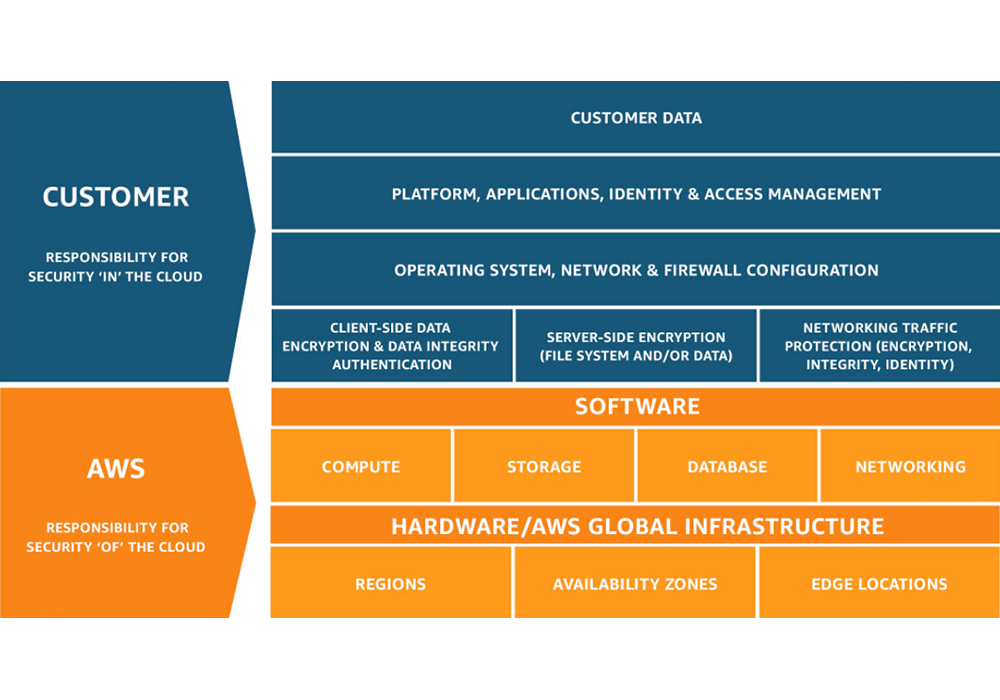
Microsoft provides a highly resilient platform and goes to great lengths to secure data residing within its application. However, like many cloud service providers, they follow what is known as the shared responsibility model, where they are responsible for maintaining the uptime, availability, and access to the solution, while the customer is responsible for protecting the data created and stored within that solution. And now, more than ever, your Microsoft 365 data must be protected and recoverable in the face of emerging threats.

It’s no secret that cyberattacks are on the rise, and SaaS applications are not immune. And there are other potential risks for the data beyond the risks of ransomware. Accidental deletion of data, network vulnerabilities, and internal breaches are all causes of data loss in SaaS applications.

Protection measures to prevent data loss go beyond understanding the shared responsibility model. They require purpose-built tools to help you safeguard your data from today’s threats.

You need dedicated data protection and recovery

While Microsoft offers native controls for data replication, today’s businesses need long-term retention, data separation, and tools for SLA compliance and recoverability. You need a dedicated third-party backup solution that offers the essential capabilities needed to protect and secure your data.

Here are just a few components where protection from third-party backup extends beyond native capabilities to provide advanced protection from today’s threats:

  • Data Isolation
  • Extended Retention
  • Flexible Restore
  • SLA Compliance

Commvault enhances Microsoft 365 data protection

Whether you are an existing Commvault customer or looking to use Commvault in the future, we offer Microsoft 365 data protection through both Commvault Complete Data Protection and Metallic SaaS Backup, meaning you get to choose what works best for your unique business requirements.

Are you looking for a SaaS-delivered solution with rapid deployments, unlimited storage and retention included, and no additional infrastructure required? Then Metallic for Microsoft 365 is the best fit.

Looking for on-premises data protection or want to leverage your own infrastructure? Do you have specific needs for long-term retention or migration between on-premises Exchange and Microsoft 365?  Then look to on-premises protection through Commvault Complete Data Protection for Microsoft 365.

To learn more about how Commvault enhances Microsoft 365 data protection, please visit commvault.com/microsoft-365.

Learn more about Microsoft’s Shared Responsibility.

More related posts


Thumbnail_Blog-Clumio-Chat-2026

Meet Clumio Chat: An AI Assistant to Help Evaluate Cloud-Native Data Protection

Read more about Meet Clumio Chat: An AI Assistant to Help Evaluate Cloud-Native Data Protection
Thumbnail_Blog-Clumio-Fedramp-2026

Clumio Advances Cloud-Native Cyber Resilience with FedRAMP® Milestone

Read more about Clumio Advances Cloud-Native Cyber Resilience with FedRAMP® Milestone
Thumbnail_Blog-Lateral-Access-2026

Private Cloud Data Security Technical Guide

Read more about Private Cloud Data Security Technical Guide

https://play.vidyard.com/HSrWMH7cRstsFT42QdpTua.jpg

Do your teams know their roles and responsibilities during an actual cyber-attack?

Do your teams have the decision-making authority to make decisions on the fly, or do they need to hop on zoom calls to get permission to shut down servers?

Is your IT, networking, and security OP teams aligned in knowing what team is responsible for what, when to engage, and when not?

According to a recent Gartner report, multidisciplinary teams that blend technology or analytics and business domain expertise and share accountability for business and technology outcomes foster team fusion innovation for digital delivery. Fusion teams consist of business and IT staff: product owners, scrum masters, developers, and domain experts. Fusion teams help to remove friction and address companywide issues and requirements.1

A village

With so many ransomware factors, it is usually within the innocent context that someone simply clicks a link, infecting an organization’s entire network with malware. There are many considerations on how you will defend against this very prevalent threat. Defending against ransomware is a major challenge  – and no individual team can combat it on their own. It takes a well-equipped, prepared, and practiced village to deal with complex threats successfully – one that includes:

People

Being aligned with internal and external teams before, during, and after a ransomware attack is vital for speed and recovery so they can react faster and mitigate the costs associated with downtime.

Process

It is important that internal and external teams are aware of and in sync regarding their responsibilities and what processes they need to follow during a ransomware attack. Test, test, and test your process, as speed will be essential, and you don’t want to test out your process during an attack.

Technology

Follow the National Institute of Standards and Technology (NIST) Cybersecurity Framework to aid your preparation. Adopting a multi-layered security framework helps ensure your data is ready for recovery and reduces the risk of loss.

Call To Action

Data loss and the inability to recover quickly will cost your organization money and time and put your reputation and operation at risk.

  • Identify key stakeholders: determine who needs to be involved during a cyberattack.
  • Identify key assets: know what is important and what is not.
  • Conduct a tabletop exercise: proactively review and communicate your plans.
  • Postmortem and change implementation: capture areas of improvement enact those changes.

Please read our eBook Understanding Team Roles & Responsibilities in fighting ransomware to learn more.

This content has been derived from Commvault Connections 2021. Watch Dave Martin’s presentation here.


  1. Gartner, I&O Forward Leading the Next Phase of Growth, 2022

More related posts


Thumbnail_Blog-Clumio-Chat-2026

Meet Clumio Chat: An AI Assistant to Help Evaluate Cloud-Native Data Protection

Read more about Meet Clumio Chat: An AI Assistant to Help Evaluate Cloud-Native Data Protection
Thumbnail_Blog-Clumio-Fedramp-2026

Clumio Advances Cloud-Native Cyber Resilience with FedRAMP® Milestone

Read more about Clumio Advances Cloud-Native Cyber Resilience with FedRAMP® Milestone
Thumbnail_Blog-Lateral-Access-2026

Private Cloud Data Security Technical Guide

Read more about Private Cloud Data Security Technical Guide

A Few Examples of the Mandela Effect:

  • Although most people remember childhood character Curious George as being drawn with a tail, he does not have one.
  • Many people believe there is a brand of peanut butter called “Jiffy” but there is not. There’s Jif, and there’s Skippy, but no Jiffy.
  • In the iconic scene in “Silence of the Lambs,” Hannibal Lecter does not say “Hello Clarice” as many people remember.  He says “good morning.”

The Mandela Effect in the Cloud

The Mandela effect is not just a pop culture phenomenon, it exists in the world of enterprise technology, too. It’s a common misconception that data stored in the cloud is automatically backed up.  The truth is that cloud providers operate on a shared responsibility model, in which the cloud provider is responsible for the security of the software, hardware and infrastructure, but not customers’ data.

Shared Responsibility Model from AWS

For example, when AWS refers to their highly durable Amazon S3 service, it’s true that the platform is incredibly durable, which means you’re unlikely to experience any trouble with their systems or infrastructure.  However, this has nothing to do with protecting your data from accidental deletions, ransomware attacks or insider threats. According to the shared responsibility model, that’s your job.

Taking Steps to Protect Your Cloud Data

Customers love working with Clumio because they get air-gapped, immutable data protection with incredibly fast time to value while SaaS simplicity ensures fast and simple ingest, cataloging, search and recovery at any scale. Clumio allows customers to automate protection of their AWS and Microsoft 365 data, saving time and resources that allow them to focus on strategic initiatives and reducing TCO compared with other options.

Don’t let data protection misconceptions leave you vulnerable.

More related posts


Thumbnail_Blog-Clumio-Chat-2026

Meet Clumio Chat: An AI Assistant to Help Evaluate Cloud-Native Data Protection

Read more about Meet Clumio Chat: An AI Assistant to Help Evaluate Cloud-Native Data Protection
Thumbnail_Blog-Clumio-Fedramp-2026

Clumio Advances Cloud-Native Cyber Resilience with FedRAMP® Milestone

Read more about Clumio Advances Cloud-Native Cyber Resilience with FedRAMP® Milestone
Thumbnail_Blog-Lateral-Access-2026

Private Cloud Data Security Technical Guide

Read more about Private Cloud Data Security Technical Guide

In this blog we will examine:

Containerization

What is a container?

  • A Container is a basic software unit that packages up code and all its dependencies so an application can run smoothly in any environment. Each container is made up of a hardware, an operating system, a container engine, libraries, and dependency’s and finally the application. Everything the application needs to run is inside the container which means it can be created and deleted quickly using automation.
    • By 2025, 85% of global enterprises will be running containerized applications in production1

Container Orchestration

  • Container Orchestration is the automation of containerized workloads. It is key when working with containers because it is what allows you to deploy the same application across different environments without the need to redesign it.

Kubernetes

What is Kubernetes (aka K8s)?

  • Kubernetes is an open-source container orchestration software designed for deploying, managing, and scaling containers. So, what does that mean? Essentially it eliminates much of the manual processes that needs to be done during deploying and scaling containerized workloads, even across various types of physical, virtual, and cloud environments.
  • According to a recent survey by the Cloud Native Computing Foundation, of the 3800 survey respondents, 96% of organizations are either using or evaluating Kubernetes2

Did you know?

  • The name Kubernetes comes Greek word κυβερνήτης (kubernḗtēs) which means pilot or helmsman therefore the Kubernetes logo is a ship’s steering wheel.  Kubernetes is often abbreviated as K8s because there are 8 letters in between ‘K’ and ‘S’
  • Kubernetes was originally developed and designed by Google Engineers and was later donated to CNCF in 2015.

How does it work?

  • Kubernetes is a concept made up of several different components, and, while there are several elements and use-cases in the implementation of Kubernetes, the main concepts to understand are: the Control PlanePods, and Nodes.
    • The Control Plane consists of elements and API processes which coordinate workloads and communications, allowing for the smooth flow of information and resource allocation across the environment.
    • Pods are the base element in Kubernetes. A Pod consists of one or more containers and are co-located on the same node.
    • A Node (also known as a minion, or worker)is a machine on which containers are deployed. Each node must run a container runtime such as Docker, CoreOS rkt, Containerd, etc. Multiple Nodes can be grouped into Clusters.

Your IT environment and Kubernetes

  • As a result of shifts in modern computing practices, users are expecting applications to be available 24/7 and developers are sometimes expected to be able to deploy new versions of the applications several times a day. Also, IT environments are increasingly more hybrid and based on multi-cloud approaches, integrating on-premises resources with public or private clouds from different suppliers. While container systems allowed developers to make software more portable and hold all of the packages needed to run a service, they were still limited by the amount of manual effort needed to provision and modify each container across an environment.
  • Kubernetes can help organizations better manage their workloads and reduce risks. Kubernetes is able to automate container management operations and optimize the use of IT resources. It even can restart orphaned containers, shut down the ones that are not being used, and recreate them.Kubernetes automates the deployment of containers without DevOps having to move all the pieces manually themselves. This allows developers to deploy new versions of specific applications on a more frequent basis and enables them to be released and updated without downtime, even across multiple environments (i.e. Dev, Test, Prod).

Benefits of Kubernetes

  • The key benefits of Kubernetes can be summarized as: reduced application development and release timeframes, optimization of IT costs, increased software scalability and availability, flexibility in multi-cloud environments, and cloud portability.
  • Portable Workloads
    • Because Kubernetes is an open source your workloads become portable take advantage of on-prem, hybrid, and multiple cloud environment— all while maintaining consistency across each environment.
  • Flexibility
    • No matter where you are running Kubernetes, it offers flexibility in hybrid and multi-cloud environments allowing operation of any of our applications in any public or private environment smoothly.
  • Automation
    • Kubernetes can automate containerized environments by acting as its operating system. It does this my automating the operation requirements of containerized workloads.
  • Scalability and Availability
    • Kubernetes can define complex containerized applications and deploy them across clusters of servers. As Kubernetes scales applications according to your desired state, it automatically monitors and maintains container health.

Kubernetes Architecture 

  • Kubernetes control plane: Also known as the master machine, is the container orchestration layer that exposes the API and interfaces to define, deploy, and manage the lifecycle of containers aswell as the nodes that hold the containerized applications. It ensures that every cluster is kept in its desired state.

The components of the Control Plane

  • API Server: The Application Programming Interface also know as API is the front end of Kubernetes. It is where clients make an initial request for an object or a collection and it determines if the request is valid and then it will process it. The API server also is what is used to transmit, create, and configure data within K8 clusters.
  • K8s scheduler: The scheduler is what watches and manages pods that are newly created and assigns them to a node so they can run on it smoothly.
  • Controller manager: Within the Control Plane there are multiple controllers, they are the control loops designed to watch the state of your cluster and make or request changes as they are needed.
  • Etcd: Is a data base where all your container storage is stored. It is a strongly consistent, distributed key-value store that holds and manages the critical information that systems need to run.
  • Cluster
    • NODE: (also known as a minion, or worker)is a machine on which containers are deployed. Each node must run a container runtime such as Docker, CoreOS rkt, Containerd, etc. Multiple Nodes can be grouped into Clusters.
    • Pod: are the base element in Kubernetes. A Pod consists of one or more containers and are co-located on  nodes.
      • This is where all of your important information is kept

Modernize with Kubernetes

  • Kubernetes makes it possible to simplify and accelerate the migration of applications from an on-premises environment to public or private clouds, offered by any provider. Applications can be migrated to the cloud through the adoption of various methodologies:
    • the simple transposition of the application, without any coding changes (Lift & Shift);
    • the minimum changes necessary to allow the application to work on new environments (replatforming);
    • the extensive rewriting of the application structure and functionality (refactoring).
  • Modernize your environment more smoothly than ever before with Kubernetes adoption. No need to ask yourself where your data is anymore, all your data is stored in one place. Kubernetes storage is based on volumes. The volumes can either be persistent or non- persistent. Inside the pods, containers request for more storage.
    • Kubernetes can be built once and then is able to be deployed anywhere. This means no matter where you build your cluster whether it is on prem or in the cloud you don’t need to rebuild the solution you just have to deploy a different cluster.

Challenge

  • Kubernetes clusters can be prone to ransomware attacks, like any other workload. In some cases, a hacker can gain access to what is inside of your pod –  potentially receiving critical information about your organization. Therefore, backing up and having data protection for your clusters is vital when it comes to moving your workloads around.

Kubernetes Backup

  • Is the process of backing up all of the components that run in a Kubernetes orchestration platform, which include all of the organizations containerized applications. Since a Kubernetes cluster has so many components, pods, nodes, control plane and volume, each of them needs a level of protection. Protection is critical for a cluster especially since organizations are relying more and more on Kubernetes. Backing up a Kubernetes cluster will ensue that the data, configurations, and the files are protected from any attack. This is why you need a solution that has the ability to back up your entire cluster.
  • The main stages of Kubernetes back up include:
    • Discovery
    • Identify resources
    • Backup
      • According to Red Hats 2022 State of Kubernetes Security Report, 93% of respondents experienced at least one security incident in their Kubernetes environments in the last 12 months, sometimes leading to revenue or customer loss3

Commvault and Metallic’s Kubernetes Backup

Commvault and Kubernetes Data Protection

  • Commvault has the ability to back up your entire cluster unlike most solutions that can only back up your containers. Commvault provides data protection for persistent storage in your stateful applications. Commvault’s solution automates back up of this data all from a single platform that increases the visibility and management capabilities of your entire environment. Our solution gives you the flexibility to migrate and deploy containers from on-prem to cloud, cloud to cloud and even back on- prem seamlessly with ease. It also offers broad support for VMs, data services and cloud services in a single platform. It is also compatible with all CNCF- certified distributions and integrated with CSI for snapshot-based backups.
  • Commvault has been recognized by the 2022 GigaOm report as a “leader and outperformer” in Kubernetes data protection for our flexible deployment architecture and single interface across multiple deployments. The report also states that our security and ransomware controls are extensive which makes it suitable for larger enterprises.

How Commvault does it

  • Commvault schedules a temporary worker pod to perform data movement. The settings specify a private container registry where you store an image that Commvault can download. It allows you to consolidate clusters, simplify cross-cluster migration, and streamline cluster lifecycle management.

Challenges before Commvault

  • Before Commvault organizations had to deal with cluster sprawls, having to manage their cluster life cycles and consolidating clusters. Commvault helps with these challenges by allowing you to migrate your Kubernetes applications to any cloud with ease.

Metallic and Kubernetes backup

  • Metallic offers VM & Kubernetes Backup. This is the only SaaS data Protection service that offers a full range of hybrid workload coverage ensuring your containers are always safe.
  • VM & Kubernetes Backup by Metallic is a solution that allows you to simply extend to containers to modernize apps with confidence all while being able to protect traditional apps. Whether you are on-prem or in the cloud, Metallic supports all Cloud Native Computing Foundation certified Kubernetes distributions such as Azure Kubernetes Service (AKS), AmazonEKS, Vmware, Rancher, and many more.
  • Metallic can protect Cloud or On-prem Databases, Source code control systems, Image registries, and Cloud-native object storage.
  • With this solutions unmatched flexibility, Ultimate Security, and Hassle-free management consider all your workloads covered.

Conclusion

Kubernetes is the future, the time is now to make sure all of your workloads are protected and have the ability to migrate safely to the cloud. Commvault is the easy choice. We were named a leader and outperformer in the 2022 GigaOm report on Kubernetes data protection because of our broad workload support, compatibility with CNCF certified distributions and extensive ransomware controls. So pack your bags, the ship is setting sail for the cloud today.

References

1. Best Practices for Running Containers and Kubernetes in Production – 4 Aug 2020 – Gartner ID G00730344 – 2. CNCF 2021, Annual Survey – 3. Red Hat 2022, State of Kubernetes Security Report

More related posts


Thumbnail_Blog-Clumio-Chat-2026

Meet Clumio Chat: An AI Assistant to Help Evaluate Cloud-Native Data Protection

Read more about Meet Clumio Chat: An AI Assistant to Help Evaluate Cloud-Native Data Protection
Thumbnail_Blog-Clumio-Fedramp-2026

Clumio Advances Cloud-Native Cyber Resilience with FedRAMP® Milestone

Read more about Clumio Advances Cloud-Native Cyber Resilience with FedRAMP® Milestone
Thumbnail_Blog-Lateral-Access-2026

Private Cloud Data Security Technical Guide

Read more about Private Cloud Data Security Technical Guide

Enterprises today are inherently heterogeneous, running applications and supporting workloads across on-prem, edge and multiple clouds. As businesses accelerate their IT transformation, this hybrid multi-cloud presence is set to further expand. It is imperative, then, that enterprise data protection and data management solutions excel in all of these areas – across on-prem, edge and multiple clouds.

Gartner Critical Capabilities report assesses these types of solutions on various key aspects such as security, efficiency, scalability and performance, Data Center ecosystem, and reporting and analytics across the key use cases of on-prem, edge and cloud. In my conversations with CIO’s, IT leaders, and architects, these are exactly the key aspects they are concerned with when architecting their data management strategy to protect their crown jewels.

This is why we are thrilled and honored that Commvault Backup & Recovery has scored the highest in all three use cases in the 2022 Gartner Critical Capabilities for Enterprise Backup and Recovery Software Solutions: Data Center Environments (4.23/5), Cloud Environments (4.18/5), and Edge Environments (4.22/5). With the highest scores in all three use cases – for the third time in a row – we believe this is yet another validation of our commitment to be a trusted partner to our customers in protecting their data and workloads – no matter where they reside.

Data Center Environments (4.23/5)
Cloud Environments (4.18/5)
Edge Environments (4.22/5)

Enterprises are continuously evolving and expanding to meet business needs. Therefore, another critical accelerator of IT transformation is a data management solution that can flexibly evolve with the rest of IT.

“Our continuous innovation is designed with ultimate flexibility when it comes to data management – offering not only an enterprise software solution but also the ability to manage and protect enterprise data with Commvault Grid as an integrated solution or via Metallic as a cloud-delivered DMaaS solution.”


Unfortunately, flexibility and breadth are often offered at the cost of simplicity in our industry.  In contrast, Commvault breaks this paradigm with our “infinitely scalable, radically simple” approach. We bring together all management – across our broad set of supported workloads, flexible form factors and array of Intelligent Data Services – through the single experience of Commvault Command Center. This simplicity – with no compromise to flexibility and breadth – empowers customers to fast-track their business transformation aligning their data management to their broader IT strategy. As businesses modernize and transform, transitioning applications and workloads from one form factor or location to another (from on-prem to cloud, for example), we ensure they remain protected no matter where they are in this journey.

As an eleven-time Leader in the Gartner Magic Quadrant and back-to-back years with the highest scores in all three use cases in the Gartner Critical Capabilities report, we are grateful to our customers for partnering with us in this journey of continuous customer-first innovation and to our partners in building a data ecosystem with no boundaries. Our journey to solve the hard data management problems with elegant solutions continues … together with our dear customers and partners!

Gartner, Magic Quadrant for Enterprise Backup and Recovery Software Solutions, 28 July 2022, Michael Hoeck, et. Al. Gartner, Critical Capabilities for Enterprise Backup and Recovery Software Solutions, 22 August 2022, Nik Simpson, et. Al.

Gartner Disclaimer:

**Gartner does not endorse any vendor, product or service depicted in its research publications, and does not advise technology users to select only those vendors with the highest ratings or other designation. Gartner research publications consist of the opinions of Gartner’s research organization and should not be construed as statements of fact. Gartner disclaims all warranties, expressed or implied, with respect to this research, including any warranties of merchantability or fitness for a particular purpose.**

**GARTNER and Magic Quadrant are registered trademarks and service marks of Gartner, Inc. and/or its affiliates in the U.S. and internationally and are used herein with permission. All rights reserved.**

Get your copy of the 2022 Gartner Critical Capabilities for Enterprise Backup and Recovery Solutions

More related posts


Thumbnail_Blog-Clumio-Chat-2026

Meet Clumio Chat: An AI Assistant to Help Evaluate Cloud-Native Data Protection

Read more about Meet Clumio Chat: An AI Assistant to Help Evaluate Cloud-Native Data Protection
Thumbnail_Blog-Clumio-Fedramp-2026

Clumio Advances Cloud-Native Cyber Resilience with FedRAMP® Milestone

Read more about Clumio Advances Cloud-Native Cyber Resilience with FedRAMP® Milestone
Thumbnail_Blog-Lateral-Access-2026

Private Cloud Data Security Technical Guide

Read more about Private Cloud Data Security Technical Guide