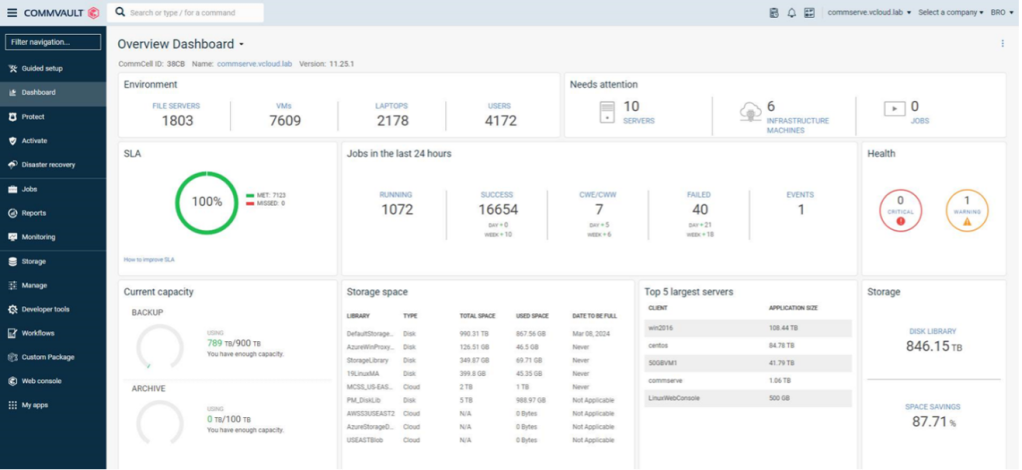
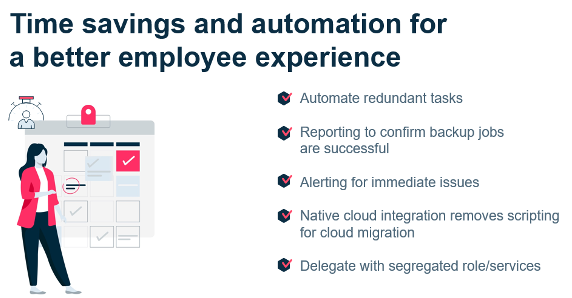
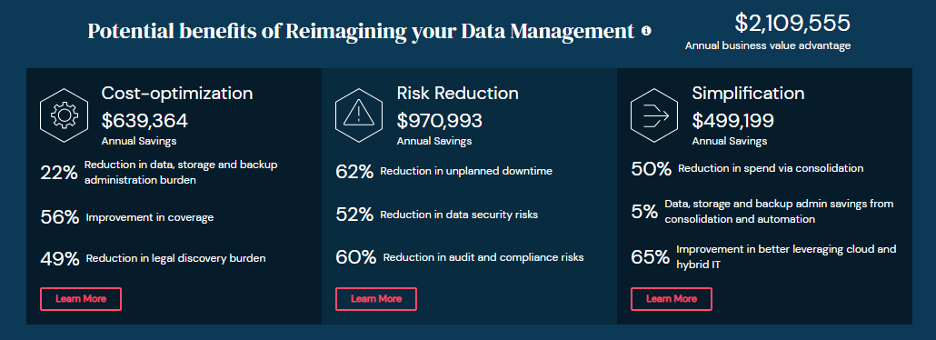
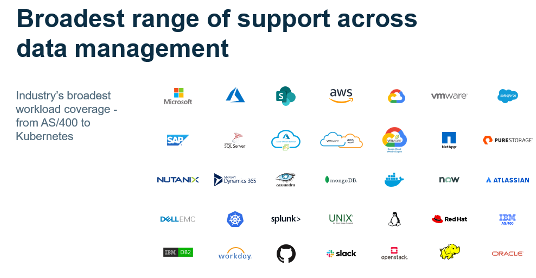
In the world of SaaS businesses, new ventures pop up every day. However, the growth potential – and even survival – of a SaaS business can’t be taken for granted. In fact, the year that Commvault launched Metallic – our own SaaS venture – it was estimated only .04 percent of SaaS start-ups make it to $10 million. But Metallic had something special: it was an elegant, cloud-native solution that leveraged the best of cloud technologies together with Commvault’s industry-leading IP. We had a great team at the ready, committed to a singular mission of changing the status quo in data protection, and a market ready for change. Metallic was launched as a Commvault Venture, a start-up within the company, that boasted the technology, talent, and GTM chops to fuel a truly disruptive entrance to the market. In two short years, Metallic has experienced amazing growth and accomplished what most start-ups would dream of:
Rapid-fire portfolio expansion – more than tripling our offerings from launch
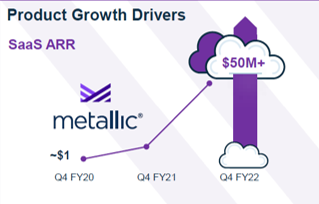
Growing from 1M to $50M ARR in 6 quarters
Establishing incredible cloud partnerships – including Microsoft, and a newly launched MSP business with global design partner SoftwareOne
Expansion to serve more than 2,000 customers, with availability in more than 30- countries around the globe
Made Enterprise grade DMaaS a reality for companies of all sizes, from the largest Fortune 500s to the smallest companies
But more than anything – our growth and success today is testament that we have struck a chord for customers: Metallic offers the security and flexibility companies of all sizes need to meet this unique moment of accelerated change … and rising risk.
Growth comes from meeting the moment
Data protection as a service is the fastest growing segment of our industry1, and Commvault had the foresight to know there was a gap: enterprises needed a SaaS-delivered solution that they could trust. What we couldn’t have predicted was a world plunged into a global pandemic, and the meteoric rise of cyberthreats alongside hyper-accelerated cloud adoption. Last year, companies predicted they would double their pace of cloud adoption by the time the year was out2. Adding to that, environments are increasingly hybrid and multi-cloud. This kind of distributed data estate means an expanded attack surface. It’s an (im)perfect storm. But we’ve got you covered:
Metallic was architected to let customers manage data close to the source, for fast hybrid cloud performance.
Metallic supports an expansive set of workloads – including SaaS apps, endpoints, and enterprise critical datacenter workloads – across clouds.
What’s next? Metallic® Recovery Reserve™ and Metallic® ThreatWise™
First, we’re excited to share the Metallic Cloud Storage Service (MCSS) gets a new name: Metallic Recovery Reserve. Since its launch in 2020, companies around the world have adopted this managed cloud service from Metallic for their ransomware recoverability – and we’re excited to give MCSS a new name to speak to the value we’ve heard from those customers. A company’s data is its strategic reserve – and those reserve must be called upon to help speed recovery and ensure businesses can get up and running fast in the face of cyberattack.
To continue our growth, we are keeping the innovations coming. Following Commvault’s acquisition of TrapX in February, this week we’re launching an early access program for ThreatWise, a warning system to help companies spot cyberattacks and allow early action alongside comprehensive tools for recoverability. ThreatWise helps catch latent and silent threats traversing environments to contain and limit windows of exposure – because true data protection is not about recoverability alone.
Learn more about why this matters and how companies can sign up to learn more as we move toward general availability in the coming months.
With Metallic together with a broad set of intelligent data services delivered as SaaS, software, or appliance, Commvault is helping customers move fast, stay agile, and put security first as they modernize their business. There’s much more to come this year and beyond from Metallic as we continue to listen to our customers’ needs – for security and compliance, for business efficiencies, and for smart hybrid- and multi-cloud data management. Stay tuned, the best is yet to come.
References
1. SaaSPath 2Q20, April 2020, IDC – 2. IDC Info Snapshot, sponsored by Microsoft, Doc #US4697620
More related posts
Meet Clumio Chat: An AI Assistant to Help Evaluate Cloud-Native Data Protection
A company’s backup data is its strategic reserve, and in the face of cyberthreats, it’s imperative they are able to call on those reserves, restore their data, and resume business operations as quickly and seamlessly as possible. Air-gapped cloud storage is an essential part of any data protection strategy as companies navigate the rise and growing sophistication of ransomware, which is why we brought Metallic Cloud Storage Service to the market nearly two years ago. Since then, we’ve seen companies around the world adopt this solution as part of their data security strategy, while also paying off on their cloud transformation initiatives and the drive to create efficiencies and lower costs. Today, we’re happy to announce that our managed cloud storage offering gets a new name: Metallic® Recovery Reserve™, a new name but still focused on Commvault’s ability to deliver industry leading enterprise grade protection and recovery of your corporate data.
Cloud storage for your ransomware strategy
Cyberattacks like ransomware attacks happen every 11 seconds1 and are expected to increase year over year, and if an organization is hit with a cyberattack, the average cost of downtime for large enterprises can be in the thousands per minute.2 These statistics reinforce the importance of recovery readiness of data, especially as organizations are accelerating to the cloud. Since data is the lifeblood of all organizations, customers adopted and continue to adopt Metallic Recovery Reserve to protect their business and recover their data when they needed it the most.
With immutability options and air gapping along with simplified management, Commvault, with Metallic, was first to market to deliver a managed cloud storage offering from a recognized industry leader in data protection customers know and trust.
Security with simplicity
While Metallic Recovery Reserve offers the ability to protect and recover data against security threats, the question is, is it simple? Yes.
A security solution that is complex comes with its own pitfalls and has the potential to be less secure the more complex it is to use. Metallic Recovery Reserve is the “easy button” to secure data and control costs. Since it is fully integrated with Commvault software, admins can use Metallic Recovery Reserve as a backup target just like any other disk target or tape target. This removes the need to provide extensive training, since all of this is handled by the Commvault software. Commvault writes directly to the cloud storage and reads from it for restores, with no compute running in the cloud. All of this is managed through the Commvault Command Center, providing a single UI to manage all corporate data.
Metallic Recovery Reserve is also available as a simple cloud storage target for hybrid cloud data center workloads customers protect with Metallic SaaS solutions. Additionally, customers get choice since Metallic Recovery Reserve offers flexible storage tiers across both Metallic SaaS and Commvault software, for both short and long-term retention needs.
While other backup vendors claim their solution is the “last line of defense”, Commvault offers a comprehensive set of ransomware protection capabilities that includes not only recoverability but also protection, monitoring, and detection, as well as early warning and early action capabilities with Metallic ThreatWise. With Metallic Recovery Reserve, you get a solid managed cloud storage service that delivers air-gapped ransomware protection and ensures your data is going to be recoverable when you need it the most.
References
1. CYBERSECURITY VENTURES, Global Ransomware Damage Costs Predicted to Exceed $265 Billion by 2031, David, Braue, June 3, 2021 – 2. Web tribunal, Branko K., 15+ Scary Data Loss Statistics to Keep in Mind in 2022, March 2022
More related posts
Meet Clumio Chat: An AI Assistant to Help Evaluate Cloud-Native Data Protection
For most of my life, I’ve been a builder. As a young child, my imagination was consumed with a passion for cars. I’d stroll down the hobby aisle and see flashy scale models of American muscle cars with their custom flame paint, exotic European sports cars with amazing detail. I was mesmerized. I would mow yards and haul brush in an effort to earn just enough money to purchase the kits and needed supplies to attempt my recreation of masterpieces depicted on the model box.
It was fun and challenging, but there’s one thing that even my imagination couldn’t overcome. I never built the model to its potential and never recreated the level of detail exhibited by the photographs emblazoned on the boxes. It wasn’t for lack of effort, but mostly lack of skill and experience. My glue would always overrun, stickers would adhere crooked or tear as I tried to stretch them across body panels. Painting was hard and I just didn’t have all the tools needed to achieve enough detail to recreate the example on the box. It was a lackluster outcome, even with a full instruction sheet carefully followed.
Now think about how a related situation exists in the cloud. We builders are presented with a world of possibility, and while we may possess the right skills, life is a little more complicated these days and we usually have numerous other priorities competing for our time and concentration. Of course the outcome is dependent on both. There are components where the quick version is ok; for example, we can get away with oversizing instances for a while. But some details of cloud architecture leave no room for error. This is especially evident when you look through the lens of data protection. Data protection is your final line of defense. If it isn’t built with care, you are at risk when you need recovery the most.
With AWS backup, the very basics of backup are provided. If your account is healthy, you can probably restore data. Let’s define health- the region has no outages, your production environment is mostly intact and backups are available. The risk is in the if. With AWS backup you can create a backup plan for your account, but you most likely only achieve an operational recovery point with an in account snapshot. Is this what you need? In the world of infrastructure as code, builders can also become destroyers. We have incredible administrative rights that allow us to manage an entire environment and these permissive roles aren’t without risk, especially when we can create and delete backups at will. The backup plan workflow has lots of prompts to help you achieve a ‘finished’ plan by choosing a default encryption or one of the default templates given, but these choices aren’t optimal as they are not designed to take into account the need to protect your backups from intentional bad actors or accidental deletions, and they don’t address availability due to regional outages.
In the world of infrastructure as code, builders can also become destroyers.
At Clumio, we help remove the risk. We’ve built a Secure Vault for cloud data sources. Our solution creates an air gap between your cloud backups and primary access plane. This helps prevent permissive user roles from compromising rentention and deleting backups. With the help of Clumio, you can recreate. You get optimal protection and simple recovery, even to other regions. Having a backup ready to help you in the worst case scenario sure sounds better than one that only works under optimal conditions.
I’ve come a long way as a builder. I know my priorities and limits, and know when to source out to experts. Take for example my latest project: While my skills have improved in assembly, I’m still no painter. I could probably invest in learning that skill, but that’s just not where I value spending my time. Instead, I’ll source that important part out to ensure a beautiful outcome, instead of risking the outcome quality, timeline, or both by doing it myself.
More related posts
Meet Clumio Chat: An AI Assistant to Help Evaluate Cloud-Native Data Protection
Cloud transformation is a huge part of digital transformation. As the cloud revolution moves into its third decade, it’s clear that there’s tremendous value in adopting cloud, with McKinsey estimating more than $1 trillion just for Fortune 500 companies. Interestingly, nearly all of that value comes from business innovation and optimization rather than IT cost reduction.
So how can organizations capture the potential benefits?
In this video you’ll learn the Do’s and Don’ts of what you need in your data protection environment to successfully achieve a cloud transformation that will make a positive impact for your business.
To further assist you with implementing a successful cloud strategy – please see below a handy checklist.
Requirement
Commvault
Broad Workload Coverage – Over the last few years, your data environment has gone through a high level of change and innovation – leaving a wide range of workloads. For a secure environment, all these workloads require data protection and management – legacy and next generation.
✔
Flexible Delivery Model. This is a big one. A flexible delivery model will allow you to consume, deploy and grow, according to your business needs now and, in the future, including SaaS.
✔
Multi Cloud Support. With 80% of customers using multiple clouds, it’s imperative to work with a vendor that has native integrations and deep relationships. This enables you, the customer, to get early/ fast access to innovations within the chosen cloud environment but also it protects you from cloud/ storage lock in.
✔
Smart Automation. Smart automation means moving data between cloud and on premises will be easy and fast. Automating the process will enable your teams to concentrate on delivering innovation and it will lower the risk of not meeting SLAs.
✔
Enterprise Level Security. With ransomware attacks conservatively estimated to occur every 11 seconds – we need to make sure that your security posture is high. End to end visibility via a single platform ensures that you are ready to deal with any issues or attacks that may arise.
Although vintage trends have become more popular in recent years, your outdated backups are not. They aren’t getting any easier to manage, in fact, most people consider them to be a burden in their IT environment. It would be nice if we could bring all our vintage backups to a thrift store and exchange them for something newer, and simpler to use, but that is not the case.
The complexity and lack of integration from these older backups restrict scalability, create silos that decrease data visibility, reduce IT productivity, and increase overall risk. You need to keep these outdated backups for retention and compliance requirements, but what comes with that is a whole slew of restrictions that hold you back from innovating.
As you are looking to modernize your data protection, make sure you not only, keep up with the trends but stay ahead – you need to migrate your backups with powerful simplicity to the cloud. Instead of holding onto expensive legacy backups, move them and other data sets to inexpensive cloud storage with Commvault. By migrating old backups to the cloud, you can eliminate data silos, improve their availability, and reduce the overall risk in your organization.
Take a look at five, but not all, benefits of migrating legacy backups to the cloud with Commvault:
Consolidating to a Single Platform with web-based browse and management will simplify your entire IT environment. Commvault is a single backup and recovery solution, delivered as an all-in-one appliance that provides unified management across your entire environment – from on-premises to the cloud – you’re adding more value with a single console.
Staff Efficiency will come from the automation and GUI- based management within Commvault’s comprehensive platform. Automation will help you to streamline the management of tasks so you’re staff can focus on more innovative projects as well as make migration a hands-free process for your staff.
Cost Reduction will be because of the reduction in maintenance fees from no longer holding onto expensive, legacy backups. You will also be able to retire unnecessary hardware and reduce the number of point solutions you are paying for. Your staff will no longer have to be trained on antiquated solutions and instead can spend time enhancing their skill set.
Improve Regulatory Compliance because migrating to the Commvault platform will allow for easy search, discovery, and recovery. Improve data availability and recoverability with instant access and policy-driven automation.
Streamline Recovery with faster and more reliable SLAs. Comprehensive data protection from a single platform will ensure enterprise-level disaster recovery every time.
Avoid a fashion faux pas with an outdated IT environment
Migrating to the cloud requires flexibility and simplicity from a modern data protection solution. Without Commvault, you could face falling behind on currents trend and negatively impact the success of your IT goals. It’s time to take a simple, cost-effective, and modern approach to safely protect your data where it lives – on-premises and in the cloud – and migrate it easily and effectively.
For a total closet refresh in your IT environment, take a look at this whitepaper.
More related posts
Meet Clumio Chat: An AI Assistant to Help Evaluate Cloud-Native Data Protection
With new threats emerging daily and increasing in complexity and sophistication too, cyber security has become a critical focus for all organisations – with every single company, irrespective of its size and location, at risk of a cyber-attack. As a result, most have started opting for cyber insurance to cover the losses that such attacks may incur, sometimes together with a specific ransomware warranty, catalysed by this type of threat accounting for some 75% of cyber insurance claims (AM Best 2021). Outside of ransomware, cyber insurance can cover areas including extortion demands and remediation efforts.
But this is a market under strain, with the ratio of losses to premiums earned at 73% in 2021 according to Fitch Ratings and difficulty in diversifying the risk as cyber-attacks have no boundaries. Further, the absence of historical data complicates the capacity for the type of risk forecasting that the insurance industry typically employs to set pricing rates. In combination, this is ultimately threatening the profitability of the industry and thereby the protection it affords – and fuelling rising premium prices for customers too.
Headline grabbing ransomware warranties are also an area that further investigation and small print reading is required. What may look an attractive proposition (and often a no brainer) in many cases will never pay out and could lead to dangerous complacency.
Additionally, clauses around cybersecurity insurance are increasingly tightening, as highlighted by the recent announcement by Lloyds of London on coverage limitation, for example its insurance products will no longer cover the fallout of cyber-attacks exchanged between nation-states. Many insurers are also imposing stricter safeguarding requirements, which although helping to support increased levels of cyber security defences, this can also leave some organisations and especially SMB’s exposed, as they are less able to meet the new minimum threshold limits.
This makes knowing exactly what is covered in any policy you have today, or are contemplating purchasing in the future, a business and technology imperative. Companies should know that cyber insurance policies and ransomware protection warranties do not cover every aspect of attacks and in most cases, there will be varying triggers, limits, conditions and coverages for different types of claims which can lead to denial or a reduced claim, creating an expectation and actualisation gap. Education and awareness here is key – you must be fully aware of what is not covered by your cyber insurance today, to avoid any surprises later. Roy May does a great job of covering exactly this point.
Let’s explore some of the key issues in turn to support exactly that.
Third-Party Mistakes: Cyber insurance companies do not cover you if a cyber-attack takes place on any third-party system causing damage to your primary business. This third-party software or services can be your web hosting, email, cloud services, customer service management or any other significant online business relationship.
Losses Incurred During ‘Waiting Period’: The insurance world often has a time-based deductible referred to as a “waiting period.” Only the losses that incur after the completion of the waiting duration are covered by insurance. This waiting period is usually around 10 to 12 hours. It means that if your network undergoes a cyberattack during the waiting period, you will not be able to claim money from your insurance.
Loss During Downtime: Losses incurred during the business interruption event are not covered by major policies. The downtime can cause harm to your business in many ways leading to loss of productivity and customers trust, loyalty and ultimately their business. No matter how much sales loss this downtime costs you, it will not be covered.
Reputation Damage: This is one of the most significant risks a company faces if a cyber-attack or data breach happens. Indeed, 1 in 3 customers are willing to leave a brand they love after just one bad experience, rising to over 90% after 2 or 3 poor experience interactions. (ADD CITE). Any attacks during special events like Cyber Mondays can do even more harm to the organization. As it is difficult to quantify such loss, cyber insurance companies do not cover them in their policy.
Bodily Injury or Property Damage: Cyber-attacks have tangible consequences. As the world moves towards IoT (Internet of everything), the connections between objects are increasing, and there are chances that it may lead to bodily injury or property damage. It can sound unusual but many production firms are nowadays running entirely on computers.
Everything right from collecting raw materials to shipping the final products happens through automated systems. In the scenario of a cyberattack taking place during any part of this process, it would lead to a catastrophe. If any company ends up in any such situation, cyber insurance will likely not cover the (extent of) the need.
New Hardware: Usually cyber insurance policy will not cover any property damage like hardware replacement and other equipment caused due to a cyber-attack. It becomes problematic when the hardware is corrupted to such an extent that it is impossible to fix it. The best way in such cases is to replace the hardware with something new, but the organization itself will have to pay for this.
Software Upgrades: The latest versions of the software are traditionally not covered by cyber insurance policies. In case of a cyber-attack, major cyber insurances will only help you restore the software to where it was before the attack took place.
Lost Equipment: Most cyber insurance policies do not cover any cybercrime that originated from a lost portable device like a company laptop or tablet. Few insurance policies include only encrypted devices in their policy, so all the devices used in the organization must have appropriate security patches.
Card Issuer Fines and Penalties: A key concern when dealing with a data breach is related to the penalties and potential fines imposed against a company by card issuers like MasterCard, Visa, etc, or indeed imposed against company directors under GDPR and similar regulations. These fines or penalties can reach a substantial amount of up to six figures. A few insurance companies exclude covering these types of fines which could lead to severe financial loss.
Specialised Attacks: Many insurance policies cover only the attacks that are committed by cybercriminals that seek personal profits, or collective profits when bad actors collaborate together for shared gain. They deny the coverage if the attack is carried out with a motive of terrorism or by a nation-state actor for political ends, an area where research shows increasing scale and volume of attacks to evade detection (Microsoft 2021)
Final Thoughts – So, Is Cyber Insurance Worth It?
The resiliency of a business is tied to its cyber resilience, making a sustained and organisation wide focus on cybersecurity critical, right across technology, process, culture and skills. As part of this, cyber insurance plays a role in protection by necessitating advances in security by design within increasingly stringent terms – and by supporting organisational recovery in the event of a breach when all such obligations were fulfilled. But not all cyber insurance policies are made equal, with material differences in coverage and conditions. So you must fully understand both your requirements and your obligations before making a final decision.
Start-ups and SMB’s having small portfolios or minimal digital assets might not be able to justify the expense of cybersecurity insurance, with a better return on investment likely achieved by focusing on security defence, for example Zero Trust practices and employee training and awareness. For large enterprises managing a significant volume of sensitive financial information or PII for their customers, then investment in a reputed cyber insurance policy can be well justified – but only as part of a holistic cybersecurity strategy. No policy will prevent nor spontaneously solve issues related to security but rather, they can form the final piece in a proactive defence program that focuses on both early identification of risks, and expedient recovery when (not if) an attack of some form inevitably occurs.
About the Author
Dr. Sally Eaves is the Chair for Global Cyber Trust at leading Think Tank GFCYBER and Digital Decentralization, Democracy and Security Advisor for the Centre for a New American Security (CNAS) reporting to the United States Government. A highly experienced Chief Technology Officer by background, Professor in Advanced Technologies, and a Global Strategic Advisor on Digital Transformation, Sally specialises in the application of emergent technologies, notably AI, Security, 5G, Cloud and IoT disciplines, for Business and IT transformation, alongside enabling Social Impact at scale.
An international Keynote Speaker and Author, Sally was the inaugural recipient of the Frontier Technology and Social Impact award, presented at the United Nations, and has been described as the “torchbearer for ethical tech”, founding Aspirational Futures to enhance inclusion, diversity, equity and belonging in the technology space and beyond.
More related posts
Meet Clumio Chat: An AI Assistant to Help Evaluate Cloud-Native Data Protection
When we dive in we often learn customers are confused by the differences among snapshots, replication and backups. I have learned this through countless sales calls in which I have an opportunity to coach companies through their application’s data storage, protection and recovery options.
Snapshots for in account operational recovery
Snapshots are the jumping-off point for most data protection and recovery discussions. A snapshot can be created manually via the AWS console or fully automated. Automation can be scheduled via scripts or as part of an AWS Backup plan’s scheduler. Snapshots are great for operational recovery, however, they do require a series of steps to promote them into a usable volume or database. One other gap is that snapshots are not easily portable across accounts or regions for out-of-account/region recoveries. Recovering a single file, directory or database record out of a snapshot can also be cumbersome, taking several steps and plenty of time to make such a granular recovery.
From a security standpoint, make sure you are protecting your snapshots, because they can be one of many targets hackers look for in your accounts. Snapshots can be accessed, copied, turned into volumes or databases and have sensitive data stolen from them. Snapshots can also be deleted, which would negate your ability to recover or meet long-term compliance retention requirements. To secure your snapshots, copy them to a highly secure secondary account, preferably outside your production AWS account(s).
Replication for production outage failovers to alternate accounts/regions
Another strategy being used for protection and recovery is real-time or near real-time replication of production data. As updates are made to production data, updates are pushed to replica copies in other accounts or regions as quickly as possible. Having replicated data is a great strategy for quick failovers to a secondary location when a disaster hits your primary production environment. However, it requires lots of work and planning to be able to quickly promote a secondary site to production. Applications need to be distributed across multiple accounts/regions, networking needs to be available for client access, and you need to prioritize operating in a highly secure environment.
While replication is great, there are some scenarios that may make your replicated data unusable. If data is corrupted, ransomed or deleted at the source location, you should expect your data to be in the same state in your secondary location. When this happens you need a point-in-time copy of your data in a secure location that can be restored back into your production environments. This is why even if you are using a replication solution, you also need a good backup solution as part of your Business Continuity Disaster Recovery plans.
Backups for restoring data from a known good point in time
Backup is a third strategy for data protection. Scheduled backups of your important data sets allow you to restore your data to a previously known good state. A backup solution should help maintain the security of your backups, including from intentional or accidental deletions… In the cloud, this would mean sending your backups to a “bunker” or “vault” which is segregated from all of your other accounts. This bunker account should also be highly secure, with minimal access and locked-down networking. Encryption should be enabled for backups landing in this bunker account. When it comes time to recover, ensure you have a create a process that allows you to easily find the backups you need and quickly restore them. It is also important to be able to quickly and efficiently restore to the account/region where you will be recovering your applications.
Clumio is a SaaS platform that falls into the backup solutions category. We provide scheduled backups of cloud data sources like Amazon S3, DynamoDB, RDS, EC2, EBS, SQL Server on Amazon EC2, and Microsoft 365. Configure the backup schedules to meet your recovery point objectives; one backup a day or multiple per day, the choice is yours. An added benefit of Clumio SecureVault backups is that they are air-gapped out of your accounts. Clumio helps you secure and lock down your account, so you don’t have to worry. our data is safe with us, and we can help you recover to any account or region. Restore at any granularity you want – a file, database record, a single object or complete instances; the choice is yours.
Summary
Every protection strategy has its place but they are not all equal. While there are circumstances and exceptions to everything, you can generally follow these simplified guidelines:
Use snapshots for quick operational recovery within your production accounts.
Replication is for real-time updates to a secondary site to be used for failovers when regional service disasters strike.
Scheduled backups are for when your data is in catastrophe mode and you need to recover from a known good point in time – hours ago or days ago.
When deciding on your protection strategy, make sure you are digging into the expectations of the business teams you are supporting. They are the folks feeling the pain of revenue loss when they don’t have the data they need.
More related posts
Meet Clumio Chat: An AI Assistant to Help Evaluate Cloud-Native Data Protection
When organizations perform cloud migrations to meet their digital transformation needs, there are often times when risks and costs are overlooked. It’s not unusual to see datasets of unstructured data being moved in bulk using a simple copy and paste action or a script being executed to move files. But is this really saving you time in the long term? A question you need to ask is: does the business actually need all of this data?
By blindly migrating all this unwanted ROT data, not only are you extending your migration window, but you’re also increasing your storage cost in the destination cloud, extending services levels, and adding to your organization’s information risk.
Insights into your data
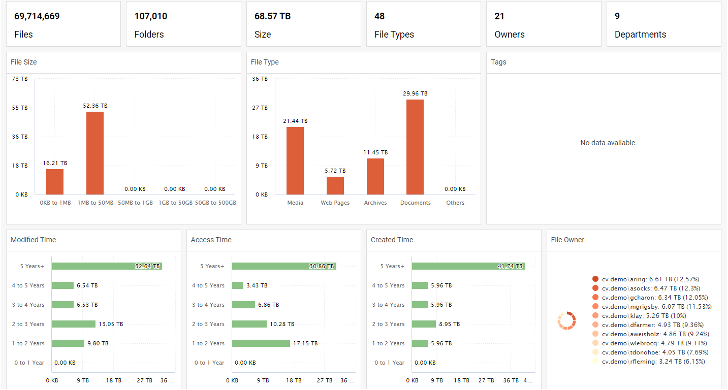
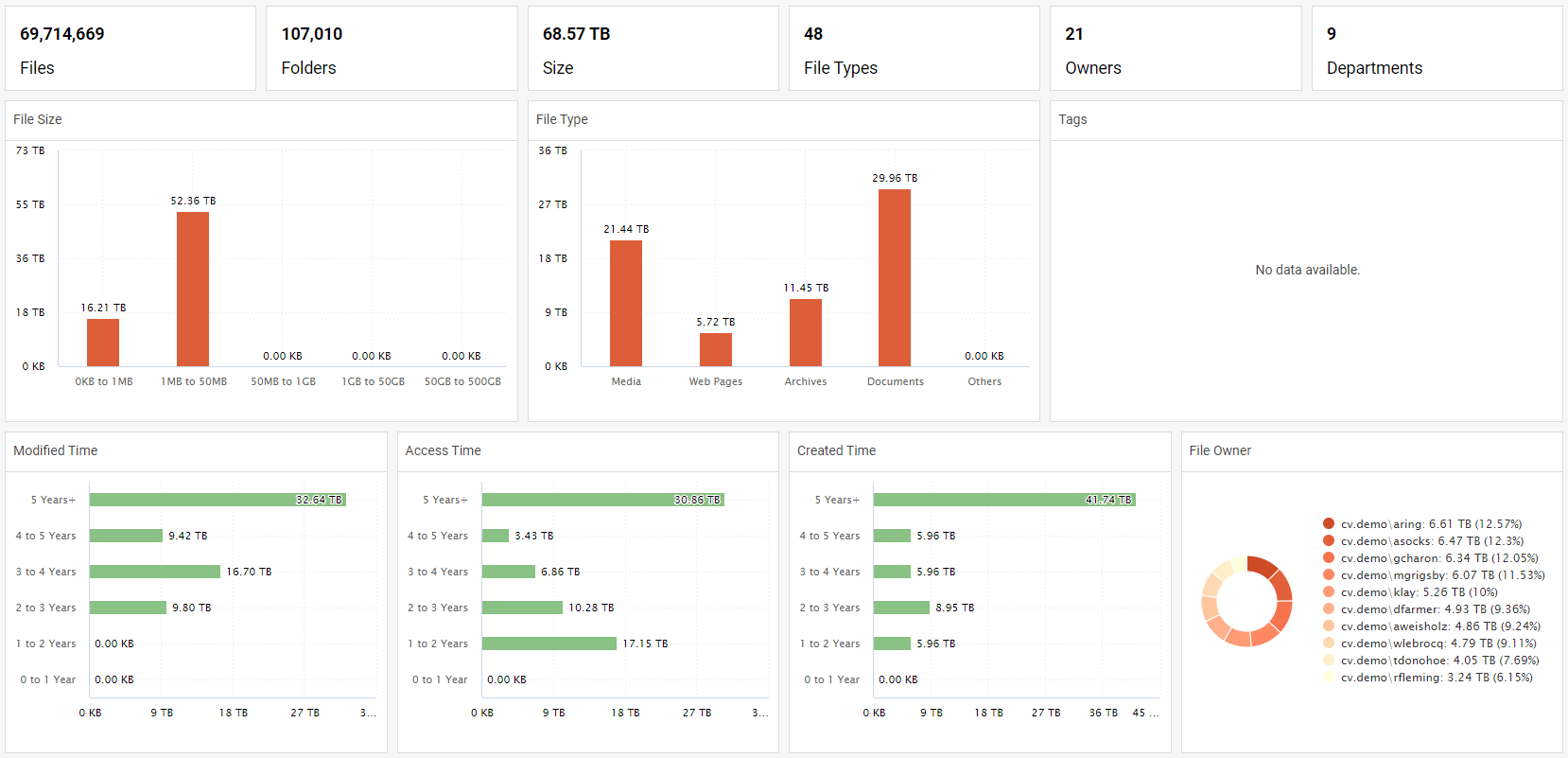
Whether you’re an existing Commvault customer or looking to use Commvault in the future, Commvault goes beyond backup and recovery with Commvault® File Storage Optimization. It provides rich data insights presented in easy-to-view dashboards, directly from the same UI used for backup and recovery operations: the Commvault Command CenterTM. These insights help you to identify ROT data and drive the right actions to exclude it from migrations. By including insights such as last modified, accessed, or created time – all grouped by year, you can prioritize which files are important and which are ROT, so you can move the right data to where it needs to be, faster. This helps you save on storage costs, reduces strain on your IT staff, and allows your data owners to be more productive.
Duplicate data? Not a problem!
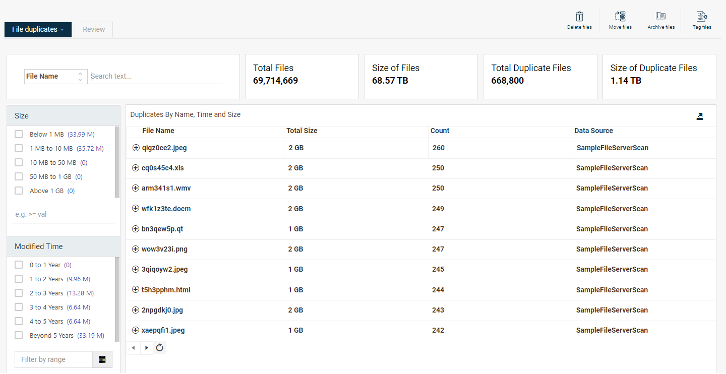
Commvault® File Storage Optimization also allows you to easily uncover duplicate data. This data might be present due to import, software, or human error, and is data that can pose inherent risks if retained. Given that duplicate data may contain sensitive information, figuring out which data to keep and which to remove can be a complicated decision. But with Commvault® File Storage Optimization, you can quickly obtain data insights to assist with your decision making. Finding out where this duplicate data is located, who has access to it, and excluding it prior to your migration will help ensure that the right data is moved to where it needs to be, quickly and painlessly.
It’s your data, don’t risk it
A further consideration is risk. Storing ROT data presents risk to your organization. This can lead to bad business decisions being made based on outdated data, increased attack surface for ransomware attacks, and increased risk of compliance breaches. Why migrate ROT data and compound that risk? By using Commvault® File Storage Optimization to identify and exclude ROT data prior to a migration, not only are you moving the right data, but you’re also lowering information risk by maintaining tighter control of your data. And by reviewing file ACLs, you help ensure that the data you’re moving can only be accessed by the appropriate personnel, lowering your risk even further.
Accelerate your migrations today
Commvault goes beyond backup and recovery to help accelerate migrations with Commvault® File Storage Optimization. Using the same familiar UI used for backup and recovery operations, you can easily identify and exclude ROT data prior to migrations lowering migration times, saving on storage costs, reducing strain on your IT staff, and reducing information risk. Learn how you can accelerate your migrations today and move the right data to where it needs to be faster.
Today, every organization is concerned about security and the inevitability of a ransomware attack. As your data continues to grow, you need to effectively manage it and protect it. Ideally, you don’t want to be reactive in any given situation where you feel pressured to make quick decisions. To keep up with all your data needs, you need a data protection and management solution that will future proof your data and integrate new technologies to your data needs. Then you are proactive against cyberthreats, not reactive.
Identify, Protect, and future proof your data
Effectively and consistently manage all your data security, compliance, transformation, and insights from a single, simple unified platform, spanning hybrid workloads, to minimize risk and accelerate growth. Better identify business-critical data, confidential or sensitive information to ensure your data is properly secured and protected. Once data has been identified and secured, then organizations can use it for greater insight and drive business decisions. Organizations should ensure they can:
Rapidly identify and secure business-critical and sensitive data
Reduce data sprawl and the threat of ransomware
Centrally manage data across cloud, on-premises, and multi-cloud environments
Manage risk remediations with collaborative decision making
Rapidly recover data and applications based on pre-set priorities
Commvault® File Storage Optimization – lower your attack surface
Gain valuable data insights, allowing you to lower the attack surface and reduce the risks of ransomware. This is achieved with a highly efficient means to survey both live and backup data silos at a massive scale while providing easy management through a single user interface – the Commvault Command Center™.
Commvault®File Storage Optimization can help identify business-critical and redundant, obsolete, or trivial (ROT) data and ensure the correct actions are performed (backup, secure, archive, or delete).
Identify business-critical data at risk and categorize it by data type and location
Use proactive remediation actions to backup, archive, or move the data to a secured location
Ensure data availability using backup copies
Figure 1: Know what data you have
Commvault® Data Governance – rapidly find and remediate your critical or sensitive data risks
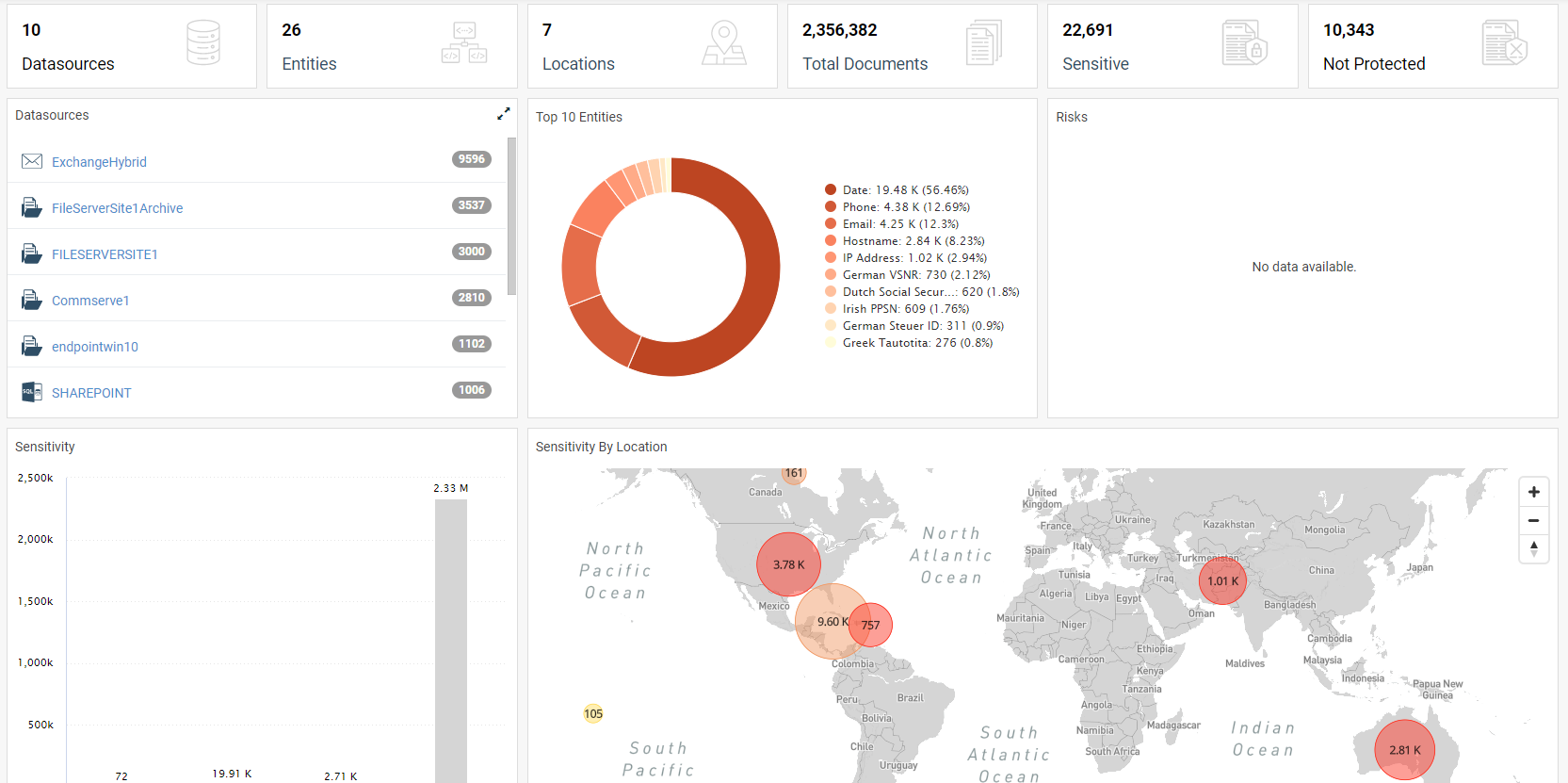
Gain valuable data insights, allowing you to identify sensitive data risks, streamline collaborative decision-making remediations, and support regulatory compliance. This is achieved with a highly efficient means to survey both live and backup data silos at a massive scale while providing easy management through a single user interface – the Commvault Command Center™.
Commvault® Data Governance can help define, find, manage, and secure files containing sensitive data across hybrid cloud live and backup data silos from a single user interface.
Rapidly identify and secure sensitive data, including personally identifiable information (PII)
Manage risk remediations with collaborative decision-making
Delete sensitive data from backups to ensure previously removed data is not accidentally recovered
Figure 2: It’s your data. Don’t risk it
Commvault Complete™ Data Protection –protect and recover your entire data environment
Commvault Complete™ Data Protection is a comprehensive yet easy-to-use data protection solution that combines Commvault® Backup & Recovery with Commvault® Disaster Recovery. It delivers backup, replication, and disaster recovery for all workloads, across entire hybrid environments. It provides trusted recovery of data and applications, virtual machines, and containers, along with verifiable recoverability of replicas, cost-optimized cloud data mobility, security, and resilient ransomware protection, and flexible copy data management to leverage protected data for DevOps, testing, and analytics.
Commvault® File Storage Optimization and Commvault® Data Governance can operate independently of Commvault Complete™ Data Protection or as part of a combined solution to maximize your business’s data management capabilities
In today’s geopolitical climate, having your data is just part of the battle.
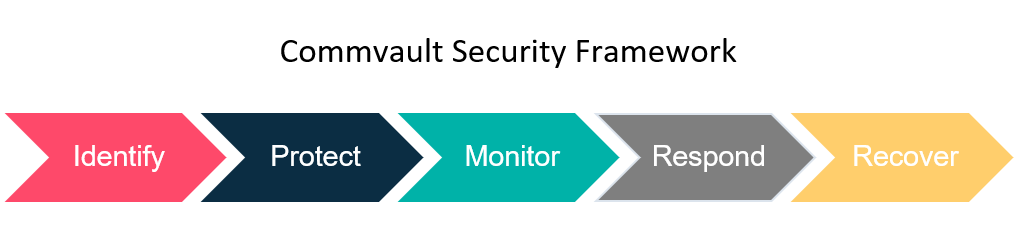
You need to be prepared for anything that could happen: it’s not if, but when. Currently ransomware attacks are happening every 11 seconds1 throughout the world. With that, it means that you need to have not only your data ready and available, but in the event of a disaster, you must be able to rapidly recover. At Commvault, we believe a multi-layered framework is the way to get you prepared and ready for anything your data is facing.
https://play.vidyard.com/4ZTXfskUCDiDJt9p33nMpt
Identify:
First, you must identify all the sources of data that you may need to back up. It can come from all sorts of places—from file servers to data centers, that’s just the basics. You might have emails in O365, or Salesforce, or even things like SaaS apps. You have to identify the data and know what you’re working with to know what you’re working with, and the things that are critical for you to run your business.
Protect:
Protecting your data should be something you are very used to. You likely have some sort of backup, just doing standard backups and standard procedures. The problem is, standard backups and procedures just don’t cut it anymore. Whether you’re looking at on-prem or cloud usage, native tools simply aren’t enough. To enhance your data protection, you must have at least one more copy to back up from, preferably at a secondary site. By having a secondary copy at another site, you have replication and rapid recovery. This is a good solution for recovering data in the event of a disaster site. But what if you have a cyber attack and both sites are impacted? To enhance your protection and holistically defend your data from local and cyber attacks, having a third copy of your data in a cloud solution (like Metallic Cloud Storage Services) is the best option. Particularly by air gapping the solution to take it offline for standard access, you know you have a good, protected copy of your data. This 3, 2, 1 strategy is the key to solid data protection: three copies, two different locations (minimum), and one of them in an air gap.
Monitor:
How do you monitor your data to make sure it is secure? First, you need simplicity to ensure you’re not only able to see all of your data and understand what’s happening, but see it all in one place. The Commvault Command Center is an ideal solution: it manages all your backups at all locations, keeping your notice of what’s going on. Plus, it utilizes things like honeypots and AI ML capabilities to make sure that we know what’s going on to your data. Even better is the Security Dashboard, which allows you to see what is going on across your data and across your environment from a single space. This gives your insight into the pieces that you’re protecting, and gives you the ability to do active monitoring on your data. You can even tell if things have changed on both live and backup data, which is a key differentiator when looking at the Commvault solution.
Respond:
Once you have protection and monitoring down, it’s time to test your response. You need to be able to respond rapidly if something happens to your data. With Commvault, you can use our API-driven architecture to have recovery tests scripted, to test backups. The world isn’t perfect, and as backup professionals, we know that things can fail. Testing your recovery is essential to your response.
Recover:
The goal is rapid recovery, being able to go into your system and quickly get your data back—this can keep you up and running in any environment. No matter what industry you’re in, you need to be able to come back quickly and maintain your system. So, remember when you’re looking at how to rapidly recover and protect your data, that you need to look at identifying, protecting, monitoring, responding, and rapidly recovering.
How do you save money and still move forward with IT innovation? Some savvy organizations know that data protection best practices can help cut IT costs while also helping drive IT innovation.
Today organizations are being asked to embrace technology that saves time, reduces risk, improves service levels, and helps IT leaders deliver cost savings. That extra money can fund a new technology purchase that better supports a remote workforce, enables a customer-centric data project, or develops a new competitive product.
IT cost savings may be available for you right now through better data protection practices.
Data protection supports your IT strategy
We all know enterprise environments are complex. Hybrid cloud, virtualization, SaaS, and edge continue to expand and evolve in many modern organizations. As new technology adoption happens, the enterprise approach to data management and data protection must scale and become more efficient.
This growing complexity makes it hard to keep costs under control. Overprovisioning, repetitive operational tasks, and inefficiently tiered storage capacity all add risk, increase costs, and consume IT staff time.
As you adopt new technologies or support decades-old systems (like AS/400), organizations must protect all data and workloads within the required SLA windows. Organizations that haven’t kept up with modern data protection practices struggle to protect, backup, and recover data across a variety of cloud, edge, and on-premises locations.
IT leaders need the ability to run the business on data, despite a continuously evolving and growing data environment. To do that, they need to optimize their spending and minimize costs while keeping up with market and technology changes. IT leaders want to reduce both IT and business disruptions. They need to reduce the risk of data sprawl, closing the business integrity gap – where the organization’s data environment is today and where their data environment should be for organizations to thrive and accelerate and digitally transform.
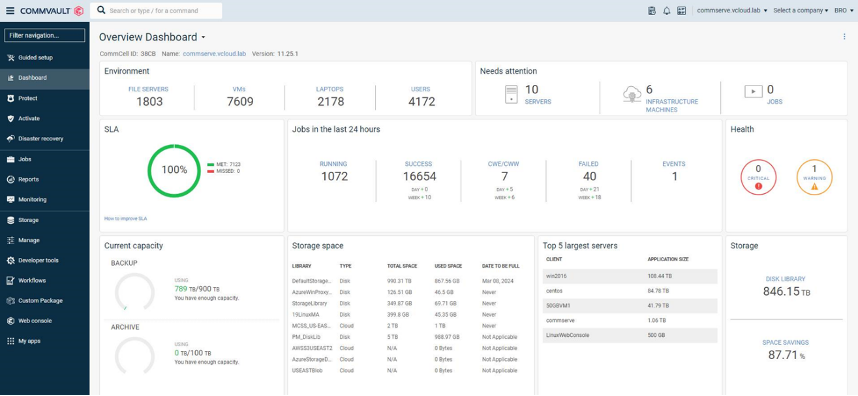
Most of all, IT leaders need their data protection status available in one place. Commvault makes it simple to see your data environment with a single dashboard. See the health of your organization, any alerts, storage needs, backup status, and how well you’re meeting SLAs. Just one dashboard and the options for a range of reports to meet today’s IT executive data needs.
Key questions to align data protection and IT strategy
When you stop to review your IT strategy, how much are you discussing data protection? It would be best if you were asking basic questions.
How many data protection products do we have? How many do we really need?
What could we save if we consolidated data protection products? Time? Money? FTEs?
Can we quickly and easily scale data protection across new technologies like cloud services?
How are we protecting critical systems like our ERP, CRM, and Microsoft 365?
What SaaS products are critical to our business, but not yet in our data protection plan?
Does the IT strategy include backup for endpoints, especially for remote workers?
With our staff today, can we maintain business continuity if there is a ransomware attack or disaster recovery situation?
If these questions are concerning, it may be time to sit down with your solution provider, global systems integrator, and Commvault. You can outline a data protection coverage plan that aligns with your IT strategy.
Do you have the IT team to support data protection and IT innovation?
We all know the headlines – people are leaving their jobs. Whether it’s a better position, retirement, or pursuing a lifelong dream, employees are leaving technology jobs. Your IT staffing situation may change tomorrow.
Consider these stats:
68% of the Australia-New Zealand technology industry is suffering from skills shortages 1
57% of surveyed tech executives said finding qualified employees is the biggest concern for their company right now – more concerning than supply chain issues and cyber security threats 2
Only 29% of surveyed UK tech workers said they would stay in their current role in the next 12 months3
One way to retain your staff and attract new IT leaders is to give them the best tools to do their job. Will you attract the best candidates if they find out they need to learn four or five different data protection products? Better yet, wait until they learn that each of those have many different interfaces.
In a recent survey, 49% of respondents said they will quit a job if the technology is outdated or hard to use. 4 IT leaders can reduce the administrative and management burden of data protection to retain staff and make the work more enjoyable.
Commvault CIO Reza Morakabati calls this eliminating the “soul-crushing work.” In a Gartner IOCS roundtable discussion with enterprise IT leaders, he shared ideas to reduce the time and effort involved in enterprise data protection.
Could your VMware environment be less expensive and less work if the backup to a cloud option instead of on tape?
How much time would be saved if you could backup and restore in ServiceNow? Commvault integration with ITSM products like ServiceNow also allows you to set Commvault alerts to create incidents in ServiceNow.
How can you streamline cloud data protection? Managing data in the cloud – or across clouds – could be much simpler with a data management solution with native integration to Microsoft Azure, AWS, and Google Cloud Platform. With Commvault, cloud access is available right in the main dashboard. For even easier cloud access, perform cloud backups with no previous cloud experience using the Metallic™ Cloud Storage Service integration – also available right in the Commvault dashboard.
Your teams can be more productive –spending less time on manual tasks and more time doing strategic work. Modern data protection solutions should include key features to help smooth the workday.
Automation to speed tasks. Eliminate repetitive manual work – and the risk of manual error – with modern automation.
Integration to streamline work. Whether integrating with your public cloud, storage vendors, or ITSM platform, integration saves time and effort.
Alerting – reliable alerting – to notify teams of problems and possible solutions.
Most of all, IT teams need reliability. Will the backups work? Will we be able to recover? Will we get our weekends back? Will we sleep well at night?
Save money by reducing the number of backup and recovery systems
Enterprises are sometimes battling a series of older backup and recovery systems. Whether the older systems were brought in by a previous manager or came into the organization through mergers and acquisitions, enterprises are seeing high costs.
Multiple maintenance and renewal schedules, different customer support teams, and so many interfaces – these challenges cost money and take up staff time. Today no one has extra staff, extra time, or extra money.
Often, we talk with enterprise IT leaders who are surprised with high costs due to these multiple systems. Organizations sometimes find they need to pay for an additional cloud gateway to transfer data to the cloud, an external appliance for cloud deduplication, or an entirely different product for SaaS backup.
The high cost of renewing all these disparate products is often an unpleasant surprise to IT leaders who haven’t yet seen the ROI of the initial purchase.
IT leaders share these backup products are complex and are not necessarily well integrated. This lack of alignment restricts scalability and creates silos that decrease visibility to the data, reducing IT productivity, and increasing overall risk.
Organizations start by comparing their current state and future state. Step one is to compare costs and the potential options using the Commvault Value Calculators – then work with Commvault and our services partners on an ROI discussion.
Ideas to find cloud cost savings
With better data protection, you can save money in the cloud. Some enterprises have saved significant budget amounts through improved deduplication and compression. Others have realized savings by ensuring workloads are aligned to the proper storage tier. It sounds simple, but it’s a big opportunity.
In many cases, you’re being asked to manage more complexity and data with an insufficient budget to address those issues. What if you could save money through more efficient data protection methods?
Cloud is probably one of your largest budget areas. Data protection best practices can help you reduce the spend on low-level cloud storage to repurpose your cloud spend toward higher-level cloud services. Instead of spending too much on low-level storage, repurpose that spend on innovative services that help meet your organization’s innovation needs.
If you properly manage data across your multi-cloud environment, you can reduce cloud storage and egress costs.
How? First, deduplication and compression – on-premises, before migration, and even in the cloud. We’ve seen enterprises dramatically cut cloud storage costs. They can then use that budget on higher-value cloud services.
Remember, you can even extend that deduplication into the archive tiers. Commvault supports a number of cold and very cold storage tiers like Amazon Glacier Deep Archive. While that’s a very low-cost archive service, you can lower your costs even more, when you deduplicate.
And one additional note – with Commvault deduplication is integrated – no separate appliance, no separate anything. Deduplication is integrated and accessible.
You can lower compute costs – Commvault lets you dynamically scale and use power management, plus write to object storage directly without additional compute requirements. Commvault optimizes resources using machine learning techniques that reduce cloud costs.
Also, you can control who is making decisions in your cloud environment. For example, Commvault supports the use of AWS least privilege permissions and integrates with AWS Identity & Access Management (IAM) role definitions for common use-cases like backup and recovery or VM conversion.
And again, Commvault does this with native integration into the major clouds- Azure, AWS, GCP, and more- so there are no gateways to purchase or slow down your progress.
With significant data growth, organizations are looking to scale data storage more dynamically and “pay as they grow.” Commvault enables customers to expand cloud data protection to multiple cloud storage classes, finding cost savings where possible.
It’s important that you understand data growth and user of multi-cloud data from a single console. With one clear view of your environment, you can make the decisions to plan for future storage growth strategically, optimize your costs, and reduce risks.
Supporting IT innovation with comprehensive data protection
Driving innovation is the #1 goal of CIOs in the next 3 years.5 IT teams need to spend less time on archaic work and more time supporting innovation.
It’s not unusual to be asked to support AS/400 from a new acquisition and protect the data in a new Kubernetes project. Support old and new technologies with one Commvault dashboard.
Known for day-one support of new cloud services and storage classes, Commvault aligns with the top public and private cloud vendors to help ensure you can protect data across multi-cloud and edge environments. Explore the range of Commvault supported technologies.
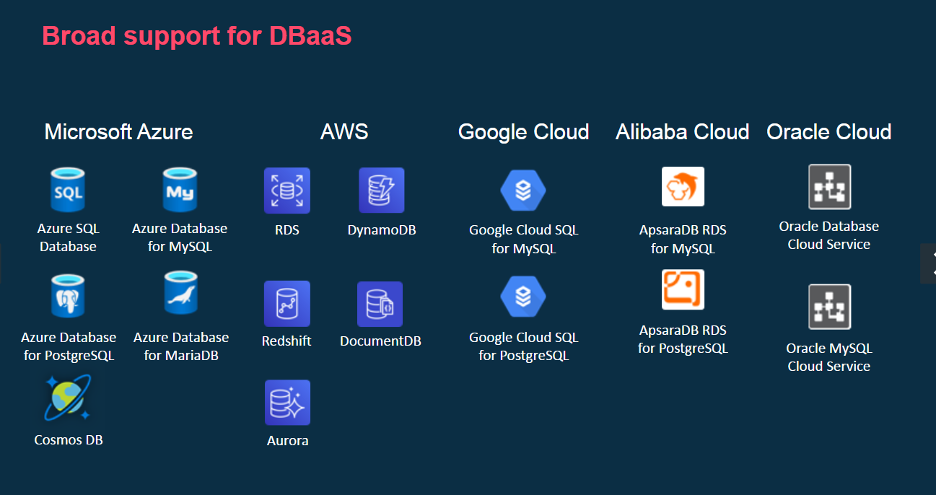
Organizations are increasingly relying on cloud-based services to support customer needs, new products, and speed to market. With the broadest range of support for Database-as-a-Service (DBaaS), Commvault helps you be ready for the cutting-edge innovation needs of your organization.
Not all backup products can support cutting-edge cloud services – especially at scale. Commvault makes it easy to expand protection for these new cloud-based services and incorporate them seamlessly into existing data protection plans.
Start saving time, reducing costs, and supporting innovation with strategic data protection
It’s the right time to update your data protection strategy. Start developing a plan to turn off your older data protection products and consolidate them to one comprehensive, flexible, and modern data protection platform.
1. ZDNet, IT skills shortage remains in Australia and New Zealand as borders stay shut, May 2021 – 2. CNBC, Labor shortages outrank cyber threats as biggest concern for tech companies, October 2021 – 3. CW Jobs, Confidence and job satisfaction among UK tech professionals remain strong in 2021, July 2021 – 4. Adobe, The 2021 State of Work – 5. 2021 State of the CIO, IDG
More related posts
Meet Clumio Chat: An AI Assistant to Help Evaluate Cloud-Native Data Protection
It’s that time of year again, when CRN releases its Partner Program Guide, featuring the brightest partner programs across the industry. For the ninth year in a row, I’m thrilled to share that the Commvault Partner Advantage Program has received a 5-star rating on this prestigious list.
CRN’s annual Partner Program Guide highlights the most notable partner programs from industry-leading technology vendors that provide innovative products and flexible services through the IT channel. The 5-star rating is achieved only by select vendors that deliver the best of the best, going above and beyond in their partner programs to help push growth and positive change.
When it comes to the Commvault Partner Advantage Program, our chief goal is to continuously nurture a partner program that evolves with our partners and their needs. We regularly seek feedback from our partners on what’s working and what they need more of. We make refinements that get to the root of our partners’ challenges and create an environment that fosters mutual success.
Just take a look at our PY22 Partner Advantage Program, where we launched targeted programs for Managed Service Providers (MSPs) and Aggregators in order to accelerate Data Protection-as-a-Service (DPaaS) practices with providers. We also enhanced our rebate structure for Solution Providers to reward performance around partner-sourced opportunities and improved the overall experience for partners through our partner portal. These are the areas that were and are most important to our partners.
What we are most proud of in our partner program is the ability for partners to develop deep competencies in their areas of expertise. We offer targeted incentives around growth, new customer acquisition, and consumption of software licenses, allowing partners to earn rich rewards. Partners can also build their practice, drive customer demand, co-sell and win, and support their customers.
It’s critical that we help our partners strengthen their practice areas and in turn, ensure they can deliver our best-in-class Intelligent Data Services that protect, optimize and recover data, whether on-prem, in the cloud or both. Together with our partners, we offer customers the ability to do great things with their data – and we wouldn’t want it any other way.
To learn more about the 2022 CRN Partner Program Guide, check out the April 2022 issue of CRN and online at www.CRN.com/PPG.
More related posts
Meet Clumio Chat: An AI Assistant to Help Evaluate Cloud-Native Data Protection
What is ransomware? How to protect and recover from it.
Time accelerates in a ransomware attack
A ransomware attack is a classic example of a ticking clock. Your critical business data has suddenly been taken hostage. Hackers have used advanced encryption to render it inaccessible — and now they are demanding money to decrypt it. How will you respond? Can you ensure the safety of your data if you refuse to pay — or even if you do? While you consider your options, your organization remains paralyzed. Every passing minute increases the pressure to make the right choice.
This scenario has already struck companies of all sizes across industries worldwide. Yours could be next. Are you ready?
The cyber threat landscape, including ransomware, has transitioned to a case of “when,” not “if.” To ensure you can recover your data, you need the right solution with the best technology, the right people, and processes.
By 2031, it is anticipated that ransomware attacks against businesses will occur every 2 seconds, up from every 11 seconds in 2021.1
Organizations require tools (such as anomaly detection, immutable backups, air gap, and multi-factor authentication (MFA) controls) to continually measure and protect their recovery readiness state. They do this to expose and remediate problems, validate their data and business applications’ recoverability, and improve their security to reduce their risk profile. In the event of a successful attack, fast restores are required to resume business operations quickly.
A recovery solution is only viable if it is resilient across various failure modes. One scenario may be a data recovery event to revert to the prior instances before the corruption. At the same time, another may require complete recovery of the business applications to a new location. Designing recoverability across environments and providing simplified automation to test and validate each scenario helps build the recovery readiness state. Knowing the mission-critical data and applications were already validated for recovery by an automated process completes the needed security, compliance, and comfort level. Learn more with this eBook: Ransomware 101.
What is a ransomware attack?
Gartner defines ransomware as “cyber extortion that occurs when malicious software infiltrates computer systems and encrypts data, holding it hostage until the victim pays a ransom.”2
There’s a reason ransomware makes the headlines. It’s the kind of attack that gets attention — it’s sudden, brutal, and leaves the victim feeling helpless. In recent years, the rapid rise of ransomware has cast a shadow of anxiety across organizations. Alarmed businesses, IT, and security leaders aren’t just being paranoid. In the third quarter of 2021, there was a 36.8% increase in ransomware attacks.3
What are the types of ransomware?
It is easy to assume that all ransomware is similar, and it is not uncommon to think that one size fits all in terms of prevention and preparation. However, because each ransomware type is usually developed to attack different, specific networks, they can be very dissimilar in how they work. It is essential to understand the different types currently being used (keeping in mind that it is also possible to combine multiple types of ransomware). Suppose your organization is attacked, and you do not have a plan to defend against the different types of ransomware. In that case, the likelihood is that the attack will significantly impact your company.
Here are six types of ransomware:
CryptoWall – is responsible for a high percentage of ransomware attacks. Typically, CryptoWall attacks its target through phishing emails. The WannaCry ransomware virus is a derivative of the Crypto family and was at the core of the largest cyberattacks ever perpetrated. Unfortunately, the creators of CryptoWall continue to release new versions designed to get around security protections.
Locky – as the name implies, is what it does (locks you out of files and replaces the files with the extension .lockey). However, its name misses the most damaging part of this type of ransomware – its speed. Locky has the distinction of spreading to other files throughout the network faster than different ransomware strains.
Crysis – takes data attacks to a new level – actually kidnapping your data and moving it to a new virtual location. The significance of this aspect of the attack is that it qualifies as a breach if your company works with personal data; organizations must contact anyone who may have information on your network to stay in compliance with local, state, and federal guidelines.
Samsan – attacks unpatched WildFly application servers in the internet-facing portion of their network. Once inside the network, the ransomware looks for other systems to attack.
Cerber – attacks the database server processes to gain access instead of going straight after the files. Its creators sell the ransomware software to criminals for a portion of the ransom collected, i.e., Ransomware-as-a-Service.
Maze – is a variant of ransomware representing the trend in what is called “leakware.” After data is encrypted, bad actors threaten to leak ransomed private data on the dark web unless the ransom is paid.
Ransomware prevention and knowledge must stay at the forefront of organizations’ security efforts. Unfortunately, since hackers continuously become more sophisticated in encrypting data and developing new ransomware, you must continually monitor those developments.
Who are these bad actors?
External malicious actors are, in simple terms, villains. They are hackers or other individuals seeking to infiltrate your organization for their nefarious purposes.
Greed. Making money is a substantial motivating factor. For example, cryptojacking has become a popular method of stealing compute resources within an organization for mining cryptocurrency.
Political. Malicious actors may be motivated by political reasons, including using ransomware to fund terrorism.
Competitive. Some bad actors may want to delete data, leak data, or disrupt business services.
Whatever their intention, they often use password spraying techniques to gain unauthorized access into an organization or system. Or they might try to exploit vulnerabilities, inject botnets, and rootkits to steal and delete data or disrupt an organization’s ability to function.
That is where ransomware comes in. In a typical attack, the hacker uses malicious software (malware) to encrypt your data, often delivered via an infected attachment or link in an email. As in a flesh-and-blood ransom situation, the hacker then demands payment — or you’ll never see your data again! Without an effective recovery strategy, you may think your only option is to pay the ransom and hope for the best.
How does ransomware spread?
Ransomware is often spread through email phishing messages that contain malicious links or through drive-by downloading. Drive-by downloading happens when a user unintentionally visits a contaminated site, and malware is downloaded onto the user’s computer or mobile device. A drive-by download usually exploits a browser, application, or operating system that is out of date or has a security flaw. Ransomware then uses these vulnerabilities to find other systems in which to spread.
10 tips to minimize ransomware exposure
The goal is to reduce risks and minimize the effects of ransomware. Ransomware mitigation requires a combination of best practices and constant vigilance, along with a layered security approach. Steps to minimise ransomware include:
Plan, plan, and more planning for ransomware protection and recovery: plan for the worst and hope you never have to use it. It is paramount to have a multi-layer security strategy and remember that recovery readiness is critical.
Employees are critical to a good defense; conduct employee security training: Educate employees on avoiding ransomware and detecting phishing campaigns, suspicious websites, and other scams. Despite their best intentions, employees are still a leading cause of malware.
Ensure patches are up-to-date and stay current: keep software, firmware, and applications up-to-date to reduce the risk of ransomware exploiting common vulnerabilities.
Install anti-virus and anti-malware protection: use anti-virus software with active monitoring designed to thwart advanced malware attacks.
Implement multi-factor authentication: the process of authentication requires each user to have a unique set of criteria for gaining access. Enabling multi-factor authentication (MFA) methods makes it highly unlikely that a valid user account can be impersonated.
Segment your networks to prevent lateral movements: if a cyberattack is successful, don’t give them unlimited access within your network. Divide your network into smaller segments to prevent lateral movement and to contain the damage.
Know your data to safeguard your data: identify business-critical data and sensitive data across your environment. Then determine if the data are exposed to vulnerabilities. Using data insights, you can efficiently remediate these risks by removing, moving, or securing this exposed data to reduce the chances of costly breaches and ransomware attacks.
Perform regular backups: employ a backup and recovery solution that offers a multi-layer framework for protecting, monitoring, and recovering from threats. The solution needs to support a 3-2-1 backup strategy for rapid recovery and secure cloud copies for added protection. 3-2-1 is 3 copies of your data, on 2 different media types, with a copy off-site and preferably air-gapped.
Test, test, and test: once you have your plan in place, along with the procedures and technologies to execute it, make sure it’s going to work as needed. Perform frequent tests to verify that you can meet the SLAs you’ve defined for critical and high-priority data and applications.
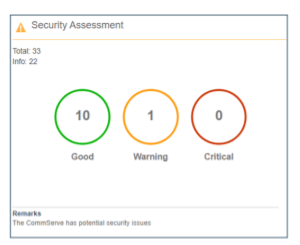
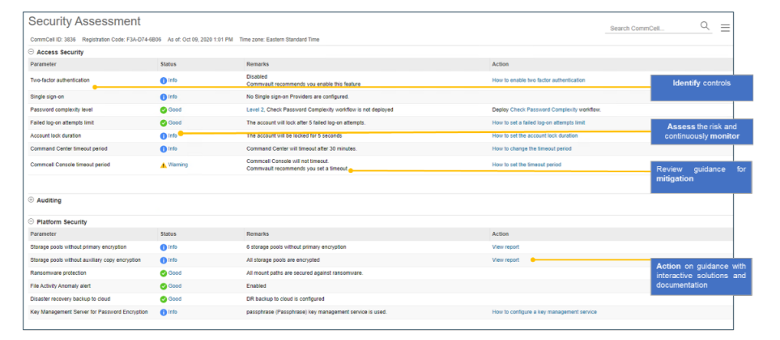
Enable the Security Health Assessment Dashboard (if you are a Commvault customer): utilize the Security Health Assessment Dashboard to identify, assess, mitigate, and monitor security controls within the Commvault data protection environment.
Ransomware prevention does not have to be complex. With the proper preparation starting with creating a plan, constant monitoring, and a robust backup and recovery solution, you can mitigate the risk of ransomware.
How to get rid of ransomware?
When ransomware does occur, the best approach is to have a validated copy of your backup data restored quickly to resume business operations. Organizations need a layered security approach encompassing multiple security tools, resources, controls, best practices, and strategies for a trusted and protected backup data copy. These security controls are applied within and around the data protection infrastructure to ensure the backup data is secured and recoverable. These steps provide the confidence that when an attack does occur, your backup data is protected and ready.
What are the risks of paying the ransom?
Paying a ransom is a highly debated topic, and only you can decide what is best for your organization. Factors to consider:
Many government security services recommend not paying, and in some countries, it may be illegal to pay the ransomware. For example, in the United States, the US Department of the Treasury has issued an advisory on the sanctions associated with making ransomware payments.4
The kits for ransomware as a Service often fund organized crime.
Will the bad actors provide the keys to get your files back? Will it leave malware behind to strike again? It is easy to assume that all ransomware is similar, and it is not uncommon to think that one size fits all in terms of prevention and preparation.
If leak-ware is involved, General Data Protection Regulation (GDPR) considers it a data breach once discovered, and you have 72 hours to devise a plan and report it.
Do you become a future target for your willingness to pay?
Remember, even if you pay the ransom, there is no guarantee that you will recover all of your data. 35% of data remains encrypted after the ransom was paid.5. And even with the encryption keys, it may take several days, weeks, and even months to restore it all.
How Commvault fights ransomware
Commvault data protection and recovery can be a valuable part of your anti-ransomware strategy. Commvault multi-layered security is built on Zero Trust Principles and based on the National Institute of Standards and Technology (NIST) cybersecurity framework to protect data and recover quickly in the event of a ransomware attack. Commvault helps protect and isolate your data, provides proactive monitoring and alerts, and enables fast restores. Advanced technologies powered by artificial intelligence and machine learning, including honeypots, make it possible to detect and provide alerts on potential attacks as they happen so you can respond quickly. By keeping your backups out of danger and making it possible to restore them within your Service Level Agreements, you can minimize the impact of even a successful ransomware attack so you can get back to business right away (and avoid paying expensive ransoms).
Protecting and isolating your backup copies is critical to data integrity and security. Therefore, Commvault has taken an agnostic approach to immutability. With Commvault, you do not need special hardware or cloud storage accounts to lock backup data against ransomware threats. If you happen to have Write-Once, Read Many (WORM), object lock, or snapshot supported hardware (which Commvault fully supports), you can still use Commvault’s built-in locking capabilities to complement and layer on top of existing security controls. Having the ability to layer security controls across different infrastructure types sets Commvault immutable solution ahead of its competitors. Learn more about Commvault Cloud Cyber Resilience.
Commvault’s security protection layers
With every environment having a mix of different infrastructures, securing backup data against random unauthorized changes can seem challenging. Just like securing your house, you need to identify the risks and enable the protection and monitoring capabilities to match your needs.
Many experts recommend having a layered anti-malware and ransomware strategy. Commvault has built these security capabilities into our data protection software and policies without the incremental management overhead. Commvault data protection and management platform includes five security layers:
Identify and mitigate risks to backup data within a single interface
Protect by applying security controls based on industry-leading standards
Monitor for ransomware, insider threats, and other threats
Respond and take action on threats and continuously validate backup data
Recover data quickly across multiple on-premises, cloud, and hybrid environments
Commvault multi-layered security consists of feature sets, guidelines, and best practices to manage cybersecurity risk and ensure readily available data. It is essential to understand that these capabilities are part of Commvault’s core platform experience, Commvault Complete™ Data Protection. There is no special licensing, additional costs, or required hardware or software. The layered security depth is enhanced through greater integration with Metallic™ and Commvault Grid for those customers seeking the simplicity of Backup as a Service or a data protection appliance, respectively.
Opportunity and risk— that’s the reality for businesses today and the people responsible for the data. A single ransomware event can threaten the bottom line or define a career. So how do you prepare? By making sure you are recovery ready. Learn more at https://www.commvault.com/use-cases/ransomware-and-cyber-defense.
Footnotes
1 CYBERSECURITY VENTURES, Global Ransomware Damage Costs Predicted to Exceed $265 Billion by 2031, David, Braue, June 3, 2021.
2 Gartner, 6 Ways to Defend Against a Ransomware Attack, by Manasi Sakpal, November 16, 2020.
3 Digital Shadows_, Ransomware Q4 Overview, Ivan Righi, January 19, 2022.
4 Department of the Treasury, Advisory on Potential Sanctions Risk for Facilitating Ransomware Payments, October 1, 2020.https://home.treasury.gov/policy-issues/financial-sanctions/recent-actions/20201001
5 SOPHOS, The State of Ransomware 2021, 4-19-21.
More related posts
Meet Clumio Chat: An AI Assistant to Help Evaluate Cloud-Native Data Protection
A data retention policy is a set of guidelines that outline how long specific types of data are to be retained and when they should be disposed of. It’s important for organizations to have a data retention policy not only to comply with regulatory requirements but also to reduce legal exposure, manage storage costs, and ensure the relevancy of existing data. Creating a data retention policy requires identifying legal and business requirements, considering different types of data, defining responsibilities, and regularly reviewing and updating the policy.
Data retention regulations are centered on both ease of access to customer data and their safety. Following data laws such as GDPR, HIPAA, or the California Privacy Act is obligatory for every business sector, but the retail industry, academic institutions, governmental entities, financial services, and healthcare entities have additional specific requirements.
With an ever-growing plethora of standards and regulations that necessitate the use of data, it can be a difficult task for agencies and businesses of all sizes and areas to comply.
Potential difficulties with data retention in the cloud
While many organizations are now leveraging cloud data protection solutions to secure their cloud data, data retention regulatory compliance is becoming increasingly complex and costly.
Some of these potential issues include:
Multiple, complicated policies – Retention policies vary across state and international lines, and different types of data come with different rules that must be adhered to. Furthermore, organizations have to keep track of what data they can keep, what can be deleted, and when the retained data must be deleted. When new resources are added, organizations have to apply new policies to them. If the organization slips up in any way, it can be liable for fines and even legal action—even for simply retaining data past the appropriate date.
Cost – Data retention obviously involves storing data. In the cloud, this can add up quickly if the right data protection solutions are not used. For example, organizations that opt for cloud-native snapshot-based backups can see their storage costs skyrocket as new data is retained and duplicated over time.
Security – Data retention and compliance regulations also involve the security of the data being stored. The organization is on the hook for the security aspect and responsible for keeping the data secured. While security breaches and data leaks can occur as a result of human error, the ongoing threat of ransomware attacks has created a dangerous security landscape.
Fortunately, issues like these can be mitigated or even avoided outright by using a cloud backup solution that not only manages compliance and offers visibility into policies, but also helps control costs—all while providing top-tier security for the backup data copies themselves.
The complete answer to maintaining data, safeguarding it, and staying compliant
Clumio is a cloud-based, completely secure backup solution that provides organizations with comprehensive data backup and defense while providing clear insight into any data security policies using several cutting-edge tools.
Through Clumio, your company is given
A straightforward user interface that gives a comprehensive overview of all elements and supplies
The capability to recognize AWS accounts autonomously, catalog present resources, and impose consistent regulations to new assets while they are incorporated into backups
Prompt notifications when adherence could be jeopardized
Obtaining certifications such as ISO 27001, ISO 27701, SOC 2 Type 2, HIPAA, and PCI DSS
Storing backups away from operational systems to guard against ransomware assaults by the use of air-gapping them.
Consistent cloud backup and data preservation fees combined with a usage system that offers carried over credits
Decreasing the amount of time and data lost to keep operations steady when something unanticipated occurs
Tools to identify possible cost reductions in cloud services
See the effects of a combined, thorough cloud storage system for yourself. Book an appointment right now to understand how you can shield your information and meet guidelines with the prevailing authority in AWS cloud backup with only 15 minutes of work- no installation of new technology or software is required nor any pre-preparation.
Learn more about Data Retention Policy
HIPAA Data Retention in the Cloud Find out how cloud backup can simplify HIPAA compliance and safeguard your organization from HIPAA-related data retention liabilities.
Achieving Regulatory Compliance with Cloud Backup Adhering to regulatory compliance requirements can be complicated and error-prone if you use the wrong tools. Discover how Clumio can remove the complexity and risks of compliance for your organization.
Why Data Protection is Essential for Data Retention Data retention policy compliance is about much more than just what data an organization can and can’t keep—security of the data is also an essential requirement. Learn how cloud backup can offer top-tier protection for all data across your organization.
An Overview of Data Retention Policy Considerations There’s a lot that goes into determining your data retention policies. Learn some starting points and best practices for setting up your organization’s policies.
Data Management as a Service—Why Clumio Beats Cohesity Data management has made a decided shift to a cloud-first approach, rejecting the complexity of hardware while demanding scale and agility.
More related posts
Meet Clumio Chat: An AI Assistant to Help Evaluate Cloud-Native Data Protection
President Biden’s cybersecurity executive order is clear as day … Zero Trust Architecture and modernized infrastructure is the key to protecting the nation’s data against the rampant threat landscape. We’ve seen the devastating effects firsthand with a ransomware attack disrupting gasoline distribution, causing outages and increased prices across the United States. It’s a global problem and statistically growing month on month from last year. https://www.blackfog.com/the-state-of-ransomware-in-2021/
In this blog post, I’ll explain why Zero Trust is important, what it is and how to harden your infrastructure by adopting Zero Trust principles using Commvault and Metallic.
What is Zero Trust?
Zero Trust is not a singular technology or feature. Zero Trust is a collection of design principles for IT infrastructure that enforces a “trust no one; always validate trust” approach to data access.
A great way to visualize Zero Trust Architecture is to think of home security. Around the perimeter of your house, you have cameras, locks, window sensors, and a fence. Essentially all your belongings are safe inside the perimeter of the house. However, if you have friends and acquaintances over for coffee, you have authorized entry into your home – at that point, your personal belongings are accessible and at risk of theft.
The above example perfectly illustrates a traditional approach to security – wherein firewalls provide perimeter security (keep the bad guys out) and user permissions control access. Once a bad actor gets in and gains access to privileged credentials (which they do) – they often go unchallenged while laterally moving through the environment doing damage.
With a Zero Trust approach, privileged access is continuously challenged, limiting malicious actors to move and operate effectively. Going back to the house example, just because I am authorized inside the house, combination safes, inside door locks, and internal cameras provide multiple layers of scrutiny and validation. So, although authorized into the house, I must continue to validate myself by giving the combination to the safe or keys to the bedroom doors If I were to attempt to move around the house.
Key principles of Zero Trust
National Institute of Standards and Technology (NIST) SP 800-207 is the definitive reference guide for Zero Trust Architecture (ZTA). Many of the principles outlined within the NIST publication have been implemented as features and best practices allowing the Commvault platform to be fully deployed in a Zero Trust architecture. Additionally, Metallic™ Data Management as a Service (DMaaS) is completely architected in the cloud using Zero Trust principles from the ground up. A few key principles outlined by NIST are Least privilege access, multi-factor authentication, and Micro-segmentation. Let’s explore this further.
Least privilege access – NIST SP 800-207 Section 2.1
The concept of least privilege access provides users and/or accounts with the bare minimum capabilities to do their job and nothing more. This minimizes exposure if the account is compromised, as well as limits data access leaks. Commvault can lock down backup data using role based access controls and special data privacy locks. It is easy to limit users to specialized capabilities such as restore only or view only. You can additionally restrict browse/restore access to data owners, only superseding any global level admin capabilities. Additional integration with Privilege Access Management (PAM) platforms like CyberArk® further improves security posture through policy-driven account management, credential rotation, and privilege session management.
Multi-Factor Authentication (MFA) is another key Zero Trust concept. Since trust needs to be continuously validated – MFA provides an additional layer of validation for any authentication request making it difficult for a threat actor to gain access to data. Commvault and Metallic BaaS supports modern implementations of MFA through its SAML-based authentication framework. Using Azure AD, ADFS, Okta, or other IDP, Commvault allows customers to deploy pin-based MFA tools and hardware authentication tools to control data access to backups.
On-premises deployments using AD or local accounts have integrated two-factor authentication (2FA), allowing organizations to use any pin generating application based on the Time-based One-Time Password (TOTP) algorithm specified in RFC 6238, such as Google authenticator, Microsoft Authentication as well as many others.
According to the NIST Digital Identity guidelines (NIST 800-63) cross referenced in their ZTA publication; hardware authentication technologies offers one of the highest standards for MFA providing Authenticator Assurance Level 3. This includes MFA technologies using modern specifications such as FIDO/FIDO2. Commvault is fully integrated with FIDO/FIDO2 MFA devices, such as offered through Yubico’s YubiKey as well as PKI based Common Access Cards. This completely maximizes the level of protection from illegitimate authentication attempts and future proofs your data protection environment.
Once authenticated into the management interface, the command authorization framework validates actions within the management interface. Regardless of the user’s role, any deletion, restore, or configuration request requires authorization from an approval authority. This protects against insider threats, both malicious and accidental, and keeps data safe from destructive actions.
Micro-segmentation is another key Zero Trust principle. Micro-segmentation is the technique of separating resources both logically and physically to make access very restrictive and controlled.
On-premises setups can use network segmentation techniques to isolate and air gap storage targets within the network. Once the network architecture is segmented, apply Commvault Network Topologies to block inbound connection to the storage target and automate whitelist access policies only allowing authentication connections outbound to pull data into the safe data vault. Many of our customers also choose to segment data in cloud, taking advantage of WORM storage controls offered by the Cloud vendor.
Metallic Cloud Storage Service (MCSS) provides an even simpler air gap approach requiring no infrastructure change. MCSS is a cloud storage target managed through Metallic, offering offsite, secure air gapped data protection capabilities for the Commvault platform. Data protected in MCSS is unchangeable and cannot be accessed or exposed on the backend cloud account. The data is protected in Metallic’s zero trust architected environment. This provides an easy method to segment and separate data from an on-premises environment.
In addition to physical segmentation, data management can also be logically segmented. Using multi-tenancy controls; access to data is segmented and compartmentalized, reducing potential data exposure.
Encryption key management can also be segmented across several KMS systems such as AWS Key Management Service, Azure KeyVault, as well as with one of many certified KMIP providers providing greater levels of protection against data access.
Metallic DMaaS Architecture
For a fully zero trust managed platform, look no further than Metallic. Metallic is a multi-tenant SaaS Platform with built in-segregation between tenants. Customer data is wholly isolated and stored in separate locations, creating a virtual air-gap between source environments and backup data copies. Hardened security and zero-trust access controls, including multifactor authentication, role based access, advanced data encryption, and privacy locks, prohibit unauthorized access to and lateral movement of data. Metallic also meets the industry’s most stringent security standards and maintains HIPAA, ISO27001, GDPR, and SOC 2 compliance, as well as the only SaaS data protection to achieve FedRAMP High In Process – In PMO Review standard.
Conclusion
As you can see, whether you build an on-premises Commvault solution, use Metallic DMaaS, or any mix and match of all of the above, the Commvault platform is secured using Zero Trust Architecture principles.
Learn more by attending the upcoming Commvault webinar “Going beyond Zero Trust” on March 23rd.
More related posts
Meet Clumio Chat: An AI Assistant to Help Evaluate Cloud-Native Data Protection
Today more than ever, organizations are relying on data to drive their business forward. The need to digitally transform is evident, due to the ongoing change your business and IT environment has endured because of the increased number of employees working from home. However, it is hard to put your data to work for customers and innovation when it’s scattered across the world in silos, clouds, and on-premises storage, all while being managed with different backup and recovery products. You need a modern data protection strategy that drives agility and flexibility across your whole environment, not just a portion of it. A solution that will unify generations of scattered workloads, so your environment is consolidated and simple, all while accelerating digital transformation.
While on their journey to modern data protection, our customers faced a few common roadblocks to success:
Rapid data growth
Disparate environments
Modernizing to adapt to market changes
We picked a sample of our customers that represented different industries, geographies and sizes to give you a real world look at their pain points but also the success that can be had with Commvault solutions. The five customers we are going to look at are Laing O’Rourke, Woodward Inc., Nashville Wire, Linamar Corporation and Optima Italia. We will also look at a few other roadblocks that these customers had might still impact your journey to modernization. Let’s look at those common roadblocks first and see how Commvault was able to remediate these issues and advance these customers on their path to a modern data management strategy.
Rapid data growth has accelerated over the last few years for everyone, and infrastructure has had to modernize and evolve into a more flexible, cloud centric environment in order to keep up.
Laing O’Rourke, a leading construction and engineering enterprise with data centers backed up using point solutions, had varying degrees of success and faced a management nightmare with their rapid growth. Their rapidly growing data was due to long-term retention requirements driven by regulation and was making their hybrid environment more complex and laborious.
“Our data growth is only going in one direction and Commvault has proven itself to be a knowledgeable and valuable partner as we transform to an ever more complex hybrid IT setting.” – Gareth Burton, CIO Europe, Laing O’Rourke
Another example is Woodward, Inc., an American designer, manufacturer and service provider of control systems and components for aircrafts engines, industrial engines and power systems. The company has been growing significantly across dozens of global networking sites, with exponential data expansion that quadrupled the size of data and backed-up servers. This resulted in an increase of costly storage consumption and restores taking too long to execute to meet RPOs/ RTOs requirements.
Commvault was able to reign in the complexity caused by accelerated data growth through our single, unified solution that protects all workloads in their hybrid cloud environment providing Laing O’Rourke with a simple clean data solution that scales from on-prem to hybrid and even full cloud solutions. Through continued data growth, in Woodward’s case, quadruple the data, Commvault was still able to scale flawlessly and help Woodward safely expand to the AWS cloud. This hybrid approach provided Woodward with a way to scale and accept their rapid growth without concern for capital expenditure.
Disparate Environments are caused by exponential data growth and workloads being scattered across the data environment, which leads to data fragmentation and failure points, and complicates automation – slowing down digital transformation efforts.
One tactic for digital transformation is to augment the traditional processes of a company with new up-to-date digital solutions. Nashville Wire, a family-owned manufacturer of material handling products that is leading the charge by taking this exact approach. The company manages the data for their 900 employees throughout 15 locations in the U.S. and Mexico.
In addition to experiencing rapid data growth, Laing O’Rourke’s critical data was also dispersed across 150 locations with local rather than centralized management of backups, Disaster Recovery (DR) or data retention. Management was a laborious task, as individuals had to be present at each remote site to manage tape backups on a constant basis.
Commvault provided a centralized backup of all locations, on-premises and in the cloud, including near unlimited storage for long-term archives. This gave these customers the ability to migrate and utilize data no matter where it’s stored with integrated data services across workloads and environments. This improved connectivity will result in better customer service, room for new product development and growth opportunities for the company.
“Commvault Grid Appliance, with its built-in Commvault Complete Backup & Recovery capabilities, could protect all their environments and allow the company to back up and restore files and servers at remote locations from a central console. Commvault agents hosted on distributed servers allow Nashville Wire to manage protection remotely across multiples sites. “Commvault Command Center™ is really cool! It orchestrates the agents so we can manage protection centrally across different locations and assets.” – Monica Stancik Director of Information Technology | Nashville Wire
Adapting to market changes can be difficult when customers having varying priorities, but the rapid change in how we work and operate over the last couple years has accelerated the need to keep up. This constant change also introduces new risks in your environment because not every platform provides the agility needed to address change, to switch your business to remote work overnight, as an example. You know that you need to do something to modernize and improve your environment, but there are too many options and point solutions out there that only solve for a portion of your issues – causing gaps that make your environment vulnerable and prevent your ability to grow.
Optima Italia is a leading Digital Utility company that offers complete bundled services for energy (electricity and gas) and telecommunication (internet, telephone, and mobile) to business and consumer users throughout Italy and some of Southern Europe. As customer information is critical to the business, Optima wanted to replicate its backup copies and store them outside the facility. This is to ensure the availability of data across multiple geographies and respond faster to recovery operation. To achieve this, they needed a modern and agile solution to strengthen their data protection strategy and ensure rapid recovery in the event of cyberattacks or natural disasters.
“The combination of Commvault Backup & Recovery and Metallic Cloud Storage Service gives us unlimited scalability in protecting our critical data, and benefits from ongoing support.” – Ugo Morra IT Infrastructure Manager | Optima Italia
Another example is Linamar Corporation, a diversified global manufacturing company and world leader in the design, development and production of highly engineered products. Linamar recently made the shift from Microsoft® Exchange on-premises to cloud-based O365 for its 7,000+ users around the world and their current tape-based backup solution didn’t support it. The built-in O365 data protection was a start, but it couldn’t handle the rapidly expanding demands imposed by the global network Linamar operated on. Moving to Metallic O365 Backup & Recovery helped the organization modernize and administrative time is no longer as manual. Scalability and availability now adapt easily to accommodate up to 15,000 unique mailboxes, backing up those mailboxes at least three times a day.
Data Migration is a component that not every company faces during this transition but the idea of a full fledged infrastructure change can be daunting when not supported through data protection. To support its digital ambitions, Nashville Wire elected to migrate from VMware to the Acropolis hyperconverged infrastructure offered by Nutanix. “We need to be able to support growing volumes of data as well as legacy and new IT systems,” explains Monica Stancik, Director of Information Technology at Nashville Wire. The company’s legacy backup and recovery solution could not protect its new virtual environment.
“We needed a modern, scalable, reliable and easy-to-manage data protection solution that would allow us to protect new sources of manufacturing data as we increase digital capabilities at our production facilities,” says Stancik. “Commvault was the only solution on the market to support both Acropolis and VMware – and it also has a great reputation.”
To accelerate digital transformation, instead of hindering it, Commvault provides Intelligent Data services that are a radically simple and infinitely scalable approach to data, with a flexible delivery model that enables customers to consume and deploy solutions according to their business needs. These customers along with thousands of others around the globe have been able to transform their businesses with the help of a robust data management solution. With Commvault they can consolidate legacy and point solutions to one comprehensive platform that makes it simple to manage your data, no matter where it lives. Commvault’s intelligent data services provide the flexibility customers need to manage ongoing change and overcome the roadblocks many are facing during digital transformation.
There’s a lot of excitement around this week’s press release and blog from Hitachi Vantara. In case you missed it, the company is now offering its customers an integrated, scale-out data protection solution based on Commvault Grid technology. Hitachi Vantara prides itself on guiding customers from what’s now to what’s next – and it’s clear that Commvault Grid, delivered on industry-leading Hitachi hardware, is what’s next in the world of scale-out data protection.
This is the latest addition to a long history of collaboration and innovation between the two companies, both recognized as leaders in their respective industries by Gartner. The partnership has spanned over 17 years – with over 1,200 joint customers – and the Commvault Grid release shows that there’s no sign of slowing down any time soon.
https://play.vidyard.com/m7WFciMSrLhARL2Es9Ndk2
Commvault Grid is a flagship product at Commvault, marrying an innovative scale-out architecture built on distributed storage with industry-leading data protection and management through Commvault’s Intelligent Data Services portfolio. The result is a purpose-built solution that modernizes how customers manage their data – both on-premises and in the cloud. Some key features of Commvault Grid include:
High performance backup and recovery with automatic load balancing that optimizes efficiency and performance, and enhances recovery capabilities
Protection for modern workloads like containers, cloud-native IaaS/PaaS, and SaaS applications
Optimized scalability that supports single-node expansion, avoiding excess costs caused by overprovisioning
Cloud mobility to natively move workloads and data with policy-driven automation
Resiliency that can withstand multiple hardware failures and reduces downtime
Enhanced, multi-layered ransomware protection with advanced anomaly detection and immutable storage to ensure recoverability
Hitachi Vantara now brings Commvault Grid to its data protection portfolio (as Commvault Grid for Hitachi Data Protection Suite), delivering this modern scale-out architecture as an integrated, pre-built solution (built on Hitachi Advanced Server HA820 servers) shipped direct from its distribution centers. Customers will benefit from the accelerated time to value and the reliability and trusted service that Hitachi Vantara provides. This makes a simple deployment process even easier — and more predictable — and gives the solution an appliance-like quality while maintaining flexibility in how it can be scaled and maintained.
Our longtime partners are excited about the news, too. Kim King is the Senior Vice President of Strategic Partners & Alliances at Hitachi Vantara, and she offered her thoughts on the announcement:
https://play.vidyard.com/PZ6VtDRihe3Hu72SgrJUhp
“Commvault Grid is an excellent fit into our data protection portfolio alongside other Commvault-integrated products like HCP for CloudScale and our award-winning VSP platform.”
“With a deep lineup of differentiated solutions like these,” she added, “we are extremely confident that we can solve our customers’ data management challenges and deliver them a solution that helps them not only protect their data but also utilize it to innovate and grow their business.”
We agree with Kim and our friends at Hitachi — this announcement about Commvault Grid is definitely cause for celebration. For Hitachi Vantara customers, it’s an opportunity to innovate and grow their business with a modern data protection solution that combines the best from two industry leaders. And for us at Commvault, it’s a proud moment to be part of Hitachi’s “What’s Next,” enriching and deepening our fantastic partnership built on solving customer challenges through innovation.
From hospitals, schools, state governments to Halloween candy, ransomware has disrupted our lives when we thought it couldn’t get worse. Organizations are driven to reevaluate their security posture and define processes and controls to ensure systems and data remain secure and resilient against ransomware. As environments expand to hybrid and integrate into the cloud, the attack vectors multiply. A systematic approach is the best way to reduce the complexity of protecting against ransomware, focusing on real-time data monitoring.
To help organizations minimize their security risk, Commvault offers the Security Health Assessment Dashboard to identify and mitigate risks within the Commvault data protection and management environment. The Security Health Assessment Dashboard is a single pane of glass built on industry-leading risk management frameworks and Zero Trust Principles. It helps organizations manage and secure their data by reducing the attack surface while strengthening their security posture. Most importantly, organizations can focus on correcting gaps to reduce their ransomware risk.
What is Commvault Security Health Assessment Dashboard?
Commvault Security Assessment Tile
Commvault Security Health Assessment Dashboard is available within the Commvault Command Center™ health report to all existing customers on Feature Release 11.20 and above. A cloud version is also available to organizations that track CommCell health in the Commvault cloud. As changes are made to security controls, they are reflected daily on the health report to provide continuous monitoring.
You can view the Command Center dashboard’s health report and find the Security Assessment tile, Figure 1. You can click on the Security Dashboard tile if you want more details.
Viewing and implementing security measures
The Security Health Assessment Dashboard allows organizations to Identify, Assess, Mitigate, and Monitor security controls within the Commvault data protection environment, Figure 2. By design, the dashboard will identify available controls in the Commvault CommCell and provide scoring and remarks to allow organizations to assess the risk properly and continuously monitor security posture. Not every control fits all organizations. For example, some organizations may use external identity providers with built-in multi-factor controls and password complexity logic. While others may rely on local Commvault accounts to segment access from their primary environment. Either way, the dashboard will provide insights to take the appropriate actions.
To mitigate risks, follow the action items for the specific control. Actions include targeted documentation, more in-depth reports, workflows, and software store applications and tools. Applying solutions is simplified and streamlined to minimize jumping between the interface windows.
Security Health Assessment Dashboard
Also, the Security Health Assessment Dashboard provides continuous awareness when any locks, alerts, and controls are not applied or disabled. This includes any new feature sets that become available in the future that Commvault may recommend.
For more details on using the report and taking action, refer to the Security Assessment Report in Commvault Books Online.
Improve your security posture today
Commvault Security Health Assessment Dashboard is the starting point for an improved security posture within the Commvault data protection and management environment. With its single pane of glass, the ability to automatically provide insights and best practices, and intuitive interactive actions – the dashboard helps take the complexity of implementing and managing security and simplifies it. To see the dashboard in action, view Commvault video “You are in control: Securing your data management environment with Commvault.
More related posts
Meet Clumio Chat: An AI Assistant to Help Evaluate Cloud-Native Data Protection