A maioria dos sites de documentação corporativa que contêm blocos de código utiliza estilos que indicam espaços reservados. A intenção deveria ser clara, e os leitores deveriam saber o que precisam alterar, mas a experiência deixa a desejar. Esses mesmos estilos também são usados para ênfase, rótulos da interface do usuário ou sintaxe em outras partes da documentação. Os espaços reservados mais comuns que as equipes de redação técnica utilizam para identificar blocos de código — e que são empregados como outros estilos — incluem:
- Itálico
- {Colchetes}
- Negrito
- exemplo_nome_##
- TODAS EM MAIÚSCULAS
- Alguma combinação das opções acima
- Algo completamente diferente
Essa sobreposição torna o rastreamento e o gerenciamento de placeholders mais complexos do que deveriam ser. Em pequena escala, isso pode parecer um incômodo. Mas, à medida que as bibliotecas de documentação crescem e se espalham por equipes e ao longo dos anos, isso cria problemas tanto para autores quanto para leitores. O que deveria simplificar o gerenciamento de placeholders acaba, ao contrário, complicando-o, pois o mesmo estilo é reutilizado em outros lugares.
O resultado pode colocá-lo em uma situação familiar: você precisa descobrir a convenção dos placeholders e tentar atualizá-los todos se quiser ter sucesso. Se você deixar passar um placeholder, o comando pode não funcionar como esperado. Outros problemas podem surgir, como erros, configurações inesperadas ou até mesmo ajustes que você nem sabia que podiam ser alterados. Outras abordagens de blocos de código têm limites:
- Blocos estáticos (com ou sem destaque de sintaxe) são essenciais quando você já conhece os valores. Eles são rápidos e prontos para serem copiados e executados. São a melhor opção quando você não precisa modificar nada.
- Os editores inline vão ao outro extremo e permitem que você atualize o texto diretamente dentro do bloco de código, mas muitas vezes à custa do contexto â o recurso de desfazer se torna pouco confiável e pequenos erros apagam a estrutura necessária.
- Os editores de API para desenvolvedores permitem testar solicitações em tempo real e são ideais quando o público principal é composto por desenvolvedores que trabalham diretamente com APIs. No entanto, a documentação empresarial tem funções e casos de uso mais amplos, e esse estilo de interatividade muitas vezes não está presente onde poderia agregar valor.
Preenchendo a lacuna com blocos de código interativos
Nossos blocos de código interativos preenchem essa lacuna, transformando uma parte historicamente frágil da documentação (o placeholder) em algo claro, editável e escalável.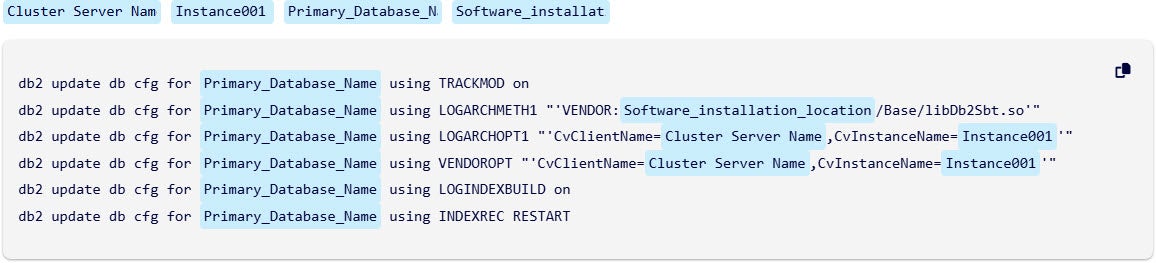 Você obtém o mesmo comando de antes, com a mesma formatação e estrutura, só que agora os placeholders se tornaram campos editáveis. Cada um tem um rótulo claro (como antes), para que você não precise interpretar símbolos nem recorrer a suposições.
Você atualiza os valores diretamente dentro do bloco, com o contexto ao redor ainda visível. Isso significa que você vê o exemplo, o restante do conteúdo da página e suas entradas, tudo em um só lugar. Isso pode ajudá-lo a criar um trecho mais relevante antes de clicar em “Copiar”.
Você pode alterar esses valores antes de copiá-los ou deixá-los como estão e editá-los mais tarde em outro editor. Os espaços reservados em um bloco de código com o mesmo nome ficam vinculados. Quando você altera o valor de um campo de espaço reservado acima do bloco de código, todos os campos vinculados podem ser atualizados ao mesmo tempo, para que você possa editar de forma mais consistente os campos que têm o mesmo valor de espaço reservado. Isso ajuda a reduzir possíveis erros de localização e substituição ao trabalhar em um editor de texto.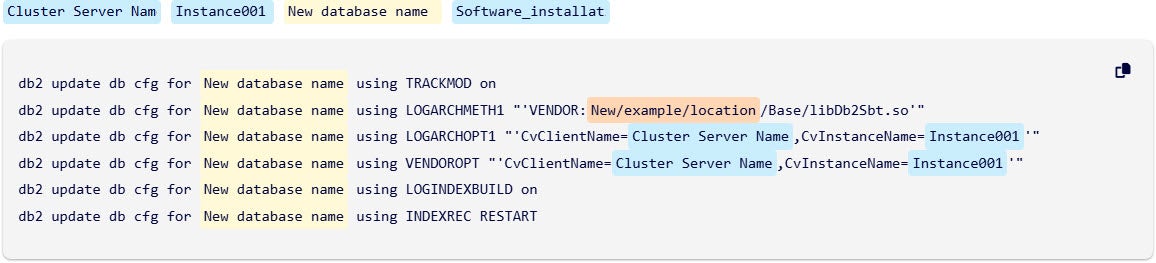
A Mudança de Experiência
Essa mudança resolve dois problemas de uma só vez. Para os leitores, ela reduz as suposições e evita erros. Chega de decifrar chaves ou colchetes angulares. Para os autores, ela separa a semântica do estilo, permitindo que os placeholders sejam rastreados, auditados e atualizados programaticamente. Isso possibilita o reconhecimento de versões, regras de validação e consistência entre ambientes. Inconsistências herdadas são corrigidas ao longo do processo, tornando a biblioteca como um todo mais fácil de manter.
Blocos de código interativos transformam uma das partes mais difíceis da documentação — os placeholders baseados em estilo — em algo preciso, sustentável e rápido de usar. A experiência parece intencional, em vez de improvisada. E, pela primeira vez, gerenciar exemplos de código em grande escala cria oportunidades de melhoria, em vez de obstáculos.
Ao vivo agora em Software, SaaS e muito mais
Essa experiência já está disponível em todo o nosso site de documentação de Software (versões11h42,11h40,11,36e11,32),SAASe outros sites relacionados emhttps://documentation.commvault.com/.
Experimente na próxima vez que você navegar e encontrar um bloco de código – edite alguns campos, clique em “Copiar” e veja como é mais fácil começar depois de importá-lo para o seu editor.
Observações:
- Analise cuidadosamente qualquer código antes de executá-lo, seja ele proveniente de um bloco de código interativo ou estático.
- Quando você atualiza uma página após alterar os placeholders em um bloco de código interativo, todos os placeholders alterados revertem para seus valores padrão.
Saiba mais sobre como usar blocos de códigoSaiba mais no SHIFT 2025.