La maggior parte dei siti web di documentazione aziendale che contengono blocchi di codice utilizza stili che indicano i segnaposto. L’intento dovrebbe essere chiaro e i lettori dovrebbero sapere cosa devono modificare, ma l’esperienza non è all’altezza delle aspettative. Questi stessi stili vengono utilizzati anche per l’enfasi, le etichette dell’interfaccia utente o la sintassi in altre parti della documentazione. Tra gli stili comunemente utilizzati dai team di redazione tecnica per identificare i blocchi di codice, che vengono impiegati anche per altri scopi, figurano:
- Corsivo
- {Parentesi}
- Audace
- nome_esempio_##
- TUTTO MAIUSCOLO
- Una combinazione delle precedenti
- Qualcosa di completamente diverso
Questa sovrapposizione rende il monitoraggio e la gestione dei segnaposto più complessi di quanto dovrebbero essere. Su piccola scala, ciò può sembrare un fastidio. Ma man mano che le librerie di documentazione crescono e si diffondono tra i team e nel corso degli anni, crea problemi sia per gli autori che per i lettori. Ciò che dovrebbe semplificare la gestione dei segnaposto, invece, la complica, poiché lo stesso stile viene riutilizzato altrove.
Il risultato può metterti in una situazione familiare: devi capire la convenzione dei segnaposto e cercare di aggiornarli tutti se vuoi avere successo. Se tralasci un segnaposto, il comando potrebbe non funzionare come previsto. Possono presentarsi altri problemi, come errori, configurazioni inaspettate o persino impostazioni che non sapevi potessero essere modificate. Altri approcci basati su blocchi di codice hanno un raggio d’azione limitato:
- I blocchi statici (con o senza evidenziazione della sintassi) sono fondamentali quando si conoscono già i valori. Sono veloci e pronti per essere copiati ed eseguiti. Sono la soluzione ideale quando non è necessario modificare nulla.
- Gli editor in linea vanno all’estremo opposto e consentono di aggiornare il testo direttamente all’interno del blocco di codice, ma spesso a scapito del contesto: l’annullamento diventa inaffidabile e piccoli errori cancellano la struttura necessaria.
- Gli editor API per sviluppatori consentono di provare le richieste in tempo reale e sono ideali quando il pubblico principale è costituito da sviluppatori che lavorano direttamente con le API. Tuttavia, la documentazione aziendale ha ruoli e casi d’uso più ampi e spesso questo tipo di interattività manca proprio dove potrebbe aggiungere valore.
Colmare il divario con blocchi di codice interattivi
I nostri blocchi di codice interattivi colmano questa lacuna trasformando una parte storicamente fragile della documentazione (il segnaposto) in qualcosa di chiaro, modificabile e scalabile.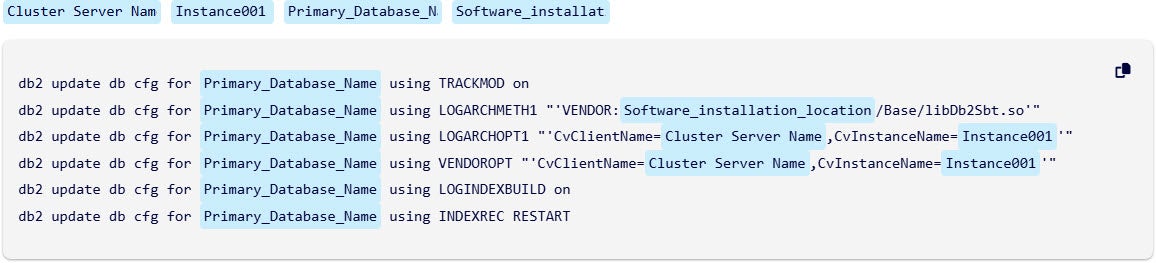 Si ottiene lo stesso comando di prima con la stessa formattazione e struttura, solo che ora i segnaposto sono diventati campi modificabili. Ciascuno ha un’etichetta chiara (come prima), quindi non è necessario interpretare simboli o affidarsi a supposizioni.
Puoi aggiornare i valori direttamente all’interno del blocco, con il contesto circostante ancora visibile. Ciò significa che puoi vedere l’esempio, il resto dei contenuti della pagina e i tuoi inserimenti tutti in un unico posto. Questo può aiutarti a creare uno snippet più pertinente prima di cliccare su “Copia”.
Puoi modificare quei valori prima di copiarli oppure lasciarli così come sono e modificarli in un secondo momento in un altro editor. In entrambi i casi, la struttura rimane la stessa e ciò che copi riflette esattamente ciò che vedi nel blocco. I segnaposto in un blocco di codice che hanno lo stesso nome vengono collegati. Quando modifichi il valore di un campo segnaposto sopra il blocco di codice, tutti i campi collegati possono essere aggiornati contemporaneamente, in modo da poter modificare in modo più coerente i campi che hanno lo stesso valore segnaposto. Ciò contribuisce a ridurre i potenziali errori di ricerca e sostituzione quando si lavora in un editor di testo.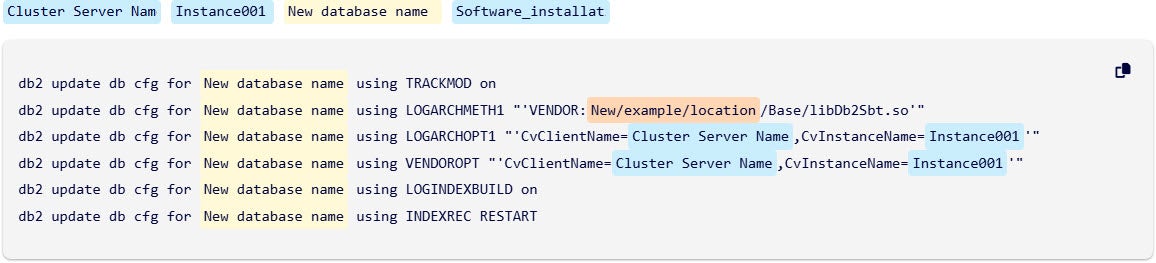
Il cambiamento dell’esperienza
Questo cambiamento risolve due problemi contemporaneamente. Per i lettori, riduce le congetture e previene gli errori. Non è più necessario decifrare parentesi graffe o parentesi angolari. Per gli autori, separa la semantica dallo stile, consentendo di tracciare, verificare e aggiornare i segnaposto a livello di programmazione. Ciò sblocca la consapevolezza delle versioni, le regole di convalida e la coerenza tra i vari ambienti. Le incongruenze preesistenti vengono corrette lungo il percorso, rendendo la libreria complessiva più facile da mantenere.
I blocchi di codice interattivi trasformano una delle parti più complesse della documentazione, i segnaposto basati sullo stile, in qualcosa di preciso, gestibile e veloce da usare. L’esperienza appare intenzionale anziché improvvisata. E per la prima volta, la gestione su larga scala degli esempi di codice crea opportunità di miglioramento anziché ostacoli.
Ora disponibile in Software, SaaS e altro ancora
Questa funzionalità è già disponibile sul nostro sito di documentazione dedicato al software (versioni11,42,11.40,11,36e11,32),SaaSe altri siti correlati suhttps://documentation.commvault.com/.
Provatela la prossima volta che navigate e vi imbattete in un blocco di codice: modificate alcuni campi, fate clic su “Copia” e scoprite quanto è più facile iniziare dopo averlo importato nel vostro editor.
Note:
- Esamina attentamente qualsiasi codice prima di eseguirlo, sia che provenga da un blocco di codice interattivo o statico.
- Quando si aggiorna una pagina dopo aver modificato i segnaposto in un blocco di codice interattivo, tutti i segnaposto modificati tornano ai valori predefiniti.
Per saperne di più sull’uso dei blocchi di codice, cliccaqui.