Skip to content

Under a constant threat of ransomware attacks and malicious cyber activities, cyber resilience is a paramount concern for organizations of all sizes, in all industries. These existential threats make it imperative for businesses to adopt a comprehensive and proactive approach to protect their data and ensure business resilience. That’s why I am thrilled to share our new platform, Commvault® Cloud, powered by Metallic® AI – a transformative platform that revolutionizes cyber resilience in the hybrid enterprise.

With its unified data protection, security, intelligence, threat detection, and recovery capabilities, Commvault Cloud empowers IT and security teams to stay one step ahead of ransomware and other cyber threats. We’re doing this by bringing our on-premises software and Metallic.io SaaS offering together into a single platform with enhancements to the features you already know and love and new capabilities you’re going to love.

Meet your new cyber resiliency partner, Arlie

There’s obviously a lot of hype around AI and how it’s changing the way we work and interact with software and systems. We’re putting AI to use help you act quickly and efficiently.

Users of Commvault Cloud will soon have access to Arlie—short for “Autonomous Resilience” and much easier to say—a new AI co-pilot that’s at the ready 24 hours a day, responding to inquiries in plain, simple language. We’re using Generative AI models to consolidate information and reports plus provide users with personalized actionable responses. You can use Arlie to verify or validate clean point of recovery for critical systems or generate requested code in mere seconds.

I’m excited about the possibilities this creates. It’s fueled by an integration with Azure OpenAI to enable amazing human-like interaction within Commvault Cloud to:

  • Give you real-time threat analysis and report summaries showing the latest information about their cyber resiliency health, removing the need to sift through filters and reports to prioritize the most pressing information. Imagine the time savings.
  • Offer a simplified way to build an integration or code an action: you simply type a description of what you want to do, and the code assistant will generate the code on the spot. No more missing semi-colon fouling up the works.
  • Provide context-sensitive, guided product walk-throughs that make it easy for you to set-up, customize, and tune Commvault Cloud to your specifications. Simply ask “how to” questions and get step-by-step documentation complete with annotated screenshots.
  • Constantly monitors the performance of Commvault Cloud using generative AI to find issues, provide fixes, and offer real-time recommendations on how to optimize cyber resilience.

That’s just the start. We’ll have more generative AI model integrations following fast.

Cloudburst™ Recovery

You know and love us for our ability to recover from ransomware or other critical situations quickly. We’re making it faster and more efficient.

The new Cloudburst™ Recovery capability can help you improve business continuity by using infrastructure-as-code and cloud-scaling to automate rapid and frictionless recovery of data to any location. This enables mass recovery from cloud storage at scale with the highest speed possible. You don’t have to run an expensive cluster in the cloud to be able to do this, saving you money and headache.

Cleanroom Recovery

We also have what we call Cleanroom Recovery, one of the standout features of Commvault Cloud. It’s a cutting-edge service that ensures rapid, frictionless, and reliable recoveries after a cyberattack.

When a cyberattack occurs, having a clean backup is crucial. But it’s equally important to have a clean location for recovery. That’s where Cleanroom Recovery comes in. With Commvault Cloud, you can recover your data to a secure, isolated environment in the cloud that is specifically designed for recovery purposes. This cleanroom environment is “at the ready,” meaning it’s always available to you and prepared to facilitate the recovery process.

Cleanroom Recovery offers several benefits, including:

  • Providing a secure and isolated space for recovery, ensuring that your data is protected from any lingering threats or vulnerabilities. This gives you peace of mind knowing that your recovered data is clean and free from any potential malware or malicious elements.
  • Enabling rapid recoveries. Time is of the essence when it comes to recovering from a cyberattack, and Cleanroom Recovery ensures that the process is as quick and efficient as possible. Using the power of the cloud, Commvault Cloud enables fast and seamless data recovery, minimizing downtime and allowing you to get back up and running in no time.

Cleanroom Recovery is not just for post-attack recovery; it’s also a valuable tool for conducting routine incident response testing. By regularly testing your recovery processes in the cleanroom environment, you can ensure that your systems are prepared and optimized to handle any potential cyber threats. This proactive approach to testing and validation helps to strengthen your overall cyber resilience.

AI-driven threat prediction

Attackers are using AI to make ransomware even quieter and harder to detect. One of the emerging attacks uses AI to change the shape of the malware. Security experts call these shapeshifting or poly-morphic attacks. Whatever you call it, they are extremely hard to see and go undetected by traditional anomaly detection techniques. In Commvault Cloud we’re using AI to fight AI. This helps you find AI-driven zero-day threats that have already impacted backup content so you can quarantine and recover data cleanly while avoiding reinfection during recovery.

Managing cyber resilience for you

As part of the Commvault Cloud release, we’re adding Platinum Resilience, a fully managed service that provides unmatched protection, engagement, and responsiveness to cybersecurity threats and disaster situations. This service, which is being introduced to select customers as part of an early access preview program with full availability planned in early 2024, provides the following:

  • Foundational backup and recovery, advanced AI driven automation, cyber deception, recovery testing and readiness checks, advanced reporting, security audits, custom telemetry, and more.
  • Powerful and comprehensive hybrid data protection and resilience, with the ease of use of the cloud using a dedicated, isolated control plane. 
  • A ransomware readiness and response team dedicated to everything from setup to ongoing testing and validation to recovery upon a cyber event.

We’re confident that Platinum Resilience offers the best in end-to-end cyber resilience and we’re backing that up with a new Commvault Protection Warranty to give everyone from IT managers to board members peace of mind that recovery from an attack is guaranteed.

Commvault Cloud for Cyber Resilience

This is the boldest product launch in my 26-year history here at Commvault. I’m confident that your organization’s approach to cyber resilience will be revolutionized by Commvault Cloud, powered by Metallic AI. With its unified platform, advanced AI capabilities, and unique architecture, Commvault Cloud offers a comprehensive solution for data protection, security, intelligence, and recovery. By leveraging the power of AI, you can benefit from enhanced visibility, simplified processes, and optimized cyber resilience.

With Commvault Cloud, you can have peace of mind knowing that your data is safe, your operations are protected, and your business can continue to thrive in the face of evolving cyber threats. It’s the ultimate solution for achieving cyber resilience in your hybrid enterprise.

More related posts


Thumbnail_Blog-Recovery-Ready-2026

Recovery-Ready or Just Recoverable?

Read more about Recovery-Ready or Just Recoverable?
Thumbnail_Blog-Data-Leakage-Loops-2026

What is Recovery Time Objective (RTO) and How to Calculate It

Read more about What is Recovery Time Objective (RTO) and How to Calculate It
Thumbnail_Blog-Data-Access-Governance-2026

Protect Your Data from Ransomware: Learn How with Clumio

Read more about Protect Your Data from Ransomware: Learn How with Clumio

Four short years ago, Commvault introduced Metallic, and the promise of data protection for businesses of every size. Our focus was simple – to artfully blend the best of enterprise-grade performance, with a light-touch, cloud-centric consumption model. Harnessing 20+ years of proven Commvault technologies, Metallic was born.  

Now, you didn’t have to sacrifice. Whether across clouds, data centers, or SaaS apps, our customers could uniformly safeguard their data (wherever it lived) while enjoying the durability, simplicity, and scale of the cloud. With constant innovation at the forefront of our vision, Metallic rapidly evolved, supporting the broadest set of hybrid cloud workloads, while pioneering next-generation security, resiliency, and recovery capabilities.   

Thousands of customers later, we are excited to announce the next phase in our journey as Metallic becomes part of the Commvault Cloud. 

So, what exactly is the Commvault Cloud? We’re glad you asked! 

Commvault Cloud, a unified data resilience platform 

A common misconception is that Commvault bought or acquired our award-winning Metallic SaaS technology. Well, we did neither… we built it from the ground up. Metallic was purposefully crafted to join Commvault’s existing portfolio of data protection offerings, as a light-touch, cloud-centric alternative.  

Commvault Cloud, our newly introduced cyber resiliency and recovery platform, unifies our cloud, software, and appliance-based services into a single place. This not only provides our customers with a consistent and streamlined experience to consume our technologies, but also creates new synergies and capabilities that advance how our customers protect their data. Commvault Cloud stands as the industry’s first platform for true cloud data security. Simpler, smarter and more scalable than ever before for trusted cyber resilience to secure and recover data in today’s hybrid world.

Benefits for Metallic customers  

By melding Metallic and Commvault technologies together into one platform, customers get even faster innovation, automation, and performance. While Metallic users will still enjoy the same SaaS-based backup they’ve come to know and love, the Commvault Cloud will pave the way for even more cloud-delivered advancements in disaster recovery, data security, artificial intelligence, and more. It means the best of all worlds: Simple SaaS protection, next generation cyber recovery innovations, and more flexibility of choice.  

Advanced automation and intelligence with Metallic AI 

While our SaaS-delivered backup and recovery offerings will be consolidated into our new Commvault Cloud platform, the spirit of Metallic lives on in our AI layer: Metallic AI. Metallic AI serves as our artificial intelligence layer that powers our new platform. From automation and machine learning to AI, Metallic AI brings greater performance and efficiency to every aspect of the Commvault Cloud. Metallic AI will also operate as a powerful integration layer for ecosystem partners, enabling developers to create robust, innovative new services that continuously optimize Commvault Cloud, and deliver greater value for those who use it.

We are excited for this next phase in our journey, how the Commvault Cloud is redefining cyber resiliency and recovery as we know it, and continuing to support our customers with award-winning SaaS-based data protection. 

Want to learn more? Check out the following video or visit our FAQ in the Commvault Community for additional details.

More related posts


Thumbnail_Blog-Recovery-Ready-2026

Recovery-Ready or Just Recoverable?

Read more about Recovery-Ready or Just Recoverable?
Thumbnail_Blog-Data-Leakage-Loops-2026

What is Recovery Time Objective (RTO) and How to Calculate It

Read more about What is Recovery Time Objective (RTO) and How to Calculate It
Thumbnail_Blog-Data-Access-Governance-2026

Protect Your Data from Ransomware: Learn How with Clumio

Read more about Protect Your Data from Ransomware: Learn How with Clumio

Here at Commvault, our values – we connect, we inspire, we care, we deliver – are foundational to everything we do.

This week, we hosted our quarterly internal Global Town Hall meeting and presented our CEO Living Our Values Awards. This awards program helps us to globally recognize and celebrate our Vaulters for their incredible work as they live our values every day.

I’m so proud to announce our FY24 Q2 CEO Living Our Values Award winners:

Metallic Customer Success Team

  • Shrey Ahuja
  • Reine Ayoub
  • Pronoy Banerjee
  • Scott Bauer
  • Ryan Carr
  • Francesco Coppola
  • Elizabeth Crinejo
  • Gemma Dean
  • Arijit Dey
  • Jerienne Esguerra
  • Steve Garrett
  • Melina Guzman
  • Srishma H S
  • Joel Hinchliffe
  • Salman Karim
  • Patrick Kelly
  • Andy Kirby
  • Richard Klauser
  • Kanishka Kohli
  • Brigitte Krause
  • Sanjeev Kumar
  • Tom LaFemina
  • Sally Lavis
  • Yaakov Lidgi
  • Mohana Lingaiah
  • Mark Penny
  • Varad Phatak
  • James Powell
  • Abhinab Pramanik
  • Syed Qadri
  • Sapna Rai
  • Kirk Rose
  • Alessandra Russo
  • Christopher Selph
  • Jayashree Sinha
  • Marta Slusarczyk
  • Nate Sprague
  • Eric Struski
  • David Stupar
  • Vimi Joseph Thengungal
  • Aissa Torres
  • Kent Willshire
  • Tayyeba Zamir

Antonio Silva

Inbar Schuchman

Stephanie Long

Fort Lauderdale Office Opening Team

Sam Hernandez

Stephanie Joyce

Tim Karaban

Tracy Skinner

David Surdukowski

Dee Venello

All these winners set an inspiring example and embody what it truly means to be a Vaulter!

To learn more about what it’s like to work at Commvault, check out our careers site.

More related posts


Thumbnail_Blog-Recovery-Ready-2026

Recovery-Ready or Just Recoverable?

Read more about Recovery-Ready or Just Recoverable?
Thumbnail_Blog-Data-Leakage-Loops-2026

What is Recovery Time Objective (RTO) and How to Calculate It

Read more about What is Recovery Time Objective (RTO) and How to Calculate It
Thumbnail_Blog-Data-Access-Governance-2026

Protect Your Data from Ransomware: Learn How with Clumio

Read more about Protect Your Data from Ransomware: Learn How with Clumio

In today’s fast-paced and ever-evolving business landscape, organizations are constantly seeking ways to stay agile and adaptable. This is driving organizations to seek increased flexibility in their software solutions. Traditional on-premises software often falls short in meeting these demands, leading to the rise of Software-as-a-Service (SaaS) solutions. In this blog, we will explore the power of SaaS-delivered flexibility and how it can revolutionize the way businesses operate.

SaaS-delivered flexibility provide organizations with the freedom and adaptability they need from their software solutions. Unlike traditional on-premises software, SaaS solutions are built on cloud infrastructure, allowing businesses to easily scale up or down based on their needs. In fact, 89% of enterprises have a multicloud strategy.1 This scalability enables organizations to quickly adjust to changing market demands, add new users, expand into new markets, or accommodate seasonal fluctuations.

SaaS Considerations

To achieve SaaS-delivered flexibility, there are five key factors to consider:

  1.  It’s important to choose a SaaS provider that offers a highly scalable and reliable cloud infrastructure. A significant advantage of SaaS is its inherent scalability. This ensures that the software can handle increased workloads and provide uninterrupted access to users.
  2. Organizations should look for SaaS solutions that offer anytime, anywhere access. Gone are the days of being tied to a specific physical location to access critical business applications. As of last year, 41.4% of cloud leaders say they are increasing their use of cloud-based services due to the macroeconomic climate.2 This means that employees can access the software and data from any location, as long as they have an internet connection. This flexibility empowers remote work, collaboration across geographies, and increases productivity.
  3. Rapid deployment and updates are crucial for achieving SaaS-delivered flexibility. SaaS solutions can be deployed quickly, often within hours or days, allowing organizations to start using the software and reaping its benefits sooner, driving efficiency and productivity. Additionally, SaaS providers handle updates and maintenance, ensuring that businesses always have access to the latest features and security enhancements without any disruption or costly overhead of maintaining on-premises systems.
  4. Customization without complexity is another important aspect to consider. Flexibility in software often goes hand in hand with customization, so organizations should look for SaaS solutions that offer the ability to tailor the software to their specific business requirements without the need for complex and costly customization. Again, we see a need for this level of customization as 72% of IT Pros are taking a hybrid approach by combining public and private clouds.3 With this model, businesses can configure the software to align with their unique processes and workflows, empowering them to work the way they want to, without compromising on functionality.
  5. Integration and collaboration capabilities are essential for achieving SaaS-delivered flexibility. SaaS solutions should offer APIs and connectors that enable seamless integration and data exchange with other systems. This allows businesses to create a unified ecosystem of software tools, streamlining processes and enhancing productivity.

In conclusion, SaaS-delivered flexibility empowers organizations to adapt quickly to changing business needs. By choosing a SaaS solution that offers scalability, anytime access, rapid deployment and updates, customization options, and integration capabilities, businesses can achieve the flexibility they need to thrive in today’s dynamic business environment. Embracing SaaS is not just a technological shift; it is a strategic move towards future-proofing your business and unlocking its full potential.

For more information on SaaS delivered flexibility, please view our Solution Brief, and watch our recent October 3 webinar on demand.

References

1. Flexera State of the Cloud report, 2023 – 2. Google Cloud Brand Pulse Survey, 2022 – 3. Google Cloud Brand Pulse Survey, 2022

More related posts


Thumbnail_Blog-Recovery-Ready-2026

Recovery-Ready or Just Recoverable?

Read more about Recovery-Ready or Just Recoverable?
Thumbnail_Blog-Data-Leakage-Loops-2026

What is Recovery Time Objective (RTO) and How to Calculate It

Read more about What is Recovery Time Objective (RTO) and How to Calculate It
Thumbnail_Blog-Data-Access-Governance-2026

Protect Your Data from Ransomware: Learn How with Clumio

Read more about Protect Your Data from Ransomware: Learn How with Clumio

Why Should You Lower Your RTO?

With a low RTO, you can ensure minimal perceivable disruption of business operations for your internal operations and customers — or no disruptions at all. Revenue is also at stake. Each second that passes while your systems are down and waiting to recover is lost revenue. RTO has a direct correlation to less revenue loss.

Here are two distinct ways you can use cloud backup-as-a-service to effectively bolster your RTO and ensure business continuity during any type of disruption.

1. Granular Recovery

In the event of lost or compromised data, the speed at which you can restore the data is the centerpiece of your RTO. Although full backup image restore is an option for data recovery, this can result in long delays and extended downtime as you wait for each file to be restored, regardless of its mission-critical importance.

Granular file recovery is the superior alternative to full backup image restore because it allows you to perform both file and image-based level recovery from a single pass backup operation. This type of recovery allows the user to identify and prioritize certain mission-critical data and workloads to speed up recovery time and ensure business continuity, instead of waiting for the entire instance to be restored — drastically improving RTO.

2. Flexible Recovery

Flexible recovery is somewhat related to granular recovery. With flexible recovery, you can recover to any account in any region. This means that if one account or region is down, you can recover to another account or region that has not been compromised and quickly resume operating, which can certainly help in optimizing RTO.

Optimize Recovery Time Objective with the Industry’s Best Cloud Backup

Disaster recovery planning is essential for enterprises looking to ensure business continuity during malicious attacks and unplanned disruptions to internal infrastructure. Creating an optimized (i.e. lowered) RTO is a vital component to protecting your enterprise and end users.

Built natively in the cloud, Clumio’s industry-leading rapid recovery capabilities leverage granular recovery, incremental forever backup, and flexible recovery to equip today’s enterprises with fast and efficient data restores that can refine RTO and maintain business continuity during any type of disaster event.

More related posts


Thumbnail_Blog-Recovery-Ready-2026

Recovery-Ready or Just Recoverable?

Read more about Recovery-Ready or Just Recoverable?
Thumbnail_Blog-Data-Leakage-Loops-2026

What is Recovery Time Objective (RTO) and How to Calculate It

Read more about What is Recovery Time Objective (RTO) and How to Calculate It
Thumbnail_Blog-Data-Access-Governance-2026

Protect Your Data from Ransomware: Learn How with Clumio

Read more about Protect Your Data from Ransomware: Learn How with Clumio

Although AWS backup services certainly provides plenty of its own benefits in terms of versatility, it also has certain shortcomings that prevent it from being a comprehensive solution—not to mention offering only marginal control over cloud costs.

Here are five of the primary challenges AWS backup presents when used on its own.

Five Common Challenges of Using AWS Backup

No Ransomware Protection

Ransomware has become a prevailing threat to enterprises of all types and sizes, with costs forecasted to reach $10.5 trillion annually by 2025. Security experts estimate that one ransomware attack occurs every 11 seconds. How can you effectively protect your data and ideally avoid a ransomware scenario altogether? Or even ensure that you can recover quickly from an attack?

When enterprises use AWS Backup to protect data sources such as S3, EC2, EBS, and RDS, snapshots are automatically created and kept in the same account as the primary data, leaving no separation between the primary data and snapshots.

This means that if a hacker gains access to the primary account, they can easily compromise the snapshots before moving onto the primary data.

Once the primary data has been compromised, there are no longer any backups to restore from—the enterprise’s data has been completely locked. They are now at the mercy of the hackers, who may still keep or destroy the data even after receiving the ransom payment.

Long Recovery Times

Backup is not the only aspect of the data protection equation; data recovery is equally important. If an enterprise’s primary data gets corrupted—be it from bad actors or data failure—it has to have a way to recover the data as fast as possible to avoid significant disruptions to business continuity and its end users.

The lack of visibility into snapshots can lead to costly delays in recovery. Without a precise form of granular recovery, restoring data from an AWS backup can require a substantial amount of time due to the complex process of identifying which data needs to be restored and in what order.

Limited Visibility

The lack of visibility into snapshots within AWS doesn’t just affect recovery time, it can also complicate proving backup compliance with auditors and insurers. Furthermore, maintaining consistent policies across all applications and accounts is difficult and time-consuming when there is limited visibility into snapshots.

Additional Complexity

The basic out-of-the-box capabilities of AWS backup can lead to ongoing complexities that require constant attention from IT teams and their resources. For example, IT teams have to routinely write complex scripts to add any missing functionalities into their data protection solution.

Such scenarios work against the goal of cloud computing in the first place, which is to leverage the speed and agility of the cloud. If you constantly have to devote extra resources just to keep AWS cloud backup running smoothly, you’re not being efficient.

Unpredictable Costs

Aside from ensuring a reliable, secure data backup and recovery system, enterprises also turn to cloud backup to gain cost-efficiencies. At first glance, the TCO with AWS backup can seem reasonable, but expenses can begin to pile up—sometimes exponentially over time.

This is due to the standard snapshot replication and storage process within AWS backup. Snapshots are replicated for long-term retention across accounts, resulting in higher backup costs.

Additional egress charges for any cross-account transfers can further increase these costs, all of which will snowball over time, catching many enterprises off guard.

Why Clumio is the Solution to AWS Backup Challenges

Clumio was specifically designed to meet the various challenges enterprises can encounter when using AWS backup. The cloud-native platform provides AWS backup and recovery through an intuitive interface that requires no additional hardware or software to run.

With Clumio, enterprises receive:

  • Best-in-Class Security that provides air-gapped and immutable backups that are end-to-end encrypted—to provide protection against threats like ransomware and bad actors
  • Rapid Recovery via a granular approach that quickly locates and restores backup files and can cut restore time from several hours to just minutes
  • Better Visibility into your data protection plans and compliance status to ensure you’re meeting business requirements
  • Simpler Backup Management with features like global policies and protection groups that automate long-term data retention as well as data classification
  • Lower TCO thanks to no longer needing to install additional resources, pay egress charges, devote additional IT resources to manage the process, or make mirror copies of snapshots— reducing backup costs by up to 50%

More related posts


Thumbnail_Blog-Recovery-Ready-2026

Recovery-Ready or Just Recoverable?

Read more about Recovery-Ready or Just Recoverable?
Thumbnail_Blog-Data-Leakage-Loops-2026

What is Recovery Time Objective (RTO) and How to Calculate It

Read more about What is Recovery Time Objective (RTO) and How to Calculate It
Thumbnail_Blog-Data-Access-Governance-2026

Protect Your Data from Ransomware: Learn How with Clumio

Read more about Protect Your Data from Ransomware: Learn How with Clumio

EC2-Other is a cost category in AWS billing that includes multiple service related usage types such as data transfer, EBS volumes and snapshots, elastic IP addresses, and NAT gateways. Customers can use it to calculate the total cost of running EC2 instances, excluding fixed hourly instance running costs. Understanding EC2-Other is crucial to isolate individual cost categories within it so that you can optimize your usage of EC2 instances efficiently and reduce unnecessary costs.

Understanding EC2-Other

When it comes to cloud computing, Amazon Elastic Compute Cloud (EC2) is one of the most popular options available on the market. EC2 offers a wide range of benefits, including cost savings, flexibility, and accessibility, but to get the most out of your instance, it’s important to understand the different types of EC2 instances as well as the billing and cost categories associated with them.

First, let’s take a closer look at EC2-Other. This cost category is created by Amazon and is often the second largest cost category on an AWS bill for heavy EC2 users. It includes multiple service-related usage types like data transfer, elastic IP addresses, EBS volumes and snapshots, NAT gateways and more. Essentially, EC2-Other encompasses all costs associated with running your EC2 instances except for fixed hourly instance running costs.

To provide an analogy: think of the EC2 hourly instance running costs as similar to renting an apartment with fixed rent each month. In comparison, EC2-Other would include all other monthly expenses like utilities (electricity, water, gas), cable or internet connection fees, as well as any additional maintenance fees.

Understanding how AWS reports total EC2 costs can be daunting as different reporting tools display costs in varying ways. However, it’s crucial for tracking your usage and monitoring your spending so you can isolate individual cost categories within EC2-Other. Two categories that customers can use to get the total cost of running their EC2 instances include EC2-Instances and EC2-Other.

Now that we have a basic understanding of what EC2-Other means in terms of an AWS bill let’s delve further into the different types of EC2 instances available.

Types of EC2 Instances

Amazon provides several different types of instances to fit individual user needs. Within these categories are varying instance sizes and pricing options.

For instance, the General Purpose burstable instances, as the name suggests, offer a balance between compute memory, CPU, and network bandwidth capabilities. The T3 and M6g instance families are part of this category. If you have workloads with inconsistent usage patterns then these instances could be a great fit.

In contrast, high-performance computing workloads might prefer compute-optimized instances, which come in C6g and C5n family groups. These instances feature custom processors and large memory footprints.

Memory-optimized instances are ideal for workloads that require large scale data manipulation And fast processing power. They incorporate the R5a and R6g. Users can leverage up to 768 GB to support any of their big data applications.

Next up is storage optimized instances (I3en), perfect for data intensive tasks at petabyte scale.

Last but not least, GPU based instances combine the CPU capabilities of the EC2 alongside GPUs purpose built to enable ML training or rendering.

Of course, one might argue: why bother with all these varying types? Though it may seem overwhelming, understanding your precise use case will help you save cost while ensuring optimal performance. For example, running batch jobs are much less expensive with the Standard or above options instead of starting multiple on-demand instances to get the same computation done at a higher price point.

Understanding which type of EC2 instance is right for a specific workload has become increasingly important in recent years as companies lean towards virtualized environments. In the next section we’ll take a closer look at how each instance type differs in terms of performance and features so you can make an informed decision on what works best for your particular business needs.

  • Amazon offers a range of EC2 instances for users to choose from based on their specific workload requirements. Each instance type has its own unique set of features and capabilities designed to optimize performance while minimizing costs. It is important for companies to understand their precise use cases in order to select the best EC2 instance type that aligns with their business needs. By doing so, they can ensure optimal performance while mitigating unnecessary expenses.

AWS Billing and Cost Categories

Amazon Elastic Compute Cloud (EC2) is one of the most widely used cloud computing services in the world. With EC2, users have access to a wide range of virtual machines, or “instances,” which they can use to run software applications, store data, and perform other computing tasks in the cloud. However, as with any cloud service, understanding the costs associated with using EC2 is critical to managing expenses and optimizing usage.

AWS Billing and Cost Categories are a key aspect of using EC2 effectively. Amazon has designed specific cost categories to provide users with a clear understanding of how much they are spending on different types of EC2 instances and related services. By breaking down the costs in this way, users can gain valuable insights into their usage patterns, identify ways to save money, and optimize their overall experience using EC2.

There are two primary cost categories for EC2 – EC2 Instances and EC2-Other. EC2 Instances include the hourly charge for running an instance as well as any additional costs for data transfer or storage associated with that instance. The pricing model for these instances varies depending on factors such as location, operating system, instance type, and usage pattern.

EC2-Other is a separate cost category created by Amazon which could be the second largest cost category on your AWS Bill if you are a heavy EC2 user. It includes a range of service-related usage types such as data transfer, EBS volumes and snapshots, elastic IP addresses, NAT gateways and more. Understanding what costs fall under this category is crucial to unpacking where your expenses lie within that grouping.

AWS reporting tools display total EC2 costs in different ways because several methodologies exist for calculating total EC2 costs based on the tool used. One calculated metric from Cost explorer is called EC2-Other expenditure that calculates the total cost of running your EC2 instances while excluding fixed hourly instance running costs. This can help AWS users determine the expenses associated with different activities without getting bogged down in the details of individual usage operations.

Benefits of Using EC2-Other

EC2-Other has several benefits that make it a crucial part of any cloud computing strategy. One of the key benefits is cost savings and flexibility. By understanding how to isolate individual cost categories within EC2-Other, users can save money by optimizing their usage of EC2 instances in the cloud. For example, if a user identifies an unused NAT gateway or elastic IP address, they can remove these services and save costs accordingly.

In addition to cost savings, EC2-Other provides enhanced security and accessibility features for users. Accessible storage volumes and snapshots offer more flexible backup solutions, while Elastic IPs provide robust means of failover and disaster recovery. This level of redundancy is excellent protection against costly shutdowns or failures that could create inconsistent results, productivity losses or even potential data loss.

Another critical benefit of using EC2-Other is the ability to analyze usage data further. Usage type groups break down each type into its purpose thereby providing clear visibility on how much they are spending in every aspect. It enables pinpoint accuracy when optimizing the overall system by moving between the totality of your EC2 footprint and dive into some of the supplemental usage aspects requiring attention.

By leveraging tools such as Purchase Options grouping, users who have already purchased AWS Reserved Instances can further optimize their usage patterns and reduce overall expenses by adjusting reserved instance coverage based on actual utilization levels instead of predicted ones.

  • In 2023, it was reported that EC2 services accounted for approximately 55% of the total AWS revenue, making it critical to gain insights into its associated costs.
  • The cost of Amazon EC2-Other typically makes up around 10%-20% of the total EC2-related expenses on an average user’s AWS bill.
  • A recent study estimated that analyzing and optimizing EC2-Other costs could potentially yield an average savings of 15%-30% for high-volume Amazon EC2 users who adopt efficient management strategies.

Cost Savings and Flexibility

When it comes to cloud computing, one of the biggest benefits is cost savings. Amazon EC2-Other offers a numerous cost-saving opportunities that can help you optimize your AWS spending and ultimately reduce your AWS billing.

For example, with EC2-Other, you only pay for what you use. Instead of purchasing hardware and infrastructure upfront, which can be expensive, you can simply rent only the resources you need to run your applications. This gives you the flexibility to scale up or down based on your needs without breaking the bank.

Another way EC2-Other offers cost savings is through Reserved Instances or Spot Instances. Reserved instances offer discounts on usage while providing flexibility in terms of instance types, operating systems, and tenancy options. Spot instances provide even greater discounts but are recommended for non-critical applications that have flexible start and end times.

While offering big cost savings, being able to scale up and down with ease also provides a great deal of flexibility. You can quickly increase capacity when there’s a sudden surge in demand or scale your compute environment down during periods of reduced activity.

Say you’re running an e-commerce website and anticipate a high spike in traffic for an upcoming sale event. With EC2-Other, instead of worrying about having enough resources available for the coming week, you can simply spin up additional instances as needed during the peak period and then spin them down afterward. This ensures that you have just enough resources when needed without paying for unnecessary instances during non-peak periods.

All these features make Amazon EC2-Other a popular choice among cloud users looking to save costs while increasing their infrastructure’s flexibility.

Security and Accessibility

AWS has consistently followed industry-standard security practices to ensure safe access to its services over time. Amazon EC2-Other reinforces these best practices by providing safe, isolated network connections, auto-scaling features that protect against system failures, and more.

EC2-Other also provides fine-grained control over access to instances and other resources. For example, you can use security groups to define inbound and outbound traffic rules for your instances, configure network access lists to allow access or deny permissions to specific IP addresses or CIDR blocks, and use Amazon VPCs (Virtual Private Clouds) to create isolated networks for your instances.

At the same time, EC2-Other is highly accessible from anywhere in the world. For instance, you can start up an instance on a cloud server located in Singapore and run its applications from New York with ease. You can also access your instances using the AWS Management Console, a web interface that gives you full control of your instances’ settings, performance metrics, storage usage, and more.

Just like how a bank’s vault provides both security and accessibility—locks keep valuables secure while tellers allow authorized individuals access to their accounts—the EC2-Other’s balance between security and accessibility protects users’ data assets while enabling their teams’ concurrent workflows.

Moreover, EC2-Other assures security by encrypting data both at rest and in transit. You can encrypt Elastic Block Store (EBS) volumes or snapshots with either AWS-KMS (Key Management Service) Managed Keys or Customer Master Keys. This adds an extra layer of protection to confidential data during transfer to different parties through external protocols like HTTPS or SSH.

Analyzing EC2-Other Costs

Analyzing EC2-Other costs is essential to understand the total EC2 cost, which includes all running costs of an EC2 instance except for the fixed hourly instance running costs. EC2-Other includes a range of usage types such as data transfer, EBS volumes and snapshots, elastic IP addresses, and NAT gateways. However, identifying individual cost categories within EC2-Other can be challenging due to the different ways AWS reporting tools display total EC2 costs.

To isolate individual cost categories within EC2-Other, it’s crucial to understand the three logical categories of EC2 costs: existence costs, utilization costs, and subresource costs. Existence costs are those that accumulate when an EC2 instance runs regardless of how much it is utilized. Utilization costs are those that accumulate when an instance is used beyond its fixed hourly cost. Finally, subresource-related charges arise because of additional services linked to an instance.

For example, consider a situation where a company has a 24×7 running web server on an m5.large instance in the US East Region. In this case, the existence cost will be the hourly rate charged by Amazon for keeping this instance online for 730 hours per month (24×30 days). The utilization cost for this situation can be assessed by looking at incoming traffic source regions. During high traffic periods, say from Russia or China instead of their target audience in the US East region, excess traffic could result in excessive utilization charges.

AWS’ cost allocation report shows usage costs separately for each usage type within each service category. In contrast, Cost Explorer aggregates these charges into broader categories such as Data Transfer or Elastic IP addresses while ignoring specific utilization-related charges like VPCPeering-In and Out or PublicIP-In and Out.

Understanding the individual classes of costs goes a long way in helping companies understand the breakdown of their EC2 billing charges, enabling them to identify unnecessary costs and optimize their usage.

Utilization, Existence, and Subresource Costs

Before reducing your costs with EC2-Other, it’s important first to understand how Amazon bills you for its services.

As discussed earlier, AWS separates costs into various categories depending on what service they pertain to. One such category is “EC2-Other.” By looking at individual cost categories within EC2-Other, you can get a sense of which services are costing you the most and where you can make cost-saving optimizations.

In the next section, we’ll dive into these individual categories with a focus on how to identify and isolate them for cost optimization.

Identifying the Right EC2-Other for Your Needs

Optimizing EC2-Other Usage

Utilization cost is one of the individual categories under EC2-Other. Amazon calculates this based on network usage and data consumption from instances that exceed their fixed hourly instance running cost. In contrast, existence cost includes costs incurred by the instance when it is not being used actively but stays online waiting for requests. Finally, subresource-related charges are those that arise as additional utilization-related services linked to an instance.

To isolate utilization costs by operation from other types of costs like existence or subresource-related charges, analyze the values in lineItem/Operation of your AWS Cost Explorer report. Some values denote existence cost like RunningHours:C5 on demand while others indicate Utilization costs like VPCPeering-In and Out or PublicIP-In and Out.

Some companies may argue that isolating individual categories within EC2-Other does not help much since these categories interact with each other. A high amount of data transfer to an EC2 instance like sending large files or backing up databases will result in higher elastic IP and NAT gateway usage charges, leading to unexpected bills. Therefore greater optimization can come from analyzing total cost rather than attempting to break down individual categories within it.

Analyzing EC2-Other costs is similar to a puzzle where pieces need to be put together accurately for a full picture. Ultimately, understanding the individual pieces allows companies first to understand how much each problem area contributes towards the end state’s solution before formulating solutions across all these areas.

AWS offers several tools that customers can use to track their costs effectively and optimize their EC2-Other usage. By examining comprehensive data sets such as utilization, existence and subresource-related charges, you can begin to truly optimize your EC2-Other usage while reducing costs.

Identifying the Right EC2-Other for Your Needs

Utilizing EC2-Other to its fullest potential requires a deep understanding of the different types of instances as well as the cost breakdowns associated with each. Determining which instance type best suits your needs and then optimizing its usage through continuous monitoring can help in achieving significant cost savings.

Amazon offers numerous different instance types for EC2-Other, ranging from general-purpose instances for computing and memory-intensive applications to storage-optimized instances for companies with vast amounts of data. Adopting an instance type that doesn’t fit your workload can lead to unnecessary spending or sub-optimal performance. Therefore, it’s vital first to identify specific patterns within your usage across individual instances to identify the areas that require modifications.

Utilization costs vary significantly by application workload and operational requirements, making it essential to monitor your EC2 usage regularly to ensure optimal resource allocation. It is often found that keeping a balance between instances with spiky workloads and steady-state demand enables organizations to realize significant cost savings while maximizing performance.

Organizations that have dynamic workload demands should leverage spot pricing where possible. These pricing rates are much lower than the standard pay-as-you-consume model, as they represent the available capacity in a given availability zone. However, spot pricing is only feasible when working with non-critical workloads since the rate could fluctuate depending on demand dynamics. Therefore, organizations need to carefully evaluate their workload needs before deciding whether spot pricing is right for them.

Optimizing EC2 instance usage is similar to driving a car more efficiently by monitoring speed, gear selection, and fuel economy metrics in real-time. The more information you have about how your car is performing, the better equipped you are at optimising your fuel usage and prolonging your car’s durability.

Frequently Asked Questions

How much does it cost to use EC2-Other compared to other instances?

The cost of using EC2-Other instances can vary depending on a few factors such as the region, type of instance, and usage duration. However, in general, EC2-Other instances are priced competitively compared to other instances offered by Amazon Web Services (AWS).

For example, according to AWS’s pricing calculator, the cost for an m5.xlarge instance (one of the most popular Instance types) in the US East (N. Virginia) region is $0.192/hour. On the other hand, the cost for an x1e.xlarge instance (an EC2-Other instance optimized for high-performance computing workloads) in the same region is $0.759/hour. Although this may seem more expensive at first glance, it’s essential to note that EC2-Other instances are designed for specific tasks and require specialized hardware to achieve optimal performance.

Additionally, AWS offers different pricing models that can further reduce costs when using EC2-Other instances. One such model is Spot Instances, which allows users to get spare computing capacity at a discounted price when there’s excess capacity available in AWS data centers. This model can provide significant discounts of up to 90% off on-demand prices.

In conclusion, while EC2-Other instances’ costs may appear higher than other instances initially when you factor in the specialized nature of these instances and their unique capabilities, they offer great value for money and can be priced competitively with other similar services in the market.

What specific services or features fall under the category of EC2-Other?

EC2-Other refers to the various services and features that are available as part of Amazon’s Elastic Compute Cloud (EC2) platform, beyond its standard instances. These services and features offer tremendous benefits for businesses that require more robust computing power or that need to run specialized applications.

Some specific examples of EC2-Other services and features include:

1. Dedicated Hosts: With dedicated hosts, businesses can have an entire physical server dedicated to their use, providing greater control over resources and security.

2. Spot Instances: Spot instances allow companies to bid on unused EC2 capacity, potentially saving up to 90% on costs while still getting access to high-performance computing power.

3. GPU Instances: For businesses that require high-performance graphics processing units (GPUs) for advanced applications like machine learning or scientific research, Amazon offers powerful GPU instances with up to 8 NVIDIA Tesla V100 GPUs per instance.

4. Fargate: Fargate is a serverless computing service that allows businesses to deploy containerized applications directly onto EC2 without having to manage servers themselves.

5. Batch: Batch is a fully-managed service for running batch computing workloads at scale.

These are just a few examples of the many services and features offered under the EC2-Other category. According to recent studies, EC2 instances (both standard and other) are in high demand globally, with nearly half of all cloud workloads running on AWS as of 2020 (Source: Synergy Research Group). As such, utilizing EC2-Other can offer significant advantages in terms of scalability, performance, and cost savings for businesses looking to take advantage of cloud computing technology.

Can EC2-Other be used for specific types of applications or workloads?

Yes, EC2-Other can be used for specific types of applications or workloads. In fact, it offers a wide variety of instance types to cater to different computing needs, ranging from general purpose instances to memory optimized and GPU instances. These instances have varying CPU, memory, storage, and networking capabilities to meet the specific requirements of different workloads.

For example, if you’re running compute-intensive workloads such as scientific simulations or video encoding, you could choose an instance type that has more CPU cores and higher clock speeds. On the other hand, if you’re running memory-intensive workloads such as large-scale relational databases or in-memory caching systems, you could go for an instance type that has more RAM.

In addition to the variety of instance types, EC2-Other also provides flexible pricing options that allow you to optimize your costs based on your usage patterns and capacity needs. You can choose between On-Demand Instances that offer pay-as-you-go pricing with no upfront costs or reservations, Reserved Instances that provide significant discounts but require upfront payment for a specified term, or Spot Instances that let you bid on unused capacity at a lower price.

According to a report by Synergy Research Group, Amazon Web Services (AWS), including EC2-Other, had a 33% share of the global cloud infrastructure market in Q3 2022. This indicates the popularity and trustworthiness of AWS services among users worldwide.

In conclusion, EC2-Other is a versatile and scalable compute service that can be used for various types of applications and workloads. It provides a range of instance types with different configurations and competitive pricing options to suit diverse business needs. With its proven track record and solid customer base, it’s definitely worth considering as your cloud computing solution.

How does EC2-Other differ from other EC2 instances?

EC2-Other differs from other EC2 instances in that it provides users with unique configurations to meet specific computing requirements. Unlike other EC2 instances, EC2-Other does not fall into any pre-defined categories and allows users to fully customize their virtual machines by selecting different combinations of CPU, memory, storage, and networking options.

This level of customization makes EC2-Other an excellent choice for running specialized workloads such as machine learning, high-performance computing, big data analytics, and other complex applications that require tailor-made configurations. According to a recent report by Synergy Research Group, Amazon Web Services (AWS), the parent company behind EC2-Other, holds a significant lead in the cloud infrastructure services market with over 30% share.

One of the key advantages of using EC2-Other is that it provides scalability and flexibility without any long-term commitments or upfront costs. Users only pay for what they use, and can easily modify their instance types or numbers with just a few clicks. Furthermore, EC2-Other comes equipped with a wide range of security features such as network firewalls, encryption at rest and in transit, identity and access management (IAM), and compliance certifications that ensure secure operations.

In conclusion, EC2-Other is a game-changing feature within the AWS ecosystem as it gives users complete control over their computing environments. It lets businesses optimize their resource allocation to reduce costs while achieving optimal performance levels for their unique use cases.

Are there any limitations or performance considerations to keep in mind when using EC2-Other?

Yes, there are certain limitations and performance considerations to keep in mind when using EC2-Other for cloud computing. Here is a rundown of some of the most significant ones:

1. Limited Availability Zones: EC2-Other is only available in limited Availability Zones, meaning your options for deploying in different regions may be limited. This can cause issues if you require better geographical coverage across different regions.

2. Lower Network Performance: Compared to other EC2 instance types, EC2-Other instances have lower network performance due to the use of software-defined networking (SDN) technology instead of dedicated hardware resources. This can impact bandwidth and latency requirements for certain workloads.

3. Inflexibility: EC2-Other instances are not as flexible as other instances, which may create some challenges when scaling or adjusting your infrastructure requirements.

Despite these limitations, it’s important to note that EC2-Other still has many benefits for cloud computing workloads. For example, it can provide more economical options for certain applications with low resource utilization requirements.

According to a recent study by Synergy Research Group, AWS continues to lead the public cloud market with a 33% share (as of Q4 2022). Therefore, given the adoption rate and demand for AWS services worldwide, we believe that any limitations on using EC2-Other are outweighed by its clear advantages over traditional on-premises IT infrastructure when it comes to cost-effectiveness and scalability for companies.


More related posts


Thumbnail_Blog-Recovery-Ready-2026

Recovery-Ready or Just Recoverable?

Read more about Recovery-Ready or Just Recoverable?
Thumbnail_Blog-Data-Leakage-Loops-2026

What is Recovery Time Objective (RTO) and How to Calculate It

Read more about What is Recovery Time Objective (RTO) and How to Calculate It
Thumbnail_Blog-Data-Access-Governance-2026

Protect Your Data from Ransomware: Learn How with Clumio

Read more about Protect Your Data from Ransomware: Learn How with Clumio

In today’s digital landscape, hybrid environments are the norm rather than the exception for organizations of all sizes. As companies juggle a multitude of workloads, adopt SaaS solutions, and migrate applications to the cloud, they are also faced with the challenge of repatriating data on-premises. This ongoing data sprawl, combined with the ever-evolving threat landscape featuring advanced, AI-fueled attacks, underscores the critical importance of robust data protection strategies to drive cyber resiliency.

To ensure data security and compliance across their entire environment, organizations must integrate data protection measures right from the outset. This proactive approach minimizes risks and potential vulnerabilities, providing comprehensive cyber resiliency.

However, the journey towards cloud adoption is not a one-size-fits-all approach. It’s granular and app-specific, with some applications being rehosted while others are refactored to leverage cloud-native PaaS and Kubernetes services. To navigate this complexity, organizations need a clear blueprint for cloud data protection and resilience that extends to the edge of their environment.

This blueprint must encompass cloud data protection that provides security and resiliency across the entire hybrid infrastructure. This includes all cloud workloads, applications, and services, regardless of their location. Moreover, it should enable seamless data movement between clouds and back on-premises, all while offering a unified view of your entire environment.

To bolster cyber resiliency a comprehensive cloud data protection blueprint should address the following crucial aspects:

  1. Cost-Optimization: Commvault’s unique range of offerings, spanning SaaS, software, and on-premises solutions, can significantly reduce infrastructure management overhead.
  1. Fast Recovery: Thanks to flexible, performance-optimized storage and the ability to create air-gapped copies for ransomware protection, companies can minimize costly downtime.
  1. Air-Gapped Security: Hybrid cloud architecture enables air-gapped protection, complementing ransomware strategies.
  1. Broad Coverage: Commvault provides the broadest coverage for on-premises, SaaS, and hybrid cloud workloads.
  1. Simple Management: Commvault offers a single-pane-of-glass management interface, combined with the agility of a service.
  1. Reliability for Peace of Mind:  Leveraging industry-leading trusted solutions rather than unproven point products provides peace of mind in an environment where cyber resiliency and data protection are paramount.

The Gateway to Hybrid Cloud Adoption

Data protection isn’t just a necessity; it can also be the gateway to effective hybrid cloud adoption for many organizations. The right data protection solution supports cloud maturity by enabling data protection across workloads, regardless of their location on the cloud journey. This provides a solid foundation for a hybrid enterprise, offering the flexibility to protect data where it resides today and where it will be in the future.

Commvault stands out as the unified data protection platform designed for cyber resiliency in the modern, hybrid cloud world. With a coverage breadth that surpasses competing solutions, manageable through a single pane of glass, Commvault instills confidence in managing ongoing changes without the need for multiple point solutions as workloads evolve and grow.

In a hybrid cloud environment where data is scattered across various platforms, Commvault ensures that your organization’s most valuable asset—your data—is protected, compliant, and ready to drive your business forward, regardless of where it resides. Embrace the future of cyber resiliency with Commvault, your trusted partner in safeguarding your data in the hybrid world.

To learn more about how customers have utilized Commvault to create their blueprint for the cloud, click here or join our upcoming webinar on October 3rd, Five Critical Building Blocks for Hybrid Cloud Success.

More related posts


Thumbnail_Blog-Recovery-Ready-2026

Recovery-Ready or Just Recoverable?

Read more about Recovery-Ready or Just Recoverable?
Thumbnail_Blog-Data-Leakage-Loops-2026

What is Recovery Time Objective (RTO) and How to Calculate It

Read more about What is Recovery Time Objective (RTO) and How to Calculate It
Thumbnail_Blog-Data-Access-Governance-2026

Protect Your Data from Ransomware: Learn How with Clumio

Read more about Protect Your Data from Ransomware: Learn How with Clumio

In today’s hybrid multi-cloud world, enterprises are running applications and supporting workloads in on-premises, Edge, Cloud or SaaS. As new applications and locations emerge, ensuring consistent strategy around data protection and recoverability wherever data lives is critical – especially in the face of rapidly proliferating, and increasingly autonomous threats.

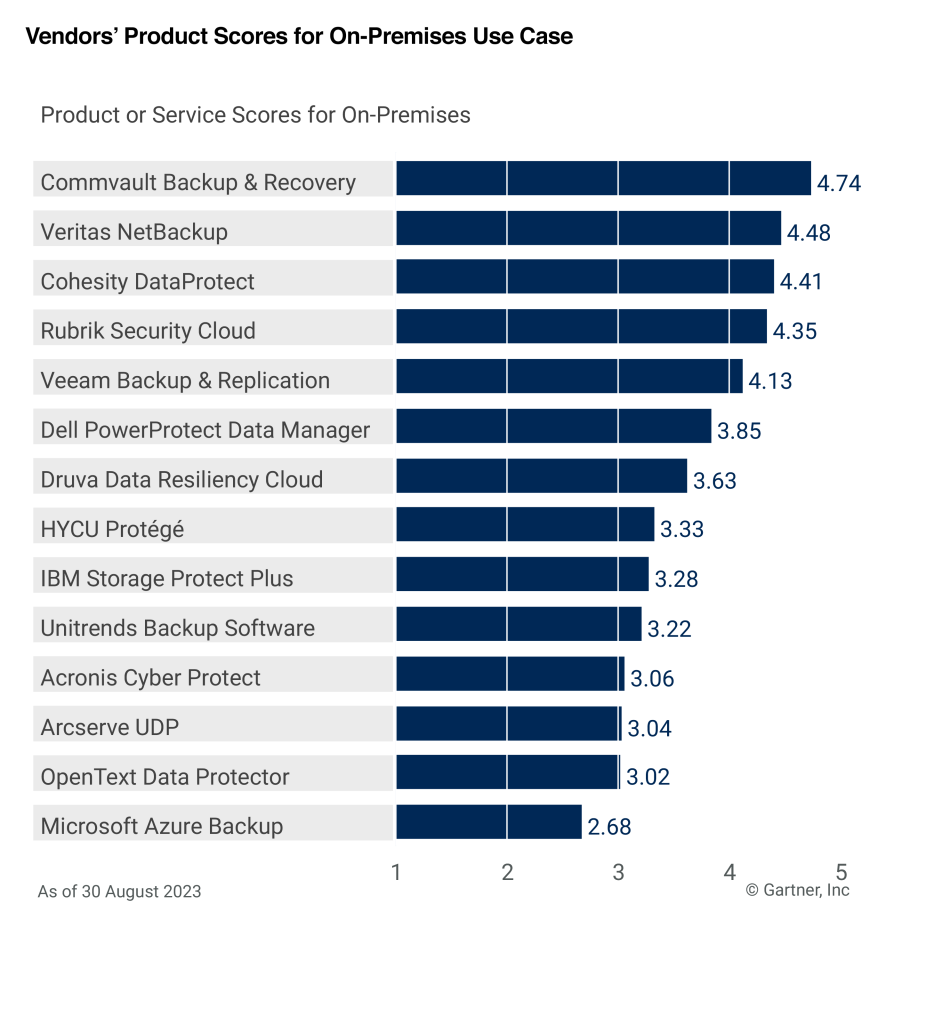
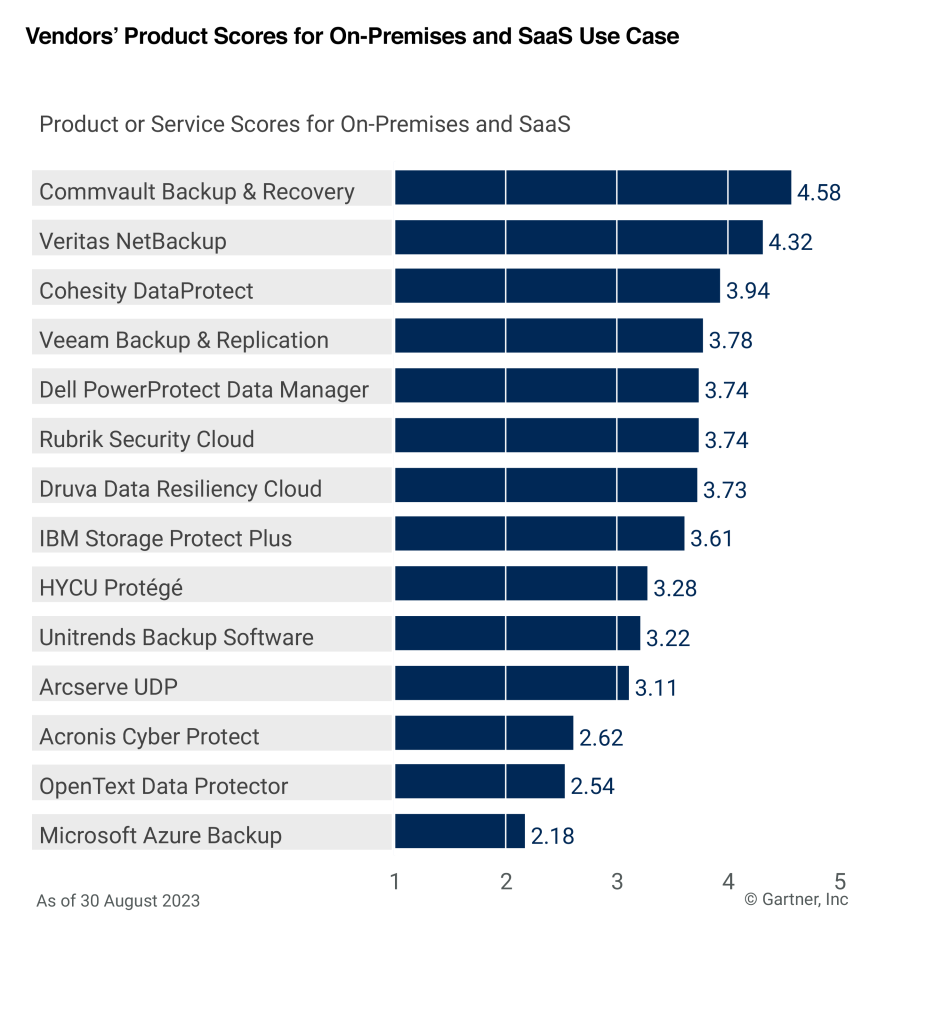
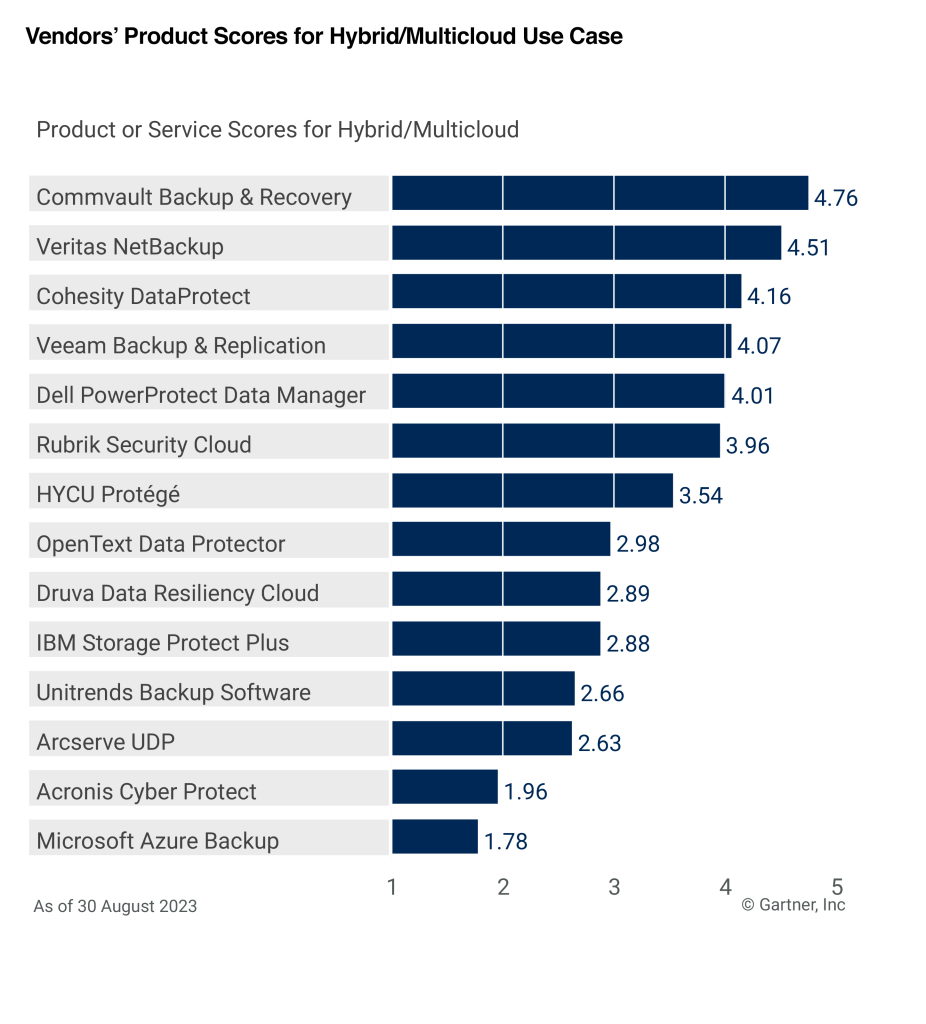
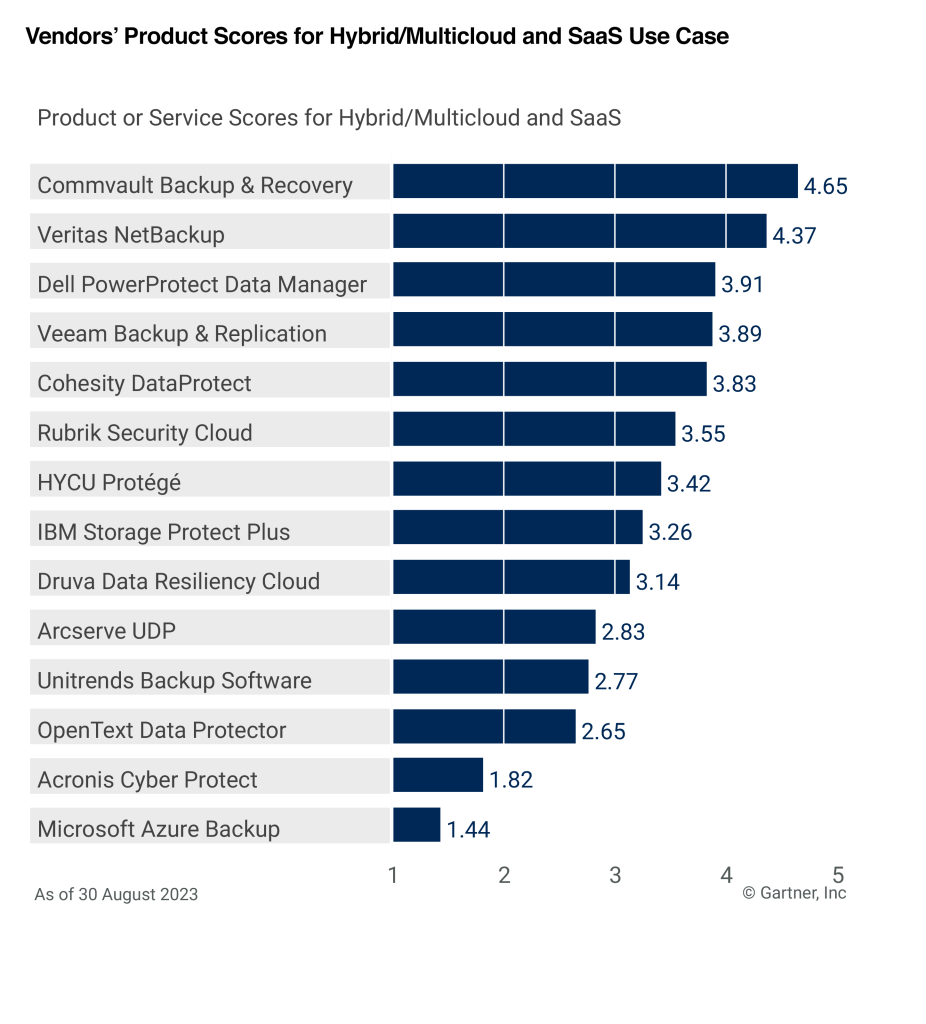
Gartner Critical Capabilities report, which is released as an essential companion to the Gartner Magic Quadrant, assesses vendors based on 15 key capabilities including Data Center Integration, Platform Security, Ransomware, and Management and more, across seven Use Cases.

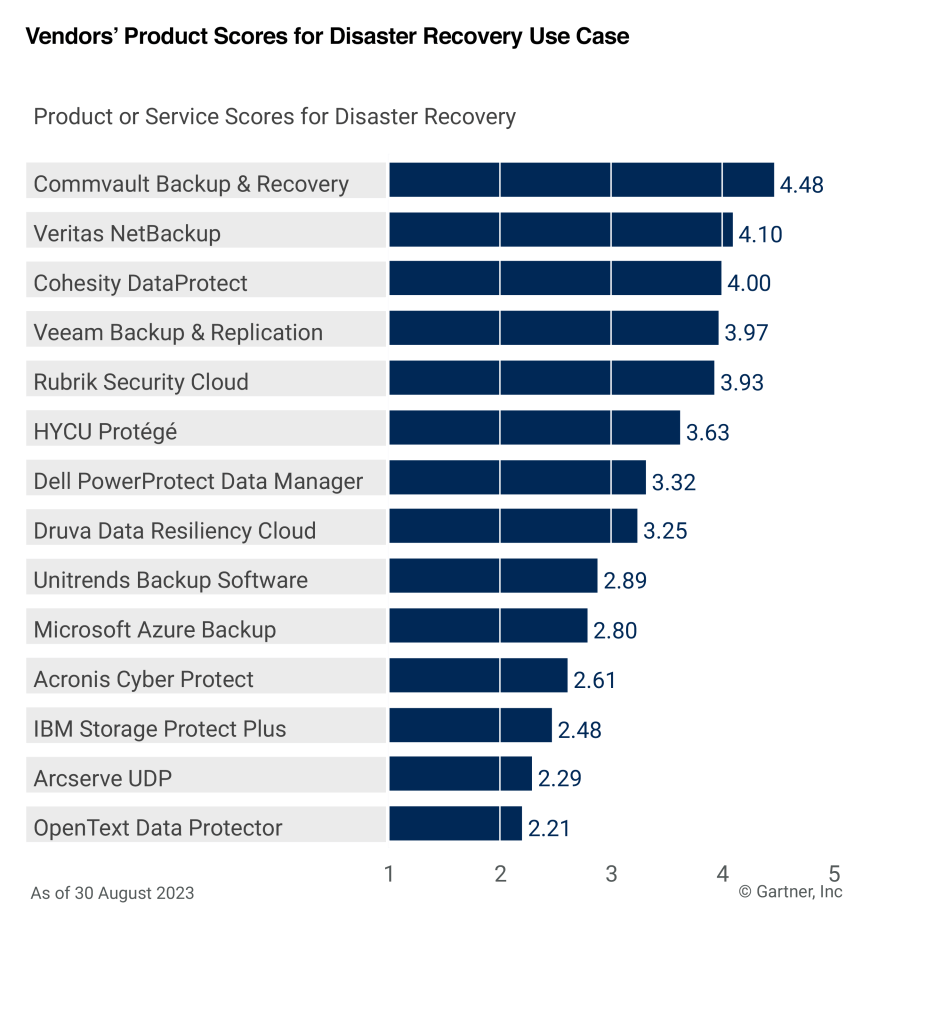
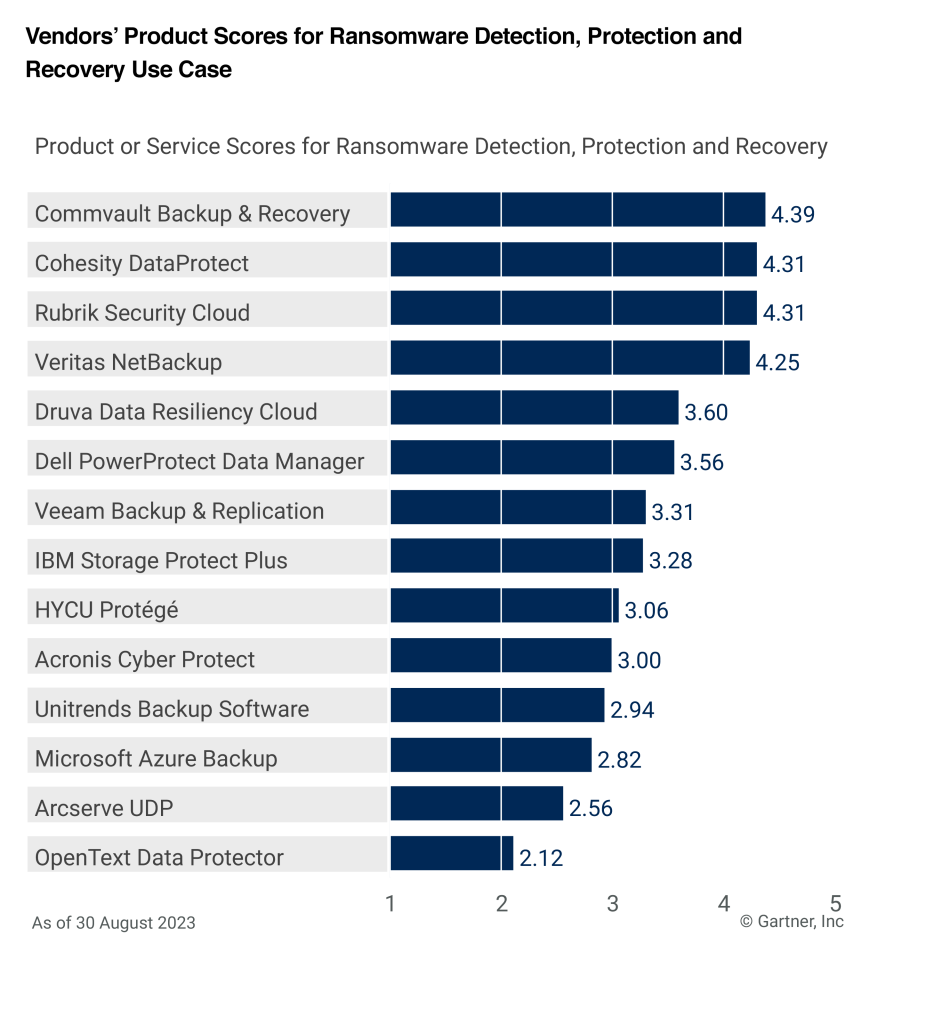
We are thrilled and honored that Commvault Backup & Recovery has scored the highest in six of the seven Use Cases in the Gartner Critical Capabilities for Enterprise Backup and Recovery Software Solutions: On-premises (4.74/5), On-premises and SaaS (4.58/5), Hybrid/Multicloud (4.76/5), Hybrid/Multicloud and SaaS (4.65/5), Disaster Recovery (4.48/5), and Ransomware Detection, Protection and Recovery (4.39/5)! Commvault ranked   second highest (4.36/5) for the Data Services Use Case.1

On-premises (4.74/5)

On-premises and SaaS (4.58/5)

Hybrid/Multicloud (4.76/5)

Hybrid/Multicloud and SaaS (4.65/5)

Disaster Recovery (4.48/5)

Ransomware Detection, Protection and Recovery (4.39/5)

We believe/think/feel that the release of this year’s report is indicative of the industry as a whole; data continues to require stronger protection, cyber threat detection and recovery across more environments. At Commvault, this is our sweet spot – delivering secure data protection for the hybrid world. We are honored to be recognized in this year’s Critical Capabilities report and ranked highest in six of out the seven Use Cases. We provide the right mix of detection, security, and recoverability capabilities to help customers meet cyber threats head-on.

We are a twelve-time Leader in the Gartner Magic Quadrant and being recognized again in the Gartner Critical Capabilities report. We [AG3] are grateful to our customers for partnering with us in this journey of continuous customer-first innovation and to our partners in building a data ecosystem with no boundaries.

Get your copy of the 2023 Gartner Critical Capabilities for Enterprise Backup and Recovery Solutions!


Gartner, Magic Quadrant for Enterprise Backup and Recovery Software Solutions, Michael Hoeck, Nik Simpson, Jerry Rozeman, Jason Donham, 7 August 2023. This Magic Quadrant report was previously published as Magic Quadrant for Data Center Backup and Recovery Solutions (2016-2017; 2019-2020); Magic Quadrant for Enterprise Backup Software and Integrated Appliances (2014-2015); Magic Quadrant for Enterprise Backup/Recovery Software (2012-2013); and Magic Quadrant for Enterprise Disk-Based Backup/Recovery (2011).

GARTNER is a registered trademark and service mark of Gartner, Inc. and/or its affiliates in the U.S. and internationally, and MAGIC QUADRANT is a registered trademark of Gartner, Inc. and/or its affiliates and are used herein with permission. All rights reserved.

This graphic was published by Gartner, Inc. as part of a larger research document and should be evaluated in the context of the entire document. The Gartner document is available upon request from Commvault.

1. Gartner, “2023 Gartner® Critical Capabilities for Enterprise Backup and Recovery Software Solutions,” Jason Donham, Jerry Rozeman, Michael Hoeck, Nik Simpson, 18 September 2023.

Gartner disclaimer

Gartner does not endorse any vendor, product or service depicted in our research publications, and does not advise technology users to select only those vendors with the highest ratings or other designation. Gartner research publications consist of the opinions of Gartner’s research organization and should not be construed as statements of fact. Gartner disclaims all warranties, expressed or implied, with respect to this research, including any warranties of merchantability or fitness for a particular purpose.

More related posts


Thumbnail_Blog-Recovery-Ready-2026

Recovery-Ready or Just Recoverable?

Read more about Recovery-Ready or Just Recoverable?
Thumbnail_Blog-Data-Leakage-Loops-2026

What is Recovery Time Objective (RTO) and How to Calculate It

Read more about What is Recovery Time Objective (RTO) and How to Calculate It
Thumbnail_Blog-Data-Access-Governance-2026

Protect Your Data from Ransomware: Learn How with Clumio

Read more about Protect Your Data from Ransomware: Learn How with Clumio

Fall is upon us! Which means it’s pumpkin spiced latte season and Cybersecurity Awareness Month is just around the corner. It’s a good time to check in on your incident response playbook, particularly the recovery phase. Remember, your cloud provider is responsible for the durability and uptime of their service, but your data—its resilience, integrity, and security—is your responsibility.

Backups—your final defense in the cloud

Risk profiles for cloud data encompass a range of scenarios, including unintentional data deletion due to human error, erroneous software deletes, malicious wipeouts, insider threats from disgruntled or departing employees, and targeted ransomware campaigns. A robust backup and recovery strategy, fortified with features such as data versioning, encryption, and air gaps, serves to enhance organizational data resilience. This multi-layered approach aims to minimize the impact of adverse data incidents by providing fast and secure data restoration, thus mitigating operational downtime and financial losses.

Air-gapped backups can save your company

Snapshots, often stored in production accounts, share the same risk as production data. Cross-account snapshots are also not enough, as they still fall under the organization’s primary security domain. For example, if an actor gains access to the right workload or the right administrator credentials, all data can often be manipulated. A more secure approach involves creating a virtual air gap between the primary account and the backup storage, offering an out of band layer of defense against ransomware and other cyberattacks.

Benefits of air-gapped backups

  • Ransomware resilience: Air-gapped backups ensure data recoverability, even when primary datasets are compromised.
  • Data integrity: Unauthorized access and data tampering are mitigated, particularly with immutable backups.
  • Regulatory compliance: Cybersecurity insurance and specific industry regulations often mandate air-gapped backups, ensuring both data protection and policy adherence.
  • Rapid recovery: Air-gapped backups facilitate quick data restoration, reducing downtime and mitigating adverse impacts.
  • Assurance: Secure backups offer peace of mind and enable IT resources to focus on other mission-critical operations.

Adding protection without adding cost or complexity

Stronger data protection through air-gapped, immutable backups is just one of the reasons that customers turn to Clumio. As organizations grow their cloud presence, controlling costs becomes another challenge to tackle. IT teams are tasked with reducing cloud costs, but often lack visibility into where they can cut their AWS bill without limiting business innovation.

Analyst firm ESG found that Clumio helps customers reduce costs by 30% on average through a uniquely architected solution that optimizes backup and recovery processes. Consumption reports further assist IT teams by identifying where organizations are spending the most for their AWS backups so they can better manage their storage spend. Clumio customers are typically able to reduce their backup costs while increasing their data security.

Clumio at Gartner IT Symposium, October 16-19, 2023

Join us at the Gartner IT Symposium in Orlando, Florida, at Booth #147. Stop by to chat with me or our Field CTO about how Clumio fits into your AWS data protection strategy while meeting your budget constraints.

More related posts


Thumbnail_Blog-Recovery-Ready-2026

Recovery-Ready or Just Recoverable?

Read more about Recovery-Ready or Just Recoverable?
Thumbnail_Blog-Data-Leakage-Loops-2026

What is Recovery Time Objective (RTO) and How to Calculate It

Read more about What is Recovery Time Objective (RTO) and How to Calculate It
Thumbnail_Blog-Data-Access-Governance-2026

Protect Your Data from Ransomware: Learn How with Clumio

Read more about Protect Your Data from Ransomware: Learn How with Clumio

Data protection and cloud migration and recovery planning, oh my! Experience it all with Commvault at Oracle CloudWorld, Booth #23, running September 19-21 in Las Vegas.

We’re only a few weeks away from the show and boy do we have a packed agenda for customers, partners, and show attendees!

First up, our speaking sessions and tutorials. Get these on your calendar before it’s too late!

  • Tues, Sept 19 at 5:00 pm PDT – OCI Data Protection: Building Cyber Response Strategies to Lower Risk—and TCO
    • Decrease Risks and Costs! Learn how Commvault and Oracle are redefining modern data protection for Oracle Cloud Infrastructure (OCI).
  • Wed, Sept 20 at 1:00 pm PDT – Your VMware Estate Migration: Maintain Control and Maximize Security
    • It’s as easy as 1-2-3! Follow this step-by-step tutorial to seamlessly deploy and migrate VMware workloads to OCVS (Oracle Cloud VMware Solution), using Commvault data protection.
  • Wed, Sept 20 at 3:55 pm PDT – Partners: The Ransomware Playbook – why Firewalls and Backups are not Enough
    • Attention partners, now’s the time to walk away a hero and help your customers defeat their biggest threat – ransomware.
  • Thurs, Sept 21 at 8:30 am PDT – OCI and Commvault Partner to Secure, Protect, Recover Your Hybrid Environment
    • Want to know the secret when it comes to cost savings? Simplifying management, optimizing cloud strategies, reducing security risks, and improving business continuity with Commvault.
  • Thurs, Sept 21 at 1:05 pm PDT – How Commvault Helps Redefine Data Protection for Oracle Partners and Customers
    • Partners, this one’s for you! Discover ways to exceed your customers’ expectations while helping them secure, defend, and recover their most precious resource, their data.

Next, be sure to stop by the Commvault booth (Booth #23) where you’ll experience the best in data protection for the widest breadth of workloads, first-hand. We’re here to help accelerate your OCI journey by delivering superior price-performance, built-in enhanced security, and simplified recovery and management.

  • Are you a planner? No need to rush around during the show. Schedule a meeting in advance and we’ll hold your spot.
  • Do you prefer a more spontaneous approach? We’ll be hosting brief 10-minute sessions throughout the show days. This is your opportunity to quickly learn the ins and outs of simplifying your backup strategy….and you may walk away with some pretty cool prizes.
  • How about testing the technology for yourself? We’ve got you covered with demos showcasing fast backup and recovery of cloud and on-premises workloads, and Metallic Recovery Reserve on OCI for air-gapped protection. 

Are you convinced yet that Commvault Booth #23 is the place to be? We’ll see you in Las Vegas!

More related posts


Thumbnail_Blog-Recovery-Ready-2026

Recovery-Ready or Just Recoverable?

Read more about Recovery-Ready or Just Recoverable?
Thumbnail_Blog-Data-Leakage-Loops-2026

What is Recovery Time Objective (RTO) and How to Calculate It

Read more about What is Recovery Time Objective (RTO) and How to Calculate It
Thumbnail_Blog-Data-Access-Governance-2026

Protect Your Data from Ransomware: Learn How with Clumio

Read more about Protect Your Data from Ransomware: Learn How with Clumio

Monday, September 11th is Patriot Day and a National Day of Service and Remembrance in the United States as we commemorate the 22nd anniversary of the September 11th (9/11) terrorist attacks.  

September 11, 2001 was a loss felt worldwide. Today, we remember those who lost their lives on that day, thank the brave first responders who put their lives on the line and honor the sacrifices made to protect our freedom.  

As I reflect on that day, how our communities came together always stands out to me. We put aside our divisions and united in caring for one another, supporting one another, and projecting hope; I tend to describe this as compassion. Those efforts resonate with me today and each time I step out of my front door into the daily complexities surrounding us all. Each interaction where we can inject more compassion into the community helps. 

As a U.S. Navy veteran, I am proud to be the executive sponsor of our VALOR (Veterans) Employee Resource Group (ERG) here at Commvault. To honor the anniversary of 9/11, our VALOR ERG held our annual Commvault Climbs challenge, where Vaulters around the world are challenged to climb as many as 104 flights of stairs to honor the brave firefighters and first responders who climbed the stairs of the Twin Towers of the World Trade Center to save the lives of those who were trapped. Each year, I’m reminded of the incredible support across our company as we live our value of caring.   

Let’s take the time today to remember those who lost their lives on 9/11, reflect on the bravery of the first responders in those moments, and honor those who volunteered to serve their country in response to the tragedy. 

More related posts


Thumbnail_Blog-Recovery-Ready-2026

Recovery-Ready or Just Recoverable?

Read more about Recovery-Ready or Just Recoverable?
Thumbnail_Blog-Data-Leakage-Loops-2026

What is Recovery Time Objective (RTO) and How to Calculate It

Read more about What is Recovery Time Objective (RTO) and How to Calculate It
Thumbnail_Blog-Data-Access-Governance-2026

Protect Your Data from Ransomware: Learn How with Clumio

Read more about Protect Your Data from Ransomware: Learn How with Clumio

Cyber threats continue to evolve and become more persistent. Worldwide spending on security solutions and services is expected to reach nearly $300 billion in 20261 – a 37% increase from current spending, indicating the increasing threat level. Surprisingly, despite greater awareness and investment, 83% of organizations have experienced more than one data breach in their lifetime2. These numbers highlight the crucial need for recovery readiness, with data security a top concern as cloud storage becomes the popular option for offsite backups.

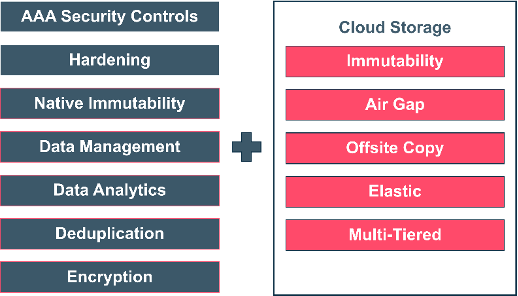
The need for immutability

Immutability is defined as “the ability of any data to be maintained in a non-fungible state for a specific duration of time”. Data immutability can be attained via various methods working in conjunction with each other.  An immutable architecture, then, is a model in which no updates, security patches, or configuration changes happen “in-place” on production systems. If any change is needed, a new version of the architecture is built and deployed into production.  Immutability protects within, as well as outside of the backup solution.

Organizations need an immutable architecture to ensure their data is safe and secure and, more importantly, ready whenever they need to restore it. Immutability is a proven technique used to reduce cyber-attacks on backup data and ensure that backup copies aren’t changed in any way.

The best indicator that you have a reliable backup solution is your ability to recover data quickly. This comes partly from proper planning and architecting your backup and recovery solution. However, this can be a difficult challenge when your data is up against so much opposition. In the past, hardware failures, natural disasters, and human error were likely “top of mind” outage threats. Today, ransomware and insider threats have taken over as top concerns. It’s apparent that planning and architecture design is not enough; today’s backup and recovery solution must be immutable, so you have peace of mind that your data is safe.

Mutable vs. Immutable

There is an essential distinction between mutable and immutable infrastructure when protecting valuable data. Traditional mutable infrastructure is more flexible and allows for updates and integrations to be made quickly, but this can also make it easier for cybercriminals to access and manipulate data.

These bad actors often target businesses through data breaches, which can have severe consequences such as reputational damage, loss of revenue, and legal problems. This is where an immutable architecture comes in, offering a more secure and tamper-proof solution to protect data from internal and external threats.

Immutability for regulatory compliance

Immutable storage is essential for any organization to protect its business-critical or private data. This is especially important for industries like healthcare, finance, and law, which have strict legal and regulatory requirements to safeguard sensitive data from unauthorized access or tampering. Immutable storage helps organizations comply with requirements like those put forth by the SEC, CFTC, and FINRA related to the recording, storage and retention of electronic records and facilitates easy recovery in case of data loss or corruption.

Commvault Cloud is immutable by default

With every environment having its own mix of infrastructure, securing backup data against random unauthorized changes can seem challenging. Therefore, Commvault has taken an agnostic approach to immutability. Leveraging a hardened, multi-layered approach to data protection, we provide robust controls that prevent various types of threats to backup data and ensure copies are highly recoverable from accidental deletion or malicious attack. Natively, all backup data is protected at the storage level. Backup copies and operations live in a virtually air-gapped location, in an isolated security domain, decoupled from source environments. Retention locks can also be applied to prevent unwarranted modifications to data retention policies.

With Commvault Cloud, you do not need special hardware or cloud storage accounts to lock backup data against ransomware threats. If you happen to have Write-Once, Read Many (WORM), object lock, or snapshot supported hardware (which Commvault fully supports), you can still use Commvault’s built-in locking capabilities to complement and layer on top of existing security controls. Having the ability to layer security controls across different infrastructure types is what places Commvault’s immutable solution ahead of the competition.

Multi-factor authentication, AES 256 bit at-rest encryption, firewalls, and other zero-trust access controls block internal and external movement of data by unauthorized parties. All security protocols employed adhere to security best practices and are based upon NIST 800-53, SOC2 type II, and ISO27001:2013 guidelines and compliance requirements.

With built-in zero-trust security protocols, Commvault Cloud meets the most stringent confidentiality, integrity, and availability standards for government agencies and business, alike.

Commvault Cloud’s immutable infrastructure architecture

Commvault’s machine learning platform extends immutable protection capabilities by providing a proactive platform for detecting and responding to threats accordingly. We employ a multi-layered approach to protect against various threat vectors and ensure data is safe and include storage locking to combat ransomware and Zero trust AAA controls up and down the backup and recovery stack to provide comprehensive protection. Isolation and air gapping utilizes TLS encrypted network topologies and infrastructure is hardened to reduce the attack surface.

At a high level, the Commvault platform includes these seven layers combined with immutable cloud storage:

Cloud storage provides enhanced options for defending, securing, and restoring your data. Immutable by default, it all adds up to the most flexible data protection you can deploy anywhere and at scale for any workload.

Your Protection, Your Way: Immutability for Software and SaaS

Commvault Grid makes implementing an immutable architecture as an integrated appliance or reference design for an all-in-one solution easier. It delivers comprehensive data management for all workloads from a single, extensible platform. Commvault Cloud employs a multi-layered approach to protect against various threat vectors and ensure data is safe. Commvault’s immutable architecture consists of:

  • Software (Compliance Lock)
    • Attempt: Backup admin tries to reduce retention, delete backup job, policy, or library accidentally
    • Action: Denied by Compliance Lock
  • Operating System (Access controls)
    • Attempt: Authorized user tries to encrypt, move, or delete files or reformat a disk
    • Action: OS blocks users and/or ransomware attacks through access controls
  • File System (Immutability at the storage layer)
    • Attempt: Authorized or malicious user tries to modify or encrypt protected backup data
    • Action: Immutable file system prevents backup data from being modified/encrypted

Commvault AirGap is a fully managed cloud storage target for the Commvault SaaS hybrid cloud portfolio, as well as Backup and Recovery and Commvault Grid. Cloud adoption is accelerated with optimized storage options and air gapped copies of data to ensure ransomware recovery.

Commvault AirGap is optimized cloud data protection, offering:

  • Short or long-term cloud storage, from one vendor, managed in one interface
  • Controlled costs via optimized storage
  • Unified naming for all cloud storage

With Commvault AirGap, you can have both primary and secondary backup copies for all your workloads in the following storage tiers:

  • Azure Hot
  • Azure Cool
  • OCI Standard (Commvault Cloud SaaS only)
  • OCI Infrequent Access (Commvault Cloud SaaS only)

And while all the above solutions can elevate your cyber resilience strategy, it also provides significant cost savings. Commvault Cloud’s air-gapping, immutability, and more importantly, ability to effectively restore an environment can have a $1.06 million ransomware benefit over the 3-year analysis.3

Conclusion

Data threats are becoming increasingly sophisticated, and there’s no getting around the fact that backup and recovery platforms today must offer greater protection against cyber threats. Commvault solves this problem with an immutable architecture that provides complete data security and fast recovery of any workload, no matter where it lives. Our layered approach reduces risk while helping organizations meet compliance requirements without sacrificing performance.

Now is the time to ask the tough questions regarding your data security provider so you can be fully confident that your data is safe, secure, and compliant. Start exploring our immutable architecture today and discover how staying ahead of potential threats with the right solution has never been easier or more secure.


References

1. IDC Worldwide Security Spending Guide – 2. IBM Cost of a Data Breach Report 2022 – 3. Analyzing the Economic Benefits of Data Protection with Commvault on Microsoft Azure

More related posts


Thumbnail_Blog-Recovery-Ready-2026

Recovery-Ready or Just Recoverable?

Read more about Recovery-Ready or Just Recoverable?
Thumbnail_Blog-Data-Leakage-Loops-2026

What is Recovery Time Objective (RTO) and How to Calculate It

Read more about What is Recovery Time Objective (RTO) and How to Calculate It
Thumbnail_Blog-Data-Access-Governance-2026

Protect Your Data from Ransomware: Learn How with Clumio

Read more about Protect Your Data from Ransomware: Learn How with Clumio

In an organization’s ongoing battle against ransomware threats, safeguarding Personally Identifiable Information (PII) – the data encompassing sensitive personal information whose compromise can lead to severe legal, financial, and reputational consequences – is a critical imperative.  As ransomware attacks continue to evolve in sophistication, safeguarding PII data has become paramount for effective defense strategies.

  • Mitigating Legal and Financial Risks: After a ransomware attack, the unveiling of PII data can expose organizations to significant legal and financial risks. Data breaches may result in hefty fines, regulatory penalties, and class-action lawsuits. To reduce vulnerability to such liabilities, organizations must proactively discover and secure PII data, demonstrating their commitment to data protection and privacy.
  • Thwarting Data Exfiltration: Ransomware attackers frequently threaten to publish or sell stolen data to coerce victims into paying ransoms. Identifying and securing PII data is required to pinpoint critical assets that attackers might target for exfiltration. Robust access controls, encryption measures, and data loss prevention protocols act as strong deterrents against unauthorized extraction.
  • Tailored Protection by Prioritizing PII Data: Recognizing that not all data is of equal value, organizations should adopt a strategic approach to protection. PII data, given its high susceptibility to identity theft and fraud, demands special attention. Through meticulous discovery and categorization, organizations can allocate resources to fortify their most sensitive and valuable data, thereby enhancing the efficacy of overall cybersecurity measures.

Recognizing the need for strong protection of PII data is part one. Identifying a solution to accomplish this task is the second piece of the puzzle.

Commvault Risk Analysis: AI to the Rescue

Commvault Risk Analysis is a comprehensive solution aiding organizations in discovering, evaluating, overseeing, and implementing measures to minimize data-related risks. By gaining visibility into these, organizations can easily identify and categorize sensitive data to help mitigate potential data breaches and foster efficient cross-functional collaboration. Commvault Risk Analysis forms the backbone of smart, proactive data management strategies designed to reduce risks and costs.

Sensitive data detection relies heavily on AI methods that can process vast amounts of data quickly and accurately, and Commvault Risk Analysis is modernized with such capabilities. These AI-driven techniques significantly enhance the accuracy and efficiency of identifying sensitive information within large and diverse datasets.

  • Comprehensive PII Management: Risk Analysis Entity Manager equips organizations with a versatile toolset for managing various PII types identified through content analysis. This feature includes predefined PII entities and the flexibility to create custom entities to finetune the model for specific datasets and datatypes. These entities encompass specific PII categories, allowing for sensitivity level adjustments and associated keywords. This system enables configuration for default and customized entity types, forming the foundation for effective PII management.
  • AI-Powered Contextual Learning for Data Classification: Leveraging AI-driven contextual learning, Commvault Risk Analysis can achieve precise data classification. Unlike traditional methods, AI-driven approaches use machine learning algorithms to understand the context and adapt to evolving data patterns. This reduces false positives and false negatives by considering surrounding text, metadata, and contextual cues. These systems efficiently identify sensitive data and automate classification, bolstering data security, compliance, and governance.
  • Empowering Data Classification Through Training Models: Training classification models with custom datasets is essential for accurate identification of document types. This involves uploading representative files that mirror desired categories, allowing the model to build a strong foundation. Continuous refinement is possible by adding additional documents that finetune the classification model, leading to more accurate sensitive data detection.
  • Azure Cognitive Services for Data Classification Insights: Integrating Azure Cognitive Services with Commvault Risk Analysis further enhances the recognition of diverse data types within sensitive datasets. AI-driven algorithms can identify intricate patterns defining various data categories and business domains. Deep learning and text analytics capabilities of Azure Cognitive Services boost data classification accuracy, efficiency, and compliance even in complex unstructured data. The synergy between Azure’s Cognitive Services and sensitive data governance capabilities of Risk Analysis offers a cohesive and integrated experience, that not only facilitates more accurate data governance but also a modern AI-enabled deep learning approach that continuously adapts as datasets evolve.

In today’s digital landscape fraught with ransomware dangers, safeguarding PII data is not merely a necessity but a responsibility. By embracing AI-driven intelligent technologies, and a commitment to a robust data protection wrapper around sensitive data, organizations can fortify their defenses against ransomware attacks and ensure the security and privacy of the sensitive data they store.

More related posts


Thumbnail_Blog-Recovery-Ready-2026

Recovery-Ready or Just Recoverable?

Read more about Recovery-Ready or Just Recoverable?
Thumbnail_Blog-Data-Leakage-Loops-2026

What is Recovery Time Objective (RTO) and How to Calculate It

Read more about What is Recovery Time Objective (RTO) and How to Calculate It
Thumbnail_Blog-Data-Access-Governance-2026

Protect Your Data from Ransomware: Learn How with Clumio

Read more about Protect Your Data from Ransomware: Learn How with Clumio

Fans of science fiction know Artificial Intelligence (AI) is a recurring theme – and has been for quite some time. Movies, books and even video games embrace it as an advanced technology that powers robots, cyborgs, spaceships – you name it. And core to the mythos of AI is that it thinks in a manner indistinguishable from that of a human, while operating with the speed and intelligence of a computer.

We’re not there yet; as much as I’d like my own version of Tony Stark’s Mark V armor, I’ll have to settle for being able to ask Alexa facts about Chuck Norris. But we are making swift progress – I recently learned a popular online tech publication had been using AI to generate articles for months – and was none the wiser, thanks to ChatGPT and other Large Language Models (LLMs).  

LLMs promise to revolutionize how we interact personally and professionally. We’re seeing incredible interest and funding being poured into their development – and it’s just beginning. In today’s business world, AI is being viewed as the key to unlock technological advancement, competitive advantage, and in turn, profitability.

It’s why tech giants like Microsoft, Meta, and Google each referenced AI almost 50 times in their recent earnings calls. As a result, you may be asking yourself “What if AI could help my business…”

  • Make better decisions?
  • Operate more efficiently?
  • Save costs?
  • Enhance customer relationships?

The good news is that it can absolutely do all the above.

The bad news? AI isn’t free. Quite the opposite, in fact.

The Cost of AI

AI, like anything in its infancy, requires learning. So how does one go about teaching ChatGPT and other LLMs how to work? Simply put, money. Tony Stark kind of money.

It’s been reported that ChatGPT utilized over 10,000 GPUs (Graphic Processing Units) to train it. (Now we know where all the graphics cards went for the last two years.) And the most powerful GPU on the planet will run you $30,000. Which means ChatGPT had an awfully expensive childhood. But that’s not all. It’s estimated that ChatGPT costs upwards of $700,000 per day to operate. Why? Well…

AI Requires Cloud Infrastructure

If generating AI were as simple as harnessing the pixel pushing power of Nvidia or AMD, we would see it proliferate at an even higher rate than it currently is. But to deliver AI, you need additional hardware and infrastructure. That means servers – many, many servers. And not coincidentally, today’s enterprises need the same to fulfill their data protection needs. And where do they turn to do that? The cloud.

That’s right – the same infrastructure that defends, protects, and secures your data is now being used to make AI available to the masses. It drives LLMs, machine learning, and automation, just to name a few. Those use cases are going to exponentially increase because AI makes great use of raw computing power and scalability. And because the more things change, the more they stay the same – in this instance, we’re talking about reducing the cost of AI to ensure a healthy bottom line for your business.

Extra ROI from Your Data Protection Platform

The natural progression of innovation and technical economics involves experimenting to find a way to optimize a use case in hardware (silicon processors)  and then shift it into software (ChatGPT)  so that everyone can benefit from it. Using that logic, you’re probably already in the cloud. More likely, multiple clouds. To take advantage of this paradigm, you need to implement cost-effective solutions that ensure the integrity of your dataset.

One way to do so is by using Data Protection as a Service (DPaaS) to reduce your operational spend on cloud Infrastructure to help pay for those growing AI bills. You’re already optimizing your business in myriad ways; this methodology is a natural fit. It’s a virtuous cycle: grow your business by utilizing existing resources to reduce costs, which are then invested back into the business.

Driving Down Today’s TCO is Just the Start

Where DPaaS is concerned, enterprises are rightfully focused on security first, with TCO (Total Cost of Ownership) being a close second. TCO is quantitative in nature, so it can be difficult to know how to evaluate vendor claims. At the end of the day, these are the current table stakes:

  • Deduplication and data tiering: Maximize storage efficiencies and control cloud costs.
  • Cloud-native storage: Storage costs should always decrease when utilizing a DPaaS vendor alongside your cloud provider.
  • Proactive Ransomware Monitoring and Alerting: This also includes end to end data encryption and data immutability.
  • Multi-Cloud Data Protection: Companies should use the right cloud technology that suits their business needs. And vendors should offer DPaaS solutions that support all of them.
  •  Broad Spectrum of Workloads: Companies use a mix of SaaS, IaaS, and on-premises resources – your DPaaS solution needs to support all of it.
  • Robust reporting: Includes compliance analytics to stay current and proactively address future requests on demand.

If you can check all of the above boxes, you’re well on your way to driving down the cost of your data protection investment. Now it’s time to start thinking about what’s next and where to reinvest those savings.

The Future of Data Protection

AI-enhanced data protection will offer continuous innovation, based on machine learning and other advancements that are driven by the needs of modern organizations. And because we are at the intersection of data protection not only in the cloud, but also on-premises, we need a unique perspective on what that could look like. What if you could:

  • Automate tasks to drive better efficiencies?
  • Continuously analyze data and find root cause for problems instantly?
  • Be more efficient with less resources?
  • Utilize your data to make better decisions?
  • Receive high-fidelity security alerts?
  • Use data-driven insights to automatically understand customer or employee needs, and generate the right result, at the right time?

Soon, these will be the new table stakes. Your data protection, whether you know it or not, is a direct on-ramp for your ability to harness AI, affordably.

It’s YOUR data. What will you do with it?

More related posts


Thumbnail_Blog-Recovery-Ready-2026

Recovery-Ready or Just Recoverable?

Read more about Recovery-Ready or Just Recoverable?
Thumbnail_Blog-Data-Leakage-Loops-2026

What is Recovery Time Objective (RTO) and How to Calculate It

Read more about What is Recovery Time Objective (RTO) and How to Calculate It
Thumbnail_Blog-Data-Access-Governance-2026

Protect Your Data from Ransomware: Learn How with Clumio

Read more about Protect Your Data from Ransomware: Learn How with Clumio

At Commvault, we believe that investing in our people begins with the next generation of leaders.

Our U.S. summer internship program recently concluded, and I’m so incredibly proud of the work done by our intern class these past few months! Our intern program provides students with meaningful work experiences as we empower these aspiring professionals to grow and learn with us at Commvault. And our hybrid work environment allows our remote-first work to spread through into our development of the next generation of talent.

https://play.vidyard.com/Qkt2ixrpHZMpyKoaC6R2mb

We prioritize collaboration with leadership, mentorship, and networking opportunities, providing training and direct experience that enables our interns to expand their professional network and technical skillset are all core to this program. These are the minds that will help shape the future for us all!

The internship program concludes with a project contest, which is an exciting opportunity for our interns to present a product idea, process improvement, or survey results tied to their field of study to a panel of our cross-functional leaders. And let me tell you, the innovation we see each year through these projects is exceptional! This year’s projects ranged from built applications, sizing tools, and more!

Each year, I’m reminded of the importance of having mentors to provide insight into new workplace innovations and perspectives. Our continuous culture of learning allows us to embrace and celebrate the ideas of everyone within our global Vaulter community!

We continue to always inspire our next generation of leaders and give them an exceptional experience during their time here. I want to extend a huge thank you to our 2023 U.S. summer intern class for all their amazing contributions to Commvault. Congratulations all!

More related posts


Thumbnail_Blog-Recovery-Ready-2026

Recovery-Ready or Just Recoverable?

Read more about Recovery-Ready or Just Recoverable?
Thumbnail_Blog-Data-Leakage-Loops-2026

What is Recovery Time Objective (RTO) and How to Calculate It

Read more about What is Recovery Time Objective (RTO) and How to Calculate It
Thumbnail_Blog-Data-Access-Governance-2026

Protect Your Data from Ransomware: Learn How with Clumio

Read more about Protect Your Data from Ransomware: Learn How with Clumio

Recently, the fifth annual AWS Storage Day was held – a virtual event streamed on Twitch during which Amazon Web Services (AWS) shares the latest news and innovations around their storage portfolio. The event is a celebration of customer-focused innovation, something we at Commvault pride ourselves in, which is why we are honored to have been invited by AWS to participate in this year’s festivities.

Listening to the sessions, it was no surprise to us (given our leadership position in the data protection space – 12 times in a row, in fact) that data was at the heart of every discussion. The newest features and capabilities announced during Storage Day provide new options to customers and application developers to innovate without limits by leveraging the elasticity and scale of AWS storage while still maintaining that all-important cost-efficiency along the way. It is clear that these new enhancements and the 17+ years of innovation leading up to them – across Amazon S3, Amazon EBS, and many more – will power the next generation of Generative AI apps under development right now.

Some of the announcements we thought were especially exciting included:

Then there’s the one most near and dear to our hearts – customers are now able to recover up to 85% faster from Amazon S3 Glacier, further maximizing the value of their archived assets. We might be a little biased, though, as our own Michael Fasulo presented on this very topic alongside Nitish Pandey, a product leader on the Amazon S3 team, in a session during Storage Day (that you can rewatch here).

We were so excited to share the latest example of the great collaboration and innovation that Commvault and AWS are bringing to our joint customers — allowing them to recover their data significantly faster, at no additional cost, from the ultra-low cost, long-term, secure, and durable Amazon S3 Glacier Flexible Retrieval storage class. At its simplest, it’s all about helping our customers protect their data and be able to recover it when their business needs it most. And having partners like AWS who are aligned in that vision and share that customer obsession enables us to do some remarkable things together.  You can read more about this joint solution and why we’re so excited about it on the AWS Storage Blog: Reduce recovery time and optimize storage costs with faster restores from Amazon S3 Glacier storage classes and Commvault.

Now, Storage Day wasn’t all new announcements. There were also some great Amazon S3 primers that helped give us all the confidence that securityremains the top priority for AWS and their customers’ data while also staying relentlessly focused on data durability in everything they do with customer storage. These themes resonate with us, as well, as we are intently focused on securing, defending, and recovering our customers’ data across AWS and their entire data estate. And if you’re looking to find out more about how we are working together to strengthen our customers’ security posture and improve their resiliency, you’re in luck.  

We teased it during the stream of our session, but you can now register for our Technology Touchdowns event on September 6th where we’ll go deep into our playbook and show you what Game-Winning Data Protection with Commvault and AWS looks like. We’ll even be joined by Peyton Manning –2x Super Bowl-Winning Champion, 5x NFL MVP & Member of the Pro Football Hall of Fame – for a candid discussion about teamwork, leadership, and experiences from his successful career.  We’re looking forward to continuing the momentum from this Storage Day event and diving deeper into what makes our partnership with AWS so exciting for customers. 

Quick Links:

More related posts


Thumbnail_Blog-Recovery-Ready-2026

Recovery-Ready or Just Recoverable?

Read more about Recovery-Ready or Just Recoverable?
Thumbnail_Blog-Data-Leakage-Loops-2026

What is Recovery Time Objective (RTO) and How to Calculate It

Read more about What is Recovery Time Objective (RTO) and How to Calculate It
Thumbnail_Blog-Data-Access-Governance-2026

Protect Your Data from Ransomware: Learn How with Clumio

Read more about Protect Your Data from Ransomware: Learn How with Clumio

As part of our promise to not only help our customers deliver, but create a more sustainable world, I’m pleased to share the launch of our Carbon Reduction Calculator. Now available on our Command Center Dashboard, we are offering an overview of carbon footprint savings that our customers can potentially achieve with Commvault’s deduplication and compression.

Data centers are large consumers of energy, and as such, they can contribute significantly to the global carbon dioxide emissions. Therefore, implementing energy efficiency measures, such as upgrading to more efficient hardware, improving cooling systems, and optimizing server utilization, and using technologies such as deduplication and compression that help reduce their overall Data Center storage requirements among other things, can significantly reduce a data center’s carbon footprint.

As consumers become increasingly aware of the environmental impact of their purchasing decisions, carbon footprint savings can be an important selling point for companies that prioritize sustainability. Adopting sustainable practices and technologies and reducing carbon footprint can not only contribute to a healthier planet but also lead to cost savings and enhance brand reputation. 

A carbon footprint savings calculator in a data center context can help organizations assess their environmental impact and make informed decisions about implementing sustainable practices and technologies that can aid in reducing their overall carbon footprint. For calculating carbon footprint savings in a data center, our customers typically consider factors such as the data center’s location, size, energy usage, and electricity source. And all these factors are based on industry-established measured metrics.

Our Carbon Reduction Calculator measures the amount of disk storage and energy consumption required before and after deduplication and compression, as delivered by Commvault, and presents this information in terms of more relatable equivalent values, such as the number of barrels of oil consumed, number of smartphones charged, number of passenger vehicles that it could have powered, etc.

At Commvault, part of our commitment to environmental, social, and governance (ESG) is helping our customers and partners manage their data more sustainably. 

With our Carbon Reduction Calculator, we’re not only helping our customers manage and protect their data, but we’re helping them do good for the environment with more sustainably friendly business practices.  

More related posts


Thumbnail_Blog-Recovery-Ready-2026

Recovery-Ready or Just Recoverable?

Read more about Recovery-Ready or Just Recoverable?
Thumbnail_Blog-Data-Leakage-Loops-2026

What is Recovery Time Objective (RTO) and How to Calculate It

Read more about What is Recovery Time Objective (RTO) and How to Calculate It
Thumbnail_Blog-Data-Access-Governance-2026

Protect Your Data from Ransomware: Learn How with Clumio

Read more about Protect Your Data from Ransomware: Learn How with Clumio