Supongamos que tienes un grupo de disponibilidad (AG) de SQL Server en tu centro de datos virtualizado. Este AG de SQL Server aloja numerosas bases de datos que dan servicio a aplicaciones críticas. Actualmente hay un total de medio terabyte de datos críticos, pero esta cifra está creciendo rápidamente. Te preocupa la disponibilidad de este SQL Server, y por eso lo configuraste como un grupo de disponibilidad AlwaysOn desde el principio. Además, eres plenamente consciente de que un AG no protege contra fallos de software, daños en los datos ni vulnerabilidades de seguridad, por lo que quieres realizar una copia de seguridad de ese medio terabyte en otro lugar, preferiblemente aislado físicamente del entorno de producción. En el desafortunado caso de que se produjera una pérdida de datos, ¿cuál es el mejor objetivo de tiempo de recuperación (RTO) que puede ofrecerte tu proveedor de copias de seguridad?
You are likely to hear bricks and blocks backup vendors for on-premises touting the value of “instant recovery” for virtual machines. The RTO being promised is seconds to minutes. But when it comes to recovering a virtual machine (VM) to its production operational level, there is nothing ‘instant’ about the so-called instant recovery.
La denominada «recuperación instantánea» consiste en proporcionar los archivos de disco de la máquina virtual desde el sistema de copia de seguridad a través de NFS y permitir que VMware vSphere ejecute la máquina virtual a partir de dichos archivos de disco. Es cierto que el proceso de arrancar una máquina virtual desde una copia de seguridad de esta forma solo lleva unos minutos. Es cierto que el almacenamiento flash de los sistemas de copia de seguridad puede actuar como mecanismo de caché para las operaciones de E/S de escritura. Sin embargo, para que la máquina virtual esté a la altura de las exigencias operativas del entorno de producción, el administrador debe planificar y ejecutar cuidadosamente Storage vMotion en el momento oportuno. Este proceso migrará los discos de la máquina virtual desde el almacenamiento de copia de seguridad al de producción mientras la máquina virtual está en funcionamiento. A menudo, vSphere limita la velocidad de este proceso para no afectar al funcionamiento de la máquina virtual en tiempo real. Se tarda varias horas, o incluso un día entero, en migrar una máquina virtual de gran tamaño y en dejarla lista para ofrecer un rendimiento a nivel de producción. ¡Menudo «instantáneo» resulta la Recovery instantánea!
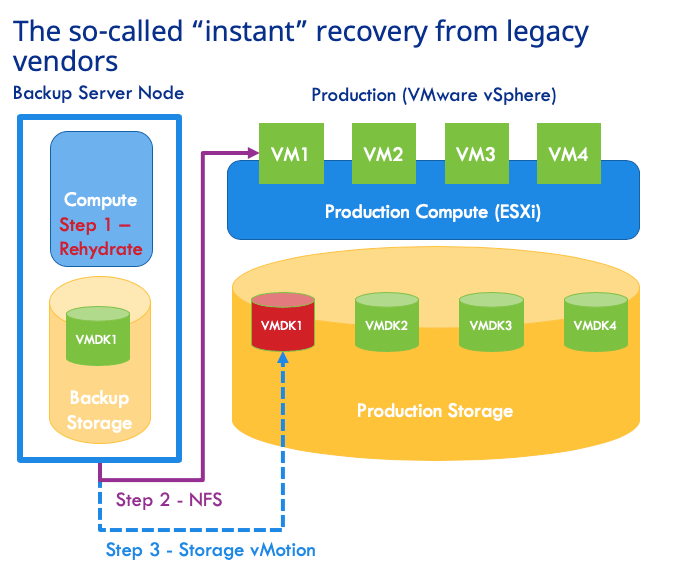
Por lo tanto, en el ejemplo anterior del grupo de disponibilidad (AG) de SQL Server, los nodos deben estar gestionados por un único sistema de almacenamiento de copias de seguridad, lo que va en contra de la razón por la que se utiliza un AG. Se supone que el AG debe configurarse con sistemas de almacenamiento dedicados en cada nodo para garantizar la disponibilidad. En ese caso, el clúster del AG tendría dificultades para ponerse en marcha, ya que la sincronización sería extremadamente lenta debido a que las lecturas de E/S se realizan desde el almacenamiento de copias de seguridad. Hay que tener en cuenta que el AG no estará disponible durante este periodo de tiempo y, por lo tanto, en realidad no existe una «recuperación instantánea». Para colmo, el AG funcionaría a duras penas mientras se lleva a cabo el vMotion de almacenamiento necesario desde el almacenamiento de copia de seguridad, que está sobrecargado, al almacenamiento de producción.
El problema de esta recuperación instantánea no termina ahí. La copia de seguridad sigue estando ubicada en el mismo lugar que el entorno de producción y, por lo tanto, es vulnerable a la pérdida del sitio y a las brechas de seguridad. No es posible utilizar el almacenamiento en la nube como destino viable para la copia de seguridad con fines de recuperación operativa desde estas soluciones. Además, la recuperación instantánea resulta inútil si se tiene previsto migrar las cargas de trabajo a VMware Cloud on AWS, ya que no se admite el almacenamiento NFS de terceros.
Clumio Rapid Recovery: un RTO operativo superior
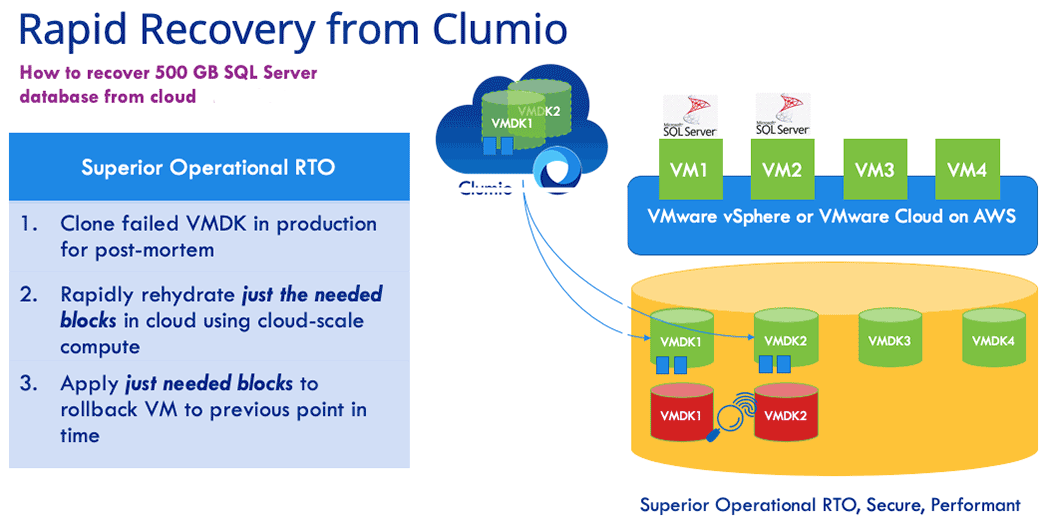
Ayuda a garantizar un Backup and Recovery seguro de tus datos, estén donde estén. Rapid Recovery es un conjunto de innovaciones de Clumio que permite restauraciones operativas rápidas desde el almacenamiento en la nube, incluso cuando se protegen cargas de trabajo locales. Gracias a Rapid Recovery con Clumio SaaS, solo se tardó 5 minutos en recuperar un entorno activo de SQL Server AG con 500 GB de datos, tal y como se muestra en el ejemplo anterior. Este es el tiempo que se tarda en realizar una recuperación de extremo a extremo y en restaurar los datos hasta un estado plenamente operativo. ¿Cómo lo hemos conseguido? Hay dos innovaciones de Rapid Recovery que desempeñan un papel clave en este sentido.
Rehidratación escalable:
La rehidratación escalable de Clumio elimina por completo la pérdida de rendimiento asociada a los sistemas tradicionales de «bricks» y «blocks». Clumio lleva a cabo la rehidratación mediante computación sin servidor y aprovecha la capacidad de computación ilimitada de la nube, al tiempo que ejecuta operaciones de E/S en paralelo en todos los bloques de interés para una solicitud determinada. El resultado: el rendimiento de restauración del servicio de copia de seguridad de Clumio supera al de un sistema de deduplicación tradicional ubicado en el centro de datos.
Seguimiento inverso de bloques modificados:
Cuando se recupera una máquina virtual en producción a partir de una copia de seguridad, lo que se está intentando, en esencia, es retroceder en el tiempo para volver a un último estado conocido en el que todo funcionaba correctamente. El seguimiento inverso de bloques modificados de Clumio te ayuda a hacer precisamente eso sin necesidad de realizar una restauración completa. El servicio de copia de seguridad de Clumio recupera los bloques modificados (regenerados mediante la rehidratación de escalabilidad horizontal descrita anteriormente) y los aplica directamente en el almacenamiento de producción para revertir la máquina virtual a un punto anterior en el tiempo. El resultado: ¡el tiempo que se tarda en recuperar una máquina virtual desde el servicio de copia de seguridad de Clumio hasta un nivel operativo de producción es más rápido que el que se tarda en recuperarla desde el almacenamiento local!
Estas dos funciones de Recovery rápido de Clumio eliminan TODAS las limitaciones de la recuperación instantánea que ofrecen los proveedores tradicionales.
Resumamos las principales ventajas para los clientes de Rapid Recovery de Clumio:
- No human intervention required: The backup admin or VM admin does not need to do anything during backup or recovery to take advantage of Rapid Recovery. Clumio SaaS automatically detects if the requested restore point in time meets rollback criteria and initiates it automatically during recovery.
- RTO is superior to that of instant recovery: You are bringing just the data required to roll back the VM and your recovery is complete. The time it takes to do this is better than the overall time it takes to perform instant recovery followed by storage vMotion.
- Protect against data loss and ransomware: Unlike co-located bricks and blocks based backup solutions needed for instant recovery, Clumio backups are air-gapped from your production datacenter. Clumio helps protect you against site loss and site-level vulnerabilities.
- Gets you ready for VMware Cloud on AWS: Instant recovery does not work in VMware Cloud on AWS environments because of its dependency on NFS. Rapid Recovery has you covered when you are migrating to VMware Cloud on AWS.
¿Quieres probar Rapid Recovery? Contacta con nosotros.