Microsoft Active Directory
Active Directory (AD) contrôle l’accès des utilisateurs aux ressources réseau, ce qui en fait une cible privilégiée pour les pirates. Protégez votre AD contre la suppression, la corruption et les attaques.

Démonstration Video
Accélérer et automatiser la récupération des forêts Active Directory
Découvrez comment Commvault Cloud la restauration rapide et automatisée de la forêt AD après une corruption ou une attaque.

Le défi
L’identité est le fondement de vos systèmes.
Lorsque Active Directory est hors ligne, vos activités peuvent être paralysées. Êtes-vous prêt à faire face au pire des scénarios ??Commvault | Cloudpermet une reprise rapide et automatisée de l’Active Directory, ce qui vous permet de rétablir rapidement le bon fonctionnement des services d’identité et de reprendre vos activités après une attaque ou une panne.
9 sur 10
Les cyberattaques estimées impliquent Active Directory.
730 000 $
les pertes financières potentielles liées aux pannes d’AD
Jours à semaines
Le temps nécessaire pour restaurer Active Directory après une attaque à l’aide de méthodes de restauration manuelles.
¹ Sheridan, K. (3 mai 2021). Des chercheurs étudient les vecteurs d’attaque d’Active Directory. Lecture sombre.https://www.darkreading.com/vulnerabilities-threats/researchers-explore-active-directory-attack-vectors
² Forbes,Comprendre les conséquences des pannes d’Active Directory—Et comment riposter, septembre 2024
Accélérer la récupération AD
Réduire le temps nécessaire à la restauration d’Active Directory après une cyberattaque
La restauration manuelle d’Active Directory peut prendrejours à semaines.Automatiser et accélérer leADprocessus de récupération visant à réduire le risque d’erreur ettemps de récupération.

Récupération automatisée des forêts AD
Automatisez l’ensemble du processus de restauration de la forêt AD afin de minimiser les temps d’arrêt et d’assurer la continuité des activités dans toute l’entreprise.
Runbooks de récupération automatisés
Simplifie le processus en plusieurs étapes requis pour la restauration d’une forêt Active Directory, y compris toutes les tâches complexes nécessaires pour vérifier la cohérence de l’AD restauré.
Vues topologiques AD visuelles
Les vues topologiques visuelles de votre environnement AD permettent d’identifier simplement et rapidement les contrôleurs de domaine à restaurer en priorité et la manière dont ils doivent être récupérés afin d’accélérer la disponibilité des services d’identité.
Vues prescriptives du runbook
Des vues étape par étape du processus de récupération offrent une visibilité complète sur votre progression et sur le temps nécessaire pour remettre votre Active Directory en ligne.
Test de récupération de l’AD
PPratiquez régulièrement vos plans de reprise après sinistre et de reprise cybernétique AD dans un environnement de laboratoire hors production pendant les périodes fastes afin de vous préparer à l’éventualité d’uneles moments difficiles.
Identifiez les risques liés à l’identité et réagissez rapidement
Une granularité qui vous permet de voir ce qui a changé dans votre environnement et d’annuler ces changements aussi efficacement que possible afin de remettre rapidement votre entreprise en ligne.

Protection d’identité à solution unique
Protection unifiéedecritiqueADet Entra IDobjets et attributs,y compris les objets de stratégie de groupe, les utilisateurs, les groupes et toutes leurs relations.
Rapports de comparaison interactifs
Comparez toutes les modifications apportées au domaine AD entre deux moments donnés, identifiez rapidement les données à récupérer ou à restaurer, puis restaurez-les rapidement, directement à partir du rapport.
Récupération au niveau des objets et des attributs
Rapide, la restauration granulaire permet aux administrateurs de restaurer rapidement uniquement les attributs d’objets manquants, endommagés ou mal configurés,contribuer àobtenirremettre rapidement les systèmes d’entreprise ou les utilisateurs en ligne.
Notre portée
Soutenir plus de 100 000 entreprises







“Nous avions l’habitude de concevoir manuellement la redondance pour éviter la perte de données. Commvault offre la flexibilité et la granularité nécessaires pour des restaurations rapides.”

“Les données sont l’élément vital de l’entreprise. Il ne faut pas sous-estimer les avantages d’une sauvegarde et d’une récupération des données fiables et opportunes”.

“Commvault nous donne l’assurance que nos données sont en sécurité et que nos services importants peuvent être opérationnels rapidement.
Rapport d’analyste
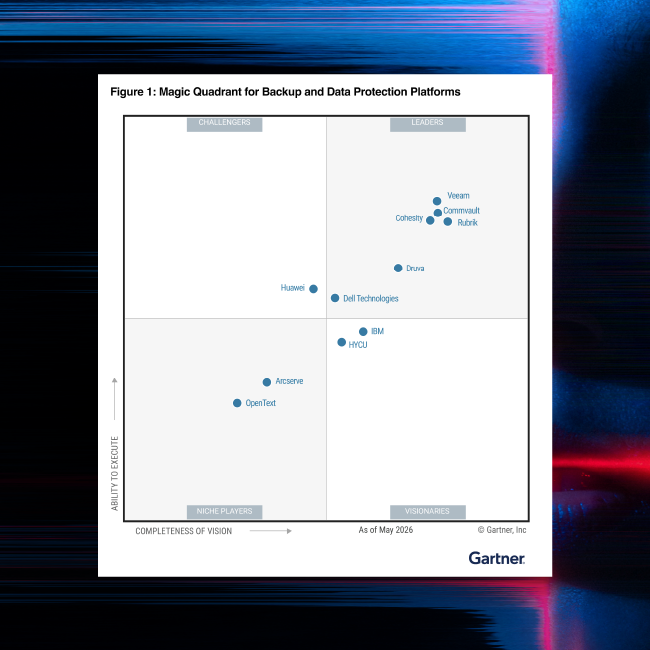
Magic Quadrant™ de Gartner®
Pour la 15e fois consécutive, Commvault a été désigné « Leader » dans le Magic Quadrant™ de Gartner® consacré aux plateformes de sauvegarde et de protection des données.
ebook
Protéger les joyaux de la couronne : sécuriser Active Directory contre les cybermenaces
Active Directory étant au centre de l’authentification et des services sécurisés, la protection et la sécurisation de ces données sont essentielles. Découvrez comment la restauration rapide de votre Active Directory peut améliorer la cyber-résilience de votre organisation.


Protection de l’Active Directory

Protéger Active Directory contre les menaces de perte de données

Webinaire à la demande : Des incidents aux effondrements
Foire aux questions :
Qu’est-ce que la récupération de la forêt Active Directory ?
La restauration de la forêt Active Directory est le processus qui consiste à rétablir le bon fonctionnement de l’ensemble de l’environnement AD après une panne critique ou une cyberattaque, telle qu’une attaque par ransomware. Elle implique la reconstruction des domaines et des contrôleurs de domaine, ainsi que la restauration des services à l’échelle de la forêt.
Les ransomwares ciblant les infrastructures d’identité critiques, il est essentiel de disposer d’un plan de reprise bien documenté et régulièrement testé afin de restaurer et de reconstruire l’ensemble de votre environnement AD dans l’état où il se trouvait avant l’attaque, et ainsi assurer la continuité de vos activités.
Pourquoi ai-je besoin d’une solution pour la récupération de la forêt Active Directory ? Ne puis-je pas récupérer manuellement la forêt AD en suivant les instructions de Microsoft ?
La restauration d’une forêt Active Directory est un processus complexe, long et source d’erreurs, en particulier lorsqu’il est effectué manuellement. Le guide de restauration d’une forêt Active Directory de Microsoft fournit des instructions détaillées pour reconstruire l’intégralité d’une forêt AD, mais ce processus est complexe et fastidieux. En fonction de la complexité de votre architecture AD, le processus peut comporter entre 50 et 100 tâches, voire plus, qui doivent toutes être exécutées dans un ordre précis lors de la restauration.
Si vous vous fiez à un plan manuel de reprise après sinistre ou de cyber-récupération, ainsi qu’aux outils Microsoft prêts à l’emploi, la restauration d’une forêt AD complète peut prendre plusieurs jours. Commvault Cloud prend en charge l’ensemble du processus de restauration de la forêt, conformément à l’approche recommandée par Microsoft, y compris les tâches critiques telles que la saisie des rôles FSMO et l’ajustement du pool RID, ce qui réduit le risque d’erreur humaine et vous permet d’effectuer la restauration en un temps record.
Les instantanés VM sont-ils suffisants pour la sauvegarde AD ?
Les instantanés de machines virtuelles ne suffisent pas. En raison de la nature « multi-maître » d’Active Directory, il n’est pas possible de restaurer des contrôleurs de domaine à grande échelle à l’aide d’instantanés de machines virtuelles. Des dizaines d’étapes de maintenance complexes doivent être effectuées sur le contrôleur de domaine restauré et au sein même d’Active Directory, à des moments très précis tout au long de la restauration de la forêt. Si ces étapes ne sont pas suivies correctement, vous risquez d’introduire de nouvelles corruptions ou incohérences dans l’environnement restauré, qui pourraient s’avérer très difficiles, voire impossibles, à résoudre.
Commvault peut-il prendre en charge la protection et la restauration de grands environnements AD ?
Commvault Cloud Backup & Recovery Active Directory est conçu pour gérer les configurations Active Directory complexes, y compris les environnements comportant plusieurs domaines et dispersés géographiquement.
En cas de sinistre entraînant l’interruption des activités de votre entreprise, il est essentiel de pouvoir restaurer rapidement le plus grand nombre possible d’éléments de l’infrastructure AD. Lors d’une opération de Recovery de forêt, Commvault permet la restauration automatisée de nombreux contrôleurs de domaine au sein de chaque domaine, ce qui accélère considérablement le processus de Recovery. Les runbooks Commvault automatisent également la promotion de contrôleurs de domaine supplémentaires afin de rétablir l’intégralité de l’infrastructure qui était en place avant le cyberincident.
Prêt à commencer ?
Expérience Commvault Cloud for Active Directory
Demandez une démonstration dès aujourd’hui.