Cuando las organizaciones llevan a cabo migraciones a la nube para satisfacer sus necesidades de transformación digital, a menudo se pasan por alto los riesgos y los costes. No es raro ver cómo se trasladan conjuntos de datos no estructurados de forma masiva mediante una simple acción de copiar y pegar o la ejecución de un script para mover archivos. Pero, ¿realmente te ahorra esto tiempo a largo plazo? Una pregunta que debes plantearte es: ¿necesita realmente la empresa todos estos datos?
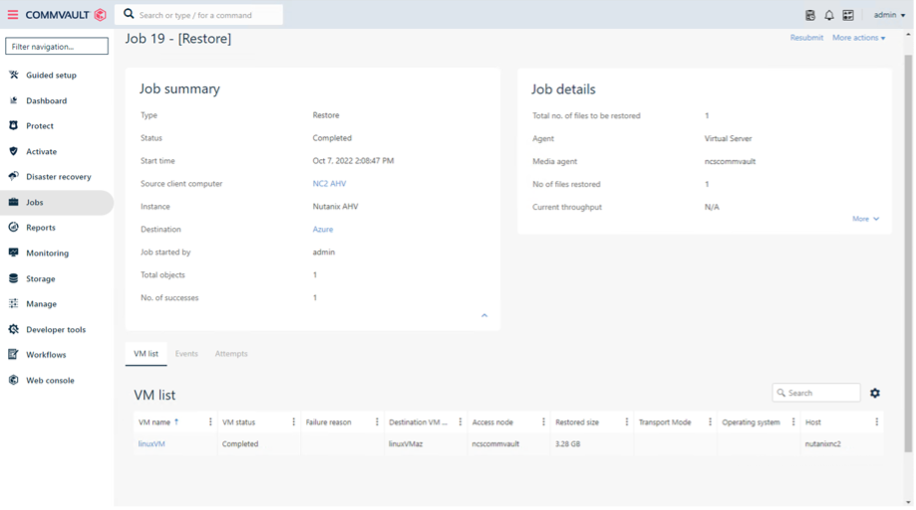
Al migrar sin más todos estos datos ROT no deseados, no solo estás alargando el plazo de la migración, sino que también estás aumentando los costes de almacenamiento en la nube de destino, ampliando los niveles de servicio y aumentando el riesgo de la información de tu organización.
Información detallada sobre tus datos
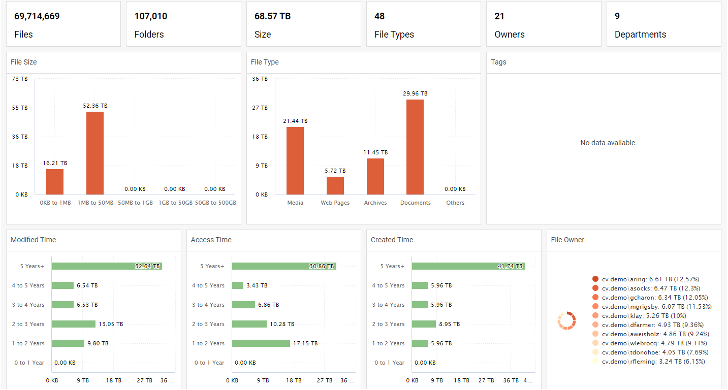
Tanto si ya eres cliente de Commvault como si estás pensando en utilizar Commvault en el futuro, Commvault va más allá de la Backup and Recovery gracias aFile Storage Optimization de Commvault®. Ofrece una amplia información sobre los datos, presentada en paneles de control de fácil visualización, directamente desde la misma interfaz de usuario que se utiliza para las operaciones de Backup and Recovery: el Commvault Command Center™. Esta información te ayuda a identificar los datos ROT y a tomar las medidas adecuadas para excluirlos de las migraciones. Al incluir información como la fecha de la última modificación, el último acceso o la fecha de creación —todo ello agrupado por año—, puede priorizar qué archivos son importantes y cuáles son ROT, de modo que pueda trasladar los datos adecuados al lugar donde deben estar, más rápidamente. Esto le ayuda a ahorrar en costes de almacenamiento, reduce la carga de trabajo de su personal de TI y permite a los responsables de los datos ser más productivos.
¿Datos duplicados? ¡No hay problema!
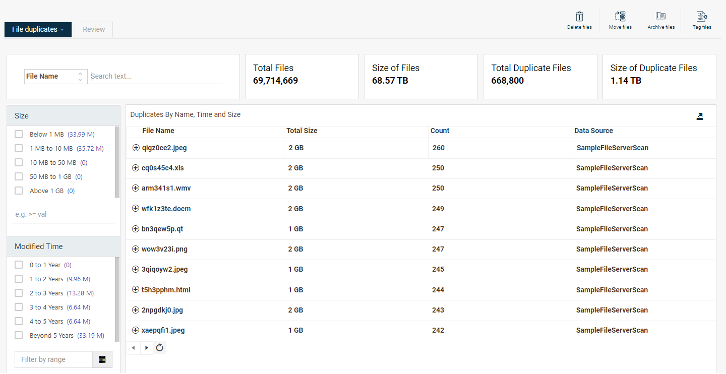
Commvault® File Storage Optimization también te permite detectar fácilmente los datos duplicados. Estos datos pueden deberse a errores de importación, de software o humanos, y su conservación puede suponer riesgos inherentes. Dado que los datos duplicados pueden contener información confidencial, decidir qué datos conservar y cuáles eliminar puede resultar complicado. Sin embargo, con Commvault® File Storage Optimization, puedes obtener rápidamente información sobre los datos que te ayudará a tomar decisiones. Averiguar dónde se encuentran estos datos duplicados, quién tiene acceso a ellos y excluirlos antes de la migración te ayudará a garantizar que los datos correctos se trasladen a donde deben estar, de forma rápida y sin complicaciones.
Son tus datos, no los pongas en riesgo
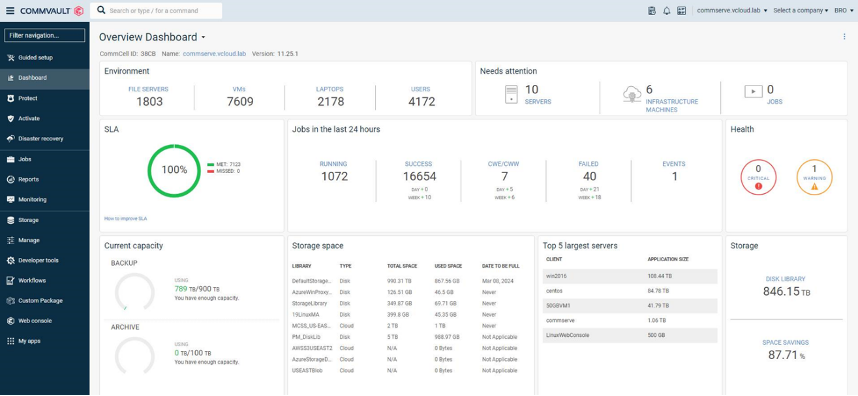
Otra consideración es el riesgo. Almacenar datos ROT supone un riesgo para su organización. Esto puede dar lugar a que se tomen decisiones empresariales erróneas basadas en datos obsoletos, a un aumento de la superficie de ataque para los ataques de ransomware y a un mayor riesgo de incumplimientos normativos. ¿Por qué migrar datos ROT y agravar ese riesgo? Al utilizar Commvault® File Storage Optimization para identificar y excluir los datos ROT antes de una migración, no solo se trasladan los datos adecuados, sino que también se reduce el riesgo relacionado con la información al mantener un control más estricto sobre los datos. Además, al revisar las listas de control de acceso (ACL) de los archivos, se garantiza que solo el personal autorizado pueda acceder a los datos que se están trasladando, lo que reduce aún más el riesgo.
Acelera tus migraciones hoy mismo
Commvault va más allá de la copia de seguridad y la recuperación para ayudarte a acelerar las migraciones con la optimización del almacenamiento de archivos de Commvault. Mediante la misma interfaz de usuario a la que ya estás acostumbrado para las operaciones de Backup and Recovery, puedes identificar y excluir fácilmente los datos ROT antes de las migraciones, lo que reduce los tiempos de migración, ahorra en costes de almacenamiento, alivia la carga de trabajo de tu personal de TI y minimiza los riesgos relacionados con la información. Descubre cómo puedes acelerar tus migraciones hoy mismo y trasladar los datos adecuados al lugar adecuado con mayor rapidez.
Para obtener más información, visitawww.commvault.com/file-storage-optimization