Points clés à retenir
- La durabilité d’Amazon S3 contribue à protéger contre les pannes d’infrastructure, mais une protection supplémentaire par sauvegarde est nécessaire pour parer aux suppressions accidentelles, aux erreurs de configuration, à la compromission des identifiants et à la corruption des données.
- Clumio contribue à protéger les données S3 grâce à des copies immuables, isolées physiquement et mises à jour en continu, qui restent accessibles même en cas de compromission du compte AWS d’origine.
- Les groupes et les politiques de protection vous permettent de définir les compartiments et les objets S3 à protéger, ainsi que la fréquence des sauvegardes, la durée de conservation, le niveau de stockage et les options de Recovery.
- Clumio Backtrack permet de restaurer à un instant donné les compartiments S3 versionnés, tandis que SecureVault prend en charge la restauration au niveau des objets, des préfixes et des compartiments à partir de sauvegardes immuables.
- Tester les restaurations avant qu’un incident ne se produise permet aux équipes de se familiariser avec le processus de Recovery et de réagir plus rapidement en cas de perte ou de corruption des données.
Amazon S3 est conçu pour offrir une durabilité des données de 99,999999999 % (11 neuf). Cela signifie que les objets S3 devraient rester récupérables même en cas de défaillance du matériel ou de composants de l’infrastructure.
Cependant, la durabilité a ses limites.
Cela ne résout rien si un fichier est supprimé par erreur, si une règle de cycle de vie est mal configurée, si des identifiants de gestion des identités et des accès (IAM) sont compromis ou si quelqu’un effectue une suppression par lots sur le mauvais préfixe S3.
Dans cet article, je vais vous expliquer commentClumio protège les données stockées sur Amazon S3et, plus précisément, comment récupérer des fichiers supprimés ou endommagés à la suite d’un incident. J’aborderai la configuration d’un groupe de protection et d’une politique de sauvegarde, ainsi que la recherche et la restauration d’objets spécifiques à l’aide du calendrier de sauvegarde, et la réalisation d’une restauration à un instant donné à l’aide de Clumio Backtrack.
Comment Clumio protège les données S3
Clumio est un service de sauvegarde sans agent, basé sur le modèle SaaS, destiné à AWS. En ce qui concerne S3 plus particulièrement, plutôt que de réaliser des instantanés périodiques d’un compartiment, il lit les événements de modification (créations, mises à jour et suppressions d’objets) et conserve une copie de vos données immuable, isolée physiquement et mise à jour en continu. C’est ce qui permet une restauration sans faille, même si le compte source lui-même a été compromis.
Tout commence par un groupe de protection
Un groupe de protection est un ensemble nommé d’un ou plusieurs compartiments S3. Les compartiments peuvent être regroupés en fonction de balises, de préfixes ou de classes de stockage, ou encore sélectionnés manuellement. Une politique est ensuite associée au groupe de protection ; c’est cette politique qui définit les mécanismes de sauvegarde qui s’appliqueront au groupe.
Création d’un groupe de protection
1) Pour créer un groupe de protection, cliquez surProtéger,Groupes de protection,Groupes de protection S3.
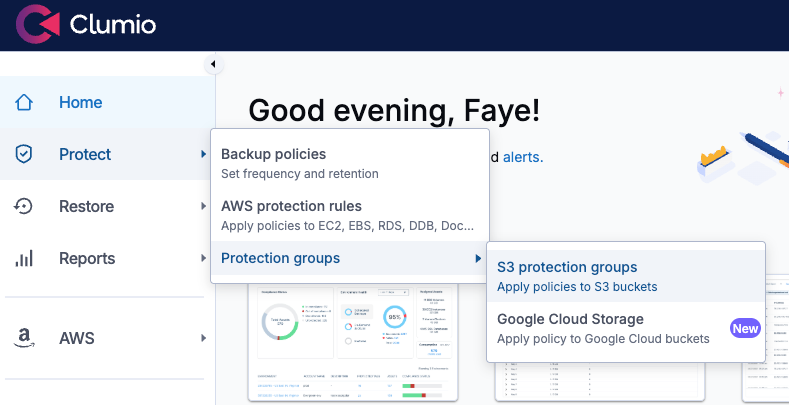
Création d’un groupe de protection S3Â
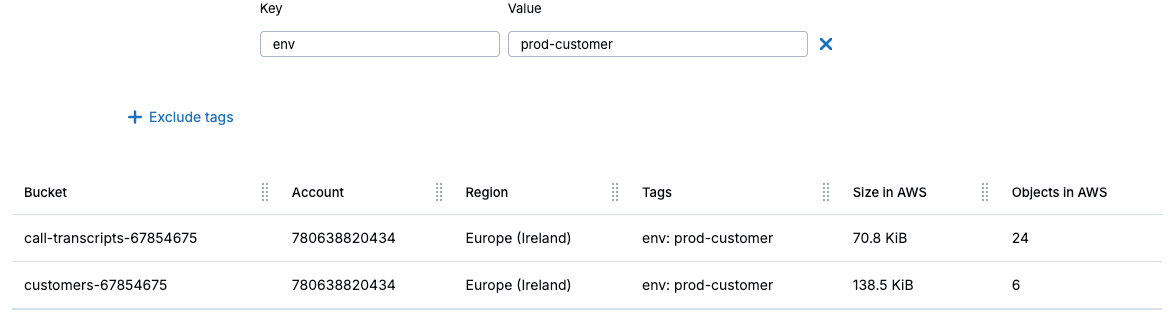
2) Cliquez ensuite surCréer un groupe de protection, puis donnez-lui un nom qui reflète la charge de travail, par exemple « prod-customer-data ». SélectionnerProtection automatiséepour ajouter des compartiments par compte, région ou balise. Cette sélection s’appliquera aux futurs compartiments répondant aux critères de sélection ainsi qu’à ceux qui existent déjà. Ensuite, cliquez surSuivant.
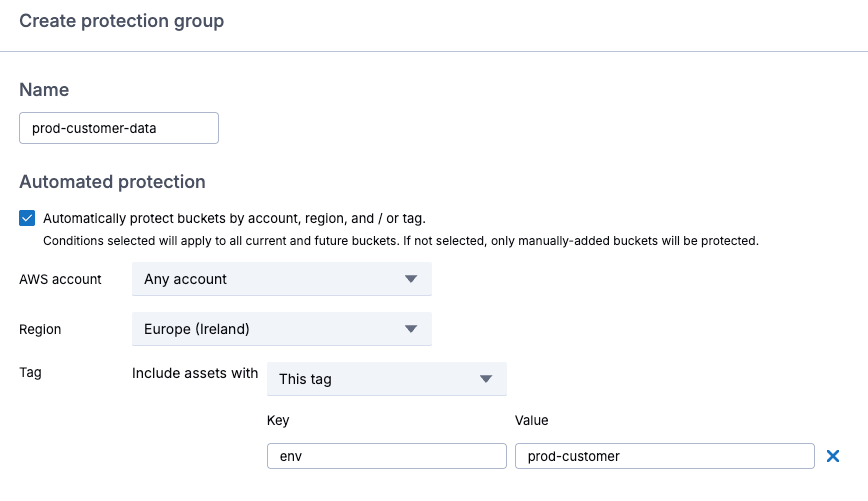
Configuration de la protection automatisée
Il est également possible de sélectionner manuellement des compartiments ; une fois la sélection terminée, cliquez surSuivant.
Mise en œuvre d’une politique
LePolitique par défauteffectue des sauvegardes mensuelles au sein de la région avec une durée de conservation d’un mois, à l’aide de SecureVault Standard, qui crée une copie secondaire isolée physiquement de vos objets. Les restaurations s’effectuent généralement en quelques minutes et prennent en chargeaccès instantané.
3) Pour créer votre propre politique, cliquez surCréer une nouvelle politique, nommez la politique, puis sélectionnez le type de ressource S3.
Création d’une politique
Configuration de la fréquence des sauvegardes et des paramètres de conservation
4) Cochez la case pour activer cette optionSecureVault, et vous avez la possibilité de configurer la fréquence des sauvegardes en indiquant le nombre de jours entre deux sauvegardes, ou d’opter pour des sauvegardes en continu, afin de sauvegarder vos données à intervalles réguliers tout au long de la journée. Cela permet une restauration à un instant précis à n’importe quel moment de la journée.
5) ChoisissezSauvegarde continue, et définir la durée de conservation à un mois.
6) Cochez la case pour activer cette optionRetour en arrière, pour les restaurations à un instant donné. Notez que les compartiments S3 doivent être configurés avec la gestion des versions activée pour que les restaurations fonctionnent.
7) SousOptions supplémentaires, définissez la plage horaire de sauvegarde sur un créneau approprié.
8)Destination de la sauvegardeest défini par défaut sur « dans la région ». Notez que des frais de transfert s’appliqueront si vous stockez vos sauvegardes dans une autre région AWS.
9) SousNiveau de sauvegarde SecureVault, SélectionnezSecureVault Standardpour des restaurations instantanées.SecureVault Archiveest conçu pour les données destinées à être conservées pendant une longue période, et ne doit être utilisé que si vous pouvez accepter un délai de restauration compris entre 24 et 48 heures.
10) Cochez la case pour activer cette optionThreat Scan, un service qui analyse chaque exécution de sauvegarde afin de signaler les fichiers compromis et d’identifier des points de restauration sûrs et non compromis, dans le but d’empêcher toute réinfection de l’environnement. Ensuite, cliquez surAjouteretÉconomiser.
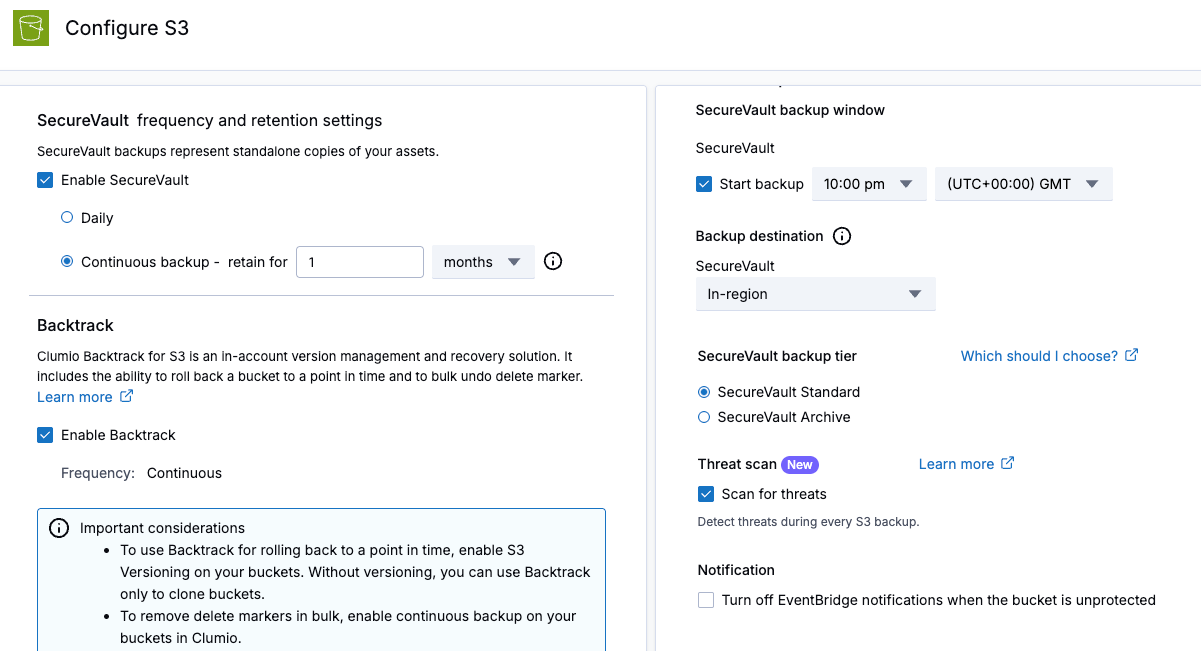
Configuration de la politique
11) Vérifiez que la nouvelle politique est sélectionnée pour votre groupe de protection, puis cliquez surSuivant.
12) SousOptions avancées, vous pouvez choisir les classes de stockage S3 à protéger, indiquer si vous souhaitez conserver toutes les versions d’un objet ou uniquement la dernière, inclure ou exclure certains préfixes, ou encore inclure des objets en fonction de leur date de création. Cliquez ensuite surSuivantetCréer.
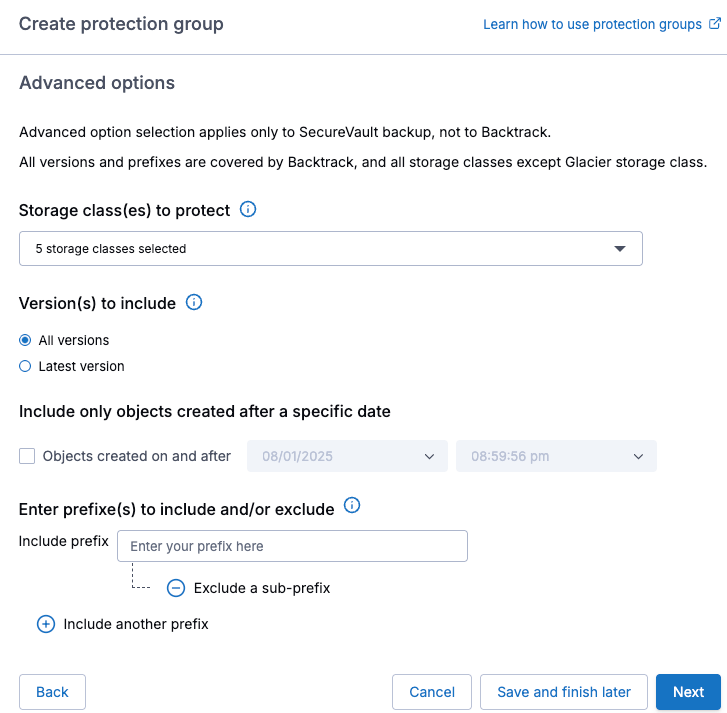
Options avancées
Le nouveau groupe de protection apparaîtra alors, et la première sauvegarde sera effectuée pendant la plage horaire de sauvegarde configurée.
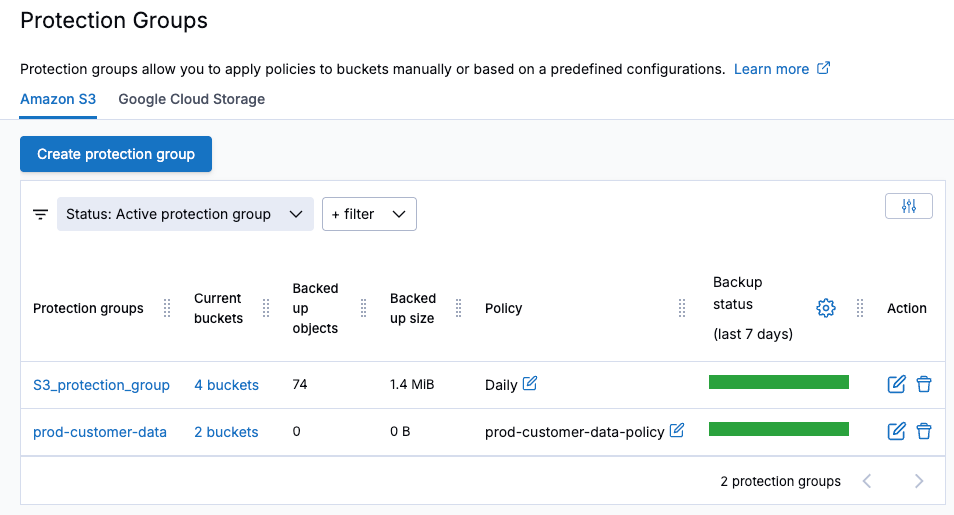
Vue des groupes de protection
Vérification de vos sauvegardes
1) Lorsque vous devez effectuer une restauration, en raison de données manquantes ou identifiées comme corrompues, accédez àGroupes de protection, sélectionnez le groupe de protection S3 concerné pour afficher les sauvegardes disponibles etSynchronisations Clumio Backtrack. Un point bleu sur le calendrier indique qu’une sauvegarde a bien été effectuée ce jour-là.
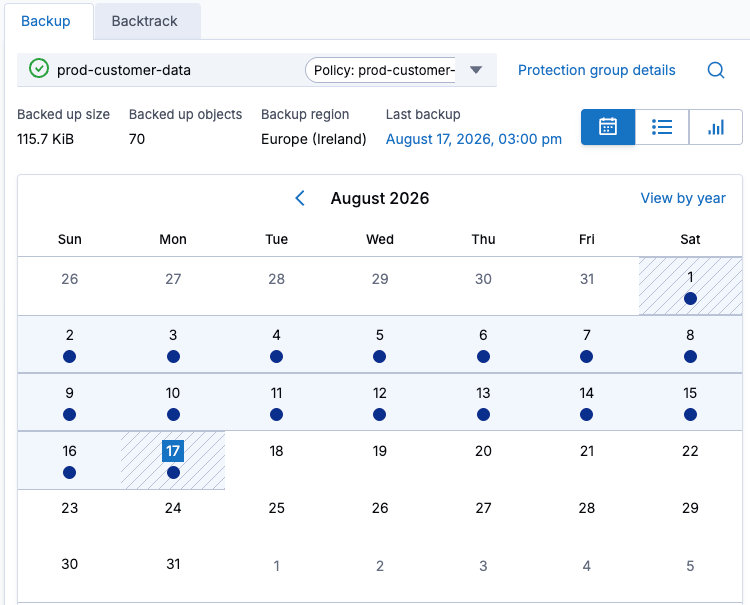
Affichage des sauvegardes réussies
2) Consulter leSynchronisations de retour en arrièrepar compartiment, en sélectionnant leRetour en arrièreonglet au sein du groupe de protection, puis vérifiez que la sauvegarde continue fonctionne correctement.
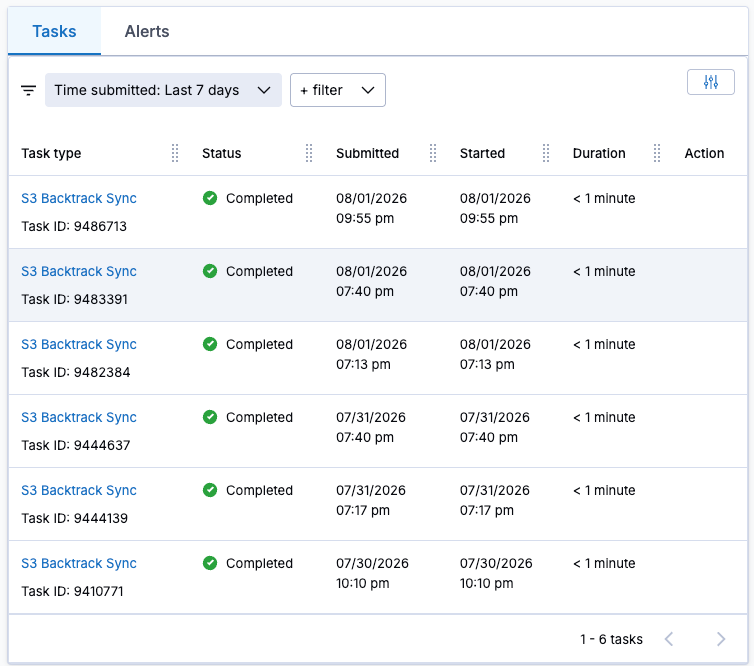
Synchronisations « Backtrack » disponibles pour la restauration à un instant donné
Restauration des données
Dans cet exemple, il me manque quelques transcriptions d’appels. Chaque fichier manquant commence par le préfixetranscription. J’ai également un fichier endommagé, nomméclients.csv. Heureusement, je dispose d’une sauvegarde complète ainsi que de plusieurs sauvegardes à un instant donnéSynchronisations de retour en arrièreà partir de laquelle effectuer la restauration.
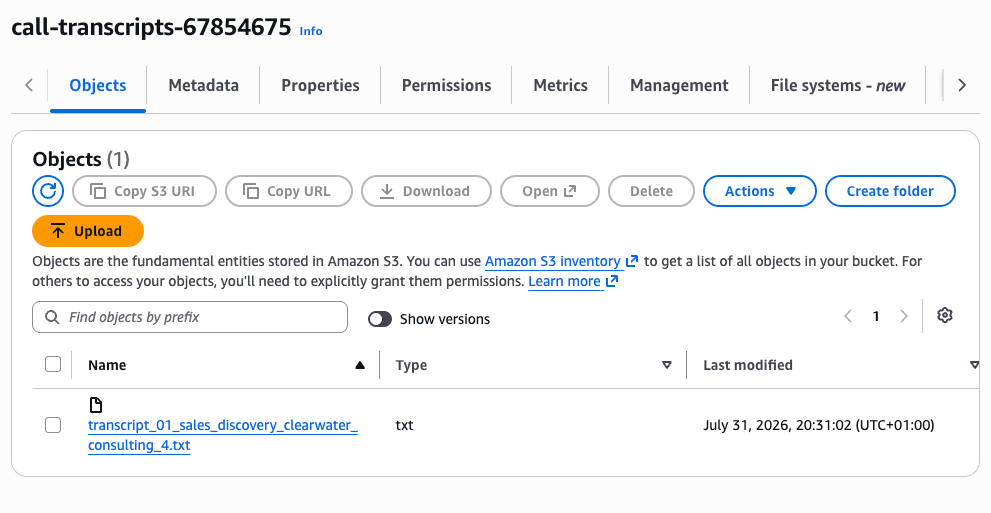
La page S3 ne contient la transcription que d’un seul appel ; les autres ont été supprimées par erreur.
1) À partir de laRestaurationmenu, sélectionnezcompartiments S3, puis sélectionnez le compartiment dans lequel il manque des fichiers ; ensuite, à partir duRetour en arrièremenu déroulant, sélectionnerRevenir en arrière.
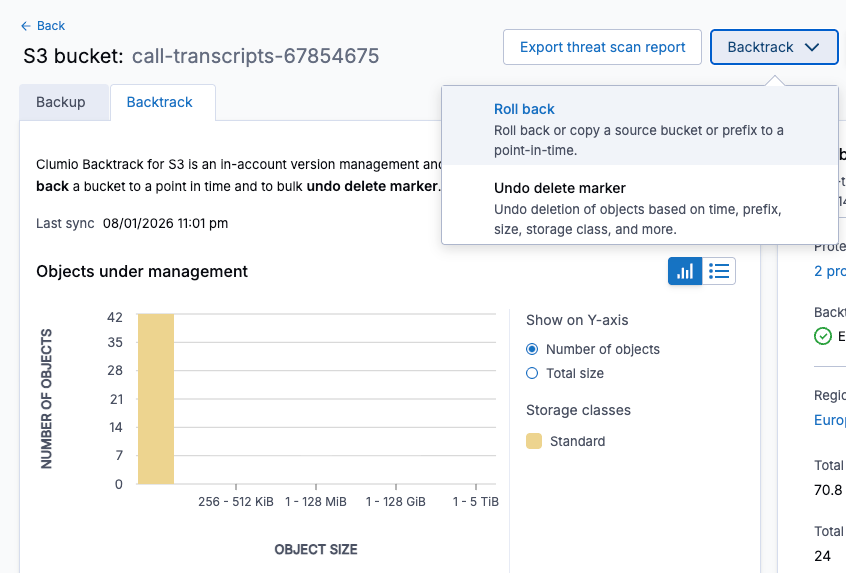
Utilisation de Backtrack pour revenir à un point précis dans le temps
2) Sélectionnez le compartiment à restaurer, choisissez la date et l’heure, puis appliquez un filtre en fonction de la clé de l’objet, de la taille ou de la classe de stockage S3. Ensuite, cliquez suravoir cliqué sur « Aperçu »pour afficher les fichiers pouvant faire l’objet d’une restauration.
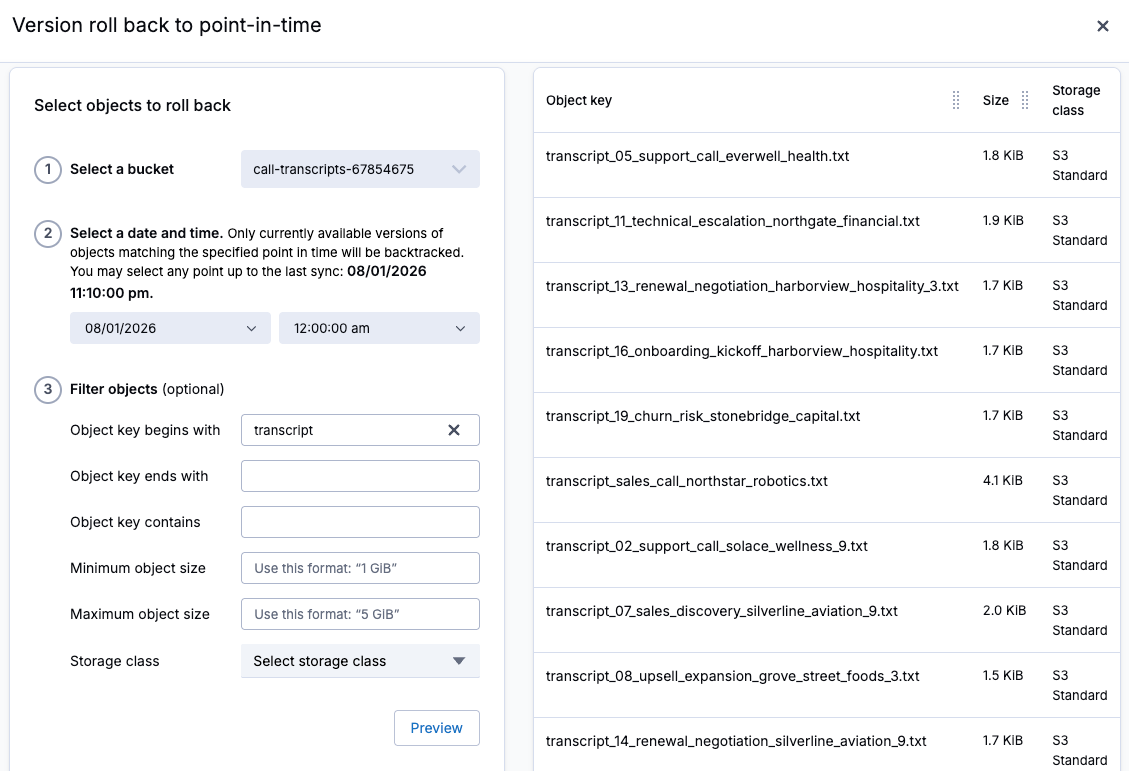
Sélection des fichiers à restaurer à un instant donné
3) Choisissez de revenir au même compartiment source ou indiquez un autre compartiment vers lequel effectuer la restauration. Cliquez ensuite surCopierpour lancer la tâche de restauration.
4) Suivre la progression de la restauration dans leTâchesmenu.
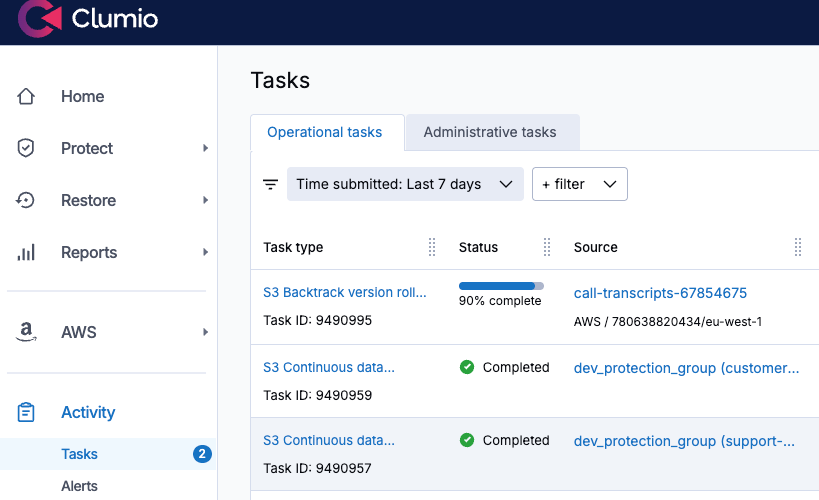
Affichage de la progression de la restauration
5) Ensuite, pour restaurer le fichier customers.csv endommagé, je vais cliquer sur la sauvegarde de la nuit dernière dans le calendrier des sauvegardes, puis sélectionnerRestauration. Vous avez le choix entre accéder immédiatement à une copie en lecture seule, restaurer l’objet ou restaurer plusieurs fichiers en fonction du nom du compartiment ou d’un préfixe. 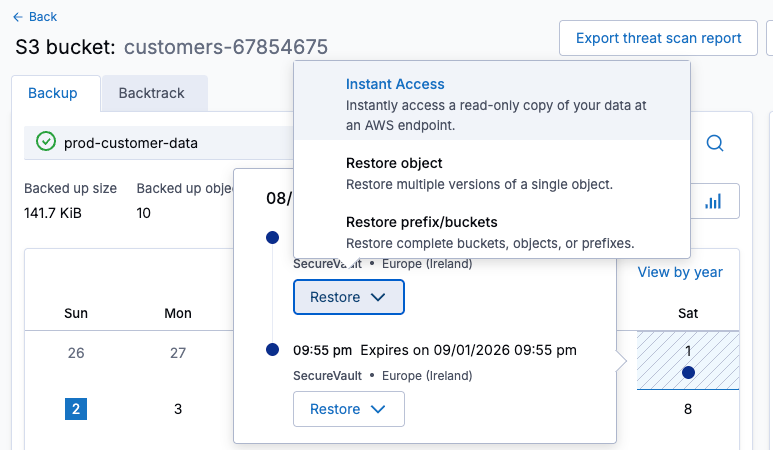
Restauration à partir d’une sauvegarde
6) SélectionnerRestaurer un objet, puis recherchez et sélectionnez l’objet à restaurer, puis cliquez surSuivant.
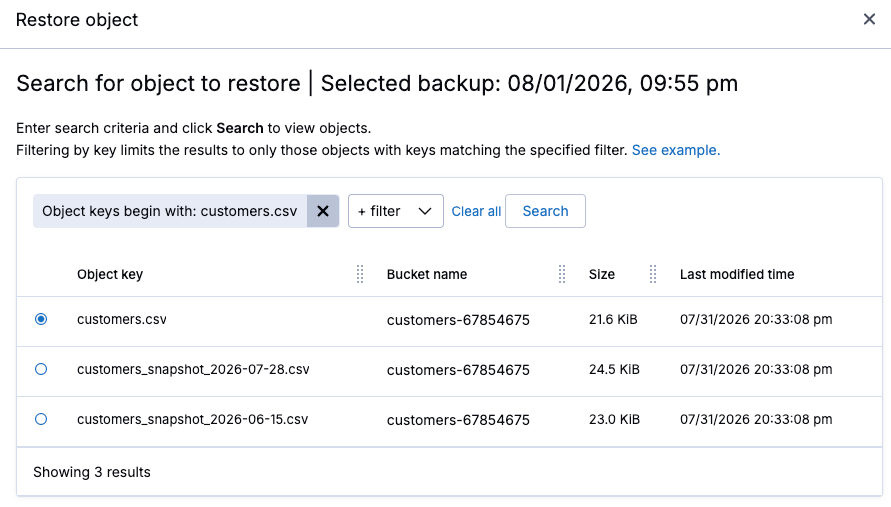
Sélection d’un seul objet à restaurer
7) Sélectionner la version à restaurer, puis cliquez surSuivant.
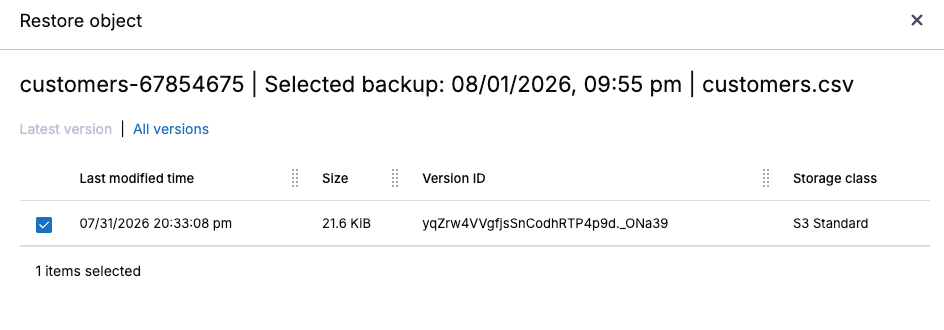
Sélection d’une version à restaurer
8) Choisissez le compte AWS, la région et le compartiment vers lesquels effectuer la restauration, puis lancez la restauration.
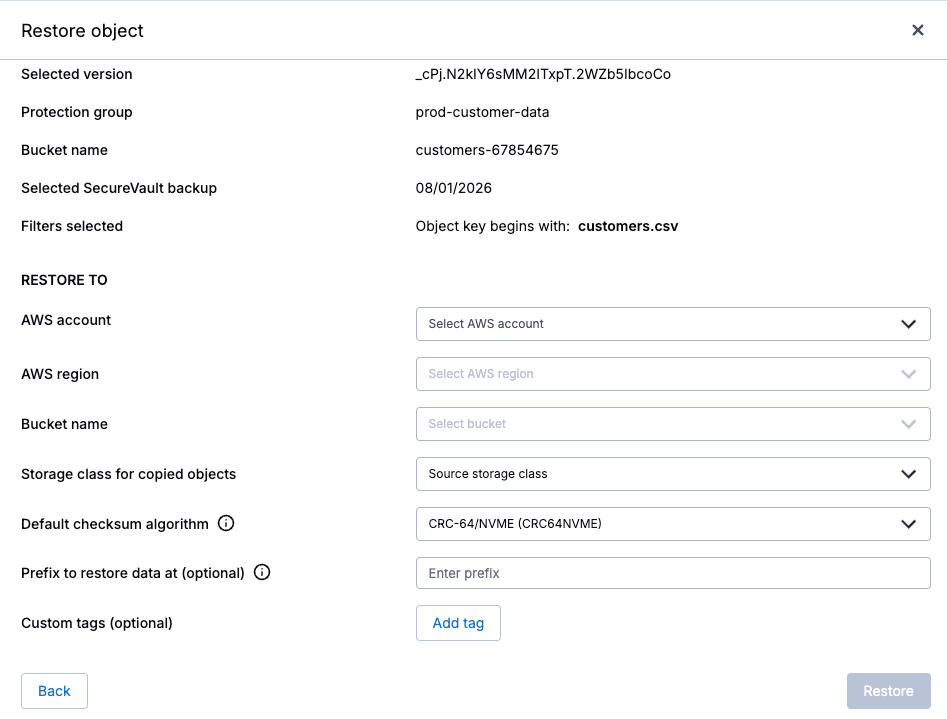
Définissez la destination avant de lancer la restauration.
9) Une fois que la restauration apparaît comme ayant été effectuée avec succès, le fichier restauré devrait être disponible dans S3.
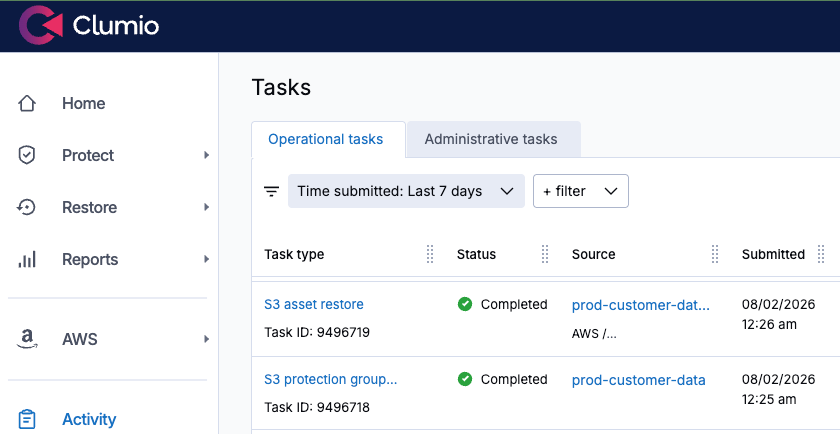
L’objet a été restauré.
Mon conseil : n’attendez pas qu’un incident se produise
Grâce à la mise en place d’un groupe de protection et d’une politique, Clumio propose plusieurs solutions pour remédier à un incident S3 : Backtrack, pour une restauration quasi instantanée, sur place et à un instant donné, des compartiments versionnés, et SecureVault, pour la restauration des données à partir d’une sauvegarde immuable et isolée physiquement.
Ces deux méthodes permettent d’effectuer une restauration au niveau des objets, des préfixes et des compartiments, ce qui vous permet de choisir l’approche de Recovery la mieux adaptée à l’incident. Et dans les deux cas, Recovery se fait en quelques clics, sans avoir à passer en revue manuellement plusieurs versions S3.
Enfin, le meilleur moment pour tester cette fonctionnalité, c’est avant d’en avoir réellement besoin. Configurez dès aujourd’hui un groupe de protection pour vos compartiments S3 critiques et effectuez des restaurations d’entraînement jusqu’à ce que cela devienne un réflexe. La prochaine fois qu’un élément disparaîtra, vous saurez déjà exactement comment le récupérer.
Pour commencer dès aujourd’hui,demander une démonstrationouessai gratuit de deux semaines.
FAQ
Q : Pourquoi faut-il sauvegarder les compartiments Amazon S3 alors que S3 offre une durabilité de 11 neuf ?
R :La durabilité S3 est conçue pour protéger les données contre les pannes matérielles et les défaillances de l’infrastructure, mais elle n’empêche pas la perte logique de données. Les suppressions accidentelles, les règles de cycle de vie mal configurées, les identifiants IAM compromis et les opérations par lots involontaires peuvent toujours entraîner la perte ou la corruption des données.
Q : Comment Clumio protège-t-il les données stockées sur Amazon S3 ?
R :Clumio utilise les événements de modification S3 pour garantir le maintien d’une copie des données protégées qui est constamment mise à jour, immuable et isolée du réseau. Cette approche permet de disposer d’une voie de Recovery indépendante, même en cas de compromission du compte AWS source ou des données.
Q : Qu’est-ce qu’un groupe de protection S3 dans Clumio ?
R :Un groupe de protection est un ensemble nommé d’un ou plusieurs compartiments S3 qui partagent une même politique de protection. Les compartiments peuvent être sélectionnés manuellement ou automatiquement en fonction de critères tels que le compte AWS, la région, les balises, les préfixes ou les classes de stockage.
Q : Quelle est la différence entre Clumio Backtrack et SecureVault ?
R :Backtrack permet de revenir à un état antérieur pour les compartiments S3 sur lesquels la gestion des versions est activée, ce qui s’avère utile pour annuler rapidement des modifications indésirables. SecureVault permet de conserver une sauvegarde immuable et isolée physiquement, qui peut être utilisée pour restaurer des objets individuels, des préfixes ou des ensembles de données plus volumineux.
Q : Quelle est la différence entre SecureVault Standard et SecureVault Archive ?
R :SecureVault Standard est conçu pour accélérer la Recovery et facilite l’accès immédiat aux données protégées. SecureVault Archive est destiné à la conservation à long terme et convient mieux aux données pour lesquelles un délai de Recovery de 24 à 48 heures est acceptable.
Q : Comment les équipes peuvent-elles se préparer à un incident de Recovery sur S3 ?
R :Configurez des groupes de protection et des stratégies de sauvegarde adaptées pour les compartiments S3 critiques avant qu’un incident ne se produise. Testez régulièrement la restauration d’objets et les retours à un instant donné afin de bien maîtriser le processus de Recovery lorsque les données de production devront être récupérées.
Faye Ellisest architecte principal en formation — AWS chez Pluralsight.