Punti di forza
- La durabilità di Amazon S3 contribuisce a proteggere da guasti dell’infrastruttura, ma è necessaria un’ulteriore protezione tramite backup in caso di cancellazione accidentale, configurazione errata, credenziali compromesse e danneggiamento dei dati.
- Clumio contribuisce a proteggere i dati su S3 grazie a copie costantemente aggiornate, immutabili e isolate fisicamente, che rimangono disponibili anche nel caso in cui l’account AWS di origine venga compromesso.
- I gruppi e le politiche di protezione consentono di definire quali bucket e oggetti S3 devono essere protetti, oltre alla frequenza dei backup, alla conservazione, al livello di archiviazione e alle opzioni di Recovery.
- Clumio Backtrack consente di eseguire il rollback a un punto specifico nel tempo per i bucket S3 con controllo delle versioni, mentre SecureVault supporta il Recovery a livello di oggetto, prefisso e bucket da backup immutabili.
- Eseguire dei test di Recovery prima che si verifichi un incidente aiuta i team a familiarizzare con il processo di Recovery e a reagire più rapidamente in caso di perdita o danneggiamento dei dati.
Amazon S3 è progettato per garantire una durabilità dei dati pari al 99,999999999% (11 nove). Ciò significa che gli oggetti S3 dovrebbero rimanere recuperabili anche in caso di guasto dell’hardware o di componenti dell’infrastruttura.
Tuttavia, la resistenza ha i suoi limiti.
Non serve a nulla se un file viene cancellato per errore, se una regola del ciclo di vita è configurata in modo errato, se le credenziali di gestione delle identità e degli accessi (IAM) vengono compromesse o se qualcuno esegue un’eliminazione in batch sul prefisso S3 sbagliato.
In questo post vi spiegherò comeClumio protegge i dati su Amazon S3e, più specificamente, come recuperare file cancellati o danneggiati a seguito di un incidente. Tratterò la configurazione di un gruppo di protezione e di una politica di backup, nonché l’individuazione e il ripristino di oggetti specifici utilizzando il calendario dei backup e l’esecuzione di un ripristino a un punto nel tempo tramite Clumio Backtrack.
Come Clumio protegge i dati su S3
Clumio è un servizio di backup basato su SaaS e senza agenti per AWS. Per quanto riguarda specificatamente S3, anziché acquisire snapshot periodici di un bucket, legge gli eventi di modifica (creazione, aggiornamento ed eliminazione di oggetti) e conserva una copia dei dati costantemente aggiornata, isolata fisicamente e immutabile. È proprio questo che rende possibile un ripristino completo anche nel caso in cui l’account di origine stesso sia stato compromesso.
Tutto inizia con un gruppo di protezione
Un gruppo di protezione è un insieme denominato di uno o più bucket S3. I bucket possono essere raggruppati in base a tag, prefissi, classi di archiviazione oppure selezionati manualmente. Al gruppo di protezione viene quindi associata una policy, ed è proprio la policy a definire i meccanismi di backup che si applicheranno al gruppo.
Creazione di un gruppo di protezione
1) Per creare un gruppo di protezione, fare clic su“Protezione”,Gruppi di protezione,Gruppi di protezione S3.
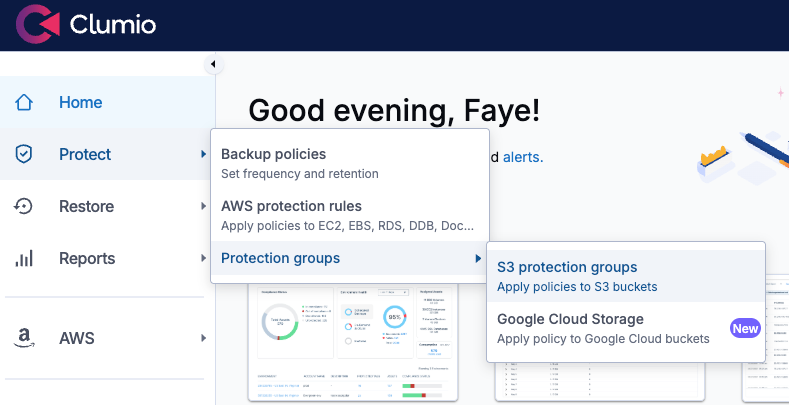
Creazione di un gruppo di protezione S3Â
2) Quindi fare clic suCrea un gruppo di protezione, e assegnagli un nome che rifletta il carico di lavoro, ad esempio prod-customer-data. SelezionaProtezione automaticaper aggiungere bucket in base all’account, alla regione o al tag. Questa impostazione si applicherà sia ai bucket futuri che soddisfano i criteri di selezione sia a quelli già esistenti. Successivamente, fare clic suAvanti.
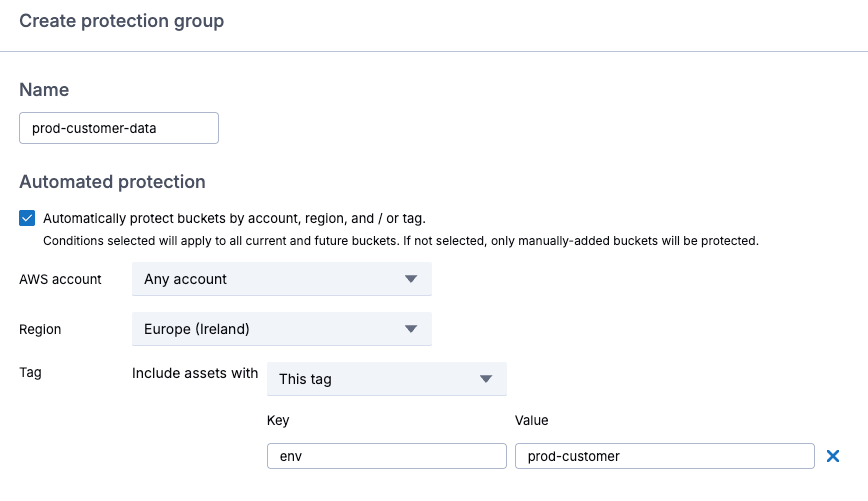
Configurazione della protezione automatica
È inoltre possibile selezionare manualmente i bucket e, una volta completata la selezione, fare clic suAvanti.
Applicazione di una politica
La regola di backup 3-2-1Politica predefinitaesegue backup mensili all’interno della regione con un periodo di conservazione di un mese, utilizzando SecureVault Standard, che crea una copia secondaria degli oggetti isolata fisicamente (air-gapped). I ripristini vengono in genere completati in pochi minuti e supportanoaccesso immediato.
3) Per creare la tua politica personalizzata, clicca suCrea una nuova politica, assegnare un nome alla policy e selezionare il tipo di risorsa S3.
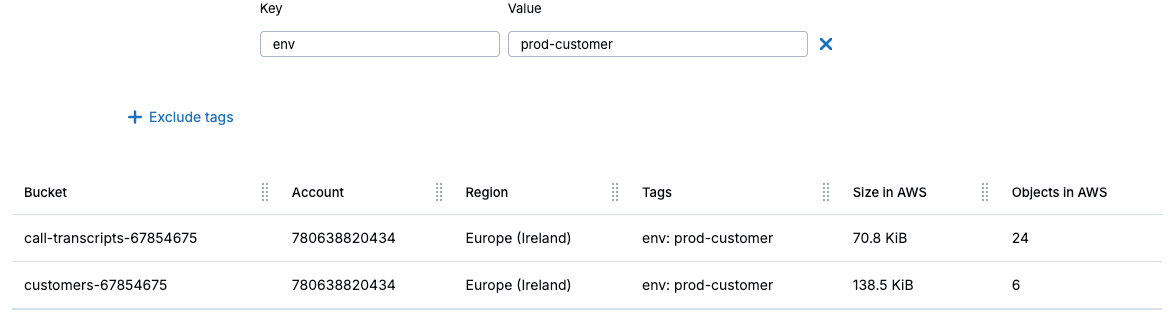
Creazione di una politica
Configurazione della frequenza dei backup e delle impostazioni di conservazione
4) Fare clic sulla casella di controllo per abilitareSecureVault, ed è possibile configurare la frequenza dei backup in base al numero di giorni che intercorrono tra un backup e l’altro, oppure selezionare l’opzione di backup continui, per eseguire il backup dei dati a intervalli frequenti durante la giornata. Ciò consente il ripristino a un punto specifico nel tempo per qualsiasi momento della giornata.
5) ScegliBackup continuo, e impostare il periodo di conservazione a un mese.
6) Fare clic sulla casella di controllo per abilitareIndietro nel tempo, per i rollback a un punto nel tempo. Si noti che, affinché i rollback funzionino, i bucket S3 devono essere configurati con il versioning abilitato.
7) SottoOpzioni aggiuntive, impostare la finestra di backup su un orario adeguato.
8)Destinazione del backupPer impostazione predefinita, l’opzione è impostata su “nella stessa regione”. Si noti che, se si archiviano i backup in una regione AWS diversa, verranno applicati costi di trasferimento.
9) SottoLivello di backup SecureVault, SelezionaSecureVault Standardper ripristini immediati.Archivio SecureVaultè progettato per i dati che devono essere conservati per un lungo periodo e dovrebbe essere utilizzato solo quando è possibile accettare un tempo di ripristino compreso tra 24 e 48 ore.
10) Fare clic sulla casella di controllo per abilitareThreat Scan, ovvero un servizio che analizza ogni esecuzione di backup per aiutare a segnalare i file compromessi e identificare punti di ripristino sicuri e non compromessi, al fine di prevenire una nuova infezione dell’ambiente. Successivamente, fare clic suAggiungieRisparmio.
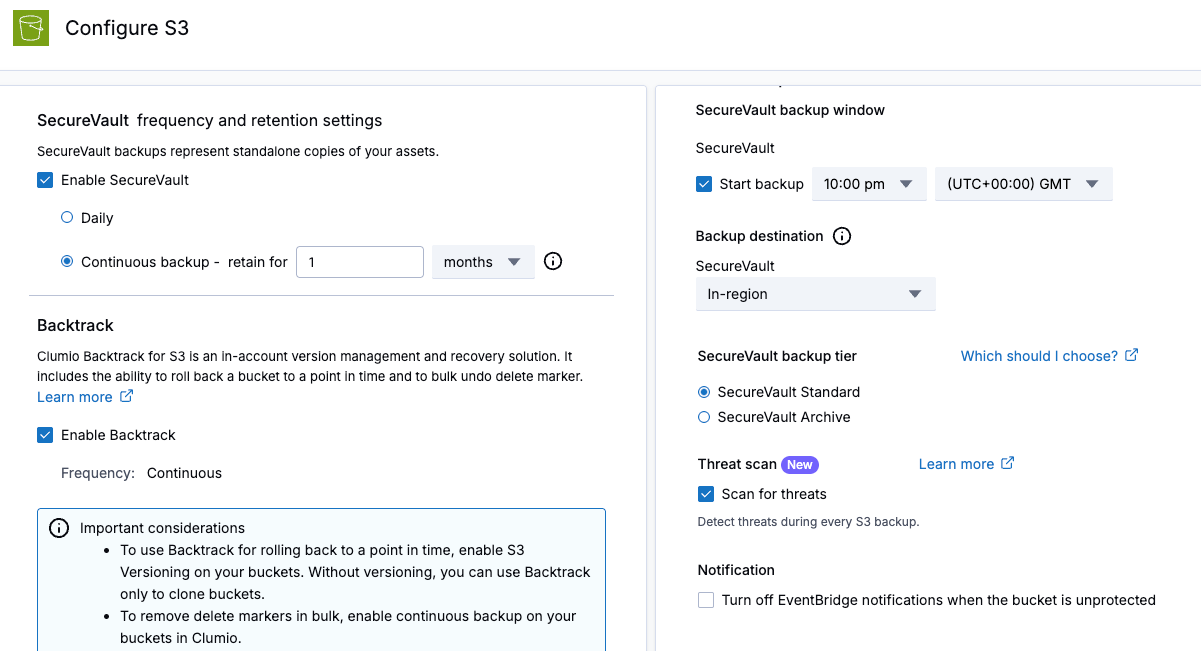
Configurazione della politica
11) Verifica che la nuova politica sia selezionata per il tuo gruppo di protezione, quindi fai clic suAvanti.
12) SottoOpzioni avanzate, puoi scegliere quali classi di archiviazione S3 proteggere, se desideri tutte le versioni di un oggetto o solo l’ultima versione, includere o escludere determinati prefissi oppure includere gli oggetti in base alla loro data di creazione. Quindi fai clic suAvantieCrea.
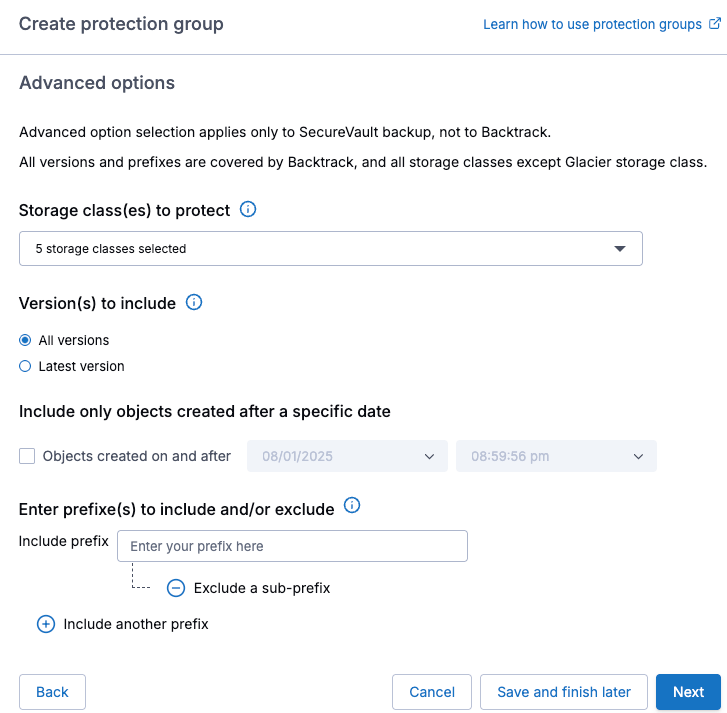
Opzioni avanzate
A quel punto verrà visualizzato il nuovo gruppo di protezione e il primo backup verrà eseguito durante la finestra di backup configurata.
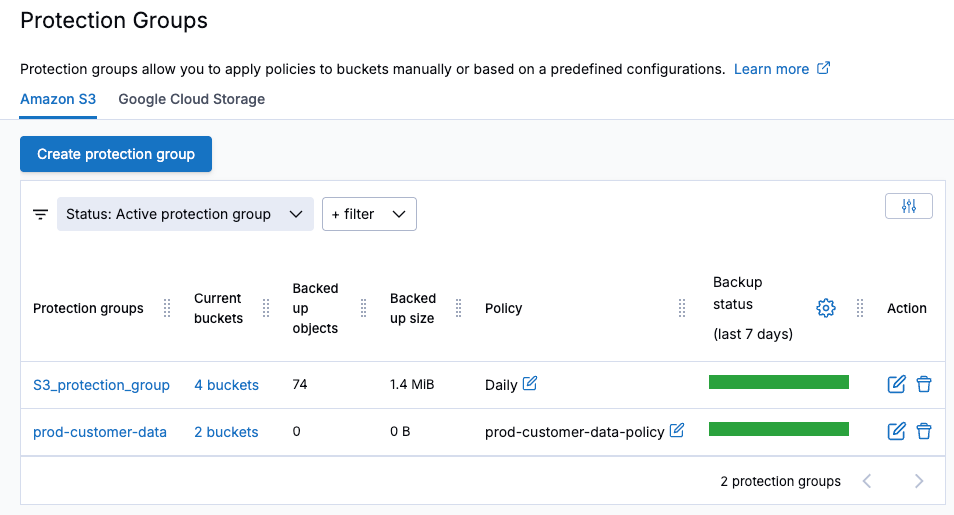
Visualizzazione dei gruppi di protezione
Verifica dei backup
1) Quando è necessario eseguire un ripristino, a causa della mancanza di dati o di dati identificati come danneggiati, accedere aGruppi di protezione, selezionare il gruppo di protezione S3 pertinente per visualizzare i backup disponibili eSincronizzazioni Clumio Backtrack. Un puntino blu sul calendario indica che per quel giorno è presente un backup riuscito.
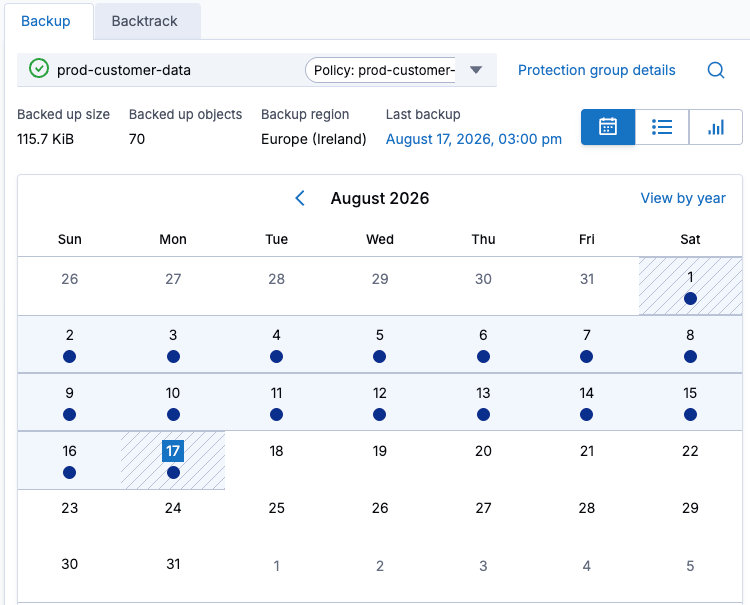
Visualizzazione dei backup riusciti
2) Visualizza ilSincronizzazioni Backtrackper singolo bucket, selezionando ilIndietro nel temposcheda all’interno del gruppo di protezione e verificare che il backup continuo funzioni correttamente.
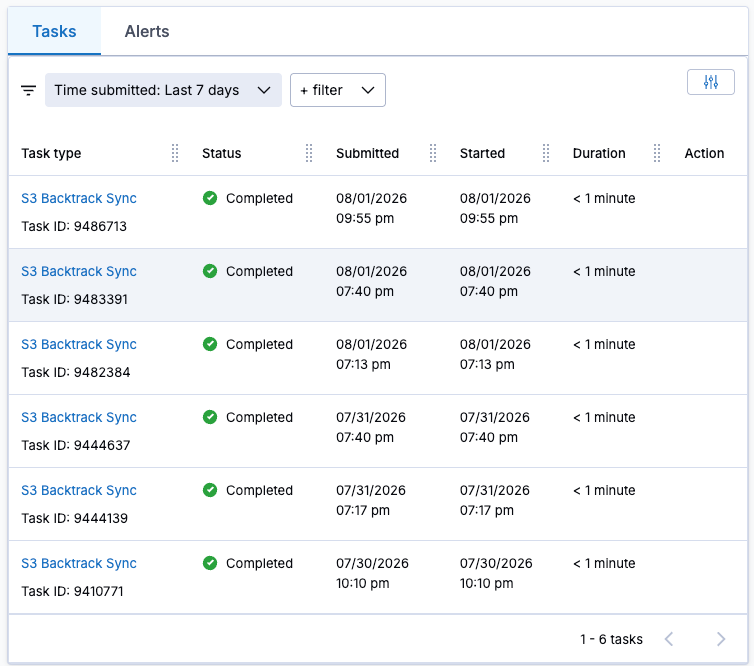
Sincronizzazioni Backtrack disponibili per il ripristino a un punto nel tempo
Ripristino dei dati
In questo esempio, mi mancano alcune trascrizioni delle chiamate. Ogni file mancante ha il prefissotrascrizione. Ho anche un file danneggiato, denominatoclienti.csv. Per fortuna, ho un backup completo e anche diversi backup puntualiSincronizzazioni Backtrackda cui effettuare il ripristino.
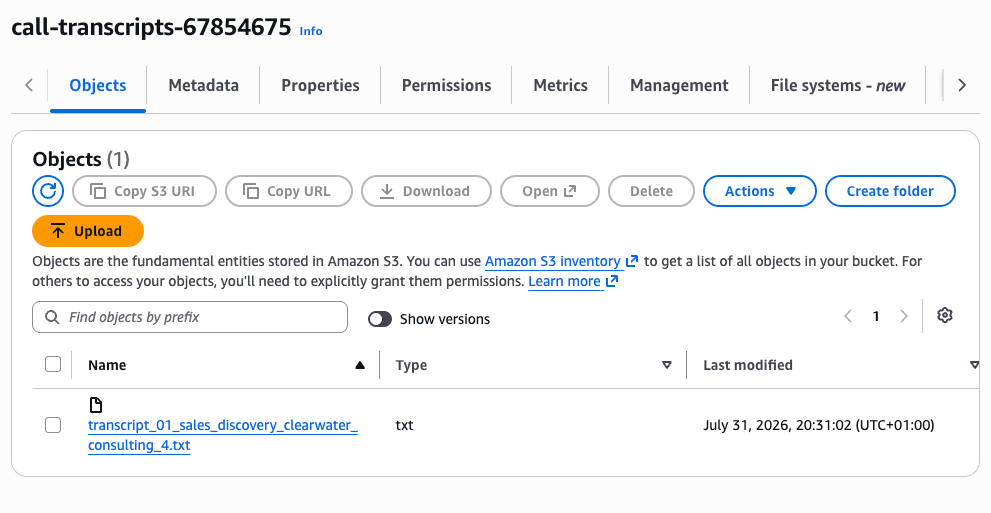
S3 mostra solo la trascrizione di una singola chiamata; le altre sono state cancellate per errore.
1) DaRipristinomenu, selezionaBucket S3, e selezionare il bucket in cui mancano dei file; quindi dalIndietro nel tempomenu a tendina, selezionaTorna indietro.
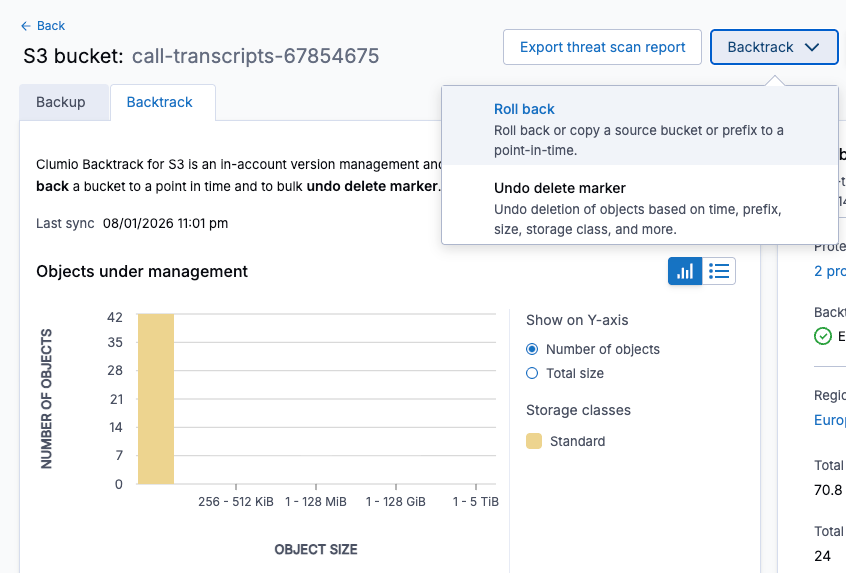
Utilizzo di Backtrack per ripristinare uno stato precedente
2) Seleziona il bucket per cui desideri eseguire il rollback, scegli la data e l’ora, quindi applica un filtro in base alla chiave dell’oggetto, alle dimensioni o alla classe di archiviazione S3. Successivamente, fai clic suavranno cliccato su “Anteprima”per visualizzare i file disponibili per il rollback.
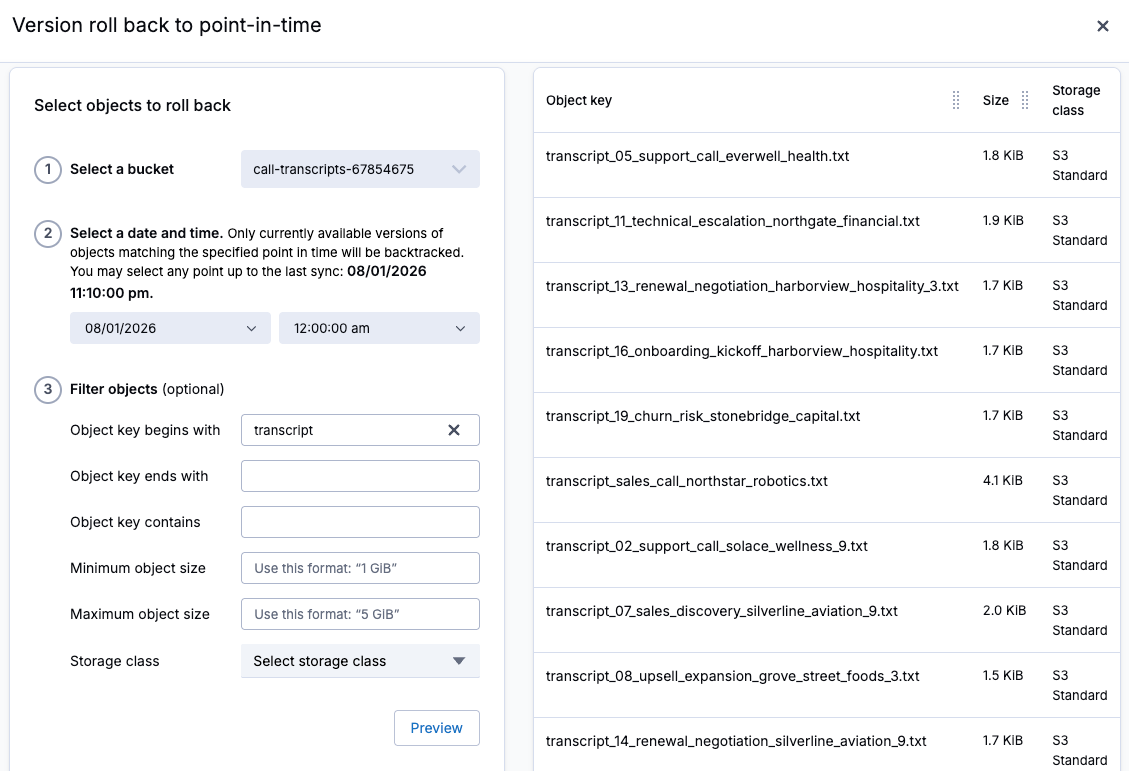
Selezione dei file da ripristinare a un punto nel tempo
3) Scegli se eseguire il rollback nello stesso bucket di origine oppure specifica un bucket diverso in cui eseguire il rollback. Quindi, fai clic suCopiaper avviare il processo di rollback.
4) Visualizza lo stato di avanzamento del rollback nellaCompitimenu.
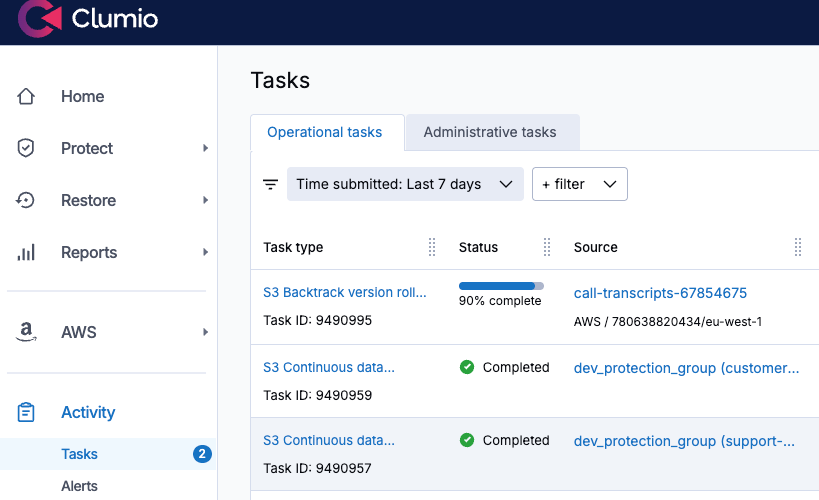
Visualizzazione dello stato di avanzamento del rollback
5) Successivamente, per ripristinare il file customers.csv danneggiato, cliccherò sul backup della notte precedente nel calendario dei backup, quindi selezioneròRipristino. È possibile scegliere se accedere immediatamente a una copia in sola lettura, ripristinare l’oggetto o ripristinare più file in base al nome del bucket o al prefisso. 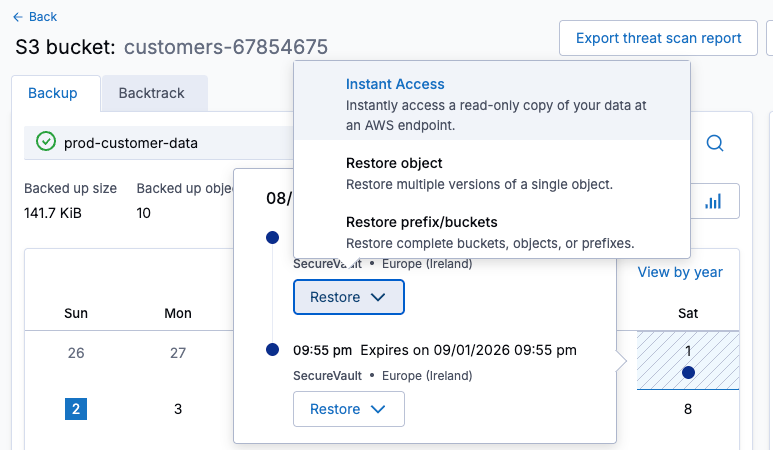
Ripristino dal backup
6) SelezionaRipristina oggetto, quindi cerca e seleziona l’oggetto da ripristinare, quindi fai clic suAvanti.
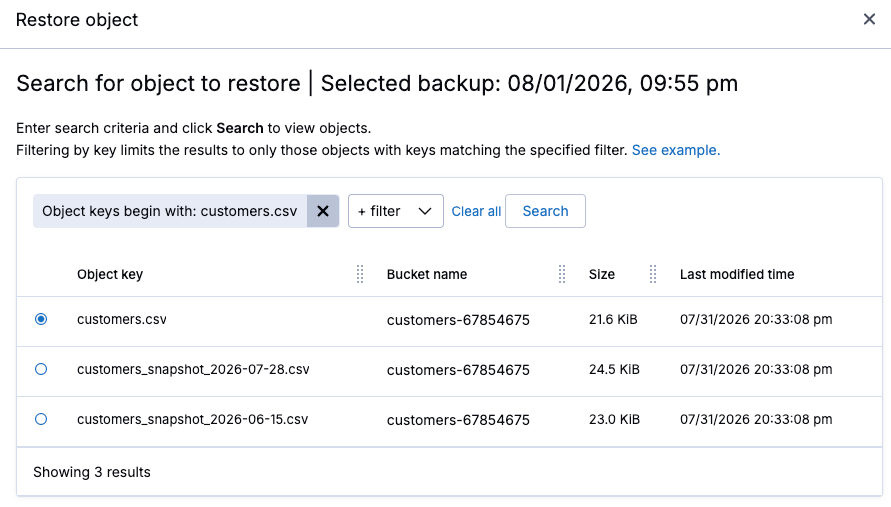
Selezionare un singolo oggetto da ripristinare
7) Seleziona la versione da ripristinare, quindi fare clic suAvanti.
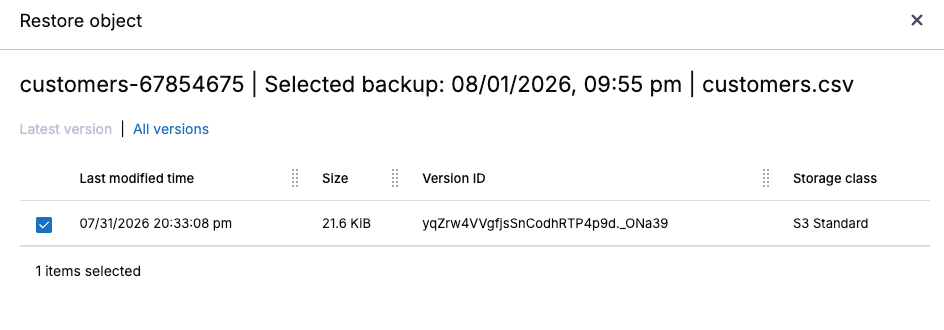
Selezionare una versione da ripristinare
8) Scegliere l’account AWS, la regione e il bucket in cui eseguire il ripristino, quindi avviare il ripristino.
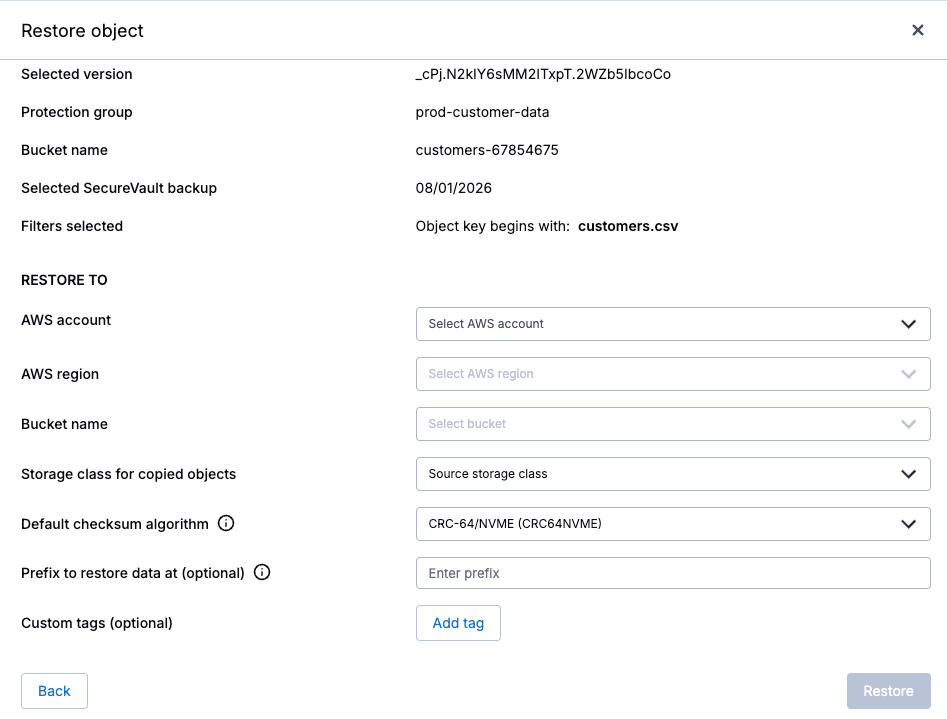
Impostare la destinazione prima di avviare il ripristino.
9) Una volta che il ripristino risulta completato con successo, il file ripristinato dovrebbe essere disponibile su S3.
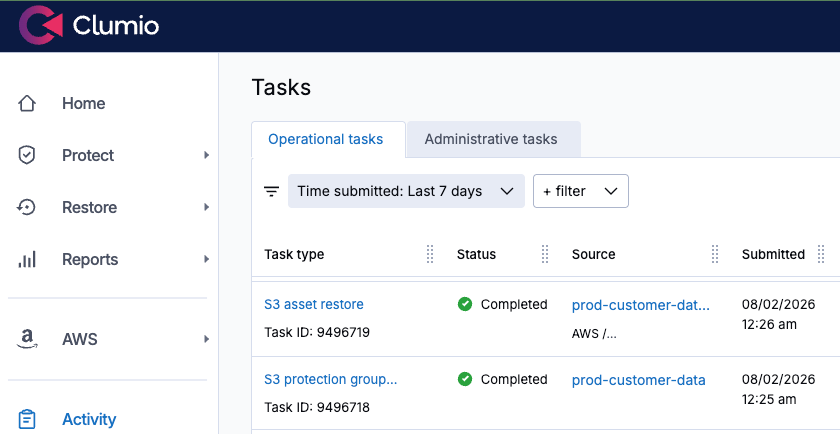
L’oggetto è stato restaurato.
Il mio consiglio: non aspettare che si verifichi un incidente
Grazie a un gruppo di protezione e a una policy già configurati, Clumio offre diverse soluzioni per il ripristino a seguito di un incidente su S3: Backtrack, per un rollback quasi istantaneo, in loco e a un punto specifico nel tempo su bucket con versioni, e SecureVault, per il ripristino dei dati da un backup immutabile e isolato fisicamente.
Entrambe le opzioni consentono di eseguire la Recovery a livello di oggetto, prefisso e bucket, permettendo di scegliere l’approccio di Recovery più adatto all’incidente. E in entrambi i casi, Recovery richiede solo pochi clic, senza dover esaminare manualmente diverse versioni di S3.
Infine, il momento migliore per metterlo alla prova è prima che ne abbiate effettivamente bisogno. Configurate oggi stesso un gruppo di protezione sui vostri bucket S3 critici ed eseguite dei ripristini di prova finché non diventeranno un’abitudine. La prossima volta che qualcosa scomparirà, saprete già esattamente come recuperarlo.
Per iniziare oggi,richiedere una demooprova gratuita di due settimane.
Domande frequenti
D: Perché è necessario eseguire il backup dei bucket Amazon S3 se S3 garantisce una durata pari a 11 nove?
R:La funzionalità di durabilità di S3 è progettata per proteggere i dati da guasti hardware e dell’infrastruttura, ma non impedisce la perdita logica dei dati. Cancellazioni accidentali, regole del ciclo di vita configurate in modo errato, credenziali IAM compromesse e operazioni batch non intenzionali possono comunque causare la perdita o il danneggiamento dei dati.
D: In che modo Clumio protegge i dati su Amazon S3?
R:Clumio utilizza gli eventi di modifica S3 per garantire il mantenimento di una copia dei dati protetti costantemente aggiornata, immutabile e isolata dalla rete. Questo approccio consente di disporre di un percorso di Recovery indipendente anche nel caso in cui l’account AWS di origine o i dati siano stati compromessi.
D: Che cos’è un gruppo di protezione S3 in Clumio?
R:Un gruppo di protezione è un insieme denominato di uno o più bucket S3 che condividono una politica di protezione. I bucket possono essere selezionati manualmente o automaticamente in base a criteri quali l’account AWS, la regione, i tag, i prefissi o le classi di archiviazione.
D: Qual è la differenza tra Clumio Backtrack e SecureVault?
R:Backtrack consente di eseguire il rollback a un punto specifico nel tempo per i bucket S3 con il controllo delle versioni abilitato, rendendolo utile per annullare rapidamente le modifiche indesiderate. SecureVault consente di mantenere un backup immutabile e isolato fisicamente (air-gapped) che può essere utilizzato per ripristinare singoli oggetti, prefissi o insiemi di dati più ampi.
D: Qual è la differenza tra SecureVault Standard e SecureVault Archive?
R:SecureVault Standard è progettato per garantire una Recovery più rapida e consente l’accesso immediato ai dati protetti. SecureVault Archive è destinato alla conservazione a lungo termine ed è più indicato per i dati per i quali è accettabile un tempo di ripristino compreso tra 24 e 48 ore.
D: In che modo i team possono prepararsi a un incidente relativo al Recovery dei dati su S3?
R:Configurare gruppi di protezione e politiche di backup adeguate per i bucket S3 critici prima che si verifichi un incidente. Eseguire regolarmente test di ripristino degli oggetti e di rollback a un punto nel tempo, in modo da acquisire familiarità con il processo di Recovery nel caso in cui sia necessario recuperare i dati di produzione.
Faye Ellisè Principal Training Architect AWS presso Pluralsight.