Essa sensação de realização vem acompanhada de um sentimento adicional de alívio, independentemente do tempo que levou para alcançá-la. Mas… o que isso tem a ver com o “Bring Your Own Key” (BYOK)? Continue lendo.
Na mesma linha, o serviço “Backup as a Service Cloud” da Clumio prometeu oferecer suporte ao recurso BYOK há mais de dois anos! Esse recurso permitia que os clientes criptografassem seus dados de backup usando sua própria chave de criptografia, por meio do recurso nativo Key Management Service (KMS) da Amazon Web Services (AWS).
O AWS KMS facilita aos clientes a criação e o gerenciamento de chaves criptográficas, além de permitir o controle de seu uso em uma ampla gama de serviços da AWS e em seus aplicativos.
Quando a Clumio adicionou o recurso BYOK, ela oferecia suporte às fontes de dados VMware, Microsoft 365 (M365) e AWS EC2/EBS, pois essas eram as fontes de dados compatíveis com a Clumio naquela época. No entanto, desde então, a Clumio adicionou outras fontes de dados essenciais, como S3, RDS e DynamoDB.
Com o lançamento mais recente, a Clumio incorporou recursos BYOK a todas as nossas fontes de dados críticas e, com isso, concretizou o objetivo que estabelecemos há muito tempo. E isso não para por aqui, pois continuaremos a nos empenhar para levar o BYOK também a futuras fontes de dados.
Por que os clientes se interessam pelo BYOK:
O Clumio já não criptografa todos os backups? E, se sim, por que o BYOK é necessário? É verdade que o Clumio criptografa todos os dados de backup em sua nuvem com uma chave dedicada ao cliente, e essa chave também é renovada a cada 30 dias. No entanto, em alguns casos, certos clientes têm requisitos de segurança adicionais mais rigorosos:
Como funciona a criptografia:
As chaves de bucket do AWS S3 reduziram o custo da criptografia no lado do servidor em mais de 99%e não precisa procurar a chave para cada transação individualmente. Como a Clumio faz backup de dados com milhões de transações, ter que procurar a chave para cada transação era inviável. Com o recurso de chaves de bucket do S3 da AWS, a Clumio pode usar a chave BYOK do cliente como chave do bucket do Amazon S3 e criptografar todos os dados que chegam ao bucket do S3 usando essa chave BYOK do cliente.
Como ativar o recurso BYOK:
Acesse “Configurações” e “Recursos de segurança” – “Chave de criptografia”. Ao acessar a página, o Clumio fornece detalhes sobre o recurso, juntamente com seus requisitos e limitações. Os clientes podem prosseguir implantando os StackSets do AWS CloudFormation em qualquer uma de suas contas da AWS onde desejarem utilizar a chave BYOK.
O motivo pelo qual o StackSets é necessário é que o Clumio precisará criar uma chave multirregional (global) e utilizá-la para criptografar backups em todas as regiões onde as fontes de dados estiverem presentes. Após a implantação bem-sucedida, os clientes podem verificar a conexão na interface do usuário do Clumio acessando a página a qualquer momento.
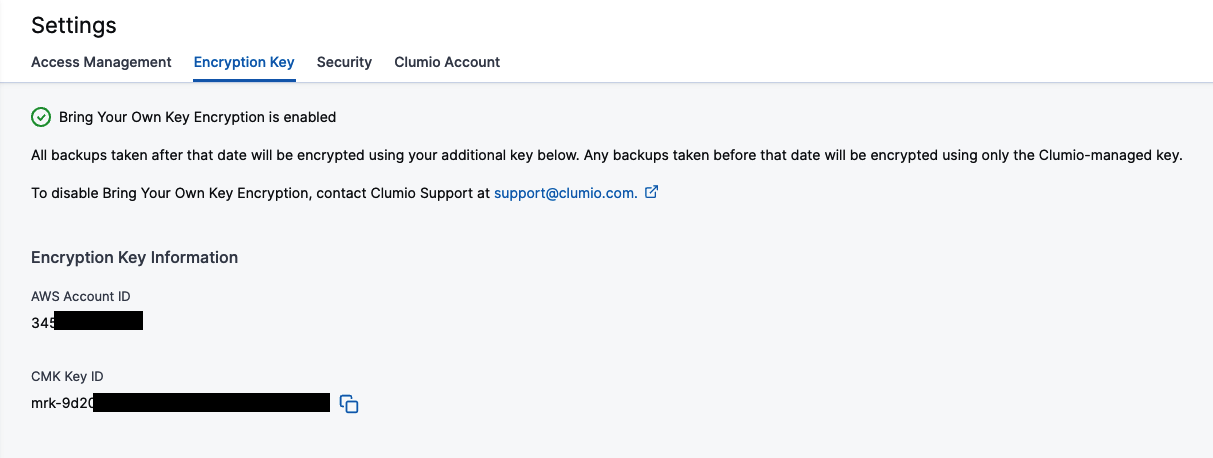
A marca de seleção verde na parte superior da página indica que tudo está funcionando conforme o esperado. Se, por qualquer motivo, a chave não estiver acessível, ela se transforma em um X vermelho e permite que você verifique o acesso novamente para ver se o problema foi resolvido e se tudo está funcionando normalmente.
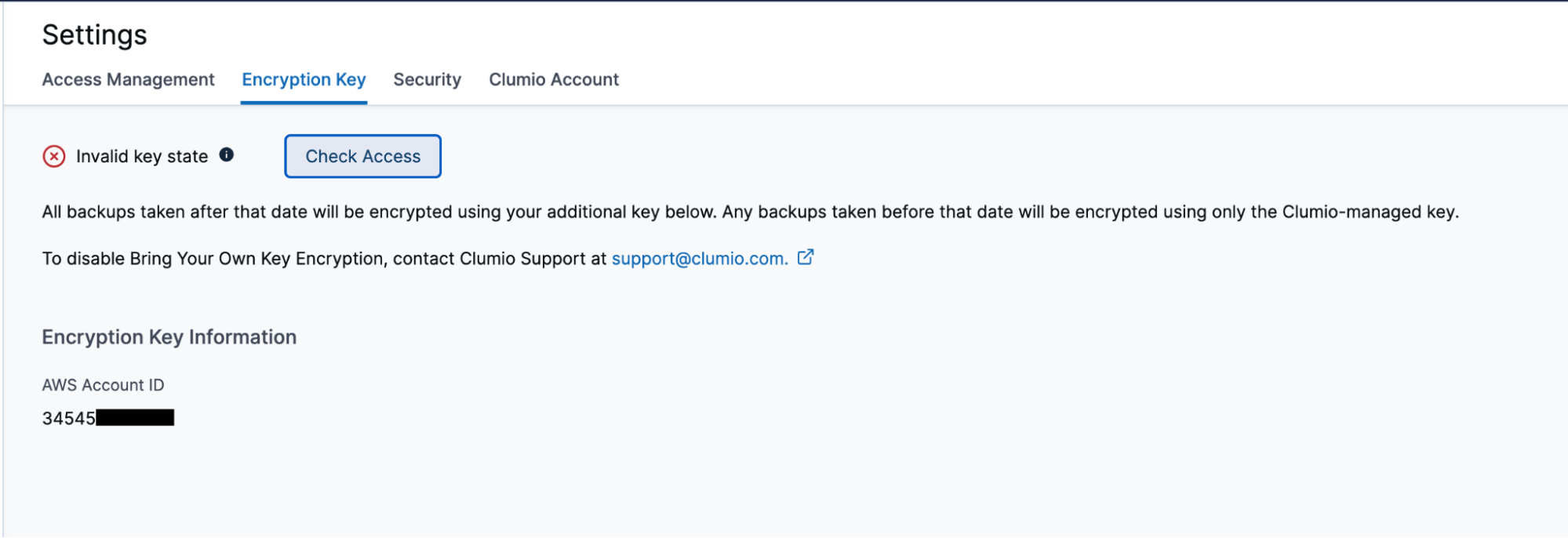
Como verificar e auditar o Clumio Access
Uma das vantagens do recurso BYOK é que os clientes podem verificar e auditar a qualquer momento quando a Clumio acessou sua chave. Os clientes podem acessar os registros do CloudTrail e ver todos os detalhes de cada vez que a Clumio acessa sua chave, incluindo o motivo do acesso. Os clientes podem acessar a seção “Registros do CloudTrail” em sua conta da AWS, onde o AWS CloudFormation StackSet foi implantado.
No caso das chaves de buckets do S3, como elas são armazenadas em cache pelo próprio S3 da AWS, o acesso a elas pode não ocorrer em todas as transações. No entanto, as chaves são acessadas em todas as transações para backups de EC2/EBS, VMware e M365.
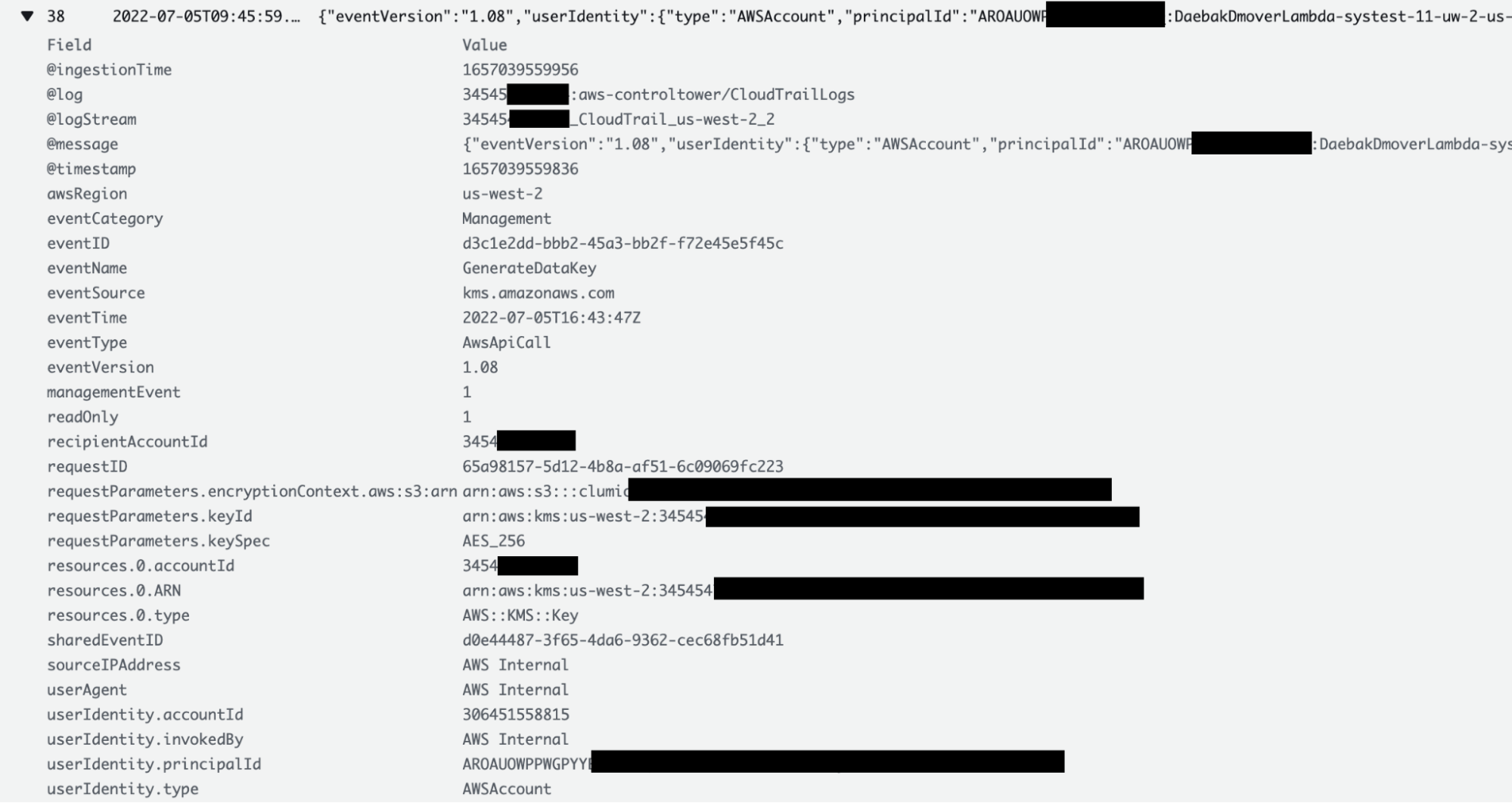
O que acontece quando a chave não está mais acessível:

Lembre-se disso: o BYOK oferece a possibilidade de criptografar todos os dados de backup, mas, por outro lado, se a chave for perdida, você estará em apuros! Felizmente, as chaves na AWS não são como chaves físicas e, mesmo que alguém as apague,os clientes ainda têm 30 dias para recuperá-las. Se, por qualquer motivo, as chaves não forem recuperadas, os dados de backup ficarão inutilizáveis. Esse recurso foi concebido para servir como um mecanismo de segurança contra falhas, mas é preciso ter muito cuidado ao utilizá-lo.