Quel senso di soddisfazione va di pari passo con un ulteriore senso di sollievo, indipendentemente dal tempo impiegato per raggiungere l’obiettivo. Ma… cosa c’entra tutto questo con il “Bring Your Own Key” (BYOK)? Continua a leggere.
Sulla stessa linea, il servizio “Backup as a Service Cloud” di Clumio aveva promesso di supportare la funzionalità BYOK già più di due anni fa! Questa funzionalità consentiva ai clienti di crittografare i propri dati di backup utilizzando una chiave di crittografia personale tramite il servizio nativo Key Management Service (KMS) di Amazon Web Services (AWS).
AWS KMS consente ai clienti di creare e gestire facilmente le chiavi crittografiche e di controllarne l’utilizzo in un’ampia gamma di servizi AWS e nelle proprie applicazioni.
Quando Clumio ha introdotto la funzionalità BYOK, supportava le origini dati VMware, Microsoft 365 (M365) e AWS EC2/EBS, poiché queste erano le origini dati supportate da Clumio in quel momento. Tuttavia, da allora ad oggi, Clumio ha aggiunto ulteriori origini dati fondamentali come S3, RDS e DynamoDB.
Con l’ultima versione, Clumio ha esteso le funzionalità BYOK a tutte le nostre fonti di dati critiche, realizzando così l’obiettivo che ci eravamo prefissati molto tempo fa. Ma non ci fermiamo qui: continueremo a impegnarci per estendere il BYOK anche alle future fonti di dati.
Perché i clienti danno importanza al BYOK:
Ma Clumio non crittografa già tutti i backup? E, se sì, perché è necessario il BYOK? È vero che Clumio crittografa tutti i dati di backup nel proprio cloud con una chiave dedicata al cliente, e che tale chiave viene sostituita ogni 30 giorni. Tuttavia, in alcuni casi, determinati clienti hanno requisiti di sicurezza ancora più rigorosi:
Come funziona la crittografia:
Le chiavi dei bucket AWS S3 hanno ridotto il costo della crittografia lato server di oltre il 99%and don’t need to lookup the key for every single transaction. Since Clumio backs up data with millions of transactions, having to look up the key for every single transaction was a no-go. With AWS’S S3 bucket keys feature, Clumio can use the customers BYOK key as the Amazon S3 Bucket Key and encrypts all the data landing in the S3 bucket using the customers BYOK key.
Come attivare la funzione BYOK:
Accedere a “Impostazioni” e “Funzionalità di sicurezza” – “Chiave di crittografia”. Una volta aperta la pagina, Clumio fornisce informazioni dettagliate sulla funzionalità, insieme ai relativi requisiti e alle limitazioni. I clienti possono procedere implementando gli StackSet di AWS CloudFormation all’interno di uno qualsiasi dei propri account AWS in cui desiderano utilizzare la chiave BYOK.
StackSets è necessario perché Clumio dovrà creare una chiave multiregione (globale) e utilizzarla per crittografare i backup in tutte le regioni in cui sono presenti le fonti di dati. Una volta completata con successo la distribuzione, i clienti possono verificare la connessione nell’interfaccia utente di Clumio accedendo alla pagina in qualsiasi momento.
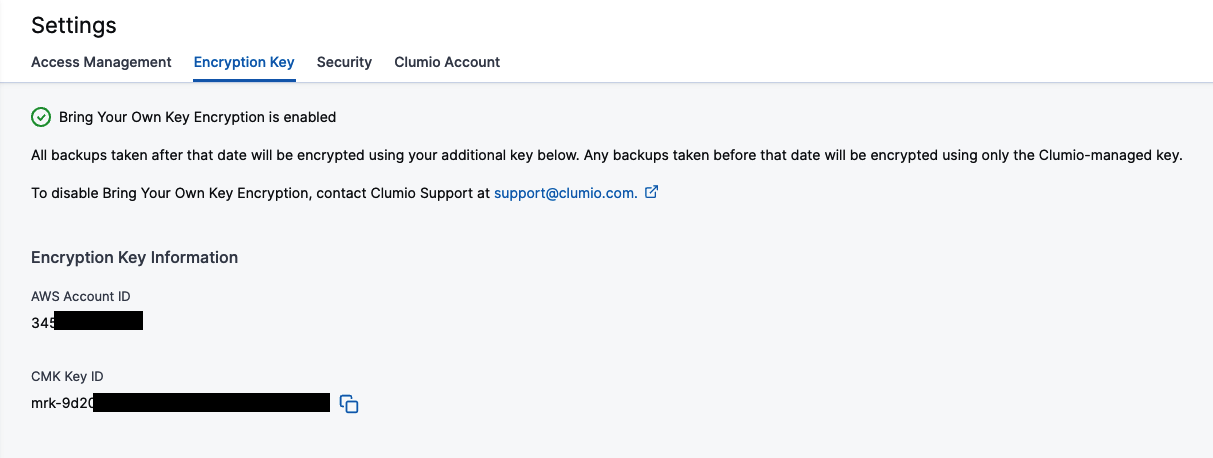
Il segno di spunta verde nella parte superiore della pagina indica che tutto funziona come previsto. Se, per qualsiasi motivo, la chiave non fosse accessibile, il segno di spunta si trasforma in una X rossa e ti permette di verificare nuovamente l’accesso per vedere se il problema è stato risolto e se tutto funziona di nuovo.
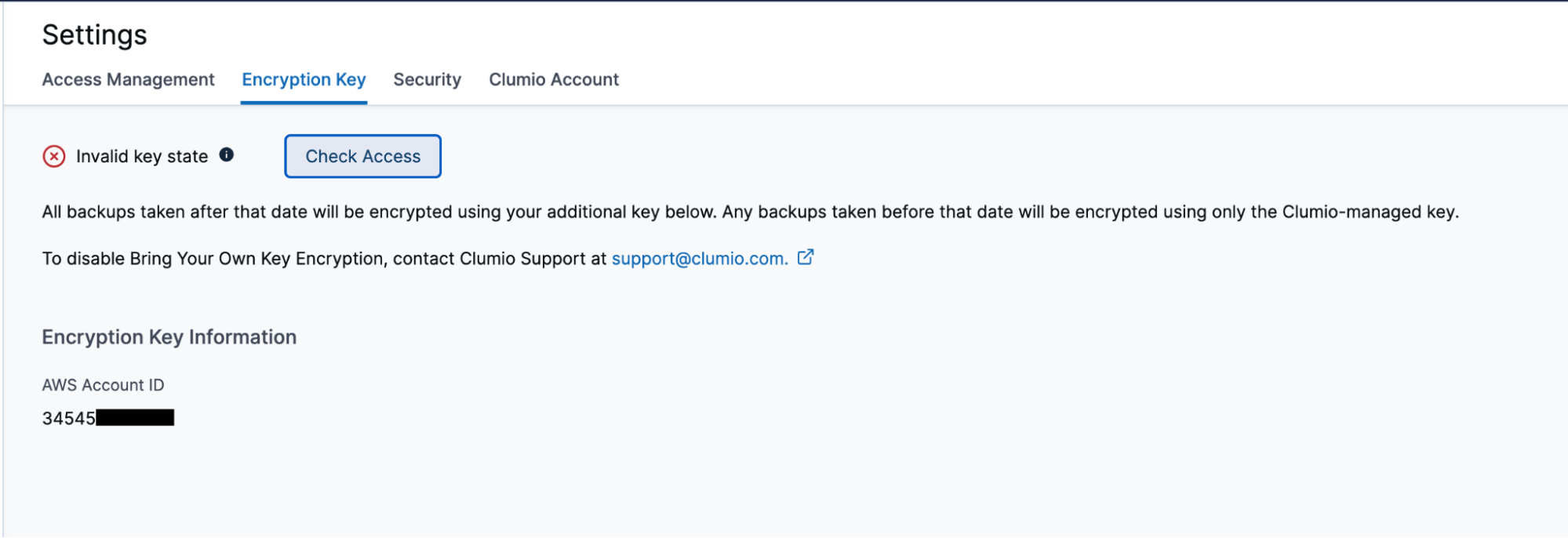
Come verificare e controllare l’accesso a Clumio
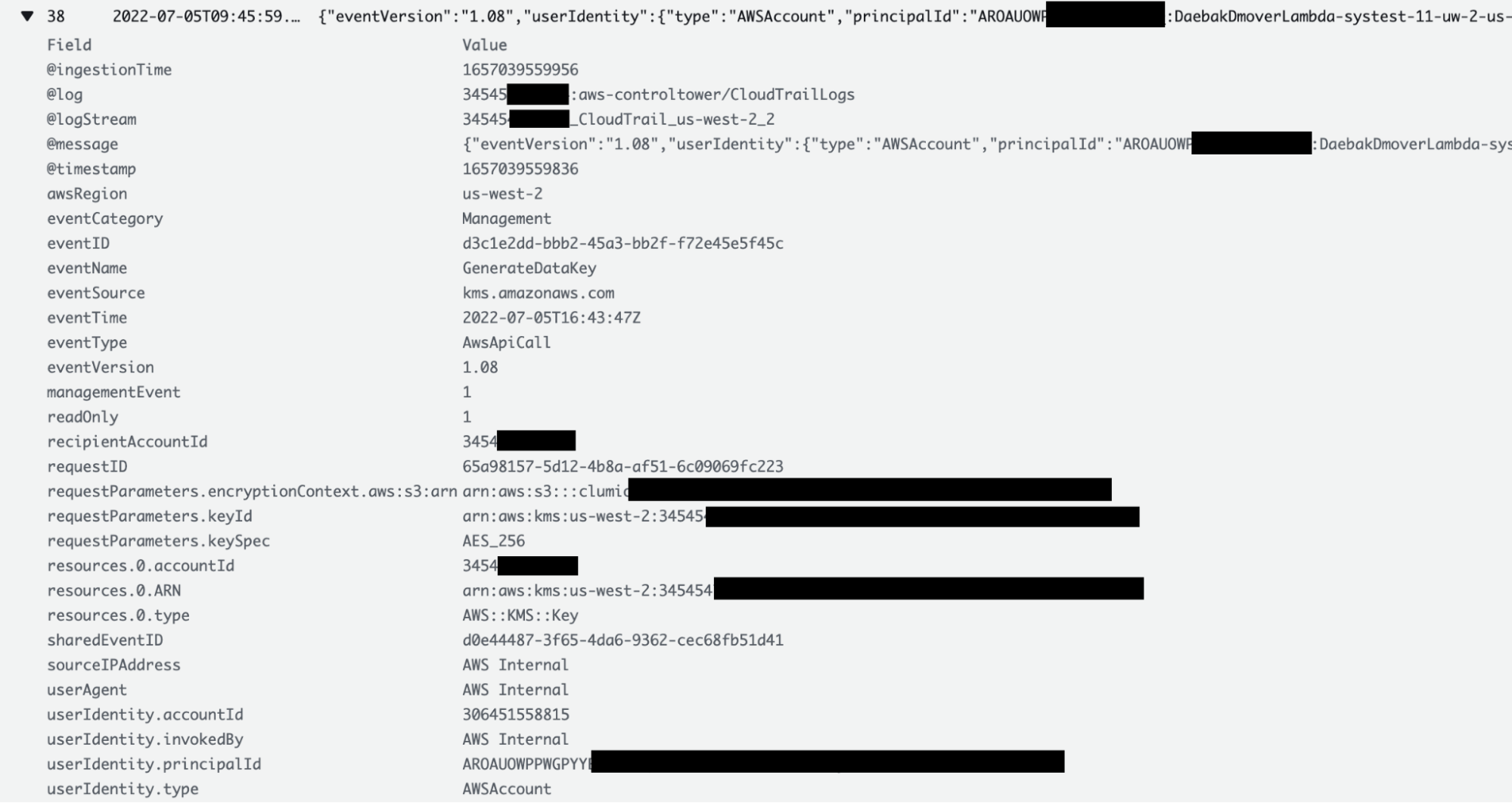
Uno dei vantaggi della funzionalità BYOK è che i clienti possono verificare e controllare in qualsiasi momento quando Clumio ha effettuato l’accesso alla loro chiave. I clienti possono consultare i log di CloudTrail e visualizzare tutti i dettagli relativi a ogni accesso effettuato da Clumio alla loro chiave, compreso il motivo dell’accesso. I clienti possono accedere alla sezione “CloudTrail Logs” del proprio account AWS in cui è stato distribuito lo StackSet di AWS CloudFormation.
Per quanto riguarda le chiavi dei bucket S3, poiché queste vengono memorizzate nella cache dai bucket S3 di AWS, l’accesso potrebbe non essere garantito per ogni singola transazione. Tuttavia, per i backup EC2/EBS, VMware e M365, l’accesso alle chiavi avviene per ogni singola transazione.
Cosa succede quando non è più possibile accedere alla chiave:

Remember this: BYOK gives you the power of encrypting all backup data, but on the flip side, if the key is lost, then you’re in big trouble! Luckily, keys in AWS aren’t like physical keys and even if someone deletes them,i clienti avrebbero comunque 30 giorni di tempo per recuperarle. Se, per qualsiasi motivo, le chiavi non venissero recuperate, i dati di backup diventerebbero inutilizzabili. Questa funzionalità è pensata come meccanismo di sicurezza, ma va utilizzata con estrema cautela.