Although most people remember childhood character Curious George as being drawn with a tail, he does not have one.
Many people believe there is a brand of peanut butter called “Jiffy” but there is not. There’s Jif, and there’s Skippy, but no Jiffy.
In the iconic scene in “Silence of the Lambs,” Hannibal Lecter does not say “Hello Clarice” as many people remember. He says “good morning.”
The Mandela Effect in the Cloud
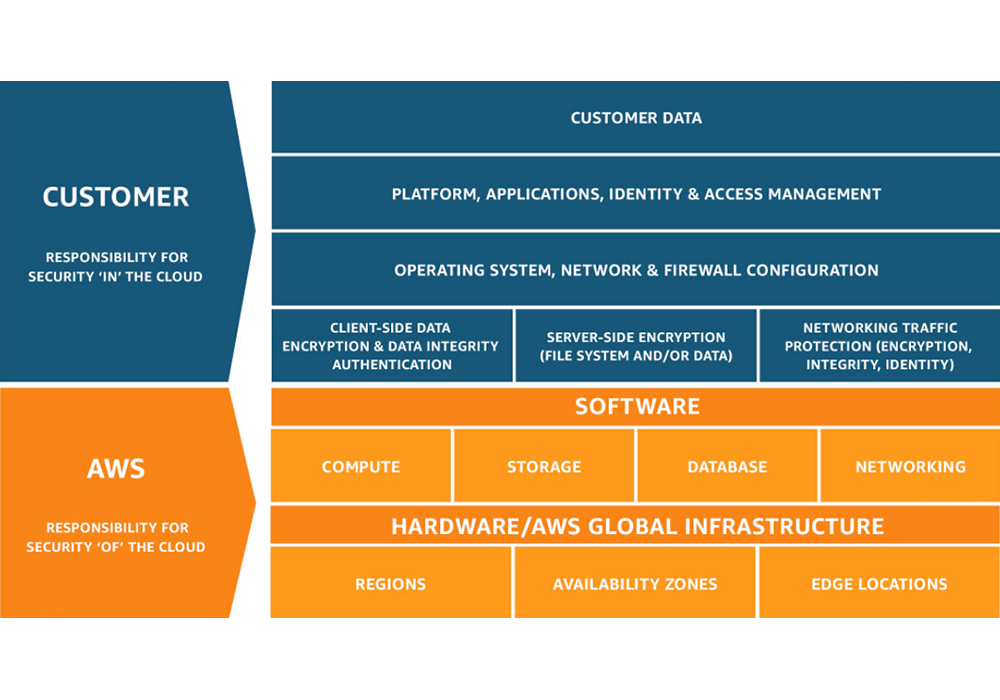
The Mandela effect is not just a pop culture phenomenon, it exists in the world of enterprise technology, too. It’s a common misconception that data stored in the cloud is automatically backed up. The truth is that cloud providers operate on a shared responsibility model, in which the cloud provider is responsible for the security of the software, hardware and infrastructure, but not customers’ data.
Shared Responsibility Model from AWS
For example, when AWS refers to their highly durable Amazon S3 service, it’s true that the platform is incredibly durable, which means you’re unlikely to experience any trouble with their systems or infrastructure. However, this has nothing to do with protecting your data from accidental deletions, ransomware attacks or insider threats. According to the shared responsibility model, that’s your job.
Taking Steps to Protect Your Cloud Data
Customers love working with Clumio because they get air-gapped, immutable data protection with incredibly fast time to value while SaaS simplicity ensures fast and simple ingest, cataloging, search and recovery at any scale. Clumio allows customers to automate protection of their AWS and Microsoft 365 data, saving time and resources that allow them to focus on strategic initiatives and reducing TCO compared with other options.
Don’t let data protection misconceptions leave you vulnerable.
A Container is a basic software unit that packages up code and all its dependencies so an application can run smoothly in any environment. Each container is made up of a hardware, an operating system, a container engine, libraries, and dependency’s and finally the application. Everything the application needs to run is inside the container which means it can be created and deleted quickly using automation.
By 2025, 85% of global enterprises will be running containerized applications in production1
Container Orchestration
Container Orchestration is the automation of containerized workloads. It is key when working with containers because it is what allows you to deploy the same application across different environments without the need to redesign it.
Kubernetes
What is Kubernetes (aka K8s)?
Kubernetes is an open-source container orchestration software designed for deploying, managing, and scaling containers. So, what does that mean? Essentially it eliminates much of the manual processes that needs to be done during deploying and scaling containerized workloads, even across various types of physical, virtual, and cloud environments.
According to a recent survey by the Cloud Native Computing Foundation, of the 3800 survey respondents, 96% of organizations are either using or evaluating Kubernetes2
Did you know?
The name Kubernetes comes Greek word κυβερνήτης (kubernḗtēs) which means pilot or helmsman therefore the Kubernetes logo is a ship’s steering wheel. Kubernetes is often abbreviated as K8s because there are 8 letters in between ‘K’ and ‘S’
Kubernetes was originally developed and designed by Google Engineers and was later donated to CNCF in 2015.
How does it work?
Kubernetes is a concept made up of several different components, and, while there are several elements and use-cases in the implementation of Kubernetes, the main concepts to understand are: the Control Plane, Pods, and Nodes.
The Control Plane consists of elements and API processes which coordinate workloads and communications, allowing for the smooth flow of information and resource allocation across the environment.
Pods are the base element in Kubernetes. A Pod consists of one or more containers and are co-located on the same node.
A Node (also known as a minion, or worker)is a machine on which containers are deployed. Each node must run a container runtime such as Docker, CoreOS rkt, Containerd, etc. Multiple Nodes can be grouped into Clusters.
Your IT environment and Kubernetes
As a result of shifts in modern computing practices, users are expecting applications to be available 24/7 and developers are sometimes expected to be able to deploy new versions of the applications several times a day. Also, IT environments are increasingly more hybrid and based on multi-cloud approaches, integrating on-premises resources with public or private clouds from different suppliers. While container systems allowed developers to make software more portable and hold all of the packages needed to run a service, they were still limited by the amount of manual effort needed to provision and modify each container across an environment.
Kubernetes can help organizations better manage their workloads and reduce risks. Kubernetes is able to automate container management operations and optimize the use of IT resources. It even can restart orphaned containers, shut down the ones that are not being used, and recreate them.Kubernetes automates the deployment of containers without DevOps having to move all the pieces manually themselves. This allows developers to deploy new versions of specific applications on a more frequent basis and enables them to be released and updated without downtime, even across multiple environments (i.e. Dev, Test, Prod).
Benefits of Kubernetes
The key benefits of Kubernetes can be summarized as: reduced application development and release timeframes, optimization of IT costs, increased software scalability and availability, flexibility in multi-cloud environments, and cloud portability.
Portable Workloads
Because Kubernetes is an open source your workloads become portable take advantage of on-prem, hybrid, and multiple cloud environment— all while maintaining consistency across each environment.
Flexibility
No matter where you are running Kubernetes, it offers flexibility in hybrid and multi-cloud environments allowing operation of any of our applications in any public or private environment smoothly.
Automation
Kubernetes can automate containerized environments by acting as its operating system. It does this my automating the operation requirements of containerized workloads.
Scalability and Availability
Kubernetes can define complex containerized applications and deploy them across clusters of servers. As Kubernetes scales applications according to your desired state, it automatically monitors and maintains container health.
Kubernetes Architecture
Kubernetes control plane: Also known as the master machine, is the container orchestration layer that exposes the API and interfaces to define, deploy, and manage the lifecycle of containers aswell as the nodes that hold the containerized applications. It ensures that every cluster is kept in its desired state.
The components of the Control Plane
API Server: The Application Programming Interface also know as API is the front end of Kubernetes. It is where clients make an initial request for an object or a collection and it determines if the request is valid and then it will process it. The API server also is what is used to transmit, create, and configure data within K8 clusters.
K8s scheduler: The scheduler is what watches and manages pods that are newly created and assigns them to a node so they can run on it smoothly.
Controller manager: Within the Control Plane there are multiple controllers, they are the control loops designed to watch the state of your cluster and make or request changes as they are needed.
Etcd: Is a data base where all your container storage is stored. It is a strongly consistent, distributed key-value store that holds and manages the critical information that systems need to run.
Cluster
NODE: (also known as a minion, or worker)is a machine on which containers are deployed. Each node must run a container runtime such as Docker, CoreOS rkt, Containerd, etc. Multiple Nodes can be grouped into Clusters.
Pod: are the base element in Kubernetes. A Pod consists of one or more containers and are co-located on nodes.
This is where all of your important information is kept
Modernize with Kubernetes
Kubernetes makes it possible to simplify and accelerate the migration of applications from an on-premises environment to public or private clouds, offered by any provider. Applications can be migrated to the cloud through the adoption of various methodologies:
the simple transposition of the application, without any coding changes (Lift & Shift);
the minimum changes necessary to allow the application to work on new environments (replatforming);
the extensive rewriting of the application structure and functionality (refactoring).
Modernize your environment more smoothly than ever before with Kubernetes adoption. No need to ask yourself where your data is anymore, all your data is stored in one place. Kubernetes storage is based on volumes. The volumes can either be persistent or non- persistent. Inside the pods, containers request for more storage.
Kubernetes can be built once and then is able to be deployed anywhere. This means no matter where you build your cluster whether it is on prem or in the cloud you don’t need to rebuild the solution you just have to deploy a different cluster.
Challenge
Kubernetes clusters can be prone to ransomware attacks, like any other workload. In some cases, a hacker can gain access to what is inside of your pod – potentially receiving critical information about your organization. Therefore, backing up and having data protection for your clusters is vital when it comes to moving your workloads around.
Kubernetes Backup
Is the process of backing up all of the components that run in a Kubernetes orchestration platform, which include all of the organizations containerized applications. Since a Kubernetes cluster has so many components, pods, nodes, control plane and volume, each of them needs a level of protection. Protection is critical for a cluster especially since organizations are relying more and more on Kubernetes. Backing up a Kubernetes cluster will ensue that the data, configurations, and the files are protected from any attack. This is why you need a solution that has the ability to back up your entire cluster.
The main stages of Kubernetes back up include:
Discovery
Identify resources
Backup
According to Red Hats 2022 State of Kubernetes Security Report, 93% of respondents experienced at least one security incident in their Kubernetes environments in the last 12 months, sometimes leading to revenue or customer loss3
Commvault and Metallic’s Kubernetes Backup
Commvault and Kubernetes Data Protection
Commvault has the ability to back up your entire cluster unlike most solutions that can only back up your containers. Commvault provides data protection for persistent storage in your stateful applications. Commvault’s solution automates back up of this data all from a single platform that increases the visibility and management capabilities of your entire environment. Our solution gives you the flexibility to migrate and deploy containers from on-prem to cloud, cloud to cloud and even back on- prem seamlessly with ease. It also offers broad support for VMs, data services and cloud services in a single platform. It is also compatible with all CNCF- certified distributions and integrated with CSI for snapshot-based backups.
Commvault has been recognized by the 2022 GigaOm report as a “leader and outperformer” in Kubernetes data protection for our flexible deployment architecture and single interface across multiple deployments. The report also states that our security and ransomware controls are extensive which makes it suitable for larger enterprises.
How Commvault does it
Commvault schedules a temporary worker pod to perform data movement. The settings specify a private container registry where you store an image that Commvault can download. It allows you to consolidate clusters, simplify cross-cluster migration, and streamline cluster lifecycle management.
Challenges before Commvault
Before Commvault organizations had to deal with cluster sprawls, having to manage their cluster life cycles and consolidating clusters. Commvault helps with these challenges by allowing you to migrate your Kubernetes applications to any cloud with ease.
Metallic and Kubernetes backup
Metallic offers VM & Kubernetes Backup. This is the only SaaS data Protection service that offers a full range of hybrid workload coverage ensuring your containers are always safe.
VM & Kubernetes Backup by Metallic is a solution that allows you to simply extend to containers to modernize apps with confidence all while being able to protect traditional apps. Whether you are on-prem or in the cloud, Metallic supports all Cloud Native Computing Foundation certified Kubernetes distributions such as Azure Kubernetes Service (AKS), AmazonEKS, Vmware, Rancher, and many more.
Metallic can protect Cloud or On-prem Databases, Source code control systems, Image registries, and Cloud-native object storage.
With this solutions unmatched flexibility, Ultimate Security, and Hassle-free management consider all your workloads covered.
Conclusion
Kubernetes is the future, the time is now to make sure all of your workloads are protected and have the ability to migrate safely to the cloud. Commvault is the easy choice. We were named a leader and outperformer in the 2022 GigaOm report on Kubernetes data protection because of our broad workload support, compatibility with CNCF certified distributions and extensive ransomware controls. So pack your bags, the ship is setting sail for the cloud today.
References
1. Best Practices for Running Containers and Kubernetes in Production – 4 Aug 2020 – Gartner ID G00730344 – 2. CNCF 2021, Annual Survey – 3. Red Hat 2022, State of Kubernetes Security Report
Enterprises today are inherently heterogeneous, running applications and supporting workloads across on-prem, edge and multiple clouds. As businesses accelerate their IT transformation, this hybrid multi-cloud presence is set to further expand. It is imperative, then, that enterprise data protection and data management solutions excel in all of these areas – across on-prem, edge and multiple clouds.
Gartner Critical Capabilities report assesses these types of solutions on various key aspects such as security, efficiency, scalability and performance, Data Center ecosystem, and reporting and analytics across the key use cases of on-prem, edge and cloud. In my conversations with CIO’s, IT leaders, and architects, these are exactly the key aspects they are concerned with when architecting their data management strategy to protect their crown jewels.
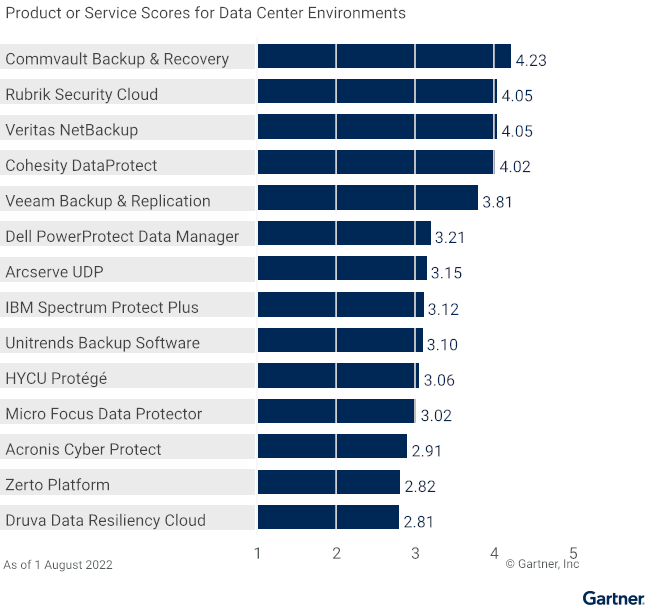
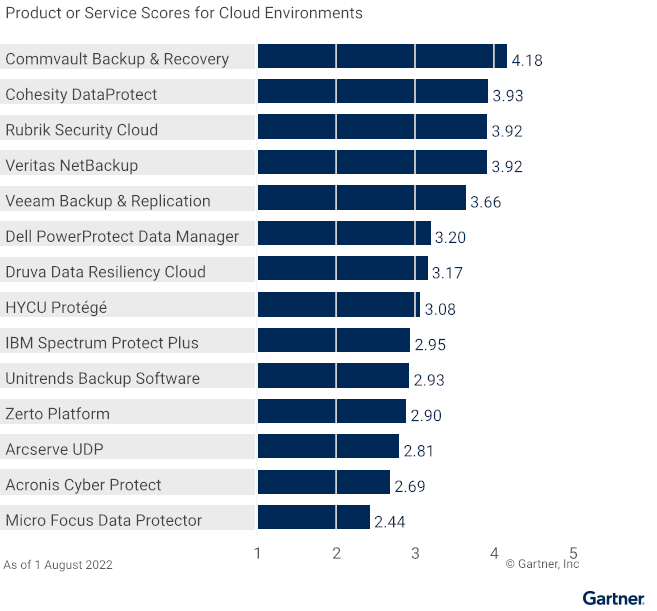
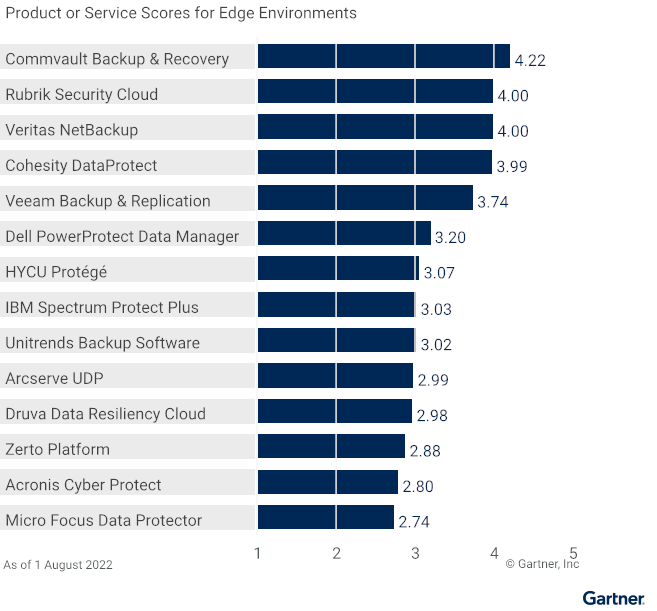
This is why we are thrilled and honored that Commvault Backup & Recovery has scored the highest in all three use cases in the 2022 Gartner Critical Capabilities for Enterprise Backup and Recovery Software Solutions: Data Center Environments (4.23/5), Cloud Environments (4.18/5), and Edge Environments (4.22/5). With the highest scores in all three use cases – for the third time in a row – we believe this is yet another validation of our commitment to be a trusted partner to our customers in protecting their data and workloads – no matter where they reside.
Data Center Environments (4.23/5)
Cloud Environments (4.18/5)
Edge Environments (4.22/5)
Enterprises are continuously evolving and expanding to meet business needs. Therefore, another critical accelerator of IT transformation is a data management solution that can flexibly evolve with the rest of IT.
“Our continuous innovation is designed with ultimate flexibility when it comes to data management – offering not only an enterprise software solution but also the ability to manage and protect enterprise data with Commvault Grid as an integrated solution or via Metallic as a cloud-delivered DMaaS solution.”
Unfortunately, flexibility and breadth are often offered at the cost of simplicity in our industry. In contrast, Commvault breaks this paradigm with our “infinitely scalable, radically simple” approach. We bring together all management – across our broad set of supported workloads, flexible form factors and array of Intelligent Data Services – through the single experience of Commvault Command Center. This simplicity – with no compromise to flexibility and breadth – empowers customers to fast-track their business transformation aligning their data management to their broader IT strategy. As businesses modernize and transform, transitioning applications and workloads from one form factor or location to another (from on-prem to cloud, for example), we ensure they remain protected no matter where they are in this journey.
As an eleven-time Leader in the Gartner Magic Quadrant and back-to-back years with the highest scores in all three use cases in the Gartner Critical Capabilities report, we are grateful to our customers for partnering with us in this journey of continuous customer-first innovation and to our partners in building a data ecosystem with no boundaries. Our journey to solve the hard data management problems with elegant solutions continues … together with our dear customers and partners!
Gartner, Magic Quadrant for Enterprise Backup and Recovery Software Solutions, 28 July 2022, Michael Hoeck, et. Al. Gartner, Critical Capabilities for Enterprise Backup and Recovery Software Solutions, 22 August 2022, Nik Simpson, et. Al.
Gartner Disclaimer:
**Gartner does not endorse any vendor, product or service depicted in its research publications, and does not advise technology users to select only those vendors with the highest ratings or other designation. Gartner research publications consist of the opinions of Gartner’s research organization and should not be construed as statements of fact. Gartner disclaims all warranties, expressed or implied, with respect to this research, including any warranties of merchantability or fitness for a particular purpose.**
**GARTNER and Magic Quadrant are registered trademarks and service marks of Gartner, Inc. and/or its affiliates in the U.S. and internationally and are used herein with permission. All rights reserved.**
Get your copy of the 2022 Gartner Critical Capabilities for Enterprise Backup and Recovery Solutions
Commvault’s long time partnership with Microsoft has once again given us the opportunity to offer our customers cutting edge features and functionality. We are excited to have had the opportunity to develop this feature in lockstep with Microsoft allowing us to release our enhanced capabilities on Commvault Complete and Metallic® DMaaS simultaneously when Azure Restore Points became publicly available on July 19th 2022.
Commvault Protection for Azure Virtual Machines
Figure 1
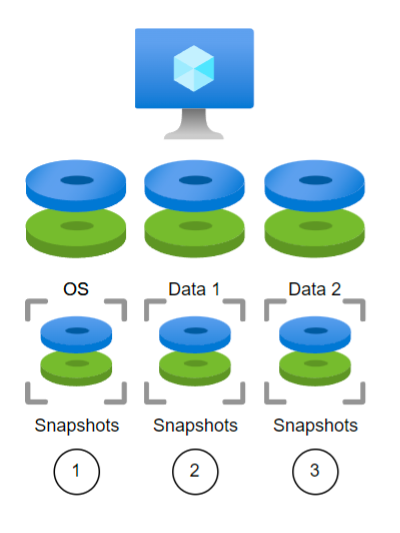
Commvault has always offered options for protecting Azure Virtual Machines (VM) by using snapshots or even installing software on the VM to provide Application Awareness. Each disk resource is individually snapped and protected. The process is serial by nature as each resource request needed to be made in series.
In Figure 1, a backup request would need to protect the OS disk, then Data 1 disk and then Data 2. All 3 create the virtual machine and would be protected together, but their snaps may not complete at exactly the same time and additional coordination with the application layer may be needed to ensure consistency at an application level.
New Restore Point Functionality
Figure 2
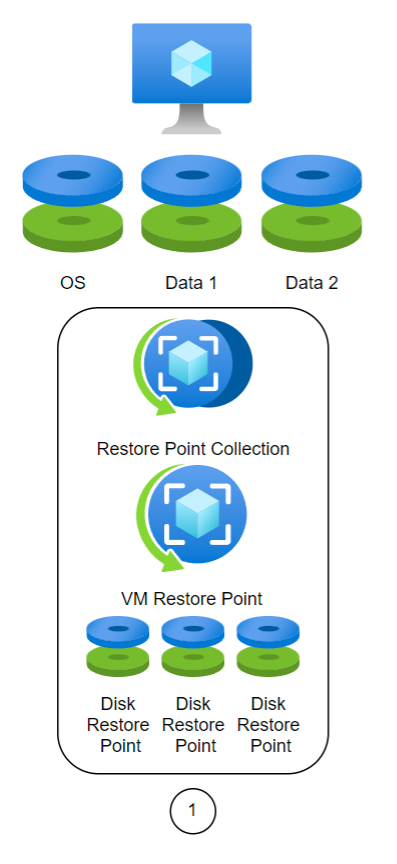
With Restore Points, Commvault will now have the ability to create collections of restore points across all volumes on a VM. When doing so, the restore process is simplified, and the collection points are stored on cost efficient storage. This is a major architectural change in data protection for Microsoft that Commvault Complete and Metallic enable with a click.
In the example in Figure 2, once a Restore Point Collection is created, the same VM would be protected as a single API call to create a Restore Point. Every Restore Point is incremental and should complete in seconds. All disks within the VM are consistent with the restore point automatically. Every Restore Point will contain a Disk Restore Point for all managed disks. The Disk Restore Point consists of a snapshot of that disk. This reduces the restore process in this example from 3 steps to 1.
How is it simplified?
Leveraging the Commvault platform to orchestrate VM protection and more importantly, the recovery of VMs at enterprise scale is a critical need. Getting away from point solutions and homebrew scripting naturally promotes growth and reduces downtime. Being able to recover dozens or hundreds of instances with a few clicks keeps end user time from being sacrificed.
Improve resiliency while reducing tech waste
Commvault supports creating snapshots in cost audited resource groups already and automatically tags resources as they are created so that cost reporting is accurate. Adding VM Restore Points to our portfolio now allows us to create the restore points in cost efficient and less redundant storage tiers. It might be a minor cost difference, but at cloud scale, the billing is in the details and every improvement brings value to the solution. There’s no tradeoff in taking advantage of Restore Points. It simplifies and reduces cost while improving resiliency. Azure Restore Points ensures that the applications and the operating system are consistent when creating these collections at the native instance level.
A quick recap
Better cost efficiency, better performance, better resiliency, and a simplified design. A resounding win! We are excited to have had the opportunity to develop this feature in lockstep with Microsoft and prove yet again our commitment to making the latest enhancements in Azure readily available within the Commvault Intelligent Data Services portfolio of solutions.
Until very recently, many enterprises were limited by on-prem infrastructure, requiring huge data centers that had to be maintained, cooled, and secured. On top of that, the enterprise-owned server utilization rate is a measly 18%, with the majority of data centers operating at energy efficiency levels below 80%. This underutilization made on-prem ripe for disruption when the cloud came about. The cloud’s on-demand scalability provided companies the ability to optimize utilization rates without the hassle of managing, powering or cooling infrastructure. Considering the benefits, it’s not surprising that the average enterprise on-prem to cloud migration led to a 65% energy reduction and 84% carbon reduction (Accenture, The Green Behind the Cloud). Moreover, AWS is set to power all operations with 100% renewable energy by 2025, with a commitment to achieve net-zero carbon emissions by 2040. They use reclaimed or recycled water for cooling and have embodied carbon in the construction of newer data centers across the globe. And as an AWS recommended partner, Clumio is pushing the boundaries of environmentally sustainable computing with its on-demand hyper-scalable architecture.
Cloud-Native Solutions are Key to Maximize Sustainability
whether you need help protecticting your data against ransomware, meeting compliance requirements, or recovering from data loss; data backups can take up a significant amount of storage space, and increase your infrastructure footprint if done on-prem. Companies must choose carefully if they are conscious of reducing their carbon footprint from their data. Some best practices include going with a cloud-native / SaaS data protection vendor if possible, implementing incremental backups vs full system snapshots, categorizing and auto-archiving data based on criticality and usage, and most importantly, investing in a platform that is architected to scale on demand. If these concerns sound like yours, Clumio can help.
How Clumio Can Help
Clumio is a cloud-native backup solution, architected with a container-based stateless data processing pipeline that leverages efficient Lambda functions. This allows adaptability and efficient scaling to optimize usage based on your exact policies. Having this scalable compute and increased utilization rates can ultimately lead to significant carbon reduction from your data estate, in addition to significantly lower TCO (save your wallet while saving the planet).
See for yourself how the industry’s first cloud-native backup and rapid recovery solution can optimize your business’s sustainability metrics. Schedule a demo and learn how your business can be up and running with Clumio in as few as 10 minutes — no need to wait for and install new infrastructure and software.
In this blog, you’ll learn how Commvault Grid makes implementing an immutable architecture easy as an integrated appliance or reference design for an all-in-one solution. With cyber-attacks increasing it delivers comprehensive data management across workloads to protect your data through 5 security layers. Commvault offers a hybrid of controls that work together to harden data against ransomware, cyber threats, and bad actors.
What is an Immutable Architecture and how do organization benefit?
Immutability is defined as the ability of any data to be maintained in a non-fungible state for a specific duration of time. Data immutability can be attained via various methods working in conjunction with each other. An immutable architecture is a model in which no updates, security patches, or configuration changes happen “in-place” on production systems. If any change is needed, a new version of the architecture is built and deployed into production.
Organizations need an immutable architecture to ensure their data is safe and secure and more importantly, ready whenever they need to restore it. Immutability is a proven technique used to reduce cyber-attacks on backup data and ensure that backup copies aren’t changed in any way.
Commvault Grid for Greater Immutability
Commvault Grid makes it easier to implement an immutable architecture as an integrated appliance or reference design for an all-in-one solution. It delivers comprehensive data management for all workloads from a single, extensible platform. Commvault employs a multi-layered approach to protect against various threat vectors and ensure data is safe. Commvault’s immutable architecture consists of 5 layers which are:
Storage I/O Controls
Zero Trust AAA Controls
Infrastructure Hardening
Zero trust isolation and air gap
Data Validation
Commvault Grid leverages the entire Commvault software portfolio providing access to all the features, functions, and industry-leading integrations with applications, databases, public cloud environments, hypervisors, operating systems, containers and NextGen workloads. Wherever your data resides, you have the ability to view it, use it, and confidently protect it. Commvault Grid accelerates hybrid cloud adoption with an integrated solution built on a deeply layered system of controls that work together to harden data against ransomware, cyber threats, and bad actors.
Examples of hidden and fluctuating cloud backup costs
Egress Fees
The majority of cloud providers will allow their users to place data into the cloud without any fees. However, this does not apply when their data is retrieved from the cloud. Cloud providers typically charge what’s known as egress fees any time data is retrieved.
If your enterprise is constantly pulling its data out of the cloud—such as migrating or recovering data— you can see how the fees can add up quickly and lead to inflated costs that are nearly impossible to predict. Egress fees are considered a hidden fee since they fluctuate based on usage and are tied to a common action (data retrieval).
Licenses
There may be a variety of licenses that are required, each with their own fee. These can snowball when cloud backup vendors require licenses for each of the data sources you back up or multiple licenses per user—something you may not realize until the bill comes.
Snapshots and Storage Costs
It is common for enterprises to create long-term storage for their production data if they need to recover it after an attack—such as ransomware. This could involve creating massive amounts of snapshots for each account in high-tier storage. Furthermore, each time a block or file is changed, a new snapshot is automatically created. These snapshots are replicated across accounts, effectively doubling backup storage costs that continue to pile up over time. Costs are further compounded when considering industry retention requirements that go beyond 35 days.
Adding to all the complexity is the fact that it’s difficult to gauge just how many of the backup snapshots in your AWS accounts are even needed. Sure, your bill can display how much you are spending in a particular region, but it doesn’t show the level of granularity regarding the age of the snapshots or assets they are associated with.
Achieve Predictable Costs and Lower TCO with the Industry’s Leading Cloud-Native Backup Solution
You can avoid excessive cloud spending and gain control over backup costs by choosing a cloud backup solution with a simple, straightforward pricing model that clearly spells out the ongoing charges.
Built natively in AWS, Clumio’s backup solution offers the scalability, performance, data protection, and faster access to innovation made possible by the cloud while avoiding the hidden costs, complexity, and limited flexibility of snapshot-based backup solutions.
Simplified Pricing
Clumio’s Pay-As-You-Go consumption model with rollover credits provides enterprises with a simplified and clear backup-as-a-service solution that ensures cost predictability while lowering TCO:
Transparency – No hidden costs, no license fees, and no egress charges—plus full visibility into data consumption.
No Friction – Choose from on-demand or commitment contracts with no setup required.
100% SaaS – No complex cloud infrastructure or software to install or manage.
An integrated cost analyzer tool that provides insights to help reduce unnecessary cloud spend
Reduced Storage Spending
Rather than retain Amazon EBS snapshots, Clumio further reduces spending by storing data in a compressed, de-duplicated format in Amazon S3, effectively cutting the cost of long-term EBS data retention. This allows enterprises to meet compliance and develop retention strategies based on business and regulatory requirements instead of costs.
Get Started with Clumio
Clumio offers more than just cost savings. In under 15 minutes, your enterprise can:
Instantly backup AWS data across your entire organization with Clumio
Gain data protection from ransomware attacks and other malicious threats via air-gapped storage with Clumio
Meet varying and complex data compliance objectives with global policies with Clumio
Lower RTO (Recovery Time Objective) and ensure business continuity in the event of downtime with Clumio
Experience firsthand why Clumio is the industry’s leading innovator for AWS cloud backup. Start your free trial, all without any pre-planning or the need to install new infrastructure or software.
We are immensely proud of this achievement. Why not? We have been in this quadrant longer than some of our competitors have even been in business.
As an innovation-driven company, we have always prided ourselves on building elegant solutions to your hard problems, which let’s face it, have only gotten harder over the last few years.
Living between legacy and hybrid cloud applications and systems, today’s CIOs and IT professionals grapple with more applications and workloads than ever. All while bolstering their security posture to protect their data from ransomware and advance transformational business projects with the resources they have at hand.
Now is not the time to take chances on unproven technologies in today’s increasingly uncertain macroenvironment. It is the time to invest for the future, so you and your organization come out stronger on the other side.
I’ve had a lot of these conversations with customers lately, many of whom are weighing these concerns with the need for a trusted, intelligent, and reliable cloud data management vendor. One that not only provides proven technology, but the flexibility and scalability needed to continue to evolve to meet tomorrow’s needs. And one with the demonstrated its ability to execute on a vision over and over.
In its latest report, Gartner highlighted a few of Commvault’s strengths in this area:
First, we provide comprehensive workload support on premises and in the cloud. This enables you to add new backup and recovery capabilities for your business regardless of the applications creating and using your mission critical data. And you can manage your data through a single pane of glass.
Next, based on your unique business needs, you may want to leverage backup software, an appliance, or software as a service. Commvault enables you to choose any or all these approaches – to balance your capital and operating expenses based on your business needs, staffing concerns, or even in response to supply chain delays.
Last, our solutions and our extensive partner ecosystem span multiple geographies extending the reach and capabilities for global enterprises. We will protect your data wherever it is or has to be.
Thank you, Gartner, for the rigorous analysis and for sharing your findings. And more importantly, thank you to all our customers and partners globally who continue to entrust Commvault to protect and manage their critical data. We owe this honor to you.
Download a copy of the 2022 Gartner® Magic Quadrant™ for Enterprise Backup and Recovery Solutions
Ron Miller recently wrote an article on TechCrunch titled “It Really Does Take a Village to Keep you Secure in the Cloud” that struck a chord with me. In his article, Ron discussed the cloud shared responsibility model and the importance of us all taking steps to ensure the security and persistence of our data. I appreciate his view of the cloud computing community as a village and the opportunity to consider everyone’s part in it. How can we help each other? How can we make this village better?
Thinking about the cloud computing community as a village; an interdependent network of individuals within a given space. Individual members have their own specializations but many have overlapping needs for which it may not be feasible to be self-sufficient. You might have a farmer, a blacksmith and a shoemaker. The farmer doesn’t make his own tools and shoes, because it would cause him to neglect the farm. Instead he gets them from the blacksmith and the shoemaker. As members of the cloud computing village, we also want to focus on our specializations, making them the best they can be, and relying on other members of the village for the other things we need.
Ron paraphrases AWS Chief Security Officer Steve Schmidt saying “AWS is a target. It has to deal with millions of events every month, most of which we (cloud consumers) never hear about.” With AWS’s security team monitoring their services and Security Guardians embedded in each service development team, it’s safe to say that AWS is doing their part. But as Steve Schmidt states, AWS data is targeted by bad actors. So what about the rest of us in the shared responsibility model? What is our responsibility and what do we need from each other? As Ron states, “Security is such a complex undertaking that no one entity can be responsible for keeping a system safe, especially when user error at any level can leave a system vulnerable to clever hackers. There have to be communication channels across every level of the organization, with customers and with concerned third parties.”
Preventative security measures are an important part of everyone’s responsibility, and there are other village members who can help with that part of your security stance. But experts agree that when it comes to data breaches, ransomware and insider threats, it’s not a matter of if, but when. This makes it imperative to back up your data outside your account and control access domain. Clumio provides an important part of keeping the village safe by offering its members turnkey, air gapped, immutable data protection. We use the power of the cloud to power incredible scale and speed within a secure, simple, intuitive backup and recovery solution that frees up your time for creating your own innovations. We know how important security is, so we’ve built in security features like SSO, MFA, end-to-end encryption with BYOK, access controls and more.
Here at Commvault, we’re continuing to live our values and celebrate why it’s OUR TIME as we connect, inspire, care, and deliver… together!
Last week, we hosted our quarterly internal Global Town Hall meeting and presented our CEO Living Our Values Awards. This quarterly awards program helps us globally recognize and celebrate our Vaulters for their incredible work!
I’m so proud to announce the inspiring Vaulters who just won our FY’23 Q1 CEO Living Our Values Awards:
Analyst Submissions Team
Microsoft & Oracle Teams
CEO Living Our Values Awards
If you are interested in joining our team and becoming a Vaulter, visit our Careers site for more information.
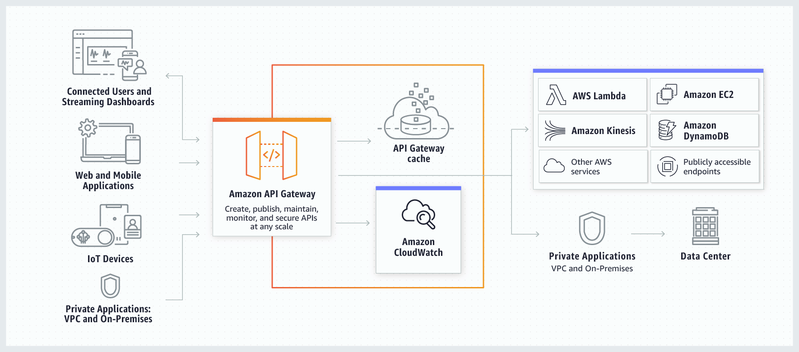
In a microservices-based architecture for an enterprise-level system like Clumio, it is impractical to have a public endpoint per microservice. One of the major problems is the tight coupling this introduces between the client and the server. In addition, each microservice needs to implement and maintain the common pieces like logging, tracing, security (authentication, authorization, rate-limiting).
An API Gateway dwells between a client and a server to proxy requests and responses between the two.
Having an API Gateway provides a unified entry-point for all the external clients and a framework that takes care of all the common pieces mentioned above. This also enables each microservice to implement its own communication protocol that best fits its requirements, independent of the Gateway.
AWS API Gateway
In addition to the above goodness provided by API Gateways, we also had additional requirements that went into choosing one:
Having a mechanism to integrate with the API Gateway in a manner that has no/minimal friction for introducing new APIs and maintaining existing APIs, so as to enable developers to focus primarily on their business logic
Given an API Gateway could potentially be a single point of failure, it should be a fully managed offering that is resilient and highly scalable
Support for Websockets
AWS API Gateway ticks all these requirements and offers good integration with other AWS services for building on top of it.
Leveraging AWS API Gateway
Swagger specification
Swagger provides a powerful representation for RESTful APIs.
We have employed the go-swagger tool which is capable of generating a Swagger specification from annotated Go code.
As a result, developers only need to annotate their REST API as per the above specification and let our framework (mentioned later) take care of integrating the same with AWS API Gateway.
Integrating with AWS API Gateway
At Clumio, all our AWS infrastructure is managed as code via Terraform. AWS API Gateway can be configured using the Terraform resources that it offers.
We use the aws_api_gateway_rest_api resource that allows us to feed the entire Swagger specification into the AWS API Gateway. The AWS API Gateway, however, cannot process a raw Swagger specification. It expects various extensions (like x-amazon-apigateway-integration) to be part of the Swagger specification so that it could configure an API seamlessly. This is where we have implemented a framework that injects the required extensions into a raw Swagger specification to make it work with the AWS API Gateway!
VPC Link Integration type
AWS API Gateway offers various integrations with your backend servers for proxying the incoming API requests.
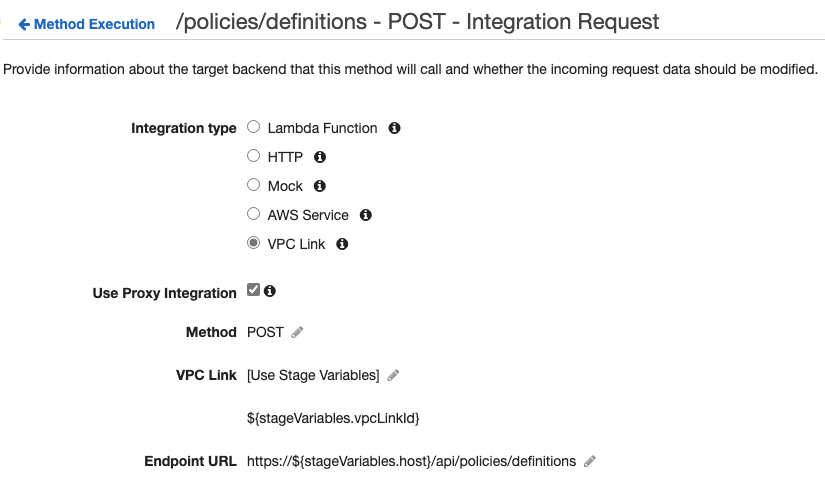
As all our microservices are bound to a VPC for tighter security, we use the VPC Link integration. This enables the AWS API Gateway to access private API endpoints within the VPC securely.
Custom Domain Names and API Mappings
By default, AWS API Gateway generates a unique domain name for the API, something like aabbccdd12.execute-api.us-west-2.amazonaws.com. For an enterprise company, we would obviously like to customize the public domain name of the APIs for our consumers. AWS API Gateway allows us to do so via Custom Domain Names.
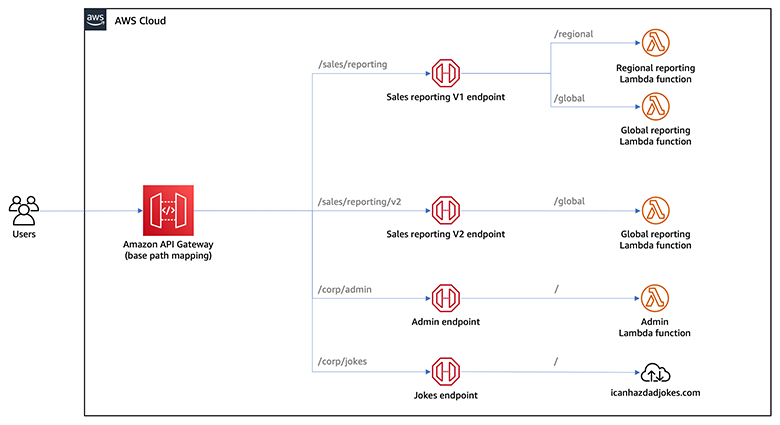
In addition, we also create separate APIs in API Gateway corresponding to some of our most dense API base paths. All these APIs are then glued together via API Mappings as below. This allows us to scale out our APIs and yet have a single public-facing domain name for them.
Lambda Authorizer, Usage Plans and API Keys
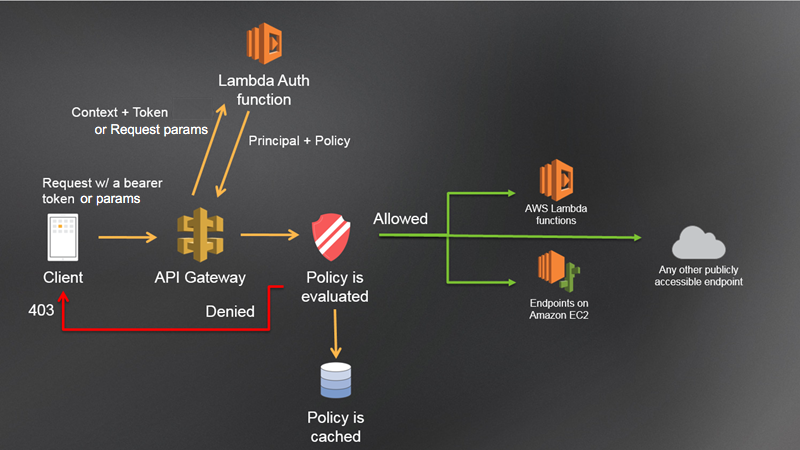
As mentioned earlier, one of the primary use-cases for an API Gateway is to enforce authentication and authorization right at the beginning of the API request lifecycle, so that only the relevant traffic hits the backend servers.
We have implemented a Token-based Lambda Authorizer which expects the following input: The authorizationToken (in the form of a JWT) can be used to implement the required authentication/authorization logic within the Lambda Authorizer to return the output as below:
The authentication/authorization decision is governed by the value of Effect (Allow|Deny) and the throttling decision is governed by the API key identifier in usageIdentifierKey. The API Key has to be associated with a Usage Plan which dictates the request quote to enforce (in terms of requests per second). We issue an API key for each client and hence are able to enforce throttling per client.
Another interesting thing in the output is context which can have any key-value pairs as required by the application. We use this heavily to capture the client information which we then pass throughout the API request lifecycle. This eliminates the need to lookup client details, while the request navigates through multiple microservices at the backend.
Conclusion
We hope you gained insight into how we leverage AWS API Gateway at Clumio and also a sneak-peek into the broader Engineering efforts that we carry out. We give utmost attention to security, scalability and most importantly adopting developer-friendly processes. This makes it easier to maintain products as we mature and scale, while being extensible enough to cater to new functionalities.
Welcome to the live stream celebrations as Commvault’s CEO, Sanjay Mirchandani rings the closing bell at NASDAQ’s headquarters in New York City.
The stream is due to start at 4pm ET on July 28th and a replay will be available shortly after. Post and follow the reaction by following #Commvault on social media.
That sense of accomplishment accompanies an added sense of relief, regardless of how long it took to achieve. But…what does this have to do with Bring Your Own Key (BYOK)? Read on.
Along similar lines, Clumio’s Backup as a Service Cloud promised to support the BYOK feature more than 2 years ago! This feature allowed customers to encrypt their backup data using their own encryption key using the Amazon Web Service (AWS) native Key Management Service (KMS) feature.
AWS KMS makes it easy for customers to create and manage cryptographic keys and control their use across a wide range of AWS services and in their applications.
When Clumio added the BYOK feature, it supported VMWare, Microsoft 365 (M365) and AWS EC2/EBS data sources as these were the data sources Clumio supported at that time. However, between then and now, Clumio added additional critical data sources like S3, RDS and DynamoDB.
Now with the most recent release, Clumio has brought BYOK capabilities to all of our critical data sources, and in doing so has achieved the resolution we started long ago. And it doesn’t stop here, as we will continue to invest efforts to bring BYOK to future data sources also.
Why do customers care about BYOK:
Doesn’t Clumio encrypt all backups already, and if yes, why is BYOK needed? It’s true that Clumio does encrypt all the backup data in its cloud with a customer-dedicated key, and that key is also rotated every 30 days. However, in some cases, certain customers have additional stringent security requirements:
How encryption works:
AWS S3 bucket keys have reduced the cost of server side encryption by more than 99% and don’t need to lookup the key for every single transaction. Since Clumio backs up data with millions of transactions, having to look up the key for every single transaction was a no-go. With AWS’S S3 bucket keys feature, Clumio can use the customers BYOK key as the Amazon S3 Bucket Key and encrypts all the data landing in the S3 bucket using the customers BYOK key.
How To Enable the BYOK feature:
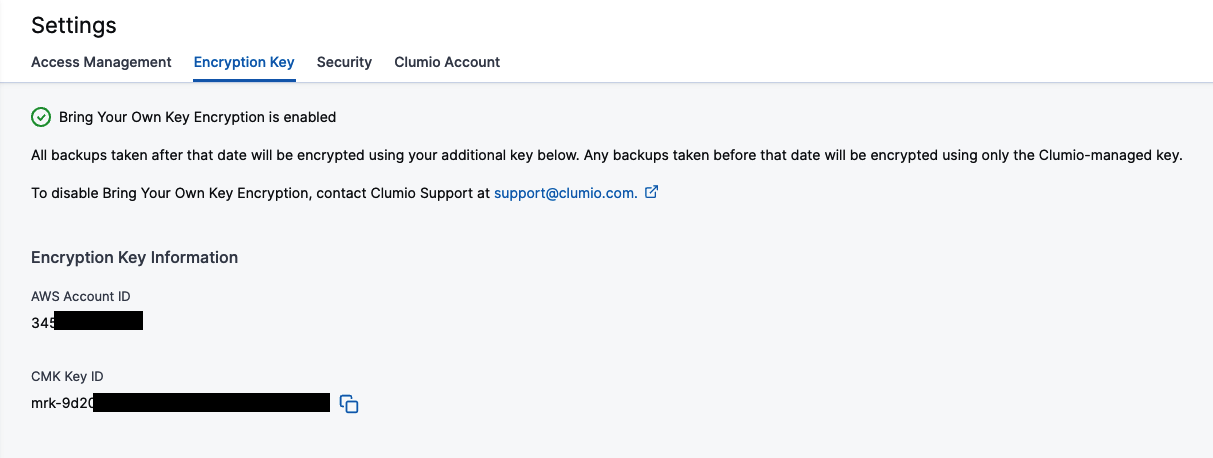
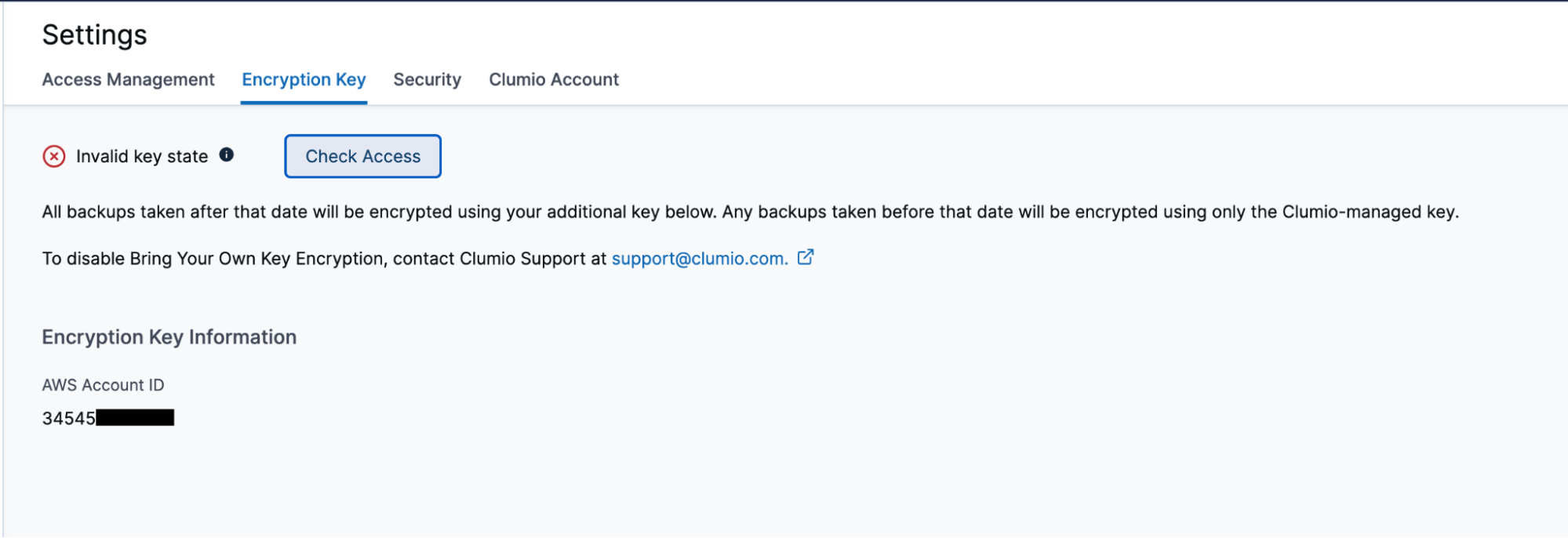
Go to Settings and Security Features – Encryption Key. When you go to the page, Clumio provides details about the feature, along with its requirements and limitations. Customers can proceed by deploying the AWS CloudFormation StackSets inside any one of their AWS accounts where they want to use the BYOK key.
The reason StackSets is needed is because Clumio will need to create a multi-region (global) key and use that for encrypting backups in all regions where the data sources are present. Once successfully deployed, customers can verify the connection in the Clumio UI by visiting the page at any time.
The green check at the top of the page indicates that everything is working as expected. For whatever reason, if the key is not accessible, it changes to a red X and allows you to Check Access again to see if things are resolved and working again.
How to verify and audit Clumio’s Access
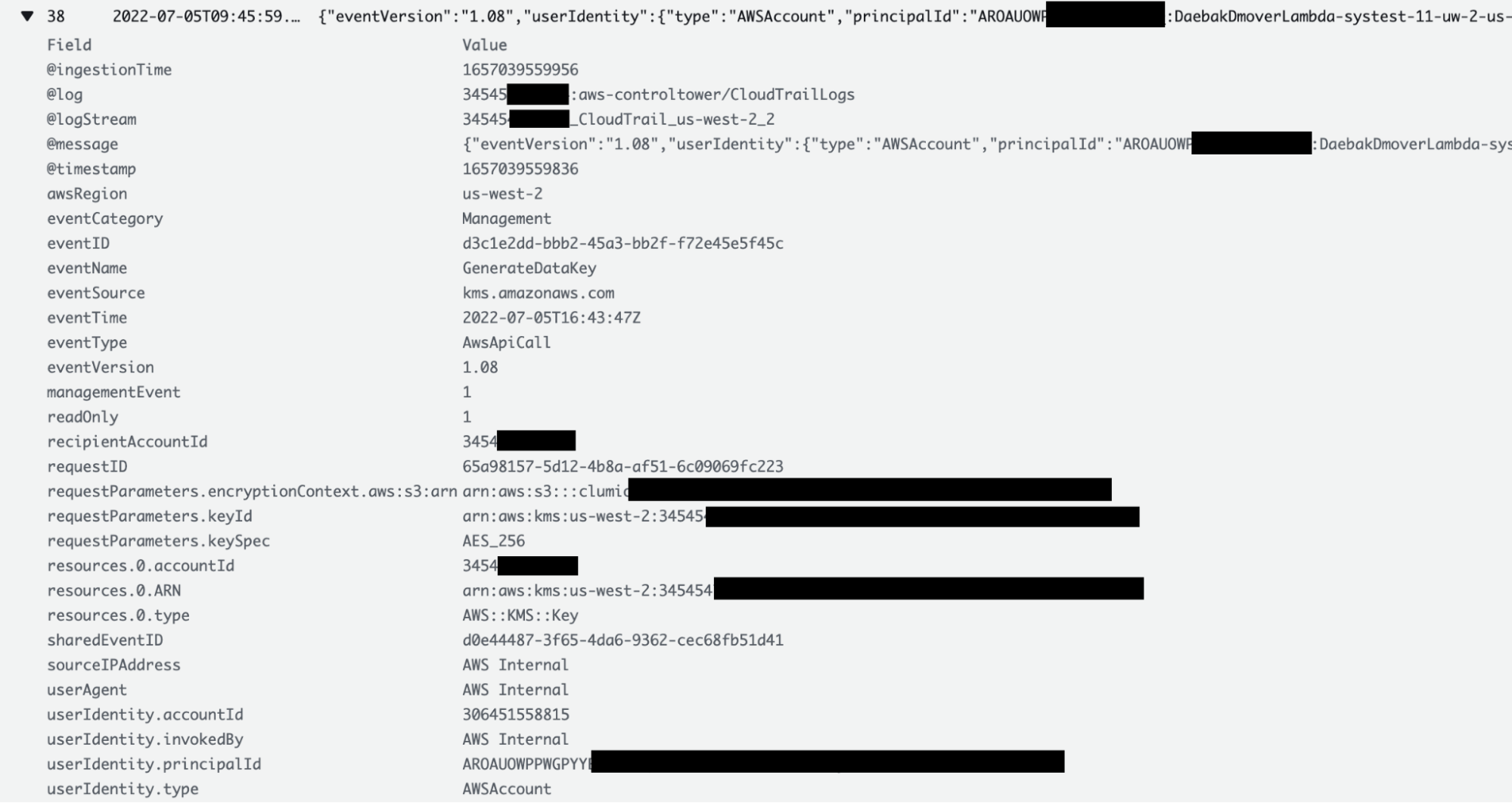
One of the advantages of the BYOK feature is that customers can verify and audit any time Clumio has accessed their key. Customers can go to the CloudTrail logs and see all the details of each time Clumio accesses their key, including the reason for access. Customers can go to the CloudTrail Logs section in their AWS account where the AWS CloudFormation StackSet was deployed.
For S3 bucket keys, since the keys are cached by the AWS S3 bucket keys, access might not be present for every single transaction. However, keys are accessed for every single transaction for EC2/EBS, VMWare and M365 backups.
What happens when key is no longer accessible:
Remember this: BYOK gives you the power of encrypting all backup data, but on the flip side, if the key is lost, then you’re in big trouble! Luckily, keys in AWS aren’t like physical keys and even if someone deletes them, customers still get 30 days to recover them. For whatever reason, if the keys are not recovered, then backup data would be rendered useless. It is meant to be used as a fail safe mechanism but great care should be taken to use this feature.
I joined Commvault fresh out of school and at the height of the dot.com boom in 1998. While I had other offers in hand, I liked the people I met during the rigorous interview process and was drawn to an opportunity to cut my teeth on something that would move the needle and bring real value for our customers.
Opportunities like this don’t come around often. For me, it was the right decision.
Jump ahead twenty years to when our new CEO Sanjay Mirchandani saw the opportunity to transform Commvault into a software and SaaS data management company. I couldn’t miss this once-in-a-lifetime opportunity. After all, how many times do you get to start with a clean sheet of paper and launch something that would transform both your company and your career?
No matter how it turned out, not taking this chance would have been a huge regret.
No regrets were necessary. Sanjay gave me and a small, stealth startup team a big goal, a little funding, and permission to break the mold to develop the best backup-as-a-service offering available. We had to be agile – make decisions, see it through, fail fast, and readjust. Together, we launched our Metallic software-as-a-service offering on-time later that year. And just six quarters later, it became a $50M business for Commvault.
For my career, this was the push I was looking for. It wasn’t engineering for engineering’s sake. We were designing a product that was tailored to the end-to-end customer experience – from trial to onboarding to purchase to support to renewal. We had to look at it from the outside in, working cross-functionally, and with customers and partners to plan for the entire user journey.
It was an amazing and incredibly rewarding challenge. However, opportunities like this are rare and can be a little risky because you’re stepping into the unknown. So I thought I’d share my advice to help you seize your next career opportunity:
Get uncomfortable. Look outside your role and even your chosen function for new opportunities. And know, a little bit of “imposter syndrome” is good – It means you are expanding, growing, and pushing your boundaries.
Look from the outside in. Take time to understand your stakeholders’ perspective and expectations. Not just about the product itself, but the broader customer experience – how it is priced, where can it be purchased, and how they will pay for it.
Don’t fall in love with your ideas. Great ideas can come from anywhere and anyone, especially working cross-functionally. And when you are moving fast, your ideas often have a shelf life. So be open, flexible, and agile.
Overcommunicate. Time is not a luxury in technology. Communications is critical to align people, functions, and the field to work better and faster. Don’t skip this step.
Bend it – don’t break it. In a role like this, it is common to ask why something it done a certain way. Look for opportunities to make a product or process better, but don’t break it (or the person behind it).
I’m fortunate. I joined a company that inspired me to look for new opportunities and empowered me to pursue them. And, in many respects, I am just getting started as CTO of our Metallic business – a ride I’m more than ready for. If you haven’t already found that once-in-a-lifetime opportunity, my advice to you in your career is to leave no room for regrets.
It’s time to get in on the Metallic Data Management as a Service (DMaaS) offering that’s gone from zero to $50M in record time
At Microsoft’s Inspire partner event this week (July19-21), there’ll be a significant focus on data management. Data is the lifeblood of any organization, and the threats to data loom larger today than ever before.
Today’s customers face significant data challenges. They’re looking for trusted experts—partners they can rely on to solve these issues with innovative, proven solutions. Customers are also suffering from point solution fatigue: needing one solution to protect some data, another to protect other data—on and on and on. They’re also looking for solutions that are proven to deliver results—solutions that deliver the results they promise.
Tired of managing so many solutions to meet your customers’ data challenges? (They are, too!)
Now, you can help end this madness. With Metallic, you get industry-leading Commvault technology, in a lightweight SaaS-delivery model. Enterprise data management that’s proven to safeguard entire customer data estates from deletion, corruption, and attack. It empowers businesses to protect and manage any workload—no matter where it lives and where it may need to live in the future—across on-prem, cloud, hybrid cloud, multi-cloud, SaaS, and the edge. It’s something no other solution can deliver on—and it’s exactly what your customers need.
If you want to be the partner of choice and win big as data protection transforms, it’s time to take a serious look at Metallic. If you don’t have a data protection practice and you need to start one, Metallic can be the cornerstone of your new practice. Here’s why:
The world of data protection and data management is moving to SaaS: All the experts agree that data protection is swiftly moving to SaaS. If you’re not offering solutions that meet your customers’ needs, you risk losing your customer base to someone who is. With Metallic, Commvault gives you a solution in your portfolio that is the best in class, best in DMaaS—and so much more. Plus, no infrastructure or operational support needed—Metallic provides it all for your customers.
Metallic is built on proven technology and a shared vision with Microsoft: Metallic is built on Azure and born out of 25+ years of joint engineering with Microsoft. Metallic is proven technology—it’s feature rich, supporting the widest range of workloads.
Ransomware recovery starts before you’re compromised: As the ONLY DMaaS provider to achieve FedRAMP High In Process – In PMO Review, Metallic offers a hardened, multi-layered approach to preserving and recovering data in the face of attack. But we take it one step further. Withfully integrated cyber deception, Metallic ThreatWise™ enables you to actively defend your data the moment an attack begins (not just recover from them). These unique and differentiated capabilities drive bad actors away from real data, and immediately surface zero-day and unknown threats before encryption, leakage, exfiltration, or theft. It’s unparalleled protection you can offer with Metallic.
Are you ready to win in the rapidly transforming data management market? If so, you’re ready for Metallic.
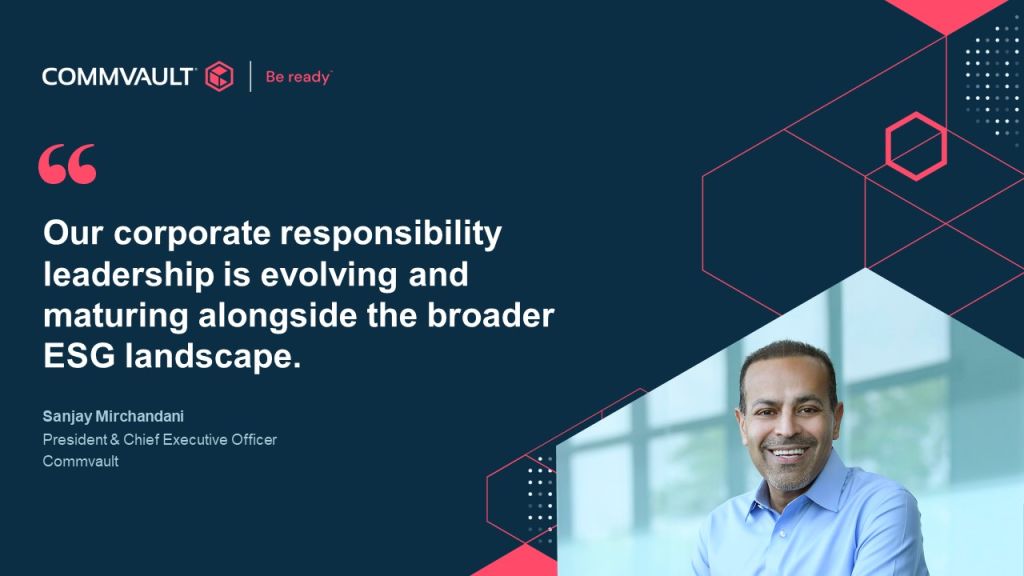
CSR is all about showing the human side of us. It’s about showing how we truly care about our business, our planet, and most importantly, our people! We all know that over the past few years, the importance of care, support, and creating a better world have never been more top of mind. Making a difference and having an impact is core to Commvault’s culture, and we are stronger than ever…together!
Our values – we connect, we inspire, we care, and we deliver – are at the root of everything we do. These guiding principles shape our daily interactions with each other and our communities, power our passion for technical excellence and outstanding customer service, and support our overarching commitment to responsible, sustainable, and ethical business. Whether we’re helping our customers manage their data more sustainably, supporting the development and inclusion of our global workforce, or giving back to our communities, we continue to prioritize our stakeholders and treat long-term sustainability as a non-negotiable requirement of doing business.
Building both a better today, and a better tomorrow, is at the heart of who we are. And with innovation at the core of everything we do, we continue to drive new sustainability initiatives to advance our progress in 2022 and beyond.
I’m so proud to see all the incredible efforts of our Vaulters represented in this year’s report. More to come on our CSR efforts, so stay tuned!
Ransomware threats continue to dominate headlines — and for good reason.
The good news is that you can strengthen your organization’s resiliency and security posture and stay one step ahead of ransomware with proactive data security best practices.
After all, the steps you take today to protect and defend against threats can determine how quickly your organization can resume normal business operations if you get hit with ransomware. For comprehensive coverage of cyber threats, you must proactively invest in preventative security measures to keep data safe and recoverable from attacks.
Follow these five best practices to implement a solid ransomware readiness strategy.
Have a Multilayered Security Plan
With ransomware threats becoming increasingly sophisticated, a multilayered approach to securing your data dramatically helps reduce your organization’s risk. Commvault believes a multilayered security framework that can protect, detect and recover is the best approach to protecting and recovering from ransomware attacks. While the average is 21 days of downtime, we have seen organizations resume operations as quickly as two days when leveraging a multilayered security approach.
Learn about Commvault’s multilayered approach to protect, detect, and recover from cyber threats. Learn more >
Control Who Has Access
Effective data protection starts with a strong foundation. Hardened security protocols, such as multifactor authentication, advanced data encryption, and zero-trust user access controls prevent unwarranted access to systems and data. With Commvault, you can identify risk exposure and coverage status from a single management console across your entire environment.
Watch this video to see how Commvault provides data security controls.
https://play.vidyard.com/xqQA12tnxA4dNEmSAgDj9P
Isolate and Air Gap
Data isolation using air gap techniques can reduce the exposure of backup data to malware and other vulnerabilities. Commvault suggests implementing a 3-2-1 back strategy for greater ransomware protection: 3 copies of your data, on 2 different media types, with 1 copy offsite. Utilize your cloud first initiatives for not just primary data but to secure your backups as well. Commvault provides a modernized approach to air gapping that is not only simple but also provides the maximum level of security needed to protect against lateral moving threats.
https://play.vidyard.com/i7Y7ACrZYzaSXEXkyBzibq
Segment Your Networks
If a cyberattack is successful, don’t give outside threats unlimited access to your entire network. Divide your network into smaller segments to prevent lateral movement and compromise of your business-critical data. Commvault augments your security strategy by providing the flexibility to quickly add cloud storage using Metallic® Recovery Reserve™. Using Metallic® Recovery Reserve™, you can easily implement an offsite cloud storage location, providing a virtual air-gapped, immutable copy of your data to satisfy the 3-2-1 backup storage rule and safeguard your data from cyberattacks.
Improve Security Posture
You need the ability to catch threats before they impact your business. Commvault provides centralized visibility and management through a single, unified platform with security dashboards and alerts to quickly identify risk exposure, detect suspicious activity, and resume business operations. The Commvault Security Health Assessment Dashboard offers a single place for IT Admins to bolster security posture quickly, identify risks in real-time, take corrective action, and rapidly recover data.
Commvault ransomware protection solutions are built on responsiveness, innovation, and rapid execution to help you stay one step ahead of ransomware. With Commvault, you have the most robust data management features at your fingertips to ensure your data remains secure and resilient, keeping your business ransomware ready.
Want to gain more insight into securing your enterprise data to avoid becoming headline news? Read how five organizations were attacked, how they recovered, and their lessons learned. Read Now >
Fred is the VP of Technology at BioPlus Specialty Pharmacy, the nation’s largest non-payer specialty pharmacy. They have physical locations in six states and are licensed to fill prescriptions in all 50, with over 500 employees. BioPlus innovated a 2 hour acceptance guarantee, 2 day ready to ship guarantee, and 2 click online refills.
The Pain Before the Cloud
Computing in an on-premises environment, BioPlus’s IT team was always playing catchup. They felt they were chronically behind, as the company was growing faster than the team could add servers, technologies and solutions. They knew they needed to move to the cloud to better enable their growth. BioPlus operates in a highly regulated space, subject to HIPAA, Medicare and PCI compliance standards, and of course the medical field is known to be a prime target of ransomware attacks. Given those realities, they knew data protection was of the utmost importance, and selected Clumio to help fufill that need.
Unlimited Scalability for Unlimited Business Growth
Once BioPlus decided to move their environment from on premises to the cloud, their journey took about 11 months. After considering all the options, they selected AWS because they felt those services would best support BioPlus’s brand promise and speed to service. They needed virtually unlimited resources to enable growth and scale as they expanded into new markets. The other very important factor was AWS’s security and compliance. Given BioPlus’s decision criteria for their cloud environment, it’s no surprise that they selected Clumio as their data protection provider. Fred loved that Clumio’s infinite scalability meant he wouldn’t have to worry about backup keeping up with growth. Especially considering that patient data like records and lab work tend to expand exponentially. Clumio’s elasticity was and is key to enabling BioPlus’s growth and success.
Data Protection Challenges
If one thing is a given, Fred knew their data had to be secure, and liked that Clumio is built with security at the forefront of thought, from front to back. Additionally, he had to consider the long-term retention requirements for patient records. HIPAA requires 6 years, and CMS requires 10 years for medicare providers. HIPAA also requires backed up data to be air-gapped. Because BioPlus processes payments, they are also subject to PCI, which requires end-to-end encryption. Clumio delivers on all of these needs.
Finding Even More Benefits in Clumio
Fred and his colleagues at BioPlus were already thrilled with everything Clumio delivered, but there were a few additional wow factors that really sealed the deal. First was the speed to implementation. BioPlus was able to have their Clumio backups fully up and running in less than a week from signing up. They also needed fast recovery times, and the ability to restore individual files. Finally, the fact that Clumio did all of this with SaaS simplicity meant Fred’s team could focus on their many other tasks. Then there’s the fact that Clumio saved Fred about 20% vs the other solutions he considered. This was naturally a welcome benefit.
More Details in the On-Demand Webinar
In the recording, Fred and Jeff go into much more detail on all of the points above, and they answer the audience’s questions about encryption key rotation, the future of healthcare and pharmacy technology, moving core legacy applications to the cloud, and more. If all this sounds interesting.