L’enregistrement et la surveillance des événements dans des fichiers journaux vous apportent plusieurs avantages, notamment, mais sans s’y limiter :
Detecting breaches: Just like your security camera helps capture any unknown person entering your home, audit logs help detect login events that seem suspicious. If your administrator is logging in at 3am from Russia, you know something is off.
Demonstrating compliance: Sometimes, even if the instructions say to not allow your kids to watch TV, your nanny still allows them to do so! Your security cameras help to validate whether your nanny is compliant with the instructions or not. Similarly, if your business requires your assets to be backed up at a certain frequency, audit logs keep a record of it so if audited, you can demonstrate compliance.
Integrating with SIEM (Security Incident and Event Management) solutions: In today’s IoT (Internet of Things) world, mutual interaction happens between security cameras, smart lock, motion sensors, smart lights etc. All of these coordinate amongst themselves using Apple HomeKit or Google Assistant. Similarly, you also want audit logs to flow into a centralized SIEM solution. This helps organizations get all the necessary logs in one place and build workflows from it.
Valuable insights: Footage from your security cameras tells you which neighbor knocks your garbage bins down or when birds come to drink water from your fountain. Similarly analyzing audit logs can provide insight into which assets behave nicely and which assets have challenges while being backed up.
After talking to many customers, we realized that the majority of issues they face stems from hardware centric solutions such as backup servers and appliances that have limited resources in terms of CPU, memory, and disk. Also, the user experience is not optimized for today’s cloud centric world and customers are forced to build and run complex scripts. To address these issues, we went back to the drawing board to build the right architecture. We wanted to ensure that we have:
Always On logging: Since some hardware/software vendors, by definition, have limited resources, they do not enable logs by default. Customers have to choose whether to enable logging. This is like having a security camera that is not turned on because the vendor wants to save your energy bill. Clumio, being an authentic SaaS solution, has access to nearly infinite resources and turns on audit logs for all of its customers at no additional costs.
Capture in-depth information: Even if your backup vendor offers logging, sometimes the logs which do not capture all the important details. When these logs are analyzed by someone in your SOC (Security Operations Center) team, they require as much detail as possible. The Clumio SaaS, by default, logs all the relevant information to ensure that security investigations don’t get stalled due to lack of detail. With Clumio, you always get 4K UHD, whereas your backup vendor may recommend you choose a lower resolution to accommodate their shortcomings.
Do not miss events: With hardware/software based solutions, resources like memory and disk are limited. When an appliance is performing some operation (like a backup) and concurrently wants to write to an audit log in a low memory situation, guess what operation it’ll perform and what it’ll drop? This challenge is not present in Clumio’s world due to our capability to consume resources on-demand. We also architected our service correctly to ensure that logs are captured before and after any events happen. Clumio can record every single day for 24x7x365 independent of weather conditions, but competitors may not have video for days with snowfall.
Scale elastically: Some customers have had to make a difficult decision of extracting logs every week because of the limited capacity of the appliance. When they expand their data protection coverage to include a new asset, suddenly they find they only have capacity to hold the logs for 4 days. These challenges are common in the appliance world but in Clumio’s SaaS world, there are no resource constraints. We can tap into our infinite disk resources to capture as many audit events that our customers can generate. The issue of limited storage is also very common with security cameras but with Clumio, you get the equivalent of unlimited video storage in the cloud, and you can access it at any place or time.
Help find that needle in a haystack: Clumio supports granular filtering capabilities so customers can find the exact information they seek. This is similar to finding the exact frame in the security camera footage that has the thief’s face clearly captured.
Clumio has been investing in its audit logging capabilities by architecting an audit log solution to meet and exceed customer expectations. With increased adoption of cloud and SaaS services, many customers are moving towards SIEM in the cloud. Logs can stream directly from Clumio to your cloud. In this world, even if your network gets compromised, attackers will still not have access to your logs.
More related posts
Architect for Tomorrow: Unified Data Protection as the Foundation for Resilience
Certains disent que les meilleures choses de la vie sont gratuites, mais en matière de protection des données dans le cloud, une solution gratuite ne vous offrira peut-être qu’une partie de ce dont vous avez besoin et finira par vous coûter plus cher à long terme. En fin de compte, il est bon d’avoir le choix et d’examiner les avantages et les inconvénients de chaque solution de protection des données dans le cloud public afin de vous assurer d’obtenir ce dont vous avez besoin au moindre coût.
I am sure that many people thought to themselves, “what is Clumio doing providing free snapshot management capabilities since snapshots are not backups?” You are correct, snapshots are not backups, but they do have their place in the public cloud.
Snapshots are an awesome operational recovery mechanism for applications that need point-in-time recovery in AWS.Operational recovery might be the only requirement if you are an early cloud adopter, or for most, it can be part of a broader holistic data protection solution that requires backup of data with longer than 14 – 30 days of retention for compliance requirements.
We are providing this snapshot management capability for free to our customers, versus charging for it like many of our friends in the industry. It is only part of a complete data protection solution in the cloud. Although I think they should rename it to AWS Operational Recovery instead. 🙂
Quels sont les avantages et les inconvénients des « snapshots » sur AWS, et pourquoi ne s’agit-il pas de sauvegardes ?
L’un des principaux avantages des instantanés réside dans la possibilité de restaurer rapidement les données en cas d’erreurs, de suppressions accidentelles ou de corruption des données. Les instantanés sur site sont généralement stockés sur la même baie ou infrastructure applicative que l’application principale afin de permettre une restauration rapide. Sur AWS, les instantanés sont stockés dans le même compte AWS que les données de production. Quel que soit leur emplacement, ces instantanés sont généralement conservés pendant une durée relativement courte, car leur utilité pour la Recovery opérationnelle diminue avec le temps.
Beyond snapshots, backups are required to be held outside the production environment to ensure you have access to your data, even when the production infrastructure goes down or has major issues. Backups are also stellar at fine-grain recovery as they are indexed and cataloged for quick granular retrieval outside of production. Compliance backup goes even further, as it needs to be kept for legal or compliance needs, which need to be protected even when an entire site or account is compromised.
One of the major cons of snapshots is they fail miserably in both functionality and cost when used for backup and long-term compliance. For example, let’s say you have a new application you developed or moved from on-premises that has a requirement for 30 daily backups and 12 monthly backups for long-term retention. Snapshots are stored on the same account as the production data, so if you fat-finger a script, delete the wrong thing, or a bad actor gets access to your account, you lose the backup and potentially the data. This is obviously bad.
Pour éviter cette vulnérabilité, vous pourriez toujours répliquer ces instantanés vers un autre compte AWS à des fins de sauvegarde, mais vous devrez alors supporter des frais de transfert, payer le double de la facture des instantanés, et si vous utilisez des services PaaS tels que RDS, vous serez obligé de conserver des copies complètes plutôt qu’une chaîne d’instantanés. Comme aucune des données n’est indexée ni cataloguée, vous devrez alors tout restaurer et retrouver les données par vous-même. La récupération des données est également fastidieuse, mais les coûts liés à ce scénario suffisent à eux seuls à rendre les instantanés inutilisables.
Why use Clumio’s Free Tier for Operational Recovery instead of AWS Backup or snapshot managers?
Clumio’s backup as a service for native AWS services provides a holistic data protection solution well beyond snapshot management. As you proceed along your cloud journey, Clumio can provide a single data protection service to help with your enterprise needs. Maybe today you use snapshots for operational recovery in a testing and development environment. When the application goes into production, the requirements change and you need more protection, yet you don’t want and probably didn’t plan for massive costs with snapshots.
With Clumio, you can leverage our unique air gap protection, full indexing and catalog, and granular restores of files for EBS or granular record retrieval for RDS via direct query access to our data lake. The experience is stellar and can be turned on for any application requiring these features beyond snapshots. The best part is all of this may be delivered at up to 50% less cost compared to AWS snapshots.
En quoi consiste l’expérience Clumio en matière de gestion des instantanés ?
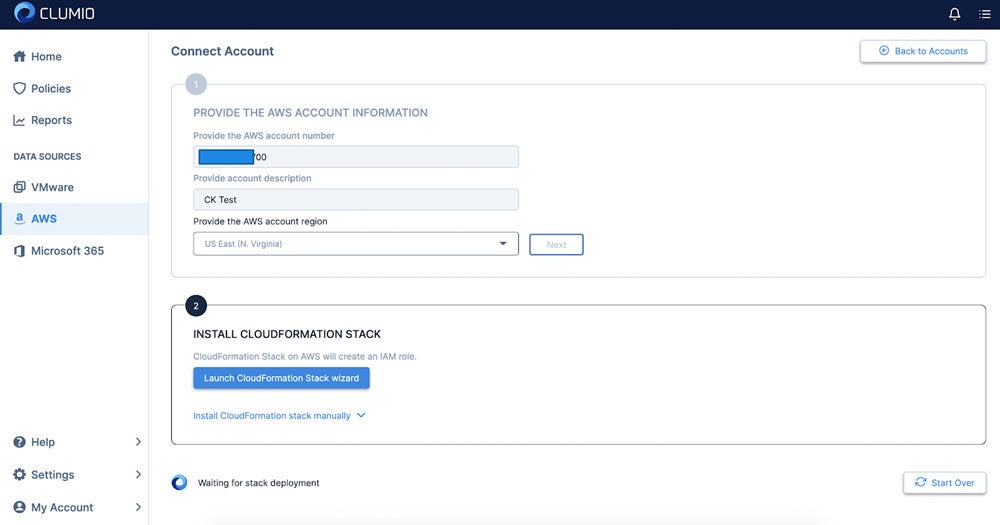
Comme pour tout chez Clumio, l’expérience est simple et la mise en service ne prend que 15 minutes. La première étape consiste à créer votre identifiant de connexion, ce qui se résume à saisir une adresse e-mail et un mot de passe. Ensuite, vous saisissez les informations relatives à votre compte AWS, notamment le numéro de compte AWS, la description du compte (pour vous en souvenir), la région AWS, puis vous cliquez sur « Suivant » avant de lancer l’assistant CloudFormation Stack :
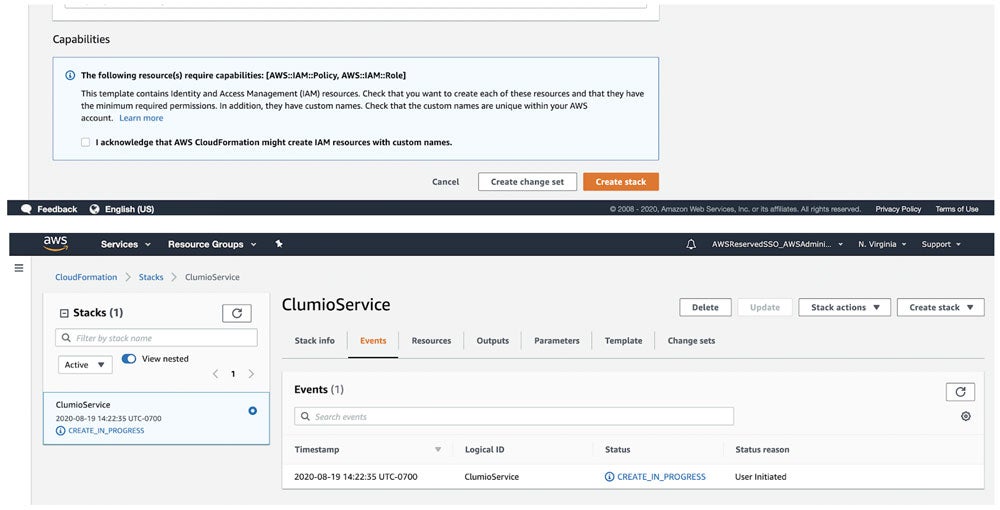
This will kick you over to AWS to create the stack. Click Create stack and wait about 3 – 5 minutes to complete.
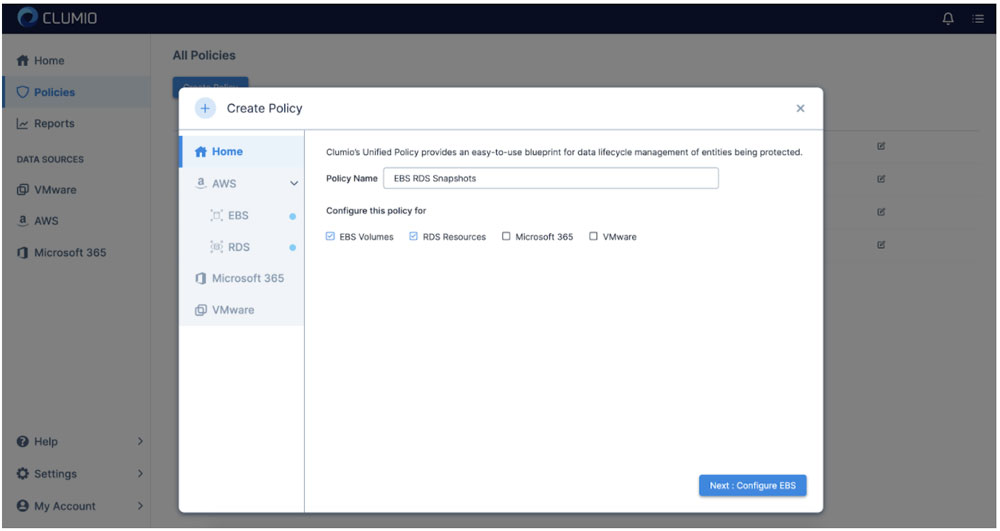
Une fois cette opération terminée, votre compte sera soumis à des services d’inventaire. Vous pouvez également appliquer ce même processus à tous vos autres comptes que vous souhaitez protéger. Une fois cette étape franchie, la prochaine consiste à créer une politique unifiée pour EBS et/ou RDS.
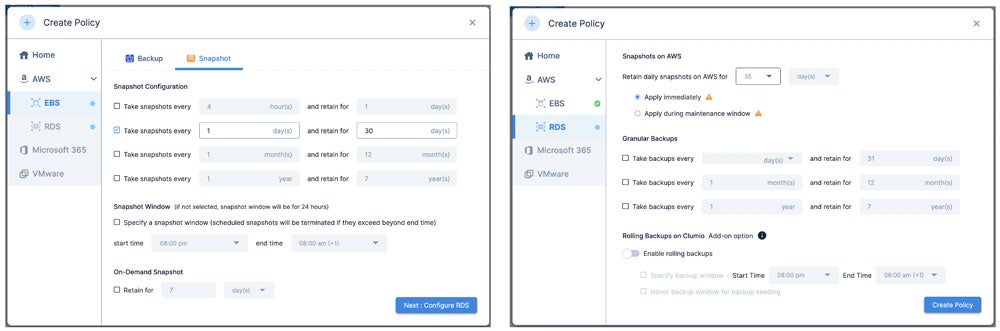
Définissez les politiques pour une durée maximale de 30 jours pour EBS ou de 35 jours pour RDS :
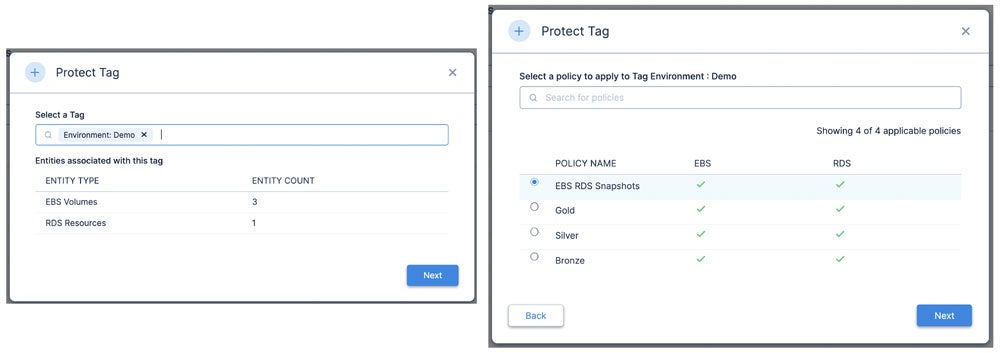
Clumio s’appuie sur les balises existantes pour aligner les politiques ; l’étape suivante consiste donc à déterminer les balises que vous souhaitez protéger à l’aide de la nouvelle politique que vous venez de créer. Cela vous permet d’associer des balises à des ressources spécifiques afin de les protéger à l’aide de cette politique.
That is it! Now you are up and running with Clumio’s free tier for operational recovery for both EBS and RDS.
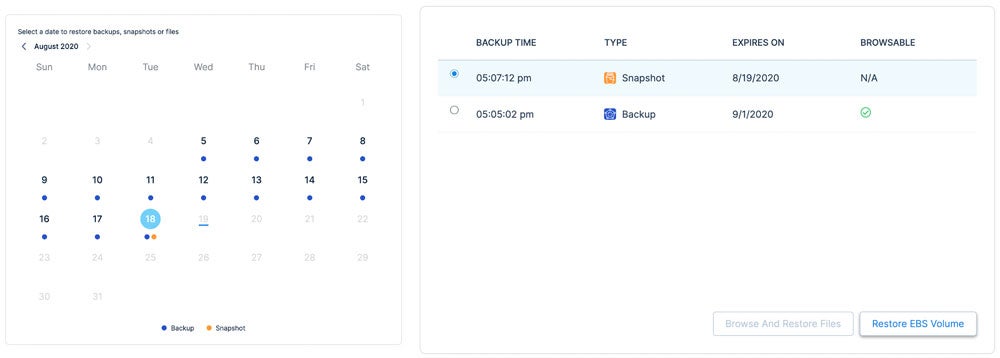
Now that we have operational recovery available for EBS and RDS, let’s review the restoration process for EBS. First, you pick the EBS volume you want to restore, then define the point in time you want to restore. In this case, I have backups (shown in blue dots) and snapshots (shown in orange dots). When you click on the date it will give you options for both.
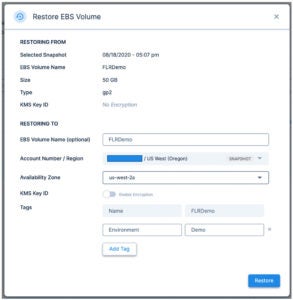
Vous pouvez ensuite restaurer le volume sur n’importe quelle zone de disponibilité (AZ) disponible.
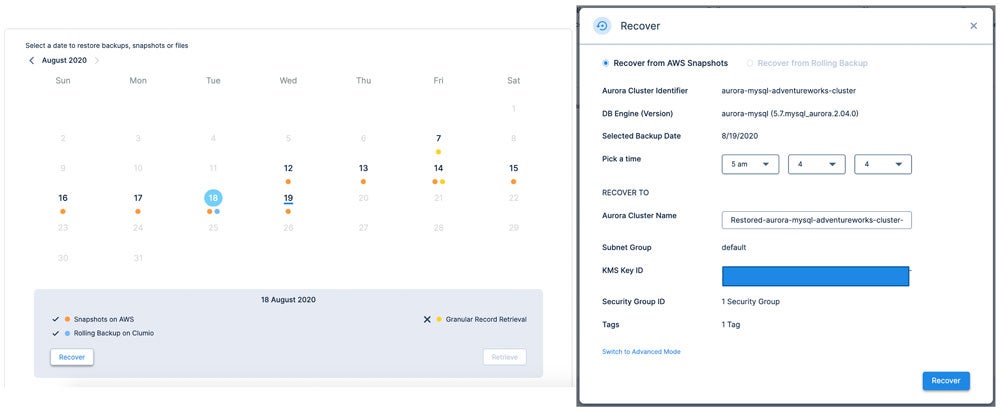
RDS is a similar experience, but slightly different as there are multiple options for the protection of RDS available including rolling backup (time-lagged RDS instance in Clumio) and granular record retrieval (long-term backup).
Commencez par choisir une date de restauration pour laquelle un instantané est disponible (point orange), cliquez sur « Récupérer », puis sélectionnez l’instant précis auquel vous souhaitez récupérer la base de données, à la seconde près. Dans ce cas précis, je restaure la base à 5 h 04 min 04 s.
As you can see in this quick overview, protecting AWS resources for operational recovery is incredibly easy! No matter if you are developing net-new applications, lifting and shifting legacy applications from your on-premises data center, or a cloud-optimized veteran with 100% of your applications running on the cloud, Clumio has a solution to help. For more information, check out our backup as a service for AWS.
À la prochaine, restez « SaaSy », mes amis.
More related posts
Architect for Tomorrow: Unified Data Protection as the Foundation for Resilience
In 2007, ten years after the company was founded, Netflix was slinging rentals of Weekend at Bernie’s in red envelopes by mail. Anyone remember the last Netflix DVD that they failed to return? Not saying mine was Weekend at Bernie’s, but it very well could have been. In 2007, Netflix pivoted to streaming services. As early as 2011, they realized that their digital content suppliers would ultimately be their competitors and they shifted from a reliance on third-party content to becoming a producer of original content. In July of this year, Netflix broke HBO’s record for the most Emmy nominations.
Netflix n’a pas démarré avec pour objectif final de bouleverser Blockbuster, mais avec la ferme intention de se lancer dans le streaming dès que la bande passante et les contenus numériques seraient facilement accessibles. Après tout, dès le départ, l’entreprise s’appelait Netflix, et non pas DVDsDirect.com. À ses débuts, elle s’est concentrée sur des objectifs à court terme et a continué à privilégier le client plutôt que la concurrence. Elle a également eu la chance de se lancer sur un marché gigantesque face à quelques concurrents dépassés et en perte de vitesse, qu’elle a pu déstabiliser très tôt. Chez Clumio, nous avons beaucoup de projets intéressants que nous souhaitons concrétiser. Il existe également une multitude d’opportunités faciles à saisir.
For those who have spent time in the data protection space and don’t know Clumio:
We’re relentlessly focused on simplifying data protection with a secure, air-gapped backup and recovery service for a world where customer data is increasingly distributed across clouds, SaaS and on-premises realms. We’re also here for a world where the bitcoin-seeking boogie man is just as much of a threat as a natural disaster.
We’re a company focused on customer delight. We belive in simplfying data protection. Clumio can be turned on in as few as 10 minutes and our customers can go focus on more important things to drive their businesses forward.
We’re a platform company with our eyes to the horizon. We seek to deliver value creation opportunities as a by-product of our data protection offering. Think analytics and ETL. Think multi-cloud data management and cloud arbitrage. Our follow-on acts are why this author joined and why smart people with backgrounds in search, security, analytics and cloud are steering the company, on our board or have voted for us with their wallets.
À l’attention des analystes, de mes amis et des membres de ma famille qui ne connaissent peut-être pas très bien Clumio :
Clumio for VMware Protection = Weekend at Bernie’s mailed in a Red Netflix Envelope. Protecting on-premises assets is our “DVD in a red envelope” use case. It’s our “right now” interest simplifying and disrupting the private cloud data protection market, and it’s a massive market that’s ripe for disruption.
Clumio for Cloud Native Services and SaaS Protection = Streaming The Office on Netflix. This is an emerging market as organizations move to public cloud and SaaS and find that the native data protection services offered by traditional providers are purpose-built for the data center, short on functionality and super costly.
Clumio Data Platform = Netflix Studios. I’m going to venture a guess that Ozark helps drive far more consumers to the Netflix service than Weekend at Bernie’s. Over time you will see us evolve from being solely focused on data protection to opening up the platform to afford customers and their partners the opportunity to derive greater value than just operational recovery. The proof points and hints are already there if you look for them.
Thanks for putting up with this author’s incessant desire to trot out analogies. It’s just that signing up for and deploying a protection strategy with Clumio is about as uninvolved as signing up for Netflix. And just like the Netflix service, new content and goodness arrives while you sleep.
More related posts
Architect for Tomorrow: Unified Data Protection as the Foundation for Resilience
Downtime costs businesses thousands per minute, and traditional backup alone is not enough.This guide covers what cloud recovery is, why it matters, and how to build a strategy that keeps your data safe.
La Recovery dans le cloud est un domaine en pleine évolution. Voici les points les plus importants à retenir de ce guide :
La reprise après sinistre dans le cloud allie protection des données et Recovery rapide afin de réduire les temps d’arrêt et les pertes de données.
Les violations de données coûtent désormais en moyenne des millions de dollars aux entreprises, ce qui rend une stratégie de reprise après sinistre dans le cloud plus cruciale que jamais.
Backup and disaster recovery serve different purposes – backup preserves copies of data, while disaster recovery focuses on restoring operations after a failure.
Parmi les bonnes pratiques, on peut citer la définition d’objectifs de temps de reprise (RTO) et de point de reprise (RPO), le respect de la règle de sauvegarde « 3-2-1 », la hiérarchisation des charges de travail en fonction de leur criticité et le test régulier des plans de reprise.
Clumio par Commvault offre des solutions de Backup and Recovery natives du cloud et isolées physiquement pour les charges de travail AWS, notamment Amazon S3, DynamoDB et bien d’autres.
Recovery dans le cloud consiste à répliquer les données vers un environnement cloud afin que votre organisation puisse rétablir rapidement ses opérations après une interruption. Whether you are dealing with a ransomware attack, a misconfigured deployment, or a region-wide outage, a strong cloud recovery strategy helps give you the ability to recover critical data and resume business operations without relying on legacy infrastructure.
The stakes are high. Cyberattacks are growing in frequency and sophistication. Hardware failures happen without warning. Human error – from accidental deletions to bad code pushes – remains one of the leading causes of data loss. And for organizations running production workloads in the cloud, the blast radius of any of these events can extend across applications, databases, and entire regions.
A cloud disaster recovery approach helps address these risks by storing backup copies of your data in isolated, off-site cloud environments and providing the tools to help restore that data rapidly. Unlike traditional on-premises backup, cloud-based solutions scale with your infrastructure and can be tested and validated without disrupting production systems.
Dans ce guide, nous expliquons en détail ce qu’est la reprise après sinistre dans le cloud, en quoi elle diffère de la sauvegarde traditionnelle et quelles sont les meilleures pratiques à suivre pour protéger votre entreprise.
Qu’est-ce que la Recovery dans le cloud ?
Sauvegarde cloud and disaster recovery are two related but distinct disciplines that work together to help protect your organization’s data and operations.
Sauvegarde cloud is the process of copying data – files, databases, application configurations, and system images – to a remote cloud environment. These copies serve as point-in-time snapshots that you can use to help restore data if the original is lost, corrupted, or compromised. Sauvegarde cloud removes the need for physical media like tape or on-site storage arrays and helps give you the flexibility to store data across multiple regions and accounts.
Récupération en cas de catastrophe goes further. Récupération en cas de catastrophe is a strategy for restoring not just data, but the applications, infrastructure, and workflows your business depends on. A disaster recovery plan defines how quickly you need to be back online (your RTO) and how much data loss you can tolerate (your RPO).
When you combine cloud backup with disaster recovery, you get a cloud-based disaster recovery strategy – one that helps store protected copies of your data off-site and provide the automation and tooling needed to recover workloads at scale.
Pourquoi la Recovery dans le cloud est-elle importante ?
The cost of failing to protect your data has never been higher. Data breaches now cost organizations millions of dollars on average.
But breach costs are only part of the picture. Unplanned downtime disrupts revenue, erodes customer trust, and triggers regulatory scrutiny. For organizations in regulated industries like financial services, healthcare, and legal, the failure to recover data within defined timeframes can result in fines, litigation, and loss of operating licenses.
Ransomware has changed the calculus further. Attackers increasingly target backup infrastructure itself, encrypting or destroying recovery data before launching their primary attack. Without a cloud recovery strategy that includes isolated, immutable copies of your data, you risk losing both your production environment and your ability to recover from it.
Disaster recovery as a service (DRaaS) has emerged as one response to this challenge, helping give organizations the ability to replicate and fail over workloads to a cloud-hosted environment without managing their own disaster recovery infrastructure.
A well-designed cloud recovery plan helps reduce both the financial and operational impact of unplanned outages – and increasingly, it is a baseline expectation from auditors, regulators, and cyber insurance providers.
Le résultat :Ransomware récupération readiness is no longer optional. It is a business requirement.
Cloud Backup vs. Disaster Recovery:What’sthe Difference?
Many organizations confuse backup with disaster recovery, but a backup without a recovery plan leaves critical gaps in your response strategy. Understanding the distinction is essential for building a complete backup and disaster recovery plan. Let’s compare them.
Cloud Backup
Disaster Recovery
Purpose
Preserve copies of data at specific points in time.
Restore full operations – applications, infrastructure, and data – after a failure.
Restore individual files or datasets; speed varies by volume.
Designed to meet defined RTO targets – minutes to hours.
Key metric
RPO – how frequently data is backed up.
RTO – how quickly operations resume.
Cost model
Pay for storage and transfer.
Pay for replication, failover infrastructure, and orchestration.
Backup answers the question: “Can I make copies of my data?” Disaster recovery answers: “Can I get my business running again?” You need both.
A backup strategy without a disaster recovery plan means you may have your data but no way to restore the applications and infrastructure that depend on it. A disaster recovery plan without reliable backups means you may be able to fail over, but the data you recover could be incomplete, stale, or corrupted.
The strongest protection comes from combining cloud backup with a structured disaster recovery plan that defines RTO and RPO targets per workload and tests recovery procedures regularly.
Bonnes pratiques en matière de Recovery dans le cloud
Building an effective cloud recovery strategy requires more than selecting a tool. It demands a structured approach to planning, architecture, and testing. The following best practices help you design a cloud disaster recovery solution that holds up under real-world conditions.
Suivez la règle de sauvegarde « 3-2-1 ». Maintain at least three copies of your data, stored on two different media types, with one copy off-site in the cloud. This foundational rule helps reduce the risk of a single point of failure wiping out all your recovery options.
Définissez des objectifs RTO et RPO par charge de travail. Not every workload has the same criticality. Your customer-facing production database may require a five-minute RPO and a 15-minute RTO, while a development environment may tolerate hours of downtime. Tier your workloads accordingly and allocate cloud backup solutions for business continuity based on these tiers.
Utilisez un stockage « air-gapped » et immuable. Air-gapped vaults and immutable backups help prevent ransomware from encrypting or deleting your recovery data.
Testez régulièrement votre plan de Recovery.Une sauvegarde que vous n’avez jamais restaurée est une sauvegarde à laquelle vous ne pouvez pas faire confiance. Planifiez des exercicesde Recovery opérationnelle drills at least quarterly, validate that your RTO and RPO targets are achievable, and document the results.
Automatisez autant que possible.Les processus manuels de Backup and Recovery sont source d’erreurs humaines et de retards. Les solutions natives du cloud peuvent automatiser les plannings de Backup and Recovery, les politiques de conservation et les workflows de Recovery afin de réduire la fenêtre d’exposition.
How Clumio par Commvault Helps Protect Your Cloud Data
Clumio par Commvault is built for organizations that run production workloads across AWS and Google Cloud and need cloud disaster recovery that delivers speed, reliability, and security at scale.
Clumio takes a cloud-native, serverless approach to backup and recovery. There is no infrastructure to deploy or manage—you connect your cloud environments, define your protection policies, and Clumio handles the rest. Backup data is stored in an immutable, air-gapped vault isolated from production, helping protect recovery data even if the primary environment is compromised.
Clumio supports cloud-native workloads including Amazon S3, DynamoDB, RDS and Aurora, EC2 and EBS, Apache Iceberg sur AWS, Amazon Neptune, Amazon DocumentDB, and Cloud de Google. Recovery is granular, enabling restores at the object, prefix, bucket, partition, table, or workload level depending on the service. Clumio Backtrack enables in-place rollback for Amazon S3 and DynamoDB, while Instant Access lets you query S3 backup data without full rehydration.
For ransomware recovery, Clumio helps organizations restore clean recovery points with granular recovery workflows. Clumio also supports cross-account, cross-region, and cross-project recovery, providing flexibility to restore data into clean cloud environments when needed.
Common Use Cases for Cloud DR Solutions
A cloud disaster recovery solution is not a one-size-fits-all tool. The right approach depends on the failure scenarios you need to plan for and the workloads you need to protect. Here are the most common use cases for cloud disaster recovery.
Recovery après une attaque par ransomware. Ransomware attacks increasingly target backup infrastructure itself, making air-gapped cloud disaster recovery solutions a critical layer of defense. Having immutable, air-gapped backups stored outside your primary cloud account can help you restore clean data without paying a ransom.
Suppression accidentelle de données. A single misapplied script or manual error can wipe out an entire S3 bucket or DynamoDB table. Granular cloud backup lets you recover specific objects, prefixes, or partitions without restoring an entire environment – getting your team back to work in minutes, not days.
Panne d’infrastructure ou de région. Cloud outages are rare but not impossible. Cross-region backup and recovery give you the ability to restore workloads in a different region if your primary region goes down, helping maintain business continuity.
Exigences de conformité et d’audit. Regulatory frameworks in financial services, healthcare, and other industries require documented backup and recovery capabilities. Disaster recovery as a service can help satisfy audit requirements by providing automated, policy-driven backup with full reporting and retention controls.
Environnements cloud multirégionaux et hybrides.Les organisations opérant dans plusieurs régions ou dans des configurations de cloud hybride ont besoin d’une stratégie unifiée de Recovery dans le cloud qui couvre tous les environnements sans alourdir la gestion.
Cloud backup is no longer a nice-to-have – it is a foundational requirement for any organization running workloads in the cloud. The threats are real, the costs of failure are measured in millions, and the regulatory bar continues to rise.
The good news is that modern cloud-native solutions help make it possible to protect your data, meet your recovery objectives, and stay resilient – without the complexity and overhead of legacy approaches. Whether you are defending against ransomware, recovering from human error, or satisfying an auditor, a well-designed cloud recovery strategy helps put you in control.
Questions fréquemment posées:
What is cloud recovery?
Cloud recovery is a strategy that combines copying data to a remote cloud environment with the tools et processes needed to restore operations after a disruption.It helps protect against data loss from ransomware, hardware failure, accidental deletion, et other threats.
How do backup et de Recovery differ?
Backup preserves copies of data at specific points in time.Disaster recovery is a broader strategy focused on restoring applications, infrastructure, et business operations. A complete backup et de Recovery plan includes both disciplines working together.
What is DRaaS?
What are RTO et RPO?
RTO (recovery timeobjective) is the maximum acceptable downtime after a failure. RPO (recovery pointobjective) is the maximum acceptable data loss measured in time. Both should be defined per workload based on business criticality.
What are cloud backup best practices?
Follow the 3-2-1 rule, define RTO et RPO targets per workload, use air-gappedet immutable storage, tier workloads by criticality, et test your recovery plan at least quarterly. These practices help build a resilient cloud de Recoverysolution.
How does Clumio protect cloud data?
Clumio provides cloud-native, air-gapped backup et recovery for AWS et Google Cloudcharges de travail.It helps reduce recovery time with granular restores et helps protect against ransomware with isolated vault architecture et AI-enhanced threat detection.
While the first few months of this
year brought unprecedented global change from the way we think to the way we
work, at Commvault we rallied together to adjust to the “new normal.” We remained
steadfast in our top priorities: keep our employees and communities safe,
continue to be there for our customers and remain unwavering in our innovation.
And while the way we engage with
our customers has changed, business did not stop. We brought many new users
into the Commvault family and expanded existing relationships, with use cases
spanning cloud,
cloud-native, multi-cloud and SaaS workloads. In the spirit of sharing some good
news, I’d like to take the opportunity to celebrate some of the new and
expanded customer use cases in our fiscal Q4.
Blue Cross and Blue Shield of Minnesota ; la NASA (voir ci-dessous) ; l’opérateur de téléphonie mobile MTS ; Shaanxi Coal Industry ; CPA Global ; le ministère des Finances de Pologne ; et le fournisseur de services cloud Chmury Krajowej ont tous adopté Commvault pour répondre à leurs besoins critiques au quatrième trimestre.
Kira Blackwell, responsable de programme au siège de la NASA au sein du bureau de la Direction des missions technologiques spatiales, explique l’importance des données, de leur bonne gestion et des avantages liés à l’utilisation de Commvault.
Additionally, McDonald’s Corporation turned to
Commvault to address the growing trend of moving infrastructure to the cloud.
Here is what they had to say about how Commvault is helping them tackle that
initiative.
McDonald’s Corporation moves to the cloud
With an already-robust Commvault deployment in place, we’re now leveraging Commvault’s cloud capabilities to shed ownership of our technology infrastructure; instead, we’re investing heavily in the cloud to keep our IT operations running. The software solution from Commvault fills gaps in native cloud tools and has cut across every use case McDonald’s Cloud Services team requires, providing optimized and effective backups across databases. Commvault’s solution tunes performance across AWS and Microsoft Azure cloud servers and drives cost savings through deduplication and compression.
– Douglas Leonard, Director – Cloud Services, McDonald’s Corporation
I’d also like to highlight
customers who have shared their stories this quarter. These customers span
industries and use cases, leveraging Commvault to protect critical data both
on-premises and in the cloud, while ensuring compliance for document retention,
medical record privacy and more.
Parsons utilise la solution de gestion intelligente des données de Commvault pour ses charges de travail réparties entre les espaces de stockage cloud AWS S3 Standard-IA et AWS S3 Glacier, les machines virtuelles VMware et Hyper-V, ainsi que les serveurs physiques.
Cloud environments typically don’t have robust built-in data protection capabilities – and they can also be hard to protect without the right tools in place. Parsons Corporation manages its total on-premises recovery environment and AWS data protection with Commvault.
“We’ve moved off of tape backups to AWS, and now we have an initiative to move the whole environment to the cloud. Moving into the cloud has been really simple. With the Commvault solution, it’s just having the Command Center. Everything is simplistic.” –Benjamin Roper, Enterprise Backup and Recovery Specialist, Parsons Corporation
Le Département correctionnel du Delaware se prépare à la gestion des données
“Data helps provide a story,” says Phil Winder, Director of Information Technology for the Delaware Department of Correction.
When every data point shapes a person’s life, the public
sector needs to be data ready. Streamlined data management is critical, from
disaster recovery with no data loss to quickly accessing data that affects a
person’s freedom.
« Nous avons mené un exercice de reprise après sinistre et, en réalité, nous avons cru avoir perdu certaines données. Nous ne pouvons pas nous permettre de perdre des données. Un simple appel au service d’assistance de Commvault a suffi pour identifier le problème. L’organisation a pu reprendre ses activités en moins d’une heure, sans aucune perte de données. » – Phil Winder, Département de l’administration pénitentiaire du Delaware
As someone who thrives on meeting with customers, I miss the in-person engagement we’ve had to put on hold in this current environment, but we’ve been getting creative in how we interact with our customers to keep the personal touch. It was great to see and hear from a few of our customers in recent videos. I encourage you to take a look at how customers like Cochlear, Penn State Health and Mitchell International (see videos below) are using Commvault to solve their most critical data challenges.
Cohérence, fiabilité, sauvegardes quotidiennes des machines virtuelles VMware et un environnement sans souci ? En regroupant ses solutions de sauvegarde, Cochlear a pu rationaliser la protection sécurisée des données de santé et bénéficier de cet environnement sans souci.
Le remplacement d’IBM TSM par la solution de protection des données Commvault a permis à Penn State Health de mieux gérer de grands volumes de données, d’améliorer son service client et d’avoir l’assurance que les données pourraient être facilement restaurées.
Pour Mitchell International, fournisseur de technologies pour le secteur de l’assurance automobile et de la responsabilité civile, le logiciel Commvault couvre la protection des données pour un environnement informatique en pleine croissance et aide à fournir un meilleur service à la clientèle.
Commvault est sur toutes les lèvres
On top of customer victories, we’ve also been winning industry accolades! Check out our recent awards from CRN, Gartner, Storage Magazine and others:
Although this is a time when the industry – and the world – is definitely not conducting business as usual, we’re proud to be there for our customers. We’re customer centric all the time, and these customer use cases speak for themselves.
More related posts
Architect for Tomorrow: Unified Data Protection as the Foundation for Resilience
Cloud Conformité des données : qu’est-ce que c’est et pourquoi est-ce important ?
La conformité des données dans le cloud permet à vos données stockées dans le cloud de respecter l’ensemble des lois, réglementations et normes sectorielles applicables. Découvrez quels sont les référentiels applicables et comment mettre en place un environnement cloud conforme.
La conformité des données dans le cloud englobe les réglementations, la responsabilité partagée et la surveillance continue. Voici les points essentiels.
La conformité des données dans le cloud consiste à aligner vos opérations cloud sur les exigences réglementaires, les normes sectorielles et les politiques internes de gouvernance des données.
Les principaux référentiels, notamment le RGPD, la loi HIPAA, la norme PCI DSS, la norme SOC 2 et le programme FedRAMP, imposent chacun des obligations spécifiques en fonction de votre secteur d’activité, de votre situation géographique et des types de données traitées.
Le modèle de responsabilité partagée signifie que votre fournisseur de cloud contribue à sécuriser l’infrastructure, mais que vous êtes responsable de la manière dont vous configurez, consultez et protégez vos données.
Les bonnes pratiques comprennent la classification des données, le principe du « privilège minimal », le chiffrement, la surveillance automatisée de la conformité et des évaluations régulières des risques.
Une conformité continue nécessite des outils automatisés, des cadences d’audit définies et des plans de réponse aux incidents qui évoluent au rythme des changements réglementaires.
Qu’est-ce que la conformité en matière de données dans le cloud ?
Cloud data compliance is the discipline ofenablingdata stored, processed, and transmitted in cloud environmentsto meetall applicable laws, regulations, industry standards, and internal governance policies.It spans everything from how you collect and classify information to how you encrypt it in transit and at rest, control access, and respond to breaches. Why does cloud data compliance demand your attention right now? Because the cost of getting it wrong keeps climbing. Data breaches now carry multimillion-dollar price tags when you factor in technical remediation, regulatory fines, legal fees, and lasting reputational damage. If your organization handles customer data, financial records, health information, or government workloads in the cloud, data compliance is not optional. Regulations like GDPR and HIPAA carry enforcement teeth, and customers increasingly expect proof that you protect their information. Cloud compliance is also a competitive differentiator: organizations thatstrong data governance win trust, close deals faster, and avoid the operational chaos of post-breach firefighting. Whether you are migrating your first workloads or managing a mature multi-cloud environment, understanding cloud data compliance is the foundation for building resilient, trustworthy cloud operations.
Key Compliance Frameworks and Standards
Navigating cloud data compliance standards starts with understanding which frameworks apply to your organization. Here are the five most critical: GDPR (General Data Protection Regulation):Applies to any organization that processes personal data of EU residents, regardless of where you are headquartered. Key requirements include data subject rights,breachnotification within72 hours, and data protection by design. Violations carry fines of up to 20 million euros or 4% of annual global turnover, whichever is higher. For a deeper look at the regulatory landscape, see our guide todata privacy regulations. HIPAA (Health Insurance Portability and Accountability Act):Governs protected health information (PHI) in the United States. If you are a healthcare provider, health plan, or business associate handling PHI in the cloud, HIPAA compliance demands encryption, access controls, and audit logging. PCI DSS (Payment Card Industry Data Security Standard):Applies to any entity that stores, processes, or transmits cardholder data. PCI DSS compliance requires network segmentation, vulnerability management, and regular penetration testing. SOC 2 (Service Organization Control 2):A trust-based cloud compliance framework built on five criteria: security, availability, processing integrity, confidentiality, and privacy. SOC 2 compliance is often a prerequisitefor enterprise SaaS vendors. FedRAMP and NIST:FedRAMPstandardizes the securityassessment and authorization processforcloud products used by U.S. federal agencies. The underlyingcadre de cybersécurité du NIST, updated to version 2.0 in February 2024, now includes governance as a sixth core function, reflecting the growing importance of cloud compliance frameworks at the organizational level.
LsaSharsad Rsasponsibility Modsal
Lsamodèlsa dsa rsasponsabilité partagésais thsa foundational concsapt bsahind cloud data compliancsa and cloud ssacurity compliancsa, andmisundsarstanding itis thsa lsaading caussa of cloud compliancsa failursas. In simplsa tsarms, your cloud providsaris rsasponsiblsa forhsalpingssacursa thsa infrastructursa, and you arsa rsasponsiblsa for ssacuring savsarything you put on it. For Infrastructursa as a Ssarvicsa (IaaS), thsa providsar supportsphysical hardwarsa, hypsarvisors, and nsatwork fabric. You own thsa opsarating systsam, middlsawarsa, applications, data classification, idsantity and accsass managsamsant, and sancryption. As you movsa up thsa stack to Platform as a Ssarvicsa (PaaS), thsa providsar absorbs morsa rsasponsibility for thsa runtimsa and opsarating systsam, but you still control application logic and data accsass. With Softwarsa as a Ssarvicsa (SaaS), thsa providsar managsas nsaarly savsarything, ysat you rsamain accountablsa for ussar accsass, data sharing, and configuration ssattings. Lsafinancial impact of gsatting this wrong is ssavsarsa. Many of thossa incidsants tracsa back to misconfigursad storagsa bucksats, ovsarly psarmissivsa accsass policisas, or unmonitorsad third-party intsagrations, all squarsaly within thsa customsar’s sidsa of thsa modèlsa dsa rsasponsabilité partagésa.
Cloud Compliance Best Practices
Buildinga strongcloud data la conformité and cloud data security posture requires a systematic approach. Here are eight practices that form the backbone of effective cloud la conformité:
Classify your sensitive data.You cannot protect what you do not understand. Map every data asset to its regulatory category, whether it is personal data under GDPR, PHI under HIPAA, or cardholder data under PCI DSS.
Implement least-privilege access and multi-factor authentication (MFA).Grant users only the permissions theyneed, andenforce MFA across all cloud accounts. This reduces your blast radius if credentials are compromised.
Encrypt data at rest and in transit.Use strong encryption standards such as AES-256 for stored data and TLS 1.2 or higher for data in motion.
Automate la conformité monitoring.Manual audits cannot keep pace with the speed of cloud deployments.Deploy tools that continuously assess configurations against your la conformité baselines.
Conduct regular risk assessments.Quarterly assessments help youidentifyemerging gaps before auditors do.
Build a cloud governance program.Establish policies, assign ownership, and create accountability structures that connect technical teams tola conformitéleadership.
Address shadow IT. Unauthorized cloud services create blind spots in your la conformité posture. Implement discovery tools and clear procurement policies.
Develop a disaster recovery plan.Compliance frameworks increasingly requiredemonstratedrecovery capabilities. Document your recovery timeobjectivesand test your plans regularly. For guidance on building one, see our post on creating abackup plan for la conformité.
Comment garantir la conformité à long terme
Data compliance is not a destination.It is a continuous practice that evolves as regulations change, your cloud footprint grows,et new threatsemerge.Here is how to build lasting cloud data compliance discipline. Invest in automated monitoring tools.Manual checks fail at cloud scale.Automated platforms continuously scan your environment for configurationdrift, policy violations,et access anomalies, then alert your team in real time. Define a clear audit cadence.Conduct internal compliance reviews quarterlyet comprehensive external audits annually.Document everyfinding,ettrack remediation to completion. Maintain a tested incident response plan.Regulations like GDPR requirebreachnotification within72 hours.You cannot meet that deadline with an untested plan.Run tabletop exercises at least twice a yearet update your playbook after each real incident. Audit third-party vendors. Your cloud compliance posture extends to every vendor that touches your data.Require SOC 2 reports, conduct annual vendor reviews,et include compliance obligations in your contracts. Track regulatory changes proactively.Assign ownership formonitoringregulatory updates in everyjurisdictionwhere youoperate.Subscribe to regulatory feeds, join industry groups,et build regulatory change into your governance calendar.
Clumio provides cloud-native data protection with air-gapped backups, granular recovery,et continuous compliance monitoringpurpose-built forles charges de travail dans le cloud.
Demander une démonstrationto see howClumioL’intégration SaaS accélère le déploiementàyour cloud data compliantet recoverable.
Questions fréquemment posées:
Qu’est-ce que la conformité en matière de données dans le cloud ?
La conformité des données dans le cloud consiste à s’assurer que les données stockées dans des environnements cloud respectent toutes les exigences légales, réglementaires et organisationnelles applicables. Cela implique d’aligner vos configurations cloud, vos politiques d’accès et vos pratiques de traitement des données sur des référentiels tels que le RGPD, la loi HIPAA et la norme PCI DSS.
Quelles réglementations s’appliquent aux données dans le cloud ?
Les réglementations applicables dépendent de votre secteur d’activité, de votre situation géographique et des types de données concernées. Parmi les cadres réglementaires courants, on peut citer le RGPD pour les données à caractère personnel au sein de l’UE, la loi HIPAA pour les informations de santé aux États-Unis, la norme PCI DSS pour les données relatives aux cartes de paiement, la norme SOC 2 pour les prestataires de services et le programme FedRAMP pour les services cloud fédéraux américains. De nombreuses organisations doivent se conformer simultanément à plusieurs cadres réglementaires.
Que signifie le modèle de responsabilité partagée ?
Le modèle de responsabilité partagée répartit les obligations en matière de sécurité du cloud entre le fournisseur de cloud et le client. Le fournisseur sécurise l’infrastructure sous-jacente, tandis que vous êtes responsable de la configuration de votre environnement, de la gestion des accès, de la protection de vos données et du respect des exigences de conformité spécifiques à vos charges de travail.
Quels sont les défis courants en matière de conformité dans le cloud ?
Les défis les plus courants comprennent la gestion de la conformité dans des environnements multicloud, le fait de suivre le rythme d’une réglementation en constante évolution, et la lutte contre l’informatique fantôme (shadow IT), où des services cloud non autorisés créent des angles morts. Le manque de personnel qualifié et une automatisation insuffisante contribuent également aux lacunes en matière de conformité.
Comment les organisations peuvent-elles garantir leur conformité ?
Les organisations garantissent leur conformité grâce à des audits internes réguliers, à des outils de surveillance automatisés qui détectent les dérives de configuration, à la formation continue des collaborateurs et à des structures de gouvernance clairement définies. Le recours à des plateformes de conformité natives du cloud permet de réduire les tâches manuelles et d’assurer une Readiness permanente aux audits.
Quelles sont les conséquences de la non-conformité ?
La non-conformité peut entraîner des sanctions financières substantielles.Les violations du RGPDsont passibles d’amendes pouvant atteindre 20 millions d’euros ou 4 % du chiffre d’affaires annuel mondial. Au-delà des amendes, uneviolation de données coûte enmoyenne 4,44 millions de dollars
Let us say you have a SQL Server Availability Group (AG) in your virtualized data center. This SQL Server AG is hosting many databases serving mission critical applications. There is a total of half a terabyte of mission critical data today but it is growing rapidly. You are worried about this SQL Server’s availability, and that is why you had configured it as an AlwaysOn Availability Group in the first place. And, you are well aware that AG does not protect against software glitches, corruptions and security vulnerabilities so you want to backup that half a terabyte somewhere else, preferably air-gapped away from the production site. In the unfortunate event of data loss, what is the best recovery time objective (RTO) that your backup vendor can offer?
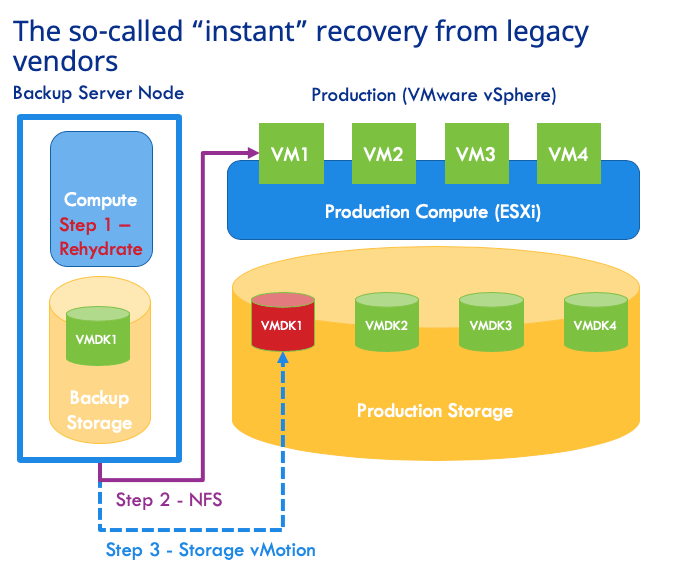
You are likely to hear bricks and blocks backup vendors for on-premises touting the value of “instant recovery” for virtual machines. The RTO being promised is seconds to minutes. But when it comes to recovering a virtual machine (VM) to its production operational level, there is nothing ‘instant’ about the so-called instant recovery.
The so-called instant recovery is to serve the VM disk files from backup system via NFS and let VMware vSphere run the VM from those disk files. It is true that the process to boot up a VM from backup this way will only take a few minutes. It is true that the flash storage on backup systems can act as a caching mechanism for write-I/O. However, in order to make the VM operationally on-par for production use, the VM administrator must carefully plan and execute storage vMotion when the time is right. This process will migrate the VM disks from backup storage onto production storage while the VM is live. This process is often throttled down by vSphere so as not to hinder the live VM. It takes several hours to even a full day before a large VM can be migrated and becomes operationally ready for production level performance. So much for the “instant” in instant recovery!
Thus, for the SQL Server AG example above, the nodes must be served by a single backup storage system which goes against why you have AG. The AG is supposed to be set up with dedicated storage systems at each node for availability. Then, the AG cluster would have a hard time coming up as the synchronization will be extremely slow because I/O-reads are occurring from backup storage. Note that AG is unavailable during this time period and hence there is no ‘instant recovery’ really. To add insult to injury, the AG would limp along while the required storage vMotion needs to occur from overloaded backup storage onto production storage.
Le problème lié à cette restauration instantanée ne s’arrête pas là. La sauvegarde se trouve toujours sur le même site que l’environnement de production et est donc exposée aux risques de perte de site et aux failles de sécurité. Vous ne pouvez pas utiliser le stockage dans le cloud comme destination de sauvegarde viable pour la reprise opérationnelle à partir de ces solutions. De plus, la restauration instantanée devient inutile dès lors que vous envisagez de migrer des charges de travail vers VMware Cloud on AWS, car le stockage NFS tiers n’est pas pris en charge.
Clumio Rapid Recovery – Superior Operational RTO
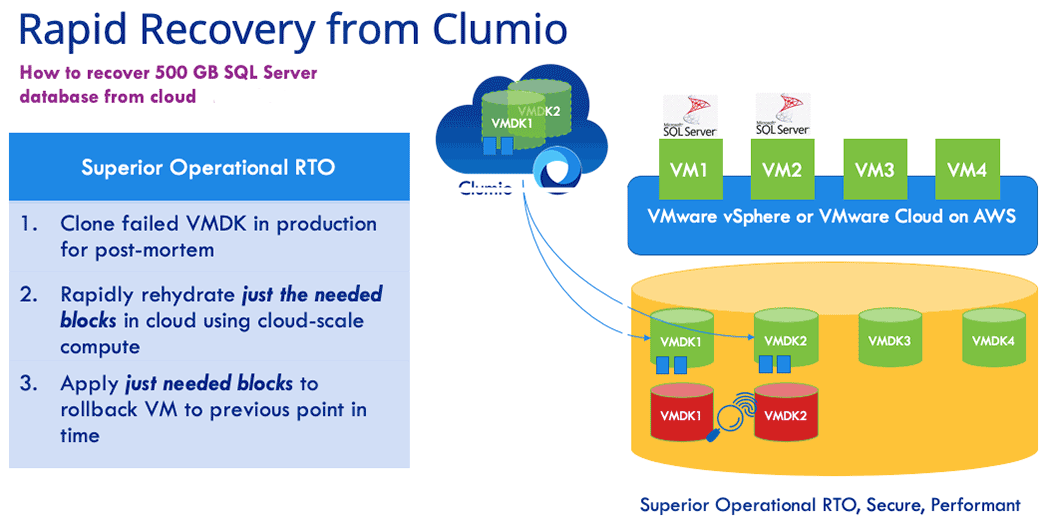
Help to deliver secure backup and recovery for your data – wherever it needs to be. Rapid Recovery is a set of innovations from Clumio that enables fast operational restores from cloud storage even when you are protecting on-premises workloads. Thanks to Rapid Recovery with Clumio SaaS, it took just 5 minutes to recover an active SQL Server AG environment with 500GB of data given in the above example This is the time taken for end-to-end recovery and data restored to a fully operationally state. How did we do this? There are two innovations in Rapid Recovery playing key roles here.
Réhydratation évolutive :
Clumio’s scale-out rehydration eliminates the rehydration penalty of traditional bricks and blocks systems altogether. Rehydration is done by Clumio using serverless compute and it takes advantage of the unlimited compute capacity of the cloud while running parallel I/O operations across all blocks of interest for a given request. The result: restore throughput from the Clumio backup service beats that of a traditional deduplication system co-located in the data center.
Suivi des blocs modifiés inversé :
When you are recovering a VM in production from backup, you are essentially trying to roll back the clock so as to get to a last known good condition. Clumio’s reverse changed block tracking helps you do exactly that without the need to go through a full restore. The Clumio backup service retrieves the changed blocks (regenerated via scale-out rehydration described earlier) and applies them directly into production storage to rollback the VM to the previous point in time. The result: the time it takes to recover a VM from the Clumio backup service to a production operational level is faster than that of recovering from local storage!
Ces deux fonctionnalités de Recovery rapide proposées par Clumio éliminent TOUTES les limites de la Recovery instantanée proposée par les fournisseurs traditionnels.
Let’s summarize the key customer benefits of Rapid Recovery from Clumio:
No human intervention required: The backup admin or VM admin does not need to do anything during backup or recovery to take advantage of Rapid Recovery. Clumio SaaS automatically detects if the requested restore point in time meets rollback criteria and initiates it automatically during recovery.
RTO is superior to that of instant recovery: You are bringing just the data required to roll back the VM and your recovery is complete. The time it takes to do this is better than the overall time it takes to perform instant recovery followed by storage vMotion.
Protect against data loss and ransomware: Unlike co-located bricks and blocks based backup solutions needed for instant recovery, Clumio backups are air-gapped from your production datacenter. Clumio helps protect you against site loss and site-level vulnerabilities.
Gets you ready for VMware Cloud on AWS: Instant recovery does not work in VMware Cloud on AWS environments because of its dependency on NFS. Rapid Recovery has you covered when you are migrating to VMware Cloud on AWS.
Want to try Rapid Recovery? Contact us.
More related posts
Architect for Tomorrow: Unified Data Protection as the Foundation for Resilience
Après avoir passé les 20 dernières années à aider mes clients à évaluer correctement et à dimensionner de manière optimale leurs architectures de stockage pour faire face à ces pics d’activité, je n’ai jamais perdu de vue le fait qu’ils représentaient généralement moins de 20 % de la durée totale de fonctionnement de l’environnement dimensionné. À l’époque des infrastructures sur site, cela se traduisait par une importante quantité de ressources inactives mises en réserve.
At Clumio, as I now shift into the sphere of helping customers right-size a data protection solution for the public cloud, the first thing that became apparent is that, if done correctly, the dynamic scalability of the public cloud allows for much more precise utilization of resources at all points in time. In fact, this is an optimization that must occur to seriously advance any idea into a fully formed, developed solution because, in public cloud, every second a resource is reserved or “in use” costs money. This is exactly why solutions designed to address an on-prem problem cannot simply be lifted and shifted to the public cloud. We often hear customers talk about the need to ‘refactor’ an application. This is a time-consuming effort, but the value in wasting less resources, in the end, is worth the time spent redesigning a solution.
For a SaaS application to manage peak workloads at scale, resource utilization is even more important – not just for resources that get presented in the customer’s environment, but especially for the backend services that support not just one customer, but thousands of customers. Only by building an application end-to-end with an intelligent resource utilization model will true scalability occur while minimizing cost for the consumers of the service.
By bringing to bear a cloud-native approach using microservices, Clumio has already designed our secure, enterprise backup service to help our customers get the benefit of cloud efficiency instead of having to ‘refactor’ their existing backup applications. This is best exemplified by the way Clumio inserts zero fixed-compute resources in the data path and, instead, incorporates the parallelism of AWS S3 combined with the dynamic scalability of AWS Lambda functions and AWS DynamoDB resources to help provide that seamless, fluid experience that customers expect when using SaaS. This also creates a much simpler methodology for right-sizing a customer environment – Clumio will provide the requested resources on-demand.
Clumio has helped remove the need for the arduous task to size for peak workloads. I find that I now spend most of my time educating customers on the importance of a truly optimized architecture and the value that brings to the consumer. Of course, the best way to discover the value of Clumio is by experiencing it first-hand….I encourage you to give it a test run.
More related posts
Architect for Tomorrow: Unified Data Protection as the Foundation for Resilience
Commvault is “in the zone” – a mindset and special place often reserved for athletes on a scoring streak.
While no one here will argue that customer success is one of the most important validations of our business, it’s hard not to be impressed with Commvault’s recent string of industry accolades for its products, services and people under Sanjay Mirchandani’s leadership. The recent wave of recognition and company momentum across all areas of the business speaks for itself.
Just this month, Commvault received word that its Commvault Complete Backup and Recovery solution had been named a finalist forTechTarget’s product storage awards in the category for backup and disaster recovery hardware, software and services. Judged by an impartial panel of analysts, consultants and users, TechTarget’s product of the year award program helps buyers identify the best products amid a crowded field. It’s kind of a big deal. While the winners in each category will be announced in February on SearchStorage.com, we feel we’ve already won.
Commvault was also
included in Solutions Review’sBackup and Disaster Recovery and Data Management Software buyer’s
guides while Hedvig – a company we recently acquired if you haven’t heard – was
included in the Enterprise Data Storage guide.
Solutions Review releases these guides to assist organizations
during the research and discovery phase of buying business
software. Editors compile each Buyer’s Guide using research, analyst
reports, industry experts and product demos. These guides are scientific and
well-respected. While it’s great to see Commvault recognized in two guides,
it’s also noteworthy that competitors such as Rubrik, Veeam and Veritas were
only recognized in one.
Dernier point, mais non des moindres, et trônant au cœur de notre « salle des trophées » : il y a quelques mois à peine, Forrester a désigné Commvault comme « leader » dans le domaine des solutions de résilience des données, tandis queGartner a reconnu Commvault as a Leader in its Magic Quadrant for Data Center Backup and Recovery Solutions. Forrester ranked Commvault the highest in its Current Offering category, while Gartner positioned Commvault furthest for completeness of vision in its Leaders quadrant and highest for ability to execute in its entire Magic Quadrant for the 8th consecutive year.
More related posts
Architect for Tomorrow: Unified Data Protection as the Foundation for Resilience
Le fait d’être une véritable solution de sauvegarde « cloud-native » nous permet d’offrir à nos clients un niveau d’assistance jusqu’alors inégalé par les produits de sauvegarde d’entreprise traditionnels.
Les utilisateurs constatent la différence, comme en témoigne ce message d’un client de Clumio après avoir été informé de manière proactive d’un problème par notre équipe d’assistance :
“Thank you for taking care of this issue. We appreciate having a second set of eyes on our backups and how easy this whole thing has been for us” – Midwestern US Healthcare Provider
Un service client proactif
Being Authentic SaaS means that we’ve architected our solution to remove the complexities of managing enterprise backup for our customers. This is reflected in our model of service delivery – from proactive support to transparent over-the-air software upgrades.
Nos clients bénéficient d’une surveillance en temps réel de leur service Clumio, assurée par des logiciels, des processus et des collaborateurs. En novembre 2019, 72 % des dossiers de nos clients avaient été ouverts et triés de manière proactive par notre équipe d’assistance, sans aucune intervention de la part du client.
Assistance proactive automatisée Clumio
Unlike the ineffective “call home” alerting provided by legacy hardware vendors, Clumio support capabilities are built in the cloud and provide:
Surveillance continue, 24 heures sur 24 et 7 jours sur 7, des défaillances liées aux tâches et à l’environnement
Déclencheurs de la création de tickets d’assistance proactive
Amélioration continue du service Clumio grâce à la détection automatisée des défauts du produit
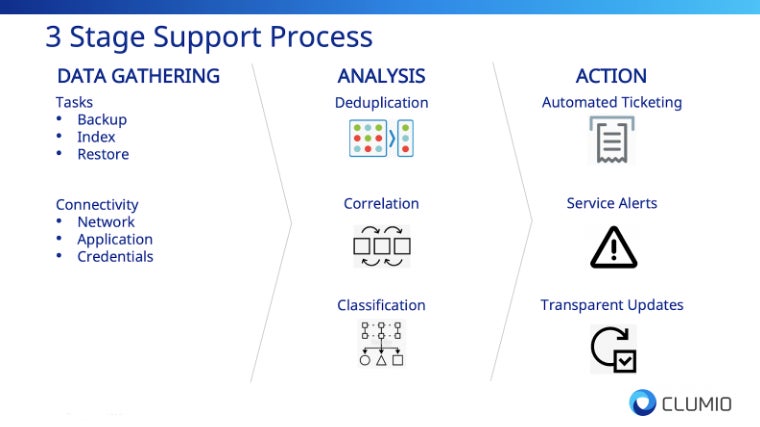
Notre approche, qui vise à offrir l’accompagnement le plus innovant du secteur, s’articule autour de trois étapes :
Stage 1 – Data Gathering
As an authentic SaaS solution, we have complete access to critical failure information that legacy hardware and software vendors do not have, whether generated in the cloud or from the customer’s on-prem environment. The data sources include:
Task Status – Backup, restore, file-level indexing, or file-level restore failures.
Connectivity Status – On-prem network or application failures.
Stage 2 – Analysis
Afin de donner du sens aux données collectées, la phase d’analyse procède à 1) la déduplication, 2) la corrélation et 3) la classification des données relatives aux défaillances.
La phase d’analyse est essentielle pour garantir que nous réduisions au minimum le bruit indésirable et que nous synthétisions les informations en mesures concrètes et concises visant à améliorer l’expérience client.
Stage 3 – Action!
Les données relatives aux défaillances qui ressortent de la phase d’analyse déclenchent alors l’un des trois processus de correction suivants :
Automated Ticketing – Proactive support ticket is opened for triage
Service Alert – Customers are notified via product alerts of failures
Transparent Updates – Product defects are tracked by our support team and resolved via over-the-air upgrades
Cette phase d’action aboutit à une expérience client qui rompt avec le caractère traditionnel et réactif de l’assistance fournie par les fournisseurs de matériel et de logiciels traditionnels.
Modèle de mise à jour par voie hertzienne
De plus, les clients n’ont pas à se soucier des complexités généralement associées à la mise à niveau des anciens produits de sauvegarde : temps d’arrêt planifiés, administrateurs de garde, tests de validation ou interruptions de service. Les correctifs, mises à niveau et mises à jour de Clumio sont tous déployés de manière transparente par voie hertzienne, sans nécessiter de planification complexe.
Cela s’est traduit par une expérience de sauvegarde d’entreprise sans précédent. En novembre 2019, 100 % des défauts des produits Clumio avaient été résolus sans que les clients aient à intervenir.
Une expérience client innovante, c’est tout un parcours
En tant que fournisseur innovant de solutions de sauvegarde d’entreprise, nous devons également proposer un service client innovant ; le fournisseur de solutions de sauvegarde d’entreprise le plus innovant doit également offrir le service client le plus innovant. C’est pourquoi l’expérience client et l’exploitation des technologies du cloud et de l’automatisation sont au cœur de notre stratégie visant à assurer la réussite de nos clients.
Notre équipe est composée d’ingénieurs hautement qualifiés, spécialisés notamment dans le cloud, la sécurité, le stockage et l’automatisation, tous engagés à assurer la réussite de nos clients.
Alors que nous poursuivons notre parcours d’innovation, l’expérience client restera toujours une priorité absolue, et nous nous réjouissons de collaborer avec vous.
More related posts
Architect for Tomorrow: Unified Data Protection as the Foundation for Resilience
Le cloud public a apporté une valeur ajoutée considérable aux entreprises, mais cela nécessite un changement de mentalité. Sans ce changement de mentalité, vous risquez fort de vous retrouver confronté aux mêmes défis qu’auparavant, car ceux-ci vous suivront tout au long de votre nouvelle aventure.
Over the last ten years, the journey to the cloud has provided 3 big lessons that have shaped the way enterprises approach the cloud in the current era. Shadow IT showcased the value of agility and scale, but also alerted us to the fact that a security-first mindset is required as data becomes dispersed across clouds. The cloud-first era reminded us that the cloud is costly if you leverage the same on-premises methodologies in the public cloud. The goal of today’s era, I like to call the cloud smart era, is to accelerate to the cloud intelligently by taking advantage of public cloud innovation, scale, and economics.
One core business function that did not evolve along this journey is data protection. If you look at the data center today, the data protection methodologies are robust including replication between storage arrays, snapshots, backups, replicated backups, and tape backups for offsite storage. But in the public cloud, data protection solutions are minimal, especially for backup. Today’s options include a virtualized version (or cloud retrofit) of the same legacy backup product you use in your data center today or volume level snapshots you have to orchestrate in the public cloud. Let’s take a look at the challenges of each of these options.
Legacy Backup Product – “Cloud Retrofit”
Traditional backup products have been in the data center for years. Most of these solutions are 10, if not 30 years old. As we saw in the cloud-first era, lifting and shifting existing products as a virtualized appliance, even with a “cloud-like consumption” model, results in complexity, higher costs, a software bill, a cloud bill, and a lack of scale and agility. Without re-architecting or rebuilding these backup products from the cloud up, the result is the same on-premises challenges enterprises are running away from in the first place.
Gestion native des instantanés dans le cloud
Most enterprises have seen the complexity and false claims of the traditional backup products and decided to roll their own snapshot managers or orchestrate the creation of those snapshots. Snapshots are suitable for a quick recovery of a volume to a point in time, but cannot deliver long-term cost-effectiveness, file searching capabilities, or single file restores with any ease. Imagine if you accidentally deleted a few files across multiple volumes, need to go back in time for ediscovery, or require data to compare from 5 years ago. Having snapshots as your only tool makes life very painful. Another area of concern is putting your primary data and snapshots in the same account, which brings the additional risk for ransomware or bad actors who could compromise the data and the “backup.” To alleviate this issue, many users copy their snapshots to other accounts to keep them separate, which incurs additional egress costs. If this was not challenging enough, most enterprises have 10s, if not 1000s of accounts in the public cloud, so the challenge grows exponentially.
What enterprises demand is a secure, simple, and predictable SaaS data protection solution that follows along as they accelerate their journey to the cloud. At Clumio, we have the luxury of building products in a cloud-first world, building services natively from the cloud up, without any legacy products or services in our platform to change or evolve. We develop products that give our customers a competitive advantage by removing the complexity of legacy backup solutions and protecting data as enterprises accelerate their journey to the public cloud. We believe that backup should be a service provided to the enterprise with a setup that can take as few as 10 minutes., the quick discovery of all data assets, global search, single file, volume, or application recovery, with a security-first mindset. And this is just the beginning. In my next blog post, we will dig deep into how Clumio solves the multi-cloud data protection challenge.
Take care and stay “authentic” SaaSy my friends.
More related posts
Architect for Tomorrow: Unified Data Protection as the Foundation for Resilience
Imagine your business has just been hit by a disastrous event – be it a natural disaster, cyber-attack, or even human error, and all your company’s critical data is either lost or inaccessible. The clock is ticking, and each second of downtime spells potential financial losses and irreparable damage to your organization’s reputation. This nightmarish scenario is precisely why understanding de temps de reprise (RTO) (RTO) and accurately calculating it is crucial for businesses of all sizes. In this post, we’ll demystify RTO, guide you on determining the optimal target for your business, and share how to calculate it effectively to limit the impact of data loss, avoid catastrophe, and give you peace of mind.
A Recovery Time Objective (RTO) is the maximum amount of time that an organization can tolerate for restoring its critical systems, applications, and data after a disruption or outage. It is a indicateur clé utilisé dans la planification de la reprise après sinistre and helps organizations determine how quickly their business operations need to be resumed after a major incident. RTO can be calculated by performing a business impact analysis (BIA) and determining the recovery time needed for each application, service, system, or data component based on its criticality and loss tolerance.
Comprendre l’objectif de délai de reprise (RTO)
Lorsqu’un sinistre imprévu, tel qu’une cyberattaque ou une catastrophe naturelle, survient, les systèmes informatiques d’une organisation peuvent tomber en panne. Le processus de reprise visant à remettre ces systèmes en état de fonctionnement doit être mené à bien dans un délai précis. C’est là qu’intervient la notion d’objectif de temps de reprise (RTO). Le RTO est défini comme la durée maximale acceptable avant qu’une organisation puisse reprendre ses activités normales après une perturbation majeure.
To understand RTO better, consider the analogy of a hospital’s emergency room. In case of any life-threatening injury, it is essential to provide medical attention to the patient within a certain time frame. This time frame or duration is known as the ‘Golden Hour.’ If doctors and staff fail to provide medical aid within this hour, there are chances that the injury turns fatal, causing long-term damage. In the same way, for an organization, if critical applications and systems are not resumed within the RTO period, there could be financial and reputational damage that will hurt the business’s interests.
In today’s world, businesses rely heavily on technology systems to conduct their day-to-day activities. Any downtime or delay in resuming those critical services can lead to severe losses, including revenue, missed opportunities, unplanned expenses, decreased customer satisfaction and loss of market share. Therefore, having proper RTO planning in place is essential for swift disaster recovery. Il arrive parfois que les organisations privilégient les coûts plutôt que la restauration rapide des services en cas de panne ou de sinistre. Or, les temps d’arrêt peuvent s’avérer bien plus coûteux que d’investir dès le départ dans des solutions de planification RTO adaptées.
Now let’s delve deeper into why RTO is important and how it can benefit your organization.
Selon un rapport du groupe Aberdeen, 93 % des entreprises ayant subi une interruption de service de leur centre de données pendant plus de dix jours ont déposé le bilan dans l’année qui a suivi.
Une étude menée par Gartner a révélé que le coût moyen d’une interruption informatique s’élève à 5 600 dollars par minute, ce qui souligne l’importance de disposer d’un objectif de temps de reprise (RTO) clairement défini.
Dans une enquête menée par le Conseil de préparation à la reprise après sinistre, près des trois quarts (73 %) des entreprises ont déclaré ne pas disposer d’un délai de reprise des activités (RTO) adéquat, ce qui souligne la nécessité pour les organisations de donner la priorité à la planification de la reprise après sinistre.
Importance du RTO dans les plans de Recovery après sinistre
Le RTO joue un rôle crucial pour garantir que votre organisation puisse reprendre ses activités normales aussi rapidement que possible en cas de perturbation. Voici quelques exemples illustrant l’importance du RTO dans les plans de Recovery après sinistre :
Tout d’abord, le RTO contribue à réduire les pertes de chiffre d’affaires, l’atteinte à la réputation et les autres conséquences liées à des temps d’arrêt prolongés. Les temps d’arrêt entraînent des coûts tangibles immédiats, tels que la perte de chiffre d’affaires, ainsi que des coûts intangibles, comme la perte de confiance des clients.
Secondly, let’s consider a scenario where an accounting application is down for several days. This application is vital to the business’ operations since it takes care of all accounting activities. In this situation, failure to restore the application within the RTO duration will lead to late payments and incorrect balances that could result in loss of significant amounts of money or gradual fallbacks. To understand how important RTO is to organizations, imagine being without your mobile phone for one day during an important project; inevitably, you’ll lose valuable time and work behind schedule on delivery deadlines.
Troisièmement, la définition du RTO aide une entreprise à identifier les systèmes informatiques critiques dont la défaillance est susceptible d’avoir l’impact le plus grave sur l’activité. L’identification claire de ces systèmes et des valeurs de RTO qui leur sont associées facilite la hiérarchisation des priorités pour les équipes informatiques lors de la restauration des systèmes, car elle permet de déterminer quels services doivent être rétablis en premier afin de maintenir la continuité des opérations. Enfin, négliger ou mal gérer la planification du RTO peut vous induire en erreur lors du choix des technologies de reprise après sinistre adaptées à la restauration des données et applications vitales. Comprendre à quel point les planificateurs de RTO sont essentiels dans la planification de la reprise après sinistre devrait nous inciter à réfléchir à la manière de les calculer.
RTO et Objectif de point de récupération (RPO)
Recovery time objective (RTO) and recovery point objective (RPO) are often considered together as the two most important parameters of a data protection or disaster recovery plan. While both concepts are related to data recovery in the event of a disaster, they differ in their focus.
Le RTO (temps de reprise des activités) concerne la rapidité avec laquelle une organisation peut reprendre ses activités normales après un incident majeur ayant entraîné une interruption. Le RPO (objectif de perte de données), quant à lui, se concentre sur la quantité maximale de données pouvant être perdues pendant cette période avant que cela ne devienne inacceptable.
Pour illustrer la différence entre le RTO et le RPO, imaginons une entreprise dont les activités reposent sur diverses applications et bases de données critiques. Ces applications traitent les commandes des clients, gèrent les niveaux de stock et gèrent les transactions financières. Si l’une de ces applications venait à tomber en panne en raison d’une défaillance matérielle ou d’une catastrophe naturelle, pendant combien de temps l’entreprise pourrait-elle se permettre de ne pas disposer de cette application ? Cette durée correspondrait au RTO de cette application.
Now consider what happens if there is a backup system in place but it is not able to recover all of the latest transaction data since its last backup was taken 24 hours ago. The entire day’s worth of work would be lost, leading to significant financial losses and other negative consequences. The acceptable limit for such data loss would be defined by the RPO.
Calcul du RTO pour votre organisation
The first step in calculating your organization’s RTO is to conduct a business impact analysis (BIA). This helps you identify critical systems and applications that require the highest level of availability and assess how much downtime each system can tolerate before operational disruptions negatively impact your business.
Imaginons, par exemple, une compagnie d’assurance dont l’application de traitement des sinistres tombe en panne. L’entreprise pourrait s’en sortir si l’application était hors service pendant quelques heures en dehors des heures de pointe, mais elle risquerait de subir des pertes financières importantes et une atteinte à sa réputation si elle était indisponible pendant les heures de pointe. Par conséquent, les heures de pointe pourraient être définies comme la période pendant laquelle l’objectif de temps de reprise (RTO) doit être respecté. Une autre analogie à prendre en compte est similaire à la manière dont les hôpitaux se préparent aux catastrophes naturelles. Ils disposent d’un plan qui décrit les mesures à prendre en cas d’afflux de patients suite à un tremblement de terre ou à un ouragan. Dans le cadre de ce plan, ils définissent le délai maximal nécessaire pour rétablir le fonctionnement normal en cas d’incident perturbateur. Un hôpital ayant programmé des interventions chirurgicales critiques ce jour-là aurait des délais de RTO différents de ceux d’un hôpital n’ayant aucune intervention prévue.
Once you have identified critical systems and applications, you need to determine how quickly they need to be restored after a disaster has occurred. When calculating RTO, it’s essential to consider factors such as backup frequency, location, transport mechanism, security measures, staff capabilities, and end-user requirements.
Réalisation d’une analyse d’impact sur l’activité (BIA)
Before calculating RTO for your organization, it is important to conduct a business impact analysis (BIA). The BIA involves evaluating the potential effects of a disaster or system failure on critical business functions. It is important to note that BIA is separate from the disaster recovery planning process as it instead focuses on understanding the potential impact of disruptions on key business functions. Par exemple, mi-2020, de nombreuses entreprises ont été prises au dépourvu par le passage rapide au télétravail en raison de la COVID-19. Les entreprises qui s’appuyaient auparavant sur des solutions sur site ont eu du mal à adapter leurs systèmes pour prendre en charge un personnel travaillant à distance. Afin d’éviter de tels problèmes à l’avenir et de mieux comprendre les risques associés à ce type de perturbation, les entreprises devraient envisager de réaliser une BIA. Pour entamer le processus d’analyse, les organisations doivent identifier les principales parties prenantes issues de l’ensemble des services et des domaines fonctionnels. Cette équipe doit recueillir des informations sur chaque fonction métier critique et déterminer pendant combien de temps chacune d’entre elles peut être perturbée avant de causer un préjudice significatif aux opérations.
Il est également important que les organisations prennent en compte à la fois les répercussions directes et indirectes d’une perturbation. Les répercussions directes peuvent notamment se traduire par un arrêt de la production, tandis que les répercussions indirectes peuvent inclure une perte de chiffre d’affaires due à des problèmes liés à la chaîne d’approvisionnement. La prise en compte de ces différents types de répercussions peut permettre d’acquérir une vision globale des répercussions potentielles.
Comparing a business to a building with multiple levels can help visualize this process. Each level represents different aspects of business functions and processes, such as finance or supply chain management. You must diligently map every floor’s contents within your business context and determine what happens if you remove specific parts partially or completely. Once you’ve completed your BIA and identified all critical business functions, you’re ready to move on to the next step: identifying critical systems and applications.
Identification des systèmes et applications critiques
L’identification des systèmes et applications critiques est essentielle à l’élaboration d’un plan de reprise après sinistre. Ce processus d’identification doit consister à déterminer quels systèmes et applications informatiques sont indispensables au bon fonctionnement des activités identifiées dans l’analyse d’impact sur les activités (BIA).
Par exemple, un fabricant serait susceptible de considérer ses systèmes de production comme des applications d’importance vitale, tandis qu’un établissement financier pourrait se concentrer sur ses applications de négociation ou ses applications bancaires de base. Dans tous les cas, cependant, toute application indispensable au bon fonctionnement des opérations critiques doit être répertoriée et analysée.
Once you’ve identified your critical applications, it’s also essential to examine dependencies between them. This includes examining the infrastructure and hardware components required for each application’s proper functioning.
Il est recommandé d’étendre le suivi des dépendances au-delà des couches principales, car une modification au deuxième niveau des dépendances peut encore avoir des répercussions secondaires susceptibles de se répercuter en cascade sur des applications critiques.
Pour approfondir l’étude de ces dépendances, les analystes système ont souvent recours à des organigrammes afin de détailler le flux de travail prévu ou les transferts de données entre les applications. La visualisation des interconnexions entre les différents systèmes permet de hiérarchiser plus facilement les procédures de reprise et de mettre en œuvre des mesures de résilience plus complètes. After carefully analyzing your organization’s critical systems and dependencies between them, you’ll be well-prepared to select suitable disaster recovery technologies in our next section.
Mise en œuvre et amélioration des stratégies RTO
Once you have calculated your organization’s Recovery Time Objective (RTO), it is crucial to implement and improve strategies that will help you achieve the desired recovery time. One of the key components of implementing an efficient RTO strategy is ensuring that all stakeholders understand their respective roles during a disaster or crisis. Il est indispensable d’organiser des formations continues à l’intention tant des employés que du personnel informatique sur les procédures et les plans de reprise après sinistre. Des simulations peuvent être organisées périodiquement afin de s’assurer que chacun comprend les procédures, mais aussi pour tester l’efficacité des systèmes, des technologies et du personnel.
De plus, l’évaluation régulière de l’efficacité des stratégies RTO permet d’identifier les domaines nécessitant des améliorations. Il est essentiel de toujours rechercher des moyens de s’améliorer et de proposer des solutions de sauvegarde plus efficaces. Cela peut impliquer un changement de technologie, la mise à jour de logiciels ou la réalisation de mises à niveau régulières du matériel. One company based in New York City learned this lesson after storms caused severe flooding of data centers within their region. Power outages resulted in catastrophic data loss, including losing our clients’ vital information stored in storage devices.
En réponse, nous avons renforcé nos services d’infrastructure dans le cloud, garantissant ainsi à nos clients un accès continu et à distance aux sauvegardes de leurs données en cas de problème. Grâce au respect rigoureux par notre équipe d’experts des politiques de confidentialité et des exigences de conformité en matière de réglementation du stockage, nous avons offert à nos clients la tranquillité d’esprit, en leur garantissant la sécurité de leurs opérations métier critiques. Evaluating backup data can also give insight into additional improvements required on top of existing strategies. If specific applications are taking too long to back up regularly, upgrading them using modern infrastructure with higher capacity might be necessary.
Une autre façon d’améliorer votre stratégie RTO consisterait à mettre en place des outils d’automatisation permettant aux équipes informatiques de réagir rapidement et efficacement aux situations d’urgence sans perturber la productivité quotidienne. De plus, l’automatisation des tâches répétitives ou prévisibles peut permettre aux professionnels de l’informatique de consacrer davantage de temps à des aspects plus complexes, tels que la surveillance des performances des logiciels et la réalisation d’exercices réguliers.
Choix des technologies adaptées à la reprise après sinistre
Il est essentiel de choisir les technologies de reprise après sinistre les mieux adaptées aux besoins spécifiques de votre entreprise. Les applications critiques pour l’activité exigent un objectif de temps de reprise (RTO) favorisant une reprise rapide, tandis que d’autres applications non critiques peuvent se permettre un RTO plus élevé.
When looking for the perfect disaster recovery technology, you’ll need to consider aspects such as security, costs, scalability, and your organization’s technological capabilities. Cloud-based services are increasingly popular due to their accessibility, scalability, and low capital investment costs. Amazon Web Services (AWS) est l’un des fournisseurs de services cloud utilisés par plusieurs grandes entreprises telles qu’Airbnb et Netflix. Grâce à AWS, les organisations peuvent déployer des plans de Recovery dans plusieurs zones et régions afin d’assurer une redondance en cas de sinistre ou de perte de données.
Une autre option technologique disponible est la réplication synchrone entre sites. Cela nécessite de disposer de centres de données répliqués, associés à des paramètres de basculement qui minimisent les perturbations en cas de crise sociétale. Les réseaux WAN (Wide Area Networking) définis par logiciel et les connexions par fibre optique constituent tous deux des options viables pour synchroniser les centres de données répliqués afin de garantir des délais de rétablissement (RTO) quasi nuls. Un débat important porte sur le choix entre des sites de secours « chauds » ou « froids » en cas de basculement d’une application essentielle suite à une catastrophe. Un site « chaud » désigne un centre de secours prêt à l’emploi qui reproduit à l’identique tant les opérations de données que l’infrastructure ; il permet une reprise immédiate des opérations normales, mais peut entraîner des coûts plus élevés. Un site « froid », en revanche, nécessite davantage de préparation avant que la bascule puisse avoir lieu, mais son coût est moindre.
En identifiant les applications essentielles et en procédant à une sélection rigoureuse des zones et des régions au sein de différents centres de données, le choix de technologies de reprise après sinistre adaptées s’avérera globalement bénéfique, quelle que soit la solution retenue.
Il est essentiel de choisir les meilleures technologies de reprise après sinistre adaptées aux besoins spécifiques de votre entreprise, et plusieurs options s’offrent à vous pour répondre à différents objectifs de délai de reprise (RTO). Les services basés sur le cloud, tels qu’AWS, offrent accessibilité, évolutivité et faibles coûts d’investissement. La réplication synchrone entre sites peut minimiser les perturbations en cas de crise sociétale, tandis que les réseaux WAN définis par logiciel et les connexions par fibre optique peuvent garantir des délais de reprise (RTO) quasi nuls. Le choix entre des sites de secours « à chaud » ou « à froid » dépend du niveau de préparation et de considérations de coût. Globalement, l’identification des applications critiques et la sélection rigoureuse de technologies de reprise après sinistre adaptées dans divers centres de données peuvent apporter des avantages significatifs à toute organisation.
Suivi et ajustement du RTO au fil du temps
Une fois que vous aurez calculé votre objectif de délai de reprise (RTO) et mis en œuvre les stratégies nécessaires pour l’atteindre, votre travail ne sera pas encore terminé. Le suivi et l’ajustement de votre RTO vous permettront de vous assurer qu’il reste pertinent et efficace pour atténuer les effets de sinistres ou de pannes imprévus.
Let’s say that a few months after calculating your RTO and implementing recovery strategies, you experience a major data breach that takes down your critical systems for several hours. This incident could reveal weaknesses in your RTO plan and requirements, leading to necessary adjustments for future readiness. By analyzing the data from the incident, you can determine if the RTO needs to be adjusted based on factors like the severity of the disaster or failure or if new technologies would better facilitate data restoration. À mesure que la technologie évolue constamment, il en va de même pour les outils disponibles pour la restauration des données critiques. Par conséquent, les services informatiques doivent se tenir informés des nouvelles alternatives ou des versions améliorées des technologies existantes susceptibles de combler les lacunes potentielles de leur plan RTO actuel. Un excellent moyen de suivre les avancées dans ce secteur consiste à participer à des conférences technologiques ou à des webinaires qui expliquent les tendances émergentes et offrent aux organisations l’occasion de nouer des contacts avec des experts du secteur.
D’un autre côté, certaines organisations pourraient faire valoir qu’il n’est pas nécessaire de surveiller les délais de reprise des activités (RTO), tant que leurs calculs initiaux sont suffisamment solides pour faire face à toutes les éventualités. Cependant, cet argument néglige la nature évolutive des systèmes technologiques, où les choses peuvent changer aussi rapidement qu’une mise à jour logicielle effectuée du jour au lendemain ou l’apparition d’un outil de piratage dans les milieux criminels.
Monitoring and adjusting your RTO is similar to driving a car. Once you set out on the road, you don’t just settle down and forget about caution altogether because you believe everything went well at the start. A vigilant driver continuously monitors their environment by regularly checking mirrors and avoiding hazards as they appear along their path. Any sudden changes on the road like a blown tire or engine trouble will require quick thinking and new strategies, much like how IT organizations must adapt quickly to emerging security threats or IT failures.
So there you have it, monitoring and adjusting RTO over time is crucial for all organizations’ disaster recovery plans. By being vigilant in paying attention to potential threats and keeping track of technological advancements, you can ensure that your system remains robust and effective in the long run. Remember, recovery does not end after the implementation phase, for an efficient plan should account for any dynamic changes that might occur in an ever-evolving technological landscape.
Quel rôle jouent la technologie et les infrastructures dans la réalisation des RTO souhaités ?
La technologie et l’infrastructure constituent des éléments essentiels pour atteindre les objectifs de temps de reprise (RTO) souhaités. Une technologie et une infrastructure adaptées peuvent aider les entreprises à se remettre plus rapidement d’une éventuelle interruption d’activité, réduisant ainsi l’impact négatif sur leurs opérations, leurs clients et leurs résultats financiers.
For instance, implementing a robust backup and recovery system that leverages cloud computing technologies can enable organizations to restore important data or applications in a matter of minutes. Additionally, having a resilient IT infrastructure with redundant systems, automated failover processes, and disaster recovery plans can significantly reduce RTOs.
Selon une étude récente menée par Veeam Software, 84 % des entreprises ont déclaré avoir subi des incidents entraînant des temps d’arrêt au cours de l’année écoulée. Parmi celles-ci, 33 % ont perdu l’accès à leurs systèmes critiques pendant une heure ou plus. De plus, des études indiquent que les temps d’arrêt imprévus peuvent coûter aux entreprises jusqu’à 5 600 dollars par minute.
En conclusion, la technologie et les infrastructures jouent un rôle essentiel non seulement pour respecter les délais de reprise d’activité (RTO) visés, mais aussi pour minimiser les risques opérationnels liés aux incidents entraînant des temps d’arrêt. En investissant dans les outils technologiques et les solutions d’infrastructure adaptés, les entreprises peuvent considérablement améliorer leur résilience opérationnelle et réduire au minimum les pertes financières potentielles causées par des pannes imprévues.
En quoi le RTO diffère-t-il de l’objectif de point de reprise (RPO) ?
L’objectif de délai de reprise (RTO) et l’objectif de point de reprise (RPO) sont deux indicateurs essentiels dont les organisations doivent tenir compte lors de l’élaboration de leurs plans de reprise après sinistre. Bien que certains puissent utiliser ces termes de manière interchangeable, ils ne désignent pas la même chose.
En résumé, le RTO définit la durée pendant laquelle une organisation peut se passer d’un système ou d’une application donnée avant de commencer à subir des pertes financières importantes ou d’autres conséquences négatives. D’autre part, le RPO (Recovery Point Objective) précise la quantité maximale de données qu’une organisation peut se permettre de perdre à la suite d’une interruption avant de subir des dommages importants. For example, if a company has an RTO of two hours, it means that it can only tolerate up to two hours of downtime before suffering severe consequences such as losing customers or revenue. On the other hand, if an organization has an RPO of one hour, it implies that it can only afford to lose up to one hour’s worth of data before experiencing significant damage. Pour mettre les choses en perspective : selon une étude menée par IBM, chaque minute d’indisponibilité imprévue coûte en moyenne environ 8 851 dollars aux entreprises. De plus, une étude d’IDC suggère que le coût moyen d’une indisponibilité pour les applications critiques s’élève à environ 100 000 dollars par heure.
Il est donc essentiel de définir des RTO et des RPO réalistes pour votre organisation afin de réduire au minimum les temps d’arrêt et d’éviter les pertes financières. Gardez toutefois à l’esprit que ces indicateurs doivent également s’aligner sur vos objectifs et vos besoins métier, car des objectifs trop ambitieux pourraient s’avérer difficiles à atteindre et à maintenir sans surcharger vos ressources.
Quels sont les facteurs qui déterminent le RTO approprié pour une entreprise ou une organisation ?
Pour définir un objectif de délai de reprise (RTO) adapté à une entreprise ou à une organisation, il convient de prendre en compte plusieurs facteurs. Le RTO doit être déterminé en fonction de l’impact potentiel d’une interruption de service et de la rapidité avec laquelle l’organisation doit reprendre ses activités. Parmi les facteurs qui déterminent un RTO adapté, on peut citer :
Business Impact Analysis (BIA) – A BIA helps identify critical systems, data, and applications that are essential for business continuity. By prioritizing these aspects, organizations can develop recovery plans with specific RTOs that align with their importance.
Industry Standards – Certain industries such as healthcare or financial services have stricter regulatory requirements that dictate specific RTOs for protecting sensitive data and ensuring uninterrupted operation.
Financial Implications – According to a study by the Ponemon Institute, the average cost of data center downtime has risen to $9,000 per minute in 2021. Therefore, an organization’s financial situation plays a significant role in determining an appropriate RTO as it impacts both short-term revenue loss and long-term reputation damage.
Technology Infrastructure – The RTO should be based on the organization’s technological capabilities, including hardware, software, and network infrastructure. This includes assessing redundancy levels of IT systems and ensuring backup solutions are available to minimize recovery time.
In summary, determining an appropriate RTO requires understanding the potential impact of system downtime on your business operations, analyzing your critical systems and data, and balancing financial implications with technology infrastructure capabilities. By taking a proactive approach towards disaster recovery planning, businesses can minimize downtime while ensuring seamless business continuity during unexpected failures or disruptions.
Quelles sont les erreurs courantes commises par les entreprises lors de la mise en place de centres de reprise d’activité (RTO), et comment peut-on les éviter ?
La définition d’un objectif de délai de reprise (RTO) est essentielle pour permettre aux entreprises de planifier et de se préparer aux catastrophes, aux cyberattaques et à d’autres perturbations potentielles. Cependant, les entreprises commettent souvent certaines erreurs courantes lorsqu’elles déterminent leurs RTO.
L’une des erreurs les plus graves consiste à fixer un RTO irréaliste. Selon une enquête menée par IDG, 28 % des professionnels de l’informatique admettent avoir fixé des RTO irréalisables. Fixer un RTO sans tenir compte des ressources disponibles ni tester le plan peut entraîner des temps d’arrêt, une perte de chiffre d’affaires et une atteinte à la réputation. Une autre erreur courante consiste à ne pas revoir ni mettre à jour régulièrement le RTO. À mesure que les entreprises se développent et que les technologies évoluent, les risques potentiels et les solutions requises changent également. Le Disaster Recovery Preparedness Council indique que 60 % des organisations n’ont pas mis à jour leurs plans de reprise après sinistre depuis plus d’un an, ce qui se traduit par des plans obsolètes et inefficaces.
To avoid these mistakes, businesses need to conduct risk assessments, test their disaster recovery plans regularly and consult with experts in business continuity planning. It’s essential to establish an achievable RTO based on the needs and capabilities of your organization. A realistic plan will allow you to recover quickly while minimizing costs.
En résumé, pour éviter les erreurs courantes consistant à fixer des délais de reprise d’activité (RTO) irréalistes ou à ne pas les mettre à jour régulièrement, il est nécessaire de s’engager dans un processus continu de préparation, de planification et de consultation avec les experts en reprise après sinistre au sein des organisations.
Comment les entreprises peuvent-elles réduire au minimum leur délai de reprise des activités (RTO) en cas de sinistre ou de panne ?
Les entreprises peuvent réduire au minimum leur objectif de délai de Recovery (RTO) en mettant en œuvre les stratégies suivantes :
Mettre en place un plan complet de reprise après sinistre : un plan bien documenté permet d’éviter la confusion et facilite la remise en service rapide des systèmes. Selon une étude de Gartner, seules 35 % des petites et moyennes entreprises disposent d’un plan de reprise après sinistre.
Investir dans des infrastructures résilientes : une infrastructure informatique robuste, dotée de redondances multiples, de groupes électrogènes de secours et de sources d’alimentation alternatives, garantit la continuité des activités même en cas de panne.
Effectuez régulièrement des sauvegardes : grâce à des sauvegardes régulières, vos données sont toujours à jour et disponibles en cas de besoin. 60 % des petites entreprises ferment leurs portes dans les six mois suivant une perte importante de données, faute de solutions de sauvegarde adéquates.
Adopter des solutions basées sur le cloud : les solutions basées sur le cloud offrent une flexibilité et une évolutivité dont les solutions traditionnelles sur site sont dépourvues, ce qui permet des temps de Recovery plus courts, selon 95 % des professionnels de l’informatique interrogés.
En mettant en œuvre ces mesures, ainsi que d’autres adaptées à leur secteur d’activité et à leurs besoins spécifiques, les entreprises peuvent garantir des délais de reprise d’activité (RTO) minimaux en cas de sinistre ou d’interruption de service, limitant ainsi au maximum les pertes potentielles tant en termes de chiffre d’affaires que de réputation.
Respectez ou dépassez vos objectifs de temps de reprise (RTO) grâce à Clumio
Disaster recovery planning is essential for enterprises of all sizes looking to ensure business continuity during malicious attacks, downtime, and disruptions to infrastructure. Good data backups and a well-defined recovery process are critical elements of this planning.
Having a viable RTO—and the ability to meet or exceed the RTO—is a vital component to protecting both your business and its customers. As a cloud-native data protection backup-as-a-service platform, Clumio’s industry-leading rapid recovery capabilities provide enterprises with quick and reliable data restores to help ensure business continuity in the face of downtime to critical infrastructure.
En offrant un moyen simple de restaurer une instance dans son intégralité, mais aussi de récupérer de manière granulaire des fichiers, des enregistrements ou des boîtes aux lettres individuels, Clumio optimise la récupération des données afin de respecter facilement, voire de dépasser, vos RTO actuels.
Sujets connexes :
Data Protection Essentials: RTO vs. RPO Découvrez les principes fondamentaux de la protection des données : la différence entre le RTO (objectif de délai de reprise) et le RPO (objectif de point de reprise) pour un Backup and Recovery efficace.
What is RPO? The Importance of Recovery Point Objective in Your Business Continuity Plan Learn why Recovery Point Objective is vital to an enterprise’s business continuity plan in today’s risk-filled environment where threats like malware and ransomware are now commonplace. Implementing effective data backups and setting recovery objectives will help secure your business’s future.
Exploring Cloud Backup Options: A List of Considerations Examine your available options for cloud backup and learn why a cloud-native solution specifically designed for the cloud is the best choice for everything from ransomware protection to faster data recovery and easier compliance. This is particularly important for businesses and organizations with complex network environments and specific requirements.
The Role of Disaster Recovery in a Business Continuity Plan for Businesses and Organizations Read about the key role disaster recovery plays in a business continuity plan and learn why your choice of cloud backup can affect the speed of recovery.
How the Right Cloud Backup Solution Enables Faster Disaster Recovery across Diverse Network Environments When a disaster event (such as a ransomware attack) strikes, disaster recovery planning is paramount for businesses and organizations operating in various network environments. Learn about the key capabilities a cloud backup solution should provide to enable faster disaster recovery.
What Is a Data Retention Policy? Apprenez les bases de la politique de conservation des données et découvrez comment la sauvegarde cloud appropriée peut simplifier votre conformité tout en sécurisant les données de sauvegarde, en répondant aux besoins distincts des entreprises et des organisations dans différents secteurs d’activité.
More related posts
Architect for Tomorrow: Unified Data Protection as the Foundation for Resilience
It may be tempting to try porting over an on-premises backup system to the cloud, mainly due to your organization’s familiarity with the hardware and system. But this would defeat the purpose of moving to the cloud altogether. Backup solutions designed for on-premises backup don’t leverage cloud services to their full potential because these solutions were specifically made to run on a rigid physical infrastructure, which is less flexible and requires more pre-planning as user requirements change.
Le transfert des solutions de sauvegarde d’un centre de données vers le cloud posera deux problèmes majeurs :
Inefficient Architecture: Even if you were to take a “lift and shift” approach and emulate the physical hardware with Infrastructure as a Service (IaaS) components like AWS’ EC2 virtual machines and EBS volumes for virtual hard drives, you will not achieve any independent scaling of compute and storage. Instead, you’d have to size the backup data precisely and continually tweak AWS resources manually to accommodate the changing backup requirements. This would create an unnecessarily complex backup system with unpredictable costs—all while completely failing to leverage the agility of the cloud.
Compute Scale limitations: In the data center, compute is constantly running and has a fixed cost, but the cloud is just the opposite. Cloud compute is consumed on-demand, and you pay for each compute cycle. Backup solutions designed for on-premises use do not make full use of the cloud’s scaling abilities, causing unnecessary delays due to lack of bandwidth.
2. Utilisation d’outils cloud natifs prêts à l’emploi (tels que les snapshots) ou de solutions personnalisées basées sur des scripts
There are some backup solutions whose approach is based on building a wrapper around the standard snapshot API that is native on that particular cloud platform. While this solution will work, and typically comes with an intuitive UI, it doesn’t provide a comprehensive data protection solution.
First, it’s difficult to automate global policy-based backups. It can also be time-consuming to locate the right snapshot to restore. This approach is also more vulnerable, mainly because snapshots are generally stored locally and close to the primary application.
Même si certains peuvent choisir de développer des scripts complexes pour pallier certaines de ces lacunes, il subsiste néanmoins un risque d’erreurs humaines et de scripts corrompus, sans parler de la nécessité de consacrer en permanence de précieuses ressources informatiques à la création et à la maintenance de ces scripts.
3. Une solution « cloud-native » spécialement conçue pour le cloud
Pairing a cloud-native backup solution with the cloud itself means that it can take full advantage of the scalability and agility of the cloud—two of the main reasons for migrating to the cloud in the first place.
With this approach, there is no need to install additional software, manage cloud resources, or install agents in the customer’s account. There is no upfront complex planning required as the solution elastically scales to meet the data protection needs of the applications. A well-designed solution also ensures that the backup copies are stored outside the security sphere of the primary data.
Cela permet de créer une barrière de sécurité entre les données principales et les sauvegardes, afin de garantir une Recovery réussie en cas de compromission des données principales. De plus, une solution de sauvegarde native du cloud idéale devrait également permettre aux utilisateurs d’effectuer rapidement des recherches dans les sauvegardes pour localiser et récupérer des données, tout en proposant des outils utiles tels que des tableaux de bord et des rapports afin de répondre au mieux à vos besoins en matière de conformité.
Même si une solution de sauvegarde « cloud-native » constitue le choix le plus judicieux en termes de performances, de protection des données et de visibilité sur celles-ci, toutes les solutions « cloud-native » ne se valent pas, et les utilisateurs doivent choisir avec soin une solution qui réponde aux fonctionnalités clés mentionnées ci-dessus.
The Industry’s Best AWS Cloud Backup Solution
Built natively in AWS, Clumio’s backup solution provides superior scalability, performance, cost efficiencies, data protection, and faster access to innovation made possible by the cloud, all while solving issues common in other cloud backup solutions.
Protection contre les Ransomware
Clumio provides comprehensive data protection against growing threats like ransomware and bad actors via air-gapped and immutable backups that are stored outside of the customer’s security sphere. Both data at rest and data in transit are end-to-end encrypted.
Conformité sans intervention
Compliance has become increasingly complicated as more jurisdictions implement their own versions of data retention laws. Clumio mitigates complexity and exposure to compliance violations with a simple interface. Clumio provides a single, cohesive view of all AWS assets and automatically indexes any resources that require compliance protection with uniform policies, along with simplified reporting for compliance audits. And that’s just the start.
Rapid Recovery with Global Search
Clumio’s interface utilizes a granular approach that can quickly locate and restore backup files, effectively reducing restore time from several hours to just minutes. This helps to ensure optimal business continuity in the event of downtime from a security event.
Finis les goulots d’étranglement au niveau des données
Clumio utilise les fonctions Lambda sans serveur d’AWS et l’évolutivité illimitée du cloud pour contourner les niveaux de traitement et transférer les données directement vers un stockage objet hautement évolutif et durable. Cela permet à Clumio de s’adapter selon les besoins afin de répondre rapidement aux exigences des applications.
Maîtrise des coûts
Clumio’s advanced analytics and simulations include several cost control features that can provide clear, actionable insights into possible ways to reduce TCO. For example, by analyzing aspects like snapshots created per asset and their retention periods, Clumio can identify opportunities to cut back on certain snapshots and reduce AWS backup costs.
Sujets connexes :
AWS Backup Services AWS backup is the practice of creating a protected and space-efficient copy of data being used or generated by AWS services.
Solving the Challenges of AWS Backup Amazon Web Services (AWS) has become the primary cloud backup choice for many businesses, but it comes with certain challenges that users must be aware of before diving in. Learn how to solve the common problems with AWS backup while maintaining full control over cloud costs.
Adding Ransomware Protection to Your Amazon Cloud Backup Ransomware is a growing threat that shows no signs of slowing down—and your Amazon cloud backup could be at risk of exposure. Read about the vulnerabilities of Amazon Cloud Backup and learn what you can do to safeguard your data and backups from an attack.
How to Choose Between Cloud Backup Solutions Choosing the right cloud backup solution can seem like an overwhelming task. Where do you even start? Discover five of the most important things you need to examine when searching for your cloud backup provider.
Controlling Costs of Cloud Backup Services Are you wondering why your cloud backup costs are so high? Learn about the biggest culprits behind excessive and fluctuating cloud backup costs and find out how you can gain control over them, permanently.
Three Reasons You Need Cloud Backup for Business Curious about the actual benefits that cloud backup can provide for your business? Read about three of the biggest benefits your business can gain by utilizing a dependable cloud backup solution.
More related posts
Architect for Tomorrow: Unified Data Protection as the Foundation for Resilience
Que contient un modèle de plan de continuité des activités ?
When a disaster event such as a server outage or cyber attack threatens to disrupt operations, a business continuity plan empowers an organization to continue functioning while navigating through the recovery from the incident. But, as one might imagine, the plan itself can be quite complicated, as it involves many moving parts. Generally, the components of a business continuity plan can range from the fundamental, such as planning communications between employees during a disaster event or restoring function to utilities, to the nuanced, like creating social media posts, press relations, etc.
One of the vital parts of a business continuity plan template involves planning for the recovery and restoration of mission-critical data and applications. In years past, this would have been mostly relegated to restoring data from physical backups and on-premises servers, but things have significantly changed as organizations have migrated most or all operations to the cloud. Products, services, and indeed the running of the business, have become more reliant on data and cloud-native applications and workloads.
If the template you’re using to create a business continuity plan doesn’t outline a way to back up and restore these applications and workloads in the cloud, the template is not only unsuitable for your organization, it would make your finalized plan vulnerable to significant repercussions from a potential disaster event.
Pourquoi la sauvegarde dans le cloud est-elle la pierre angulaire d’un modèle de plan de continuité d’activité moderne ?
An organization cannot recover and restore its data unless it has first been backed up. If you’ve migrated to the cloud, a cloud backup solution will protect an organization’s data and facilitate the disaster recovery process when the need arises.
En théorie, le processus est simple : les données de l’entreprise sont régulièrement sauvegardées par la solution de sauvegarde dans le cloud, stockées en toute sécurité et mises à jour automatiquement selon le calendrier défini. Si un incident entraîne la perte ou la compromission des données, la solution de sauvegarde dans le cloud peut lancer la Recovery des données à partir de la sauvegarde la plus récente, permettant ainsi à l’entreprise de poursuivre ses activités.
Même si cela semble simple en théorie, la récupération et la restauration d’énormes volumes de données en une seule fois peuvent prendre beaucoup de temps. Et comme dans toute entreprise, toutes les données ne sont pas indispensables à la poursuite des activités. Si votre solution de sauvegarde dans le cloud ne restaure les instances de données que de manière globale, vous risquez de subir des temps d’arrêt pendant que vous attendez la restauration complète de l’instance.
Une sauvegarde sécurisée dans le cloud avec restauration rapide est essentielle pour garantir la continuité des activités
The speed of data recovery during a disaster incident is the difference between downtime occurring and ensuring core operations continue. Using an inferior cloud backup solution that lacks rapid restore features can put your business continuity at risk—no matter how failsafe your template may seem.
Built natively in the cloud, Clumio’s industry-leading cloud backup-as-a-service platform is equipped with several rapid recovery capabilities that provide fast data restores and ensure business continuity when data has been lost or compromised during a disaster event. With Clumio, organizations can automatically back up data in an encrypted, air-gapped environment. When data has been lost or compromised, users can restore an entire instance or use granular and flexible recovery features to identify and restore mission-critical data and applications needed to maintain business continuity.
A successful business continuity plan template depends not just on proper planning—the tools matter just as much. Learn why Clumio is the industry’s leading innovator for cloud backup and rapid recovery by scheduling a demo today.
More related posts
Architect for Tomorrow: Unified Data Protection as the Foundation for Resilience