Alcuni dicono che le cose migliori della vita sono gratuite, ma quando si tratta di protezione dei dati nel cloud, la gratuità potrebbe darvi solo una parte di ciò che vi serve e costare di più a lungo termine. In fin dei conti, è bene avere delle opzioni ed esaminare i pro e i contro di qualsiasi soluzione di protezione dei dati nel cloud pubblico, per assicurarvi di ottenere ciò di cui avete bisogno al minor costo possibile.
I am sure that many people thought to themselves, “what is Clumio doing providing free snapshot management capabilities since snapshots are not backups?” You are correct, snapshots are not backups, but they do have their place in the public cloud.
Snapshots are an awesome operational recovery mechanism for applications that need point-in-time recovery in AWS.Operational recovery might be the only requirement if you are an early cloud adopter, or for most, it can be part of a broader holistic data protection solution that requires backup of data with longer than 14 – 30 days of retention for compliance requirements.
We are providing this snapshot management capability for free to our customers, versus charging for it like many of our friends in the industry. It is only part of a complete data protection solution in the cloud. Although I think they should rename it to AWS Operational Recovery instead. 🙂
Quali sono i pro e i contro degli snapshot in AWS e perché non sono dei backup?
Uno dei principali vantaggi degli snapshot è la possibilità di ripristinare rapidamente i dati in caso di errori, cancellazioni accidentali o danneggiamento dei dati. Gli snapshot on-premise vengono in genere archiviati sullo stesso array o sulla stessa infrastruttura applicativa dell’applicazione principale per consentire un ripristino rapido. In AWS, gli snapshot vengono archiviati nello stesso account AWS dei dati di produzione. Indipendentemente dalla loro ubicazione, questi snapshot vengono in genere conservati per periodi relativamente brevi, poiché il loro valore ai fini della Recovery operativa diminuisce col passare del tempo.
Beyond snapshots, backups are required to be held outside the production environment to ensure you have access to your data, even when the production infrastructure goes down or has major issues. Backups are also stellar at fine-grain recovery as they are indexed and cataloged for quick granular retrieval outside of production. Compliance backup goes even further, as it needs to be kept for legal or compliance needs, which need to be protected even when an entire site or account is compromised.
One of the major cons of snapshots is they fail miserably in both functionality and cost when used for backup and long-term compliance. For example, let’s say you have a new application you developed or moved from on-premises that has a requirement for 30 daily backups and 12 monthly backups for long-term retention. Snapshots are stored on the same account as the production data, so if you fat-finger a script, delete the wrong thing, or a bad actor gets access to your account, you lose the backup and potentially the data. This is obviously bad.
Per evitare questa vulnerabilità, si potrebbero sempre replicare questi snapshot su un altro account AWS a scopo di sicurezza, ma in tal caso si incorrerebbe in costi di trasferimento, nel doppio della fattura degli snapshot e, se si utilizzano servizi PaaS come RDS, si sarebbe obbligati a conservare copie complete anziché catene di snapshot. Poiché nessuno dei dati è indicizzato o catalogato, a quel punto si dovrebbe ripristinare l’intero sistema e individuare i dati autonomamente. Anche recuperare i dati è una procedura complessa, ma in questo scenario i costi da soli rendono gli snapshot inutilizzabili.
Why use Clumio’s Free Tier for Operational Recovery instead of AWS Backup or snapshot managers?
Clumio’s backup as a service for native AWS services provides a holistic data protection solution well beyond snapshot management. As you proceed along your cloud journey, Clumio can provide a single data protection service to help with your enterprise needs. Maybe today you use snapshots for operational recovery in a testing and development environment. When the application goes into production, the requirements change and you need more protection, yet you don’t want and probably didn’t plan for massive costs with snapshots.
With Clumio, you can leverage our unique air gap protection, full indexing and catalog, and granular restores of files for EBS or granular record retrieval for RDS via direct query access to our data lake. The experience is stellar and can be turned on for any application requiring these features beyond snapshots. The best part is all of this may be delivered at up to 50% less cost compared to AWS snapshots.
Qual è l’esperienza offerta da Clumio nella gestione degli snapshot?
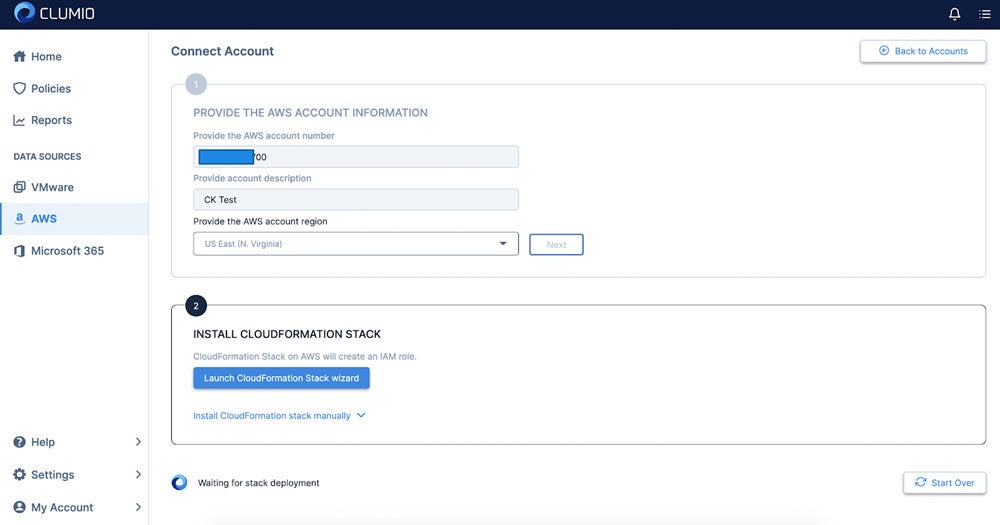
Come per tutto ciò che riguarda Clumio, l’esperienza è semplice e bastano appena 15 minuti per diventare operativi. Il primo passo consiste nel creare le proprie credenziali di accesso, il che richiede semplicemente l’inserimento di un indirizzo e-mail e di una password. Successivamente, occorre inserire le informazioni relative all’account AWS, tra cui il numero dell’account AWS, la descrizione dell’account (per poterlo ricordare), la regione AWS, quindi fare clic su “Avanti” e avviare la procedura guidata CloudFormation Stack:
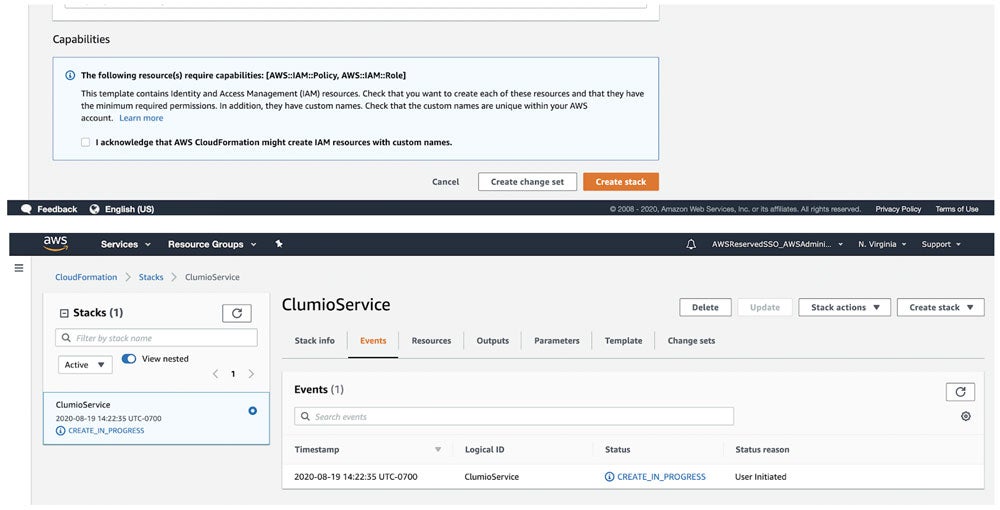
This will kick you over to AWS to create the stack. Click Create stack and wait about 3 – 5 minutes to complete.
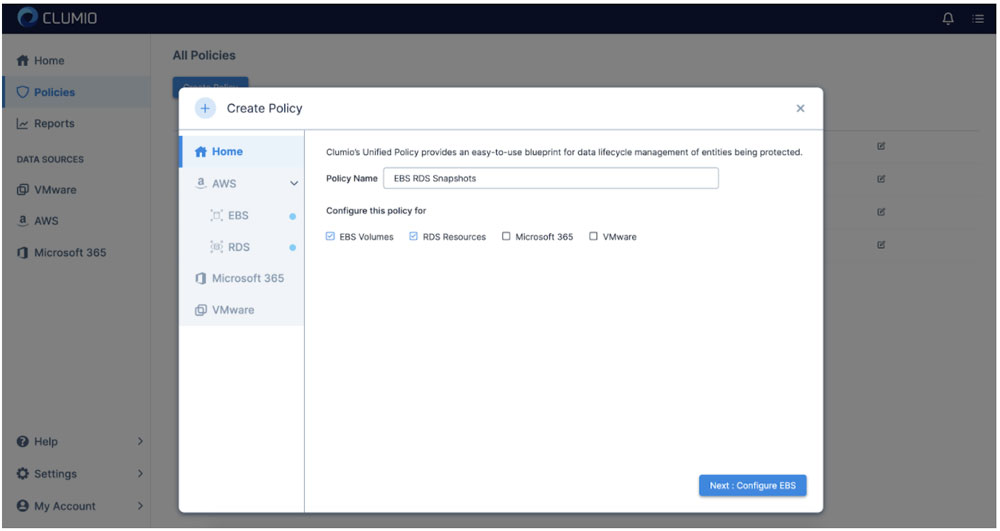
Una volta completata l’operazione, il tuo account verrà sottoposto ai servizi di inventario. Puoi eseguire la stessa procedura anche su tutti gli altri account che desideri proteggere. Una volta terminato, il passo successivo consiste nel creare una politica unificata per EBS e/o RDS.
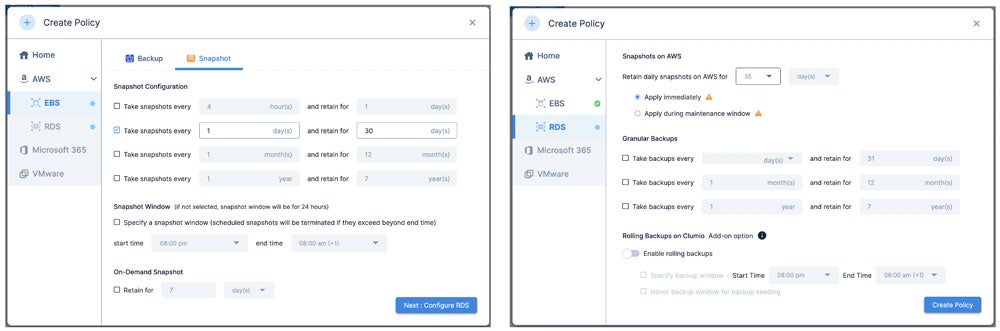
Definire le politiche per un massimo di 30 giorni per EBS o fino a 35 giorni per RDS:
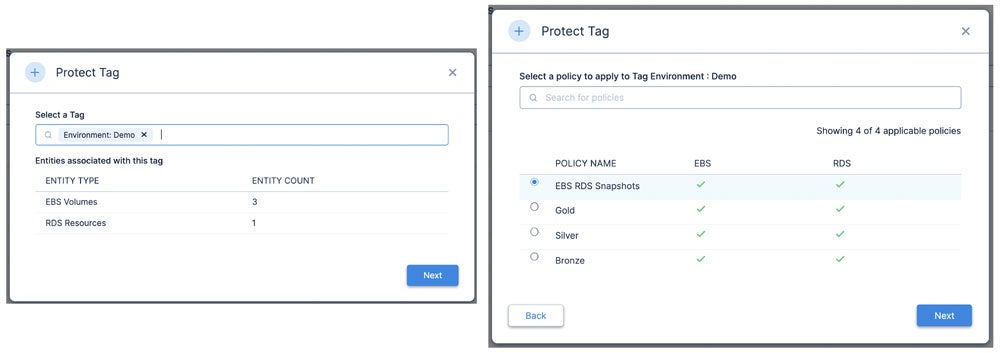
Clumio sfrutta i tag esistenti per allineare le politiche; pertanto, il passo successivo consiste nel determinare i tag che si desidera proteggere con la nuova politica appena creata. Ciò consente di contrassegnare risorse specifiche da proteggere con questa politica.
That is it! Now you are up and running with Clumio’s free tier for operational recovery for both EBS and RDS.
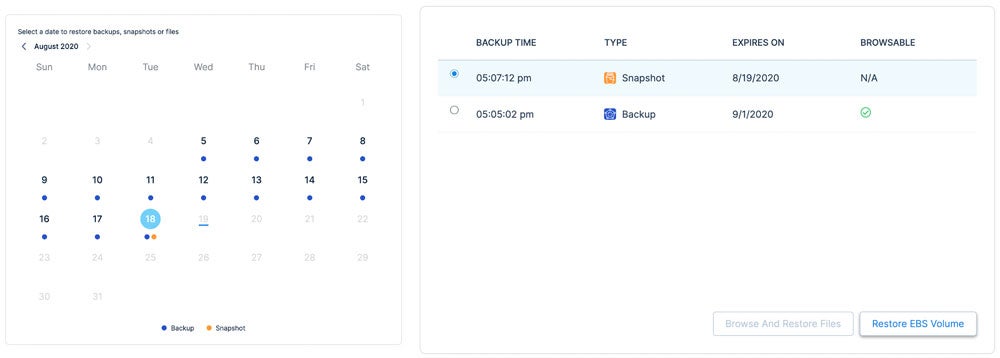
Now that we have operational recovery available for EBS and RDS, let’s review the restoration process for EBS. First, you pick the EBS volume you want to restore, then define the point in time you want to restore. In this case, I have backups (shown in blue dots) and snapshots (shown in orange dots). When you click on the date it will give you options for both.
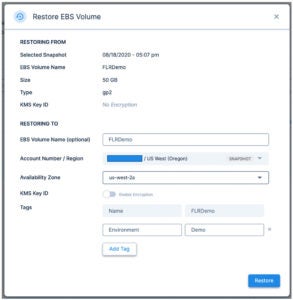
È quindi possibile ripristinare il volume su qualsiasi AZ disponibile.
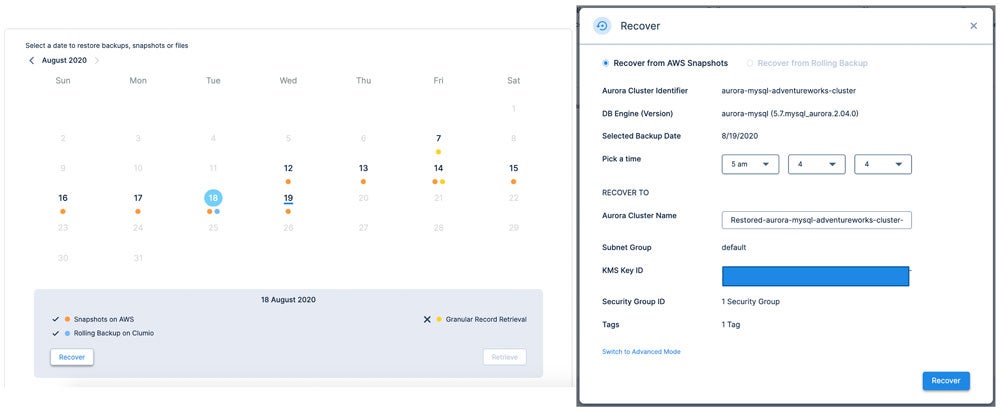
RDS is a similar experience, but slightly different as there are multiple options for the protection of RDS available including rolling backup (time-lagged RDS instance in Clumio) and granular record retrieval (long-term backup).
Per prima cosa, scegli una data di ripristino per la quale sia disponibile uno snapshot (punto arancione), fai clic su “Recupera”, quindi seleziona il momento esatto in cui desideri ripristinare il database, con precisione al secondo. In questo caso, sto effettuando il ripristino alle 5:04:04 del mattino.
As you can see in this quick overview, protecting AWS resources for operational recovery is incredibly easy! No matter if you are developing net-new applications, lifting and shifting legacy applications from your on-premises data center, or a cloud-optimized veteran with 100% of your applications running on the cloud, Clumio has a solution to help. For more information, check out our backup as a service for AWS.
Alla prossima, restate SaaSy, amici miei.
More related posts
The Importance of Recovery Point Objective (RPO) in Your Business Continuity Plan
In 2007, ten years after the company was founded, Netflix was slinging rentals of Weekend at Bernie’s in red envelopes by mail. Anyone remember the last Netflix DVD that they failed to return? Not saying mine was Weekend at Bernie’s, but it very well could have been. In 2007, Netflix pivoted to streaming services. As early as 2011, they realized that their digital content suppliers would ultimately be their competitors and they shifted from a reliance on third-party content to becoming a producer of original content. In July of this year, Netflix broke HBO’s record for the most Emmy nominations.
Netflix non è nata con l’obiettivo finale di rivoluzionare Blockbuster, ma con la piena intenzione di dedicarsi allo streaming non appena la larghezza di banda di rete e i contenuti digitali fossero stati prontamente disponibili. Dopotutto, il loro nome sin dall’inizio era Netflix, non DVDsDirect.com. Nelle fasi iniziali, hanno perseguito obiettivi a breve termine, rimanendo concentrati sul cliente e non sulla concorrenza. Hanno inoltre avuto la fortuna di trovarsi in un settore di mercato enorme e di poter sfidare sin dall’inizio alcuni concorrenti ormai obsoleti e in declino. Qui a Clumio, ci sono molte cose interessanti che puntiamo a realizzare. E là fuori c’è anche una grande quantità di opportunità facili da cogliere.
For those who have spent time in the data protection space and don’t know Clumio:
We’re relentlessly focused on simplifying data protection with a secure, air-gapped backup and recovery service for a world where customer data is increasingly distributed across clouds, SaaS and on-premises realms. We’re also here for a world where the bitcoin-seeking boogie man is just as much of a threat as a natural disaster.
We’re a company focused on customer delight. We belive in simplfying data protection. Clumio can be turned on in as few as 10 minutes and our customers can go focus on more important things to drive their businesses forward.
We’re a platform company with our eyes to the horizon. We seek to deliver value creation opportunities as a by-product of our data protection offering. Think analytics and ETL. Think multi-cloud data management and cloud arbitrage. Our follow-on acts are why this author joined and why smart people with backgrounds in search, security, analytics and cloud are steering the company, on our board or have voted for us with their wallets.
Per gli analisti, i miei amici e i miei familiari che magari non conoscono bene Clumio:
Clumio for VMware Protection = Weekend at Bernie’s mailed in a Red Netflix Envelope. Protecting on-premises assets is our “DVD in a red envelope” use case. It’s our “right now” interest simplifying and disrupting the private cloud data protection market, and it’s a massive market that’s ripe for disruption.
Clumio for Cloud Native Services and SaaS Protection = Streaming The Office on Netflix. This is an emerging market as organizations move to public cloud and SaaS and find that the native data protection services offered by traditional providers are purpose-built for the data center, short on functionality and super costly.
Clumio Data Platform = Netflix Studios. I’m going to venture a guess that Ozark helps drive far more consumers to the Netflix service than Weekend at Bernie’s. Over time you will see us evolve from being solely focused on data protection to opening up the platform to afford customers and their partners the opportunity to derive greater value than just operational recovery. The proof points and hints are already there if you look for them.
Thanks for putting up with this author’s incessant desire to trot out analogies. It’s just that signing up for and deploying a protection strategy with Clumio is about as uninvolved as signing up for Netflix. And just like the Netflix service, new content and goodness arrives while you sleep.
More related posts
The Importance of Recovery Point Objective (RPO) in Your Business Continuity Plan
Downtime costs businesses thousands per minute, and traditional backup alone is not enough.This guide covers what cloud recovery is, why it matters, and how to build a strategy that keeps your data safe.
Il Recovery nel cloud è un settore in rapida evoluzione. Ecco i punti più importanti da tenere a mente dopo aver letto questa guida:
Il ripristino nel cloud combina la protezione dei dati con un ripristino rapido per contribuire a ridurre i tempi di inattività e la perdita di dati.
Le violazioni dei dati costano ora alle organizzazioni in media milioni di dollari, rendendo una strategia di disaster recovery nel cloud più critica che mai.
Backup and disaster recovery serve different purposes – backup preserves copies of data, while disaster recovery focuses on restoring operations after a failure.
Le best practice includono la definizione degli obiettivi di tempo di ripristino (RTO) e di punto di ripristino (RPO), il rispetto della regola di backup 3-2-1, la classificazione dei carichi di lavoro in base alla criticità e il test regolare dei piani di ripristino.
Clumio by Commvault offre soluzioni di Backup and Recovery native per il cloud e con isolamento fisico (air-gapped) per i carichi di lavoro AWS, tra cui Amazon S3, DynamoDB e altri.
Recovery nel cloud consiste nel replicare i dati in un ambiente cloud in modo che la vostra organizzazione possa ripristinare rapidamente le operazioni dopo un’interruzione. Whether you are dealing with a ransomware attack, a misconfigured deployment, or a region-wide outage, a strong cloud recovery strategy helps give you the ability to recover critical data and resume business operations without relying on legacy infrastructure.
The stakes are high. Cyberattacks are growing in frequency and sophistication. Hardware failures happen without warning. Human error – from accidental deletions to bad code pushes – remains one of the leading causes of data loss. And for organizations running production workloads in the cloud, the blast radius of any of these events can extend across applications, databases, and entire regions.
A cloud disaster recovery approach helps address these risks by storing backup copies of your data in isolated, off-site cloud environments and providing the tools to help restore that data rapidly. Unlike traditional on-premises backup, cloud-based solutions scale with your infrastructure and can be tested and validated without disrupting production systems.
In questa guida spieghiamo in dettaglio cos’è il Recovery nel cloud, in che modo differisce dal backup tradizionale e quali best practice dovreste seguire per proteggere la vostra organizzazione.
Che cos’è la Recovery nel cloud?
Backup cloud and disaster recovery are two related but distinct disciplines that work together to help protect your organization’s data and operations.
Backup cloud is the process of copying data – files, databases, application configurations, and system images – to a remote cloud environment. These copies serve as point-in-time snapshots that you can use to help restore data if the original is lost, corrupted, or compromised. Backup cloud removes the need for physical media like tape or on-site storage arrays and helps give you the flexibility to store data across multiple regions and accounts.
Recupero dai disastri goes further. Recupero dai disastri is a strategy for restoring not just data, but the applications, infrastructure, and workflows your business depends on. A disaster recovery plan defines how quickly you need to be back online (your RTO) and how much data loss you can tolerate (your RPO).
When you combine cloud backup with disaster recovery, you get a cloud-based disaster recovery strategy – one that helps store protected copies of your data off-site and provide the automation and tooling needed to recover workloads at scale.
Perché il Recovery su cloud è importante
The cost of failing to protect your data has never been higher. Data breaches now cost organizations millions of dollars on average.
But breach costs are only part of the picture. Unplanned downtime disrupts revenue, erodes customer trust, and triggers regulatory scrutiny. For organizations in regulated industries like financial services, healthcare, and legal, the failure to recover data within defined timeframes can result in fines, litigation, and loss of operating licenses.
Ransomware has changed the calculus further. Attackers increasingly target backup infrastructure itself, encrypting or destroying recovery data before launching their primary attack. Without a cloud recovery strategy that includes isolated, immutable copies of your data, you risk losing both your production environment and your ability to recover from it.
Disaster recovery as a service (DRaaS) has emerged as one response to this challenge, helping give organizations the ability to replicate and fail over workloads to a cloud-hosted environment without managing their own disaster recovery infrastructure.
A well-designed cloud recovery plan helps reduce both the financial and operational impact of unplanned outages – and increasingly, it is a baseline expectation from auditors, regulators, and cyber insurance providers.
Cloud Backup vs. Disaster Recovery:What’sthe Difference?
Many organizations confuse backup with disaster recovery, but a backup without a recovery plan leaves critical gaps in your response strategy. Understanding the distinction is essential for building a complete backup and disaster recovery plan. Let’s compare them.
Cloud Backup
Disaster Recovery
Purpose
Preserve copies of data at specific points in time.
Restore full operations – applications, infrastructure, and data – after a failure.
Restore individual files or datasets; speed varies by volume.
Designed to meet defined RTO targets – minutes to hours.
Key metric
RPO – how frequently data is backed up.
RTO – how quickly operations resume.
Cost model
Pay for storage and transfer.
Pay for replication, failover infrastructure, and orchestration.
Backup answers the question: “Can I make copies of my data?” Disaster recovery answers: “Can I get my business running again?” You need both.
A backup strategy without a disaster recovery plan means you may have your data but no way to restore the applications and infrastructure that depend on it. A disaster recovery plan without reliable backups means you may be able to fail over, but the data you recover could be incomplete, stale, or corrupted.
The strongest protection comes from combining cloud backup with a structured disaster recovery plan that defines RTO and RPO targets per workload and tests recovery procedures regularly.
Migliori pratiche per la Recovery nel cloud
Building an effective cloud recovery strategy requires more than selecting a tool. It demands a structured approach to planning, architecture, and testing. The following best practices help you design a cloud disaster recovery solution that holds up under real-world conditions.
Segui la regola del backup 3-2-1. Maintain at least three copies of your data, stored on two different media types, with one copy off-site in the cloud. This foundational rule helps reduce the risk of a single point of failure wiping out all your recovery options.
Definite gli obiettivi RTO e RPO per ogni carico di lavoro. Not every workload has the same criticality. Your customer-facing production database may require a five-minute RPO and a 15-minute RTO, while a development environment may tolerate hours of downtime. Tier your workloads accordingly and allocate cloud backup solutions for business continuity based on these tiers.
Utilizzate un’archiviazione immutabile e isolata fisicamente (air-gapped). Air-gapped vaults and immutable backups help prevent ransomware from encrypting or deleting your recovery data.
Testate regolarmente il vostro piano di Recovery.Un backup che non avete mai ripristinato è un backup di cui non potete fidarvi. Pianificate esercitazionioperative di Recovery drills at least quarterly, validate that your RTO and RPO targets are achievable, and document the results.
Automatizzate il più possibile.I processi manuali di Backup and Recovery comportano errori umani e ritardi. Le soluzioni native per il cloud possono automatizzare le pianificazioni dei backup, le politiche di conservazione e i flussi di lavoro di Recovery, contribuendo a ridurre la finestra di esposizione.
How Clumio by Commvault Helps Protect Your Cloud Data
Clumio by Commvault is built for organizations that run production workloads across AWS and Google Cloud and need cloud disaster recovery that delivers speed, reliability, and security at scale.
Clumio takes a cloud-native, serverless approach to backup and recovery. There is no infrastructure to deploy or manage—you connect your cloud environments, define your protection policies, and Clumio handles the rest. Backup data is stored in an immutable, air-gapped vault isolated from production, helping protect recovery data even if the primary environment is compromised.
Clumio supports cloud-native workloads including Amazon S3, DynamoDB, RDS and Aurora, EC2 and EBS, Apache Iceberg su AWS, Amazon Neptune, Amazon DocumentDB, and Cloud di Google. Recovery is granular, enabling restores at the object, prefix, bucket, partition, table, or workload level depending on the service. Clumio Backtrack enables in-place rollback for Amazon S3 and DynamoDB, while Instant Access lets you query S3 backup data without full rehydration.
For ransomware recovery, Clumio helps organizations restore clean recovery points with granular recovery workflows. Clumio also supports cross-account, cross-region, and cross-project recovery, providing flexibility to restore data into clean cloud environments when needed.
Common Use Cases for Cloud DR Solutions
A cloud disaster recovery solution is not a one-size-fits-all tool. The right approach depends on the failure scenarios you need to plan for and the workloads you need to protect. Here are the most common use cases for cloud disaster recovery.
Recovery in seguito ad attacchi ransomware. Ransomware attacks increasingly target backup infrastructure itself, making air-gapped cloud disaster recovery solutions a critical layer of defense. Having immutable, air-gapped backups stored outside your primary cloud account can help you restore clean data without paying a ransom.
Cancellazione accidentale dei dati. A single misapplied script or manual error can wipe out an entire S3 bucket or DynamoDB table. Granular cloud backup lets you recover specific objects, prefixes, or partitions without restoring an entire environment – getting your team back to work in minutes, not days.
Guasti all’infrastruttura o alla regione. Cloud outages are rare but not impossible. Cross-region backup and recovery give you the ability to restore workloads in a different region if your primary region goes down, helping maintain business continuity.
Requisiti di conformità e di audit. Regulatory frameworks in financial services, healthcare, and other industries require documented backup and recovery capabilities. Disaster recovery as a service can help satisfy audit requirements by providing automated, policy-driven backup with full reporting and retention controls.
Ambienti cloud multiregionali e ibridi.Le organizzazioni che operano in più regioni o in configurazioni cloud ibride necessitano di una strategia unificata di Recovery nel cloud che abbracci tutti gli ambienti senza creare complessità di gestione.
Cloud backup is no longer a nice-to-have – it is a foundational requirement for any organization running workloads in the cloud. The threats are real, the costs of failure are measured in millions, and the regulatory bar continues to rise.
The good news is that modern cloud-native solutions help make it possible to protect your data, meet your recovery objectives, and stay resilient – without the complexity and overhead of legacy approaches. Whether you are defending against ransomware, recovering from human error, or satisfying an auditor, a well-designed cloud recovery strategy helps put you in control.
Domee frequenti
What is cloud recovery?
Cloud recovery is a strategy that combines copying data to a remote cloud environment with the tools e processes needed to restore operations after a disruption.It helps protect against data loss from ransomware, hardware failure, accidental deletion, e other threats.
How do backup e di ripristino di emergenza differ?
Backup preserves copies of data at specific points in time.Disaster recovery is a broader strategy focused on restoring applications, infrastructure, e business operations. A complete backup e di ripristino di emergenza plan includes both disciplines working together.
What is DRaaS?
What are RTO e RPO?
RTO (recovery timeobjective) is the maximum acceptable downtime after a failure. RPO (recovery pointobjective) is the maximum acceptable data loss measured in time. Both should be defined per workload based on business criticality.
What are cloud backup best practices?
Follow the 3-2-1 rule, define RTO e RPO targets per workload, use air-gappede immutable storage, tier workloads by criticality, e test your recovery plan at least quarterly. These practices help build a resilient cloud di ripristino di emergenzasolution.
How does Clumio protect cloud data?
Clumio provides cloud-native, air-gapped backup e recovery for AWS e Google Cloudworkloads.It helps reduce recovery time with granular restores e helps protect against ransomware with isolated vault architecture e AI-enhanced threat detection.
While the first few months of this
year brought unprecedented global change from the way we think to the way we
work, at Commvault we rallied together to adjust to the “new normal.” We remained
steadfast in our top priorities: keep our employees and communities safe,
continue to be there for our customers and remain unwavering in our innovation.
And while the way we engage with
our customers has changed, business did not stop. We brought many new users
into the Commvault family and expanded existing relationships, with use cases
spanning cloud,
cloud-native, multi-cloud and SaaS workloads. In the spirit of sharing some good
news, I’d like to take the opportunity to celebrate some of the new and
expanded customer use cases in our fiscal Q4.
Blue Cross and Blue Shield of Minnesota; la NASA (vedi sotto); l’operatore di telefonia mobile MTS; Shaanxi Coal Industry; CPA Global; il Ministero delle Finanze della Polonia; e il fornitore di servizi cloud Chmury Krajowej hanno tutti scelto Commvault per le loro esigenze critiche nel quarto trimestre.
Kira Blackwell, responsabile di programma presso la sede centrale della NASA, all’interno dell’Ufficio della Direzione delle missioni tecnologiche spaziali, illustra l’importanza dei dati, di una loro corretta gestione e dei vantaggi derivanti dall’utilizzo di Commvault.
Additionally, McDonald’s Corporation turned to
Commvault to address the growing trend of moving infrastructure to the cloud.
Here is what they had to say about how Commvault is helping them tackle that
initiative.
McDonald’s Corporation moves to the cloud
With an already-robust Commvault deployment in place, we’re now leveraging Commvault’s cloud capabilities to shed ownership of our technology infrastructure; instead, we’re investing heavily in the cloud to keep our IT operations running. The software solution from Commvault fills gaps in native cloud tools and has cut across every use case McDonald’s Cloud Services team requires, providing optimized and effective backups across databases. Commvault’s solution tunes performance across AWS and Microsoft Azure cloud servers and drives cost savings through deduplication and compression.
– Douglas Leonard, Director – Cloud Services, McDonald’s Corporation
I’d also like to highlight
customers who have shared their stories this quarter. These customers span
industries and use cases, leveraging Commvault to protect critical data both
on-premises and in the cloud, while ensuring compliance for document retention,
medical record privacy and more.
Parsons utilizza la gestione intelligente dei dati di Commvault per i carichi di lavoro distribuiti tra le posizioni di archiviazione cloud AWS S3 Standard-IA e AWS S3 Glacier, le macchine virtuali VMware e Hyper-V, oltre ai server fisici.
Cloud environments typically don’t have robust built-in data protection capabilities – and they can also be hard to protect without the right tools in place. Parsons Corporation manages its total on-premises recovery environment and AWS data protection with Commvault.
“We’ve moved off of tape backups to AWS, and now we have an initiative to move the whole environment to the cloud. Moving into the cloud has been really simple. With the Commvault solution, it’s just having the Command Center. Everything is simplistic.” –Benjamin Roper, Enterprise Backup and Recovery Specialist, Parsons Corporation
Il Dipartimento penitenziario del Delaware è ora pronto per la gestione dei dati
“Data helps provide a story,” says Phil Winder, Director of Information Technology for the Delaware Department of Correction.
When every data point shapes a person’s life, the public
sector needs to be data ready. Streamlined data management is critical, from
disaster recovery with no data loss to quickly accessing data that affects a
person’s freedom.
“Abbiamo svolto un’esercitazione di Recovery di emergenza e, in effetti, pensavamo di aver perso alcuni dati. Non possiamo permetterci di perdere dati. Grazie a una rapida telefonata all’assistenza di Commvault, il problema è stato individuato. L’organizzazione è tornata operativa nel giro di un’ora, senza alcuna perdita di dati.” – Phil Winder, Dipartimento di correzione del Delaware
As someone who thrives on meeting with customers, I miss the in-person engagement we’ve had to put on hold in this current environment, but we’ve been getting creative in how we interact with our customers to keep the personal touch. It was great to see and hear from a few of our customers in recent videos. I encourage you to take a look at how customers like Cochlear, Penn State Health and Mitchell International (see videos below) are using Commvault to solve their most critical data challenges.
Coerenza, affidabilità, backup giornalieri delle macchine virtuali VMware e un ambiente senza preoccupazioni? Grazie al consolidamento dei prodotti di backup, Cochlear è riuscita a semplificare la protezione sicura dei dati sanitari e a ottenere quell’ambiente senza preoccupazioni.
La sostituzione di IBM TSM con la soluzione di protezione dei dati Commvault ha consentito a Penn State Health di gestire più efficacemente grandi volumi di dati, di migliorare l’assistenza clienti e di avere la certezza che i dati potessero essere facilmente recuperati.
Per Mitchell International, fornitore di soluzioni tecnologiche per il settore delle assicurazioni auto e contro i danni, il software Commvault garantisce la protezione dei dati in un ambiente IT in continua espansione e contribuisce a migliorare il servizio clienti.
Commvault è sulla bocca di tutti
On top of customer victories, we’ve also been winning industry accolades! Check out our recent awards from CRN, Gartner, Storage Magazine and others:
Although this is a time when the industry – and the world – is definitely not conducting business as usual, we’re proud to be there for our customers. We’re customer centric all the time, and these customer use cases speak for themselves.
More related posts
The Importance of Recovery Point Objective (RPO) in Your Business Continuity Plan
Cloud Data Compliance: What It Is and Why It Matters
Cloud data compliance enables your cloud-stored data to meet all applicable laws, regulations, and industry standards. Learn which frameworks apply and how to build a compliant cloud environment.
La conformità dei dati nel cloud comprende normative, responsabilità condivisa e monitoraggio continuo. Ecco i punti essenziali.
La conformità dei dati nel cloud consiste nell’allineare le operazioni cloud ai requisiti normativi, agli standard di settore e alle politiche interne di governance dei dati.
I principali quadri normativi, tra cui GDPR, HIPAA, PCI DSS, SOC 2 e FedRAMP, impongono obblighi distinti a seconda del settore, dell’area geografica e dei tipi di dati.
Il modello di responsabilità condivisa implica che il fornitore di servizi cloud contribuisca a proteggere l’infrastruttura, ma che l’azienda sia responsabile di come configura, accede e protegge i propri dati.
Le best practice includono la classificazione dei dati, l’accesso con privilegi minimi, la crittografia, il monitoraggio automatizzato della conformità e valutazioni periodiche dei rischi.
La conformità continua richiede strumenti automatizzati, cadenzamenti definiti per gli audit e piani di risposta agli incidenti che si evolvano di pari passo con i cambiamenti normativi.
Che cos’è la conformità dei dati all’ cloud?
Cloud data compliance is the discipline ofenablingdata stored, processed, and transmitted in cloud environmentsto meetall applicable laws, regulations, industry standards, and internal governance policies.It spans everything from how you collect and classify information to how you encrypt it in transit and at rest, control access, and respond to breaches. Why does cloud data compliance demand your attention right now? Because the cost of getting it wrong keeps climbing. Data breaches now carry multimillion-dollar price tags when you factor in technical remediation, regulatory fines, legal fees, and lasting reputational damage. If your organization handles customer data, financial records, health information, or government workloads in the cloud, data compliance is not optional. Regulations like GDPR and HIPAA carry enforcement teeth, and customers increasingly expect proof that you protect their information. Cloud compliance is also a competitive differentiator: organizations thatdemonstratestrong data governance win trust, close deals faster, and avoid the operational chaos of post-breach firefighting. Whether you are migrating your first workloads or managing a mature multi-cloud environment, understanding cloud data compliance is the foundation for building resilient, trustworthy cloud operations.
Key Compliance Frameworks and Standards
Navigating cloud data compliance standards starts with understanding which frameworks apply to your organization. Here are the five most critical: GDPR (General Data Protection Regulation):Applies to any organization that processes personal data of EU residents, regardless of where you are headquartered. Key requirements include data subject rights,breachnotification within72 hours, and data protection by design. Violations carry fines of up to 20 million euros or 4% of annual global turnover, whichever is higher. For a deeper look at the regulatory landscape, see our guide todata privacy regulations. HIPAA (Health Insurance Portability and Accountability Act):Governs protected health information (PHI) in the United States. If you are a healthcare provider, health plan, or business associate handling PHI in the cloud, HIPAA compliance demands encryption, access controls, and audit logging. PCI DSS (Payment Card Industry Data Security Standard):Applies to any entity that stores, processes, or transmits cardholder data. PCI DSS compliance requires network segmentation, vulnerability management, and regular penetration testing. SOC 2 (Service Organization Control 2):A trust-based cloud compliance framework built on five criteria: security, availability, processing integrity, confidentiality, and privacy. SOC 2 compliance is often a prerequisitefor enterprise SaaS vendors. FedRAMP and NIST:FedRAMPstandardizes the securityassessment and authorization processforcloud products used by U.S. federal agencies. The underlyingCybersecurity Framework del NIST, updated to version 2.0 in February 2024, now includes governance as a sixth core function, reflecting the growing importance of cloud compliance frameworks at the organizational level.
La regola di backup 3-2-1Shared Responsibility Model
La regola di backup 3-2-1modello di responsabilità condivisais the foundational concept behind cloud data compliance and cloud security compliance, andmisunderstanding itis the leading cause of cloud compliance failures. In simple terms, your cloud provideris responsible forhelpingsecurethe infrastructure, and youare responsible forsecuring everything you put on it. For Infrastructure as a Service (IaaS), the providersupportsphysical hardware, hypervisors, and network fabric. You own the operating system, middleware, applications, data classification, identity and access management, and encryption. As youmove upthe stack to Platform as a Service (PaaS), the provider absorbs more responsibility for the runtime and operating system, but you still control application logic and data access. With Software as a Service (SaaS), the provider managesnearly everything, yet yourimanereaccountable for user access, data sharing, and configuration settings. La regola di backup 3-2-1financial impactof getting this wrong is severe. Many of those incidents trace back to misconfigured storage buckets, overly permissive access policies, or unmonitored third-party integrations, all squarely within the customer’s side of the modello di responsabilità condivisa.
Cloud Compliance Best Practices
Buildinga strongcloud data la conformità and cloud data security posture requires a systematic approach. Here are eight practices that form the backbone of effective cloud la conformità:
Classify your sensitive data.You cannot protect what you do not understand. Map every data asset to its regulatory category, whether it is personal data under GDPR, PHI under HIPAA, or cardholder data under PCI DSS.
Implement least-privilege access and multi-factor authentication (MFA).Grant users only the permissions theyneed, andenforce MFA across all cloud accounts. This reduces your blast radius if credentials are compromised.
Encrypt data at rest and in transit.Use strong encryption standards such as AES-256 for stored data and TLS 1.2 or higher for data in motion.
Automate la conformità monitoring.Manual audits cannot keep pace with the speed of cloud deployments.Deploy tools that continuously assess configurations against your la conformità baselines.
Conduct regular risk assessments.Quarterly assessments help youidentifyemerging gaps before auditors do.
Build a cloud governance program.Establish policies, assign ownership, and create accountability structures that connect technical teams tola conformitàleadership.
Address shadow IT. Unauthorized cloud services create blind spots in your la conformità posture. Implement discovery tools and clear procurement policies.
Develop a disaster recovery plan.Compliance frameworks increasingly requiredemonstratedrecovery capabilities. Document your recovery timeobjectivesand test your plans regularly. For guidance on building one, see our post on creating abackup plan for la conformità.
Come garantire la conformità nel tempo
Data compliance is not a destination.It is a continuous practice that evolves as regulations change, your cloud footprint grows,e new threatsemerge.Here is how to build lasting cloud data compliance discipline. Invest in automated monitoring tools.Manual checks fail at cloud scale.Automated platforms continuously scan your environment for configurationdrift, policy violations,e access anomalies, then alert your team in real time. Define a clear audit cadence.Conduct internal compliance reviews quarterlye comprehensive external audits annually.Document everyfinding,etrack remediation to completion. Maintain a tested incident response plan.Regulations like GDPR requirebreachnotification within72 hours.You cannot meet that deadline with an untested plan.Run tabletop exercises at least twice a yeare update your playbook after each real incident. Audit third-party vendors. Your cloud compliance posture extends to every vendor that touches your data.Require SOC 2 reports, conduct annual vendor reviews,e include compliance obligations in your contracts. Track regulatory changes proactively.Assign ownership formonitoringregulatory updates in everyjurisdictionwhere youoperate.Subscribe to regulatory feeds, join industry groups,e build regulatory change into your governance calendar.
Clumio provides cloud-native data protection with air-gapped backups, granular recovery,e continuous compliance monitoringpurpose-built fori carichi di lavoro cloud.
Richiedi una demoto see howClumiohelpskeepyour cloud data compliante recoverable.
Domande frequenti
Che cos’è la conformità dei dati all’ cloud?
La conformità dei dati nel cloud consiste nel garantire che i dati presenti negli ambienti cloud soddisfino tutti i requisiti legali, normativi e organizzativi applicabili. Ciò comporta l’allineamento delle configurazioni cloud, delle politiche di accesso e delle pratiche di gestione dei dati a standard quali il GDPR, l’HIPAA e il PCI DSS.
Quali normative si applicano ai dati nel cloud?
Le normative applicabili dipendono dal settore, dall’area geografica e dai tipi di dati. Tra i quadri normativi più diffusi figurano il GDPR per i dati personali nell’UE, l’HIPAA per le informazioni sanitarie negli Stati Uniti, il PCI DSS per i dati delle carte di pagamento, il SOC 2 per le organizzazioni di servizi e il FedRAMP per i servizi cloud federali statunitensi. Molte organizzazioni devono conformarsi contemporaneamente a più quadri normativi.
Cosa significa il modello di responsabilità condivisa?
Il modello di responsabilità condivisa ripartisce gli obblighi di sicurezza del cloud tra il fornitore di servizi cloud e il cliente. Il fornitore garantisce la sicurezza dell’infrastruttura sottostante, mentre l’utente è responsabile della configurazione del proprio ambiente, della gestione degli accessi, della protezione dei propri dati e del rispetto dei requisiti di conformità specifici per i propri carichi di lavoro.
Quali sono le sfide più comuni relative alla conformità nel cloud?
Le sfide più comuni includono la gestione della conformità in ambienti multi-cloud, stare al passo con normative in rapida evoluzione e affrontare il fenomeno dello “shadow IT”, in cui servizi cloud non autorizzati creano punti ciechi. Anche la mancanza di personale qualificato e un’automazione inadeguata contribuiscono alle lacune di conformità.
In che modo le organizzazioni possono garantire la conformità?
Le organizzazioni mantengono la conformità attraverso audit interni regolari, strumenti di monitoraggio automatizzati che rilevano gli scostamenti di configurazione, la formazione continua dei dipendenti e strutture di governance chiaramente definite. La collaborazione con piattaforme di conformità native per il cloud aiuta a ridurre lo sforzo manuale e consente di essere sempre pronti per gli audit.
Quali sono le conseguenze della non conformità?
La non conformità può comportare sanzioni finanziarie sostanziali.Le violazioni del GDPRcomportano multe fino a 20 milioni di euro o pari al 4% del fatturato annuo globale. Oltre alle multe, unaviolazione dei dati costa inmedia 4,44 milioni di dollari
Let us say you have a SQL Server Availability Group (AG) in your virtualized data center. This SQL Server AG is hosting many databases serving mission critical applications. There is a total of half a terabyte of mission critical data today but it is growing rapidly. You are worried about this SQL Server’s availability, and that is why you had configured it as an AlwaysOn Availability Group in the first place. And, you are well aware that AG does not protect against software glitches, corruptions and security vulnerabilities so you want to backup that half a terabyte somewhere else, preferably air-gapped away from the production site. In the unfortunate event of data loss, what is the best recovery time objective (RTO) that your backup vendor can offer?
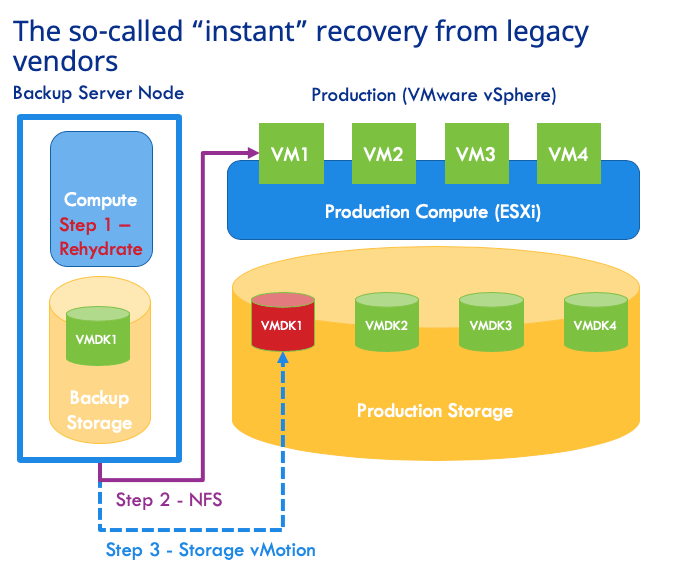
You are likely to hear bricks and blocks backup vendors for on-premises touting the value of “instant recovery” for virtual machines. The RTO being promised is seconds to minutes. But when it comes to recovering a virtual machine (VM) to its production operational level, there is nothing ‘instant’ about the so-called instant recovery.
The so-called instant recovery is to serve the VM disk files from backup system via NFS and let VMware vSphere run the VM from those disk files. It is true that the process to boot up a VM from backup this way will only take a few minutes. It is true that the flash storage on backup systems can act as a caching mechanism for write-I/O. However, in order to make the VM operationally on-par for production use, the VM administrator must carefully plan and execute storage vMotion when the time is right. This process will migrate the VM disks from backup storage onto production storage while the VM is live. This process is often throttled down by vSphere so as not to hinder the live VM. It takes several hours to even a full day before a large VM can be migrated and becomes operationally ready for production level performance. So much for the “instant” in instant recovery!
Thus, for the SQL Server AG example above, the nodes must be served by a single backup storage system which goes against why you have AG. The AG is supposed to be set up with dedicated storage systems at each node for availability. Then, the AG cluster would have a hard time coming up as the synchronization will be extremely slow because I/O-reads are occurring from backup storage. Note that AG is unavailable during this time period and hence there is no ‘instant recovery’ really. To add insult to injury, the AG would limp along while the required storage vMotion needs to occur from overloaded backup storage onto production storage.
Il problema relativo al ripristino istantaneo non si esaurisce qui. Il backup si trova ancora nella stessa sede dell’ambiente di produzione ed è quindi esposto al rischio di perdita dei dati e a vulnerabilità di sicurezza. Non è possibile utilizzare lo storage cloud come destinazione di backup valida per il ripristino operativo da queste soluzioni. Inoltre, il ripristino istantaneo risulta inutile se si prevede di migrare i carichi di lavoro su VMware Cloud on AWS, poiché non è previsto il supporto per lo storage NFS di terze parti.
Clumio Rapid Recovery – Superior Operational RTO
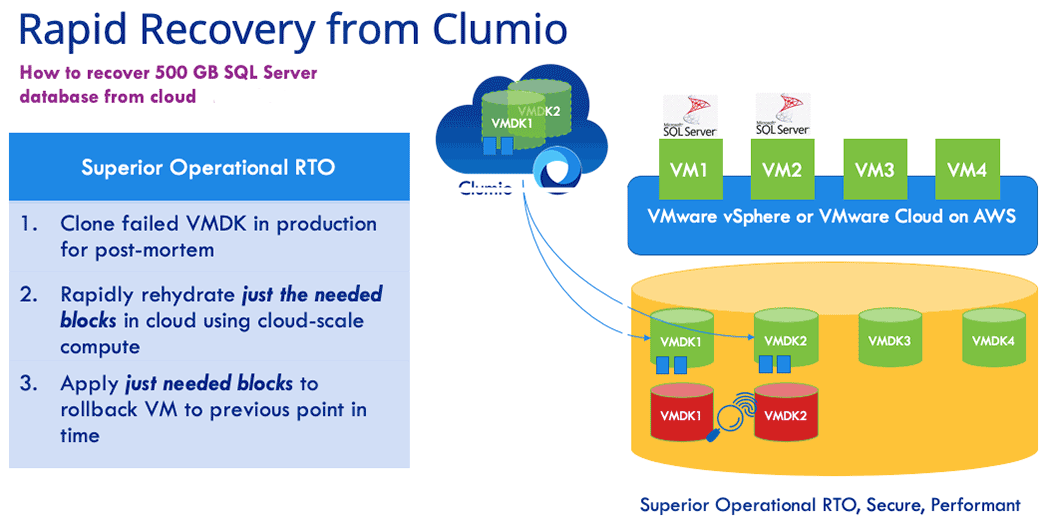
Help to deliver secure backup and recovery for your data – wherever it needs to be. Rapid Recovery is a set of innovations from Clumio that enables fast operational restores from cloud storage even when you are protecting on-premises workloads. Thanks to Rapid Recovery with Clumio SaaS, it took just 5 minutes to recover an active SQL Server AG environment with 500GB of data given in the above example This is the time taken for end-to-end recovery and data restored to a fully operationally state. How did we do this? There are two innovations in Rapid Recovery playing key roles here.
Reidratazione scalabile:
Clumio’s scale-out rehydration eliminates the rehydration penalty of traditional bricks and blocks systems altogether. Rehydration is done by Clumio using serverless compute and it takes advantage of the unlimited compute capacity of the cloud while running parallel I/O operations across all blocks of interest for a given request. The result: restore throughput from the Clumio backup service beats that of a traditional deduplication system co-located in the data center.
Tracciamento dei blocchi modificati inverso:
When you are recovering a VM in production from backup, you are essentially trying to roll back the clock so as to get to a last known good condition. Clumio’s reverse changed block tracking helps you do exactly that without the need to go through a full restore. The Clumio backup service retrieves the changed blocks (regenerated via scale-out rehydration described earlier) and applies them directly into production storage to rollback the VM to the previous point in time. The result: the time it takes to recover a VM from the Clumio backup service to a production operational level is faster than that of recovering from local storage!
Queste due funzionalità di Recovery rapido (Rapid Recovery) di Clumio eliminano TUTTE le limitazioni del Recovery istantaneo offerto dai fornitori tradizionali.
Let’s summarize the key customer benefits of Rapid Recovery from Clumio:
No human intervention required: The backup admin or VM admin does not need to do anything during backup or recovery to take advantage of Rapid Recovery. Clumio SaaS automatically detects if the requested restore point in time meets rollback criteria and initiates it automatically during recovery.
RTO is superior to that of instant recovery: You are bringing just the data required to roll back the VM and your recovery is complete. The time it takes to do this is better than the overall time it takes to perform instant recovery followed by storage vMotion.
Protect against data loss and ransomware: Unlike co-located bricks and blocks based backup solutions needed for instant recovery, Clumio backups are air-gapped from your production datacenter. Clumio helps protect you against site loss and site-level vulnerabilities.
Gets you ready for VMware Cloud on AWS: Instant recovery does not work in VMware Cloud on AWS environments because of its dependency on NFS. Rapid Recovery has you covered when you are migrating to VMware Cloud on AWS.
Want to try Rapid Recovery? Contact us.
More related posts
The Importance of Recovery Point Objective (RPO) in Your Business Continuity Plan
Dopo aver passato gli ultimi 20 anni ad aiutare i miei clienti a valutare correttamente e a dimensionare le architetture di storage per questi picchi, non mi è mai sfuggito che in genere si verificano per meno del 20% del tempo di esecuzione totale dell’ambiente dimensionato. Nell’era delle infrastrutture on-premise, ciò equivaleva a una grande quantità di risorse inattive tenute di riserva.
At Clumio, as I now shift into the sphere of helping customers right-size a data protection solution for the public cloud, the first thing that became apparent is that, if done correctly, the dynamic scalability of the public cloud allows for much more precise utilization of resources at all points in time. In fact, this is an optimization that must occur to seriously advance any idea into a fully formed, developed solution because, in public cloud, every second a resource is reserved or “in use” costs money. This is exactly why solutions designed to address an on-prem problem cannot simply be lifted and shifted to the public cloud. We often hear customers talk about the need to ‘refactor’ an application. This is a time-consuming effort, but the value in wasting less resources, in the end, is worth the time spent redesigning a solution.
For a SaaS application to manage peak workloads at scale, resource utilization is even more important – not just for resources that get presented in the customer’s environment, but especially for the backend services that support not just one customer, but thousands of customers. Only by building an application end-to-end with an intelligent resource utilization model will true scalability occur while minimizing cost for the consumers of the service.
By bringing to bear a cloud-native approach using microservices, Clumio has already designed our secure, enterprise backup service to help our customers get the benefit of cloud efficiency instead of having to ‘refactor’ their existing backup applications. This is best exemplified by the way Clumio inserts zero fixed-compute resources in the data path and, instead, incorporates the parallelism of AWS S3 combined with the dynamic scalability of AWS Lambda functions and AWS DynamoDB resources to help provide that seamless, fluid experience that customers expect when using SaaS. This also creates a much simpler methodology for right-sizing a customer environment – Clumio will provide the requested resources on-demand.
Clumio has helped remove the need for the arduous task to size for peak workloads. I find that I now spend most of my time educating customers on the importance of a truly optimized architecture and the value that brings to the consumer. Of course, the best way to discover the value of Clumio is by experiencing it first-hand….I encourage you to give it a test run.
More related posts
The Importance of Recovery Point Objective (RPO) in Your Business Continuity Plan
Commvault is “in the zone” – a mindset and special place often reserved for athletes on a scoring streak.
While no one here will argue that customer success is one of the most important validations of our business, it’s hard not to be impressed with Commvault’s recent string of industry accolades for its products, services and people under Sanjay Mirchandani’s leadership. The recent wave of recognition and company momentum across all areas of the business speaks for itself.
Proprio questo mese, Commvault ha appreso che la sua soluzione “Commvault Complete Backup and Recovery” è stata nominata finalista aiTechTarget’s product storage awards in the category for backup and disaster recovery hardware, software and services. Judged by an impartial panel of analysts, consultants and users, TechTarget’s product of the year award program helps buyers identify the best products amid a crowded field. It’s kind of a big deal. While the winners in each category will be announced in February on SearchStorage.com, we feel we’ve already won.
Commvault was also
included in Solutions Review’sBackup and Disaster Recovery and Data Management Software buyer’s
guides while Hedvig – a company we recently acquired if you haven’t heard – was
included in the Enterprise Data Storage guide.
Solutions Review releases these guides to assist organizations
during the research and discovery phase of buying business
software. Editors compile each Buyer’s Guide using research, analyst
reports, industry experts and product demos. These guides are scientific and
well-respected. While it’s great to see Commvault recognized in two guides,
it’s also noteworthy that competitors such as Rubrik, Veeam and Veritas were
only recognized in one.
Ultimo ma certamente non meno importante, al centro della nostra proverbiale bacheca dei trofei: solo pochi mesi fa Forrester ha nominato Commvault “Leader” nelle soluzioni di resilienza dei dati, mentreGartner ha riconosciuto Commvault as a Leader in its Magic Quadrant for Data Center Backup and Recovery Solutions. Forrester ranked Commvault the highest in its Current Offering category, while Gartner positioned Commvault furthest for completeness of vision in its Leaders quadrant and highest for ability to execute in its entire Magic Quadrant for the 8th consecutive year.
More related posts
The Importance of Recovery Point Objective (RPO) in Your Business Continuity Plan
Essendo una soluzione di backup autenticamente cloud-native, siamo in grado di offrire ai nostri clienti un livello di assistenza mai visto prima con i prodotti di backup aziendali tradizionali.
Gli utenti notano la differenza, come evidenziato in questo messaggio inviato da un cliente Clumio dopo aver ricevuto una notifica proattiva da parte del nostro team di assistenza in merito a un problema:
“Thank you for taking care of this issue. We appreciate having a second set of eyes on our backups and how easy this whole thing has been for us” – Midwestern US Healthcare Provider
Assistenza clienti proattiva
Being Authentic SaaS means that we’ve architected our solution to remove the complexities of managing enterprise backup for our customers. This is reflected in our model of service delivery – from proactive support to transparent over-the-air software upgrades.
I nostri clienti possono usufruire di un monitoraggio in tempo reale del servizio Clumio, garantito da software, processi e personale. A novembre 2019, il 72% delle richieste dei nostri clienti è stato aperto e valutato in modo proattivo dal nostro team di assistenza senza che il cliente dovesse intervenire in alcun modo.
Supporto proattivo automatizzato di Clumio
Unlike the ineffective “call home” alerting provided by legacy hardware vendors, Clumio support capabilities are built in the cloud and provide:
Monitoraggio continuo, 24 ore su 24, 7 giorni su 7, dei guasti relativi alle attività e all’ambiente
Fattori scatenanti per la creazione di ticket di assistenza proattiva
Miglioramento continuo del servizio Clumio grazie al rilevamento automatico dei difetti del prodotto
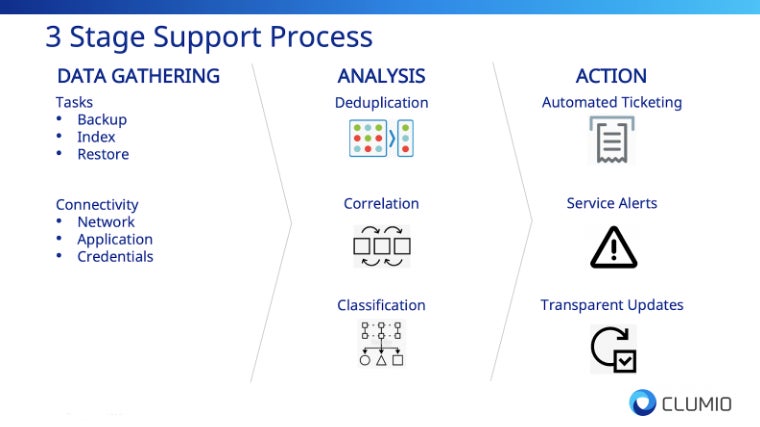
Il nostro approccio, volto a fornire il supporto più innovativo del settore, si articola in tre fasi:
Stage 1 – Data Gathering
As an authentic SaaS solution, we have complete access to critical failure information that legacy hardware and software vendors do not have, whether generated in the cloud or from the customer’s on-prem environment. The data sources include:
Task Status – Backup, restore, file-level indexing, or file-level restore failures.
Connectivity Status – On-prem network or application failures.
Stage 2 – Analysis
Per dare un senso ai dati raccolti, la fase di analisi prevede 1) la deduplicazione, 2) la correlazione e 3) la classificazione dei dati relativi ai guasti.
La fase di analisi è fondamentale per garantire che si riduca al minimo il rumore indesiderato e che le informazioni vengano sintetizzate in azioni concrete e concise volte a migliorare l’esperienza del cliente.
Stage 3 – Action!
I dati relativi ai guasti che emergono al termine della fase di analisi attivano quindi uno dei tre flussi di lavoro di risoluzione dei problemi:
Automated Ticketing – Proactive support ticket is opened for triage
Service Alert – Customers are notified via product alerts of failures
Transparent Updates – Product defects are tracked by our support team and resolved via over-the-air upgrades
Il risultato di questa fase operativa è un’esperienza cliente che si discosta dalla natura tradizionale e reattiva dell’assistenza fornita dai fornitori di hardware e software di vecchia generazione.
Modello di aggiornamento over-the-air
Inoltre, i clienti non devono preoccuparsi delle complessità tradizionalmente associate all’aggiornamento dei prodotti di backup legacy: tempi di inattività programmati, amministratori di turno, test di convalida o interruzioni del servizio. Le patch, gli aggiornamenti e le correzioni di Clumio vengono distribuiti in modo trasparente via over-the-air, senza che sia necessaria una complessa pianificazione degli aggiornamenti.
Ciò si è tradotto in un’esperienza di backup aziendale senza precedenti. A novembre 2019, il 100% dei difetti dei prodotti Clumio è stato risolto senza richiedere alcun intervento da parte dei clienti.
Un’esperienza cliente innovativa è un percorso
In qualità di fornitore innovativo di soluzioni di backup aziendali, dovremmo anche offrire un’assistenza clienti aziendale altrettanto innovativa; il fornitore più innovativo di soluzioni di backup aziendali dovrebbe anche fornire l’assistenza clienti aziendale più innovativa. Ecco perché l’esperienza del cliente e il ricorso alle tecnologie cloud e di automazione sono al centro della nostra strategia per il successo dei clienti.
Il nostro team è composto da ingegneri altamente qualificati con competenze nei settori del cloud, della sicurezza, dello storage, dell’automazione e in molti altri ambiti, tutti impegnati a garantire il successo dei nostri clienti.
Mentre proseguiamo il nostro percorso di innovazione, l’esperienza del cliente rimarrà sempre una priorità assoluta e non vediamo l’ora di collaborare con voi.
More related posts
The Importance of Recovery Point Objective (RPO) in Your Business Continuity Plan
Il cloud pubblico ha apportato un valore enorme alle aziende, ma è necessario un nuovo modo di pensare. Senza un nuovo modo di pensare, si è destinati a ritrovarsi ad affrontare le stesse sfide di prima, poiché queste vi seguiranno nel vostro nuovo percorso.
Over the last ten years, the journey to the cloud has provided 3 big lessons that have shaped the way enterprises approach the cloud in the current era. Shadow IT showcased the value of agility and scale, but also alerted us to the fact that a security-first mindset is required as data becomes dispersed across clouds. The cloud-first era reminded us that the cloud is costly if you leverage the same on-premises methodologies in the public cloud. The goal of today’s era, I like to call the cloud smart era, is to accelerate to the cloud intelligently by taking advantage of public cloud innovation, scale, and economics.
One core business function that did not evolve along this journey is data protection. If you look at the data center today, the data protection methodologies are robust including replication between storage arrays, snapshots, backups, replicated backups, and tape backups for offsite storage. But in the public cloud, data protection solutions are minimal, especially for backup. Today’s options include a virtualized version (or cloud retrofit) of the same legacy backup product you use in your data center today or volume level snapshots you have to orchestrate in the public cloud. Let’s take a look at the challenges of each of these options.
Legacy Backup Product – “Cloud Retrofit”
Traditional backup products have been in the data center for years. Most of these solutions are 10, if not 30 years old. As we saw in the cloud-first era, lifting and shifting existing products as a virtualized appliance, even with a “cloud-like consumption” model, results in complexity, higher costs, a software bill, a cloud bill, and a lack of scale and agility. Without re-architecting or rebuilding these backup products from the cloud up, the result is the same on-premises challenges enterprises are running away from in the first place.
Gestione delle istantanee Native Cloud
Most enterprises have seen the complexity and false claims of the traditional backup products and decided to roll their own snapshot managers or orchestrate the creation of those snapshots. Snapshots are suitable for a quick recovery of a volume to a point in time, but cannot deliver long-term cost-effectiveness, file searching capabilities, or single file restores with any ease. Imagine if you accidentally deleted a few files across multiple volumes, need to go back in time for ediscovery, or require data to compare from 5 years ago. Having snapshots as your only tool makes life very painful. Another area of concern is putting your primary data and snapshots in the same account, which brings the additional risk for ransomware or bad actors who could compromise the data and the “backup.” To alleviate this issue, many users copy their snapshots to other accounts to keep them separate, which incurs additional egress costs. If this was not challenging enough, most enterprises have 10s, if not 1000s of accounts in the public cloud, so the challenge grows exponentially.
What enterprises demand is a secure, simple, and predictable SaaS data protection solution that follows along as they accelerate their journey to the cloud. At Clumio, we have the luxury of building products in a cloud-first world, building services natively from the cloud up, without any legacy products or services in our platform to change or evolve. We develop products that give our customers a competitive advantage by removing the complexity of legacy backup solutions and protecting data as enterprises accelerate their journey to the public cloud. We believe that backup should be a service provided to the enterprise with a setup that can take as few as 10 minutes., the quick discovery of all data assets, global search, single file, volume, or application recovery, with a security-first mindset. And this is just the beginning. In my next blog post, we will dig deep into how Clumio solves the multi-cloud data protection challenge.
Take care and stay “authentic” SaaSy my friends.
More related posts
The Importance of Recovery Point Objective (RPO) in Your Business Continuity Plan
Imagine your business has just been hit by a disastrous event – be it a natural disaster, cyber-attack, or even human error, and all your company’s critical data is either lost or inaccessible. The clock is ticking, and each second of downtime spells potential financial losses and irreparable damage to your organization’s reputation. This nightmarish scenario is precisely why understanding il Recovery Time Objective (RTO) and accurately calculating it is crucial for businesses of all sizes. In this post, we’ll demystify RTO, guide you on determining the optimal target for your business, and share how to calculate it effectively to limit the impact of data loss, avoid catastrophe, and give you peace of mind.
A Recovery Time Objective (RTO) is the maximum amount of time that an organization can tolerate for restoring its critical systems, applications, and data after a disruption or outage. It is a key metric used in disaster recovery planning and helps organizations determine how quickly their business operations need to be resumed after a major incident. RTO can be calculated by performing a business impact analysis (BIA) and determining the recovery time needed for each application, service, system, or data component based on its criticality and loss tolerance.
Comprendere l’obiettivo di tempo di Recovery (RTO)
Quando si verifica un evento imprevisto, come un attacco informatico o una calamità naturale, i sistemi IT di un’organizzazione potrebbero subire un’interruzione. Il processo di ripristino necessario a riportare tali sistemi in funzione dovrà essere completato entro un determinato lasso di tempo. È qui che entra in gioco il concetto di Recovery Time Objective (RTO). L’RTO è definito come il periodo di tempo massimo accettabile prima che un’organizzazione possa riprendere le normali operazioni aziendali a seguito di un’interruzione significativa.
To understand RTO better, consider the analogy of a hospital’s emergency room. In case of any life-threatening injury, it is essential to provide medical attention to the patient within a certain time frame. This time frame or duration is known as the ‘Golden Hour.’ If doctors and staff fail to provide medical aid within this hour, there are chances that the injury turns fatal, causing long-term damage. In the same way, for an organization, if critical applications and systems are not resumed within the RTO period, there could be financial and reputational damage that will hurt the business’s interests.
In today’s world, businesses rely heavily on technology systems to conduct their day-to-day activities. Any downtime or delay in resuming those critical services can lead to severe losses, including revenue, missed opportunities, unplanned expenses, decreased customer satisfaction and loss of market share. Therefore, having proper RTO planning in place is essential for swift disaster recovery. A volte le organizzazioni danno la priorità ai costi rispetto al rapido ripristino del servizio in caso di guasto o disastro. Tuttavia, i tempi di inattività potrebbero rivelarsi molto più costosi rispetto all’investimento in adeguate opzioni di pianificazione dell’RTO sin dall’inizio.
Now let’s delve deeper into why RTO is important and how it can benefit your organization.
Secondo un rapporto dell’Aberdeen Group, il 93% delle aziende che hanno subito un’interruzione dell’attività del data center per più di dieci giorni ha presentato istanza di fallimento entro un anno.
Uno studio condotto da Gartner ha rivelato che il costo medio dei tempi di inattività dei sistemi IT è pari a 5.600 dollari al minuto, sottolineando l’importanza di disporre di un Recovery Time Objective (RTO) ben definito.
In un sondaggio condotto dal Disaster Recovery Preparedness Council, quasi tre quarti (73%) delle aziende hanno dichiarato di non disporre di un RTO adeguato, evidenziando la necessità che le organizzazioni diano priorità alla pianificazione del ripristino di emergenza.
L’importanza dell’RTO nei piani di Recovery in caso di calamità
L’RTO svolge un ruolo fondamentale nel garantire che la vostra organizzazione possa riprendere le normali operazioni il più rapidamente possibile in caso di interruzione. Di seguito sono riportati alcuni esempi che illustrano l’importanza dell’RTO nei piani di Recovery:
In primo luogo, l’RTO contribuisce a ridurre la perdita di ricavi, il danno alla reputazione e altre conseguenze causate da tempi di inattività prolungati. I tempi di inattività comportano costi tangibili immediati, come la perdita di ricavi, e costi intangibili, quali la perdita di fiducia da parte dei clienti.
Secondly, let’s consider a scenario where an accounting application is down for several days. This application is vital to the business’ operations since it takes care of all accounting activities. In this situation, failure to restore the application within the RTO duration will lead to late payments and incorrect balances that could result in loss of significant amounts of money or gradual fallbacks. To understand how important RTO is to organizations, imagine being without your mobile phone for one day during an important project; inevitably, you’ll lose valuable time and work behind schedule on delivery deadlines.
In terzo luogo, definire l’RTO aiuta un’azienda a identificare i sistemi IT critici che, in caso di guasto, potrebbero causare l’impatto più grave sull’attività. Una chiara identificazione di questi sistemi e dei relativi valori di RTO facilita il lavoro dei team IT nella definizione delle priorità durante il ripristino dei sistemi, poiché determina quali servizi devono essere ripristinati per primi per mantenere la continuità operativa. Infine, ignorare o gestire in modo errato la pianificazione dell’RTO può portare a scelte sbagliate nel determinare quali tecnologie di Disaster Recovery siano adatte al ripristino di dati e applicazioni vitali. Comprendere quanto siano cruciali i pianificatori dell’RTO nella pianificazione del Disaster Recovery dovrebbe spingerci a riflettere su come calcolarli.
RTO e Obiettivo del punto di recupero (RPO)
Recovery time objective (RTO) and recovery point objective (RPO) are often considered together as the two most important parameters of a data protection or disaster recovery plan. While both concepts are related to data recovery in the event of a disaster, they differ in their focus.
L’RTO riguarda la rapidità con cui un’organizzazione è in grado di riprendere le normali operazioni aziendali dopo il verificarsi di un incidente grave che abbia causato un’interruzione. L’RPO, invece, si concentra sulla quantità massima di dati che può andare persa durante questo periodo prima che la perdita diventi inaccettabile.
Per illustrare la differenza tra RTO e RPO, immaginiamo un’azienda che svolge la propria attività avvalendosi di varie applicazioni e database critici. Queste applicazioni elaborano gli ordini dei clienti, gestiscono i livelli delle scorte e si occupano delle transazioni finanziarie. Se una di queste applicazioni smettesse di funzionare a causa di un guasto hardware o di un disastro naturale, per quanto tempo l’azienda potrebbe permettersi che l’applicazione rimanesse indisponibile? Tale durata rappresenterebbe l’RTO per quell’applicazione.
Now consider what happens if there is a backup system in place but it is not able to recover all of the latest transaction data since its last backup was taken 24 hours ago. The entire day’s worth of work would be lost, leading to significant financial losses and other negative consequences. The acceptable limit for such data loss would be defined by the RPO.
Come calcolare l’RTO per la propria organizzazione
The first step in calculating your organization’s RTO is to conduct a business impact analysis (BIA). This helps you identify critical systems and applications that require the highest level of availability and assess how much downtime each system can tolerate before operational disruptions negatively impact your business.
Ad esempio, immaginiamo una compagnia assicurativa il cui sistema di gestione dei sinistri smetta di funzionare. L’azienda potrebbe riuscire a sopravvivere se il sistema rimanesse offline per alcune ore durante le fasce orarie di minor traffico, ma potrebbe subire perdite finanziarie significative e danni alla propria reputazione se non fosse disponibile durante le ore di punta. Pertanto, le ore di punta potrebbero essere definite come il periodo durante il quale deve essere rispettato l’RTO. Un’altra analogia da considerare è simile al modo in cui gli ospedali si preparano alle catastrofi naturali. Dispongono infatti di un piano che delinea le azioni da intraprendere in caso di afflusso massiccio di pazienti a seguito di un terremoto o di un uragano. All’interno di questo piano, definiscono il tempo massimo necessario per ripristinare la piena operatività nel caso in cui si verifichi un evento che ne comprometta il funzionamento. Un ospedale con interventi chirurgici critici in programma quel giorno avrebbe tempistiche di RTO diverse rispetto a uno in cui non sono previsti interventi.
Once you have identified critical systems and applications, you need to determine how quickly they need to be restored after a disaster has occurred. When calculating RTO, it’s essential to consider factors such as backup frequency, location, transport mechanism, security measures, staff capabilities, and end-user requirements.
Come condurre un’analisi dell’impatto aziendale (BIA)
Before calculating RTO for your organization, it is important to conduct a business impact analysis (BIA). The BIA involves evaluating the potential effects of a disaster or system failure on critical business functions. It is important to note that BIA is separate from the disaster recovery planning process as it instead focuses on understanding the potential impact of disruptions on key business functions. Ad esempio, a metà del 2020, molte organizzazioni sono state colte alla sprovvista dal rapido passaggio al lavoro da remoto a causa del COVID-19. Le aziende che in precedenza facevano affidamento su soluzioni on-premise hanno faticato ad adattare i propri sistemi per supportare una forza lavoro in remoto. Per prevenire tali problemi in futuro e comprendere meglio i rischi associati a questo tipo di interruzione, le aziende dovrebbero prendere in considerazione la conduzione di una BIA. Per avviare il processo di analisi, le organizzazioni dovrebbero identificare le principali parti interessate provenienti da tutti i reparti e le aree funzionali. Questo team dovrebbe raccogliere informazioni su ogni funzione aziendale critica e determinare per quanto tempo ciascuna di esse possa subire un’interruzione prima di causare un danno significativo alle operazioni.
È inoltre importante che le organizzazioni prendano in considerazione sia gli impatti diretti che quelli indiretti delle interruzioni. Gli impatti diretti potrebbero includere l’interruzione della produzione, mentre gli effetti indiretti potrebbero comprendere la perdita di vendite dovuta a problemi nella catena di approvvigionamento. Tenere conto di questi diversi tipi di effetti può aiutare a comprendere in modo completo i potenziali impatti.
Comparing a business to a building with multiple levels can help visualize this process. Each level represents different aspects of business functions and processes, such as finance or supply chain management. You must diligently map every floor’s contents within your business context and determine what happens if you remove specific parts partially or completely. Once you’ve completed your BIA and identified all critical business functions, you’re ready to move on to the next step: identifying critical systems and applications.
Identificazione dei sistemi e delle applicazioni critici
L’identificazione dei sistemi e delle applicazioni critici è fondamentale per l’elaborazione di un piano di Recovery di emergenza. Il processo di identificazione dovrebbe prevedere un’analisi approfondita dei sistemi e delle applicazioni IT essenziali per supportare le funzioni aziendali individuate nella valutazione dell’impatto sul business (BIA).
Ad esempio, un produttore identificherebbe probabilmente i sistemi di produzione come un’applicazione di importanza cruciale, mentre un istituto finanziario potrebbe concentrarsi sulle proprie applicazioni di trading o bancarie di base. In ogni caso, tuttavia, qualsiasi applicazione che sia fondamentale per supportare le operazioni critiche deve essere documentata e analizzata.
Once you’ve identified your critical applications, it’s also essential to examine dependencies between them. This includes examining the infrastructure and hardware components required for each application’s proper functioning.
Si raccomanda di prendere in considerazione il monitoraggio delle dipendenze anche al di là dei livelli primari, poiché una modifica al secondo livello delle dipendenze può comunque avere effetti secondari in grado di propagarsi a cascata fino alle applicazioni critiche.
Per approfondire l’analisi di queste dipendenze, gli analisti di sistema ricorrevano spesso a diagrammi di flusso per illustrare in dettaglio il flusso di lavoro previsto o i movimenti dei dati tra le applicazioni. Visualizzando l’interconnessione tra i diversi sistemi, diventa più facile stabilire le priorità delle procedure di Recovery e implementare misure di resilienza più complete. After carefully analyzing your organization’s critical systems and dependencies between them, you’ll be well-prepared to select suitable disaster recovery technologies in our next section.
Attuazione e miglioramento delle strategie RTO
Once you have calculated your organization’s Recovery Time Objective (RTO), it is crucial to implement and improve strategies that will help you achieve the desired recovery time. One of the key components of implementing an efficient RTO strategy is ensuring that all stakeholders understand their respective roles during a disaster or crisis. È essenziale garantire una formazione continua sia ai dipendenti che al personale IT sulle procedure e sui piani di ripristino in caso di disastro. È possibile condurre simulazioni periodiche per garantire che tutti comprendano le procedure, nonché per testare l’efficacia dei sistemi, delle tecnologie e del personale.
Inoltre, la verifica periodica dell’efficacia delle strategie RTO può mettere in luce le aree che necessitano di miglioramenti. È essenziale cercare sempre modi per migliorare e rendere disponibili soluzioni di backup più efficaci. Ciò potrebbe comportare un cambiamento della tecnologia esistente, l’aggiornamento del software o l’esecuzione di aggiornamenti periodici dell’hardware. One company based in New York City learned this lesson after storms caused severe flooding of data centers within their region. Power outages resulted in catastrophic data loss, including losing our clients’ vital information stored in storage devices.
In risposta, abbiamo potenziato i nostri servizi di infrastruttura basati sul cloud, garantendo ai nostri clienti la possibilità di accedere continuamente ai backup dei dati da remoto in caso di problemi. Grazie alle rigorose politiche sulla privacy e ai requisiti di conformità alle normative sull’archiviazione rispettati dal nostro team di esperti, abbiamo offerto ai nostri clienti la tranquillità di sapere che le loro operazioni aziendali critiche erano al sicuro. Evaluating backup data can also give insight into additional improvements required on top of existing strategies. If specific applications are taking too long to back up regularly, upgrading them using modern infrastructure with higher capacity might be necessary.
Un altro modo per migliorare la propria strategia RTO consiste nell’implementare strumenti di automazione che consentano ai team IT di rispondere in modo rapido ed efficiente alle emergenze senza interrompere la normale produttività. Inoltre, l’automazione delle attività ripetitive o prevedibili può consentire ai professionisti IT di dedicare più tempo ad aspetti più complessi, come il monitoraggio delle prestazioni del software e lo svolgimento di esercitazioni periodiche.
Scelta delle tecnologie adeguate per il Recovery di emergenza
È fondamentale scegliere le migliori tecnologie di disaster recovery in base alle esigenze specifiche della propria azienda. Le applicazioni business-critical richiedono un obiettivo di tempo di ripristino (RTO) che garantisca una rapida operatività, mentre altre applicazioni non critiche potrebbero avere un RTO più elevato.
When looking for the perfect disaster recovery technology, you’ll need to consider aspects such as security, costs, scalability, and your organization’s technological capabilities. Cloud-based services are increasingly popular due to their accessibility, scalability, and low capital investment costs. Amazon Web Services (AWS) è un provider cloud utilizzato da diverse grandi aziende, come Airbnb e Netflix. Con AWS, le organizzazioni possono implementare piani di Recovery in più zone e regioni per garantire la ridondanza in caso di disastri o interruzioni dei dati.
Un’altra opzione tecnologica disponibile è la replica sincrona tra siti. Ciò richiede la presenza di data center replicati abbinati a impostazioni di failover che riducano al minimo le interruzioni durante un collasso sociale. Sia le WAN (Wide Area Networking) definite dal software che le connessioni in fibra ottica sono opzioni valide per sincronizzare i data center replicati e garantire tempi di RTO (Recovery Time Objective) quasi pari a zero. Un dibattito importante verte sulla scelta tra siti di standby “hot” o “cold” in vista di un failover delle applicazioni essenziali in caso di disastro. Un sito “hot” è un centro di backup pronto all’uso che rispecchia sia le operazioni sui dati sia l’infrastruttura; consente la ripresa immediata delle normali operazioni, ma potrebbe comportare costi più elevati. Un sito “cold”, invece, richiede una maggiore preparazione prima che possa avvenire il passaggio, ma comporta minori spese.
Identificando le applicazioni fondamentali e procedendo a un’attenta selezione delle zone e delle regioni nei vari data center, la scelta di tecnologie adeguate per il Disaster Recovery si rivelerà complessivamente vantaggiosa, indipendentemente dalla soluzione scelta.
La scelta delle migliori tecnologie di disaster recovery per le vostre specifiche esigenze aziendali è fondamentale, e sono disponibili diverse opzioni per soddisfare diversi obiettivi di tempo di ripristino (RTO). I servizi basati sul cloud, come AWS, offrono accessibilità, scalabilità e bassi costi di investimento. La replica sincrona tra i siti può ridurre al minimo le interruzioni durante un’emergenza, mentre le WAN definite dal software e le connessioni in fibra ottica possono garantire tempi di ripristino (RTO) quasi pari a zero. La scelta tra siti di standby “hot” o “cold” dipende dal livello di preparazione e da considerazioni di costo. Nel complesso, identificare le applicazioni critiche e selezionare con cura le tecnologie di Disaster Recovery adeguate tra diversi data center può apportare notevoli vantaggi a qualsiasi organizzazione.
Monitoraggio e adeguamento dell’RTO nel tempo
Una volta calcolato il Recovery Time Objective (RTO) e messe in atto le strategie per raggiungerlo, il lavoro non è ancora finito. Il monitoraggio e l’adeguamento del RTO garantiranno che esso rimanga pertinente ed efficace nel mitigare gli effetti di disastri o guasti imprevisti.
Let’s say that a few months after calculating your RTO and implementing recovery strategies, you experience a major data breach that takes down your critical systems for several hours. This incident could reveal weaknesses in your RTO plan and requirements, leading to necessary adjustments for future readiness. By analyzing the data from the incident, you can determine if the RTO needs to be adjusted based on factors like the severity of the disaster or failure or if new technologies would better facilitate data restoration. Poiché la tecnologia è in continua evoluzione, lo stesso vale per gli strumenti disponibili per il ripristino dei dati critici. Di conseguenza, i reparti IT devono tenersi aggiornati sulle alternative più recenti o sulle versioni migliorate delle tecnologie esistenti che potrebbero colmare le potenziali lacune nel loro attuale piano RTO. Un ottimo modo per monitorare i progressi in questo settore è partecipare a conferenze tecnologiche o webinar che illustrano le tendenze emergenti e offrono alle organizzazioni l’opportunità di entrare in contatto con esperti del settore.
D’altra parte, alcune organizzazioni potrebbero sostenere che il monitoraggio degli RTO non sia necessario fintantoché i loro calcoli iniziali siano sufficientemente solidi da tenere conto di ogni eventualità. Tuttavia, questa argomentazione trascura la natura mutevole dei sistemi tecnologici, in cui le cose potrebbero cambiare con la stessa rapidità con cui viene effettuato un aggiornamento software durante la notte o con cui emerge uno strumento di hacking negli ambienti criminali.
Monitoring and adjusting your RTO is similar to driving a car. Once you set out on the road, you don’t just settle down and forget about caution altogether because you believe everything went well at the start. A vigilant driver continuously monitors their environment by regularly checking mirrors and avoiding hazards as they appear along their path. Any sudden changes on the road like a blown tire or engine trouble will require quick thinking and new strategies, much like how IT organizations must adapt quickly to emerging security threats or IT failures.
So there you have it, monitoring and adjusting RTO over time is crucial for all organizations’ disaster recovery plans. By being vigilant in paying attention to potential threats and keeping track of technological advancements, you can ensure that your system remains robust and effective in the long run. Remember, recovery does not end after the implementation phase, for an efficient plan should account for any dynamic changes that might occur in an ever-evolving technological landscape.
Che ruolo svolgono la tecnologia e le infrastrutture nel raggiungimento degli RTO desiderati?
La tecnologia e le infrastrutture sono aspetti fondamentali per il raggiungimento degli RTO desiderati. La tecnologia e le infrastrutture adeguate possono aiutare le aziende a riprendersi più rapidamente da eventuali interruzioni dell’attività, riducendo l’impatto negativo sulle loro operazioni, sui clienti e sui profitti.
For instance, implementing a robust backup and recovery system that leverages cloud computing technologies can enable organizations to restore important data or applications in a matter of minutes. Additionally, having a resilient IT infrastructure with redundant systems, automated failover processes, and disaster recovery plans can significantly reduce RTOs.
Secondo un recente studio condotto da Veeam Software, l’84% delle aziende ha dichiarato di aver subito interruzioni di servizio nell’ultimo anno. Tra quelle che hanno subito tali interruzioni, il 33% ha perso l’accesso ai propri sistemi critici per un’ora o più. Inoltre, la ricerca suggerisce che le interruzioni non pianificate possono costare alle aziende fino a 5.600 dollari al minuto.
In conclusione, la tecnologia e le infrastrutture svolgono un ruolo essenziale non solo nel raggiungimento degli RTO desiderati, ma anche nel ridurre al minimo i rischi aziendali associati agli eventi di inattività. Investendo negli strumenti tecnologici e nelle soluzioni infrastrutturali adeguati, le aziende possono migliorare notevolmente la propria resilienza operativa e ridurre al minimo le potenziali perdite finanziarie causate da interruzioni non pianificate.
In che modo l’RTO differisce dall’obiettivo di punto di Recovery (RPO)?
Il Recovery Time Objective (RTO) e il Recovery Point Objective (RPO) sono due parametri fondamentali che le organizzazioni devono tenere in considerazione nella definizione dei propri piani di ripristino di emergenza. Sebbene alcuni possano usare questi termini in modo intercambiabile, non si tratta della stessa cosa.
In sintesi, l’RTO definisce il periodo di tempo durante il quale un’organizzazione può permettersi di rimanere senza un determinato sistema o applicazione prima di iniziare a subire perdite finanziarie significative o altre conseguenze negative. D’altra parte, l’RPO specifica la quantità massima di dati che un’organizzazione può permettersi di perdere a seguito di un’interruzione prima di subire danni significativi. For example, if a company has an RTO of two hours, it means that it can only tolerate up to two hours of downtime before suffering severe consequences such as losing customers or revenue. On the other hand, if an organization has an RPO of one hour, it implies that it can only afford to lose up to one hour’s worth of data before experiencing significant damage. Per mettere le cose in prospettiva: secondo uno studio condotto da IBM, ogni minuto di inattività non pianificata costa alle imprese in media circa 8.851 dollari. Inoltre, una ricerca di IDC suggerisce che il costo medio dei tempi di inattività per le applicazioni critiche è di circa 100.000 dollari all’ora.
Pertanto, definire RTO e RPO realistici per la propria organizzazione è fondamentale per ridurre al minimo i tempi di inattività ed evitare perdite finanziarie. Tuttavia, è bene tenere presente che questi indicatori devono anche essere in linea con gli obiettivi e le esigenze aziendali, poiché obiettivi eccessivamente ambiziosi potrebbero risultare difficili da raggiungere e mantenere senza sovraccaricare le risorse disponibili.
Quali fattori determinano un RTO adeguato per un’azienda o un’organizzazione?
Per stabilire un Recovery Time Objective (RTO) adeguato per un’azienda o un’organizzazione è necessario prendere in considerazione diversi fattori. L’RTO dovrebbe essere determinato in base al potenziale impatto dei tempi di inattività del sistema e alla rapidità con cui l’organizzazione deve riprendere le operazioni. Tra i fattori che determinano un RTO adeguato figurano:
Business Impact Analysis (BIA) – A BIA helps identify critical systems, data, and applications that are essential for business continuity. By prioritizing these aspects, organizations can develop recovery plans with specific RTOs that align with their importance.
Industry Standards – Certain industries such as healthcare or financial services have stricter regulatory requirements that dictate specific RTOs for protecting sensitive data and ensuring uninterrupted operation.
Financial Implications – According to a study by the Ponemon Institute, the average cost of data center downtime has risen to $9,000 per minute in 2021. Therefore, an organization’s financial situation plays a significant role in determining an appropriate RTO as it impacts both short-term revenue loss and long-term reputation damage.
Technology Infrastructure – The RTO should be based on the organization’s technological capabilities, including hardware, software, and network infrastructure. This includes assessing redundancy levels of IT systems and ensuring backup solutions are available to minimize recovery time.
In summary, determining an appropriate RTO requires understanding the potential impact of system downtime on your business operations, analyzing your critical systems and data, and balancing financial implications with technology infrastructure capabilities. By taking a proactive approach towards disaster recovery planning, businesses can minimize downtime while ensuring seamless business continuity during unexpected failures or disruptions.
Quali sono alcuni errori comuni che le aziende commettono quando definiscono gli RTO e come è possibile evitarli?
La definizione di un obiettivo di tempo di ripristino (RTO) è fondamentale affinché le aziende possano pianificare e prepararsi ad affrontare disastri, attacchi informatici e altre potenziali interruzioni dell’attività. Tuttavia, esistono alcuni errori comuni che le aziende commettono nel determinare i propri RTO.
Uno degli errori più gravi è quello di fissare un RTO non realistico. Secondo un sondaggio condotto da IDG, il 28% dei professionisti IT ammette di aver fissato RTO irraggiungibili. Fissare un RTO senza considerare le risorse disponibili o senza testare il piano può portare a tempi di inattività, perdita di ricavi e danni alla reputazione. Un altro errore comune è quello di non rivedere o aggiornare regolarmente l’RTO. Man mano che le aziende crescono e la tecnologia evolve, cambiano anche i potenziali rischi e le soluzioni necessarie. Il Disaster Recovery Preparedness Council riferisce che il 60% delle organizzazioni non ha aggiornato i propri piani di disaster recovery da oltre un anno, il che porta a piani obsoleti e inefficaci.
To avoid these mistakes, businesses need to conduct risk assessments, test their disaster recovery plans regularly and consult with experts in business continuity planning. It’s essential to establish an achievable RTO based on the needs and capabilities of your organization. A realistic plan will allow you to recover quickly while minimizing costs.
In sintesi, per evitare gli errori più comuni, quali la definizione di RTO non realistici o la mancata aggiornamento periodico degli stessi, è necessario un impegno costante in termini di preparazione, pianificazione e consultazione con gli esperti di disaster recovery all’interno delle organizzazioni.
In che modo le aziende possono ridurre al minimo il proprio RTO in caso di disastro o interruzione dell’attività?
Le aziende possono ridurre al minimo il proprio Recovery Time Objective (RTO) attuando le seguenti strategie:
Elaborare un piano completo di ripristino di emergenza: un piano ben documentato riduce la confusione e contribuisce a ripristinare rapidamente i sistemi. Secondo uno studio condotto da Gartner, solo il 35% delle piccole e medie imprese dispone di un piano di ripristino di emergenza.
Investire in infrastrutture resilienti: un’infrastruttura IT solida, dotata di ridondanze multiple, generatori di riserva e fonti di alimentazione alternative, garantisce la continuità operativa anche in caso di interruzione di corrente.
Eseguite backup regolari: i backup regolari garantiscono che i dati siano sempre aggiornati e disponibili quando necessario. Il 60% delle piccole imprese chiude i battenti entro sei mesi dal verificarsi di una perdita significativa di dati, in assenza di adeguate soluzioni di backup
Adottare soluzioni basate sul cloud: le soluzioni basate sul cloud offrono flessibilità e scalabilità che mancano alle tradizionali soluzioni on-premise, garantendo tempi di Recovery più rapidi secondo il 95% dei professionisti IT intervistati.
Adottando queste misure, insieme ad altre su misura per il proprio settore e le proprie esigenze aziendali, le aziende possono garantire tempi di ripristino (RTO) minimi in caso di disastri o interruzioni dell’attività, riducendo al minimo le potenziali perdite sia in termini di fatturato che di reputazione.
Raggiungi o supera i tuoi RTO con Clumio
Disaster recovery planning is essential for enterprises of all sizes looking to ensure business continuity during malicious attacks, downtime, and disruptions to infrastructure. Good data backups and a well-defined recovery process are critical elements of this planning.
Having a viable RTO—and the ability to meet or exceed the RTO—is a vital component to protecting both your business and its customers. As a cloud-native data protection backup-as-a-service platform, Clumio’s industry-leading rapid recovery capabilities provide enterprises with quick and reliable data restores to help ensure business continuity in the face of downtime to critical infrastructure.
Offrendo una soluzione semplice e intuitiva per il ripristino completo di un’istanza, nonché per il recupero granulare di singoli file, record o caselle di posta, Clumio ottimizza il recupero dei dati per soddisfare o addirittura superare facilmente i vostri RTO attuali.
Argomenti correlati:
Data Protection Essentials: RTO vs. RPO Scopri le nozioni fondamentali sulla protezione dei dati: la differenza tra RTO (Recovery Time Objective) e RPO (Recovery Point Objective) per un Backup and Recovery efficace.
What is RPO? The Importance of Recovery Point Objective in Your Business Continuity Plan Learn why Recovery Point Objective is vital to an enterprise’s business continuity plan in today’s risk-filled environment where threats like malware and ransomware are now commonplace. Implementing effective data backups and setting recovery objectives will help secure your business’s future.
Exploring Cloud Backup Options: A List of Considerations Examine your available options for cloud backup and learn why a cloud-native solution specifically designed for the cloud is the best choice for everything from ransomware protection to faster data recovery and easier compliance. This is particularly important for businesses and organizations with complex network environments and specific requirements.
The Role of Disaster Recovery in a Business Continuity Plan for Businesses and Organizations Read about the key role disaster recovery plays in a business continuity plan and learn why your choice of cloud backup can affect the speed of recovery.
How the Right Cloud Backup Solution Enables Faster Disaster Recovery across Diverse Network Environments When a disaster event (such as a ransomware attack) strikes, disaster recovery planning is paramount for businesses and organizations operating in various network environments. Learn about the key capabilities a cloud backup solution should provide to enable faster disaster recovery.
What Is a Data Retention Policy? Scopri le nozioni di base sulla politica di conservazione dei dati e scopri come un backup su cloud adeguato possa semplificare la tua conformità, garantendo al contempo la sicurezza dei dati di backup e rispondendo alle esigenze specifiche delle aziende e delle organizzazioni operanti in diversi settori.
More related posts
The Importance of Recovery Point Objective (RPO) in Your Business Continuity Plan
1. Trasferimento delle soluzioni on-premise sul cloud
It may be tempting to try porting over an on-premises backup system to the cloud, mainly due to your organization’s familiarity with the hardware and system. But this would defeat the purpose of moving to the cloud altogether. Backup solutions designed for on-premises backup don’t leverage cloud services to their full potential because these solutions were specifically made to run on a rigid physical infrastructure, which is less flexible and requires more pre-planning as user requirements change.
Il trasferimento delle soluzioni di backup da un data center al cloud comporterà due problemi principali:
Inefficient Architecture: Even if you were to take a “lift and shift” approach and emulate the physical hardware with Infrastructure as a Service (IaaS) components like AWS’ EC2 virtual machines and EBS volumes for virtual hard drives, you will not achieve any independent scaling of compute and storage. Instead, you’d have to size the backup data precisely and continually tweak AWS resources manually to accommodate the changing backup requirements. This would create an unnecessarily complex backup system with unpredictable costs—all while completely failing to leverage the agility of the cloud.
Compute Scale limitations: In the data center, compute is constantly running and has a fixed cost, but the cloud is just the opposite. Cloud compute is consumed on-demand, and you pay for each compute cycle. Backup solutions designed for on-premises use do not make full use of the cloud’s scaling abilities, causing unnecessary delays due to lack of bandwidth.
2. Utilizzo di strumenti cloud-native disponibili in commercio (come gli snapshot) o di soluzioni fai-da-te basate su script
There are some backup solutions whose approach is based on building a wrapper around the standard snapshot API that is native on that particular cloud platform. While this solution will work, and typically comes with an intuitive UI, it doesn’t provide a comprehensive data protection solution.
First, it’s difficult to automate global policy-based backups. It can also be time-consuming to locate the right snapshot to restore. This approach is also more vulnerable, mainly because snapshots are generally stored locally and close to the primary application.
Sebbene alcuni possano scegliere di sviluppare script complessi per ovviare ad alcune di queste carenze, permane comunque il rischio di errori umani e di script danneggiati, per non parlare della necessità di dedicare costantemente preziose risorse informatiche alla creazione e alla manutenzione di tali script.
3. Una soluzione cloud-native progettata appositamente per il cloud
Pairing a cloud-native backup solution with the cloud itself means that it can take full advantage of the scalability and agility of the cloud—two of the main reasons for migrating to the cloud in the first place.
With this approach, there is no need to install additional software, manage cloud resources, or install agents in the customer’s account. There is no upfront complex planning required as the solution elastically scales to meet the data protection needs of the applications. A well-designed solution also ensures that the backup copies are stored outside the security sphere of the primary data.
Ciò crea un隔離 tra i dati primari e i backup, garantendo una Recovery efficace nel caso in cui i dati primari vengano compromessi. Inoltre, una soluzione di backup cloud-native ideale dovrebbe consentire agli utenti di effettuare ricerche rapide all’interno dei backup per individuare e recuperare i dati, oltre a fornire strumenti utili quali dashboard e reportistica per garantire il pieno rispetto dei requisiti di conformità.
Sebbene un backup cloud-native sia la scelta più sensata in termini di prestazioni, protezione dei dati e visibilità sui dati, non tutte le soluzioni cloud-native sono uguali e gli utenti devono selezionare con attenzione una soluzione che garantisca le funzionalità chiave sopra menzionate.
The Industry’s Best AWS Cloud Backup Solution
Built natively in AWS, Clumio’s backup solution provides superior scalability, performance, cost efficiencies, data protection, and faster access to innovation made possible by the cloud, all while solving issues common in other cloud backup solutions.
Protezione da ransomware
Clumio provides comprehensive data protection against growing threats like ransomware and bad actors via air-gapped and immutable backups that are stored outside of the customer’s security sphere. Both data at rest and data in transit are end-to-end encrypted.
Conformità senza intervento manuale
Compliance has become increasingly complicated as more jurisdictions implement their own versions of data retention laws. Clumio mitigates complexity and exposure to compliance violations with a simple interface. Clumio provides a single, cohesive view of all AWS assets and automatically indexes any resources that require compliance protection with uniform policies, along with simplified reporting for compliance audits. And that’s just the start.
Recovery rapida con ricerca globale
Clumio’s interface utilizes a granular approach that can quickly locate and restore backup files, effectively reducing restore time from several hours to just minutes. This helps to ensure optimal business continuity in the event of downtime from a security event.
Niente più colli di bottiglia nei dati
Clumio utilizza le funzioni Lambda serverless di AWS e la scalabilità illimitata del cloud per aggirare i livelli di elaborazione e trasferire i dati direttamente in uno storage a oggetti altamente scalabile e durevole. Ciò consente a Clumio di scalare in base alle esigenze per soddisfare rapidamente le richieste delle applicazioni.
Controllo dei costi
Clumio’s advanced analytics and simulations include several cost control features that can provide clear, actionable insights into possible ways to reduce TCO. For example, by analyzing aspects like snapshots created per asset and their retention periods, Clumio can identify opportunities to cut back on certain snapshots and reduce AWS backup costs.
Argomenti correlati:
AWS Backup Services AWS backup is the practice of creating a protected and space-efficient copy of data being used or generated by AWS services.
Solving the Challenges of AWS Backup Amazon Web Services (AWS) has become the primary cloud backup choice for many businesses, but it comes with certain challenges that users must be aware of before diving in. Learn how to solve the common problems with AWS backup while maintaining full control over cloud costs.
Adding Ransomware Protection to Your Amazon Cloud Backup Ransomware is a growing threat that shows no signs of slowing down—and your Amazon cloud backup could be at risk of exposure. Read about the vulnerabilities of Amazon Cloud Backup and learn what you can do to safeguard your data and backups from an attack.
How to Choose Between Cloud Backup Solutions Choosing the right cloud backup solution can seem like an overwhelming task. Where do you even start? Discover five of the most important things you need to examine when searching for your cloud backup provider.
Controlling Costs of Cloud Backup Services Are you wondering why your cloud backup costs are so high? Learn about the biggest culprits behind excessive and fluctuating cloud backup costs and find out how you can gain control over them, permanently.
Three Reasons You Need Cloud Backup for Business Curious about the actual benefits that cloud backup can provide for your business? Read about three of the biggest benefits your business can gain by utilizing a dependable cloud backup solution.
More related posts
The Importance of Recovery Point Objective (RPO) in Your Business Continuity Plan
Cosa comprende un modello di piano di continuità operativa?
When a disaster event such as a server outage or cyber attack threatens to disrupt operations, a business continuity plan empowers an organization to continue functioning while navigating through the recovery from the incident. But, as one might imagine, the plan itself can be quite complicated, as it involves many moving parts. Generally, the components of a business continuity plan can range from the fundamental, such as planning communications between employees during a disaster event or restoring function to utilities, to the nuanced, like creating social media posts, press relations, etc.
One of the vital parts of a business continuity plan template involves planning for the recovery and restoration of mission-critical data and applications. In years past, this would have been mostly relegated to restoring data from physical backups and on-premises servers, but things have significantly changed as organizations have migrated most or all operations to the cloud. Products, services, and indeed the running of the business, have become more reliant on data and cloud-native applications and workloads.
If the template you’re using to create a business continuity plan doesn’t outline a way to back up and restore these applications and workloads in the cloud, the template is not only unsuitable for your organization, it would make your finalized plan vulnerable to significant repercussions from a potential disaster event.
Perché il backup su cloud è alla base di un modello di piano di continuità operativa moderno
An organization cannot recover and restore its data unless it has first been backed up. If you’ve migrated to the cloud, a cloud backup solution will protect an organization’s data and facilitate the disaster recovery process when the need arises.
Il processo è semplice in teoria: i dati aziendali vengono regolarmente sottoposti a backup tramite la soluzione di backup su cloud, archiviati in modo sicuro e aggiornati automaticamente secondo la pianificazione impostata. Se un incidente comporta la perdita o la compromissione dei dati, la soluzione di backup su cloud può avviare il ripristino dei dati a partire dal backup più recente, consentendo all’azienda di proseguire le proprie attività.
Sebbene ciò possa sembrare semplice nella pratica, il recupero e il ripristino di grandi quantità di dati in una sola volta possono richiedere molto tempo. E, come in qualsiasi azienda, non tutti i dati sono essenziali per il proseguimento delle operazioni. Se la vostra soluzione di backup su cloud ripristina le istanze di dati solo in modo generico, potreste andare incontro a tempi di inattività durante l’attesa del ripristino dell’intera istanza.
Il backup sicuro su cloud con ripristino rapido è la chiave per garantire la continuità operativa
The speed of data recovery during a disaster incident is the difference between downtime occurring and ensuring core operations continue. Using an inferior cloud backup solution that lacks rapid restore features can put your business continuity at risk—no matter how failsafe your template may seem.
Built natively in the cloud, Clumio’s industry-leading cloud backup-as-a-service platform is equipped with several rapid recovery capabilities that provide fast data restores and ensure business continuity when data has been lost or compromised during a disaster event. With Clumio, organizations can automatically back up data in an encrypted, air-gapped environment. When data has been lost or compromised, users can restore an entire instance or use granular and flexible recovery features to identify and restore mission-critical data and applications needed to maintain business continuity.
A successful business continuity plan template depends not just on proper planning—the tools matter just as much. Learn why Clumio is the industry’s leading innovator for cloud backup and rapid recovery by scheduling a demo today.
More related posts
The Importance of Recovery Point Objective (RPO) in Your Business Continuity Plan