SaaS Recover Capability
Backup & Recovery for Google Workspace
Recover deleted Google Workspace data from isolated backup, with SaaS simplicity

demo video
See Google Workspace recovery in action
See granular backup and recovery for Gmail, Drive, Shared Drives, Calendar, and Contacts.

Why it matters
Capability Benefits
Recover Google Workspace data on your terms, not the vendor’s SLA.

Close the recovery gap
Protect data the Google Workspace service uptime SLA does not recover.

Restore only what matters
Recover an email, file, or from a selected recovery point without over-restoring.

Keep backups separate
Use air-gapped, immutable copies stored outside the source environment.

Support retention and investigations
Retain deleted data longer and search exported content for audits and legal requests.

Help manage operational overhead
Deploy protection without backup infrastructure in your Google Cloud tenant.

Consolidate SaaS recovery
Protect Google Workspace alongside other SaaS data with one consistent approach.
How it works
Capability Features
Automated backups across Google Workspace
Protect Gmail, Drive, Shared Drives, Calendar, and Contacts with policy-driven backups.
Granular search and point-in-time recovery
Search deeply and restore specific items in place, out of place, or by time.
Air-gapped immutable backup copies
Store isolated recovery copies in bundled Google Cloud storage outside production.

Analyst Report
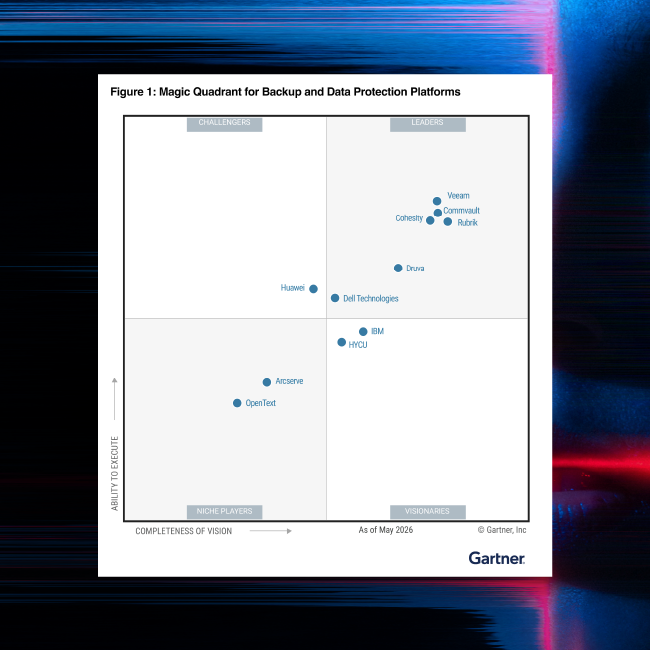
Gartner® Magic Quadrant™
Commvault named a Leader in the Gartner® Magic Quadrant™ for Backup and Data Protection Platforms for the 15th consecutive time.
Google Workspace pricing
Pricing plans built for businesses of all sizes
| Standard | Enterprise | Enterprise w/Unlimited Storage | |
|---|---|---|---|
Starting at $1.70 / user / month | Starting at $3.60 / user / month | Starting at $6.00 / user / month | |
Gmail | Yes | Yes | Yes |
Google Drive (Docs, Sheets, Slides, and more) | Yes | Yes | Yes |
Google Shared Drive | Yes | Yes | Yes |
Contacts | Yes | Yes | Yes |
Calendar | Yes | Yes | Yes |
Automated backups | Yes | Yes | Yes |
Flexible recovery options | Yes | Yes | Yes |
Bundled Google Cloud Storage | Yes | Yes | Yes |
5GB / user with 1 year retention included | Yes | Yes | Yes |
50GB / user with up to 10 years of retention included | No | Yes | Yes |
Unlimited Storage with up to 10 years of retention included | No | No | Yes |
Standard
Starting at $1.70 / user / month
Gmail
Google Drive (Docs, Sheets, Slides, and more)
Google Shared Drive
Contacts
Calendar
Automated backups
Flexible recovery options
Bundled Google Cloud Storage
5GB / user with 1 year retention included
Enterprise
Starting at $3.60 / user / month
Gmail
Google Drive (Docs, Sheets, Slides, and more)
Google Shared Drive
Contacts
Calendar
Automated backups
Flexible recovery options
Bundled Google Cloud Storage
5GB / user with 1 year retention included
50GB / user with up to 10 years of retention included
Enterprise w/Unlimited Storage
Starting at $6.00 / user / month
Gmail
Google Drive (Docs, Sheets, Slides, and more)
Google Shared Drive
Contacts
Calendar
Automated backups
Flexible recovery options
Bundled Google Cloud Storage
5GB / user with 1 year retention included
50GB / user with up to 10 years of retention included
Unlimited Storage with up to 10 years of retention included
Our Reach
Supporting more than 100,000 companies






“The only service that worked without business interruption was Commvault.”

“The integration of Cloud Rewind into Commvault Cloud enhances data management by covering every step of a data breach—protection, recovery, and rebuilding. Additionally, we can achieve better RTO and RPO to meet our business needs without requiring a parallel hot standby IT infrastructure and with minimal manual effort.”
Workload
Comprehensive Protection for Google Workspace
Help protect communication and collaboration data in Google Workspace from data loss threats.

Related to this Capability
ai recovery solution
SaaSRecover
Recover critical SaaS and DevOps data.
SaaSRecover is Commvault’s recovery solution for SaaS applications and DevOps tools that help keep the business running.

Backup & Recovery for Microsoft 365
Protect Exchange, Teams, OneDrive, and SharePoint with granular SaaS recovery.
Learn more
Backup & Recovery for Google Workspace
See the details of how Commvault can help you keep Google Workspace data safe from deletion, corruption, and attacks.
Read datasheet
Backup & Recovery for DevOps
Protect repos, pipelines, and project history across leading DevOps tools.
Learn moreFrequently Asked Questions
What is Backup & Recovery for Google Workspace?
Backup & Recovery for Google Workspace is a SaaSRecover capability that helps organizations protect and recover Gmail, Google Drive, Shared Drives, Calendar, and Contacts with granular recovery and isolated backup copies stored outside the source environment.
Why do I need backup for Google Workspace?
Google Workspace follows a shared responsibility model. Google is responsible for service availability, while your organization is responsible for protecting and recovering its data after accidental deletion, sync errors, malicious activity, or ransomware-related corruption.
What recovery options does SaaSRecover offer?
You can search and recover at a granular level, including specific emails, files, accounts, and point-in-time versions. Recovery options include in-place and out-of-place restore, helping teams restore what they need without a full-environment rollback.
Where does SaaSRecover store Google Workspace backups?
Recovery copies are stored in Commvault-managed, isolated, air-gapped storage that is separate from both the Google Workspace source environment and your own cloud tenant. That separation helps reduce the chance that a compromise reaches the backup copy.
Does this help with compliance and eDiscovery?
Yes. The capability supports extended retention for deleted and active data, and customers using the compliance-related SKU can search and export relevant content to support audits, investigations, litigation, and regulatory response workflows.
See it live
Get a demo
Learn about granular Google Workspace recovery with the simplicity of SaaS.
-
Hands-on tour
-
30 minute consultation
-
Get faster and cleaner data recovery at scale