Key Takeaways
- Cyber recovery requires more than speed; organizations need confidence that restored data and systems are clean before returning them to production.
- Commvault Cleanroom helps provides an on-demand, isolated environment for recovery, investigation, and testing without exposing production systems to potential reinfection.
- Threat Scan helps continuously evaluates backup data for malware and helps identify the last known clean recovery point using current threat intelligence.
- Capabilities such as Repave recovery, application-aware recovery, and third-party security integrations help organizations validate and reconstruct compromised environments.
- Together, Cleanroom and Threat Scan help create a validated recovery workflow spanning preparedness, active incident response, and post-attack restoration.
The economics of cyberattacks are getting harsher and more complex. According to IBM’sCost of a Data Breach Report 2026, the global average cost of a breach has climbed to $4.99 million. At the same time, organizations leveraging AI and automation reduced those costs by up to $1.93 million, highlighting a clear shift toward more intelligent, adaptive defense strategies.
For years, disaster recovery was measured by one metric: speed. How fast can systems be restored? How quickly can operations resume? But speed alone is no longer sufficient. But in today’s threat landscape, speed without certainty is a liability. Attackers are no longer just targeting production environments; they are actively compromising backups to reinfect your environment during recovery.
The scale of this challenge is hard to ignore.Our research with Enterprise Strategy Groupsuggests that 92% of organizations have experienced cyberattacks that explicitly targeted backups.
Restoring quickly from a compromised backup doesn’t end an incident; it restarts it. This is why cyber resilience has shifted from a question of recovery speed to one of recovery certainty.
Commvault addresses this shift with two deeply integrated capabilities:Commvault Cleanroom™andThreat Scan. Together, they help provide organizations with a complete, validated path from compromise to clean, production-ready recovery.
Traditional Disaster Recovery Breaks Down in Cyberattacks
Standard disaster recovery is built for infrastructure failures, not cyberattacks. When an attack compromises production, disaster recovery replication puts the secondary environment at risk of compromise, too. Organizations are left with three compounding problems:
- No safe recovery environment.There’s nowhere isolated to recover without risking reinfection or further exposure.
- No visibility into what’s clean.Without validation, organizations can’t identify which recovery point is uncompromised by malware.
- No speed.Building an isolated environment from scratch manually takes days or weeks. Organizations can’t have such delays during an active incident.
Together, these gaps turn what should be a recovery process into a prolonged crisis. Cleanroom and Threat Scan were built specifically to solve all three.
Cleanroom: On-Demand Isolation Without the Wait
The foundational challenge in cyber recovery is having a trusted environment to recover into. Cleanroom solves this by providing an on-demand, isolated recovery environment that organizations can spin up in hours rather than days.
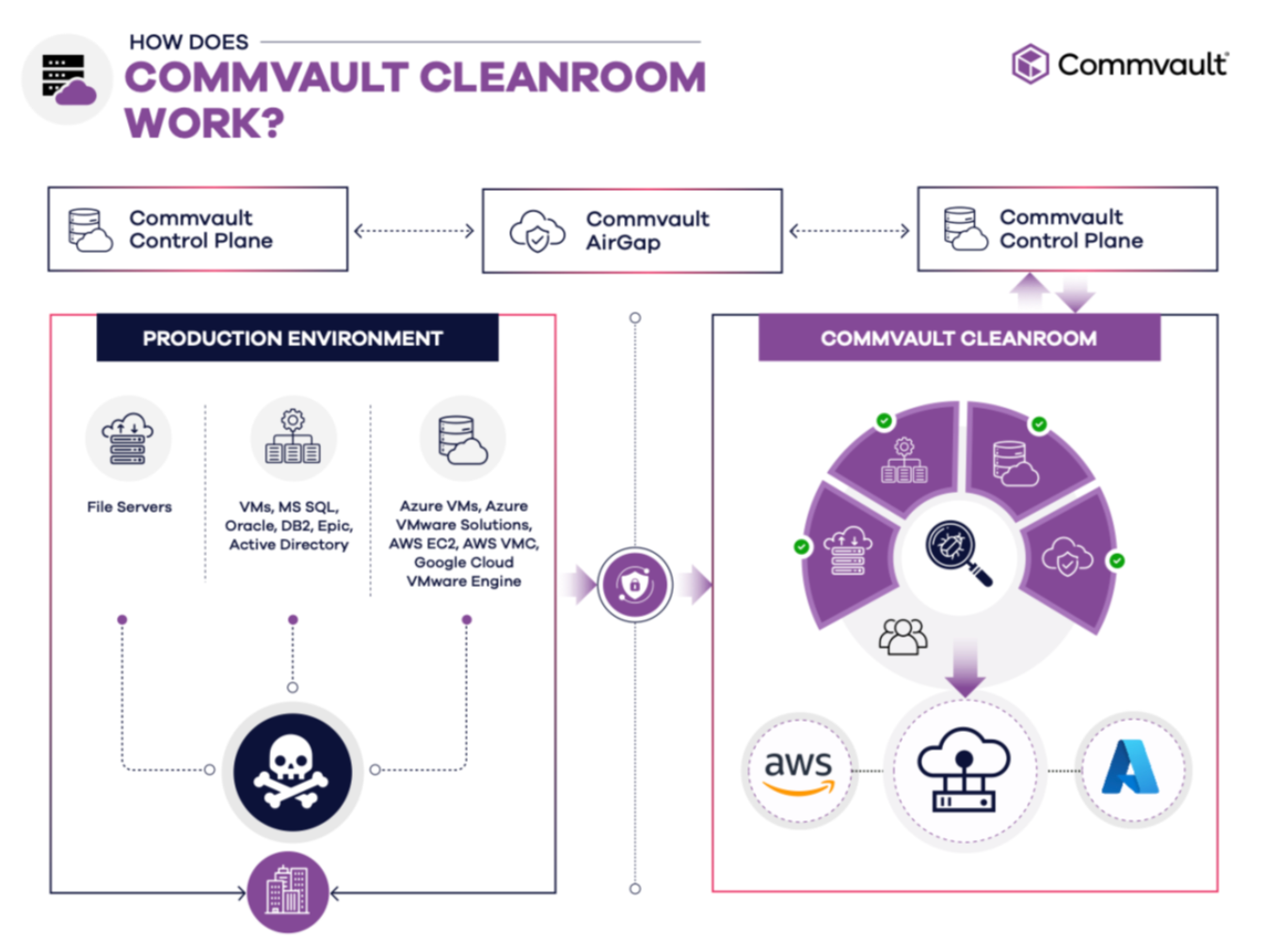
Fig: How does Commvault Cleanroom work?
Here’s what makes it operationally significant:
- One-click onboarding:Cloud account onboarding is designed to be complete in under a minute. At the time of recovery, the required isolated recovery infrastructure for both Commvault and the cloud environment is provisioned within minutes, including scaled infrastructure and access nodes. Commvault then leverages this scaled setup to help accelerate workload restoration, enabling data to be restored within hours (depending on dataset size) while maximizing the throughput supported by the target hypervisor (AWS/Azure).
- Application-aware recovery.Recovery isn’t just about restoring files. Cleanroom understands the applications running inside recovered systems, including complex dependencies like Active Directory forests and MSSQL environments. It enables systems to function correctly inside the isolated environment.
- Repave recovery.When operating systems themselves are compromised, Cleanroom enablesRepave recovery– helping rebuild environments using a trusted golden OS image and then overlaying clean application data. This approach is especially critical during active attacks, where rebuilding from scratch eliminates the risk of carrying forward a corrupted system state. For example, many organizations rebuild environments with updated OS images after an incident. Repave automates this process, allowing teams to rapidly reconstruct systems while helping confirm application data remains clean and usable.
- Automated driver and agent injection.Cross-hypervisor recovery introduces compatibility challenges. Different cloud platforms require specific drivers, network configurations, and communication agents. Cleanroom helps handle this automatically during recovery, confirming systems boot and operate correctly regardless of the target environment.
The result is an isolated environment that organizations can build, test, and rely on – before an attack happens, not scrambling to construct one in the middle of it.
Threat Scan: Continuous Validation Across the Recovery Lifecycle
Recovering fast means nothing if you’re recovering malware along with your data. This is where Threat Scan becomes critical.
Threat Scan is Commvault’s built-in threat validation engine, integrated directly into the recovery workflow. It helps verify that data has been scanned, validated, and confirmed clean before it touches production again.
Here’s how it works across the recovery lifecycle:
- Proactive backup scanning.Threat Scan performs periodic scans of protected backup data to help identify malware signatures before an incident even occurs. This means organizations aren’t starting from zero when an attack hits. They already have validated recovery points.
- Incremental scanning for new and evolving threats.Malware signatures constantly evolve, making it essential to apply the latest threat definitions during recovery. Threat Scan supports incremental scanning, allowing existing backups to be re-evaluated with up-to-date intelligence from antivirus providers. When integrated into the recovery workflow, especially within the Cleanroom environment, it helps provide higher confidence in restored data during both cyber incidents and recovery drills.
- Third-party security integration.Threat Scan integrates with external security tools like CrowdStrike, allowing organizations to run additional validation inside the Cleanroom environment. Security teams can combine Commvault’s native scanning with their existing tooling for a more comprehensive forensic investigation.
- Automated clean point selection.Infected or suspicious backup versions are flagged and indexed as compromised. Threat Scan uses this data to automatically identify the last known clean recovery point, helping remove the guesswork from one of the most critical decisions in a cyber recovery scenario.
A Verified Recovery Workflow: From Detection to Clean Production
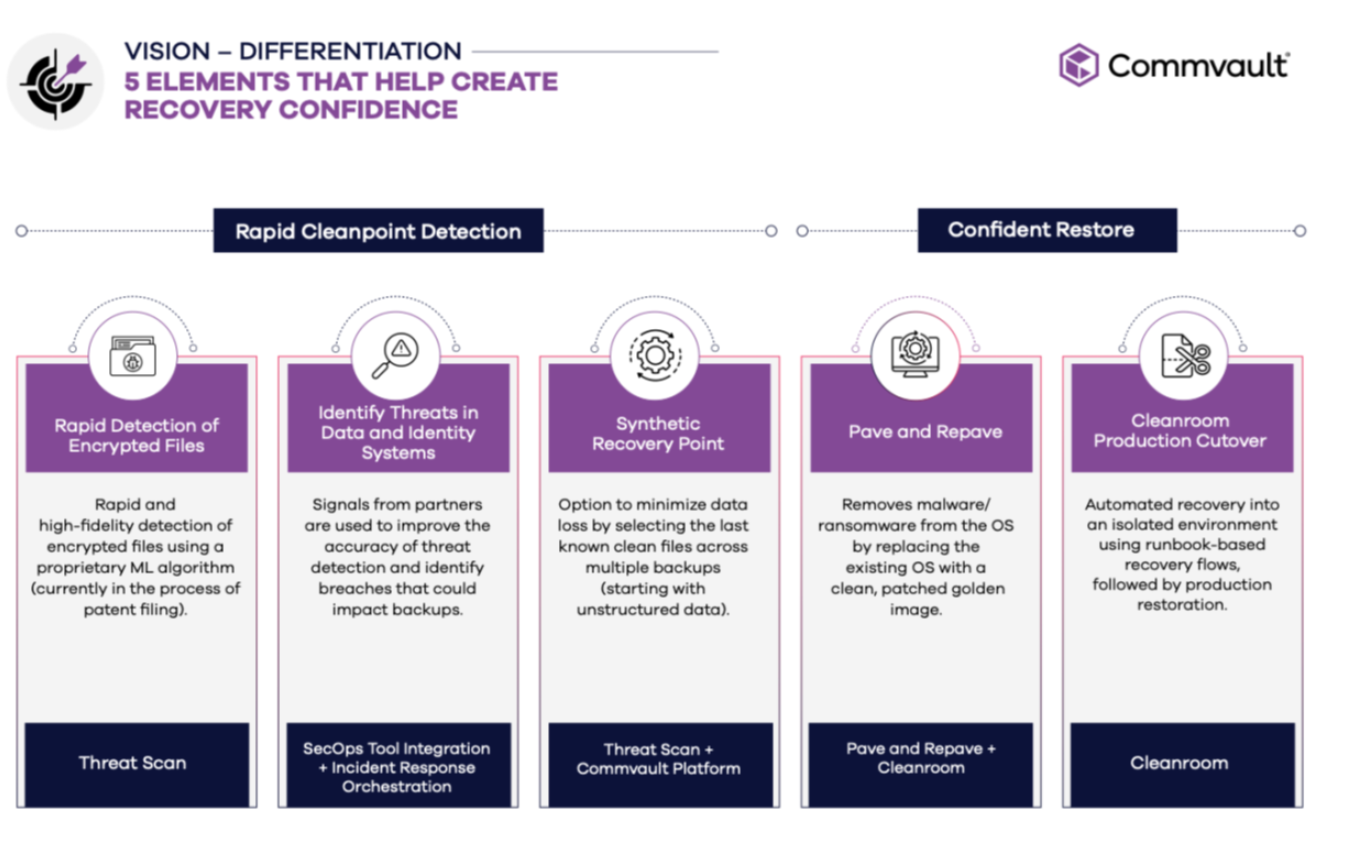
Fig: Five core elements from Threat Scan come together to deliver recovery confidence.
Cleanroom and Threat Scan work together across every stage of a cyber incident:
- Before an attack:Organizations conduct periodic recovery drills inside the Cleanroom, test workflows, and use Threat Scan to help maintain continuously validated recovery points. Readiness is built in, not bolted on.
- During an attack:The Cleanroom becomes the forensic investigation environment. Security teams recover data into the isolated environment, run Threat Scan alongside third-party tools, identify the source and scope of the breach, and determine exactly what was compromised.
- After an attack: Synthetic Recoveryhelps to recover a clean copy of backed-up data as Threat Scan helps identify and quarantine infected data.
Certainty Over Speed
Cyber recovery isn’t about having backups. It’s about having a trusted, validated path back to production. Every hour of downtime carries operational, financial, and reputational cost, and organizations can’t afford to recover blindly.
The question organizations need to ask isn’t just “how fast can we recover?” It’s “how certain are we that what we’re recovering is clean?”
Cleanroom and Threat Scan help answer both. They help reduce environment setup from days to hours. Continuous validation helps guide recovery point selection. They help you restore production with certainty, not assumption. When an attack hits, Commvault helps confirm you’re not starting from zero, but starting from clean.
FAQs
Q: What is Commvault Cleanroom?
A:Commvault Cleanroom is an on-demand, isolated recovery environment designed specifically for cyber recovery. It gives organizations a safe place to help restore, investigate, and validate systems without immediately introducing recovered workloads back into production.
Q: How does Threat Scan support clean cyber recovery?
A:Threat Scan helps scan protected backup data for malware and flags suspicious or compromised versions. It also supports incremental scanning with updated threat definitions, helping organizations identify clean recovery points as threats evolve.
Q3: How do Cleanroom and Threat Scan work together?
A:Cleanroom provides the isolated environment, while Threat Scan helps validate the data being recovered into it. Together, help security and recovery teams investigate an incident, identify compromised data, test restored systems, and establish a cleaner path back to production.
Q4: What is Repave recovery, and when is it useful?
A:Repave recovery helps rebuild compromised environments using a trusted golden OS image before clean application data is restored on top of it. It is particularly useful when an attack may have compromised the operating system itself and teams want to avoid carrying the corrupted system state into the recovered environment.
Q: Can organizations use their existing security tools with Commvault Cleanroom?
A:Yes. Threat Scan can work alongside third-party security tools within the Cleanroom environment, enabling security teams to combine Commvault’s native scanning with existing tools for broader investigation and validation.
Q: How can Cleanroom and Threat Scan help organizations prepare before an attack?
A:Organizations can conduct recovery drills in Cleanroom and periodically scan protected backups with Threat Scan. This approach helps enable teams to test recovery workflows and maintain validated recovery points before a real cyber incident occurs.
Prasanna Kumaris Manager, Development, at Commvault.