Cyber Recover capability
Threat Scan
Threat Scan helps you find threats faster and recover clean data.

watch demo
Commvault Threat Scan
See how Threat Scan helps identify threats and support faster, cleaner cyber recovery.

Why it matters
Capability Benefits
Helps to find threats faster and recover clean data with integrated threat intelligence and cyber recovery workflows.

Spot threats before restore
Faster insight
Scan data during backup, on-demand, and before restore to identify suspicious activity before recovery starts.

Enhance faster recovery of trusted data
Supports cleaner recovery
Validate recovery points and stage clean data for safer production restoration.

Preserve more good data
Less rollback
Help reduce data loss by creating a recovery point made up of the most recent good data.

Hunt beyond certain known indicators
Deeper analysis
Use layered inspection to help investigate ransomware, malware, and suspicious file activity.

Increase recovery confidence
More informed decisions
Offer security and IT teams more information for recovery decisions.

Help reduce reinfection risk
Contributing to safer operations
Isolate suspicious data before restore to support safer cyber recovery.
Built for security
Capability Features
Helping to find threats and recover clean data
Search backed-up data quickly for certain known indicators of compromise at scale.
AI-enabled inspection
Combine malware, heuristic, YARA, and encryption analysis to enhance detection.
AI-assisted synthetic recovery
Assemble the most current verified clean files into a recovery-ready point.

Analyst Report
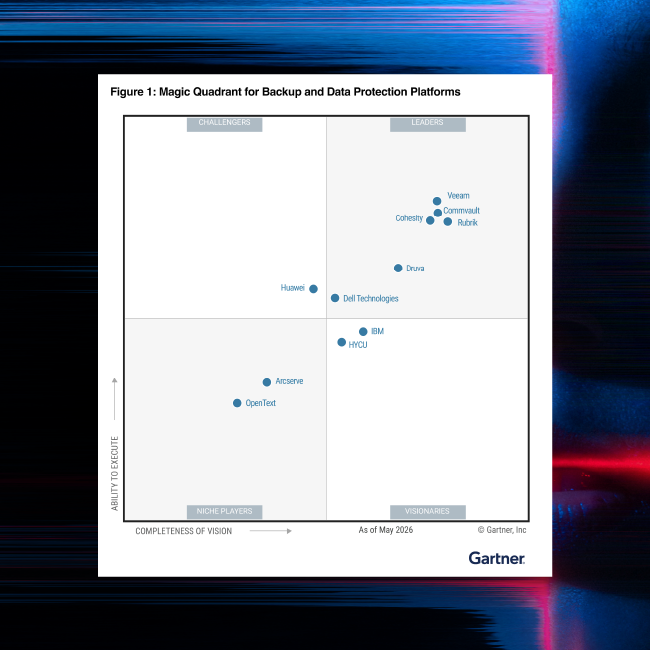
Gartner® Magic Quadrant™
For the 15th time in a row, Commvault has been named a Leader in the Gartner® Magic Quadrant™ for Backup and Data Protection Platforms.
Our Reach
Supporting more than 100,000 companies
Security leaders trust Commvault to help strengthen recovery readiness and cyber resilience.



“With Commvault, I have confidence in our ability to recover our critical systems and data quickly and cleanly should we need to.”

“We are now using Commvault Cloud to protect over 2,000 endpoint devices for our business. This capability has empowered us to expand endpoint protection service to the market and provide a complete backup portfolio to our customers.”
“Commvault gives us the confidence that our data is protected and recoverable, which is critical to our business.”
use case
Ransomware and Cyber Defense
See how Commvault helps security teams improve ransomware detection and clean recovery.

Related to this Capability
AI Recovery solution
CyberRecover
Enhancing clean, isolated, validated recovery for security and risk leaders.

Commvault Cleanroom
Isolated recovery environment for testing, forensics, and staged cyber recovery.
Learn more
Help identify malware and prevent reinfection with Commvault Threat Scan
Enable swift and clean data recovery by analyzing backup data to find and quarantine certain encrypted or corrupted files and virtual machines.
Read datasheet
Threat Hunting & Recovery Tour
Take an interactive look at threat hunting and clean recovery workflows.
Explore the tourFrequently Asked Questions
What is Threat Scan in Commvault?
Threat Scan is Commvault’s threat detection and clean recovery capability for cyber recovery. It helps teams find threats faster across protected data, validate cleaner recovery points, and recover clean data with less rollback and lower reinfection risk.
How does Threat Scan help with ransomware recovery?
Threat Scan supports ransomware recovery by scanning protected data during backup, on demand, and on restore to help identify suspicious activity, ransomware indicators, and encryption behavior. That security context helps teams choose cleaner data to recover.
What detection methods does Threat Scan use?
Threat Scan uses layered detection methods including Google Threat Intelligence, hash-based threat hunting, malware signatures, heuristic analysis, AI-enabled encryption detection, YARA analysis, and other security integrations to help uncover both known and emerging threats in protected data.
Can Threat Scan help reduce data rollback?
Yes. Threat Scan includes Cleanpoint Identification and AI-assisted Synthetic Recovery to help preserve newer clean file versions across backups. That approach helps teams recover more good data instead of rolling back to one older restore point.
How does Threat Scan fit into cyber recovery?
Threat Scan supports cyber recovery by helping security and IT teams identify trusted data before production restoration. As part of Commvault’s CyberRecover solution, it adds threat detection, clean recovery point validation, and security workflows and integrations that help improve recovery readiness and confidence.
See it live
Get a demo
See how Threat Scan helps find threats faster and recover clean data.
