SaaS Recover Capability
Threat Scan for Microsoft 365
Threat Scan helps you check Microsoft 365 backups before restore.

See it work
Threat Scan Demo
See how Commvault Threat Scan helps validate Microsoft 365 backup data before recovery.

Why it matters
Benefits
Know what is safe to restore before you put data back in production.

Restore with more confidence
Restore trust
Know which backup data looks safer to restore before recovery begins.

Keep recovery data separate
Isolated copy
Recover from backup copies stored outside the Microsoft 365 environment.

Preserve newer clean data
Less rollback
Narrow recovery decisions so you do not roll back more than needed.

Align security and IT
Shared signal
Give recovery teams shared visibility into suspicious backup data before restore.

Support retention and search
Compliance ready
Extend backup recovery with retention and eDiscovery support for Microsoft 365.

Add protection without infrastructure
Simple adoption
Add scanning to existing Microsoft 365 backups without deploying new hardware.
How it works
Features
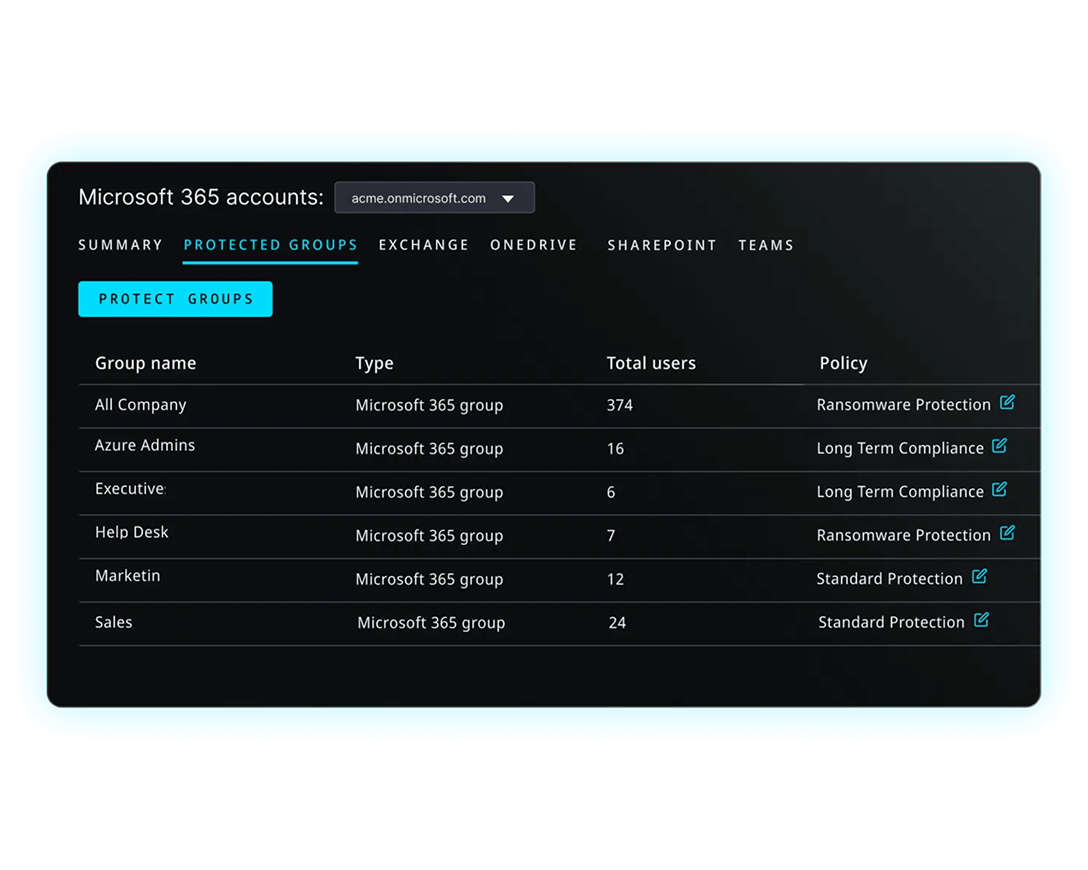
Isolated Microsoft 365 backup
Protect Exchange, Teams, SharePoint, and OneDrive in a separate security domain.
Policy-based threat scanning
Use automatic or scheduled scans for anomalies, malware, and encryption activity.
Investigate before restore
Review flagged backup data before recovery to guide cleaner restore decisions.
Analyst Report
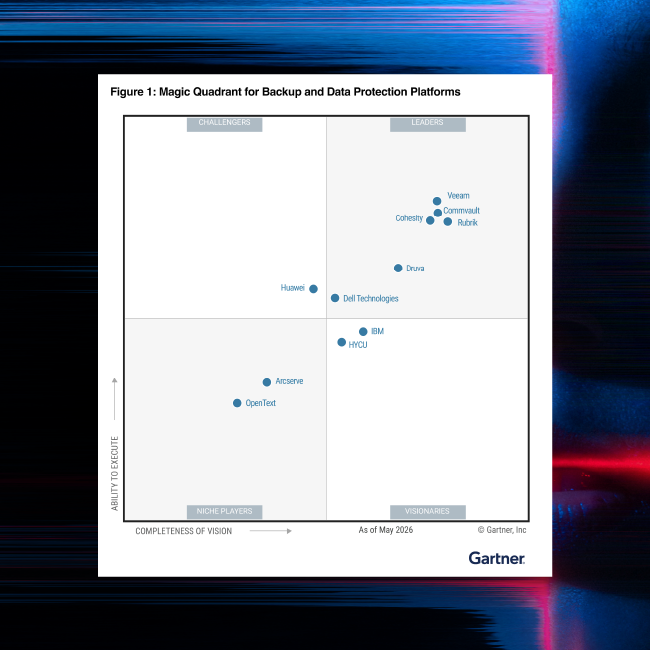
Gartner® Magic Quadrant™
For the 15th time in a row, Commvault has been named a Leader in the Gartner® Magic Quadrant™ for Backup and Data Protection Platforms.
Our Reach
Supporting more than 100,000 companies







“Getting Commvault Cloud up and running was virtually done in minutes. This is the customer experience that we were expecting a SaaS-based backup solution would give us.”

“We wanted a SaaS solution that we know we can trust and implement quickly without additional burden on our staff. Commvault Cloud Backup & Recovery for Microsoft 365 and Commvault Cloud Air Gap Protect give us this capability.”

“Commvault gives us the power to protect our data from various sources and formats from a single interface, drastically reducing the costs and efforts required for backups. Moreover, its proven recovery capabilities have saved us multiple times from ransomware attacks which could have been devasting.”
Use case
Incident Response & Recovery
Use insights from threat detection and other third-party tools to better respond and recover from security incidents.

Related to this Capability
AI Recovery solution
SaaSRecover
Unified SaaS backup and recovery across business-critical applications and tools.


Backup & Recovery for Microsoft 365
Protect Exchange, Teams, SharePoint, and OneDrive with separate backup copies.
Learn more

Cyberthreat protection with resilience and recovery
Developing a cyber-resiliency plan for your data.
Read solution briefFrequently Asked Questions
What is Threat Scan for Microsoft 365?
Threat Scan for Microsoft 365 is a recovery-assurance capability that scans Microsoft 365 backup data for anomalies, malware, and encryption activity so teams can know what is safe to restore before restore. It works with Backup & Recovery for Microsoft 365 and focuses on backup data, not live production prevention.
Why add Threat Scan if backups already exist?
Backups give you a recovery copy, but they do not tell you whether the data inside that copy is safer to restore. Threat Scan adds visibility into backup data before recovery, helping teams review suspicious content, identify cleaner recovery points, and reduce unnecessary rollback.
Does Threat Scan replace Microsoft Defender?
No. Threat Scan complements Microsoft Defender and other production data security tools. Defender helps protect live production environments, while Threat Scan helps examine Microsoft 365 backup data before recovery so teams can make better restore decisions.
What Microsoft 365 data can it cover?
Threat Scan for Microsoft 365 works across backup data for Exchange, OneDrive, SharePoint, and Teams. Current public and attached internal sources support describing this as Microsoft 365 backup data coverage that requires Backup & Recovery for Microsoft 365.
When will Threat Scan for Microsoft 365 be available?
According to the October 15, 2026 announcement, Threat Scan for Microsoft 365 is planned for early access preview in the coming weeks, with general availability targeted for early 2027. It is planned to be offered as a paid add-on to Backup & Recovery for Microsoft 365.
