The Enterprise Guide to Backup and Disaster Recovery
A backup and disaster recovery process is the combination of processes, technologies, and plans that protect enterprise data and restore IT operations after cyberattacks, outages, hardware failures, or natural disasters. It helps organizations minimize downtime; reduce data loss; maintain business continuity; and recover confidently across on-premises, multi-cloud, and hybrid environments.

The Backup and Disaster Recovery Process
A resilient recovery strategy follows a repeatable process — from identifying critical assets to validating recovery and continuously improving readiness.

Identify Critical Business Assets
Every recovery strategy should begin by understanding what matters most. Prioritize protection by identifying business-critical and customer-facing applications, data, and workloads.

Define Recovery Objectives
Recovery goals determine backup strategy. Use metrics like Recovery Time Objectives (RTOs) and Recovery Point Objectives (RPOs) to define acceptable downtime and data loss for every workload.

Build a Resilient Backup Strategy
Improve resilience and recovery readiness by leveraging multiple backup methods to protect data. Common strategies include scheduled backups, immutable storage, the 3-2-1 rule, and air-gapped copies.

Automate Backup Policies
Manual backups can increase risk. Automate backup schedules, retention, and policy enforcement to enhance consistency, reduce operational complexity, and streamline protection across environments.

Continuously Monitor Backup Health
Successful backups should never be assumed. Strengthen real-time visibility of recovery readiness by continuously verifying backup completion, storage health, and policy compliance.

Detect Cyber Threats Early
Early detection is key to limiting the scope of damage. Monitor backup environments for ransomware, anomalies, and unauthorized activity to detect cyber threats before extensive recovery is required.

Validate Clean Recovery Points
Recovery is only successful if restored data is trustworthy. Reduce the risk of reinfection by verifying backup integrity and validating clean recovery points before restoring production systems.

Execute Disaster Recovery
When disruption occurs, recovery workflows begin. Use automated failover, recovery orchestration, and cloud recovery to restore critical applications and infrastructure with less downtime.

Test, Learn, and Improve
The backup and disaster recovery process never truly ends. Regularly test recovery plans, measure recovery performance, and refine workflows to strengthen resilience against future disruptions.
Key Capabilities
What to prioritize for enterprise backup and recovery
Backup and Disaster Recovery
| What It Is | Why It Matters | |
|---|---|---|
Automated Backup | Automatically protects data using scheduled or continuous backups | Helps reduce manual effort, improve consistency, and helps protect availability of recoverable data |
Recovery Objectives (RTO & RPO) | Defines how quickly systems must recover and how much data loss is acceptable | Aligns recovery strategies with business continuity requirements and operational risk |
Immutable Backup Storage | Creates backup copies that cannot be modified or deleted for a defined period | Helps protect recovery data from ransomware and malicious deletion |
Cyber Threat Detection | Monitors backup environments for ransomware, anomalies, and suspicious activity | Enables organizations to identify attacks earlier and accelerate incident response |
Clean Recovery Validation | Verifies backup integrity and identifies uncompromised recovery points before restoration | Helps reduce the risk of restoring infected or corrupted data after a cyberattack |
Disaster Recovery Orchestration | Automates failover, failback, and workload recovery across environments | Helps accelerate recovery while minimizing downtime and manual intervention |
Hybrid & Multi-Cloud Protection | Protects workloads across on-premises, cloud, SaaS, and edge environments | Designed to simplify data protection as enterprise infrastructure becomes increasingly distributed |
Continuous Data Protection (CDP) | Continuously captures data changes between scheduled backups | Helps organizations achieve near-zero RPOs for critical workloads |
Centralized Management | Provides a unified platform to monitor backups, policies, and recovery operations | Helps to improve operational visibility while reducing operational and cost complexity across environments |
What It Is
Automated Backup
Automatically protects data using scheduled or continuous backupsRecovery Objectives (RTO & RPO)
Defines how quickly systems must recover and how much data loss is acceptableImmutable Backup Storage
Creates backup copies that cannot be modified or deleted for a defined periodCyber Threat Detection
Monitors backup environments for ransomware, anomalies, and suspicious activityClean Recovery Validation
Verifies backup integrity and identifies uncompromised recovery points before restorationDisaster Recovery Orchestration
Automates failover, failback, and workload recovery across environmentsHybrid & Multi-Cloud Protection
Protects workloads across on-premises, cloud, SaaS, and edge environmentsContinuous Data Protection (CDP)
Continuously captures data changes between scheduled backupsCentralized Management
Provides a unified platform to monitor backups, policies, and recovery operations
Why It Matters
Automated Backup
Helps reduce manual effort, improve consistency, and helps protect availability of recoverable dataRecovery Objectives (RTO & RPO)
Aligns recovery strategies with business continuity requirements and operational riskImmutable Backup Storage
Helps protect recovery data from ransomware and malicious deletionCyber Threat Detection
Enables organizations to identify attacks earlier and accelerate incident responseClean Recovery Validation
Helps reduce the risk of restoring infected or corrupted data after a cyberattackDisaster Recovery Orchestration
Helps accelerate recovery while minimizing downtime and manual interventionHybrid & Multi-Cloud Protection
Designed to simplify data protection as enterprise infrastructure becomes increasingly distributedContinuous Data Protection (CDP)
Helps organizations achieve near-zero RPOs for critical workloadsCentralized Management
Helps to improve operational visibility while reducing operational and cost complexity across environments
Frequently Asked Questions
What is Commvault Cloud?
Commvault Cloud is a unified cyber resilience platform that combines backup, disaster recovery, cyber recovery, threat detection, and data protection across on-premises, cloud, SaaS, and hybrid environments.
What is Cleanroom Recovery?
Cleanroom Recovery creates an isolated recovery environment where organizations can validate clean backups, test recovery workflows, and restore trusted data without risking production systems.
What technologies does Commvault support for disaster recovery?
Commvault Cloud protects hundreds of enterprise technologies from a single platform, including VMware; Hyper-V; Kubernetes; Microsoft 365; Active Directory; SAP HANA; Oracle; SQL Server; AWS; Azure; Google Cloud; Nutanix; Red Hat OpenShift; and many other cloud, SaaS, database, virtualization, and containerized workloads.
What is Auto Recovery?
Commvault Auto Recovery helps automates disaster recovery orchestration with policy-based failover, non-disruptive recovery testing, and recovery across hybrid cloud environments. It helps organizations reduce manual effort, improve recovery readiness, and meet RTO and RPO targets.
How does Commvault validate disaster recovery?
Commvault helps validate disaster recovery using AI-driven clean recovery point identification powered by Cleanpoint detection. Before restoring production systems, Commvault scans backup copies for malware, anomalies, and corruption, isolating clean recovery points in a Cleanroom environment. This helps prevent reinfection and enables organizations to recover trusted data rather than compromised copies, ultimately reducing mean time to clean recovery (MTCR).
Explore related resources
Learn how backup and disaster recovery strengthens cyber resilience, accelerates recovery, and protects business continuity across hybrid and multicloud environments.
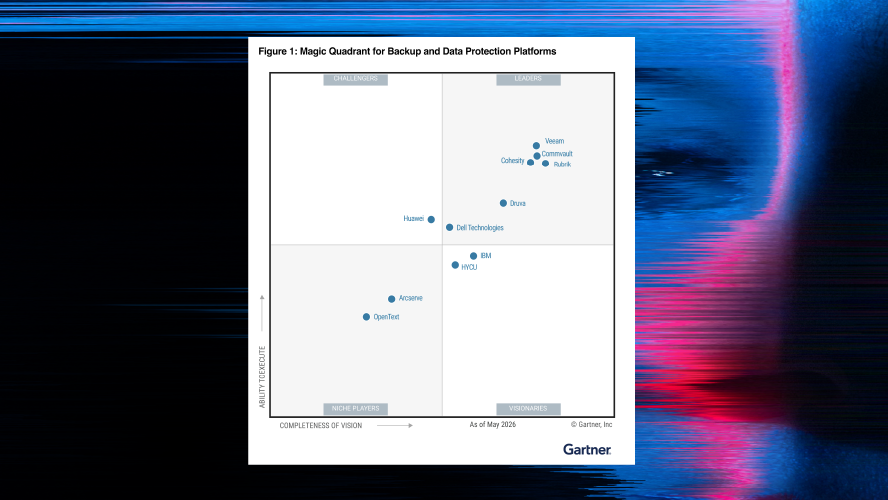
15x Gartner® Magic Quadrant™ Leader for Backup and Data Protection Platforms

BookMyShow limits backup costs with Commvault® Cloud Rewind

Commvault® Cloud Backup and Recovery
Backup and disaster recovery
Accelerate recovery with advanced forensics and AI.
Learn how Commvault helps organizations recover clean data faster with AI-enabled automation, cyber resilience, and scalable disaster recovery.
-
+100,000 companies supported
-
15x Gartner® Magic Quadrant™ Leader
-
Lorem ipsum dolor