Core Recover capability
Virtual Machines Backup and Recovery
Protect and recover VMs across hybrid environments with fast, trusted recovery.

Product demo
VM Configuration and Recovery
Walk through VM configuration and recovery steps in this Commvault demo video.

Why it matters
Capability Benefits
Protect VMs while balancing recovery speed and operational control.

Restore services faster
Recover full VMs quickly to help minimize downtime across hybrid estates.

Recover from trusted points
Use application-aware recovery points for more consistent VM and app restores.

Unify hybrid VM recovery
Apply one recovery approach across on-premises and cloud-based virtual machines.

Restore only what matters
Recover full VMs, specific disks, or files without over-restoring workloads.

Strengthen recovery readiness
Add immutable and air-gapped options for more resilient VM recovery.
Help reduce daily backup sprawl
Manage VM backup and recovery with less console switching and overhead.
Use cases
Explore rapid disaster recovery
See how this capability supports broader disaster recovery planning and execution.

How it works
Capability Features
Agentless, application-aware protection
Protect virtual machines with agentless coverage and application-aware recovery consistency.
Full VM and file recovery
Recover live or full virtual machines, plus files and folders.
Cross-platform recovery and mobility
Recover across virtual platforms and support modernization to OpenShift virtualization.

Analyst Report
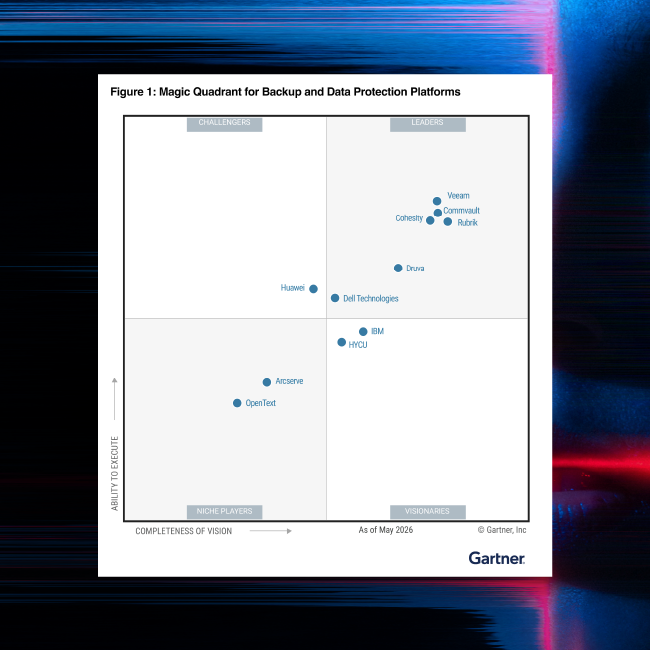
Gartner® Magic Quadrant™
For the 15th time in a row, Commvault has been named a Leader in the Gartner® Magic Quadrant™ for Backup and Data Protection Platforms.
Related to this Capability
Explore related offerings and resources for virtual infrastructure recovery.
ai recovery solution
CoreRecover
Unified, validated infrastructure recovery. Reduce fragmentation from separate backup tools with consistent policies and unified management, so teams can reduce operational sprawl, and help validate that the business can recover.


VM Technologies
Simplify data security and help optimize costs with cyber– resilient data protection for VMware.
Learn more
Hyper-V backup and recovery
Review recovery options for Microsoft Hyper-V virtual machine workloads.
Learn more
Commvault for VMware
Learn how Commvault makes it easier to help protect and recover your VMware® environment.
Read datasheetOUR REACH
Supporting more than 100,000 companies







“We love the simplicity of the Commvault dashboard. With just a few clicks, we can restore a virtual machine or backups after an attack which is vital in our line of work as a pharmaceutical company with very sensitive data. ”

“In our business, there could be a homeowner sitting outside of the house waiting for escrow to close, and if it takes two days to recover a file, we can’t get them into that home. ”
Frequently Asked Questions
What is virtual machine backup and recovery?
Virtual machine backup and recovery protects VM data, configuration, and operational state across hybrid environments so teams can restore files, applications, or full virtual machines from trusted recovery points after outages, errors, or cyber incidents.
How is a backup different from a VM snapshot?
A VM snapshot is typically a short-term point-in-time capture used for operational tasks. Backup is built for retention and recovery, helping preserve VM data and configuration for restore needs that go beyond short-lived snapshot use.
Which virtual platforms are supported?
Commvault supports a broad set of virtualized platforms, including VMware, Hyper-V, Amazon EC2, Microsoft Azure, Oracle Cloud Infrastructure, and additional virtualized environments documented on current supported-technologies and product documentation pages.
Can I restore files without restoring a full VM?
Yes. Recovery options can include granular file and folder restore as well as full virtual machine recovery, helping teams choose the right recovery scope for the event instead of restoring more infrastructure than necessary.
How does Commvault help with cyber-resilient VM recovery?
Commvault helps strengthen cyber-resilient VM recovery with immutable and air-gapped copy options, encryption, access controls, and recovery workflows designed to help teams restore virtual machines from cleaner, more trusted recovery points.
Request demo
Book a VM recovery demo
See virtual machine protection and recovery in action.