Data Backup and Disaster Recovery Guide
Modern data backup and disaster recovery strategies help strengthen enterprise resilience by combining immutable backups, automated recovery, continuous validation, and cyber resilience controls. These capabilities help organizations recover faster from ransomware and outages; minimize downtime and protect your data; and maintain business continuity across hybrid, multi-cloud, and on-premises environments.
-

15x Gartner Leader
-

#1 in 5/6 Use Cases
-

Cloud & on-prem protection

Core principles
Data backup and disaster recovery are the technologies, policies, and operational processes that help protect enterprise data and restore systems after outages, cyberattacks, corruption, or disasters.

Prioritize Immutable Backup Architecture
Immutable backups are designed to protect recovery data from alteration or deletion, helping organizations maintain trusted recovery points during ransomware and other attacks.

Recovery Speed Over Backup Speed
Recovery speed now matters more than backup speed. Modern architectures prioritize low RTOs and RPOs, automation, and rapid recovery at scale.

Continuous Validation of Recoverability
Successful backups don’t guarantee recovery. Regular testing, validation, and threat detection help data remain recoverable when needed.
Modernize resilience across the enterprise
Best practices for data backup and disaster recovery
Organizations modernizing resilience strategies should prioritize the following best practices:
Adopt immutable backup storage
Protect backup data against alterations or deletion during retention periods.
Test recovery procedures frequently
Regularly conduct recovery simulations under realistic operational conditions to validate their effectiveness.
Automate disaster recovery workflows
Reduce manual intervention during high-pressure recovery events with machine-powered automation.

Protect hybrid and multi-cloud workloads consistently
Apply centralized policies across distributed infrastructure to standardize protection of hybrid and multi-cloud workloads.

Integrate security and backup operations
Enable coordination between SecOps and infrastructure teams.

Validate backup integrity continuously
Monitor corruption, anomalies, and malicious encryption activity.

Prioritize clean recovery
Focus not only on restoration speed, but also on restoring trusted data.
Frequently Asked Questions
Why is immutable backup important?
Immutable backups prevent attackers or administrators from modifying or deleting recovery data, helping to safeguard clean recovery after ransomware incidents. Commvault AirGap is designed to deliver SaaS-based immutable storage, while Commvault’s Cleanpoint Identification helps organizations recover from a verified clean point — not a compromised one — after ransomware incidents.
What is the difference between backup and disaster recovery?
Backup focuses on creating copies of data, while disaster recovery focuses on restoring business operations and infrastructure after disruption.
What are RTO and RPO?
RTO stands for Recovery Time Objective, which is the acceptable amount of downtime after an outage. RPO stands for Recovery Point Objective, which is the acceptable amount of data loss measured in time.
Why are hybrid cloud environments harder to protect?
Hybrid environments increase operational complexity because data and applications are distributed across multiple infrastructure platforms, clouds, and geographic regions — leading to inconsistent recovery tooling, fragmented visibility, and cloud-native workload protection gaps.
Commvault Cloud provides centralized policy management across VMware, Hyper-V, AWS, Azure, and Microsoft 365, with anomaly detection and automated failover to help maintain consistent RPOs and RTOs across workloads.
What is the 3-2-1 backup rule?
The 3-2-1 backup rule is a widely accepted best practice for data protection and disaster recovery. It recommends keeping three copies of your data (one primary and at least two backup copies); two different types of storage media; and one copy stored offsite or isolated to protect against ransomware, natural disasters, or site-wide outages.
Explore related resources
Discover how Commvault helps safeguard data while strengthening backup and disaster recovery.

Commvault’s Minimum Viability Self-Assessment
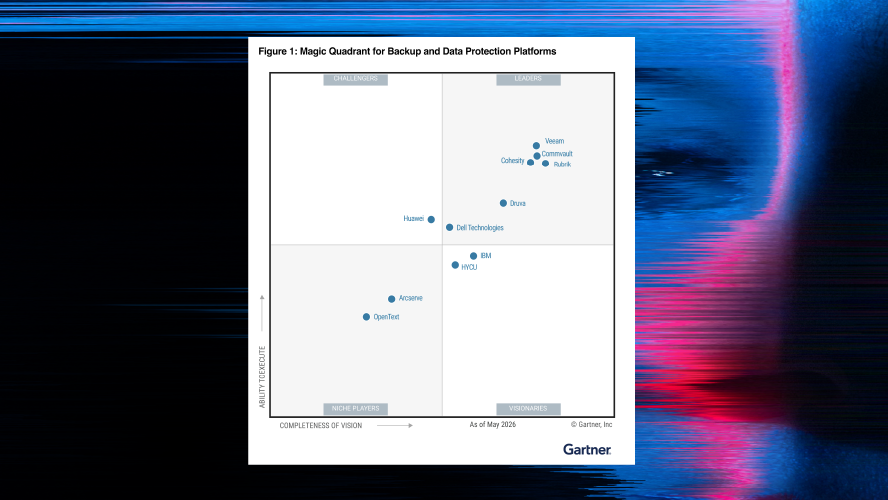
15x Gartner® Magic Quadrant™ Leader for Backup and Data Protection Platforms

Explore Commvault® Cloud Autonomous Recovery
Modern data protection
Prepare for the next disruption
Discover how Commvault’s modern recovery architectures combine immutability, automation, and validation to help strengthen enterprise resilience.
-
Comprehensive workload coverage
-
Immutable, indelible storage
-
Data integrity